TikTok is, for a very large number of teenagers, the main event. It is where they spend their time, find their humour, discover music, and increasingly get their news and their sense of what the world thinks. For a parent, that combination of enormous influence and an algorithm you cannot see into can feel unnerving, and the instinct to either ban it outright or throw up your hands and ignore it is understandable. Neither is the best move. TikTok safety rests on a real set of tools, most notably a parental-linking feature called Family Pairing, and with those in place and a couple of honest conversations, it becomes something most families can manage.
This guide covers what actually makes TikTok risky (it is not only the endless scroll), the settings that genuinely help, how Family Pairing works, and the conversations that matter more than any toggle. As always, TikTok changes its menus and features regularly, so treat the specific names as a 2026 snapshot and the underlying logic as the durable part.
What makes TikTok different, and why that matters
The thing that sets TikTok apart from older social apps is the power of its recommendation algorithm, the “For You” feed. Most platforms mainly show you content from people you follow. TikTok, by contrast, decides almost entirely on its own what to show each user, learning with unnerving speed from every pause, rewatch, and swipe. It is brilliant at holding attention, which is exactly why children can lose an hour without noticing, and it means the experience is intensely personalised: two teenagers can open the same app and see completely different worlds.
This matters for safety in two ways. First, the algorithm is the reason the time cap is often more important than the content settings, because the sheer, engineered pull of the feed is the most universal problem. Second, because the feed is personalised and opaque, you cannot simply glance at it and know what your child is seeing, which puts more weight on settings and conversation than on over-the-shoulder supervision.
The risks worth understanding
It helps to be specific about what actually goes wrong on TikTok, because the risks are more varied than the “it rots their brain” headline suggests.
The most universal is the time and attention problem: the feed is designed to be near-bottomless, and unmanaged, it eats time that should go to sleep, homework, and the rest of life. The second is content the algorithm surfaces: while TikTok moderates and much of the platform is harmless fun, the recommendation engine can lead a vulnerable teenager toward content about dieting, self-harm, or other unhealthy material, sometimes without them seeking it out. The third is contact and comments: strangers can reach a child through comments and direct messages, and public accounts expose a child’s posts to anyone. The fourth is the quieter one, comparison and pressure: a feed of polished, filtered, highlight-reel lives takes a well-documented toll on body image and self-esteem, particularly for teenage girls, and that one has no simple setting to fix it.
Family Pairing: the single most useful thing to set up
TikTok’s Family Pairing lets you link your own TikTok account to your child’s, so you can manage key safety settings from your phone rather than relying on them to configure their own. This is the backbone of managing TikTok well, and setting it up is the first thing to do.
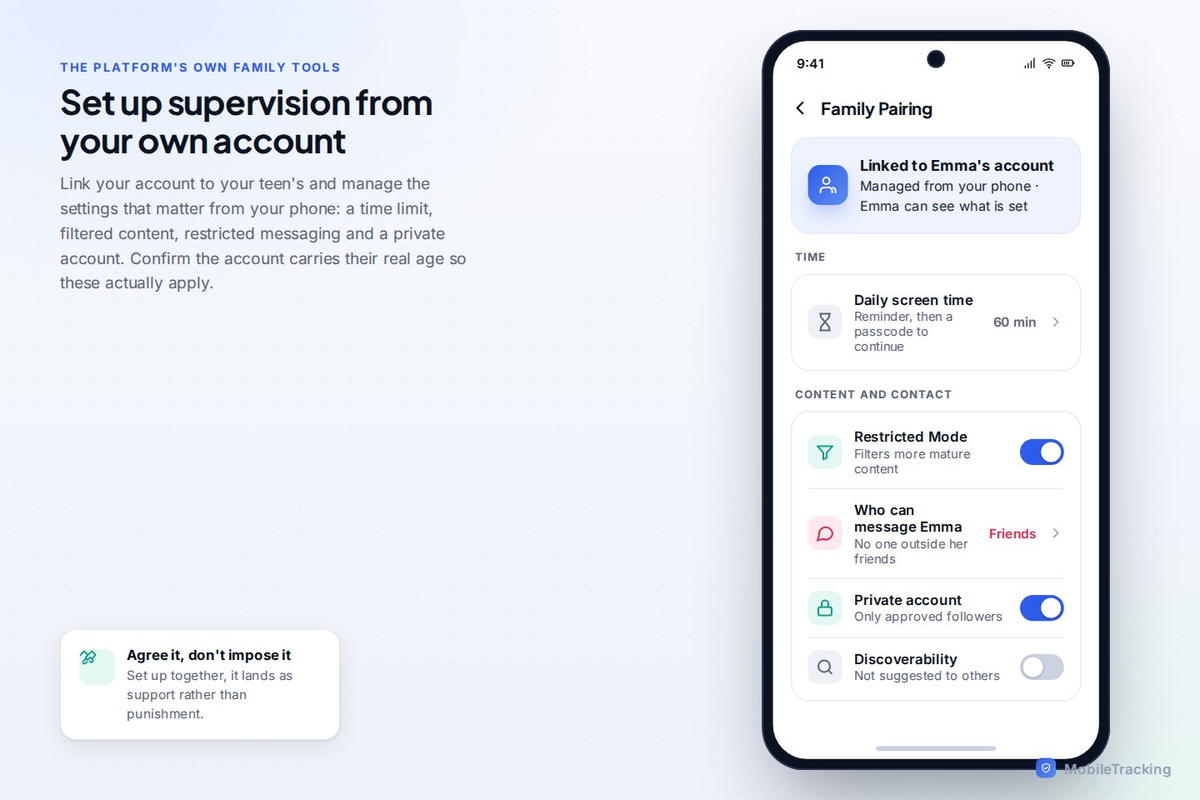
Once paired, you can set a daily screen-time limit, switch on Restricted Mode to filter out more mature content, manage who can send your child direct messages (including turning DMs off entirely for younger teens, which TikTok does automatically under a certain age), and control other privacy settings. Recent versions have added more, including tools that show you who your teen follows and who follows them, and options around night-time notifications. It is worth spending ten minutes exploring everything Family Pairing now offers, because TikTok has expanded it considerably and most parents never look past the time limit.
The TikTok safety settings to prioritise
Whether through Family Pairing or on the account directly, a handful of settings do most of the work.
Make the account private. This is the big one: on a private account, only approved followers can see your child’s videos, and it sharply reduces contact from strangers. For younger teens TikTok sets this by default, but confirm it, because it is the most important single privacy setting on the platform.
Turn on Restricted Mode to filter out content that may not be suitable for younger viewers. It is not perfect, no filter is, but it meaningfully reduces exposure to mature material. Set a daily screen-time limit, because on TikTok more than almost any other app, the time cap is the setting that matters most. And manage DMs and comments: restrict who can message your child (off, or approved contacts only, for younger teens) and who can comment on their videos, since comments and DMs are the main channels through which strangers make contact.
Understanding the algorithm, and teaching your teen to as well
Here is something more powerful than any setting: helping your child understand how the feed works on them. The For You page is not neutral. It is engineered to keep them watching, it learns from their behaviour, and it will happily serve more of whatever holds their attention, including content that makes them feel worse. A teenager who grasps this is far better protected than one who does not, because they can start to notice the pull and push back on it.
Two practical habits help. First, teach them to curate deliberately: TikTok lets users tap “not interested” on content, and every signal reshapes the feed, so a teen who actively steers away from content that makes them anxious or down will get a healthier feed. Second, talk openly about the fact that what they see is designed to be addictive and is not a fair picture of real life, especially the polished, filtered bodies and lifestyles. Naming the machine takes away some of its power, and it is a lesson that serves them across every algorithmic app they will ever use.
The screen-time conversation TikTok specifically needs
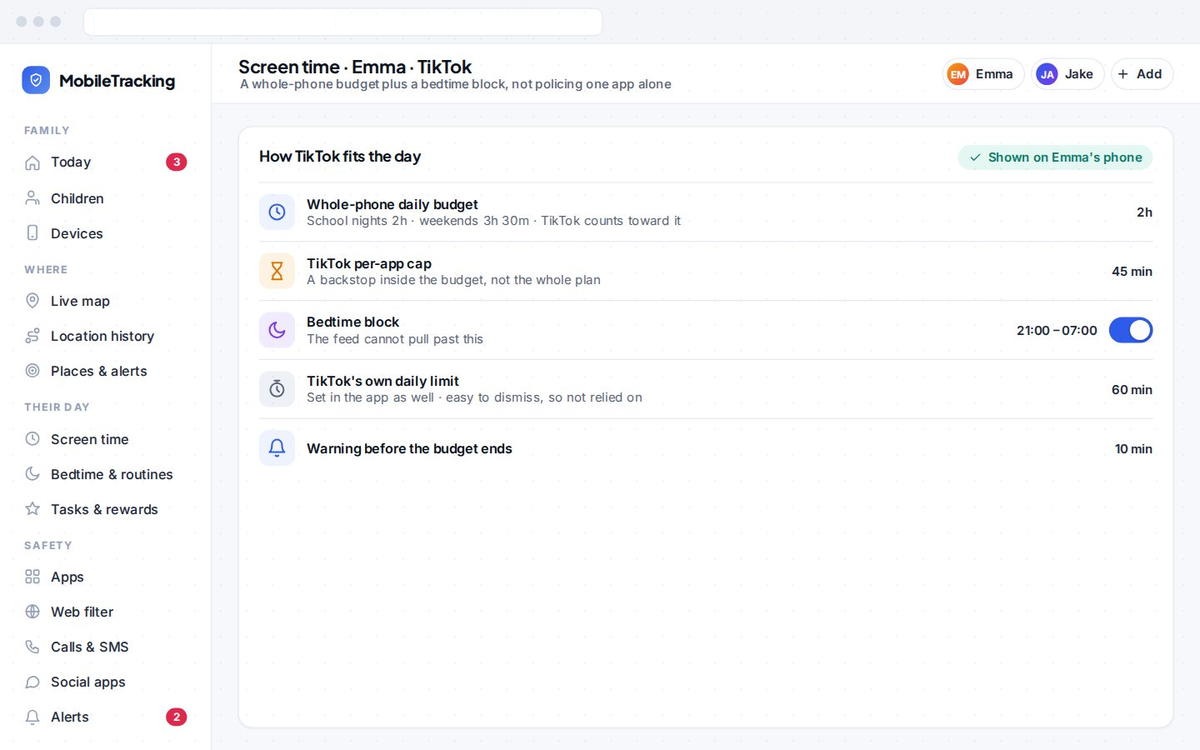
Because TikTok is so good at swallowing time, it deserves particular attention on the screen-time front, and a limit lands far better as an agreed arrangement than a surprise lockout. TikTok’s own daily limit (settable via Family Pairing) is a useful backstop, and pairing it with a broader routine, no phone in the bedroom overnight, a screen-free hour before bed, phones away at meals, does more than fighting over TikTok specifically.
It is worth being honest with your teen that even you would struggle to put this app down, because that is true and it disarms the “you don’t understand” defence. The feed is built by experts to be hard to leave. Framing the limit as “this thing is designed to trap all of us, so let’s have a sensible boundary” is more effective, and more truthful, than treating your child as uniquely weak-willed for finding it hard to stop.
Live streaming, going viral, and the things teens don’t think about
A couple of TikTok-specific issues catch families out because they are not obvious from the outside. The first is live streaming. TikTok lets users broadcast live to viewers who can comment and, on some accounts, send paid “gifts” in real time. For a young person this is a heady mix: instant attention from strangers, live reactions, and sometimes money, and it can pull a teen into performing for, and interacting with, an audience of people they do not know, in the moment, with no chance to edit or take it back. TikTok restricts live features by minimum age, but it is worth knowing the feature exists and checking your teen is not using it, because live is a very different risk from posting a clip.
The second is what your child gives away without realising. A video filmed in a school uniform, or in the front garden, or tagged with a location, quietly tells strangers where a child goes to school and lives. Going viral, which teenagers often actively want, means a video escaping their friends and reaching hundreds of thousands of strangers, complete with whatever it revealed. It is worth a specific conversation: think about what is in the background and on the uniform before posting, keep the account private so posts do not travel by default, and treat “I want to go viral” as a moment to talk about what that actually means rather than a harmless ambition.
Neither of these needs panic, but both are worth raising directly, because they are the parts of TikTok a teen is least likely to think through on their own.
What monitoring can and cannot do here
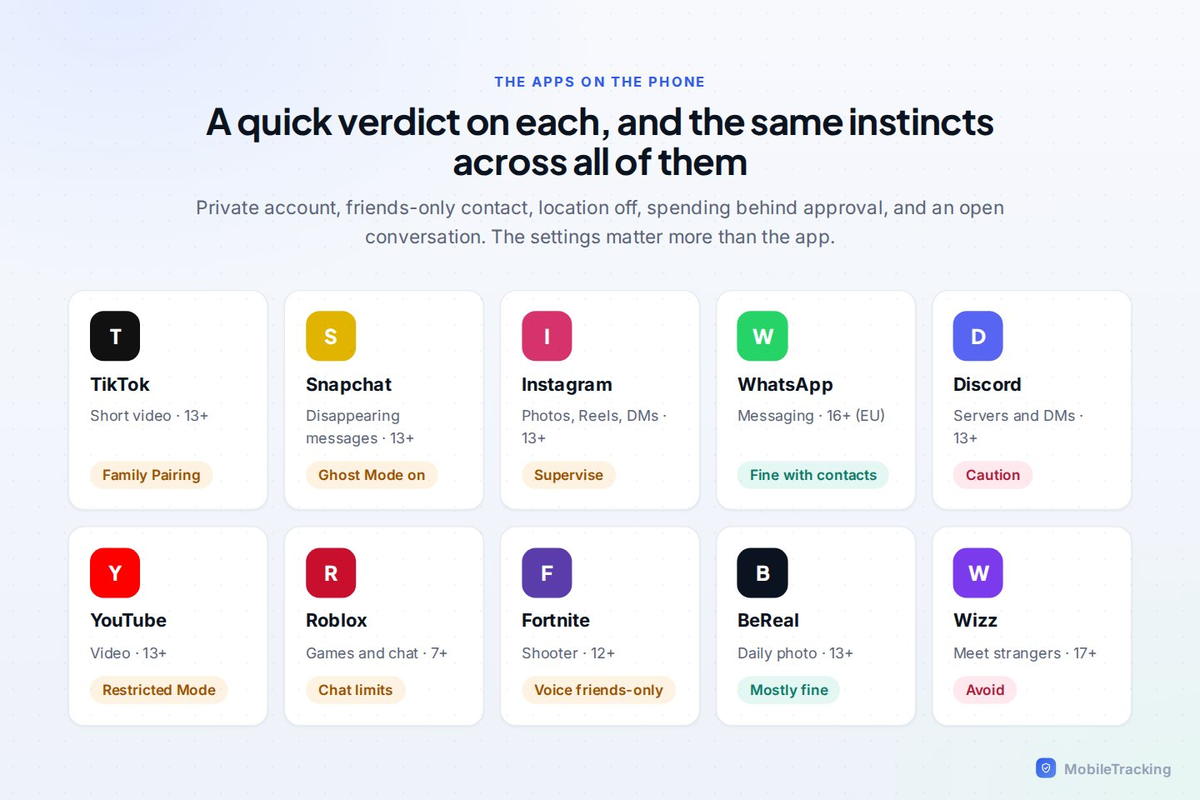
It is worth being precise about where software helps with TikTok, because the app’s closed, personalised nature limits what any external tool can see. A parental-control app can show you how much time your child spends in TikTok, so you can spot a creeping increase, flag if a new social app appears alongside it, and help enforce the overnight and screen-time boundaries that matter most. Those are genuinely useful.
What no external tool can do is see inside TikTok’s feed or read the private, personalised stream of content the algorithm serves your child, which is precisely why the in-app settings (Family Pairing, private account, Restricted Mode) and the conversations carry most of the load. Think of monitoring as the whole-phone layer that catches the obvious signals, sitting underneath TikTok’s own controls and, above all, an open relationship where your child would tell you if the feed took them somewhere that scared or upset them.
A sensible setup
Put together, good TikTok safety looks like this: Family Pairing set up so you can manage it from your phone; the account private; Restricted Mode on; DMs restricted or off for younger teens; a daily time limit backed by an overnight-charging routine; and ongoing, honest conversations about the algorithm, comparison, and coming to you if anything disturbing shows up. That combination lets your child enjoy what is genuinely fun about TikTok, the creativity, the humour, the connection, while keeping the real risks in check.
Using MobileTracking for this
MobileTracking works alongside TikTok’s own Family Pairing, not in place of it. It shows how much time TikTok and other apps are taking so a creeping increase is easy to spot, flags when a new social app appears on the phone, lets you set a whole-phone screen-time budget and a bedtime block, and can alert you to keywords you are watching for. Because it cannot see inside TikTok’s private feed, and no external tool can, it is best understood as the whole-phone layer that supports TikTok’s in-app settings and the conversations that do the real work.
Frequently asked questions
What age is TikTok appropriate for?
TikTok sets a minimum age of 13, and applies stricter defaults to younger teen accounts. Whether it suits a particular 13-year-old depends on the child and, crucially, on the setup: a private account, Restricted Mode, restricted DMs, and a time limit make it far more manageable. The algorithm’s pull, more than the content, is the biggest factor to manage.
What is TikTok Family Pairing?
Family Pairing links your TikTok account to your child’s so you can manage key safety settings, screen-time limits, Restricted Mode, direct messages, and privacy, from your own phone rather than relying on them to set it up. It is the single most useful tool for managing TikTok, and it is worth exploring fully, as TikTok has expanded it well beyond the basic time limit.
How do I limit my child’s time on TikTok?
Set a daily screen-time limit through Family Pairing as a backstop, then back it with a whole-phone routine: no phone in the bedroom overnight, a screen-free hour before bed, and phones away at meals. Because TikTok’s feed is engineered to be hard to put down, an agreed limit framed honestly works far better than a surprise lockout or singling out one app.
Can strangers contact my child on TikTok?
They can, through comments and direct messages, and a public account exposes your child’s videos to anyone. Making the account private (only approved followers see their posts), restricting or disabling DMs, and limiting who can comment closes off most stranger contact. For younger teens, TikTok applies several of these restrictions by default, but confirm them.
Is TikTok’s algorithm dangerous for teens?
The For You algorithm is powerful and opaque: it is engineered to hold attention and can lead a vulnerable teen toward unhealthy content without them seeking it out. The best protection is a combination of Restricted Mode, a time limit, and, importantly, teaching your teen how the feed works on them so they can steer it deliberately and recognise that it is not a fair picture of real life.
Keep going
Read our guides on Snapchat safety, the social apps teens actually use, and how much screen time is healthy by age. For trusted guidance beyond this site, Common Sense Media is a well-regarded resource for parents: Common Sense Media.