MobileTracking FAQ: the questions parents ask before installing
Everything below comes from questions parents send us before they pair a phone, grouped the way they tend to arrive: what you need, what the app collects, what your child sees, which devices work, who pays and who can see the data, and what the law allows. Each answer starts with the answer. Where a feature cannot do something, the answer says so in the first line rather than the last.
Android child app · Parent panel in any browser · Visible on your child’s phone

Getting started
Most of what goes wrong with a parental control app goes wrong in the first twenty minutes, and almost all of it is avoidable. These questions cover what to have ready, which phone the app goes on, how the six-character pairing code behaves and why you cannot finish pairing from the office. The last one is the one we would most like you to read: what to set in week one, which is less than you think.
What do I need before I start?
Your child’s Android phone or tablet running Android 8.0 or later, your own phone or computer with a browser, and about ten minutes together. Nothing needs to be rooted or changed on either device. Have the child’s phone unlocked and connected to Wi-Fi, and know their date of birth, because the panel uses it to choose sensible starting settings. That is the whole list; there is no router setting, SIM card or special cable involved.
Where does the app go: my phone or my child’s?
The child app goes on your child’s Android phone, and only there. You use the parent panel in any browser, or the same account in the MobileTracking app on your own phone if you prefer. Your own phone can be an iPhone, because the parent side is just a website and a sign-in. Installing the child app on your own phone by mistake is the most common day-one error, and it does nothing useful; uninstall it and start again.
What is the pairing code, and why does it expire?
A six-character code the panel creates when you add a child, which you type into the app on their phone. It works once, for that child only, and expires after about fifteen minutes. The short life is deliberate: a code that stayed valid for days could be written down and used on a phone you never meant to pair. If it times out, make another; there is no limit. If it is refused, check for a zero typed as the letter O.
Which limits should I set in the first week?
None, if you can bear it. A newly paired phone starts with no screen-time limit, no blocked apps and no web categories blocked, so nothing changes for your child on day one. Let a normal week record itself, then look at the weekly report together and set a budget from what you actually saw rather than from a guess. Families who block on the first evening tend to argue about the number; families who wait tend to argue less.
Can I set it up while my child is at school?
No. Pairing needs the phone in your hand, because the code is typed into the app on that device and the permissions are granted there, one dialog at a time. There is no remote install, no link to send, and no way to finish setup without the consent screen being tapped on the phone itself. This is a limit we chose. The same thing that stops a stranger pairing a phone in secret also stops a parent doing it.
What it collects
The app collects the shape of what a phone is doing: names, numbers, times, durations, categories and counts. It never collects what was said, typed, photographed or shown on screen, and no plan changes that. Parents arrive at this group having read other apps’ feature lists, so the answers below are blunt about what MobileTracking will not do, and why keyword alerts can exist without anyone reading a message.
What exactly does the app collect from my child’s phone?
Names, numbers, times, durations, categories and counts: where the phone is and has been, minutes per app, page titles and categories visited, who called or texted and for how long, which social apps are installed and how often they notify, battery and permission state. In the direct-download build, that includes the call and SMS logs without any message text. The full list sits on the child’s “What’s shared” screen and in our privacy policy, item by item.
Does it take screenshots or record what is on the screen?
No. The app never takes screenshots, never records the screen, never uses the camera or the microphone, never records calls and never logs keystrokes. If you are reading a comparison that lists those as features of some other app, you are reading about stalkerware, not parental control. MobileTracking can tell you that Roblox had 48 minutes on Tuesday; it cannot show you what happened inside Roblox, and it is built so that it never could.
Can I see which websites my child visits?
You can see the titles of pages visited and the category each one falls into, plus any attempt to open a page in a blocked category. You cannot see what was typed into a page, any password, any form entry, or the contents of a logged-in account. Filtering runs on the phone itself, so the log works on mobile data and on a friend’s Wi-Fi as well as at home. An allow list lets you unblock a single site for homework.
How do keyword alerts work if the app never reads messages?
They match a short list of words you choose against notification previews, and the matching happens on the phone. When a word matches, you receive the word, the app it appeared in and the time, such as “send pics · Snapchat · 22:14”. The message around the word is never collected or sent anywhere. Keep the list to about twenty words; a long list produces alerts about homework and football and trains you to ignore the one that matters.
Does it show what my child posts or who follows them on Instagram or Snapchat?
No. For every social app the panel shows that it is installed, how many minutes it had, when a new one appeared, and how many notifications arrived and when. It does not show posts, direct messages, followers, friends lists or stories. WhatsApp, Messenger and Viber are end-to-end encrypted, so any honest app can see only what the notification shows. Each per-app page on this site starts with that app’s own safety settings, which do more than any tracker.
Your child and consent
Amara, 13, can open the app on her Galaxy A35 and read every rule Priya set, the places that are saved and the day’s location timeline, the same as the panel shows. That is the design, not a leak. This group covers what the child app shows, what happens when a child uninstalls it, how the “Ask for more time” button works, and how to raise the subject with a teenager so the first conversation is about the rules rather than about being watched.
What does my child see on their phone?
A visible app with a home screen that greets them by name, shows today’s screen-time budget and the places on today’s timeline, and offers two buttons: “What’s shared” and “Ask for more time”. The “What’s shared” screen lists every active feature, place, limit and rule, and changes the same afternoon you change something. When an app is blocked, the phone shows a plain screen naming the rule and who set it, never a fake crash.
Can my child see the same lists I see?
Yes. The location history, the app list, the web categories, the places and the rules are the same on the child’s phone as on your panel. There is no parent-only view of their activity. What they do not see is your account, your notification settings or the other children in the family. We think the fairest test of a monitoring feature is whether you would be comfortable with your child reading its output, so we let them.
Will I know if the app has been removed from the phone?
Yes: collection stops at once and you get a tamper alert naming the phone and the time, such as “The app was removed from Noah’s phone at 16:12”. It never hides from the uninstall screen and never puts itself back. Uninstall protection, if you switched it on, makes removal take deliberate steps rather than one long press, but it never makes it impossible. An uninstall is information: something about the arrangement stopped feeling fair, and that is worth asking about.
Can my child ask for more screen time from their phone?
Yes. When the daily budget is close to running out, a ten-minute warning appears and the child can send a request from their phone, picking fifteen or thirty minutes and adding a short note. You approve or decline with one tap from the panel or the parent app, and approved minutes land immediately. You set a daily cap on how many times they can ask, so the button is useful rather than a way to nag.
How do I bring this up with a teenager without a row?
Show them the app before you install it, not after. Open the demo together, walk through the “What’s shared” screen, and let them read what will never be collected. Agree the saved places and the budget together and write them down. Then say, plainly, that they can see every rule and that you will loosen them as they show you they can manage. A thirteen-year-old who helped choose the rules argues about the rules, not about being watched.
Devices and limits
The child app runs on Android 8.0 and later, in two builds that differ by exactly one feature, and that single fact answers a surprising number of support emails. Here you will find the iPhone answer, the Google Play versus APK answer, what to do about a tablet that two children share, how many children one account holds, and what a day of reporting costs in battery on a Pixel 7a or a Galaxy A35.
My child has an iPhone. Is there a version for that?
No. The child app runs only on Android 8.0 or later, because the permissions it uses to count app time and show block screens do not exist for third-party apps on iOS. Your own phone can be an iPhone; the parent panel is a website and works in Safari. If your child has an iPhone, Apple’s own Screen Time and Family Sharing are the right tools, and no app that claims to do what we do on an iPhone should be trusted.
What is the difference between the Google Play version and the APK?
One feature. The Google Play build installs and updates like any other app and is scanned by Play Protect, but Google Play policy does not allow it to read call and SMS logs. The direct APK from our download page adds the call and SMS logs: numbers, contact names, times, durations and counts, never message text. Everything else is identical. Install the APK only from this site typed into the address bar, and switch “Install unknown apps” off again afterwards.
Two of my children share one tablet. How does that work?
It works on any Android tablet running 8.0 or later, paired as one child. A shared device is harder, because the app has no way to know which child is holding it, so every minute counts against whichever child it is paired to. For a tablet two children share, pair it to the younger child and set that child’s limits, or decide that the tablet is the one device in the house without the app. Both are reasonable.
How many children can I add to one account?
As many as live in your house. Each child has their own screen-time budget, bedtime, blocked apps, web categories, saved places, alerts and keyword list, and a child switcher at the top of the panel moves between them. A subscription, where one is needed, covers every child under the account rather than charging per phone. Amara at 13 and Noah at 9 do not share a single rule between them, and that is the normal arrangement.
Will my child’s phone run out of battery faster with it installed?
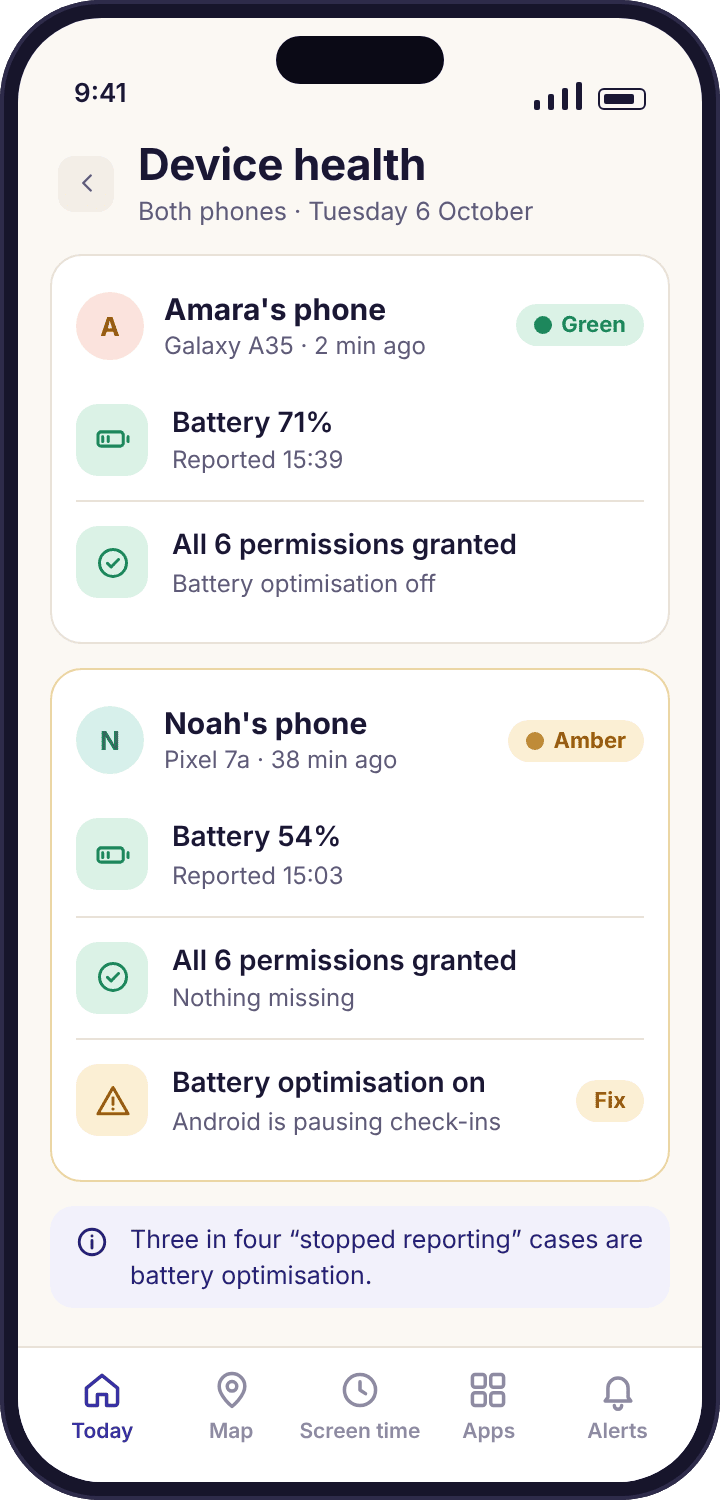
Usually a few percent a day. The app uses Android’s low-power location services and reports where the phone settles rather than polling it constantly, and the schedules and filters run on the phone without talking to a server. The one thing that does hurt is being killed by battery optimisation, which stops reports rather than saving power. Device health tells you if that has happened and names the exact setting to change.
Privacy and billing
We are paid by parents, which is why the app and the panel carry no advertising and sell nothing to anyone. The website you are reading does carry display ads, and the answers below say so rather than hoping you will not notice. This group also covers who can see a family’s data, what support can and cannot look at, how deletion works at each level, and how a subscription and a cancellation behave without quoting a price that would be wrong in your currency.
Who can see my family’s data?
You, and any co-parent you invite to the account. Nobody at MobileTracking reads a family’s data in the ordinary course of things. When support needs to look at an account to fix a problem, that access is limited to what the problem needs and is logged. We do not sell data to anyone, and there is no advertising SDK and no third-party analytics on location data inside the child app. The privacy policy spells out each item.
Are there ads or data sales inside the app?
No. The app and the parent panel contain no advertising and no data broking, because we are paid by parents rather than by advertisers. The public website you are reading does show display ads, which keep the free pages online; those ads are served separately from the product and never see anything from a family account. If you ever see an advert inside the app or the panel, something is wrong and we want to hear about it.
How do I delete my child’s history, or close the account altogether?
Deleting a child from the panel removes that child’s history. Closing the account from account settings removes everything under it. Uninstalling the child app stops collection immediately, even before you touch the panel. Location history is also kept only for a rolling window of recent weeks, so most of it expires on its own. None of these steps needs an email to support, and none of them is hidden behind a retention offer.
Do I need a separate subscription for each child?
No. Where a feature needs a subscription, one subscription covers all the children under your account, however many phones that is. The panel shows what each option includes before any payment is taken, and a free account lets you pair phones and use the included features for as long as you like. We do not publish prices on these pages because they change by country and currency; the panel shows yours.
How do I cancel?
From account settings in the panel, in a couple of taps, with no phone call and no retention script. The app keeps working until the end of the period you have already paid for, then the features that needed a subscription switch off and the free ones carry on. Your data stays where it was unless you delete a child or close the account. Cancelling and deleting are separate choices, and you can do either without the other.
Legal
A visible app on your own child’s phone, with their knowledge, is the ordinary case the law in most countries allows a parent. Everything outside that case, from a partner’s phone to an elderly relative who has not asked, is outside what MobileTracking is for and outside our terms. These answers are not legal advice; they explain where we draw the line, why the consent screen cannot be skipped, and where the full terms and privacy policy live.
Is it legal to put this on my child’s phone?
In most countries a parent or legal guardian may supervise a phone used by their own minor child, and a visible app the child knows about sits well within that. Laws differ by country, and in some places the child’s own consent carries weight as they get older. We are not your lawyer. The app makes lawful use easy by being visible and asking for consent on the phone; using it lawfully in your country is your responsibility.
Can I put it on another adult’s phone, such as a partner or an elderly parent?
No. MobileTracking is for a child you are responsible for, on a phone they use, with their knowledge, and our terms say so. Monitoring another adult without their informed agreement is unlawful in most places, whatever the app. An older relative who asks for help can share their location with the tools built into Android or iOS. If you are looking for something to install on a partner’s phone, we would rather you did not use ours.
Does my child have to agree before it works?
The app will not start collecting until the consent screen on the phone has been read and tapped. We require that the child knows the app is there, because that is both the lawful way to do this and the only way it stays useful. Whether a child’s formal consent is legally required depends on their age and your country. Either way, a nine-year-old and a sixteen-year-old deserve different conversations, and the app is built to be loosened as they grow.
Can I install it on a phone the school gave my child?
Usually not, and you should ask the school first. School-issued devices are normally managed by the school, which may block app installs or have its own monitoring and rules about what parents may add. MobileTracking is meant for a phone your child uses and you are responsible for. If the school’s device policy allows it and your child knows, the app works like any other Android phone; if not, leave it off.
Where are the full terms and the privacy policy?
Both are linked from the footer of every page on this site, written in plain language rather than legal boilerplate. The privacy policy lists what the child app collects, item by item, what it never collects, how long each kind of data is kept and how to delete it. The terms cover acceptable use, which comes down to one line: only a child you are responsible for, who knows. Contact us if anything in either is unclear.
If your question is about one phone, it is probably a device health question.
Roughly three in four messages that begin “it stopped working” turn out to be battery optimisation switched back on after an Android update, and the panel’s health line already names the setting and the path to fix it. Check there first; it is faster than we are. For everything else, the contact page has a short form, and it helps to tell us the child’s phone model, the Android version and whether you installed from Google Play or the APK.
If the question is about a single feature, its own page goes much deeper than an FAQ answer can. The feature list is the index, and each page there covers what the feature shows, what it cannot show, how to set it for a nine-year-old versus a thirteen-year-old, and what to do when it misbehaves. The download and setup guide walks through pairing dialog by dialog.
- Stopped reporting. Open Device health on the panel before writing; the amber line usually tells you the fix.
- A question about what is collected. The privacy policy lists every item the child app sends, and every item it never does.
- Something on this site is wrong. Tell us through the same form. Corrections are read by a named person and the page’s Updated date changes when it is fixed.
The next question is best answered with the phone in your hand.
Open the read-only demo of the Okafor family to see every screen filled in, or pair your child’s Android phone in about ten minutes and watch the health line turn green together.
Android · Free account · Visible on your child's phone