Every MobileTracking feature, and the line none of them cross
Nineteen features, sorted into four tiers by the question they answer: where your child is, how their day is going, what they do with apps and the web, and what deserves your attention. Each one is described with what it shows you, what it refuses to show you, and which Android permission it depends on. If you are deciding whether to install anything at all, start with the table of worries below and work out from there.
Android 8.0 or later on the child's phone · Visible app with a consent screen · Parent panel in any browser

Pick the worry first, then the feature
Nobody installs a parental control app because they want a feature list. They install it because of one specific thing that happened last Tuesday. This table maps the things parents tell us about to the feature that helps, and is candid about what each one will not do, so you can decide before pairing a phone whether the app answers your question at all.
| The worry | Start with | What it will not do |
|---|---|---|
| Did they get to school? | A place alert on the school, arrival only. One message at 08:49 and nothing else all day. | It cannot tell you they are in the right classroom, or that the phone is with them rather than in a locker. |
| Where are they right now? | The live map, with the time of the last reading and an accuracy circle you should read before the pin. | Indoors it can drift by tens of metres. It does not work on a phone that is off or flat. |
| They were somewhere for an hour and I don't know where | Location history, which turns a day into stops and journeys with saved place names. | A rolling window of recent weeks, not a permanent archive. Your child can see the same timeline. |
| The phone is never put down | A daily screen time budget, set after a week of watching what normal looks like. | It cannot judge whether an hour was homework or videos. Calls and maps keep working when the budget ends. |
| They are awake on it at midnight | A bedtime schedule that lives on the phone and runs without a signal. | It cannot stop them reading a paperback under the duvet, which is probably fine. |
| Which apps are eating the time? | App activity, ranked by minutes, with new installs flagged on the day they appear. | It sees nothing inside an app. No screenshots, no post, no video title. |
| One app needs to go, at least during school | App blocking on a schedule, with a block screen that names the rule and who set it. | It will not pretend the app crashed, and it cannot block the web version inside a browser on its own. |
| I don't want them landing on adult sites | Web filtering by category plus safe search locked on. | It does not read what they type into a site, and it cannot filter inside an app that is not a browser. |
| An unknown number keeps texting | The calls and texts overview with its unknown-number flag (APK build only). | It never shows the words of a text. Not on any plan, not for any price. |
| Someone might be pressuring them online | Keyword alerts matched on the phone against about twenty words you choose. | The alert carries the word, the app name and a timestamp. The message stays on their phone and is never uploaded. |
| Too many apps, too many notifications | The social media overview: which platforms, how long, and how loud. | No posts, DMs, followers or friend lists. Encrypted apps only show what reaches a notification. |
| I would never know if it stopped working | Device health: a green, amber or red line per phone that names the missing permission exactly. | It cannot stop a determined child uninstalling the app. It sends a tamper alert when they do. |
Every feature above lives on the same phone, in the same visible app. The child's "What's shared" screen lists whichever of them you switch on, and updates the same afternoon.
Where they are
Three features share one Android permission and one idea: a pin is a guess, a trail is evidence, and an alert on a saved place is better than either because you never had to open the map.
Location tracking: a position, a time and an accuracy circle
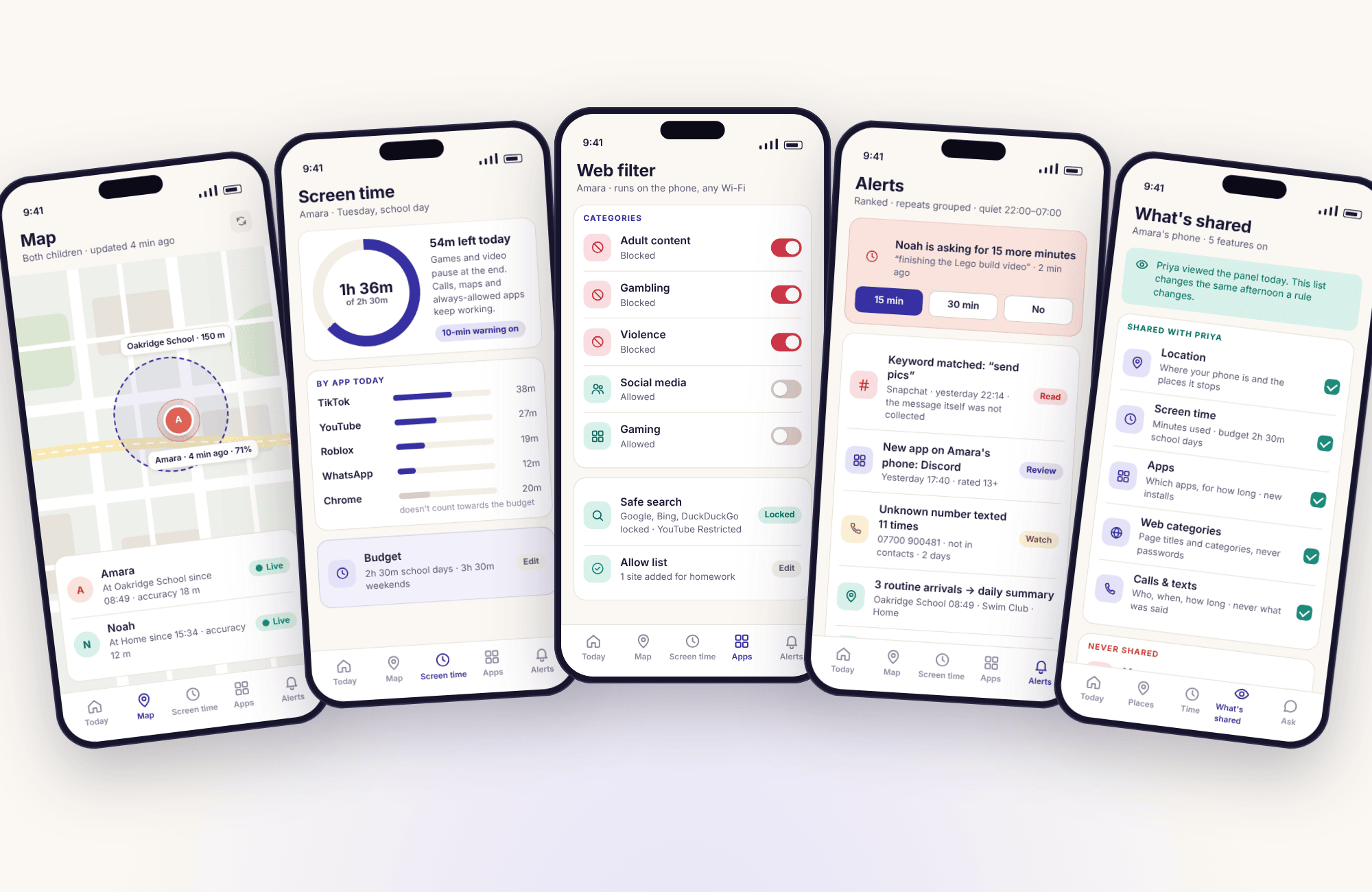
The map shows each child's phone as a pin with three things attached: when the reading was taken, how accurate it was, and how much battery was left. On the demo map Amara sits at Oakridge School with an 18-metre circle, read four minutes ago, at 71%. Those three numbers tell you more than the dot. A reading from ninety minutes ago is ninety minutes old, and the app says so instead of leaving it looking fresh.
Rather than polling every few seconds, the app uses Android's low-power location services and reports where a phone settles. That is why the battery cost stays low and why the pin can lag a moving bus by a few minutes. A manual refresh button asks for a fresh reading when you need one.
- Outdoors, a few metres. Indoors, tens of metres, because the phone is guessing from Wi-Fi rather than satellites.
- One permission decides it. "While using the app" looks granted and collects nothing once the app is closed.
- Both children, one map. Noah at Home and Amara at school, each with their own last-seen time.
Location history: a day as stops and journeys
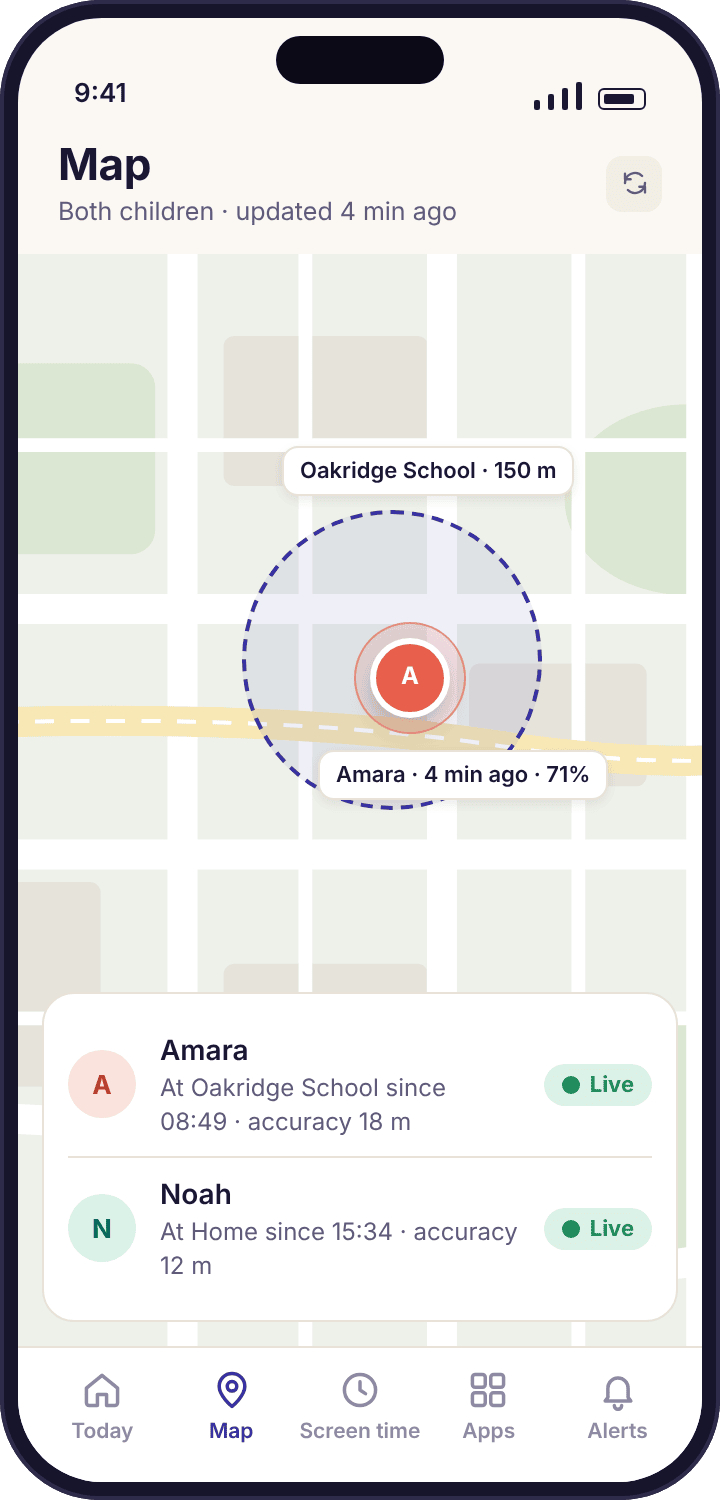
History takes a day of readings and folds them into something a person can read: Home until 07:52, a journey, Oakridge School 08:49 to 15:31, Swim Club 16:05 to 17:10, Home by 17:34. Stops are labelled with your saved place names, and an unnamed twenty-minute stop near Mill Road gets a "Name this place" prompt rather than a pile of coordinates.
Amara can open the same timeline on her own phone. That is deliberate. A history your child can read is a shared record of the week; one they cannot is surveillance, and teenagers can tell the difference. You can delete any day at any time, and the app keeps a rolling window of recent weeks rather than an archive of a childhood.
- Stops need a few readings to agree. A single wandering pin does not become a stop.
- Gaps fill in later. A phone with no signal stores readings and uploads them when it reconnects.
Places and geofencing: be told, instead of checking
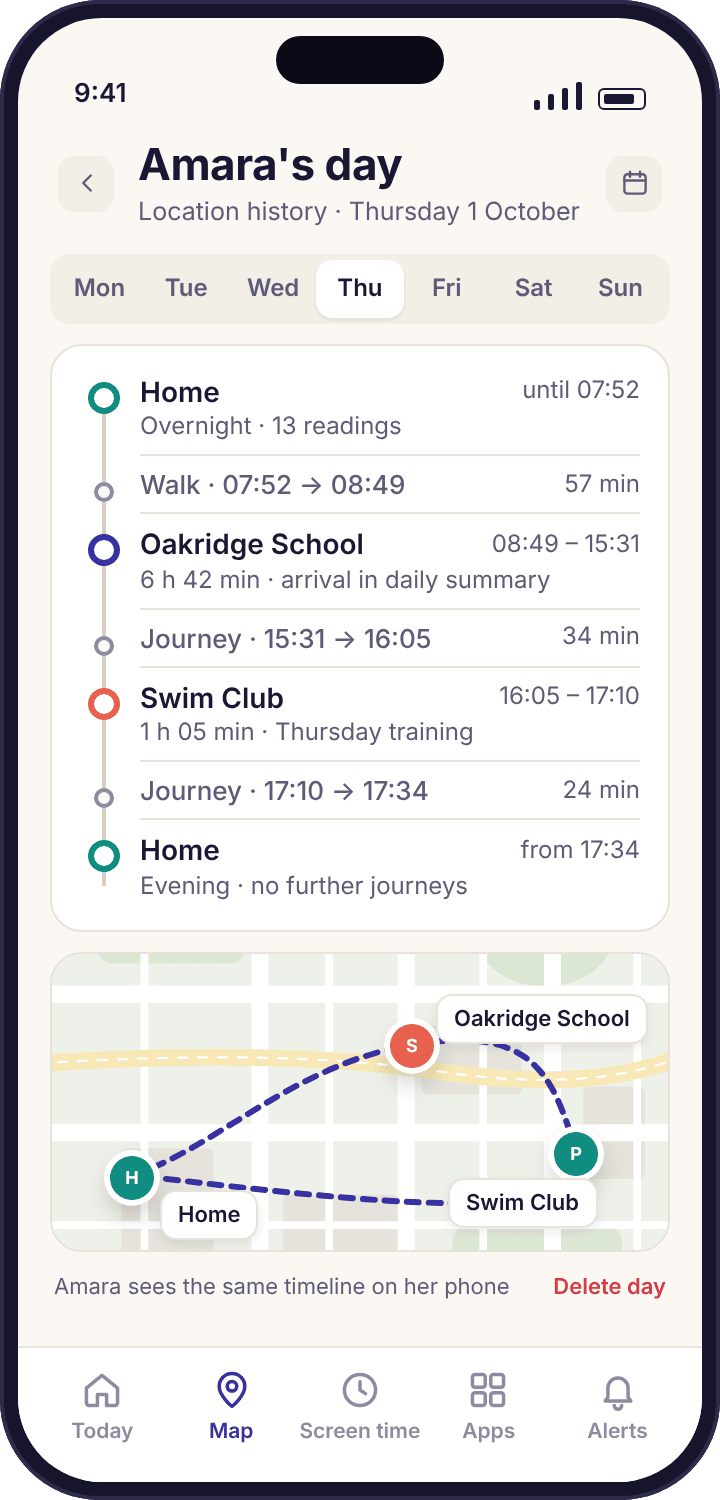
A place is a circle around somewhere that repeats: Home, Oakridge School, Swim Club, Grandma Ngozi's. Each place has its own rule. School can alert on arrival and on any departure before 15:00; Home can alert on arrival only; Grandma's can stay silent. The default radius is about 50 metres, and for a school we suggest drawing it a little larger than the building so that a GPS wobble in the playground does not fire a false departure.
The habit this replaces is opening the map fifteen times an evening. Priya gets "Amara arrived at Oakridge School · 08:49" and nothing else until 15:31. Routine arrivals can go into the daily summary instead of interrupting, and quiet hours overnight keep a 23:40 "arrived home" from waking you.
- Arrive, leave, or neither, per place. A friend's house is the one most parents should leave unfenced.
- The child sees the list. Saved places appear on their transparency screen the same afternoon.
Their day
The time features. All three are designed so that the child can see the limit coming, ask for more, and earn some back, because a limit that arrives as a surprise is a fight and a limit that was agreed is a routine.
Screen time: a daily budget they can see counting down
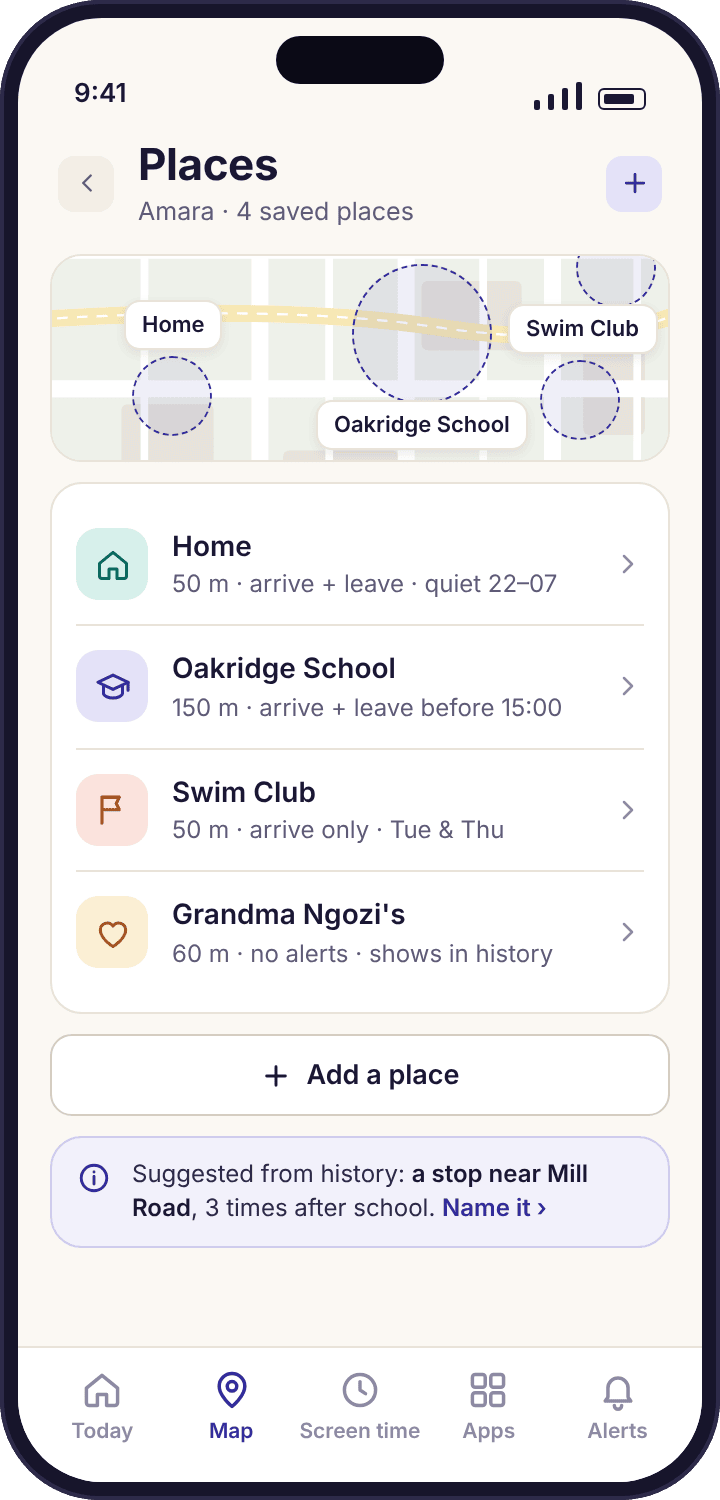
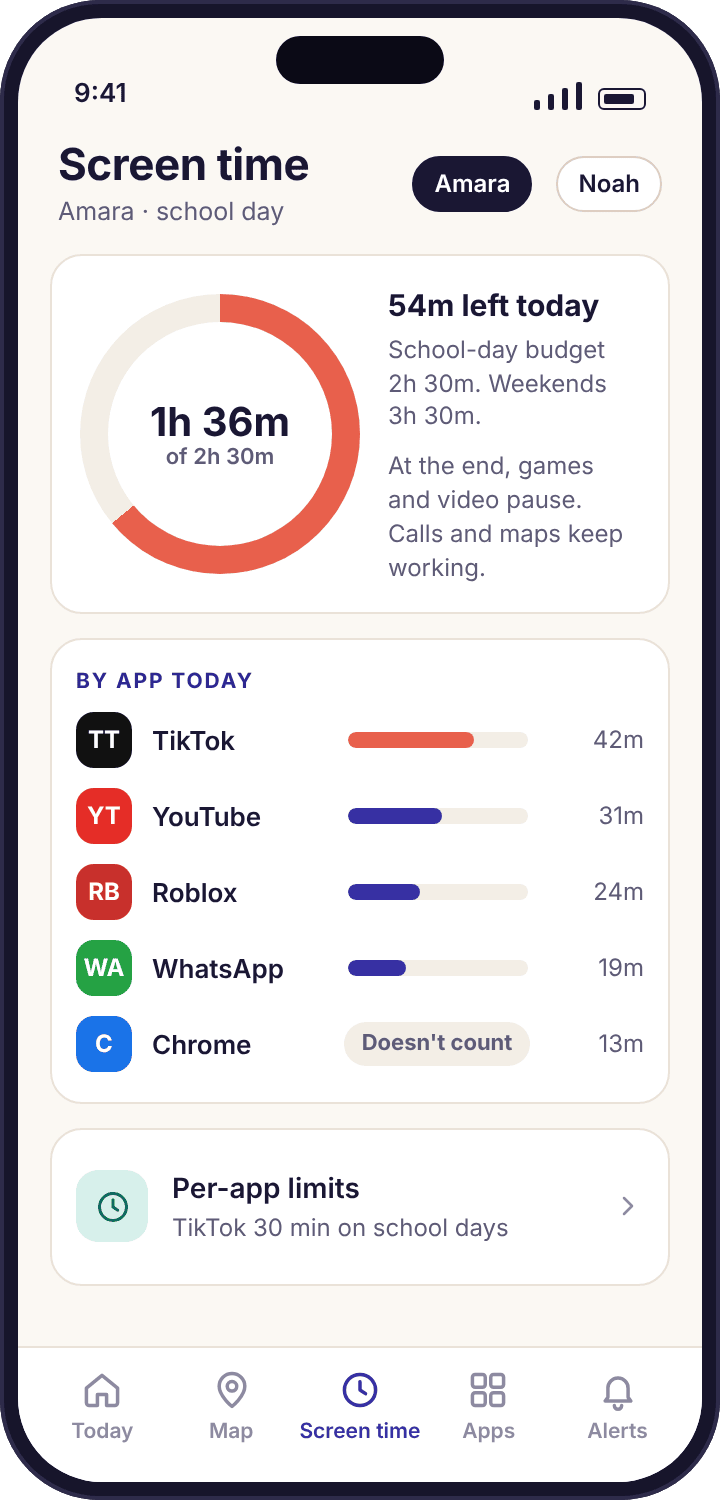
Each child gets a daily budget, different on school days and weekends, with optional limits on individual apps. Amara's school-day budget in the demo is 2h 30m with TikTok capped at 30 minutes inside it. Ten minutes before the end her phone shows a warning banner. When the budget runs out, games and video pause while calls, maps and anything you mark "always allowed" keep working.
A freshly paired phone starts with no limit at all. Nothing is blocked until a parent sets something, and our advice is to set nothing for the first week. Record a normal seven days, look at the weekly bars, and then choose a budget that is a little below the real average rather than a number from a magazine.
- Requests, not pleading. Noah taps "Ask for more time", picks 15 or 30 minutes, and Priya approves or declines with one tap.
- A cap on asking. You decide how many requests a day are allowed, so the button does not become a nag.
Bedtime and routines: wind-down that runs itself
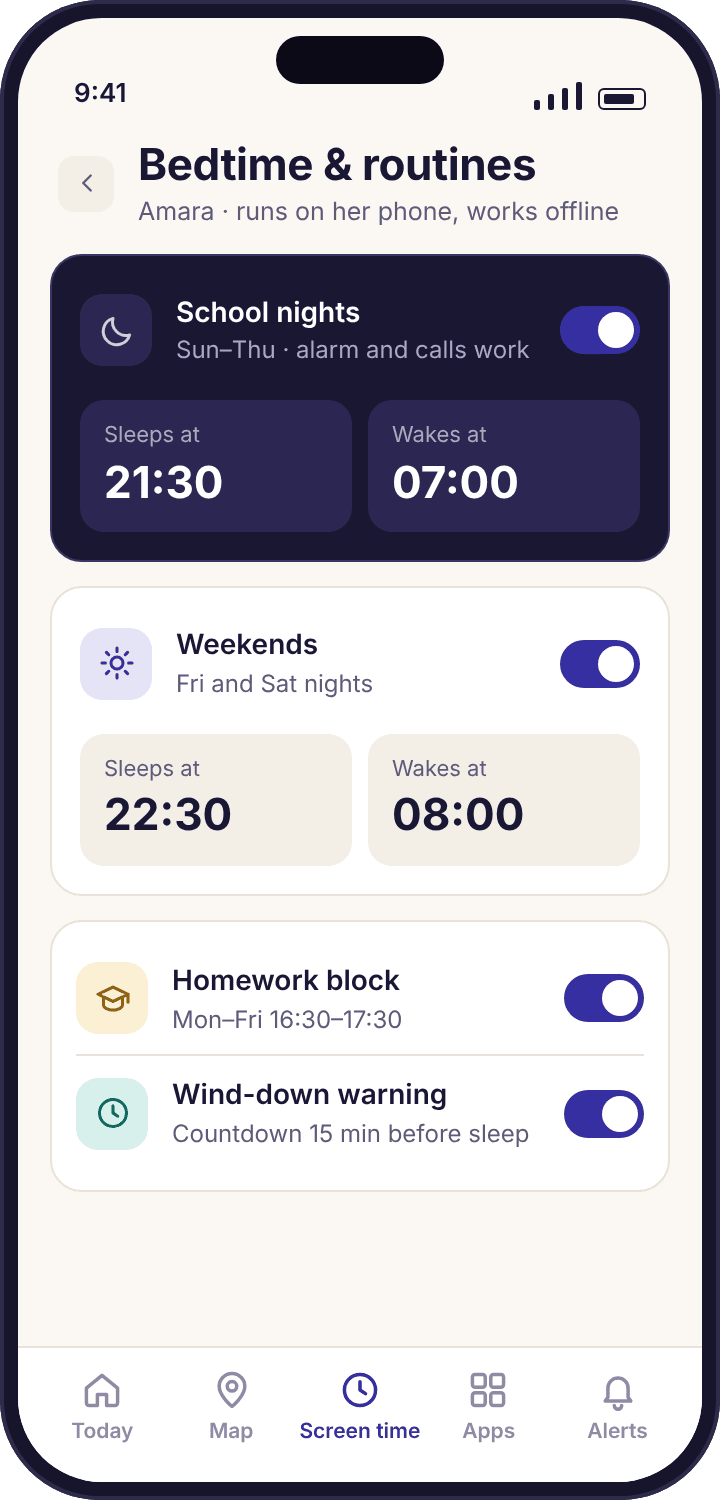
A bedtime is a schedule, not a nightly negotiation. School nights 21:30 to 07:00, weekends 22:30 to 08:00, and an optional homework block from 16:30 to 17:30 if that is when homework happens in your house. Twelve minutes before the phone sleeps the child app says so, and tells them plainly that the alarm and calls will still work.
The schedule is stored on the phone itself, which matters more than it sounds. A bedtime that depends on a server would fail on a night with no Wi-Fi, which is exactly the night a child would notice. This one runs on a phone in flight mode.
- Different nights, different rules. Friday can be later without touching Monday.
- The alarm survives. Wind-down never silences the morning alarm or an incoming call.
Tasks and rewards: earned minutes, one tap of approval
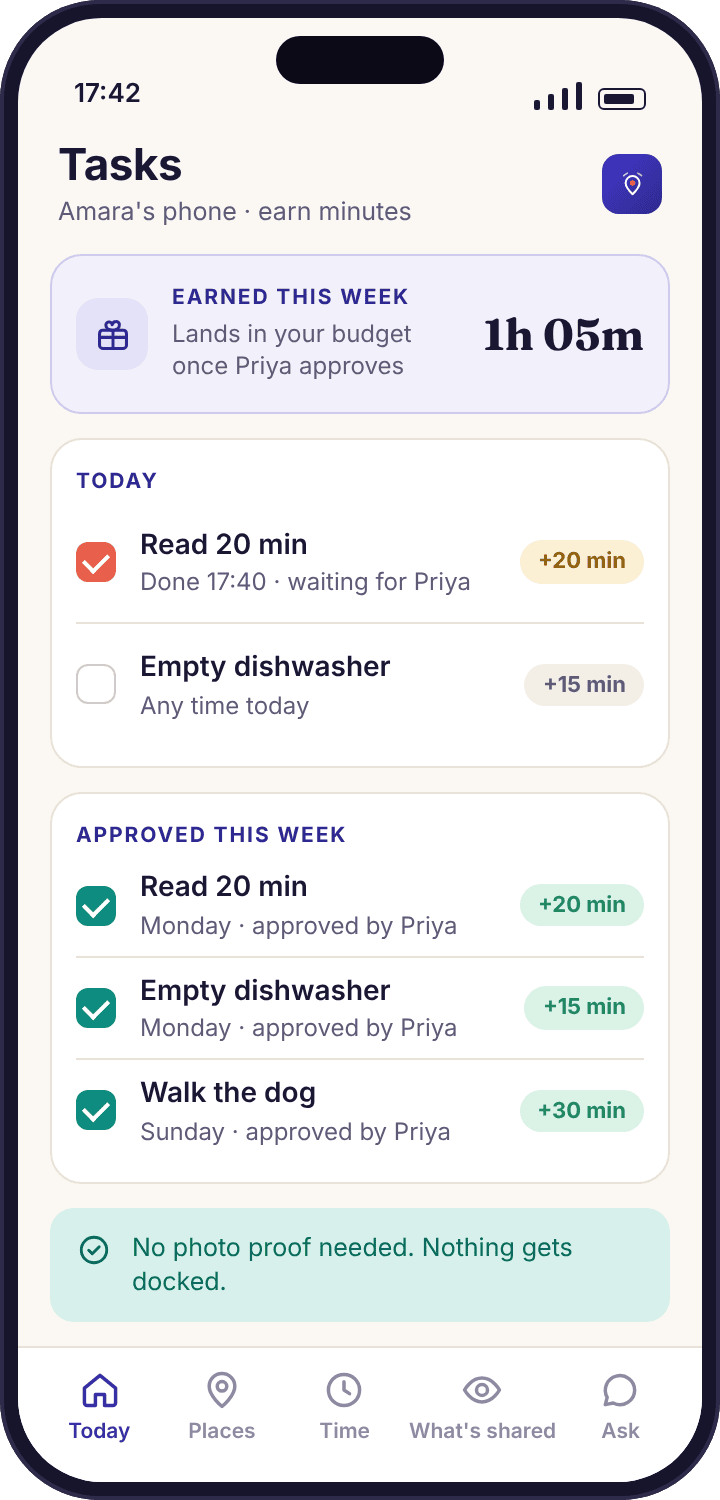
This is the one feature that gives time back. Amara marks "Read 20 min" as done on her phone; Priya sees "Amara says: Read 20 min — approve?" and taps Approve; twenty minutes land in today's allowance. The ledger shows the week: 1h 05m earned from a dishwasher, two reading sessions and a dog walk.
There is no photo proof and no docking of time, on purpose. Asking a thirteen-year-old to photograph an emptied dishwasher turns a chore into an audit, and taking minutes away for a missed task turns a reward scheme into a punishment scheme. Trust the tap, and talk about it if the taps and the dishwasher stop agreeing.
- Entirely optional. Families who do not want a points economy never see it.
- Minutes go into the same budget. No separate currency to explain.
Apps and the web
What is installed, how long each app runs, which categories of website open and which do not. These features see the outside of an app, never the inside, and the block screens always say who set the rule.
App activity: ranked by minutes, with new installs flagged
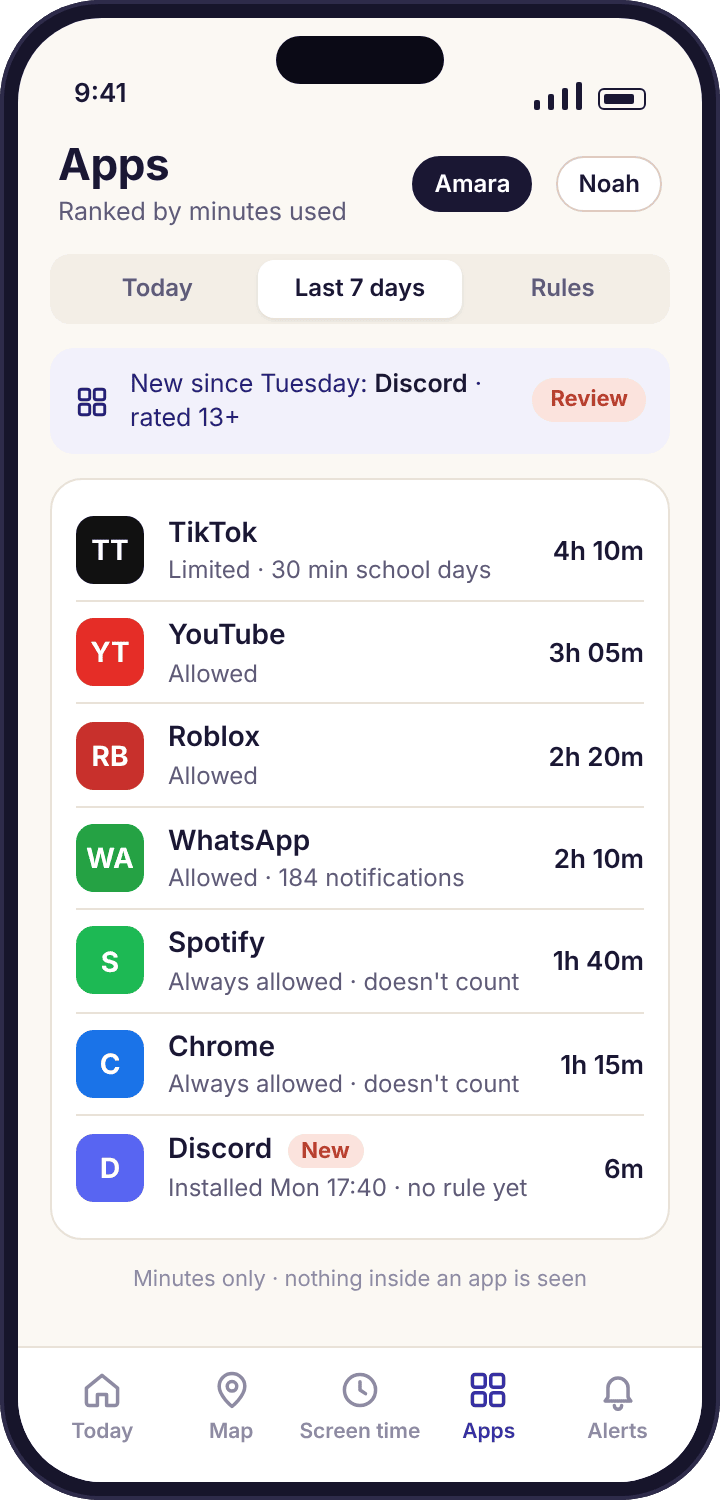
Apps are listed by minutes used, day by day, so the question "what is eating the time" has a sorted answer. The more useful line is the small chip at the top: "New since Tuesday: Discord". A new install is flagged on the day it appears, with its store age rating and the permissions it asks for, which is the moment to have the conversation rather than three months later.
The app sees that Roblox ran for 48 minutes. It does not see which game, who was in the server, or anything on the screen. There are no screenshots anywhere in the product, and that is not a setting you can change.
- Day by day, and the week. A bar chart Monday to Sunday with the average, best day and worst day.
- Allow, limit or block a new app from the install alert itself.
App blocking: a screen that says why
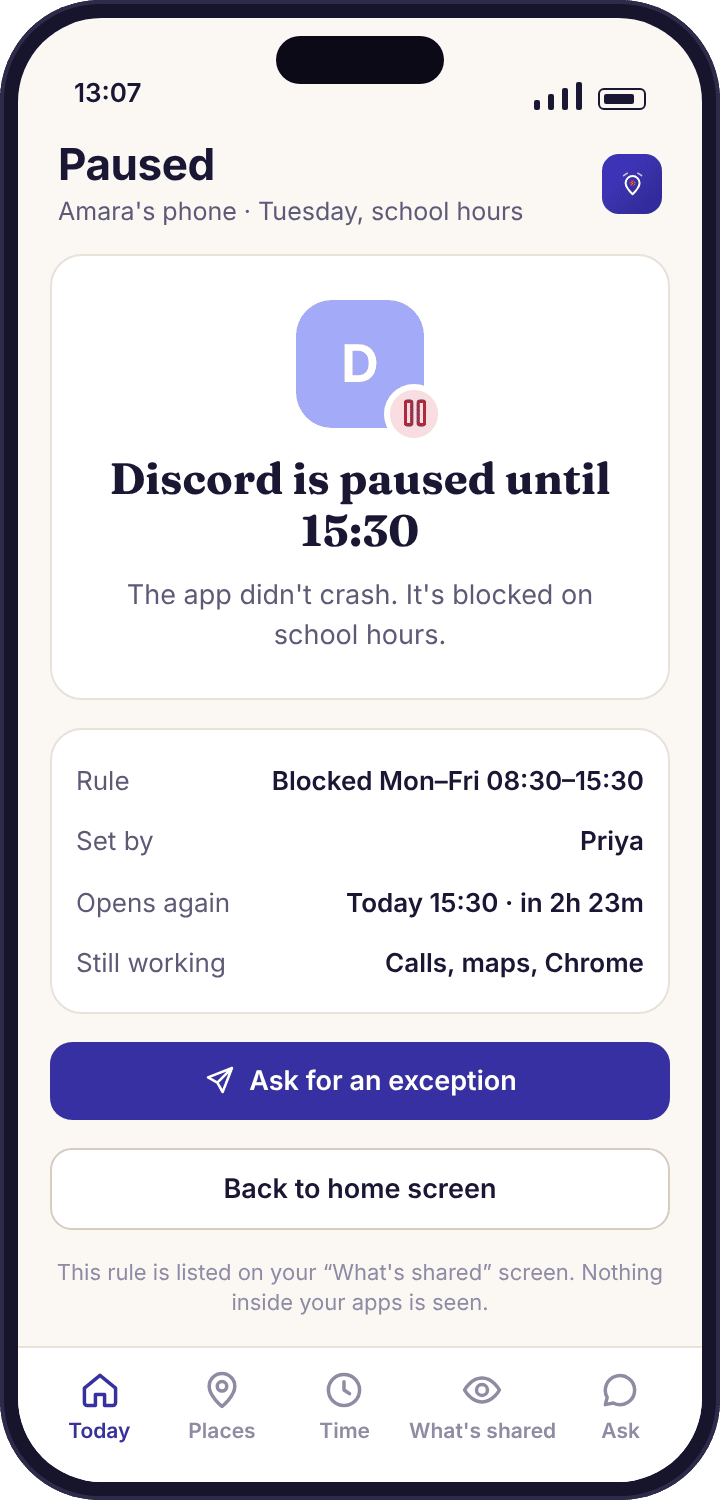
Block an app always, or on a schedule such as Monday to Friday 08:30 to 15:30. When Noah opens Discord during that window his phone shows a plain screen: "Discord is paused until 15:30 · rule set by Priya · Ask for an exception". It never pretends the app crashed. A child who is told the truth about a block argues about the rule, which is a conversation a family can have; a child who thinks the app is broken reinstalls it.
For younger children there is an approval mode for new installs, so anything downloaded waits for a parent's tap before it opens. Blocking needs the Accessibility service; without it, apps can be counted but not stopped.
- Always allowed exists too. Maps, the phone dialler and a reading app can be exempt from every limit.
- Exceptions are requests. The ask reaches you as a one-tap decision, the same as more time.
Web filtering: categories, on mobile data as well as Wi-Fi
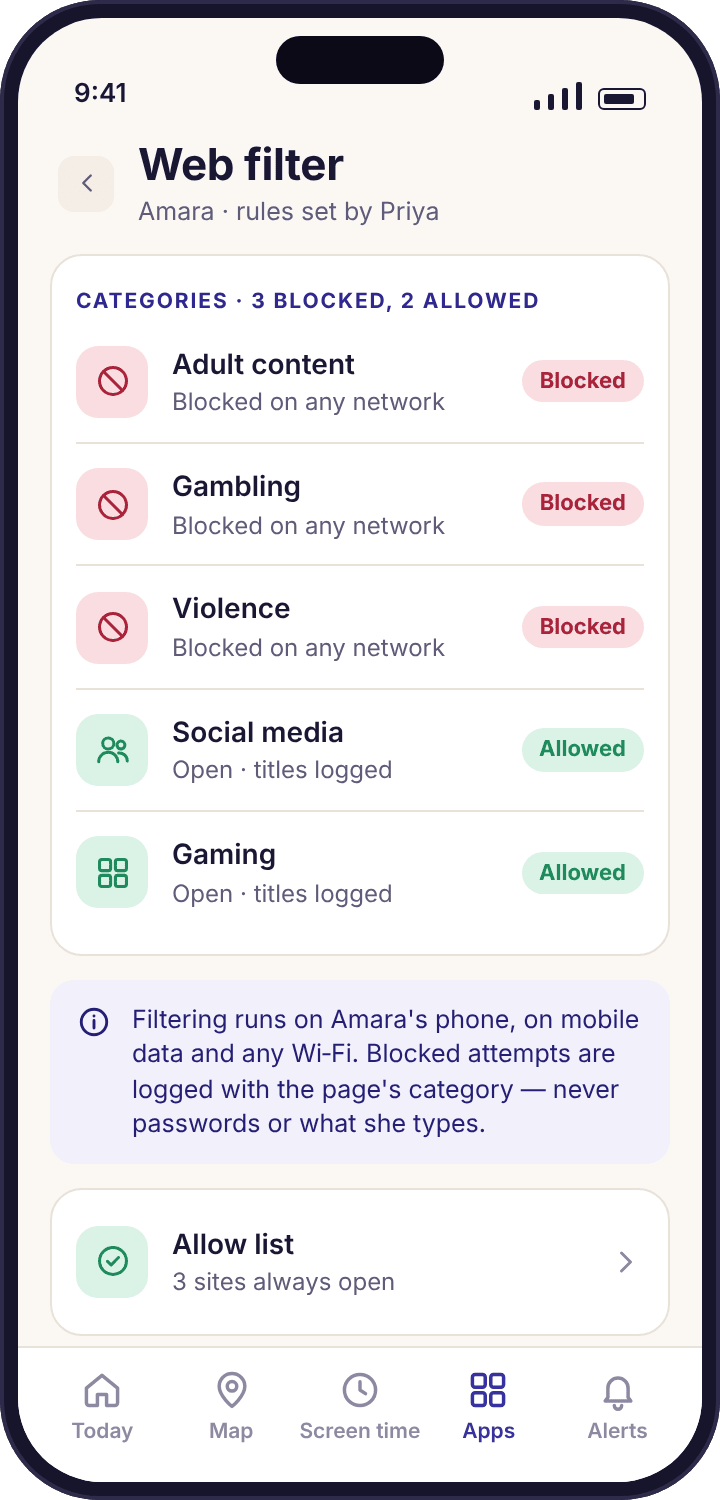
Choose categories per child: adult content, gambling and violence blocked for Noah; social media and gaming allowed for Amara. The filter runs on the phone, so it works on 4G at the bus stop and on a friend's Wi-Fi, not only on a home router. A blocked attempt shows the child a screen naming the category and the family rule, with an "Ask Priya" button, and logs the attempt with that category in the panel.
The web log lists visited page titles with their categories. It never shows passwords, anything typed into a form, or the contents of a logged-in account. An allow list lets you unblock one site "for homework" without reopening a whole category.
- Browsers only. The filter cannot see inside apps that are not browsers.
- Two blocked attempts in a week is normal. Twenty in an evening is worth a chat.
Safe search: locked on, not merely switched on
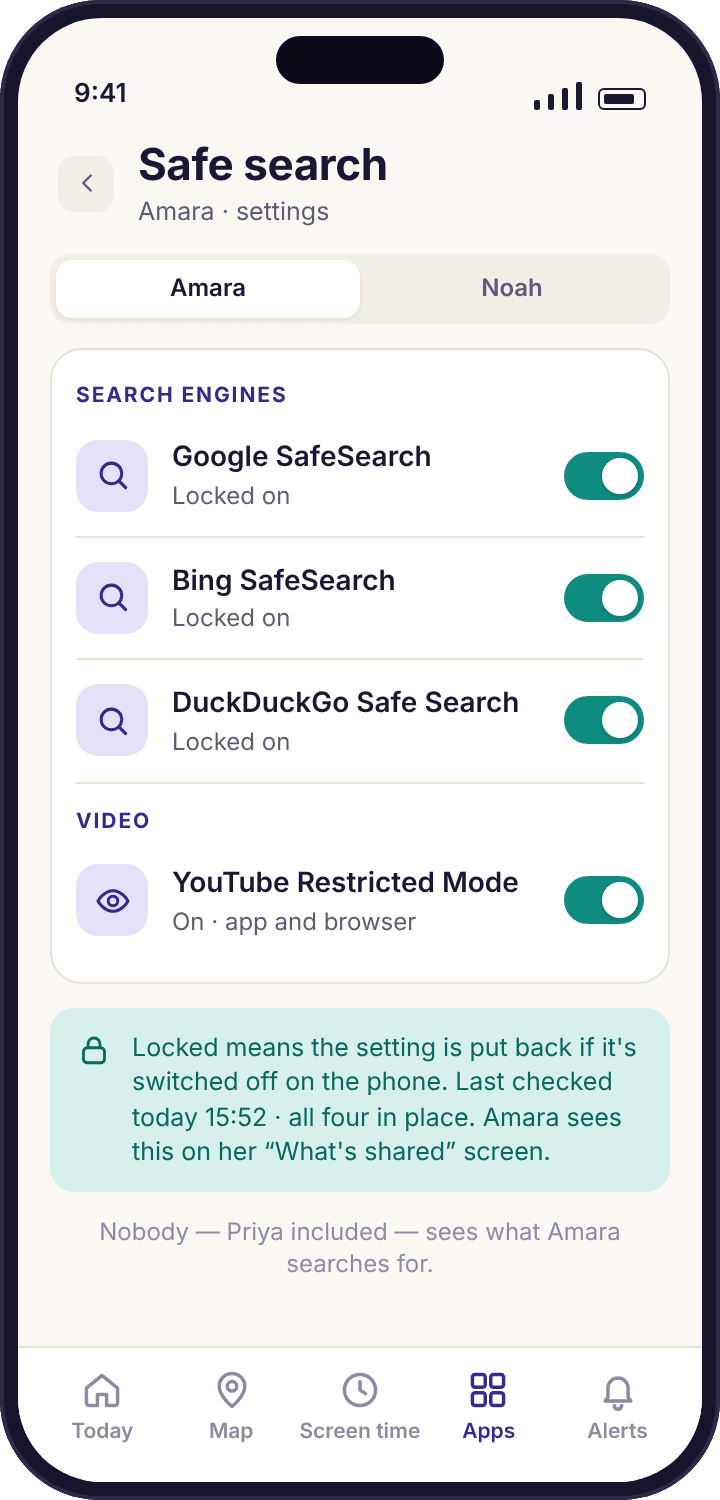
Google, Bing and DuckDuckGo all have a SafeSearch setting, and YouTube has Restricted Mode. All of them can be switched off by a nine-year-old in two taps. This feature locks them on, so the setting is enforced on the phone rather than remembered by a browser that can be cleared. The child app shows "Safe search is locked on by your family" on the transparency screen, so nothing is sneaked.
It is a blunt tool and we say so. Safe search hides the obvious results from an obvious query. It does not filter a page reached through a link, which is what web filtering is for, and it does nothing inside an app that is not a search engine.
- Engine by engine. Each one shows "Locked" in the parent app so you can see it held.
- Restricted Mode hides comments too, which for some families is half the point.
Worth your attention
The features that watch patterns in calls, texts, notifications and social apps. Every one of them works on the shape of communication, who, when, how often and how long, and not one of them can read a message.
Calls and texts: who, when and how often
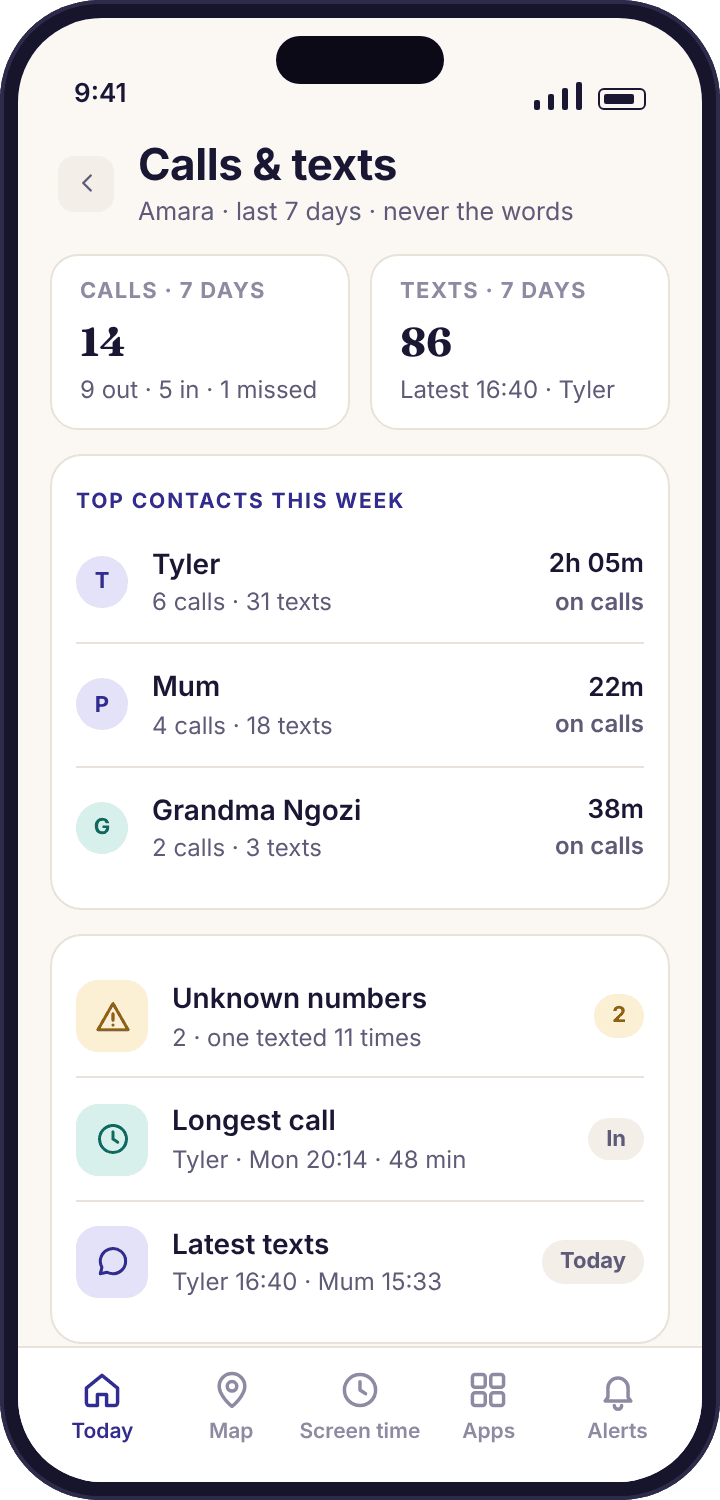
The overview shows the week's top contacts, the longest call, the latest text times and a count of unknown numbers. Underneath sit the call log (contact, direction, time, duration) and the SMS log (contact, direction, time, count). The flag worth having is the unknown-number one: "07700 900481 texted 11 times in 2 days · not in contacts", with Save as contact, Watch or Ignore.
The words of a text are never collected, and calls are never recorded, in any build at any price. Google Play's policy does not allow apps like this one to read call or SMS logs, so this feature exists in the direct APK build only; the Play build simply omits it.
- Patterns, not transcripts. "Calls after 22:00 this week: 3, all with Tyler" is the kind of line you get.
- The child sees the same. Their transparency screen says: who you call and text, when and for how long.
Keyword alerts: matched on the phone, reported as a word
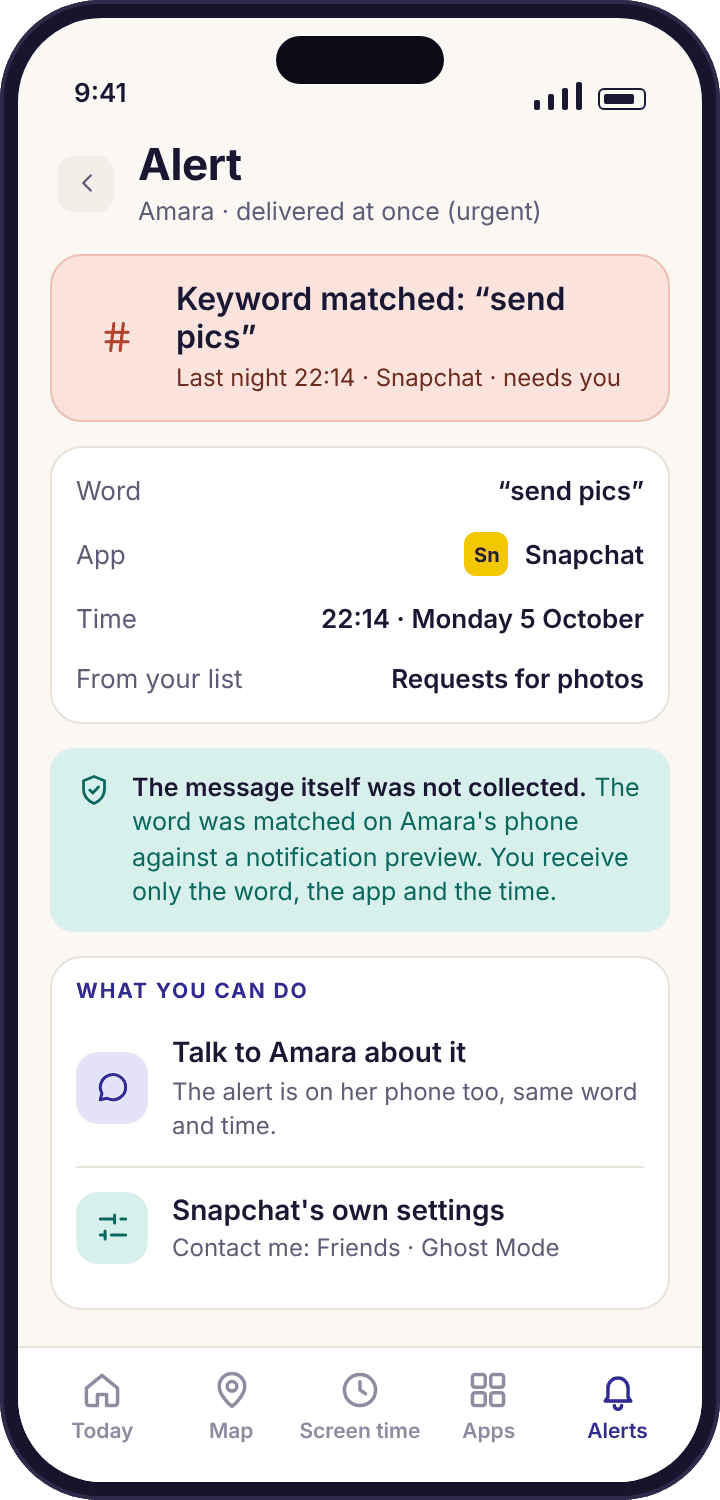
You keep a short list of words, around twenty, grouped by concern: bullying, self-harm, requests for photos. The child's phone compares that list against the preview text of incoming notifications, on the phone, and when something matches Priya receives exactly three facts: which word, which app, what time. "Keyword matched: 'send pics' · Snapchat · 22:14". The alert itself says the message was not collected, because it was not.
Keep the list short. A long list of ordinary words produces an alert a day that means nothing, and by week three nobody reads it. Twenty words that would stop you in your tracks produce perhaps one alert a month that matters.
- Previews only. If a notification shows no text, nothing can match.
- The child's transparency screen says keyword alerts are on, so the feature is never a secret.
Smart alerts: a feed you still read in week six
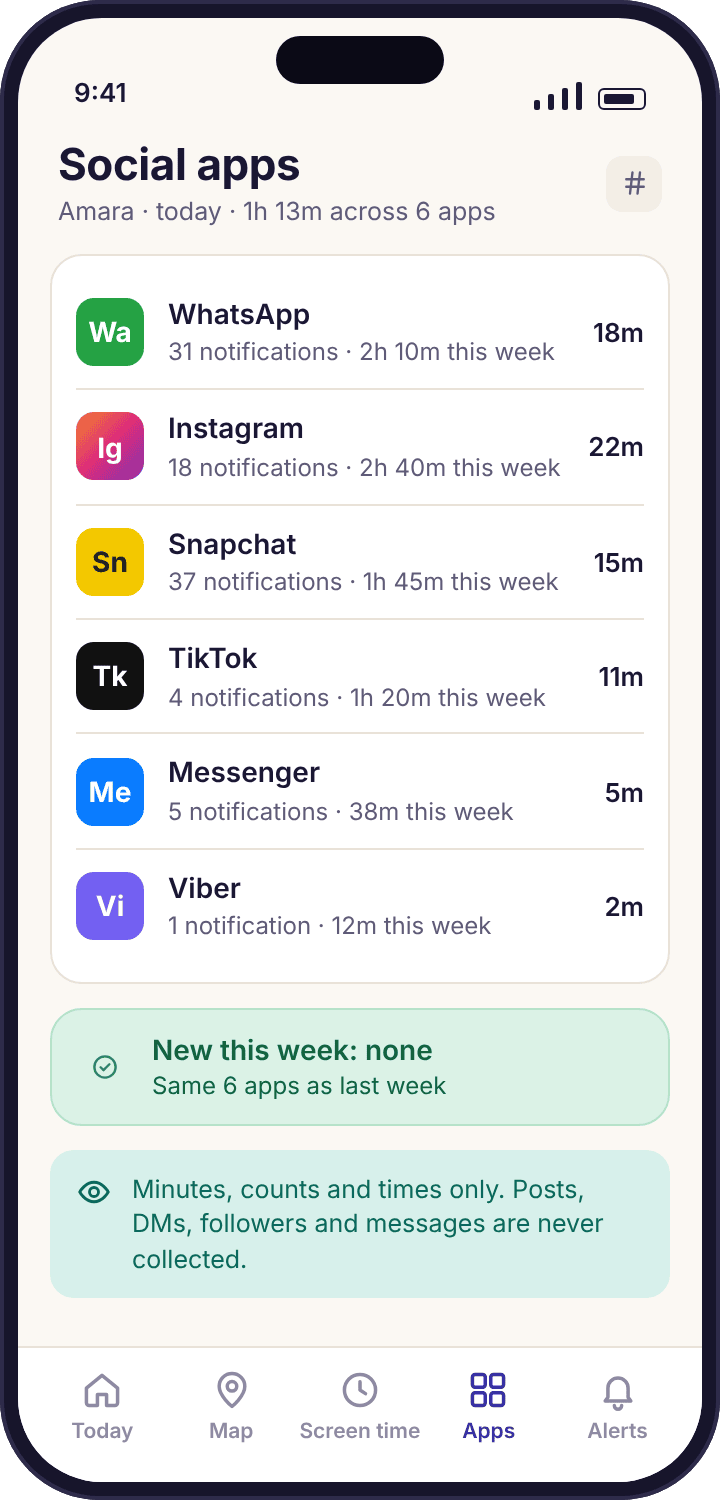
Most monitoring apps die of their own notifications. By the second week the parent has muted everything and the one alert that mattered arrives into silence. Smart alerts rank what needs you, group repeats into one line ("3 routine arrivals → daily summary"), hold non-urgent items during quiet hours, and turn a burst of events into a single message.
Each alert type can be set to interrupt, go into the 18:00 daily summary, or stay silent. A tamper alert always interrupts. An arrival at Swim Club on a Wednesday probably should not.
- Quiet hours with an exception. Set 22:00 to 07:00 and urgent items still come through.
- The summary is five lines. If it is longer than that, something is set to the wrong level.
Social media: how much, how often, and when something new appears
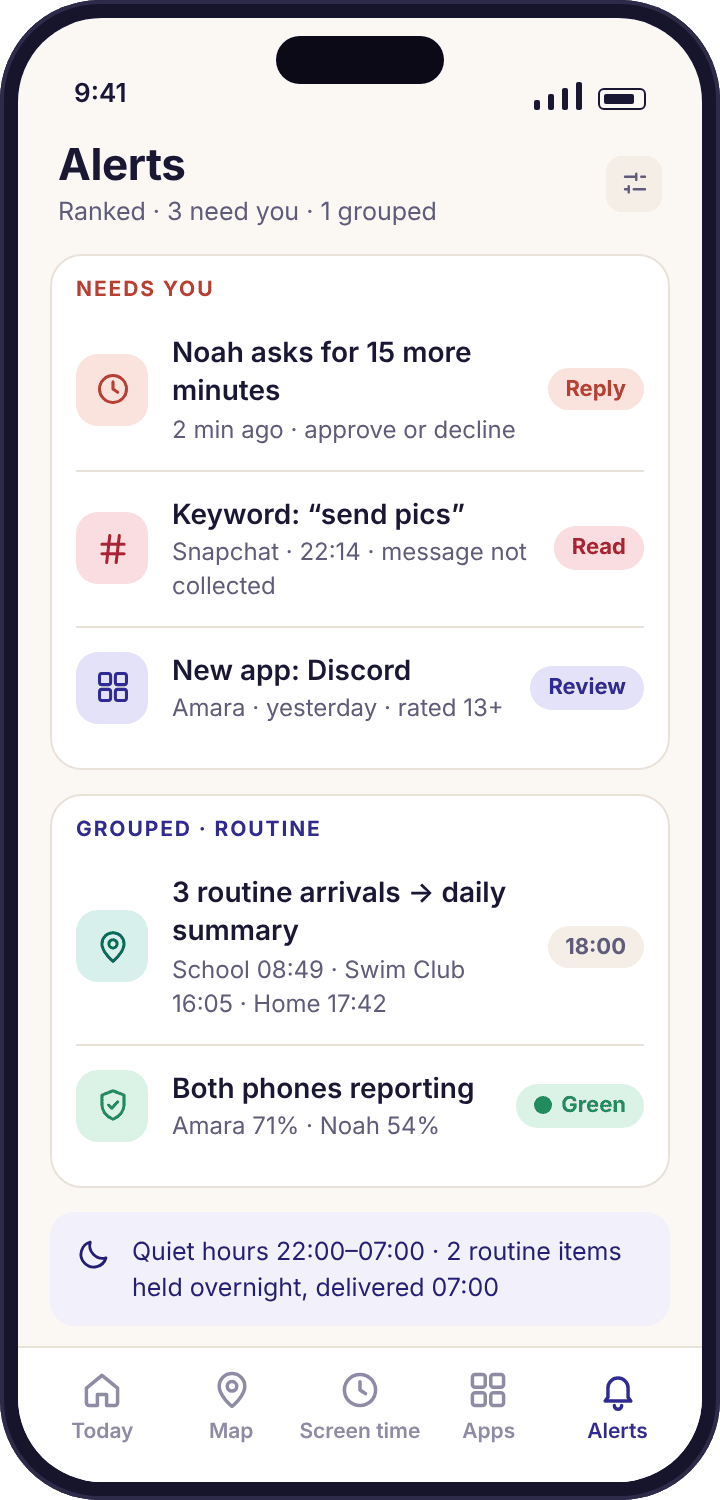
The social overview lists which platforms are installed, how many minutes each had this week, and how many notifications each one sent. Per-app pages for WhatsApp, Messenger, Snapchat, Viber and Instagram each lead with that app's own built-in safety settings, because those are free, stronger, and the first thing to switch on.
WhatsApp, Messenger and Viber are end-to-end encrypted. No honest app on earth can read those chats; the only thing visible to anyone is what the app chooses to put in a notification. Anything claiming otherwise is either lying or asking you to install something you should not.
- What you get: WhatsApp 2h 10m, 184 notifications, busiest 21:00 to 22:00.
- What you never get: posts, DMs, followers, friend lists, photos, or who sent what.
Four more features hold all of this together rather than adding to it: the Today view that answers "is everything okay?" in three seconds, a child switcher with separate rules for each child in the house, the child app your child actually sees, and the device health line that tells you on a Tuesday that a permission has dropped. The pairing guide covers how a phone joins the account in the first place.
Signals reach you. Contents stay on their phone.
Every feature on this page collects the shape of activity: names, numbers, times, durations, categories and counts. None of them collects what was said, shown, typed or photographed. The two columns below are the whole product in one picture, and the right-hand column is the same on every plan.
What you see
- Where the phone is, with the time and accuracy of the reading
- A day as stops and journeys, named by your saved places
- Arrivals and departures at places you chose
- Minutes per app, per day, and new installs the day they land
- Website titles and categories, including blocked attempts
- Who called or texted, when, how long, and how often (APK build)
- Which social apps are installed, their minutes and notification counts
- A keyword that matched: the word, the app, the time
- Battery, last check-in and every missing permission by name
What you never see
- The text of any message on any app: SMS, WhatsApp, Instagram, Snapchat, Messenger, Viber or anything else
- Screenshots or a mirror of the screen
- Keystrokes, passwords or anything typed into a form
- Photos, videos or the camera roll
- The camera or the microphone, ever, remotely or otherwise
- Recordings of calls
- Posts, DMs, followers, friend lists or comments
- What was on the screen inside any app
- Anything without your child's phone showing that it is shared
Google Play or the direct APK: one difference
The child app comes two ways, and the only difference between them is the call and SMS log. Everything else on this page is identical in both.
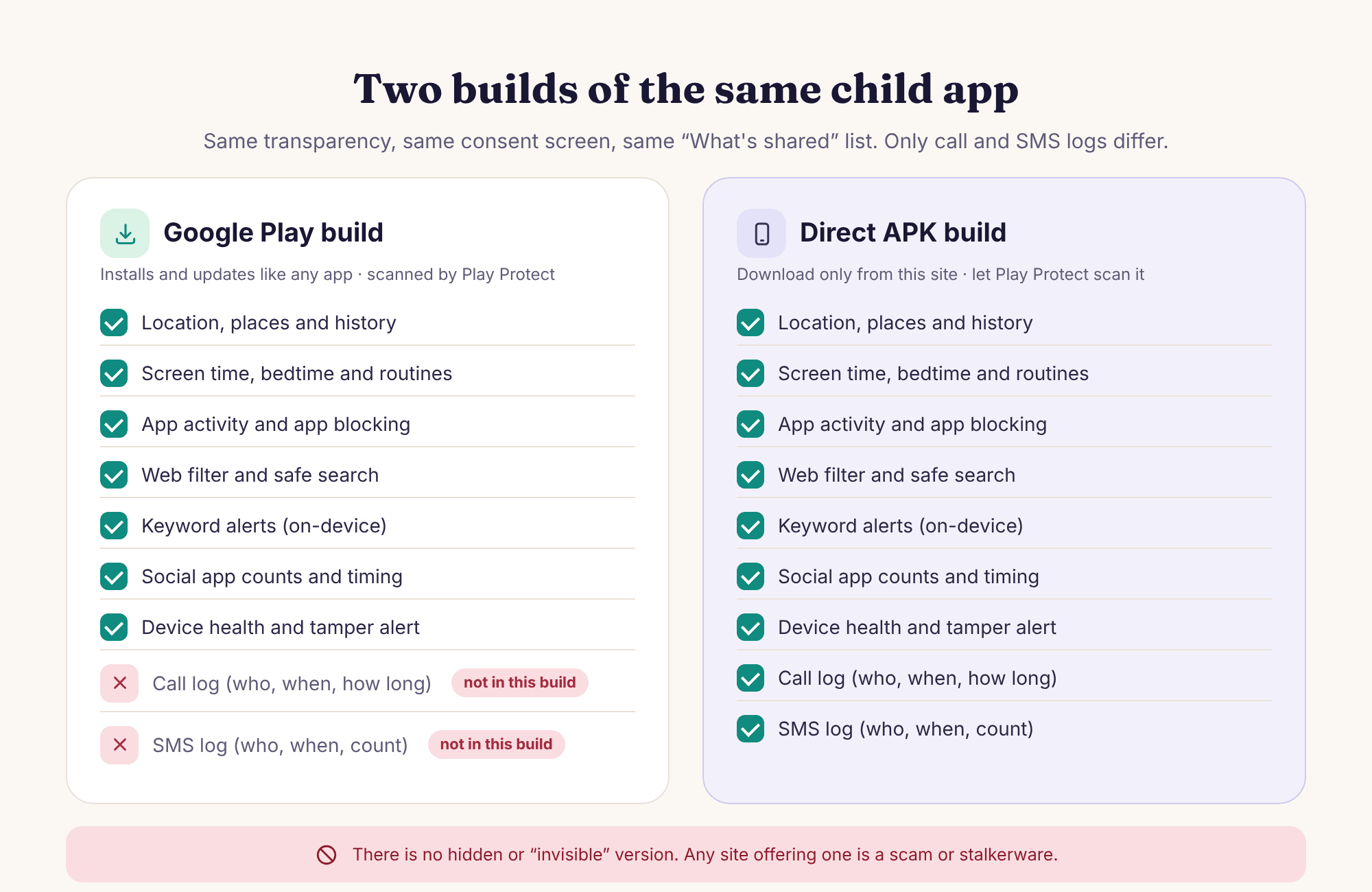
If calls and texts are not your worry, install from Google Play and forget the rest of this section. If they are, the APK install guide shows the three Android dialogs you will meet, and asks you to switch "Install unknown apps" back off once you are done. Both builds show the same icon, the same consent screen and the same "What's shared" list on the child's phone.
Each permission powers specific features, and declining one stops only those
Android asks for each permission separately, and the setup checklist on the child's phone walks through them one at a time with you both in the room. Here is what each one is for, so a tick is a decision rather than a reflex.
Location, all the time
Map · Places · HistoryPowers the live map, place alerts and the daily timeline. The trap is "While using the app", which Android shows as granted but which stops collecting the moment the app leaves the screen. Device health flags it by name if it slips.
Settings → Apps → MobileTracking → Permissions → Location → Allow all the timeUsage access
Screen time · App activity · LimitsLets the app count minutes per app and enforce budgets. Without it the screen time ring stays empty and app limits have nothing to measure. It reveals which app was in the foreground and for how long, never what was on the screen.
Settings → Apps → Special app access → Usage access → MobileTracking → AllowNotification access
Keyword alerts · Social countsLets the app see notification previews on the phone, so it can count them per app and match them against your keyword list. The matching happens on the phone and the previews are not uploaded. Decline it and social counts and keyword alerts simply switch off.
Settings → Apps → Special app access → Notification access → MobileTracking → AllowAccessibility service
App blocking · Web filtering · Safe searchThis is what lets the app draw the block screen over a paused app or a blocked page, and keep safe search locked. Without it everything can still be counted and logged, but nothing can be stopped. Android's wording for this permission is alarming; what it is used for here is listed on the child's transparency screen.
Settings → Accessibility → Installed apps → MobileTracking → OnBattery optimisation off
Regular check-insNot a permission so much as an exemption. Android puts background apps to sleep to save power, and a sleeping app cannot report location or enforce a bedtime. Roughly three in four "stopped reporting" cases are this setting having switched itself back on after an update.
Settings → Apps → MobileTracking → Battery → UnrestrictedUninstall protection
Tamper alertDevice admin makes removing the app take deliberate steps instead of a long press, and sends you a tamper alert when it happens. It does not make the app invisible, it does not reinstall it, and your child can still remove it if they decide to. You will be told when it happens.
Settings → Security → Device admin apps → MobileTracking → ActivateFour features other apps sell, and why you will never find them here
These come up in support email every week, usually as "does it also…". The answer is no in each case, and the reason is not that we have not got round to it.
A stealth or hidden mode
There is no setting that hides the icon, no "invisible" version, and no version that skips the consent screen. The child app has a home screen, a "What's shared" list and a line saying a parent opened the panel today. A monitoring app that hides from the person it monitors is stalkerware with a different label, and it would be used against partners within a week of release. If a website offers a hidden MobileTracking build, it is not ours and you should not install it.
Reading messages
Not SMS, not WhatsApp, not Instagram DMs, not Snapchat, not Messenger, not Viber. The feature does not exist in the code, and no subscription unlocks it. The pattern of who texts whom and when tells a parent most of what they need to know; the text of a thirteen-year-old's chats tells them a great deal they should not have, and teaches the child that nothing they write is theirs. Keyword alerts are the compromise, and they report a word, not a message.
Remote camera and microphone
The app never asks for the camera or microphone permission, so Android will not let it use either. There is no "listen to surroundings", no remote photo, no call recording. Any app that offers these on a child's phone is offering them on every phone it is installed on, and that is not something we are willing to put into the world for the sake of a feature comparison table.
Keylogging and screenshots
Nothing typed on the phone is recorded, which means no passwords, no searches, no half-written messages that were deleted before sending. No screenshots are taken, so there is no gallery of your child's screen anywhere. The Accessibility service the app uses for block screens could technically do both, and the transparency screen states that it does neither, which you can hold us to.
Which features suit which age, and when to switch some off
A child's date of birth sets age-appropriate starting values when you add them, but those are only a starting point. The right set of features for Noah at nine is wrong for Amara at thirteen, and the loosening should be visible and on purpose.
Structure, and an open door on installs
At Noah's age the phone is mostly a games and video device, and the useful features are the ones that shape the day. Approval for new installs catches the app a friend recommended before it is on the phone for a month.
- Screen time budget after a week of watching
- Bedtime on school nights, later on Saturday
- Approve new installs; safe search locked
- Place alerts for school and home
The years the attention features earn their place
Amara's age is when messaging apps arrive, journeys get longer and the phone becomes social. Keep the keyword list short and agreed, and make sure she knows the transparency screen exists.
- Per-app limits instead of a blanket budget
- Keyword alerts with about twenty words
- Social overview; per-app safety settings first
- School place alert with the early-departure rule
Loosen in the open, and say so
By fifteen most of this should be switched off or agreed as a two-way share. The features that survive are the ones a teenager would choose for themselves: a location share they can see, a bedtime they negotiated.
- Live map, agreed and visible
- Keyword alerts off, or a list they helped write
- No app blocking; app activity if they are fine with it
- Review the "What's shared" screen together every term
Questions parents ask about the feature list
Which features work on the Google Play build and which need the APK?
Everything on this page works on either build except call and SMS logging, which Google Play's policy does not allow and which therefore exists only in the direct APK build from this site. Location, history, places, screen time, bedtime, tasks, app activity, app blocking, web filtering, safe search, keyword alerts, smart alerts and the social overview are identical in both.
Can any feature read my child's messages?
No. The app never reads message text on any platform, and no plan changes that. Keyword alerts compare notification previews against your word list on the child's phone and send you the word, the app and the time only. Calls and texts show who, when, how long and how often. The message itself stays on their phone.
Does my child see which features are switched on?
Yes, all of them. The child app's "What's shared" screen lists every active feature, saved place, limit and rule, and updates the same afternoon when you change something. Their phone also shows that a parent opened the panel today, though not which screens were looked at. There is no way to switch any of this off.
What happens if my child declines one of the permissions?
Only the features that depend on it stop. Decline Notification access and keyword alerts and social counts switch off; everything else keeps working. Decline the Accessibility service and apps and sites are still counted but cannot be blocked. Device health names any missing permission exactly, so you can decide together whether to grant it later.
Can the app block YouTube inside the app as well as in the browser?
App blocking can pause the YouTube app on a schedule or always. Web filtering and safe search work in browsers, and Restricted Mode is locked on for YouTube itself. What no feature does is see or filter the individual videos playing inside the app; it knows YouTube ran for 42 minutes and nothing more.
Do the features work on a tablet?
Yes, on any Android tablet running Android 8.0 or later, with the same app and the same permissions. Location depends on the tablet having GPS, which Wi-Fi-only tablets often lack, so the map may show a rough Wi-Fi position. Screen time, bedtime, app rules and web filtering work exactly as on a phone.
How quickly does a change in the panel reach the phone?
Usually within a few minutes while the phone has a connection. A new limit, place or rule is sent to the child app, which applies it and adds it to the "What's shared" screen. If the phone is offline, the change waits and lands when it reconnects. Bedtimes and limits already on the phone keep running regardless.
Can I use some features for one child and different ones for another?
Yes. Every feature, limit, place, rule and alert is set per child under one account, so Noah can have approval for new installs and an early bedtime while Amara has per-app limits and keyword alerts and no install approval. A child switcher in the app and the panel moves between them.
Does the parent's own phone have to be Android as well?
No. Only the child's device needs to be Android. The parent side is the web panel at /my/, which opens in any browser, plus the same account in the app if your own phone happens to be Android. Your own phone can be an iPhone. The child app itself has no iPhone version, so a child with an iPhone needs Apple's own tools instead.
Where to go from here
The features above are the content; three pages describe the container they sit in: family dashboard, the child app, device health and parent panel.
If you would rather see the features than read about them, the read-only demo opens every screen for the Okafor family with a full week of data, and nothing in it can be changed. The FAQ page gathers the questions about consent, billing and the law that do not belong to any one feature.
Every feature on this page switches on once your child's phone is paired with your account, which takes about ten minutes with both devices on the table. The download and setup guide walks through every screen.
Switch on the features you need, and only those.
Pair your child's phone in about ten minutes, leave the limits off for the first week, and add features as the week shows you what matters. Your child sees every one of them.
Android · Free account · Visible on your child's phone