Nothing makes a parent feel more out of date than glancing at a teenager’s home screen. The social apps for teens change every couple of years, the one that mattered when your eldest was thirteen is gone by the time your youngest gets there, and half of them you’ve genuinely never heard of. It’s tempting to either panic or give up. Don’t do either.
You don’t need to be personally active on every app your child uses. What you need is a rough working map: what each of the big ones is, where the real risks sit, the two or three settings actually worth changing, and an honest verdict. With that, you can set sensible rules and, just as importantly, have conversations that don’t open with “so what exactly is a Discord?”
Here’s that map for 2026. Treat the verdicts as starting points, not commandments; every child and every family is different, and the settings matter more than the app.
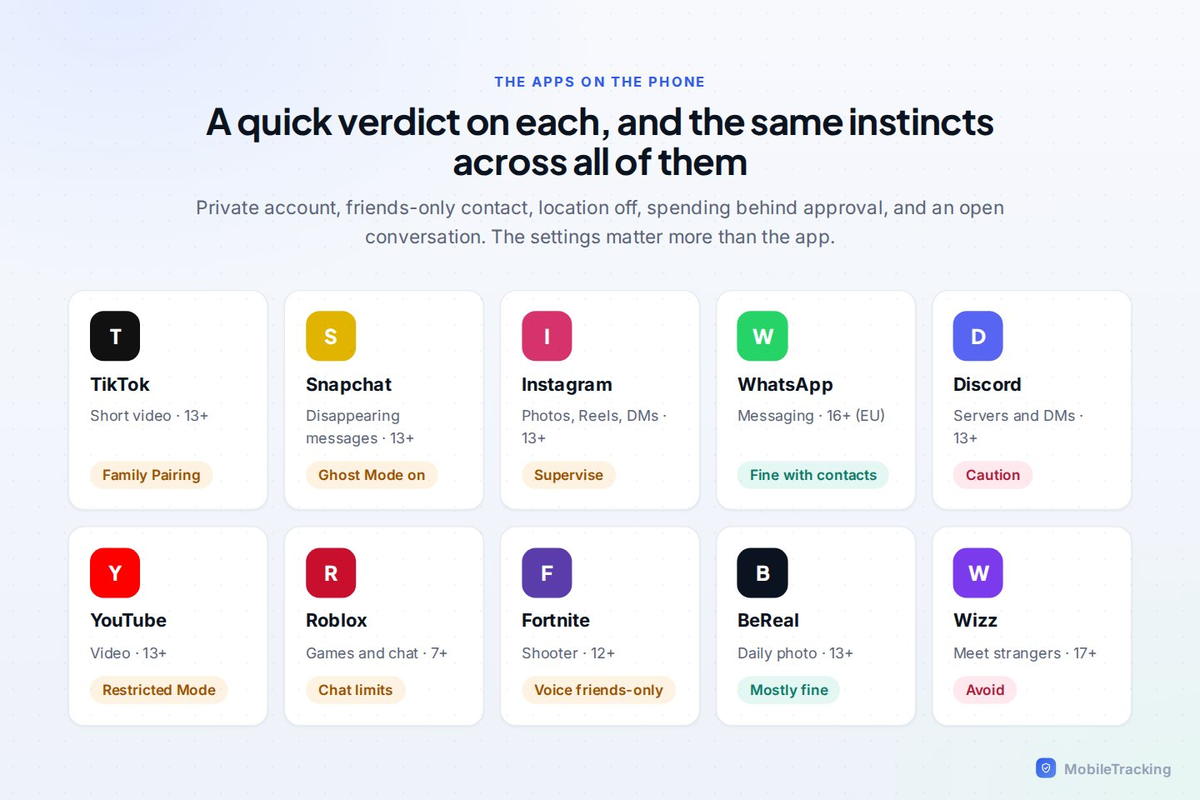
The big four: video and social
TikTok
Still the centre of gravity for teen attention, and likely to stay there. The risks aren’t only the famously bottomless scroll. It’s what the algorithm decides to show a particular kid, contact from strangers in comments and DMs, and the quiet pressure of performing for a public audience.
What to do: set up Family Pairing, which links your account to your teen’s and lets you manage screen-time limits, restricted mode and messaging from your own phone. Turn on Restricted Mode, set a daily time limit, and make the account private so only approved followers see their posts. Verdict: workable for most teens once limits are in place, and honestly, the time cap tends to matter more than the content settings, because the sheer volume is the real issue.
Instagram has shifted meaningfully in the last couple of years. Teen Accounts now apply stricter defaults automatically to under-16s, private by default, tighter limits on who can message them, and built-in supervision tools for parents. That’s a real improvement, but it doesn’t erase the core issues: DMs from strangers, the relentless comparison and body-image pressure of a highlight-reel feed, and “finstas,” the secondary or fake accounts teens keep away from adult eyes.
What to do: set up supervision, confirm the account is private, restrict DMs to people they actually follow, and, this one’s not a setting, have the body-image conversation early and more than once. Verdict: reasonable for 13 and up with a teen account and supervision switched on.
Snapchat
Beloved by teens, nerve-wracking for parents, largely because of two features: messages disappear by default, and the Snap Map can broadcast your child’s location. The disappearing messages aren’t a reason to panic, you can’t and shouldn’t try to read them, but they do mean you’re relying on trust rather than a paper trail, which is worth being honest with yourself about.
What to do: set up Family Center, which lets you see who your teen is talking to (not the content) without reading their messages; turn on Ghost Mode so their location isn’t shared on the map; and limit or disable the My AI chatbot for younger teens. Verdict: okay for older teens with Family Center and Ghost Mode on; think harder for younger ones.
YouTube
Not usually filed under “social,” but it belongs here, because the comments, the algorithm and the sheer volume of adult content make it one of the most important apps to set up properly, and one of the easiest to leave on its risky defaults.
What to do: Restricted Mode for older kids; YouTube Kids or a supervised account for younger ones; autoplay off to break the rabbit hole; and comments off for younger children. Verdict: essential to configure deliberately. The out-of-the-box experience simply isn’t built with kids in mind.
Chat and community
Discord
Originally built for gamers, now where a great deal of teen social life actually happens. The risk is structural: servers are semi-public spaces where strangers and kids mix freely, and direct messages can arrive from anyone who shares a server with your child. It’s less about the app being “bad” and more about it being open in ways a young teen may not appreciate.
What to do: use Family Center, lock down who can DM and add your child, and switch on the explicit-content filter. Verdict: better suited to older teens; the stranger-contact risk is real and worth a proper conversation rather than just a settings pass.
Mostly used for real friends and family group chats, which makes it one of the lower-risk options, it’s a communication tool, not an algorithmic content feed pulling for attention. The issues that do exist are being added to group chats by strangers, and disappearing messages.
What to do: tighten the privacy settings so only saved contacts can add your child to groups, and teach them to block and report. Verdict: one of the safer ways for a teen to stay in touch, provided the privacy settings are locked down.
The ones parents haven’t heard of
BeReal
A once-a-day, unfiltered photo app that prompts everyone to post at the same random moment. It’s lower-risk than most, because it’s friends-only, not algorithm-driven, and not built around public metrics like followers and likes. Verdict: genuinely one of the gentler social apps for teens, and a reasonable first social app for a younger teen.
AI companion apps
Apps like Character.AI are increasingly on teen phones, and they’re a different category of risk, open-ended, emotionally intense chats with an AI, sometimes with weak age gates and adult role-play. Verdict: for older teens at most, and worth watching for signs of unhealthy attachment. We go into this in depth in our guide on AI chatbots and kids.
Anonymous and “add-on” apps
Apps like NGL and Sendit bolt anonymous questions onto Snapchat or Instagram. Anonymity plus teenagers is a well-established recipe for cruelty, and these apps show up again and again in cyberbullying cases, precisely because the sender can’t be held accountable. Verdict: approach with real caution. Many families simply block them, and that’s a defensible call.
How to keep up without spying
You cannot, and genuinely should not, read every message across every app your child uses. Beyond being a privacy violation, it’s the fastest way to teach a teen to move their real conversations somewhere you can’t see. What actually helps is a lighter, more sustainable kind of awareness: knowing which apps are on the phone, roughly how much they’re used, and, crucially, when something new appears.
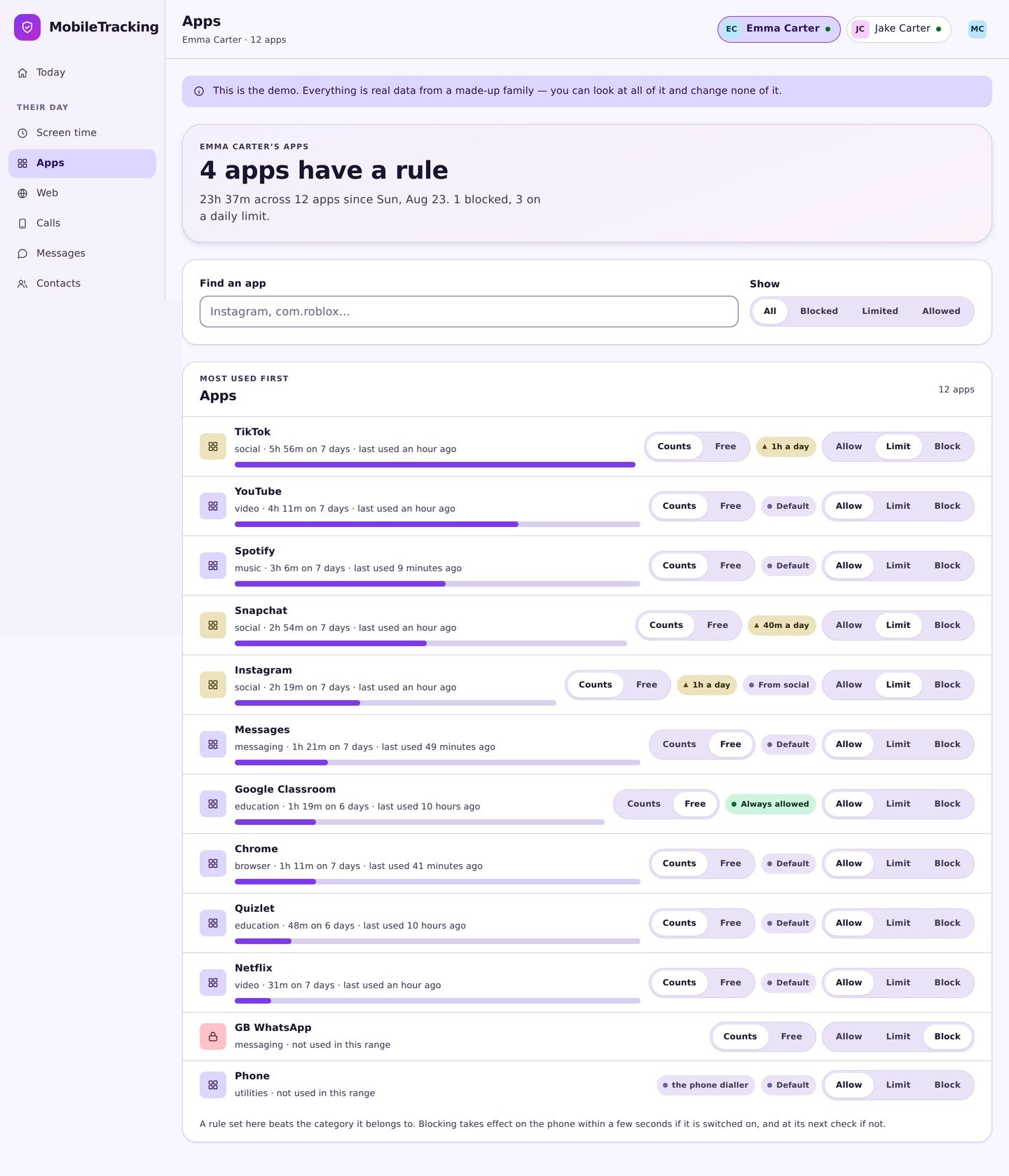
The signals worth noticing are changes: a messaging app you’ve never seen before, a sudden spike in time on one platform, a jump in unknown contacts. Catch the change while it’s small and you get to have a calm, curious conversation. Miss it for three months and you’re managing a crisis instead. The point isn’t to surveil, it’s to notice, early, so you can talk.
Seven red flags across any app
Whatever the app of the moment is, these are the patterns worth paying attention to:
- A new app appears that your child is secretive about.
- A sudden spike in late-night use.
- They quickly switch or hide the screen when you walk in.
- New “friends” or contacts they can’t really explain.
- They’re visibly upset after using a particular app.
- A secondary or hidden account you didn’t know existed.
- Talk of someone online they’ve grown close to but never met in person.
Any single one of these can be nothing at all, teenagers are moody and private by nature. But a cluster of them, arriving together, is worth a gentle, curious conversation rather than an interrogation. “I’ve noticed you’ve been on this new app a lot, tell me about it” opens a door. “What are you hiding?” slams it.
What app monitoring can’t tell you
Knowing which apps your child uses, and for how long, is genuinely useful, but it’s the outside of the envelope, not the letter inside. It can’t tell you the emotional temperature of a friendship, whether banter has curdled into cruelty, or how your child actually feels about what they’re scrolling past. Those things only surface if you’ve kept the relationship close enough that they’ll tell you. The apps will keep changing, there’ll be three new ones by the time your youngest is a teenager, but that relationship is the constant, and it’s what actually keeps them safe.
How to vet any new app in ten minutes
Because the apps change so fast, the most useful skill isn’t knowing every one of them, it’s having a quick routine for sizing up a new app when it lands on your child’s phone. Here’s a ten-minute version that works on almost anything.
First, check the age rating and the actual minimum age in the app store, then read a handful of the recent one-star and three-star reviews, which is where parents and users flag the real problems the marketing hides. Second, ask three questions about how it works: can strangers contact my child, is there open chat or live streaming, and does it push content by an algorithm or only show them friends? Those three features, stranger contact, live interaction, and algorithmic feeds, are where most of the risk concentrates, whatever the app is called.
Third, open the settings yourself and find the privacy controls, the account-private toggle, and any parental or family tools. If they’re buried or barely exist, that tells you something. Finally, search the app’s name together with “safety for kids” and see whether the concerns are the ordinary ones every social app shares, or something specific and alarming to that app. Ten minutes of this beats either banning everything on instinct or waving it all through, and it means you can give your child a real answer instead of a flat no.
Where a tool like MobileTracking helps
MobileTracking shows you which apps are installed and how much each is used, flags when a new app appears on the phone, and lets you set keyword alerts for words you’d never want to miss. It’s a way to keep up with a fast-changing home screen and catch the early signals, without reading your teen’s private messages. It’s built to work alongside the app-by-app settings above, not to replace the conversations that matter more than any of them.
Frequently asked questions
What age should my child get social media?
Most platforms set a minimum of 13, but genuine readiness varies a lot from child to child. Consider the individual kid’s maturity, and think about starting with the lower-risk apps, WhatsApp, BeReal, before the algorithm-driven ones like TikTok and Instagram.
Which social apps for teens are safest?
No app is truly “safe,” but friends-only, non-algorithmic apps like WhatsApp and BeReal tend to carry less risk than open, public, algorithm-driven platforms. In every case, the settings matter more than the app’s reputation.
Should I have my child’s social media passwords?
For younger children, having access is reasonable. As they get older, shift toward the platforms’ own supervision tools and toward trust, rather than reading everything, it works better and it keeps them talking to you.
How do I keep up when the apps change so fast?
You don’t have to master each one. Know what’s installed, watch for new apps and sudden changes, and ask your child to show you what they use, most teens will, if you come at it curious rather than accusatory.
Should I let my younger teen have TikTok or Instagram?
Both set a minimum age of 13, but readiness varies. If you do allow it, set up the parental supervision tools (Family Pairing on TikTok, supervision and a Teen Account on Instagram), keep the account private, and agree a time limit up front. Starting with a lower-risk app first, and adding these later, is a reasonable middle path.
How do I keep track when my teen has ten different apps?
You don’t need to master all of them. Focus on the pattern rather than each app: know roughly which apps are on the phone, apply the same core settings everywhere (private account, friends-only contact, restricted DMs, location off), and watch for changes, a new app you haven’t seen, a spike in time on one, or a jump in unknown contacts. Catching a change while it is small lets you have a calm conversation, and asking your teen to show you how a new app works usually tells you more than trying to research it yourself.
Keep going
Read our guides on AI chatbots and kids, cyberbullying, and cutting screen time without a fight. For trusted guidance beyond this site, Common Sense Media is a well-regarded resource for parents: Common Sense Media.