Calls and texts: who, when and how often, never what was said
The calls and SMS feature keeps a log of the phone numbers and saved contact names your child calls and texts, the time of each call or message, how long a call lasted, whether it was incoming or outgoing, and how often each number comes up. That is the whole of it. The words of a text are never collected, there is no call recording, and no setting on any plan changes that. One more thing to know before you read on: this log exists only in the direct-download APK build of the child app, because Google Play's policy does not permit call or SMS log access for apps in this category. On the Google Play build, this screen is empty by design.
Android · APK build only · Visible on their phone · Permissions: Call log, SMS (metadata only)

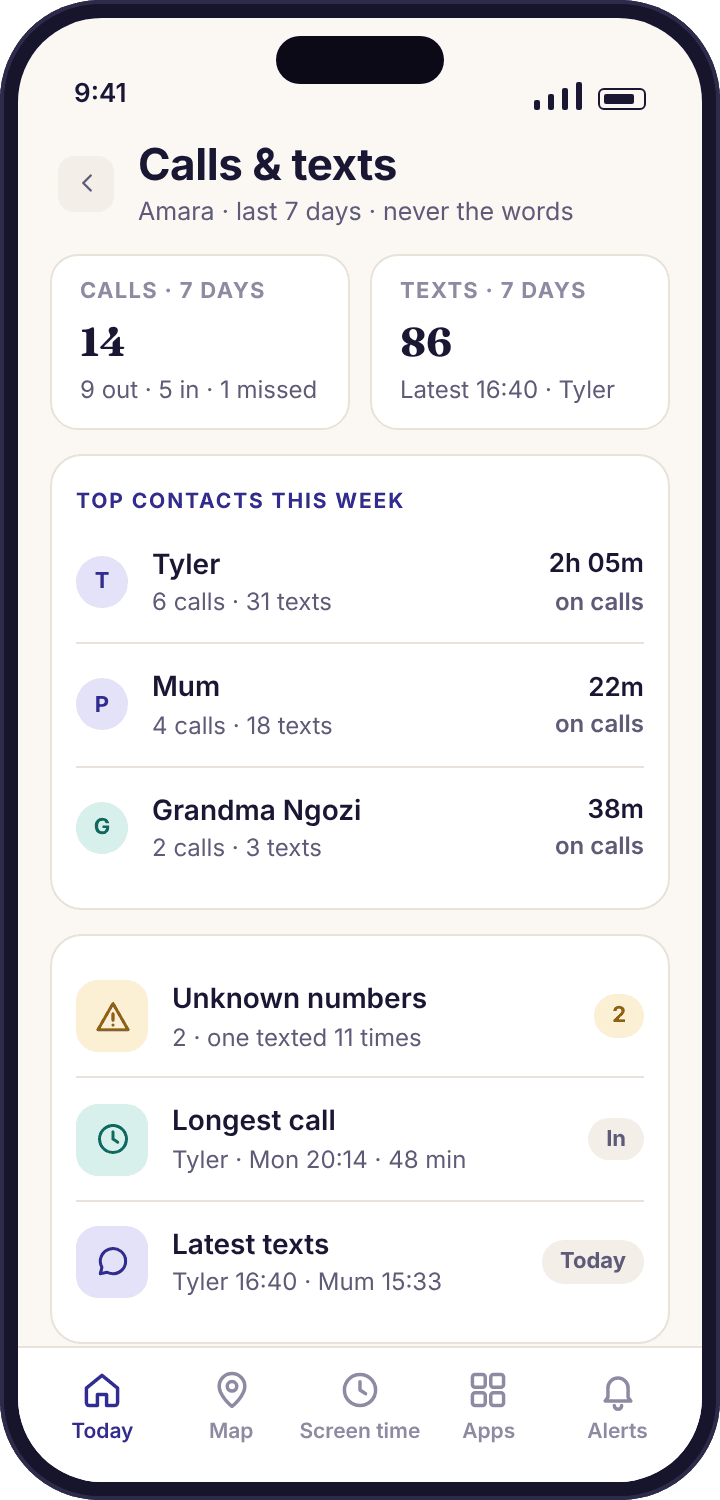
What the calls and SMS log shows a parent, and what it never contains
Think of the log as the envelope, not the letter. Every row carries who, when, how long and which direction. No row carries a word anyone typed or a second of anyone's voice. The right-hand column below is not a roadmap; it is a list of things the child app has no code for, and the "What's shared" screen on your child's phone says the same thing in fewer words.
What you see
- The number, and the name it is saved under. If your child has saved 07700 900213 as "Tyler", the log shows Tyler. If a number is not in their contacts, the log shows the number and says so.
- When. The time of each call and each text, to the minute, in the phone's local time. Tuesday 21:30 is Tuesday 21:30.
- How long, for calls. A duration in minutes and seconds. A missed call shows as missed, with no duration. Texts have no duration; they have a count.
- Which direction. Incoming, outgoing or missed for calls; sent or received for texts. Thirty texts received and two sent is a different picture from sixteen each way.
- How often. A tally per contact per week, so the overview can say "top contacts this week" and flag a number that keeps appearing without a name.
What you never see
- The text of any message. Not an SMS, not an MMS caption, not a preview, not the first line. The log stores a row per message with no body field at all.
- The audio of any call. There is no call recording and no "listen in". The app never asks for the microphone, so Android would not allow it to hear anything even if it tried.
- Photos or attachments. A picture message shows as a received MMS at a time, from a number. The picture stays on the phone.
- Messages in other apps. WhatsApp, Snapchat, Instagram, Messenger and Viber chats are not in this log and not in any other screen. Those apps are covered by counts and timing only.
- Voicemail, contact notes or the address book. The app reads a name for a number that appears in the log. It does not upload your child's contact list.
The overview, the unknown-number flag, and the screen your child sees
Most weeks you will only open the first of these. The second finds you when it needs to. The third is on your child's phone, and it is worth reading before you switch anything on, because it is the version of this page they will see.
The overview: a week of calls and texts on one card
Open Amara's calls and SMS card and you get four things: her top contacts this week ranked by how often they appear, the number of unknown numbers that came up more than once, her longest call, and the times of her most recent texts. For a thirteen-year-old in a normal week that reads something like: Tyler, Mum, Grandma Ngozi, Swim Club coach; unknown numbers: 2; longest call: Tyler, 41 minutes, Sunday 20:05; last texts 21:12, 21:14, 21:31. You can glance at it in the time it takes the kettle to boil.
Tap a contact and the rows underneath are plain: direction, time, duration or count, and nothing else. There is no text column because there is no text. Tap "This week" and it becomes "Last week", which is the comparison that matters. A child whose texting trebles in a fortnight, or whose calls all move past 22:00, is showing you a change, and a change is the only thing a log can usefully show.
- Per child. Noah, at nine, has a card with three contacts on it and no texts at all. The screen does not compare the two children, and neither should you.
- Counts, not contents. "Received 14 texts from Tyler on Tuesday" is a count. What those fourteen texts said is on Amara's phone and nowhere else.
- The same card in the panel. The parent panel shows the same week in a wider table, with a day picker, for the evenings you want to sit down with it.
Unknown-number flags: a number with no name that keeps coming back
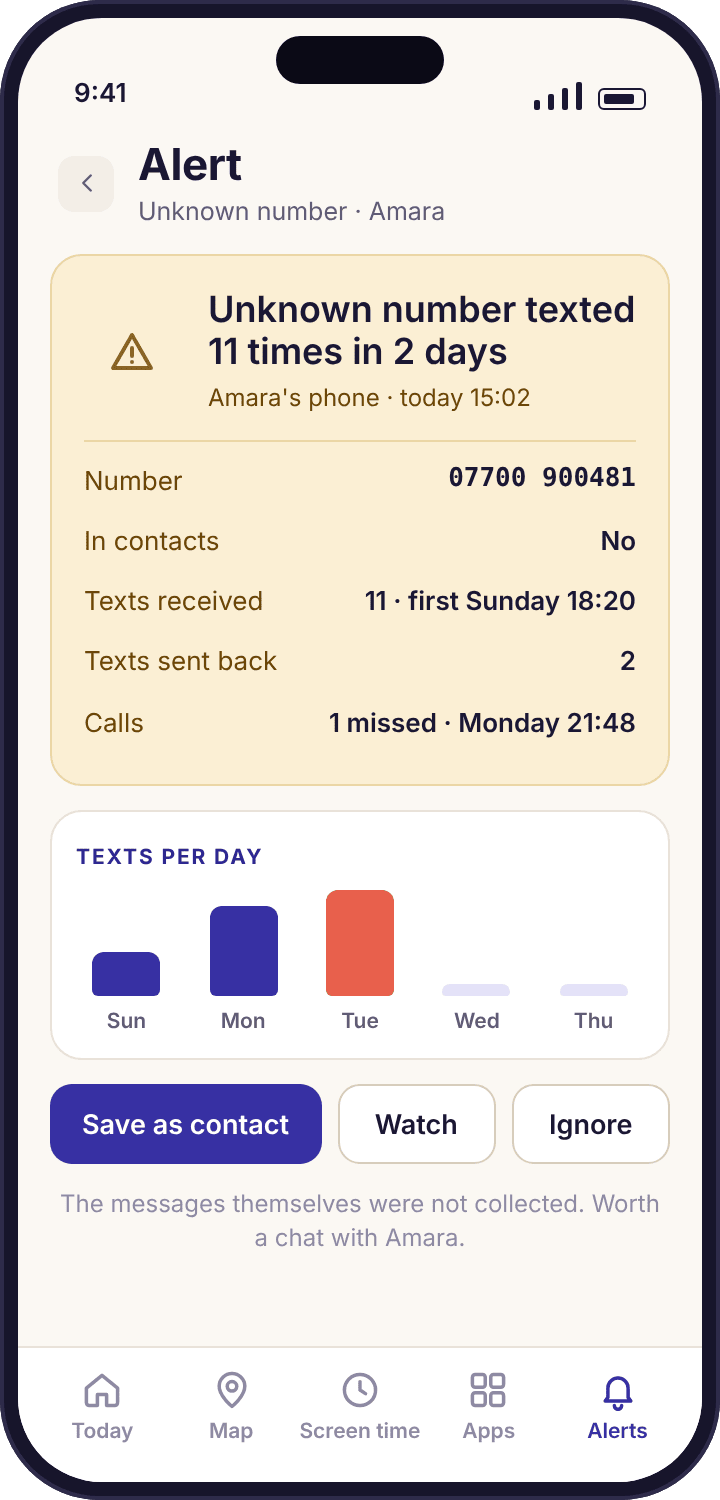
An unknown number, to the app, means a number that is not in your child's contacts. One such call or text is ordinary: a delivery driver, a dentist's reminder, a wrong number. The flag is reserved for repetition. When a number with no saved name appears several times in a short span, the app raises an alert that reads, for example, "Unknown number texted 11 times in 2 days · 07700 900481 · not in contacts". That single line is the most useful thing on this page, and it is the reason the feature exists.
The alert offers three responses. "Save as contact" is for the number that turns out to be the new swim coach; it stops being unknown from then on. "Watch" keeps it flagged and tells you if it appears again, without interrupting you each time. "Ignore" mutes it. None of the three shows you what the texts said. If the number is a stranger pressing your child for a reply, the step is to ask your child about it, with the phone in the room.
- Repetition is the trigger. A number has to appear repeatedly, not once, before it is flagged. One-off numbers appear in the log as rows and nothing more.
- Both directions count. Calls out to an unsaved number count as well as calls in, because a child who keeps ringing a number they have not saved is as worth a question as one being rung.
- Grouped, not repeated. Eleven texts produce one alert, not eleven, and it goes through the same ranking as everything else in your smart alerts feed.
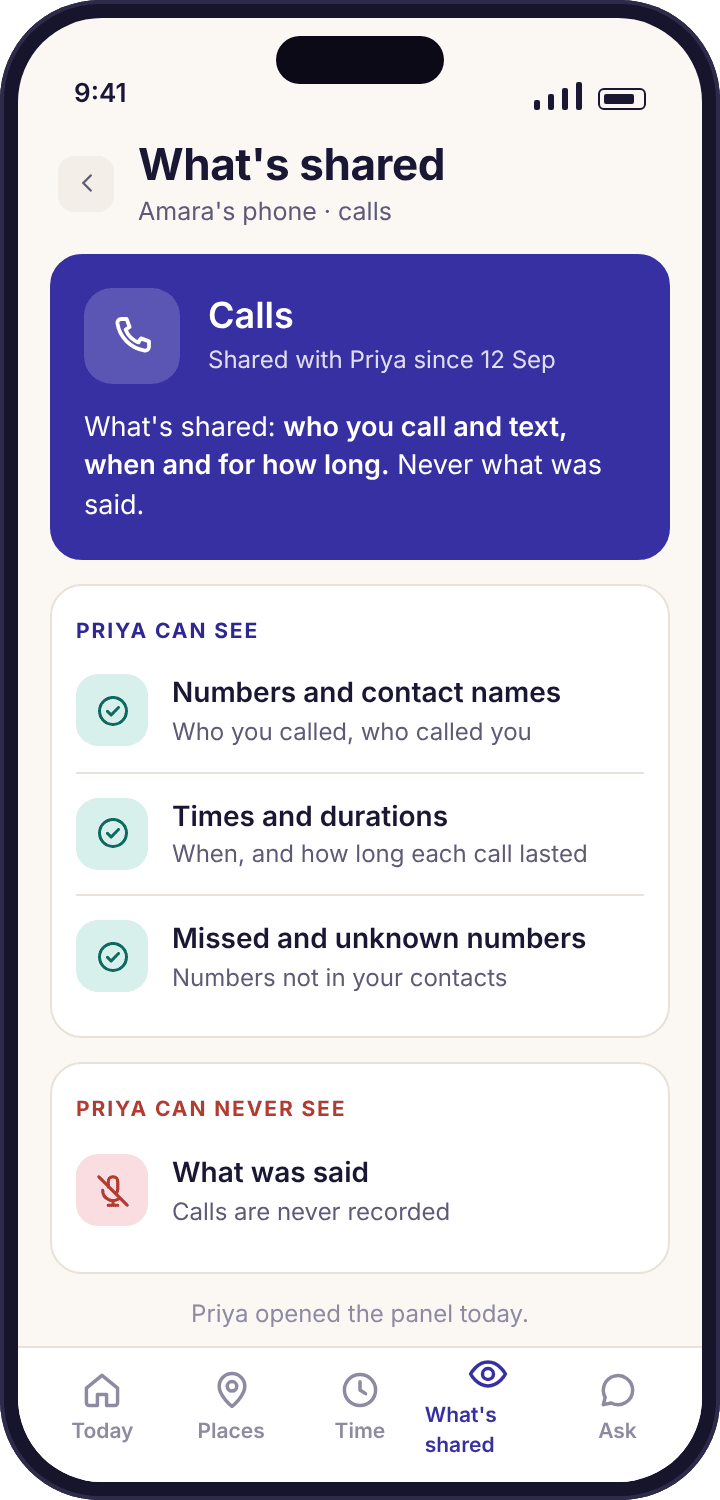
On their phone: the "What's shared" line for calls and texts
The moment you switch call and SMS logging on, a line appears on the "What's shared" screen of the child app: "Who you call and text, when and for how long. Never what was said." It is there the same afternoon, and it stays there for as long as the feature is on. Below it the child can open the same list you see: the contacts, the counts, the times. There is no version of this feature that runs without that line, and no way to hide the app's icon from the app drawer.
This is deliberate and it changes how the feature gets used. A child who knows the log exists, and knows exactly what is in it, has no reason to go looking for a second phone or a second SIM. A child who discovers a secret log, on the other hand, learns that their parent reads things in secret, and most of what that teaches is bad. The child app's consent screen names the calls and SMS log in the "will see" list before pairing finishes, so the first time your child hears about it should not be from this page.
- The exact words. The child's screen uses the same "never what was said" wording as this page. If the two ever differ, tell us through the contact page and we will fix whichever is wrong.
- They can see that you looked. The child's home screen notes that a parent opened the panel today. It does not say which card.
- Switching it off is visible too. Turn the feature off and the line disappears from their screen the same day, which makes loosening it as a child grows an easy thing to show rather than a promise.
What a log of numbers and times can tell you, and where it stops
The same log, three different weeks in the Okafor house. In each one the feature does one specific thing and then hands over to a conversation. Notice how often the answer is boring; that is usually the point.
The unknown number that appears eleven times in two days
Wednesday evening, Priya's phone shows one new alert: "Unknown number texted 11 times in 2 days · 07700 900481 · not in contacts". She opens it. The rows underneath say: Tuesday 15:40 received, 15:41 received, 15:52 received, 16:30 received, 19:05 received, and on through Wednesday afternoon. Amara has sent one reply, Tuesday at 15:44. Eleven in, one out, from a number with no name, over two school days.
Priya does not know who 07700 900481 is and the app cannot tell her. It can tell her the pattern: a number Amara has not saved is messaging her repeatedly and she is barely answering. That is enough to ask. It turns out to be a girl from the swim relay team who got Amara's number from a group chat and is keen, and Amara has been ignoring her because she is "a bit much". Priya taps "Save as contact" so the number stops counting as unknown, and the two of them talk for five minutes about how to say "please stop" kindly to someone your own age.
What the app did: Counted eleven received texts and one sent from an unsaved number, grouped them into one alert, and offered three responses. It did not show a word of any text, and the conversation that followed happened because Priya asked, not because she read.
The 2 a.m. call
Sunday morning, the overview card for Amara shows "Longest call: Tyler, 38 min, Saturday 02:14, outgoing". Priya had assumed the phone was charging in the kitchen, which is the house rule on school nights but not, it turns out, on Saturdays. The log says what it says: a call that Amara made, at fourteen minutes past two, to a friend she talks to most days, lasting thirty-eight minutes.
What the log does not say is why. It could be a thirteen-year-old's long-running drama, or a friend who was upset and needed someone, or two people who woke up and were bored. Priya has one line of data and no transcript, and that is the right amount. She raises it at lunch: "You were on the phone to Tyler at two in the morning. Everything okay?" The answer is that Tyler's parents had a row and Tyler could not sleep. The outcome is not a punishment; it is a rule that the phone charges in the kitchen on Saturdays too, and a message to Tyler's mum.
What the app did: Logged one outgoing call with a contact name, a time and a duration, and surfaced it as the longest call of the week. The call log page shows the full week of rows this came from. No audio exists anywhere, because none was ever captured.
The friend who stopped texting
Six weeks later, Priya notices something by its absence. Tyler had been at the top of Amara's contacts every week since September: forty to sixty texts a week, two or three calls. This week Tyler is not on the card at all. Last week, four texts, all sent by Amara, none received. The week before that, the usual sixty. Nothing in the house has changed, Amara has not said anything, and screen time is the same as ever.
The SMS log cannot tell Priya whether there was a falling-out, a new friendship group, or a lost phone on Tyler's side. It can show her a friendship that went from busy to silent in a fortnight, with Amara still trying. That is what she brings to the kitchen table, gently and without the numbers: "I haven't heard you mention Tyler for a while." Amara cries. There was a group chat, and Amara was left out of it, and nobody has texted her from it for ten days. None of that is in any log, and it did not need to be. The pattern was enough to open the door.
What the app did: Showed a weekly count per contact and a direction split, which together made a two-week silence visible. The SMS tracker page goes into the pattern view by hour and by week. The group chat itself was in another app and was never visible to anyone.
Google Play build against the direct APK build, feature by feature
Google Play's developer policy restricts the call log and SMS permissions to a few app categories, such as a phone's default dialler or messaging app, and parental control is not one of them. So the version of the child app you install from Google Play does not ask for those permissions and cannot show this log. The direct APK from this site's download page can. Everything else in the app is the same code in both.
| What | Google Play build | Direct APK build |
|---|---|---|
| Call log: number, name, time, duration, direction | Not available | Yes |
| SMS log: number, name, time, count, direction | Not available | Yes |
| Unknown-number flags | Not available | Yes |
| "What's shared" line for calls and texts on the child's phone | Shown as off | Shown as on while the feature is on |
| Keyword alerts on notification previews | Yes | Yes, identical |
| Location, places, history, screen time, bedtime, apps, web filter, safe search, social counts, device health | Yes | Yes, identical |
| The words of any SMS, or audio of any call | Never | Never |
| Installs and updates through Google Play | Yes | Updates come from the download page |
| Scanned by Play Protect | On install and after | Yes, when you let it scan the file |
| Needs "Install unknown apps" switched on once | No | Yes, then switch it off again |
| Visible icon, consent screen, transparency screen | Yes | Yes, the same |
If you do not need this log, install from Google Play. The Play build is the simpler install and keeps itself updated. Choose the APK only if the call and SMS log is a feature you have decided you want, and get it from the download page of this site typed into the address bar, never from a link in a forum or a third-party APK mirror. A site offering a "hidden" or "invisible" version of this app is offering stalkerware; there is no such build and never will be.
What a calls and texts log is for in a family, and how to keep it from becoming the opposite
The three questions the log answers
Parents who switch this on tend to want one of three things. The first is to know whether a stranger is contacting their child, and the unknown-number flag answers that directly: a number with no name, appearing again and again, is exactly the thing it is built to catch. The second is to know whether the phone is being used at hours it should not be, and a call log with times answers that too, without needing to know what the call was about. The third is the vaguest and the most common: a sense that something has shifted, a child who is quieter, and a wish to know whether the shift is visible anywhere. The weekly counts per contact answer that one, slowly and imperfectly, and only when you compare weeks.
What the log is not good at is the question most people imagine asking it: "what is going on?" It has no idea. It knows that Tyler called at 02:14 and nothing about why. If you install this expecting it to replace the conversation, the first week will disappoint you. If you install it expecting it to tell you when a conversation is due, it will do that job quietly for years.
Why the words are missing, and why that is the design
A parent could reasonably ask: if the app can see that eleven texts arrived, why can it not show them? The technical answer is that it reads the fields of the log it needs (number, timestamp, type) and never requests the body of a message. The real answer is that we do not want it to. A child's texts to a friend are the closest thing a thirteen-year-old has to a diary, and reading a diary teaches a child to keep a better-hidden one. The patterns in this log, by contrast, can be shown to the child without shame on either side. "You were on the phone at two" is a fair thing to say. "I read what you told Tyler at two" is not, and the relationship rarely recovers from it.
The same reasoning rules out call recording. Recording a child's calls also records whoever is on the other end, who never agreed to anything, and in many countries that alone makes it unlawful. The app never asks for the microphone, so there is no toggle to find and no plan that unlocks one. If a product in this category offers recorded calls, that is the product telling you what else it is willing to do.
SMS is a small part of a teenager's messaging
Most of a thirteen-year-old's conversations happen in WhatsApp, Snapchat or Instagram, and none of those are in this log. For those apps the app shows counts and timing of notifications, and a short list of parent-chosen words checked on the phone through keyword alerts. Treat the SMS log as the view of the older, slower channel: family, school, clubs, and anyone who does not have your child on the other apps, which is often exactly the stranger you were worried about.
Telling your child, and what to show them
Because the feature is listed on the consent screen and the "What's shared" screen, your child will know it exists. The only decision is whether they hear it from you first. The version that works in most houses is one sentence and a demonstration: "I can see who you call and text and when, and nothing you write. Here, look." Then open the card on your own phone and show them Tyler's name, the counts and the times, and show them that there is no text under any row. A child who has seen the screen stops imagining a worse one.
Agree the two things you will act on before you need to. In the Okafor house they are: a number with no name that keeps turning up, and calls after the phone is supposed to be in the kitchen. Everything else on the card is information, not a trigger, and Priya has said so out loud. A log with two agreed rules attached is a tool; a log a parent reads looking for anything is surveillance, and a child can tell the difference within a week.
What is kept, where it goes, and how to remove it
Each row is tied to the child's record in your family account and is visible to you and any co-parent you have invited. It is not sold, not shared with the website's advertising, and not used to build anything. Support staff can look at it only during a troubleshooting request you have opened, and every such access is logged. Deleting a child from the account removes their log along with everything else; closing the account removes it all; uninstalling the child app stops any new rows being written from that moment. The privacy policy lists the fields item by item.
Nothing in the log is a copy of a message, so there is no message store to breach. The worst case for this feature, were the account ever compromised, is a list of numbers and times. That is a smaller thing than an inbox, and it is the reason the design stops where it does.
Deciding whether the APK is worth it for your family
The honest position is that many families do not need this feature, and for them the Google Play build is the better install: one tap, automatic updates, and nothing to switch on or off in Android's security settings. Choose the APK if the unknown-number flag or the call times matter to you specifically. A nine-year-old with a first phone and three contacts, most of whom are relatives, gains little from a call log. A thirteen-year-old with a new SIM and a swim team's worth of new numbers is a different case.
If you do choose the APK, the install adds about three minutes to setup: allow Chrome to install unknown apps, let Play Protect scan the file, install, then switch "Install unknown apps" back off. The download and setup guide walks through the dialogs. You can also start with the Play build and move to the APK later, by uninstalling and reinstalling on the child's phone with the child present; the account, the rules and the history all stay.
How much of the calls and SMS log a child's age calls for
A contact list you already know by heart.
Noah's phone calls four people. A log of those calls tells Priya nothing she does not know. The one thing worth having at this age is the unknown-number flag, because a stranger texting a nine-year-old is rare and serious.
- Unknown-number flag on, if using the APK
- Weekly card only; no need to open rows
- Often the Play build is enough
New numbers every term, and the years the flag earns its keep.
Secondary school multiplies contacts. This is the age the overview and the unknown-number flag do their best work, agreed in the open with two clear rules.
- Full log, with the child shown the screen
- Two agreed triggers, nothing else acted on
- Compare weeks, not days
Loosened on purpose, and shown.
By now most messaging is elsewhere and the SMS log is thin. Keep the unknown-number flag if your teenager agrees it is reasonable, and switch the rest off where they can watch it disappear from their screen.
- Flag only, or nothing
- Reviewed together each term
- Off entirely before they leave home
Questions parents ask about the calls and texts log
Can I read my child's text messages with this feature?
No, and there is no plan, setting or build that changes that. The log records the number, the saved name, the time, the direction and a count. The body of a message is never requested from the phone, so it is never stored and cannot be shown. If you need to know what a text said, the only route is to ask your child, which is the route the feature is built to lead you to.
Why is the calls and SMS card empty on my child's phone?
Almost always because the child app was installed from Google Play. The Play build does not include call or SMS log access, because Google's policy does not allow it for parental control apps, so the card shows nothing and the transparency screen lists the feature as off. To use the log you need the direct APK from this site's download page, installed on the child's phone with the child present.
Does the app record phone calls?
No. The app never asks for the microphone, which means Android would not let it capture audio even if it tried. A call appears in the log as one row: who, when, how long, and whether it was incoming, outgoing or missed. Recording a call would also record the person on the other end without their knowledge, which we think is wrong and in many places is unlawful.
What counts as an unknown number?
A number that is not saved in your child's contacts on their phone. One call or text from such a number sits in the log as a row and triggers nothing. When the same unsaved number appears repeatedly over a short span, the app raises a single grouped alert, such as "Unknown number texted 11 times in 2 days". Saving the number as a contact, from the alert or from the phone, ends the flag.
Will the log show WhatsApp or Snapchat messages?
No. This log covers the phone's own call and SMS history only. Chats in WhatsApp, Snapchat, Instagram, Messenger, Viber or any other app are not in it, and no other part of the app shows their contents either. For those apps you see how many notifications arrived and when, how long the app was used, and whether a word from your short keyword list appeared in a notification preview.
Does my child see that calls and texts are logged?
Yes, in two places. The consent screen at pairing names the calls and SMS log in its "will be able to see" list, and the "What's shared" screen in the child app carries a permanent line reading "Who you call and text, when and for how long. Never what was said." Turning the feature on adds the line the same afternoon; turning it off removes it just as quickly.
Which Android permissions does the log need?
On the APK build, the child's phone asks for the Call log and SMS permissions during setup, one dialog each, and you grant them together with your child in the room. Declining either one stops only the corresponding half of this feature; everything else in the app keeps working. The Google Play build never requests these permissions at all, so the dialogs will not appear on it.
Can the log tell me who an unknown number belongs to?
No. The app does not look numbers up against any directory or database. It can tell you the number, how often it appeared, in which direction, and when. Identifying the person behind it is a conversation with your child, or a search you choose to run yourself. We would rather give you a clear pattern than a guess about a name.
Do calls made through WhatsApp or Messenger appear in the call log?
No. Those are internet calls inside their own apps and they never reach the phone's call log, which is the only source this feature reads. Time spent in such a call counts towards that app's minutes in app activity, and the call notification counts towards its notification tally, but there is no row for it here and no duration recorded.
Can I switch off the SMS half and keep the call half?
Yes. Calls and texts are separate toggles in the child's settings, and the "What's shared" screen shows each one independently. A common arrangement for an older teenager is to keep the unknown-number flag and the call times and switch SMS counts off. Whatever you choose, the child's screen updates the same day so the loosening is visible to them, not just promised.
Where this fits with everything else
This page is the overview; the detail lives on two pages beneath it and three beside it: call log, SMS tracker, keyword alerts, smart alerts and social media monitoring.
The calls and SMS log switches on once your child's phone is paired with your account, which takes about ten minutes with both devices on the table. The download and setup guide walks through every screen.
Know who rang at two, and never what they said.
Install the APK build with your child beside you, show them the "What's shared" line, and agree the two things you will act on. The log does the counting; the conversation stays yours.
Android · Free account · Visible on your child's phone