What does the phone do when the bedtime arrives?
Games, video and social apps go to sleep; the phone itself stays on.
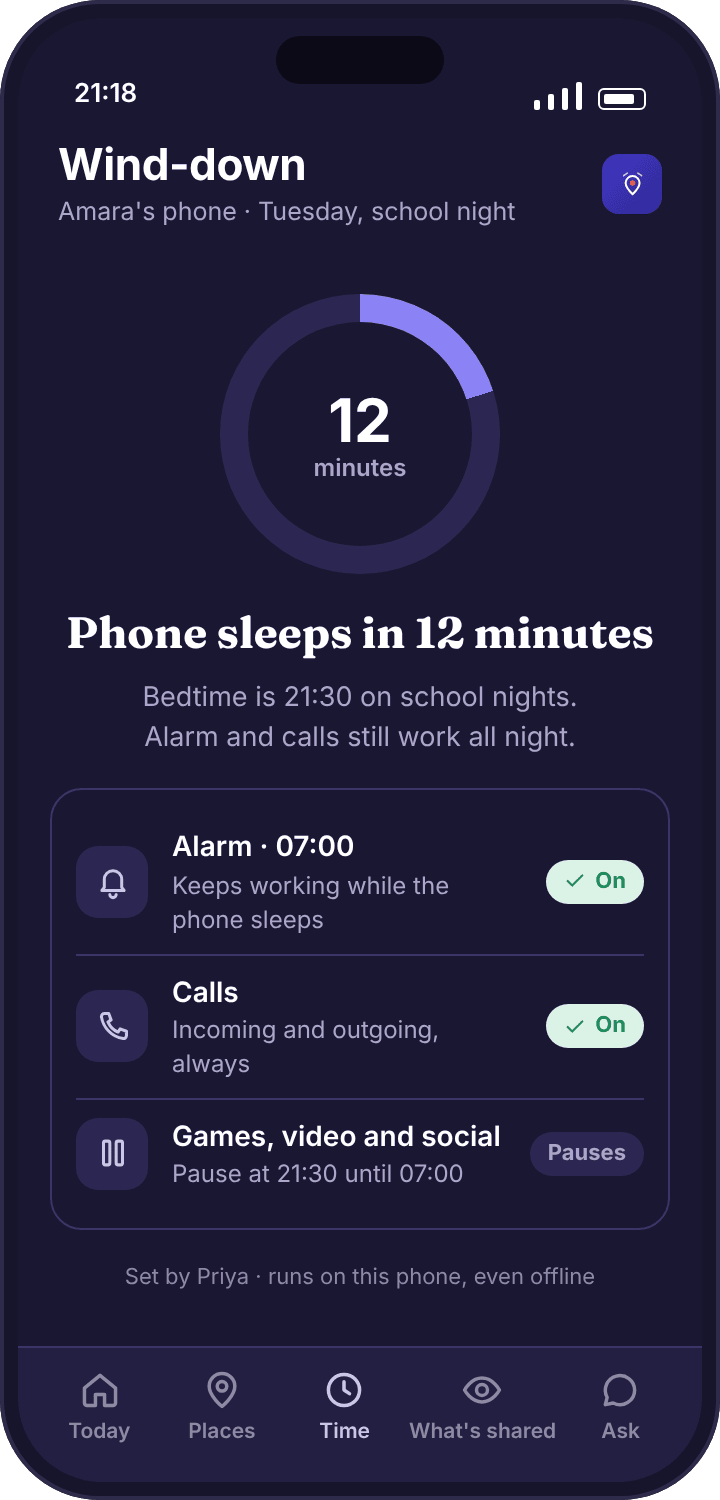
Twelve minutes before the time you set, a banner appears on the child’s phone: “Phone sleeps in 12 minutes · alarm and calls still work.” At the time itself, every app that is not on the always-allowed list stops opening. Tapping one shows a plain screen inside the app with the time it wakes up again, the name of the parent who set the schedule, and a Close button. The home screen is still there. The lock screen is still there. Nothing is wiped, hidden or shut down.
In the Okafor house the school-night time is 21:30 and the morning end is 07:00, so at 21:30 Amara’s TikTok, YouTube, Roblox and WhatsApp stop opening and at 07:00 they start again. The clock on the phone, the alarm she set for 06:50 and incoming calls from Priya all behave exactly as they did at 21:29. If she has left a video playing, it pauses rather than cutting off mid-sentence; the pause screen explains why. That is the whole of what happens. It is deliberately dull.
Will the bedtime still run if the phone has no signal?
Yes. The schedule lives on the phone, not on our servers.
When you save a schedule in the parent app or the panel, it is sent to the child’s phone and stored there. From then on the phone keeps the schedule itself, using its own clock, and needs nothing from us to run it. A night at Grandma Ngozi’s with no Wi-Fi, a tent in a field, a flat in a basement with one bar of signal: the 21:30 wind-down happens at 21:30 regardless, because the thing enforcing it is the app on the phone, not a message from the internet.
The one thing that does need a connection is a change. If you move bedtime to 22:00 for a sleepover, the new time reaches the phone on its next check-in, which is usually within minutes when the phone is online and whenever it next connects if it is not. The parent app shows whether tonight’s schedule has reached the phone, with the time it was confirmed, so you are never guessing which version is running. Until a change is confirmed, the old schedule runs, which is the safe failure.
What still works during wind-down?
Calls in and out, the alarm, the clock, the dialler, and every always-allowed app.
A bedtime that locks a child out of calling home is a bedtime a parent switches off after the first late train, so the list of what stays awake is not negotiable and not editable downwards. Incoming calls ring. Outgoing calls connect. The alarm fires. The clock, the torch, the camera and emergency calling work. Then there is the always-allowed list, which is yours to extend: a music app for falling asleep to, an audiobook app, the school’s homework app for the one night a term when the essay is late.
What does not stay awake is anything you have not put on that list. Messaging apps are the ones parents hesitate over. Our advice is to let them sleep: a WhatsApp group at 23:40 is the thing most parents installed a bedtime for. If a friend needs to reach your child urgently overnight, a phone call rings through, and a child who knows that is less anxious about the group than a parent expects.
What is the homework block, and what does it pause?
A second, shorter wind-down in the afternoon, with its own always-allowed list.
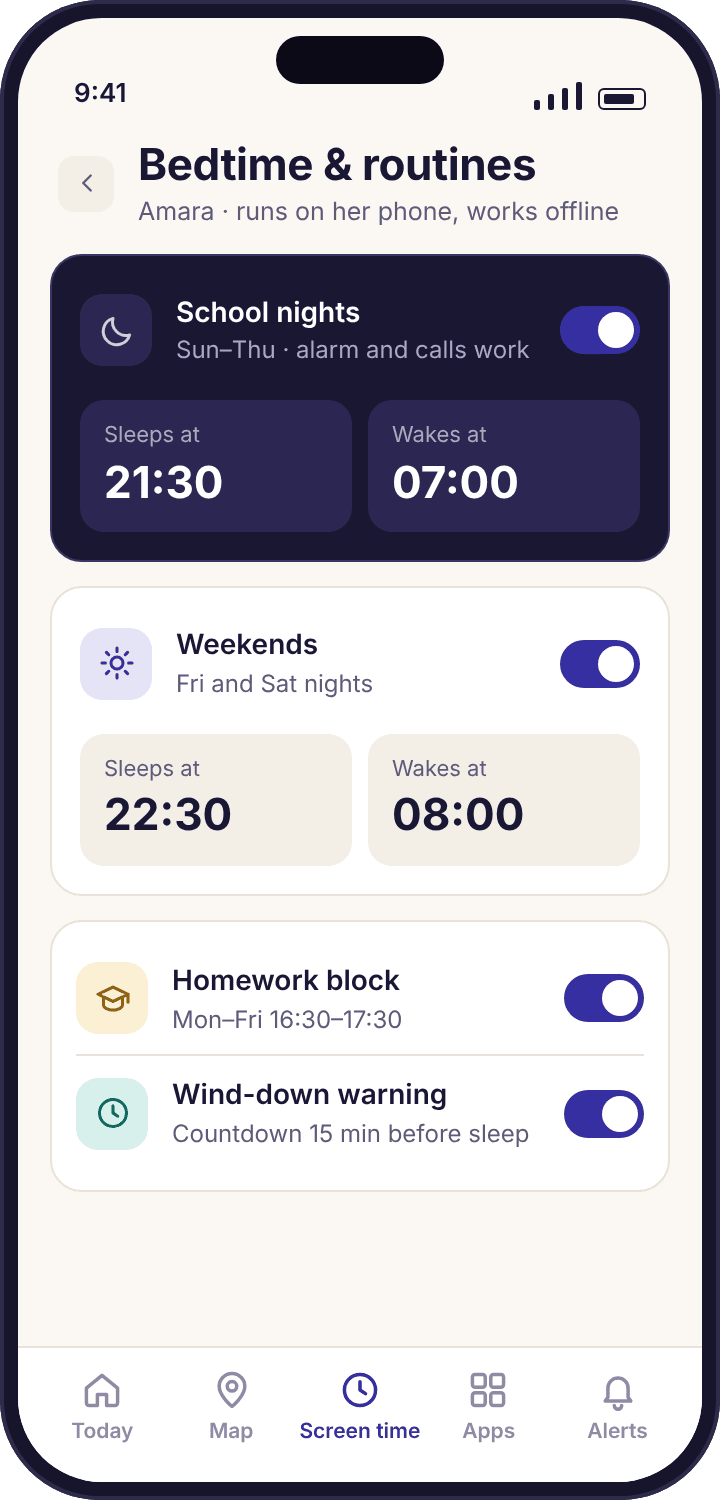
The homework block is optional and off by default. Switch it on and it behaves like a bedtime that lasts an hour: in the Okafor schedule it runs 16:30 to 17:30 on school days, and during that hour the same apps that sleep at night sleep again. The difference is its own always-allowed list, which is where Chrome, the calculator and whatever the school uses for assignments go, so the block pauses the distractions and not the work.
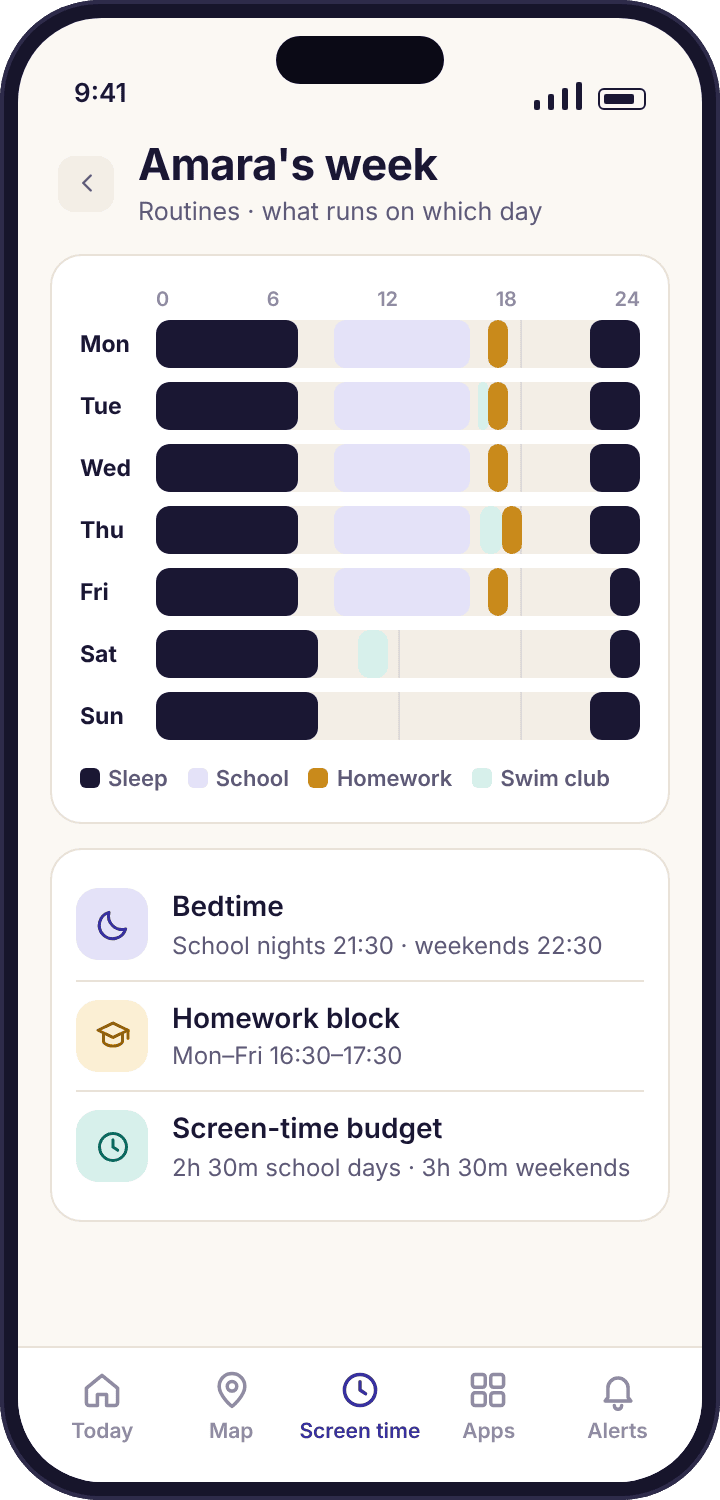
Two honest limits. The block cannot tell whether homework is being done; it only removes the apps that compete with it. And an hour starting at 16:30 assumes a child who is home by 16:30, which is not every day. Swim Club evenings end after six, so Priya set the block for Monday to Thursday and left Friday and swim nights out. A homework block that fires while the child is in a pool does nothing useful and teaches them that the schedule does not understand their week.
Can the school-night and weekend times be different?
Yes. Two times for sleep, two for waking, and Friday counts as a weekend night.
A schedule has a school-night pair and a weekend pair. School nights are Sunday to Thursday, because what matters is the morning after; weekend nights are Friday and Saturday. Amara’s weekend wind-down is 22:30 with an 08:00 end, an hour later at each end than the school-night times. Noah’s, at nine, is 20:30 and 21:15, with the morning end the same seven days a week because he is awake at 06:30 whatever day it is.
There is no third pair for holidays. Most parents move the school-night times later for the summer and put them back the week before term, which takes a minute each way and gives the child a visible marker that the holiday has started. Editing a time is the same screen whether you do it in the app on your phone or in the panel on a laptop, and the child’s phone shows the new time the same afternoon.
Will my child know the bedtime is coming?
Yes. Tonight’s time is on their home screen, and a banner counts down the last twelve minutes.
The child app’s home screen shows tonight’s wind-down time all day, next to the screen time ring, so there is no ambush at 21:30. The transparency screen lists the full schedule: both pairs of times, the homework block if it is on, and the always-allowed list, with the name of the parent who set each one. When you change anything, the child’s phone updates the same afternoon. A child who can read the schedule can plan the evening around it, which is the point of making it visible rather than something that just happens to the phone.
The banner is also the moment to put the phone on charge outside the bedroom, if that is the house rule; the app cannot enforce where a phone sleeps, only what it will open, and the two rules work best together.
Noah, at nine, mostly uses the banner as a timer: twelve minutes means one more level, and he knows it. Amara reads the schedule once in September and then ignores it, because at thirteen the schedule is boring, and a boring schedule is one that is working.
What if they are out late, or it is a special night?
You push tonight’s wind-down back from your phone; the child cannot do it from theirs.
From the parent app, tonight’s time can be moved later with a couple of taps, and the change applies to tonight only; tomorrow goes back to the schedule. The child’s wind-down screen has no “Ask for more time” button of its own, which is a difference from the screen time budget and a deliberate one. Bedtime is the rule families told us they did not want negotiated from the sofa at 21:28. If the child wants a later night, they ask you in person, you decide, and the phone follows.
If a child is out at 21:30, nothing dramatic happens: the apps go to sleep where they are, calls and maps still work, and they can ring you from the bus. A parent who knows the evening will run late moves the time before leaving the house. A parent who forgets gets a phone call from a child who can still make one, which is the design working as intended.
How does the bedtime fit with the screen time budget?
The budget counts minutes; the bedtime sets hours. Whichever is stricter wins at that moment.
The two features are independent and both can be on. The screen time budget says how many minutes a day; the bedtime says which hours of the day are available at all. If Amara has 40 minutes of budget left at 21:30, the bedtime wins and the apps sleep anyway. If she has used her budget by 19:00, the budget wins and the apps are paused before bedtime arrives. Neither can override the other; they simply stack.
Many families run bedtime alone for younger children, because a nine-year-old with a 20:30 wind-down and a school day in between does not have enough free hours to need a minute budget as well. The reverse is also common: a sixteen-year-old with no budget and a 23:00 wind-down they agreed to. Start with the one that solves the problem you have, and add the other only if a problem remains.