What does the SMS tracker record?
Who was texted, when, and how often. Nothing from inside the message.
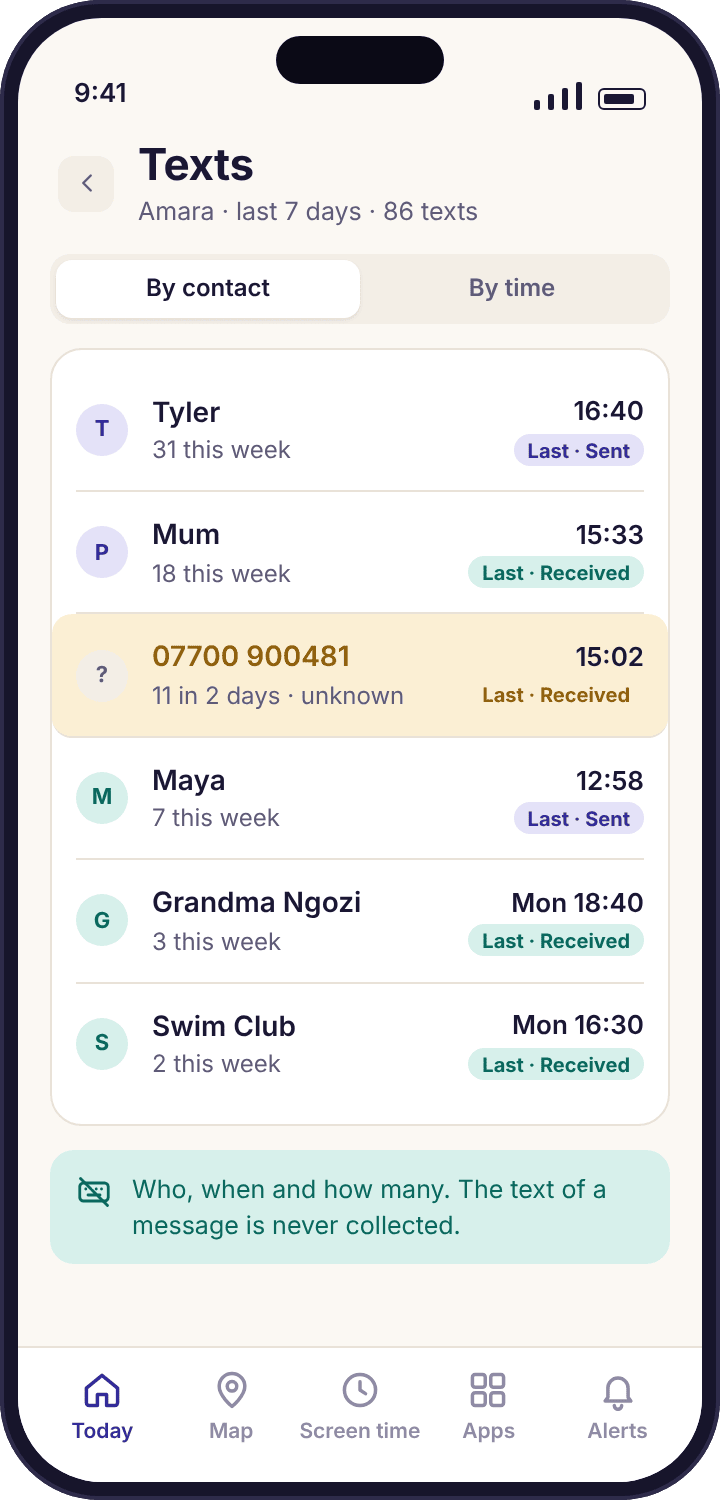
Each text message that arrives on or leaves your child's phone adds one row to the log. The row holds the contact name if the number is saved, or the bare number if it is not, an arrow for sent or received, the time to the minute, and a running count for that number on that day. That is the whole record. In a normal week for Amara, who is thirteen, the log holds about 86 rows, and 31 of them belong to her friend Tyler. Priya can see that Tyler texted at 15:34 and again at 21:41. She cannot see what either of them said, and the app has no way to show her, because the words were never collected.
The feature is built on the same rule as everything else in MobileTracking: the app collects the shape of activity and never the contents. Names, times, counts and directions are the shape. The text is the contents. If you are looking for an app that reads messages, this is not it, and we would rather say so in the first paragraph than let you find out after pairing.
Can I see the text of a message on a higher plan?
No. There is no plan, price or setting that shows message text.
Some monitoring apps show you a locked preview of a message and offer the words for a monthly fee. That design depends on reading every message in the first place and holding it on a server somewhere, which is exactly what we refuse to do with a child's conversations. MobileTracking's child app does not contain a reader for SMS content, so there is nothing to unlock. A subscription changes which features are switched on across your account; it does not change what any feature is allowed to look at. The panel lists what each plan includes before you pay, and the SMS log is described there the same way it is described here: contact, direction, time, count.
This also means a support request cannot get you the text of a message. Support staff see the same rows you see, with limited and logged access for troubleshooting, and no more. If a page anywhere on the web promises to show you a child's texts through this app, it is not describing this app.
Why is the log missing from the Google Play build?
Google Play policy does not allow SMS-log access for this category of app, so the Play build does not ask for it.
Google restricts which apps may read the SMS log on Android, and a parental-control app installed from the Play Store is not permitted to. We follow that rule rather than work around it, so the Google Play build of the child app has no SMS permission, collects nothing about texts, and shows an empty state on the SMS page of the panel with a note explaining why. The same applies to the call log; the calls and SMS monitoring page has the full comparison of the two builds.
The direct-download build from this site's download page is the same app with the SMS and call-log permissions added. It installs through Android's "Install unknown apps" setting, which you switch on for one browser, use once, and switch off again. Play Protect still scans the file. If you already paired the Play build and want texts included, install the APK over it. The phone usually stays paired, and if the Devices page says otherwise a fresh code pairs it again in a couple of minutes. The SMS rows start from the moment the new permission is granted, not before.
Does it cover WhatsApp, Snapchat or Instagram messages?
No. The SMS log is text messages only. Messaging apps are covered separately, by notification counts.
A text message goes through the phone's messaging app and the mobile network, and Android keeps a log of it that this feature reads. A WhatsApp message goes through WhatsApp's own servers, is end-to-end encrypted, and never touches that log. The same is true of Snapchat, Instagram DMs, Messenger and Viber. No honest app on an unmodified phone can list those conversations, and this one does not try.
What MobileTracking can see for those apps is how many notifications each one raised and when, plus how long the app was open, which is the job of social media monitoring. Between the two features you get a comparable picture: 31 texts with Tyler on the SMS page, and perhaps 184 WhatsApp notifications in the week on the social page, each with its timing. Neither tells you a word of what was written, and for a thirteen-year-old most of the traffic will be in the apps, not in SMS. Expect this page to be the quieter of the two.
What does my child see about it?
A line on the "What's shared" screen of their own phone, reading "Texts: numbers and times only".
The child app is a visible app with its own icon, and its transparency screen lists every feature a parent has switched on. When Priya turns the SMS log on in the panel, Amara's phone updates the same afternoon with a new line under "What's shared" that names the feature and states what it collects: who she texts, when, how many. Directly under it is a line that says "Never the words of a message", because a child who assumes the worst behaves as if the worst is true, and a child who knows exactly what is shared can decide what to think of it.
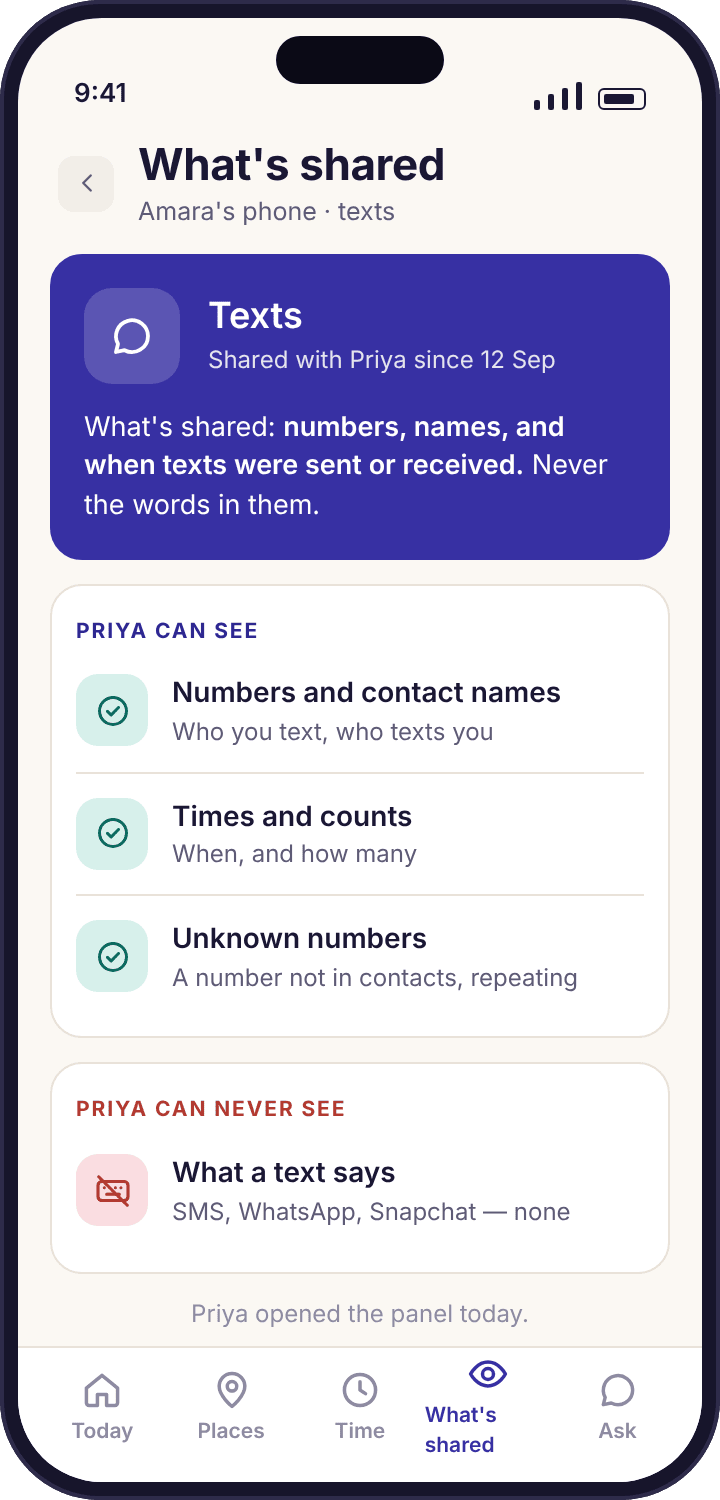
Amara can also see that a parent opened the panel today, though not which pages. We think that is the right balance. A parent who looks at the SMS log is doing nothing to be ashamed of, and a child who knows a parent might look has every reason to keep their texting ordinary. The page on the child app walks through the whole transparency screen if you would like to show it to your child before you pair.
What is an unknown-number flag?
An alert when a number that is not in your child's contacts keeps texting, such as 11 texts in 2 days.
Most texts on a child's phone come from a few saved people: a parent, a sibling, two or three friends, the orthodontist's reminder service. A number with no name attached that appears once is usually a delivery, a verification code or a wrong number. A number with no name that appears eleven times in two days is something else, and that is the pattern the flag watches for. In the Okafors' demo week, 07700 900481 texted Amara on Tuesday evening and kept going through Wednesday, and the flag appeared on the second day with three choices: save it as a contact, watch it, or ignore it.
"Watch" keeps the number highlighted so you notice the next time it appears. "Ignore" stops that number raising the flag again, which is right for the dentist. "Save as contact" is the most common ending, once a parent has asked and learned that it is a classmate's new SIM. The flag never involves the content of the texts; it is counting rows. A number that sends one text a week will not trigger it, and a parent who wants every unknown number listed can see them all on the Calls and SMS overview, where they are counted separately.
What does the texting pattern view show?
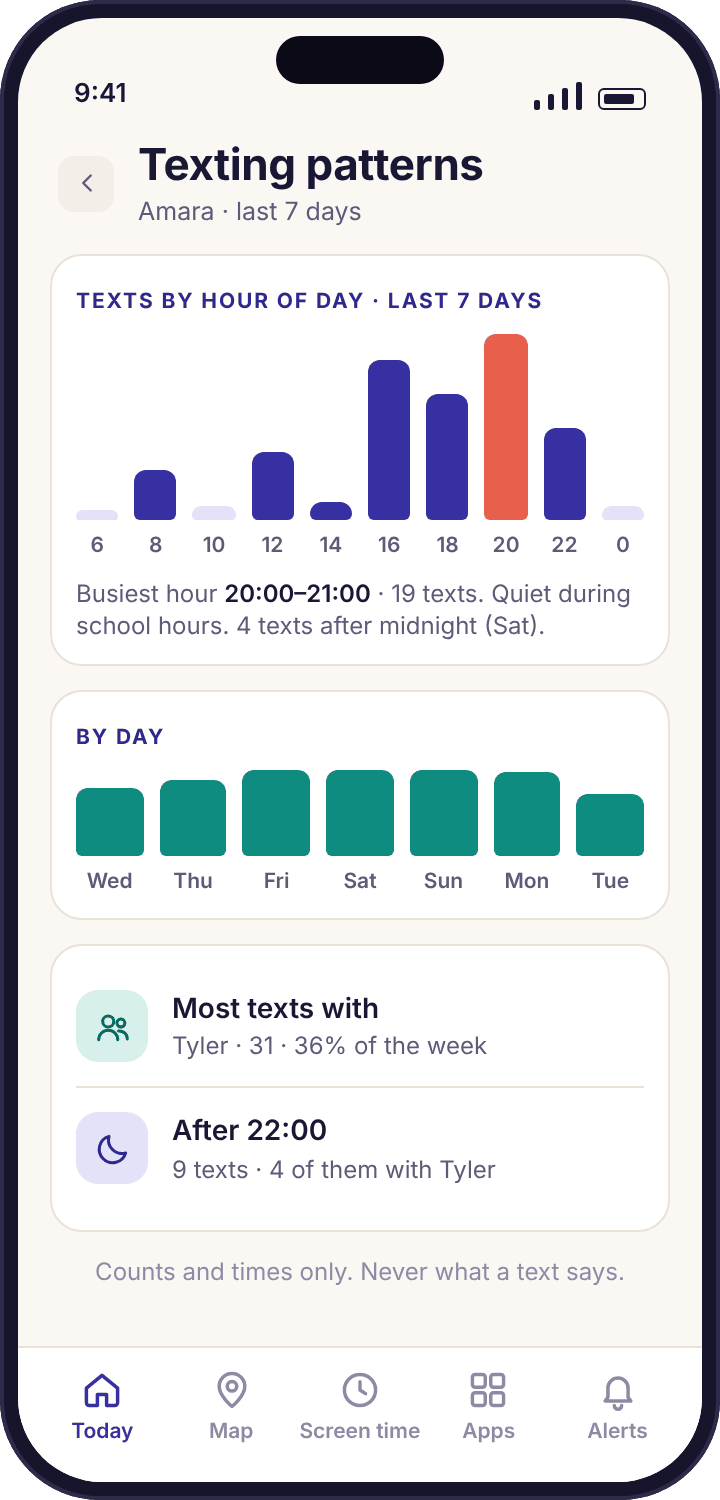
Bars for each hour of the day, showing when texts happen. Amara's busiest hour is 21:00 to 22:00.
The pattern view takes the week's rows and sorts them into twenty-four bars, one per hour. It does not name anyone; it answers a different question from the log, which is "when does my child's phone do its texting?" For Amara the picture is unsurprising: almost nothing before 08:00, a small bump at lunch, a rise after 15:31 when school finishes, and the tallest bar between 21:00 and 22:00, which is the hour after homework and before the bedtime schedule turns the phone off at 21:30. Most of that tall bar is Tyler.
The bars are useful because they change slowly. A week that looks like the one above is a settled routine. A week where the tallest bar has moved to 23:00 to midnight, on a phone whose bedtime starts at 21:30, is worth a look at the bedtime schedule and a question at breakfast. A tall bar in the middle of a school morning is a different question again. None of these needs a message read; they need a parent who has seen the ordinary shape and notices when it moves.
What should I actually do with a week of it?
Look once, learn the normal shape, and only act when the shape changes.
The temptation with any log is to read it every evening, and the result is a parent who knows that Tyler texted at 21:41 on Wednesday and has no idea why that matters. It usually does not. A better routine is to open the pattern view on Sunday, glance at the top three contacts and the unknown-number count, and close it. In the Okafor house that takes under a minute: 86 texts, Tyler on 31, Priya herself on 19, Noah on 9, one flagged number dealt with on Wednesday. The number to remember is 86. If next week is 240, something has changed and it is worth asking about, kindly, with the phone nowhere near the conversation.
The other thing to do is tell your child the number. "You sent and received 86 texts this week, mostly Tyler" is not an accusation, and saying it out loud reminds both of you what the log is for. The smart alerts feed will carry the unknown-number flag to you so you do not need to check for it; everything else on this page can wait for Sunday.