Viber on a child's phone: what notifications reveal and what they don't
Viber chats are end-to-end encrypted, which means no parental app can read them, and any app that says it can is lying to you or breaking the phone. What a parent can see is the shape of the week: how many minutes Viber took on each day, when the notifications arrived and how many there were, and whether a word from your own short list turned up in a preview. This page starts with the settings inside Viber itself, because they do more for a thirteen-year-old than any tracker, and then explains exactly what MobileTracking adds on top.
Android · Either build · Visible on their phone · Permissions: Notification access, Usage access

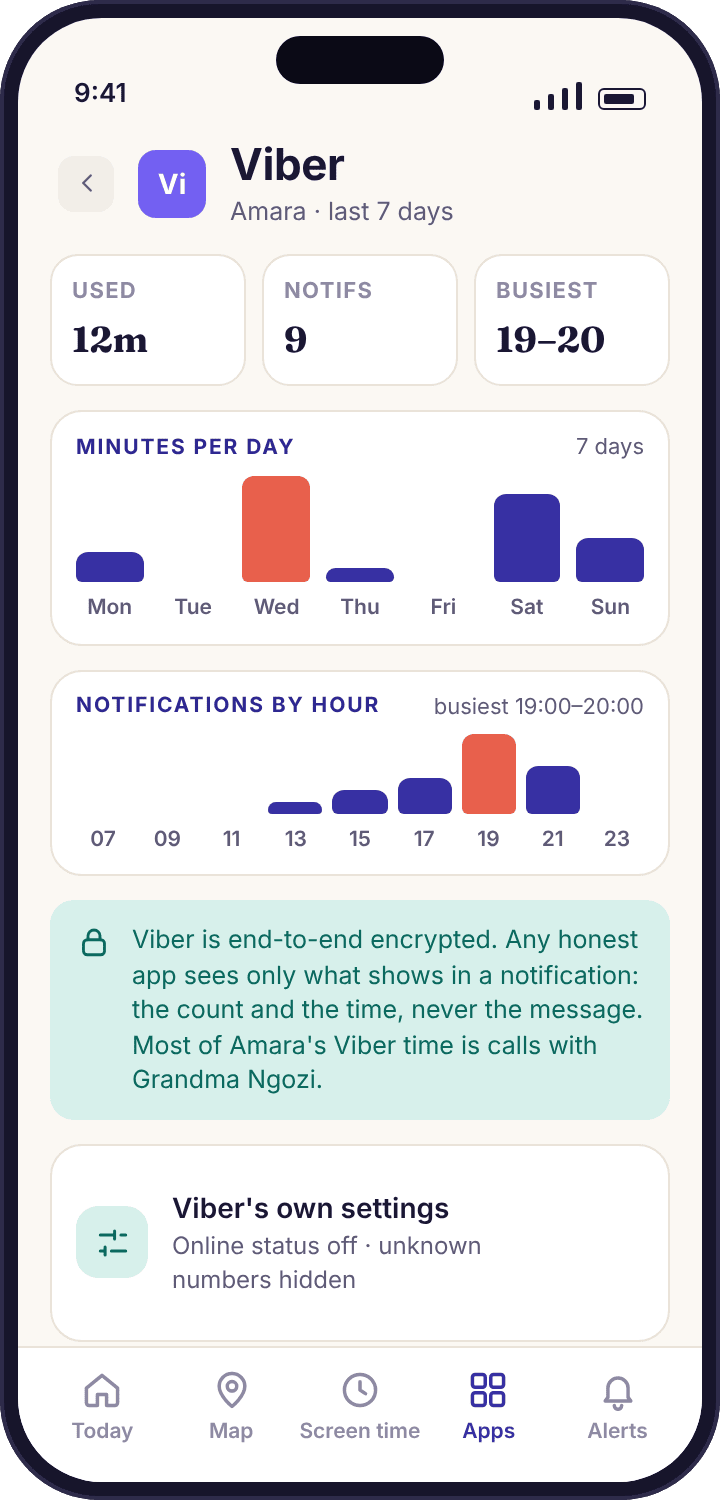
- Viber's own privacy settings come first. Online status, who can add your child to groups, message requests from strangers and blocking are all inside Viber, and they protect Amara whether or not any tracker is installed.
- The chats are encrypted end to end. MobileTracking does not read them, cannot read them, and will not add a way to. The same is true of any app that is being straight with you.
- What you do get is the shape of the week. Minutes on Viber per day, the number of notifications and the hours they cluster in, and a flag when a word from your list appears in a notification preview.
- Amara sees the same figures. Her phone's "What's shared" screen lists Viber by name, with the minutes and counts, and shows when you opened the panel.
- It works on either build. Viber monitoring relies on Notification access and Usage access, not on call or SMS logs, so the Google Play build and the APK behave the same here.
Minutes on Viber, day by day, with the hour it peaks
The Viber card in the parent app shows seven bars, one per day, each the total minutes the app was on screen. Under them sits one line with the week's total, the notification count and the busiest hour. On Amara's Galaxy A35 a typical school week reads something like 1h 52m in total, 230 notifications, busiest between 20:00 and 21:00. None of those numbers tells you what anyone said. All of them tell you how much room Viber is taking in her evening.
Timing is the part most parents find more useful than the total. A hundred notifications spread across the afternoon is a group chat about homework. The same hundred arriving between 22:30 and midnight on a school night is a different thing, and the bars show the difference without you reading a word. The app records the time each notification appeared on the phone and the count per hour; it discards the preview text as soon as the keyword check is done.
- Minutes come from Android's own usage counter. Viber only counts while it is the app on screen, so a chat left open under the lock screen adds nothing.
- Notification counts are per app, not per person. You see that 38 Viber notifications arrived on Tuesday evening, not who sent them.
- Viber calls count as Viber time. A twenty-minute Viber call shows up as twenty minutes in the app, not as a row in the call log, which only covers the phone's own dialler.
A keyword match tells you the word, the app and the time, and stops there
When a Viber notification appears on Amara's phone, the child app compares the preview text against the short word list you chose, on the phone itself. If nothing matches, the preview is dropped and nothing leaves the device. If something matches, one alert reaches you: the word, the app, the time. The alert on the right reads "Keyword matched: 'meet up' · Viber · 21:47". It does not include the sentence the words came from, the sender, or anything typed in reply, because none of that was ever sent to our servers.
This is the limit of what any honest Viber tracker can do, and it is worth being precise about why. Viber encrypts chats between the two phones. The only moment the text exists outside Viber's own storage is when Android draws it inside a notification, and only if Viber's preview setting is on. A tracker reading notifications is reading what the phone chose to display on the lock screen. It is not reading the chat, and it never sees messages Amara reads while Viber is already open.
- Keep the list short. Around twenty words is plenty. Longer lists match more innocent sentences, and every false alert makes the next real one easier to ignore.
- The word, not the message. Even if you wanted the full text, there is no setting for it. The preview is checked and discarded on the phone.
- Amara's list is the same as yours. The keyword alerts page covers how to choose words with a child rather than against them.
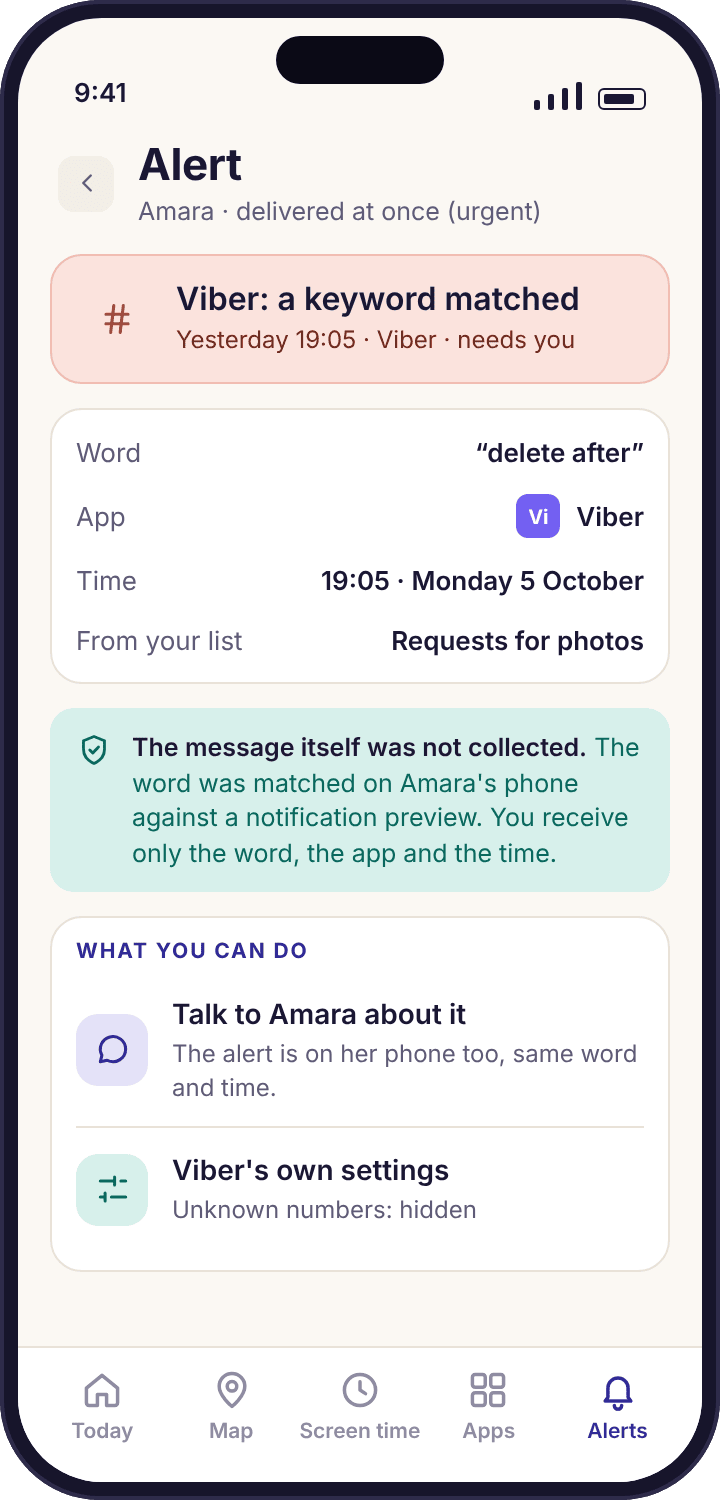
Set Viber's own privacy screen with your child before you set anything in ours
Viber keeps its privacy controls under More → Settings → Privacy, and a thirteen-year-old can walk through them with you in the time it takes to make a drink. The ones that matter are whether strangers can see when she is online, whether anyone can drop her into a group chat without asking, how messages from numbers she has not saved are treated, and how to block someone. Those four settings decide who can reach Amara in the first place. A tracker can only tell you what happened afterwards.
Set them together, on her phone, with the screen between you. It takes the mystery out of the app, and it gives her a reason to tell you when a stranger does get through, because she knows what the settings were meant to stop. The table below lists what we would choose for a thirteen-year-old and why. Viber moves its menus between versions, so if a name does not match, look for the nearest one rather than assuming the setting has gone.
- Message requests are the big one. Messages from numbers not in her contacts land in a separate requests area rather than in her chat list, and she can decline without the sender knowing she read it.
- Communities hide numbers. In Viber's large public communities other members do not see her phone number, but admins can still message her, so treat joining one as a decision.
- Blocking is quiet. A blocked number gets no notice. Show her where it is before she needs it.
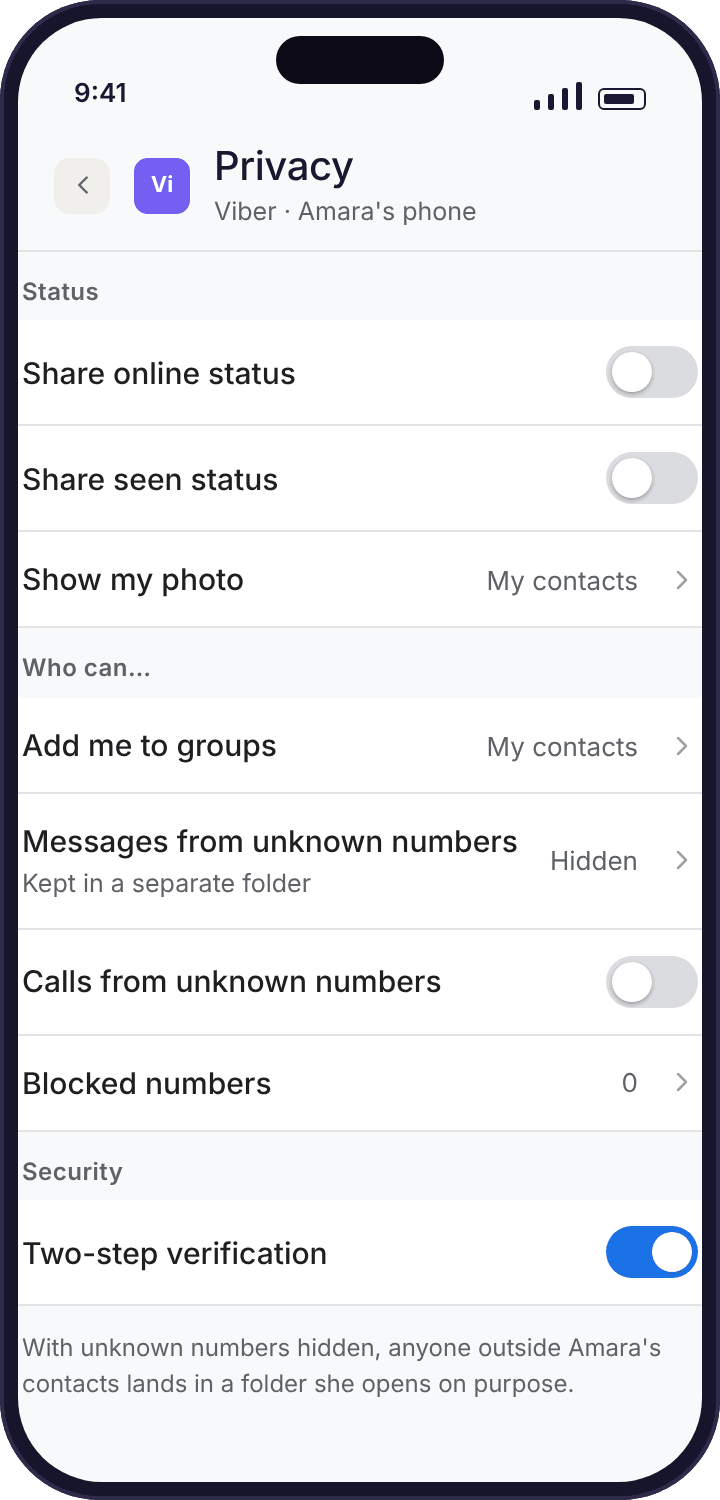
What each Viber privacy setting does, and what we would choose at thirteen
These live on your child's phone inside Viber, not in MobileTracking. The app cannot change them for you, and it should not be able to. What it can do is tell you, through the notification counts, whether they are still doing their job.
| Setting in Viber | What it controls | For a 13-year-old | Why |
|---|---|---|---|
| Show online status | Whether contacts and group members can see that she is on Viber right now | Off | An "online" badge at 23:40 invites a message at 23:41. Off removes the prompt for both sides. |
| Share "seen" status | Whether senders see when she has read their message | Off | Read receipts create pressure to reply at once. Turning them off gives her room to think, or to show you first. |
| Who can add me to groups | Anyone, or only her saved contacts, can put her into a group chat | My contacts | Being added to a group of strangers is the commonest way an unknown adult reaches a child on Viber. |
| Messages from unknown numbers | Chats from numbers not in her contacts go to a requests area rather than the main list | Keep on | She sees a request, not a conversation. Decline, delete or block without replying. |
| Phone number in communities | Whether other members of a public community see her number | Hidden | Viber hides numbers from other community members by default. Check it is still the case after an update. |
| Block and report | Stops a number contacting her and reports it to Viber | Show her where | Blocking takes three taps and the other person is not told. A child who knows the path uses it. |
| Disappearing messages and secret chats | Messages that delete after a timer, often with notification previews suppressed | Talk about it | Nothing stops her using them. Because previews are hidden, these chats add to the minutes but not the notification counts, which is worth knowing when you read the bars. |
| Lenses and Explore content | Viber's built-in channels and camera effects | Review together | Public channels can carry adult content. Unfollow what she does not use; the tracker sees none of this. |
Viber's terms set a minimum age for an account. If your child is younger than that, the right answer is not a tracker but a conversation about whether the account should exist yet. MobileTracking does not create, verify or bypass age on any platform.
What a burst of Viber notifications looks like from the parent's side
The feature is easiest to understand through two ordinary situations. In both, Priya learns something from counts and timing alone, and in both the fix happens inside Viber, with Amara, rather than in the tracker.
Twenty-three notifications between 22:10 and 23:50 on a Tuesday
Amara's Viber bars are usually flat after 21:30, because that is when her social apps wind down for the night. On this Tuesday the smart alerts feed shows one grouped line the next morning: "Viber: 23 notifications, 22:10–23:50, unusual for a school night". There is no sender and no text. There is just a count at an hour that does not fit the pattern.
Priya asks at breakfast, not as an accusation but with the number: "Your phone was busy on Viber after ten last night. Everything all right?" Amara shows her. A number she does not recognise, in the +44 7700 900 range, sent a run of messages into her requests area, each one a notification because Viber previews were on. It turns out to be someone from a school group chat who had her number from a shared list. Not dangerous, but not someone she wanted messaging her at midnight either.
They sit with the phone and go through the table above. Group invitations get switched to "My contacts", the number is blocked, and online status goes off. Ten minutes, done by the child, with a parent beside her.
What the app did: counted notifications per hour, noticed the hour was unusual, and put one line in the morning summary. It did not read a message, name a sender or wake anyone at 22:10. The settings that fixed it were Viber's.
Viber jumps from 15 to 90 notifications an evening after Amara joins a community
The week view tells the story before anyone asks. Monday and Tuesday look like every other week: twenty-odd Viber notifications an evening, mostly between 19:00 and 21:00. From Wednesday the bar triples, and the busiest hour moves to 21:00–22:00. Minutes on Viber go up too, from around fifteen a day to nearly fifty. The daily summary mentions it once: "Viber notifications up sharply since Wednesday".
Amara has joined a fan community for a band, several thousand members, with a steady stream of posts and replies. Each post is a notification. None of it is sinister, and the tracker has no way of knowing what the posts say. What it can show is that one app has started taking an extra half hour of each evening and buzzing her phone ninety times before bed.
The fix is inside Viber again. Communities can be muted, so the chat stays but the phone stops buzzing, and Amara chooses that herself rather than leaving. Priya also checks that the community hides members' numbers, which it does. The following week's bars settle back to about thirty notifications an evening, with the minutes a little higher than before, which is a reasonable price for something she enjoys.
What the app did: showed a change in volume and timing across the week and said so once. The decision to mute, and the knowledge that the community was the cause, both came from Amara. If she had wanted to leave it instead, the tracker would have seen the counts fall and nothing more.
Four reasons the Viber card shows less than you expect, and what to do about each
Every one of these is a permission or a setting on the child's phone, and the device health line usually names it before you notice the gap. None of them is fixed from the parent panel alone; the phone has to be in the room.
Viber shows zero minutes, but she uses it every day.
Usage access was revoked, often after an Android system update or when a "permission auto-reset" removed it from an app that had not been opened in a while.
Fix: On her phone, Settings → Apps → Special app access → Usage access → MobileTracking → Allow. The minutes resume from that moment; the missing days stay empty, because nothing was recorded.
Minutes are fine, but notification counts and keyword alerts stopped.
Notification access was reset. Android does this after some updates, and a few manufacturers switch it off for apps they consider to be sleeping.
Fix: Settings → Notifications → Device and app notifications (or Notification access) → MobileTracking → On. The health line goes amber the moment access drops, so you usually know within the hour.
Viber minutes are high, but the notification count is near zero.
Notifications are muted inside Viber, or the phone is in Do Not Disturb for long stretches. The app counts what Android shows; a muted chat shows nothing. Secret chats with hidden previews behave the same way.
Fix: Nothing in MobileTracking. Read the minutes instead, which do not depend on notifications. If you rely on keyword alerts, ask Amara to leave previews on for ordinary chats and talk about why.
A keyword alert fired on something plainly harmless.
A word on the list is too common. "Party", "drink" and "pics" all match birthday plans, a lemonade stand and a holiday photo album.
Fix: Shorten the list. Two-word phrases match far less often than single words. A list of around twenty specific phrases, agreed with Amara, catches what matters and leaves her Tuesday alone.
What parents ask before switching Viber monitoring on
Is there any way to read Viber chats with MobileTracking?
No, and no honest app can. Viber encrypts chats end to end, so the text only exists on the two phones in the conversation. MobileTracking sees the minutes Viber was on screen, the number and timing of notifications, and whether a word from your list appeared in a notification preview. The preview is checked on the phone and discarded. There is no setting, paid or otherwise, that shows the message.
Does it show who Amara is talking to on Viber?
No. Notification counts are per app, not per sender, so you see that 38 Viber notifications arrived on Tuesday evening and not who they came from. A keyword alert names the word, the app and the time only. If you want to know who is in her contacts, the answer is to look at the phone with her, which Viber's own settings screen makes a natural moment to do.
Do Viber calls appear in the call log feature?
No. The call log covers the phone's own dialler, which Viber does not use. A Viber voice or video call counts as minutes in the Viber app instead, so a long call shows up as a tall bar on that day. If the call came from someone not in her contacts, Viber's own message request and blocking tools are the place to deal with it.
What about disappearing messages and secret chats?
They are invisible to the tracker, as they are to everything outside Viber. Secret chats usually hide the notification preview too, so they add to the minutes but not to the notification count and never trigger a keyword match. We mention it so you read the bars correctly: high minutes with few notifications can mean muted chats, secret chats, or both.
Will Amara know Viber is being monitored?
Yes, by design. Her phone's "What's shared" screen lists Viber by name with the same minutes and counts you see, and it shows that a parent opened the panel today. Switching Viber monitoring on updates her screen the same afternoon. A hidden version does not exist, on any build, and nothing on her phone pretends otherwise.
Does Viber monitoring need the APK build?
No. Everything on this page uses Notification access and Usage access, which both builds have. The APK build differs only in adding the phone's own call and SMS logs, which Viber does not touch. Install from Google Play unless you specifically want those logs.
Is a tablet with Viber covered?
Yes, if the tablet runs Android 8.0 or later and is paired to your account as its own device. Each paired device reports its own Viber minutes and counts. Viber on a laptop or an iPad is not covered, because the child app only runs on Android.
What happens if she deletes Viber and reinstalls it later?
The day it reappears, app activity flags it as a new install and the Viber card starts again. Nothing about the old chats is visible either way; the app only ever counted them. If she uninstalls MobileTracking itself, you get a tamper alert and collection stops at once, because the app does not hide and does not reinstall itself.
How old does a child need to be for Viber?
Viber's own terms set a minimum age, and it is Viber's rule rather than ours, so check their current terms. If your child is below it, the better question is whether the account should exist yet, not how to monitor it. MobileTracking does not verify, change or work around the age on any account.
Can I block Viber at certain hours instead of watching it?
Yes. App blocking lets you pause Viber on a schedule, for instance after 21:30 on school nights, and her phone shows a plain screen naming the rule and who set it. Many families find a schedule works better than counts, because it removes the late-night burst instead of reporting it.
Where Viber fits with everything else
Viber is one app on the social overview, and the same counts-and-timing approach runs across its neighbours: social media monitoring, WhatsApp tracker, keyword alerts and Snapchat tracker.
Viber monitoring switches on once your child's phone is paired with your account, which takes about ten minutes with both devices on the table. The download and setup guide walks through every screen.
See how much Viber takes, without ever seeing what was said.
Set Viber's own privacy screen with your child first. Then pair the phone, grant Notification access and Usage access together, and the week view fills in from the next evening.
Android · Free account · Visible on your child's phone