Instagram time and timing, not their DMs
Instagram already has more parental controls built into it than most parents have switched on: teen accounts that are private by default, a message request folder for strangers, time limits inside the app, and supervision through Meta's Family Center. Start there. What MobileTracking adds is the part Instagram does not report to you unasked: how many minutes the app took on each day of the week, when the notifications clustered, the odd burst at 23:00, and a flag when a word from your list shows up in a notification preview. It never shows posts, direct messages, followers or who liked what.
Android · Either build · Visible on their phone · Permissions: Usage access, Notification access

Six things to set inside Instagram before you install anything else
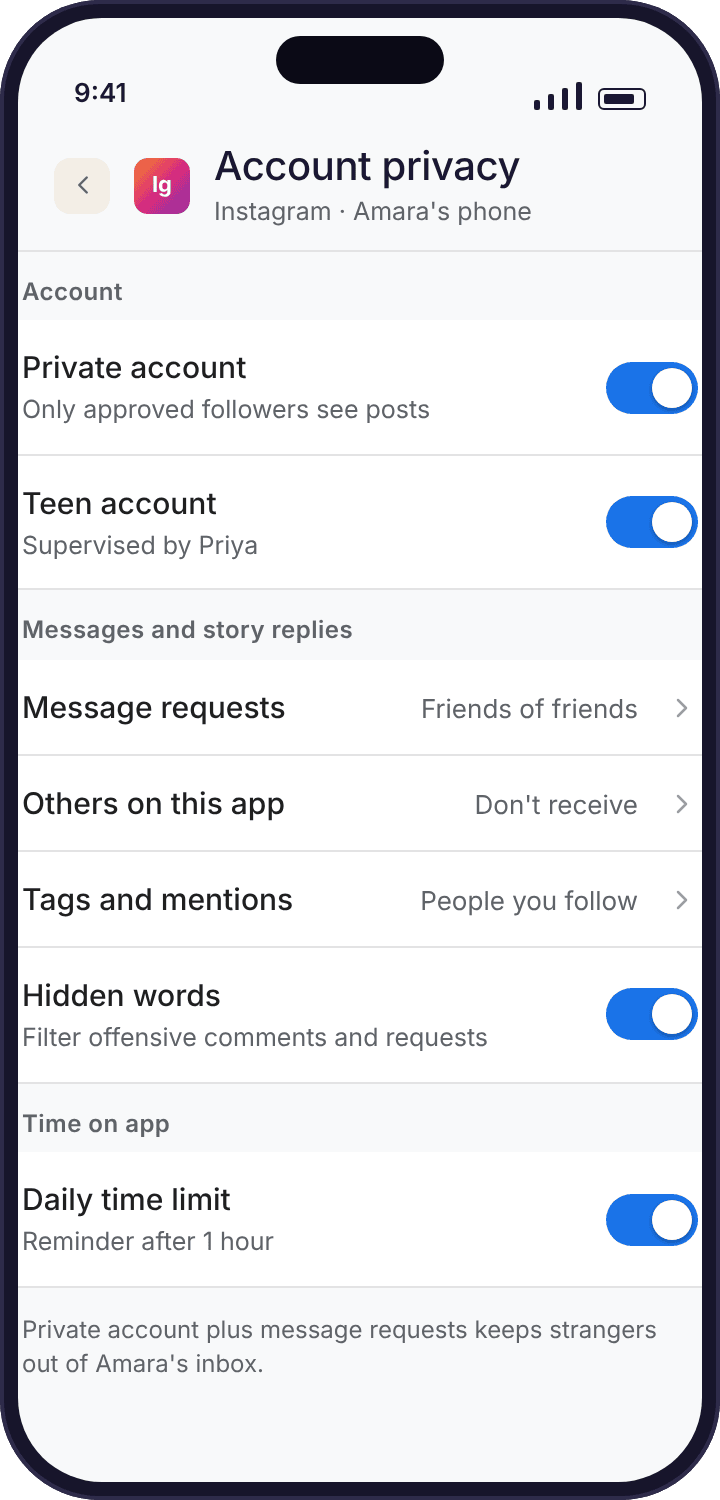
Instagram's own controls act on the account itself, which means they follow Amara to any device she signs in on. A tracker only sees the one Android phone it is installed on. Go through these with her, on her phone, and only then decide what the tracker is for. Names and menu positions change often; if one does not match, search Instagram's help pages for the current name rather than assuming the setting has gone.
Accounts whose birth date puts them under 18 are placed in teen account settings: private by default, direct messages only from people the teen follows or is already connected to, limits on sensitive content, a reminder after an hour of use and a sleep mode that mutes notifications overnight. Younger teens need a parent's approval through supervision to loosen any of it. The single most useful check a parent can make is whether the birth date on the account is true. An account created with an adult date of birth has none of these protections, and a surprising number of thirteen-year-olds have exactly that.
With a private account, only approved followers see posts, stories and reels, and strangers see a name and a profile picture. It is on by default for teen accounts and can be checked under Settings → Account privacy. Private does not stop someone sending a follow request or a message request; it stops them seeing anything before Amara says yes.
Messages from people she does not follow go into a requests folder rather than her inbox. She can read a request without the sender knowing, and delete or block from there. Teen account settings narrow this further so that people she is not connected to cannot message her at all. Worth showing her where the folder is, because the first stranger usually arrives within a fortnight of the account opening.
Meta's own supervision, set up from the parent's Instagram account with the teen's agreement, shows how much time she spends on Instagram, lets you set a daily limit and scheduled breaks, lists who she follows and who follows her, and tells you when she reports an account. It is the only place a parent can legitimately see her follower list, and it is Meta's to show, not ours. MobileTracking does not duplicate it and never will.
Under Your activity → Time spent, Instagram shows her own daily average and lets her set a daily limit reminder and a quiet mode that pauses notifications and auto-replies to DMs. These are reminders, not locks: she can dismiss them. That is fine as a first step at thirteen. If reminders are not enough, a limit set in the social overview or app blocking actually pauses the app, which is a different conversation.
Hidden words filters comments and message requests containing words she chooses, invisibly to the sender. Restrict hides someone's comments from everyone but them and moves their messages to requests, without the drama of a block. Block is the full stop. Three tools for three levels of problem, all inside Instagram, all hers to use. A child who knows the difference uses the right one.
Instagram's own minimum age is thirteen. If your child is younger, the account is against Instagram's terms regardless of any monitoring, and the right conversation is about whether it should exist yet. MobileTracking does not verify or alter the age on any account.
Minutes on Instagram per day, and the hour they pile up in
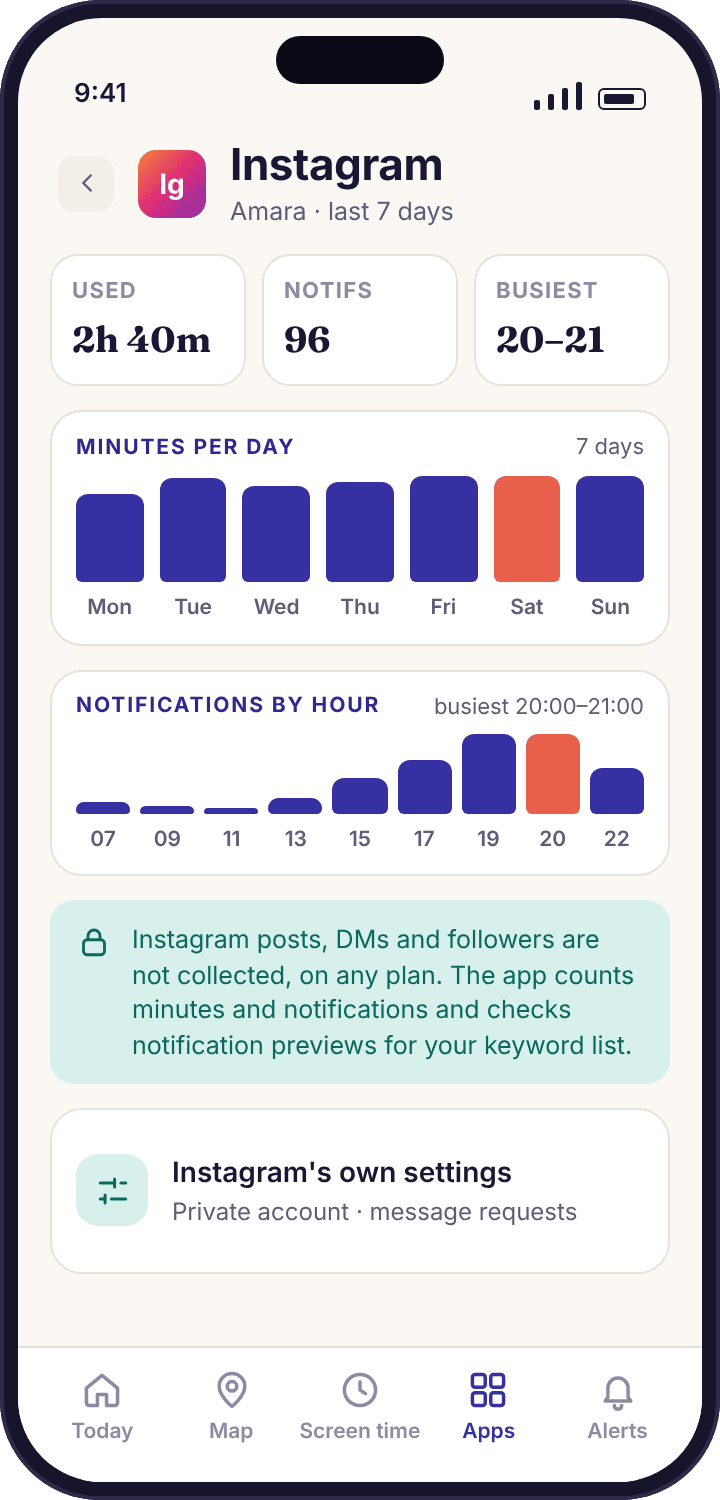
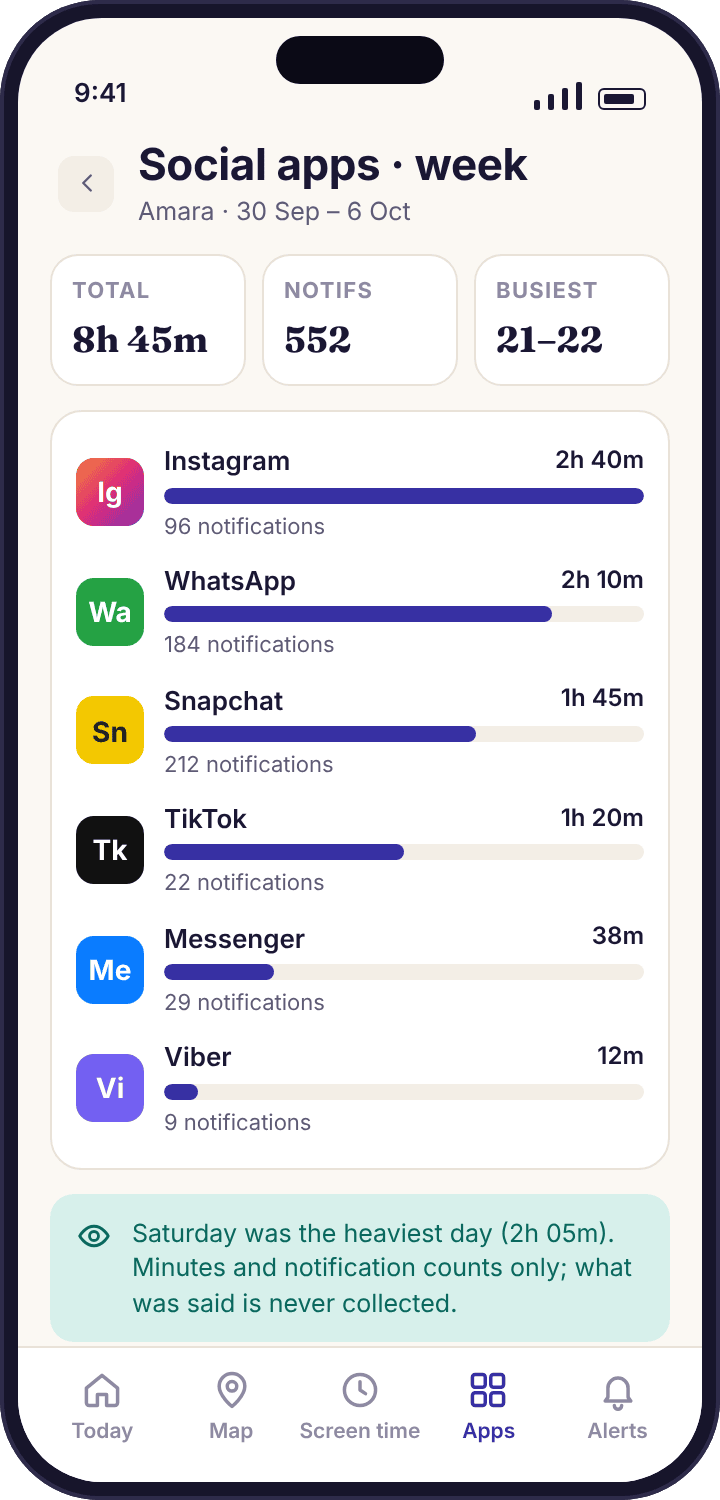
The Instagram card shows seven bars, one per day, each the number of minutes the app was on screen according to Android's own usage counter. Beneath them is the week's total, the number of notifications and the hour with the most of them. For Amara a typical week in October reads 5h 10m in total, with weekdays around thirty-five minutes and Saturday nearer two hours. That split between school days and weekends is the first thing worth looking at, before any individual number.
Instagram's own time-spent screen shows her something similar, and that is a good thing: when the two agree, the tracker is simply confirming a figure she can already see. Where ours differs is that it sits beside every other app on the phone, so you can see that Instagram's forty minutes came after an hour of YouTube, and that it runs across the week without anyone opening Instagram to check. If she has a time limit reminder set inside Instagram, you will see whether the minutes actually stop at it.
- Screen time only. Instagram running in the background, or a reel left playing under the lock screen, adds nothing.
- No feed, no posts, no stories. The app has no idea what she watched. It knows the app was open and for how long.
- Same figure on her phone. The child app's "What's shared" screen lists Instagram with the same minutes you see.
Notification timing, bursts and keyword matches
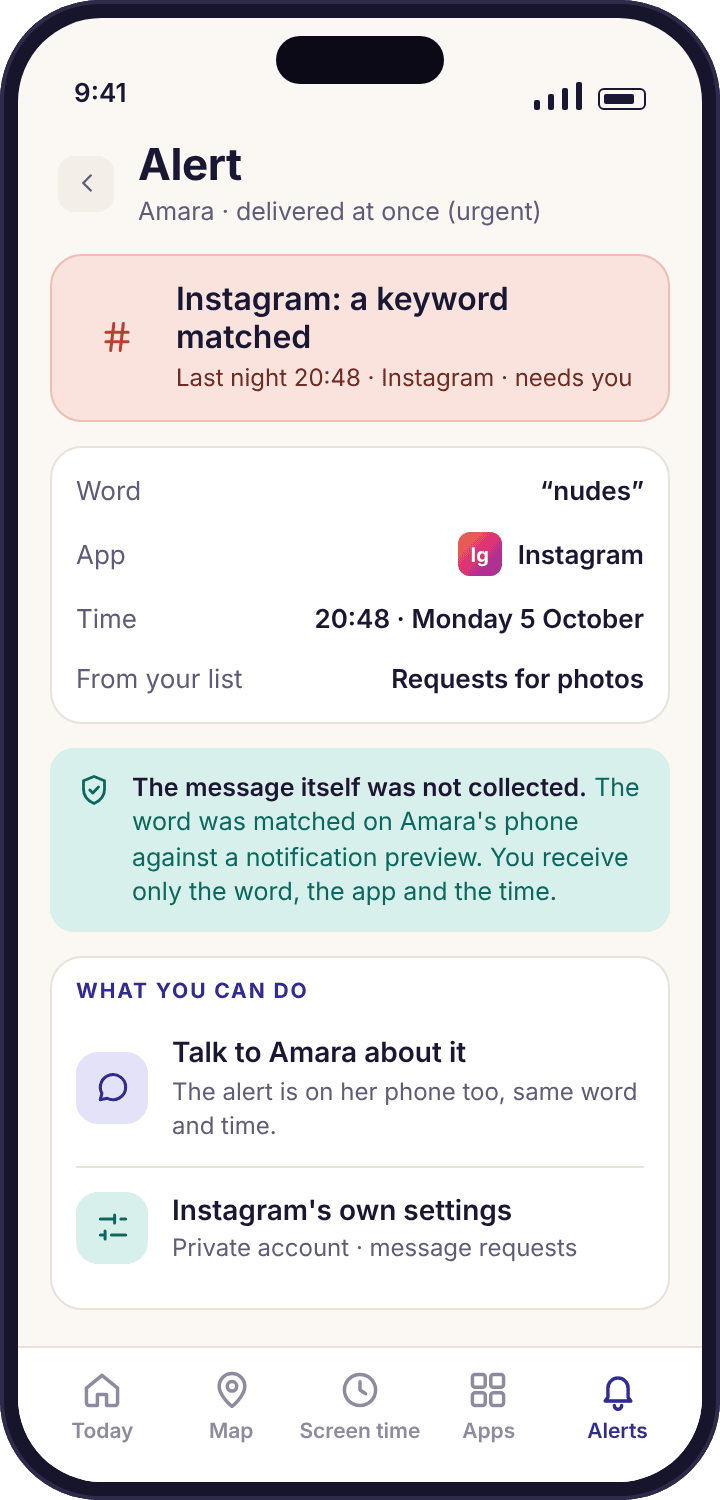
Every Instagram notification that appears on Amara's phone is counted, with its time. The count per hour is what makes a burst visible: fourteen notifications in twenty minutes at 23:00 on a Wednesday stands out against a week where Instagram is quiet after 21:30. A sudden run of new-follower notifications on a Saturday afternoon, say thirty in an hour after a reel of hers got shared around, shows up the same way. In neither case does the app know what the notifications said or who they were from. It knows the app, the time and the number.
Keyword matching uses the same notifications. The child app compares each preview against the short list you chose, on the phone itself, and discards the preview straight after. A match sends one alert: the word, the app and the time, as in the screen on the right. The sentence around the word, the sender and anything Amara typed back are not collected, because nothing but the match ever leaves her phone. That is the whole of what a keyword alert can tell you, on any plan, and we think it is enough to start a conversation.
- Bursts are grouped. Thirty new-follower notifications become one line in your feed, not thirty.
- Previews off means nothing to match. If Instagram notification previews are hidden on her lock screen, counts still work but keyword matching has nothing to read.
- Direct messages are never shown. A DM that arrives while Instagram is already open produces no notification, and the app does not see it at all.
Do the Instagram settings with her, then let the week view show whether they stuck
The ledger above is a list of things to do on her phone, with her, with the screen between you. Open Settings, check the birth date, confirm the account is private, open the message requests folder so she knows it exists, set a daily limit reminder she picks herself, and if she is willing, set up supervision from your own Instagram account. It takes about ten minutes, and it does more than any tracker because it works on the account, on every device, including a friend's phone she borrows.
What the tracker adds is a quiet check afterwards. Sleep mode in a teen account mutes notifications overnight, so if the notification bars start showing activity at 23:00, something changed: the birth date, the setting, or the account she is using. A daily limit reminder she agreed to should show as minutes that stop around the same point each evening. When the week view disagrees with what you set together, that is a prompt to look at the phone again, not a verdict.
- Her screen shows it too. Instagram appears on the "What's shared" list the afternoon you switch monitoring on.
- A second account is just another app session. The tracker counts Instagram, not accounts, so a switch between accounts shows as the same minutes.
- Check it again after updates. Instagram changes its menus often. A five-minute look every term keeps the settings where you put them.
Seven days of Amara's Instagram use, with the two things worth noticing
An ordinary October week on a thirteen-year-old's Galaxy A35. Five of the seven days say nothing at all, which is what a normal week should look like. Two days say something, and in both cases the thing they say is about timing rather than content.
A flat school day.
Instagram opens at 07:40 for six minutes on the bus, nothing until 15:45, then two longer sessions before dinner. Notifications arrive in a trickle through the afternoon and stop by 21:30, when her social apps wind down. Nothing reaches Priya. The daily summary at 18:00 lists Instagram at 29 minutes so far and moves on.
Still ordinary.
A little more than Monday, with the busiest hour at 17:00. The week view is starting to show its shape: Instagram sits third behind YouTube and WhatsApp on minutes. Priya does not open the panel at all on Tuesday, and Amara's phone shows "no parent view today".
Fourteen notifications between 23:02 and 23:21.
The first thing worth noticing. Amara's teen account has sleep mode, which mutes notifications from 22:00, so a run of fourteen at 23:00 should not have happened. Smart alerts hold it until 07:00 because of quiet hours, then show one line: "Instagram: 14 notifications 23:02–23:21, outside the usual pattern". No sender, no text. Over breakfast Amara explains she is signed into a second account a friend made for a group project, created with an adult birth date. That account has no teen settings at all. They fix the birth date together on Thursday.
The quietest day of the week.
Swim club evening. Instagram gets twenty-two minutes, all before 16:30, and the notifications stop at 21:40 now both accounts have teen settings. Priya opens the panel once to check the fix held; Amara's phone notes that a parent viewed the panel today.
Friday evening, as expected.
Longer sessions after school and a busiest hour at 20:00. Fifty-eight minutes is above her weekday average, but it is Friday, and the agreed weekend budget is higher. Nothing is flagged, because nothing is unusual for the day it is.
Thirty-one new-follower notifications in one hour.
The second thing worth noticing. A reel Amara posted gets shared by a friend with a larger following and the follow requests roll in from 15:10. The app sees thirty-one Instagram notifications in an hour and groups them into one line. It has no idea they are follow requests, and it cannot see who sent them. Priya asks; Amara shows her the requests list and they go through it together, accepting the people she knows and leaving the rest. Meta's supervision would have shown the follower list directly. Ours never does, by design.
The week closes at 5h 10m.
A long morning session, then not much. The weekly report puts Instagram at 5h 10m, average 44 minutes a day, best day Thursday, heaviest Saturday. Two conversations happened this week because of it, both short, both about timing. Neither needed a message to be read.
Three things the Instagram tracker will not do, and why we are glad
It will not show followers or following.
Meta's own supervision can show a parent who their teen follows and who follows them, with the teen's agreement and with Instagram's name on it. We could try to reconstruct the same list from notifications, badly, and without her agreement. We would rather point you at the supervision tool, which does it properly, and keep our own list of what we collect short enough to fit on a child's screen.
It will not read direct messages, even the ones in notifications.
A DM preview appears on the lock screen for a moment, and a tracker could store it. Ours checks it against your word list on the phone and throws it away. The reason is not technical. A thirteen-year-old who knows her parent can read her messages stops writing anything in them that matters, and the parent ends up knowing less, not more. Counts and timing keep the conversation open.
It will not pretend to see more than the phone it is on.
Instagram is an account, and Amara can sign in on a tablet, a laptop or Tyler's phone. The tracker only sees the Android phone it is installed on, and we say so rather than implying a complete picture. For anything that follows the account, Instagram's own settings and supervision are the right tool. The tracker's job is the one device it can be honest about.
What time and timing can tell you about Instagram, and what they cannot
Reading the minutes without panicking
The first week of Instagram minutes usually looks higher than a parent expected, and the temptation is to set a limit the same evening. Resist it. A single week is one data point, and a week that includes a birthday, a half-term or a new friend group is not a typical one. Record two weeks without changing anything, look at the split between school days and weekends, and then talk about what a reasonable number might be. Amara's weekday average of thirty-five minutes and a Saturday near two hours is not unusual for a thirteen-year-old, and the useful question is what the two hours displaced, not whether the number is large.
When you do want a limit, Instagram's own daily reminder is the gentlest version, because it is hers to dismiss. A per-app limit through screen time limits is firmer: the app pauses, her phone shows a plain screen naming the rule, and she can ask for more time with one tap. Which one you choose matters less than agreeing it with her first.
Reading the timing, which tells you more
Minutes answer "how much". Timing answers "when", and when is where most of the useful signals live. A phone that buzzes with Instagram at 23:00 on a school night is a sleep problem before it is anything else. A burst of notifications at 15:10 on a Saturday is something that happened, and usually something Amara is happy to explain. Instagram quiet by 21:30 all week is the pattern you want, and seeing it hold without checking is the point of the feature.
Two settings shape the timing more than any tracker. Teen account sleep mode mutes notifications overnight, and quiet mode inside Instagram does the same on a schedule she chooses. If the notification bars show activity when those should be on, something has changed, and the wrong birth date on an account is the most common reason. The tracker's job is to notice that the pattern broke; the fix is in Instagram.
She can see that you looked
Amara's phone shows that a parent opened the panel today, without saying which screens. That is deliberate. A child who knows exactly what is visible, and knows when it was looked at, has no reason to suspect there is more.
What the numbers cannot tell you
Nothing on this page tells you what Amara posts, what she watches, who messages her, what they say, or whether a stranger is in her requests folder. Forty minutes on Instagram can be forty minutes of swimming videos or forty minutes of something you would want to know about, and the bar is the same height either way. Instagram's own tools answer some of those questions with her agreement, and a conversation answers the rest. A tracker that claimed to answer them from the outside would be reading her messages, and we do not build that on any build or at any price.
It also cannot see what happens on another device. Instagram is an account, not an app on one phone, and the minutes and counts here come from her Galaxy A35 alone. If the numbers drop to nothing while she is clearly still using Instagram, the first guess is a tablet or a friend's phone, and the second is a permission that reset, which the device health line will name.
Telling Amara, in a sentence
The version that works is short and true: "I can see how long you spend on Instagram each day and when your phone gets notifications from it. I can't see your posts, your messages or who you follow, and I'm not trying to." Then open the "What's shared" screen on her phone together so she sees the same list. Her phone will show when you opened the panel, so there is nothing to catch her out with, and that is the point. Families who do this on day one tend to still be using the feature in week six. Families who skip it tend to have an argument in week two.
If she asks why, the answer is also short: sleep, and a stranger problem that Instagram's own settings handle better than a parent can. Keyword alerts are the part most teenagers push back on, and the keyword alerts page has a way of choosing the list with her that usually settles it.
Loosening it as she grows
Monitoring that never changes becomes surveillance, however transparent it is. At thirteen, minutes, timing and a short word list are reasonable. By fifteen, the word list is usually the first thing to go, and by sixteen many families keep only the minutes, as a shared number both sides can see, or nothing at all. The WhatsApp page and the Snapchat page follow the same arc. Loosening a setting is as visible on her phone as tightening one was, so make it a conversation too: "I'm switching the keyword list off for Instagram. You've shown me you handle it." That sentence is worth more than any week of bars.
What parents ask about monitoring Instagram
Can MobileTracking see my child's Instagram DMs?
No. The app never reads direct messages, posts, stories or comments, on any build or plan. What it collects is the minutes Instagram was on screen each day, the number and timing of notifications, and whether a word from your short list appeared in a notification preview, which is checked on the phone and then discarded. If you need to see messages, that feature does not exist here and we will not add it.
Does it show who follows Amara or who she follows?
No. Follower lists are something Meta's own supervision can show a parent, with the teen's agreement, from Family Center. MobileTracking does not reconstruct them and does not show account names from notifications. A burst of new-follower notifications appears as a count at a time, nothing more.
What is the difference between this and Instagram's supervision?
Instagram's supervision works on the account, across every device, and can show time spent, set limits and list followers. MobileTracking works on one Android phone and sits beside every other app on it, so you see Instagram's minutes next to YouTube's and WhatsApp's, with notification timing and keyword alerts. Use supervision first; use the tracker for the whole-phone picture.
Will it tell me when she gets a message request from a stranger?
Not as such. The app counts Instagram notifications and their timing; it does not know which were requests or who sent them. What it can show is a burst at an unusual hour, which is often how a parent first notices something. The requests folder itself, and the teen account settings that limit who can message her, are inside Instagram.
What if she opens Instagram in Chrome instead of the app?
Only partly. Minutes in Chrome count as Chrome, not Instagram, and web filtering would log the page title. Notifications from the Instagram app are what the counts and keyword matches rely on, so a browser session shows up as web use rather than Instagram use. On a phone, almost all use is in the app.
Can I set a time limit for Instagram alone?
Yes. Screen time limits include per-app limits, so Instagram can have thirty minutes on school days and an hour at weekends while the rest of the phone keeps its own budget. When the limit runs out, her phone shows a plain screen naming the rule and who set it, and she can ask for more time. Instagram's own daily reminder is a softer version she can dismiss.
Why did notifications appear at 23:00 if sleep mode is on?
Usually because the account is not a teen account. Sleep mode comes with teen account settings, which depend on the birth date Instagram holds. An account created with an adult date of birth, or a second account made by a friend, has none of the overnight muting. Check the birth date on each account she uses, on her phone, together.
Does switching Instagram monitoring on show up on her phone?
Yes, the same afternoon. The child app's "What's shared" screen lists Instagram with the minutes and notification counts you see, and her phone shows when a parent opened the panel. Nothing is collected from Instagram before she has been through the consent screen at pairing.
Can it see Instagram on her tablet as well as her phone?
Yes, if the tablet is Android 8.0 or later and paired as its own device. Each device reports its own minutes and counts, so Instagram on the tablet appears under the tablet. An iPad or a laptop is not covered, because the child app only runs on Android.
What if she signs out of Instagram or deletes the app?
Deleting the app shows up as a removed app in app activity on the day it happens, and the Instagram card goes quiet. Signing out but keeping the app simply shows zero minutes. Neither tells you anything about the account, which may still be in use elsewhere. That is the honest limit of a phone-based tracker.
Where Instagram fits with everything else
The same minutes-and-timing picture runs across every social app on the phone, so this page has close neighbours: social media monitoring, Messenger tracker, Snapchat tracker and keyword alerts.
Instagram monitoring switches on once your child's phone is paired with your account, which takes about ten minutes with both devices on the table. The download and setup guide walks through every screen.
Know the hours Instagram takes, and leave the DMs alone.
Check her teen account settings together first. Then pair the phone, grant Usage access and Notification access with her, and the week view fills in from tomorrow.
Android · Free account · Visible on your child's phone