Keyword alerts for the words that matter, checked on the phone
You choose a short list of words. The child's phone compares each incoming notification preview against that list, on the handset, and throws the preview away. If a word matches, you are told three things: the word, the app it came from and the time. The message itself never leaves the phone, because the app never keeps it. This page explains how that works, which words are worth listing, which are not, and what a keyword alert can and cannot tell you.
Android · Either build · Visible on their phone · Permission: Notification access

The match happens on your child's handset, and only the result travels
Most "keyword monitoring" products upload every message to a server and search it there. MobileTracking does the opposite. The word list is sent down to the phone, the comparison runs inside the child app, and the only thing sent up is a one-line result when a word matches.
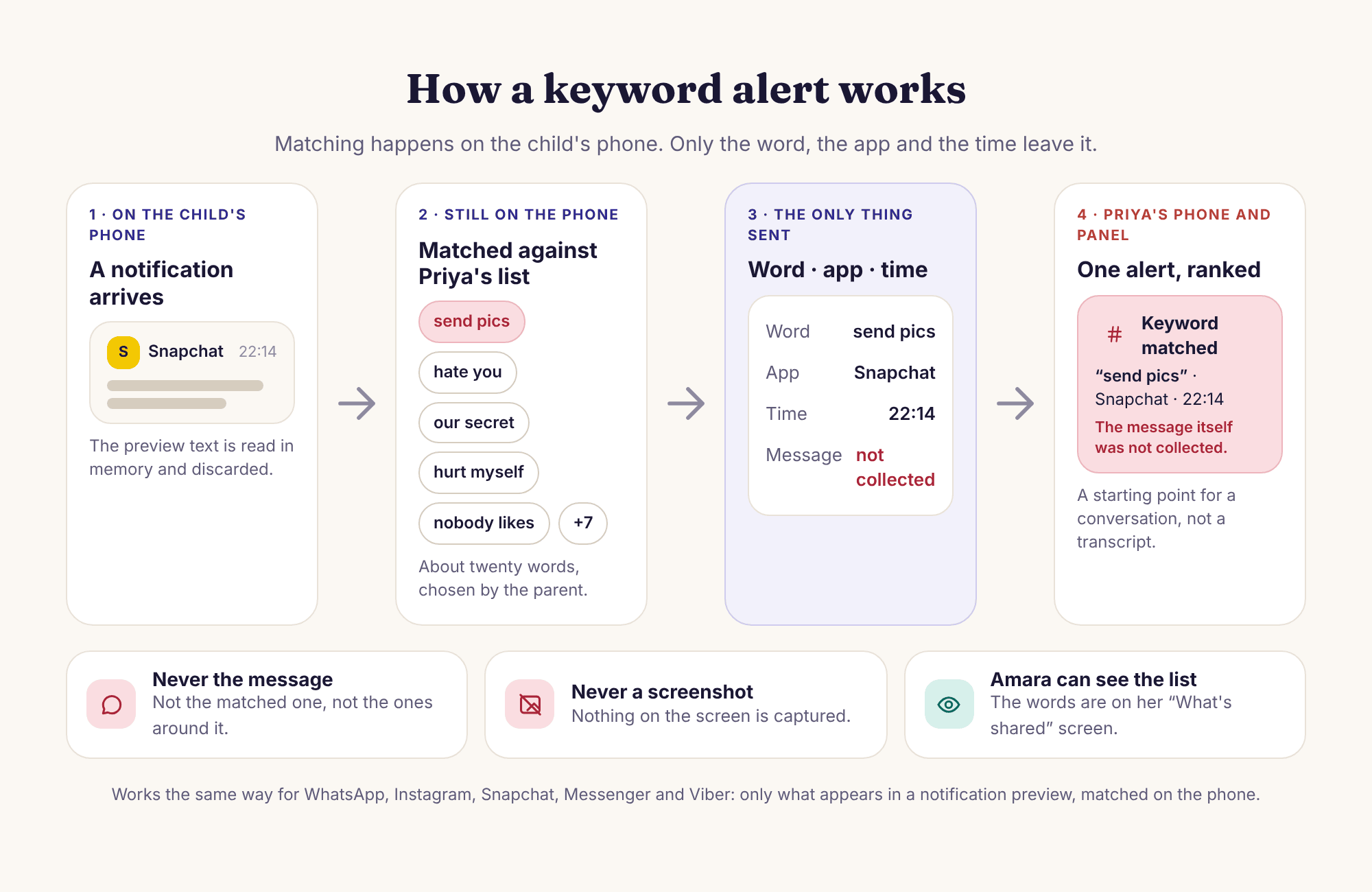
What is compared
The text Android shows in a notification preview: the few lines a message app puts on the lock screen. Incoming messages, group mentions, comment notifications. Nothing the child types, because outgoing messages do not produce notifications.
What is sent
Three fields: the matched word as you wrote it, the app the notification belonged to, and the clock time. Not the sender, not the sentence around the word, not the rest of the conversation. There is no field for those things.
What the child sees
The transparency screen on their phone lists keyword alerts as active and shows the same word list you see. A child who can read the list has no reason to wonder what else is being watched for.
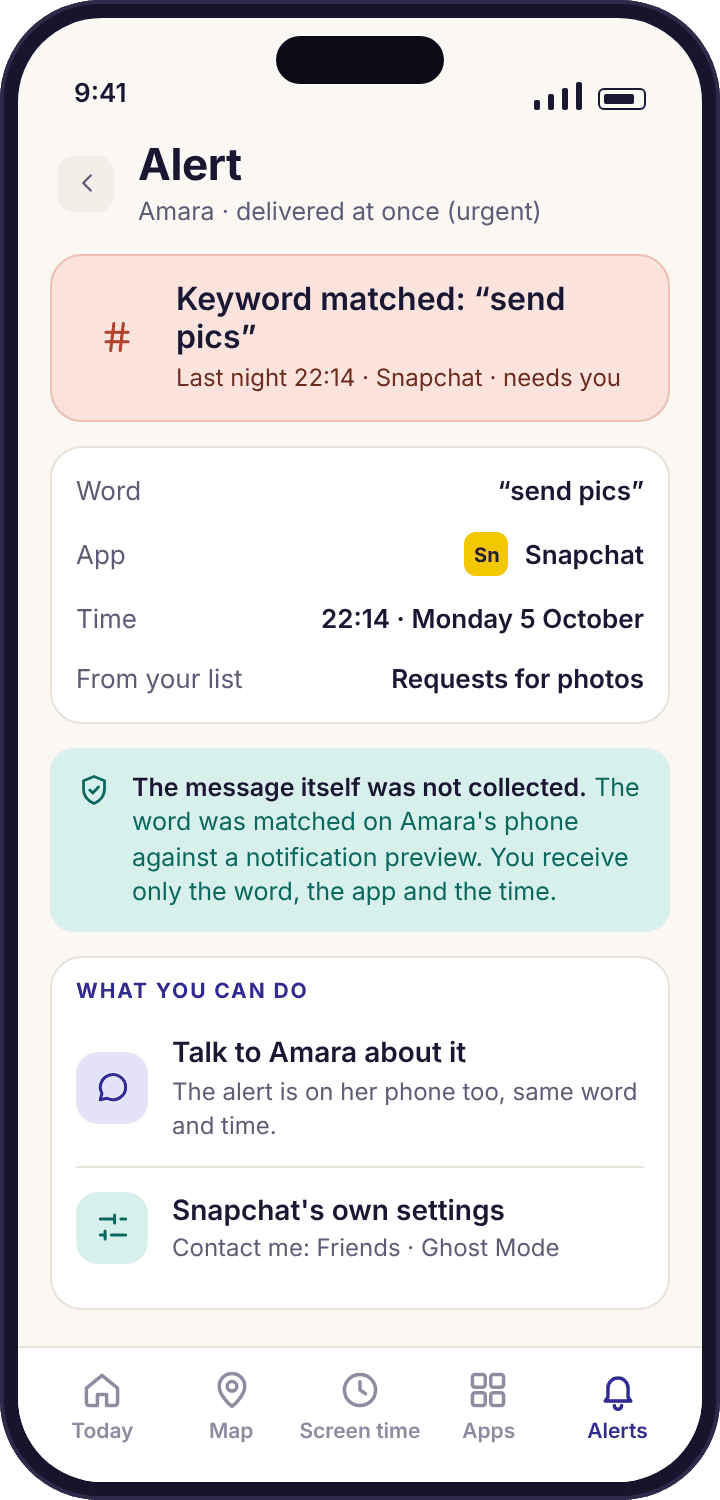
What a keyword alert looks like when it arrives
Priya's phone buzzes at 22:14 on a Tuesday. The alert reads: Keyword matched: "send pics" · Snapchat · 22:14, and underneath, in smaller type, "the message itself was not collected". That last line is on every keyword alert, because the first thing a parent wants to do is tap through to the message, and there is nothing to tap through to.
What Priya has is a word, an app and a time. She does not know who sent it, whether it was a joke between Amara and Tyler about holiday photos, or something she should be worried about. What she does have is a reason to ask, and a specific enough reason that the question can be plain: "Something on Snapchat at quarter past ten mentioned sending pics. What was that?" Amara knows the list exists and knows the phrase is on it, so the question is not an ambush.
- Three fields, always. Word, app, time. The alert has no sender field and no message field, on any plan.
- Ranked with everything else. Keyword matches land in the same feed as place arrivals and screen-time requests, sorted so the ones that need you sit at the top.
- Logged per child. Each child has their own list and their own matches; Noah's list is shorter and different from Amara's.
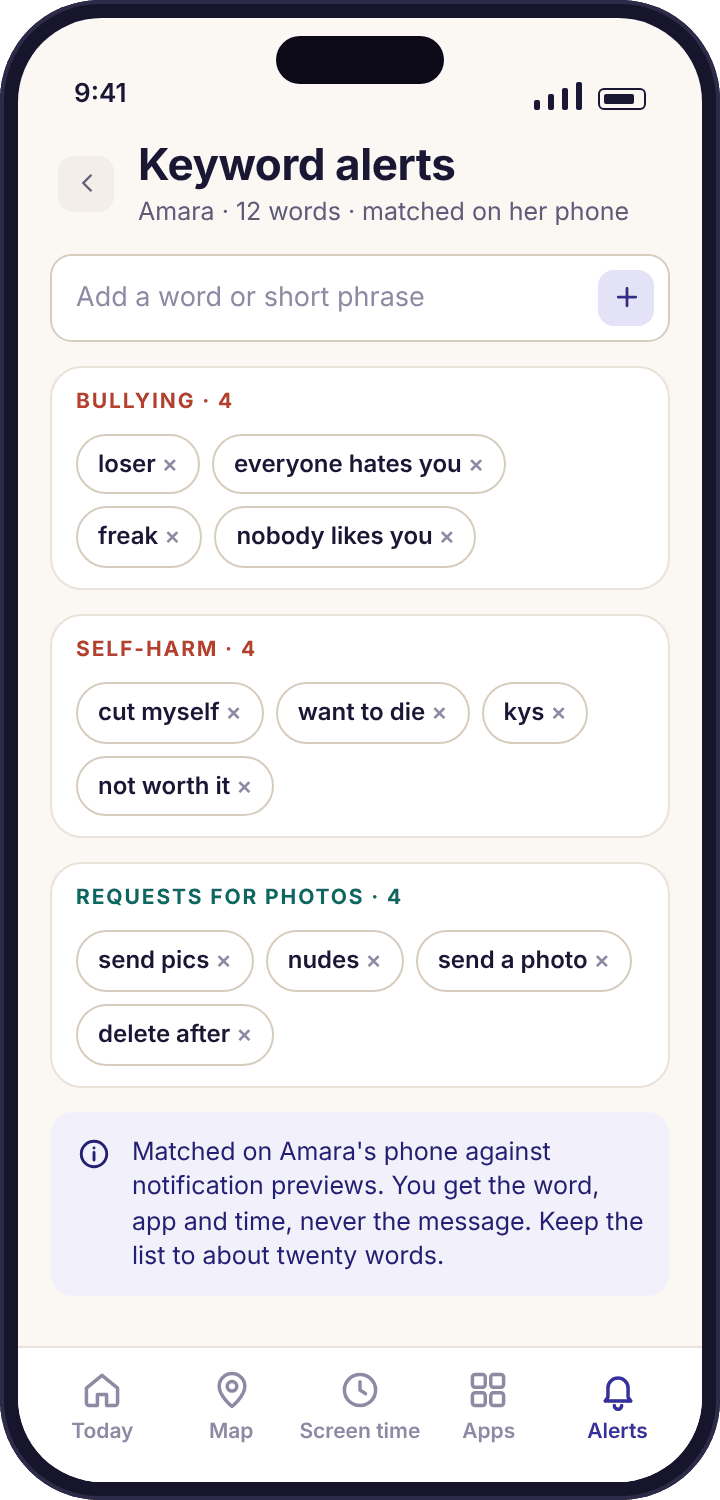
Building the list: twenty words, grouped by what worries you
The list editor opens with a starter set of about a dozen words in three groups: bullying, self-harm and requests for photos. You can keep them, delete them or add your own, and each child has a separate list. Our advice, repeated on the screen itself, is to stop at about twenty words. A list of eighty catches everything and tells you nothing, because by week two you have stopped reading the alerts.
A good entry is a word or short phrase that would rarely appear in an innocent message to a thirteen-year-old. "Send pics" is a good entry. "Pics" on its own is not, because a group chat about a school trip will trigger it fifteen times in an evening. Phrases are allowed and often better than single words, for exactly that reason.
- Capitals do not matter. "KYS" and "kys" match the same entry. Spelling does: if your child's friends write "ur" you will need "ur" as well as "your" in any phrase.
- Short words match inside longer ones. "Pill" matches "pillow". Prefer a phrase, or a word of six letters or more, unless the short one is unmistakable.
- Edits reach the phone the same afternoon. Add a word in the panel and the child's transparency screen shows it the next time the app checks in.
Why notification previews are the honest boundary
WhatsApp, Messenger and Viber encrypt messages end to end. The message exists in readable form on the sender's phone and on your child's phone, and nowhere between. Any app on your child's phone that claims to read those chats is either doing something Android forbids or is not telling the truth. What Android does offer, to any app the user grants Notification access, is the preview text a message app chooses to show in the notification shade.
That is the whole of what keyword alerts can see, and it is deliberately the whole of what we built on. It means the feature works the same way for every app that posts notifications, from WhatsApp to a game's chat, without needing to understand any of them. It also means the feature inherits the app's own limits: a chat your child has muted posts no notification, and a message read while the chat is already open on screen often never becomes one.
- Incoming only. Your child's replies do not produce notifications on their own phone, so they are never checked.
- Hidden previews hide the words. If an app is set to show "New message" instead of the text, there is nothing to match against. The social media monitoring page lists which apps have that setting.
- Nothing is stored for later. There is no option to keep previews that did not match. Unmatched text is gone the moment it is checked.
Five concerns, and the kind of words that catch each one without catching everything
These are the groups parents most often build a list around, with the sort of entry that works, the sort that fires all evening, and the one thing to remember when the alert arrives. Treat them as a starting point, not a prescription, and shorten rather than lengthen.
| Concern | Entries that work | Entries to avoid | When one fires |
|---|---|---|---|
| Bullying | "nobody likes you", "everyone hates", "kys", "loser" as a phrase with a name | "hate", "stupid", "ugly" on their own: ordinary banter between friends uses all three daily | A single match is usually a joke. Three from the same app in a week is a pattern, and the pattern is what you raise. |
| Self-harm | "want to die", "end it all", "cutting myself", "no point anymore" | "die", "dead", "kill": every game chat and most memes | Treat it as the one alert you act on the same evening, gently, and without saying how you knew the words. |
| Requests for photos | "send pics", "send a pic", "nudes", "snap of you", "delete after" | "pic", "photo", "selfie": the school trip group alone will fire these fifty times | Ask who was in the chat, not what was said. You cannot see the sender; your child can tell you. |
| Substances | "vape", "edibles", "get some weed", "bring the bottle" | "drink", "smoke", "high": too common in ordinary sentences | Age matters. At nine a match is almost always a word repeated from somewhere; at fourteen it is worth a calm conversation. |
| Meeting strangers | "don't tell your mum", "our secret", "meet up alone", "how old are you" | "meet", "secret", "alone": birthday surprises use all three | If it comes from an app where your child does not know the contacts well, check the app's own blocking tools first, then talk. |
A note on spelling. The match is against the text as it was written. Children abbreviate, misspell and substitute numbers for letters, and no list keeps up with all of it. A list that catches the plain spelling of twenty phrases is doing its job; a list that tries to catch every variant is a list nobody reads.
What keyword alerts will never be asked to do
The preview is checked and dropped, never stored.
The child app compares a notification preview against the list and discards it in the same moment. There is no setting that keeps previews, no "see context" upgrade, and no server copy to subpoena. If we built a way to store the text, the feature would stop being what the consent screen says it is.
Your child can read the list.
The transparency screen on their phone shows every word on the list, because a child who knows which words are watched for can decide what to tell you before the alert does. Parents sometimes ask for a hidden list. The answer is no, for the same reason there is no hidden mode: a secret list turns a safety net into a trap.
Three fields, and no fourth.
Word, app, time. We are regularly asked to add the sender's name, and we understand why. We will not, because the sender's name is the first step towards the message, and the second step is always requested next. A keyword alert is a reason to talk, not a transcript.
Short lists by design.
The editor nudges you towards about twenty entries and shows the count. Long lists produce an alert feed nobody reads, and an alert feed nobody reads is worse than none, because it gives you the feeling of watching without the fact of it. The smart alerts feed groups repeats for the same reason.
Four reasons a keyword list goes quiet, and the one that is not a fault
A silent keyword list usually means nothing matched, which is the normal state for most families most weeks. When you suspect it should have matched and did not, it is nearly always one of these.
No matches since setup, including on words you tested.
Notification access was declined during pairing, or was switched off by an Android update. This is the permission that powers the whole feature, and without it the child app sees no notifications at all.
Fix: The device health line names the missing permission. On the phone: Settings → Notifications → Device and app notifications (or Notification access on older versions) → MobileTracking → Allow. Grant it together; it takes one toggle.
Matches from some apps but never from WhatsApp.
WhatsApp's "Show preview" is off, so its notifications say "New message" with no text. The same setting exists in Messenger, Viber, Instagram and Snapchat under different names.
Fix: Open the app's own notification settings on the child's phone and turn previews back on. This is your child's choice to make with you; the tracker cannot override it and should not.
A word you know was sent did not match.
The chat was muted, so no notification was posted, or your child was already in the conversation when the message arrived and the app did not post one. Or the spelling differed: "snd pics" is not "send pics".
Fix: Nothing to repair. This is the feature's boundary rather than a fault. Add the abbreviated form if your child's friends use it consistently, and keep the list short regardless.
The list on the child's phone is older than the one in the panel.
The phone has not checked in since you edited the list, usually because battery optimisation has put the app to sleep.
Fix: Device health shows the last check-in time. If it is hours old, switch battery optimisation off for MobileTracking (Settings → Apps → MobileTracking → Battery → Unrestricted). The new list arrives at the next check-in.
A keyword alert is a prompt to talk, and that is all it is
What to do with the first match
The first keyword alert most parents receive is a false alarm, and how you handle it sets the tone for every one after. Priya's first was "loser" from a group chat on a Thursday afternoon. She had the word on the bullying list. It turned out to be Tyler, about a football result. Had she opened with "who is calling you a loser?", Amara would have learned that any alert means an interrogation. Instead she waited until the evening, mentioned that the list had flagged something from the group chat, and asked whether the chat was being nice to her. The answer took ten seconds and the subject moved on.
The rule that comes out of that: wait for a quiet moment, name the app and roughly the time, and ask an open question. You cannot see the sender or the message, so do not pretend to. "Something came up on Snapchat last night" is true and leaves room. "Who sent you that?" is a question you cannot follow up on, because you have no idea what "that" was.
False alarms, and why a short list has fewer
Every word on the list is a bet that it appears more often in trouble than in ordinary life. Single common words lose that bet almost every time. "Hate" appears in "I hate Mondays", "dead" in "I'm dead" after a joke, "pics" in every group chat about every trip. The entries that win are phrases: three or four words that rarely appear together innocently. A list of twenty phrases will fire perhaps a few times a month in a typical household. A list of sixty single words will fire several times a day, and after a fortnight you will have muted it.
When a false alarm does happen, remove or sharpen the entry straight away, from the alert itself. The habit of pruning is what keeps the feature useful into month three. The editor shows the count for exactly this reason: if it reads 34, something needs to go.
They can see that you looked
Your child's phone shows that a parent opened the panel today, though not which screens. Combined with a word list they can read, this means a keyword alert never arrives as a surprise from a system they did not know was there.
Agreeing the list together
Because the list is visible on the child's transparency screen anyway, the honest move is to build it with them. With a nine-year-old that is a short conversation: "There are some words that, if someone sends them to you, I want to know about, so we can sort it out together." With a thirteen-year-old it can be a negotiation, and that is fine. Amara argued "loser" off the list on the grounds that her friends use it hourly, and she was right. She did not argue about "send pics", which tells you something about what she already understood.
Say plainly what you will and will not see: the word, the app, the time, and never the message. Then show them the alert screen so they can see that there is no message on it. Children who have seen the alert tend to believe it; children who have only been told about it tend to assume you can see more than you say.
How the list changes with age
For a child under eleven the list can be very short, often five or six phrases around strangers and secrets, because the apps posting notifications are mostly games and a family group chat. Between eleven and fourteen the social apps arrive, and so do the three groups the starter list covers. This is the age at which the feature earns its place. From fifteen upwards, many families drop keyword alerts altogether and keep the parts of social media monitoring that show time and timing, on the grounds that a sixteen-year-old's messages are theirs. Loosening it on purpose, and saying so, is part of the arrangement working.
What keyword alerts are not
They are not a way to read messages, and they do not become one on any plan. They are not a record of who your child talks to; the calls and SMS monitoring answers that for calls and texts by number and time, and nothing on this site answers it for chat apps. They are not evidence. A match is a word in a notification, with no sender and no context, and treating it as proof of anything is how a false alarm becomes a row. Used as a prompt, it is one of the quieter features in the app, and quiet is the point: most weeks it says nothing, and the week it says something, you are glad it did.
If what you want is to know how much time the social apps take and when, the smart alerts feed and the per-app pages for WhatsApp, Snapchat and Instagram cover that without a word list at all.
Questions parents ask about keyword alerts
Can I see the message that triggered a keyword alert?
No. The alert contains the word, the app and the time, and there is no message behind it to open. The child app compares the notification preview against your list on the phone and discards it immediately. We do not store previews on any plan, so there is nothing to show you later.
Does keyword matching work on WhatsApp if it is end-to-end encrypted?
Yes, as far as notifications go. Encryption means the message is readable only on the two phones in the conversation. Your child's phone is one of them, and it shows a preview in the notification shade, which is what the child app checks. If WhatsApp's "Show preview" is off, the notification carries no text and nothing can match.
Does my child know which words are on the list?
Yes. The transparency screen on the child app shows the current list for that child, and it updates the same afternoon you edit it. We do this on purpose. A list your child can read is a safety net they understand; a hidden one is a trap, and it does not belong in a visible app.
Are my child's own messages checked?
No. The feature only sees notification previews, and a phone does not post a notification for messages its owner sends. So an alert always refers to something that arrived, never to something your child wrote. That is a limit of the method, not a setting, and it is worth explaining to your child so they understand what you can and cannot see.
How many words should I put on the list?
About twenty, and phrases rather than single words where you can. The editor shows the count and nudges you towards that number. A longer list fires on ordinary chatter, the alerts stop being read, and by week three the feature is doing nothing useful. Prune from the alert itself whenever a false alarm arrives.
Which permission does it need, and what happens without it?
Notification access, granted on the child's phone during pairing. Without it the child app sees no notifications, so keyword alerts and the notification counts in social media monitoring both stop. Everything else keeps working. Device health names the missing permission and shows the settings path if it is ever switched off.
Does a keyword alert wake me up at night?
That depends on your alert rules. Keyword matches are ranked as needing you, so by default they come through. If you have quiet hours set, you can decide whether keyword alerts are allowed to interrupt during them or wait for the morning. Many parents leave them on and set everything else to the daily summary.
Can it match words in a game's chat or a comment on a video?
Only if that app posts a notification containing the text. Game chat notifications and comment-reply notifications usually do, so they are checked like any other. Anything shown only inside the app, with no notification, is never seen. The feature does not look at the screen, only at the notification shade.
Will a match tell me who sent the message?
No. The alert has no sender field, and we will not add one. The sender is the first step towards wanting the message, and the message is the thing we do not collect. Ask your child who was in the chat; they can tell you in a sentence, and the conversation is better for being asked.
Is this available in the Google Play build?
Yes. Keyword alerts rely on Notification access, which both builds request, so the feature is identical in the Google Play build and the direct APK. The only difference between the two builds is call and SMS logging, which is in the APK build alone.
Where this fits with everything else
A keyword list answers one narrow question, which words arrived; the features around it answer the rest: social media monitoring, smart alerts, SMS tracker, Messenger tracker and Viber tracker.
Keyword alerts switches on once your child's phone is paired with your account, which takes about ten minutes with both devices on the table. The download and setup guide walks through every screen.
Twenty words, checked on their phone, and a reason to talk.
Build the list together, grant Notification access during pairing, and the alert that matters arrives with the word, the app and the time. Never the message.
Android · Free account · Visible on your child's phone