Place alerts: be told when they arrive, instead of checking
Save the handful of places your child's week revolves around, draw a circle around each, and MobileTracking sends one short message when a phone crosses the edge: "Amara arrived at Oakridge School · 08:49". Each place has its own rules, so school can alert on arrival and on leaving before 15:00 while Home says nothing at all. Overnight the alerts wait, and the routine ones can be folded into a single evening summary. The aim is a parent who stops opening the map, and a child who knows exactly which four circles exist because they helped draw them.
Android · Visible on their phone · Every saved place is listed on the child's "What's shared" screen

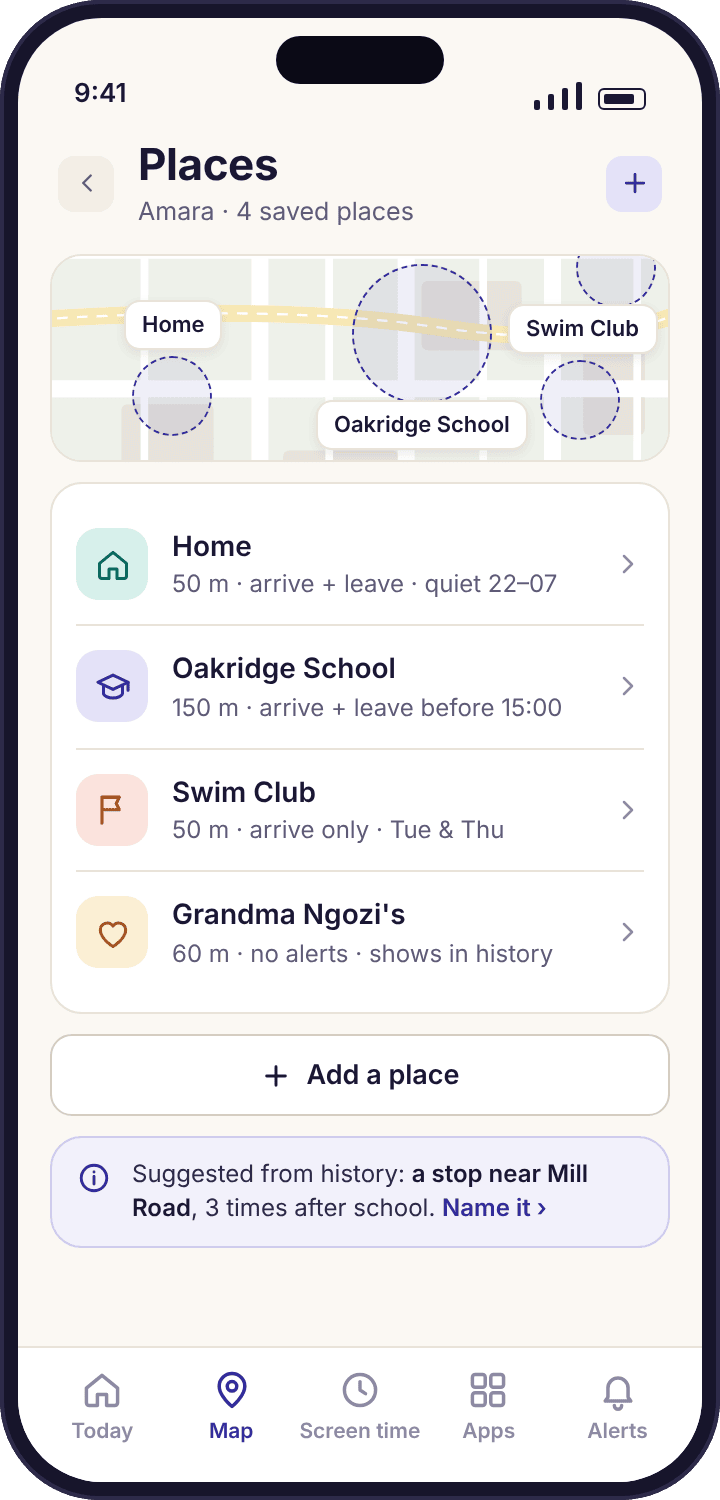
The Okafors' four places, and the one they decided not to save
A place alert is only as good as the decision behind it: where the circle goes, how big it is, and which crossings deserve a message. These four worked situations cover the decisions most families face in the first month, including the one where the right answer is to add nothing.
Noah's first day walking to Oakridge School alone
Noah is nine and has been walking the eleven minutes to school with Amara. This term she catches an earlier bus, so he goes on his own. Priya does not want to watch a map for eleven minutes every morning for the rest of the year; she wants one message when he gets there and silence otherwise.
She opens the places list, taps Oakridge School, and sees the default 50-metre circle sitting on the front gate. For a school that is too tight: the playground, the sports hall and the back entrance are all outside it, and a phone in a classroom at the far end could be read as "not arrived" for half the morning. She drags the radius to 150 metres so the circle covers the whole site with a little to spare, switches on "Arrive" and leaves "Leave" off for Noah, because a nine-year-old leaving school early is a phone call from the office, not something a geofence needs to catch.
What the app did: At 08:51 on Monday Priya's phone buzzed once: "Noah arrived at Oakridge School · 08:51". By Thursday she had moved that alert into the daily summary, because an on-time arrival four days running had stopped being news. Noah's own phone lists the place, the radius and the rule under "What's shared".
Swim Club on Tuesdays and Thursdays, and the afternoon that went wrong
Amara swims after school twice a week and gets herself there by bus. The place is a leisure centre with a car park, and the useful question is not "is she there now" but "did she get there at all", because the club has a habit of cancelling sessions by text to the parents' group that Priya reads two hours late.
Swim Club gets a 100-metre circle to take in the car park and the bus stop outside, "Arrive" on, and "Leave" on as well, because a departure at 16:20 instead of 17:10 is exactly the kind of thing Priya wants to know about before she drives to collect her. There is no time condition on the departure rule here; any departure is worth a line.
What the app did: On one Thursday the arrival alert did not come at 16:05, and instead at 16:12 the message was "Amara arrived at Home". The session had been cancelled and she had got the next bus back. Priya knew before she had read the parents' group, and the location history for that afternoon showed the bus journey home and nothing else, which was all she needed.
Sunday afternoons at Grandma Ngozi's
Both children spend most Sunday afternoons at their grandmother's, a twenty-minute bus ride that Amara has started doing without a parent. Grandma Ngozi does not have a smartphone, and ringing her landline to check they arrived has become a small weekly embarrassment for everyone, Grandma included.
Grandma Ngozi's is a terraced house, so the default 50-metre circle is about right; Priya nudges it to 60 so a reading from the back garden counts. "Arrive" on, "Leave" off. She also sets this place's arrival to go into the daily summary rather than interrupting, since a Sunday arrival is routine, then changes her mind after the first week and makes it an interruption for Amara only, because the solo bus journey is still new. The two children can have different rules for the same place.
What the app did: "Amara arrived at Grandma Ngozi's · 14:12" buzzed once on Sunday, and Noah's arrival ten seconds later, with Priya in the car, sat quietly in the 18:00 summary. The landline calls stopped. Grandma asked why, and Amara showed her the place on her own phone, radius and all.
Tyler's house, which Priya decided not to fence
Amara spends two or three afternoons a week at Tyler's. Priya would, in a weak moment, quite like to know when she arrives and leaves, and the app would let her add the house in thirty seconds. She asks herself what she would say when Amara found it on the "What's shared" screen that evening, because Amara would find it that evening.
The answer is that there is nothing to say. Fencing a friend's house tells a thirteen-year-old that her friendship is being monitored, and it tells the friend's parents something too, since Tyler would hear about it by the following day. The information gained is tiny: the history already shows an afternoon stop near Tyler's road, and Amara already says where she is going. What is lost is the whole arrangement, which only works while the places on the list are the places Amara would have chosen herself.
What the app did: Nothing, which was the point. Priya told Amara she had thought about it and decided against it, and why. The places list stayed at four. If Amara ever asks for Tyler's house to be added so that Priya stops texting "are you there yet", that will be a different conversation, started from the other side.
Every place has its own rules, and so does every child
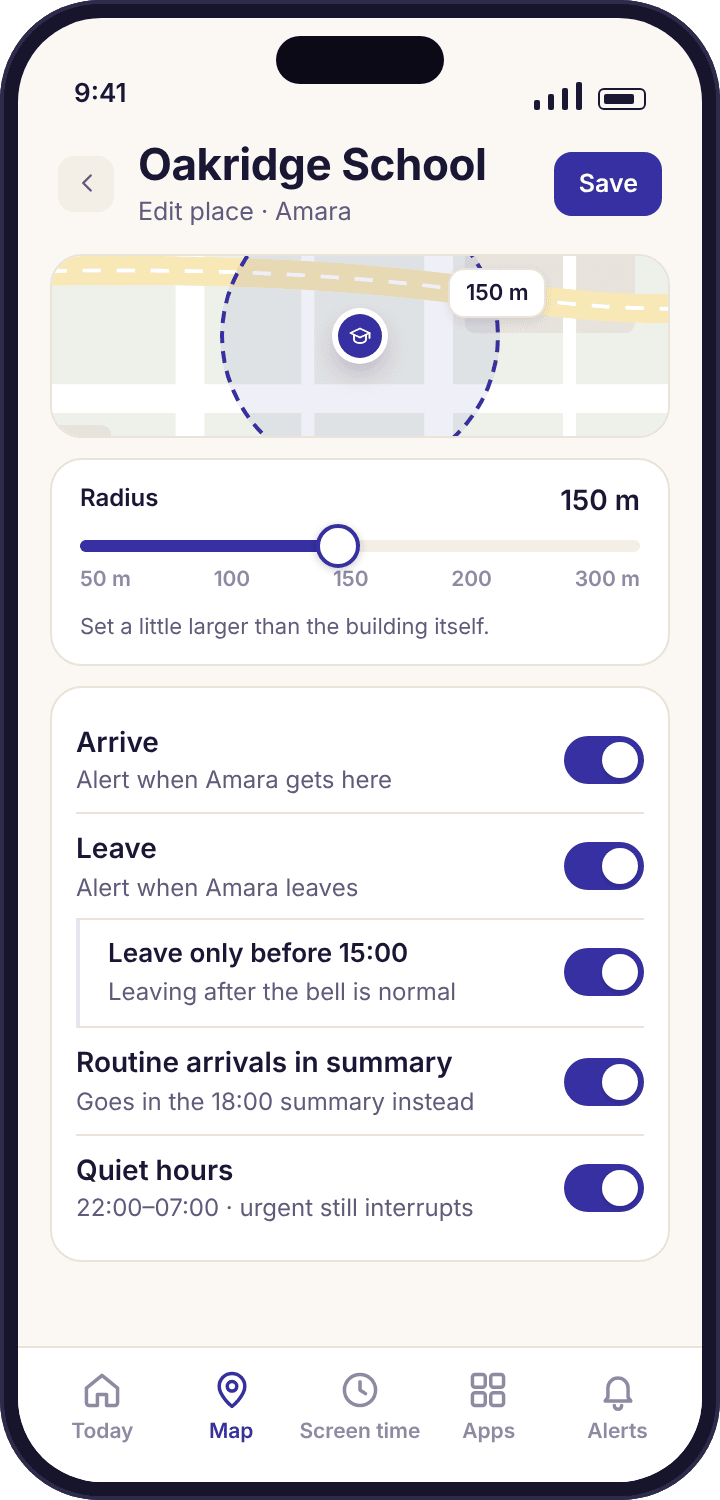
Editing a place shows everything about it on one screen. At the top is the map with the circle and a radius slider under it, starting at the default of about 50 metres. Below are two switches, "Arrive" and "Leave", which can be on or off independently, so a place can alert on arrival only, departure only, both, or neither. A place with neither rule still earns its name on the history timeline, which is reason enough to save Home even if you never want a message about it.
The "Leave" rule takes an optional time condition: "only before 15:00" for Oakridge School means a departure at 15:31 is silent and a departure at 11:20 is an alert. This is the single most useful setting on the page, because it turns a departure rule from a daily nuisance into a message that only ever arrives when something has changed. Rules are per child as well as per place, so Noah's school rules can differ from Amara's at the same gate.
- Interrupt or summarise. Each rule can buzz your phone at once or wait for the daily summary. Routine arrivals belong in the summary; early departures belong in your pocket.
- Quiet hours overnight. Place alerts hold between the hours you set, so a phone that drifts out of the Home circle at 02:00 from the bedroom does not wake you. They are listed in the morning.
- Who set it is recorded. A co-parent sees "rule changed by Priya, Tuesday 21:30" on the place, so nobody is surprised by an alert the other parent added.
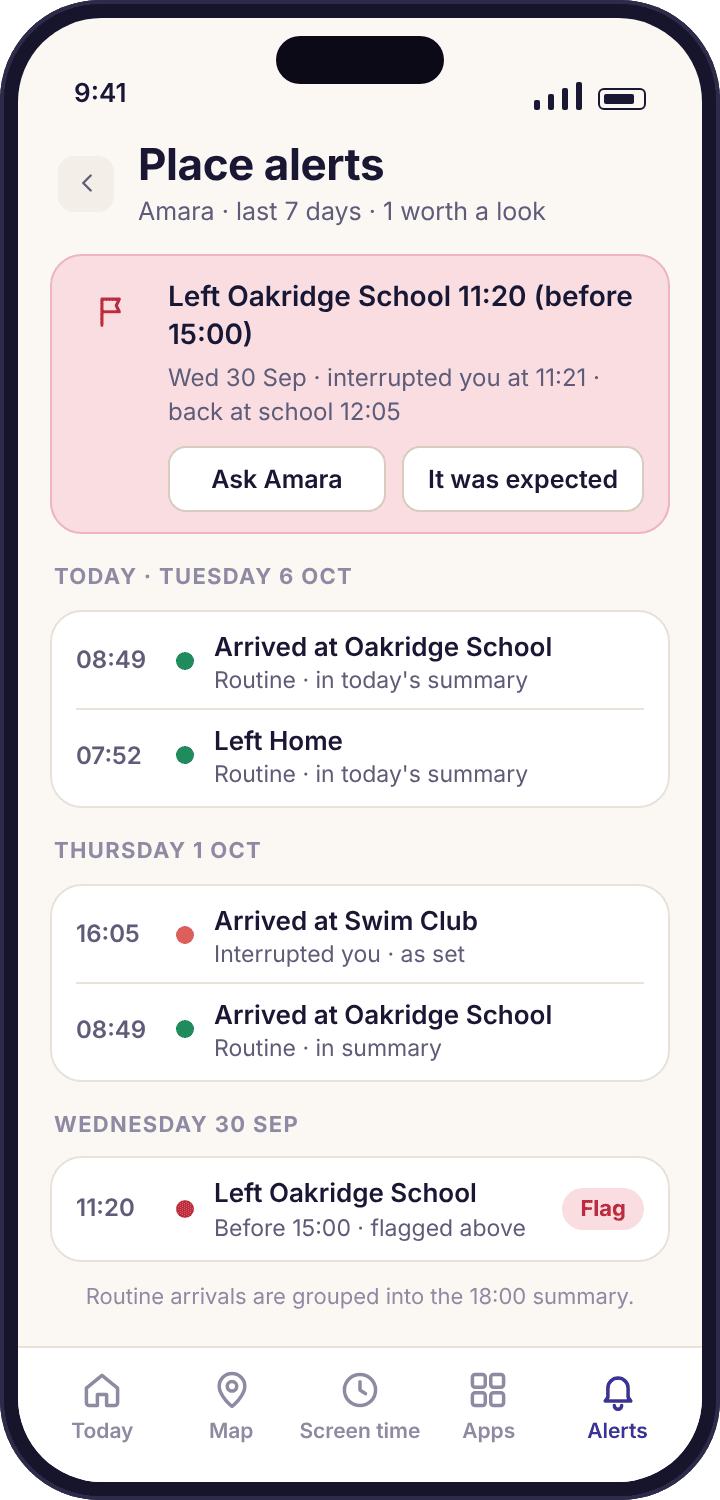
What a week of place alerts looks like when the rules are right
A good week is dull. The alerts screen for the Okafors' week shows arrivals at school, two arrivals at Swim Club, one at Grandma Ngozi's, and most of them tagged "summary" because Priya moved them there once they stopped being news. One line is different, and it is drawn in rose: "Amara left Oakridge School · 11:20 (before 15:00)". That line is the reason the feature exists. A two-hour absence that would otherwise have vanished into an ordinary Wednesday became a question at dinner, with a dull answer about a dentist the other parent had booked.
Alerts reach you as a notification on your phone and as a list in the panel, each with the place, the time and a link to the map. They fire on crossings of circles you drew, not on movement in general, so the list is a list of events rather than a stream of positions. A co-parent you invite gets the same alerts, and the device health line tells you both if a phone has stopped reporting, which is the one situation in which silence from a place does not mean the child is still there.
What the alert never contains is why. "Left Oakridge School at 11:20" is the entire message. It does not come with a photo, a sound clip, a list of who was nearby or a guess about what happened, because the app collects none of those things. The why comes from Amara, and the alert gives you a precise, calm way to ask for it.
How big to draw the circle, place by place
The default is about 50 metres, which suits a house. Most other places need more, because a circle has to be large enough that a rough indoor reading still lands inside it, and small enough that the shop over the road does not count as school. These are the starting sizes we suggest, and why.
| Place type | Suggested radius | Arrive | Leave | Why that size, and what to watch |
|---|---|---|---|---|
| Home (house or flat) | 50–80 m | Summary, or off | Usually off | Indoors at home the phone reads from Wi-Fi and can wander a few doors down. Draw the circle to cover the garden and the parking space. Departure alerts from Home on school mornings are noise; switch them off or wait for quiet hours to end. |
| School | 120–200 m, a little larger than the site | On, then summary once routine | On, "only before" the end of the day | A school is several buildings, a playground and a field. A tight circle produces false "left" alerts at break time. Stand at the far corner on the map and make sure it is inside. The time condition is what makes the departure rule worth having. |
| Sports club or leisure centre | 80–120 m | On | On, any time | Include the car park and the bus stop. Sessions get cancelled, and a departure forty minutes early is the thing you want to hear about. Sports halls are hard on phones; a generous circle absorbs the rough readings. |
| A relative's house | 50–70 m | On for a new journey, summary once it is routine | Off | Useful mainly while the route is unfamiliar. When the child has done the journey alone a dozen times, move the arrival to the summary and let the place keep its name on the timeline. |
| A park or an open space | 150–300 m | Summary | Off | A park has no building to anchor the circle, and children move around it. A large circle with a summary-only arrival gives the history a name for the place without a single interruption. |
| A friend's house | Do not save it | — | — | The history already shows a stop on that road. What a fence adds is a message to your child that the friendship is being monitored, and that message is read within the day. If a friend's house ever gets saved, it should be at your child's request. |
Two things make the radius less fiddly than it sounds. A crossing needs more than one reading to agree, so a single rough fix that lands outside the circle for a moment does not fire anything. And the location tracking page's accuracy circle is drawn on the same map as the place circle, so when you are choosing a size you can see how far the phone's own estimate wanders at that spot and draw the fence to cover it. If the two circles overlap the edge most of the time, go bigger.
Five ways a place alert goes wrong, and the setting behind each
Nearly every complaint about place alerts comes down to a circle the wrong size, a rule set at the wrong time, or a phone that has stopped reporting. Each has a fix that takes under a minute.
"Left school" fires at 10:40 and "arrived" again at 10:55, most days.
The circle is too small for the site. At break the phone goes to the far side of the playground, a rough reading lands outside the fence, and a crossing is recorded in each direction.
Fix: Open the place, drag the radius out until the whole site plus a margin sits inside, and save. For Oakridge School that was 150 metres. If you want to keep a departure rule, add the "only before 15:00" condition so a break-time wobble can never look like a real exit.
The arrival alert comes twenty minutes after the child got there.
The phone reports where it settles, not every step, so a crossing is confirmed when the phone comes to rest inside the circle and a second reading agrees. Indoors, that first settled reading can take a while.
Fix: Nothing to fix; this is how a low-power fence works. If you need the moment of arrival to the minute, you are asking for a feature that keeps the satellite receiver running all day, which is a feature we have chosen not to build.
No alerts at all since Tuesday, from any place.
The phone has stopped reporting, so no crossing can be seen. The usual causes are a flat battery, battery optimisation switched back on after an update, or the Location permission dropped to "While using the app".
Fix: Open device health. It names the cause and gives the Settings path, and can send the child a one-tap prompt to fix it together. Place rules are not the problem and do not need touching.
"Arrived at Home" at 02:14 woke me up.
Overnight, a phone on a bedside table can take a rough Wi-Fi reading, drift outside the Home circle, and then settle back inside it, which counts as an arrival. Quiet hours were not set, or the Home circle is too small.
Fix: Set quiet hours on the place or across all places (22:00 to 07:00 suits most families), and widen Home to 60 or 70 metres. Alerts that happen inside quiet hours are listed in the morning rather than lost.
My phone buzzes four times every school day and I have started ignoring it.
Routine arrivals are set to interrupt. After the first week an on-time arrival at school is not information, and an alert feed that repeats itself stops being read, which makes the one unusual line invisible.
Fix: On each routine place, change the arrival from "Interrupt" to "Summary". The arrivals still happen and still appear in the 18:00 digest; only the early departure and the new journey keep the right to buzz. The smart alerts page covers the same idea across every alert type.
What parents ask about saved places and the fences around them
How many places can I save for each child?
As many as a child's week needs, and we would suggest four or five. Home, school, one or two activities and a relative's house cover almost every family. Beyond that, each extra fence is one more thing on your child's "What's shared" screen, and the alert feed gets noisier without getting more useful. A short list that your child helped choose outlasts a long one every time.
What radius should I use for a school?
A little larger than the whole site, which usually means 120 to 200 metres rather than the 50-metre default. A school has a playground, a field and more than one building, and a phone indoors at the far end reads tens of metres out. If the circle is tight, break time produces false departures. Drag the slider until the farthest corner of the site is inside with room to spare.
Can I get an alert only if my child leaves school early?
Yes. The "Leave" rule on any place takes a time condition, so "only before 15:00" on Oakridge School means a normal departure at 15:31 is silent and a departure at 11:20 arrives on your phone at once. This is the rule most parents keep on interrupt after they have moved everything else into the daily summary.
Will my child see which places I have saved?
Yes, all of them, with their radius and rules, on the "What's shared" screen in the child app. Adding or changing a place updates that screen the same afternoon. There is no way to save a place the child cannot see, and we would not add one. If a place would be awkward to explain when they find it, that is a reason not to save it.
Can I stop place alerts waking me at night?
Yes. Set quiet hours, either on one place or across all of them, and alerts inside that window are held and listed in the morning instead of buzzing. Most families use something like 22:00 to 07:00. A phone drifting briefly out of the Home circle from a bedside table is the usual cause of a 2 a.m. "arrived home", and a slightly larger Home radius helps as well.
Why did "arrived at school" come fifteen minutes after the bell?
Because a crossing is confirmed when the phone settles inside the circle and a second reading agrees, not when it first touches the edge. The app uses Android's low-power location services and reports resting points rather than polling, which keeps the battery cost low. A delay of some minutes on arrival is normal and does not mean the fence is in the wrong place.
Can the two children have different rules for the same place?
Yes. Places are saved once but rules are set per child, so Noah's Oakridge School can alert on arrival only while Amara's alerts on arrival and on leaving before 15:00. The same applies to interrupt versus summary. A co-parent sees who changed each rule and when, so neither of you is surprised by an alert the other set up.
Does a place alert tell me who my child is with or what they are doing?
No. An alert is the place, the direction of the crossing and the time, nothing more. The app does not take a photo, listen, read a message or look at who else is nearby to add context, because it collects none of those things on any plan. The alert gives you a precise question to ask; the answer comes from your child.
Should I add my child's friend's house as a place?
We would say no, and strongly. The history already shows an afternoon stop on that road, so the information gained is almost nothing. What a fence on a friend's house adds is a message, read by your child the same day and by the friend soon after, that the friendship is being watched. If a friend's house ever gets saved, let it be because your child asked for it to stop the "are you there yet" texts.
Do place alerts work if my child's phone has no mobile data?
The crossing is detected on the phone, so the phone knows it happened, but the alert cannot reach you until the phone has a connection. When it reconnects, the crossing is sent with its original time, so "arrived at Swim Club · 16:05" can land on your phone at 16:40 and still say 16:05. Nothing is lost; it is late.
Where place alerts fit with everything else
A place alert is the moment of arrival; the features beside it cover where the phone is right now, where it has been all day, and whether it is still reporting: location tracking, location history and device health.
Place alerts switches on once your child's phone is paired with your account, which takes about ten minutes with both devices on the table. The download and setup guide walks through every screen.
Four circles, one message a day, and the map stays shut.
Draw the places with your child beside you, choose which crossings deserve a buzz, and let the routine ones wait for the evening summary.
Android · Free account · Visible on your child's phone