Parental controls your child can see
MobileTracking is a parental control app for a child's Android phone that works in the open. It shows you where they are, how long they have been on the phone and which apps are new, and it shows your child the same list, on their own screen, every day. It never reads a message, takes a screenshot or listens through a microphone, on any plan, for any price.
Six things a parent can act on, and the line none of them cross
Every feature below collects the shape of a day, not the contents of it. Each has a page of its own that says what it shows, what it cannot show, and which Android permission it needs.
Where they are, with the time of the reading
A live map with an accuracy circle and the minute the phone last reported, a day's history turned into stops and journeys, and arrival alerts for the places you save. Outdoors it is usually within a few metres; indoors it can drift by tens of metres, and the map says so.
Location tracking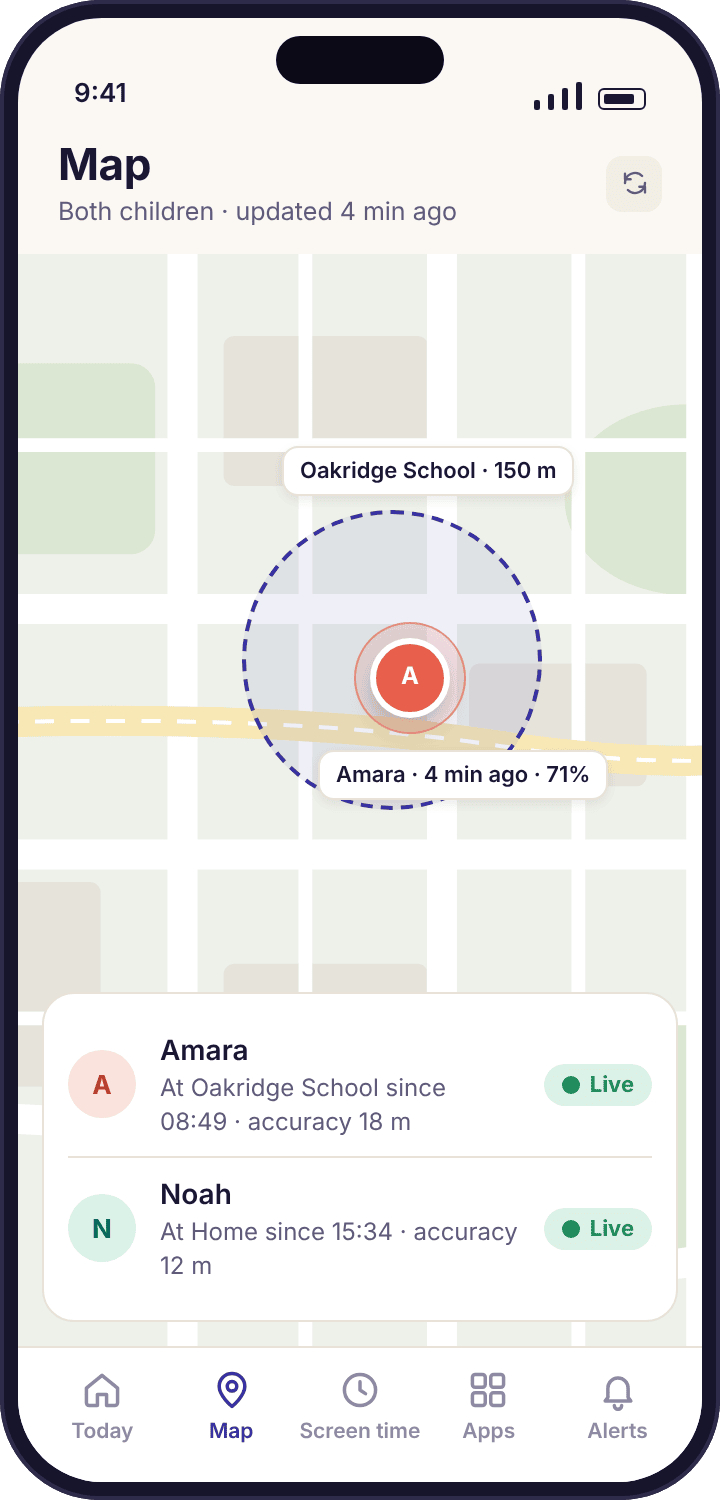
Screen time they can see coming
A daily budget per child, different for school days and weekends, with a ten-minute warning before games and video pause. Calls and maps keep working.
Screen time limits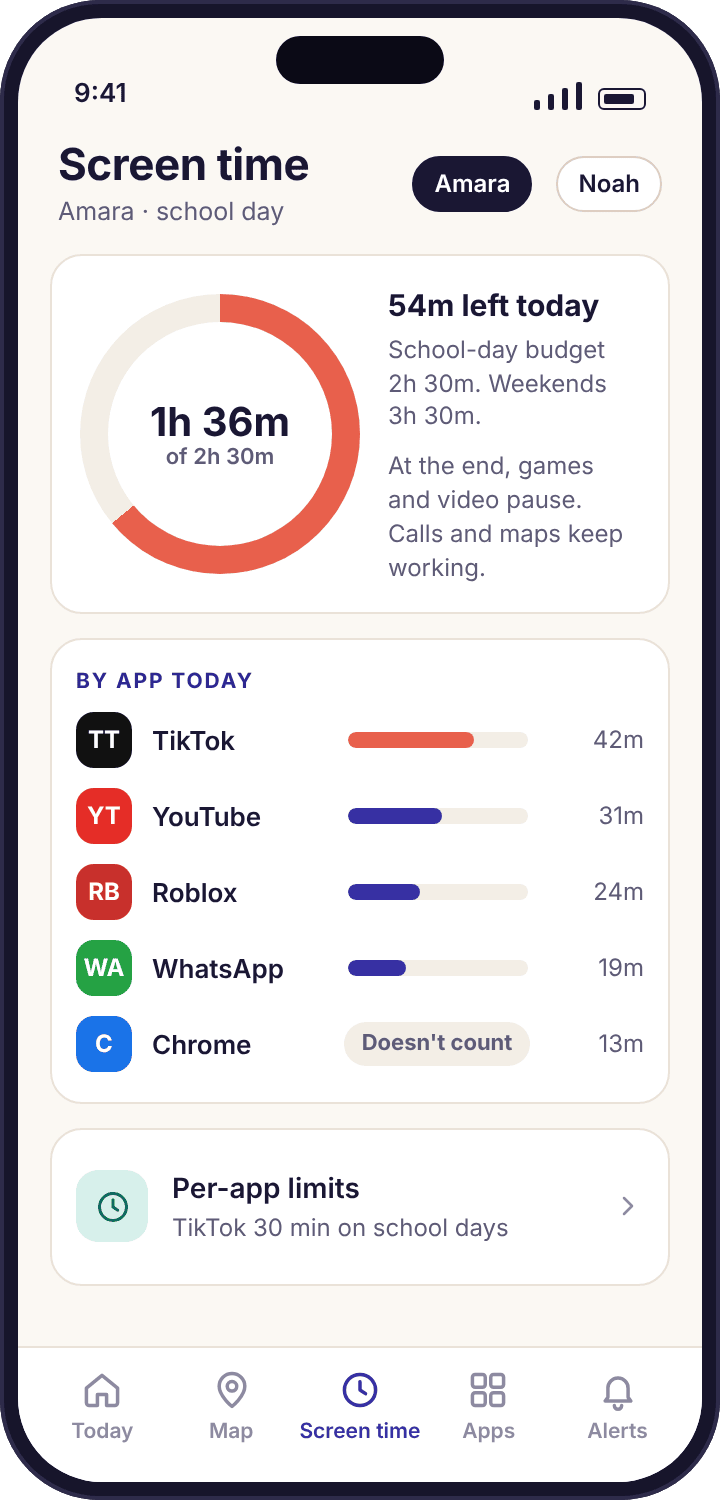
Web filtering on mobile data too
Category blocking that runs on the phone, so it holds on 4G and at a friend's house, with safe search locked on and an allow list for homework sites.
Web filtering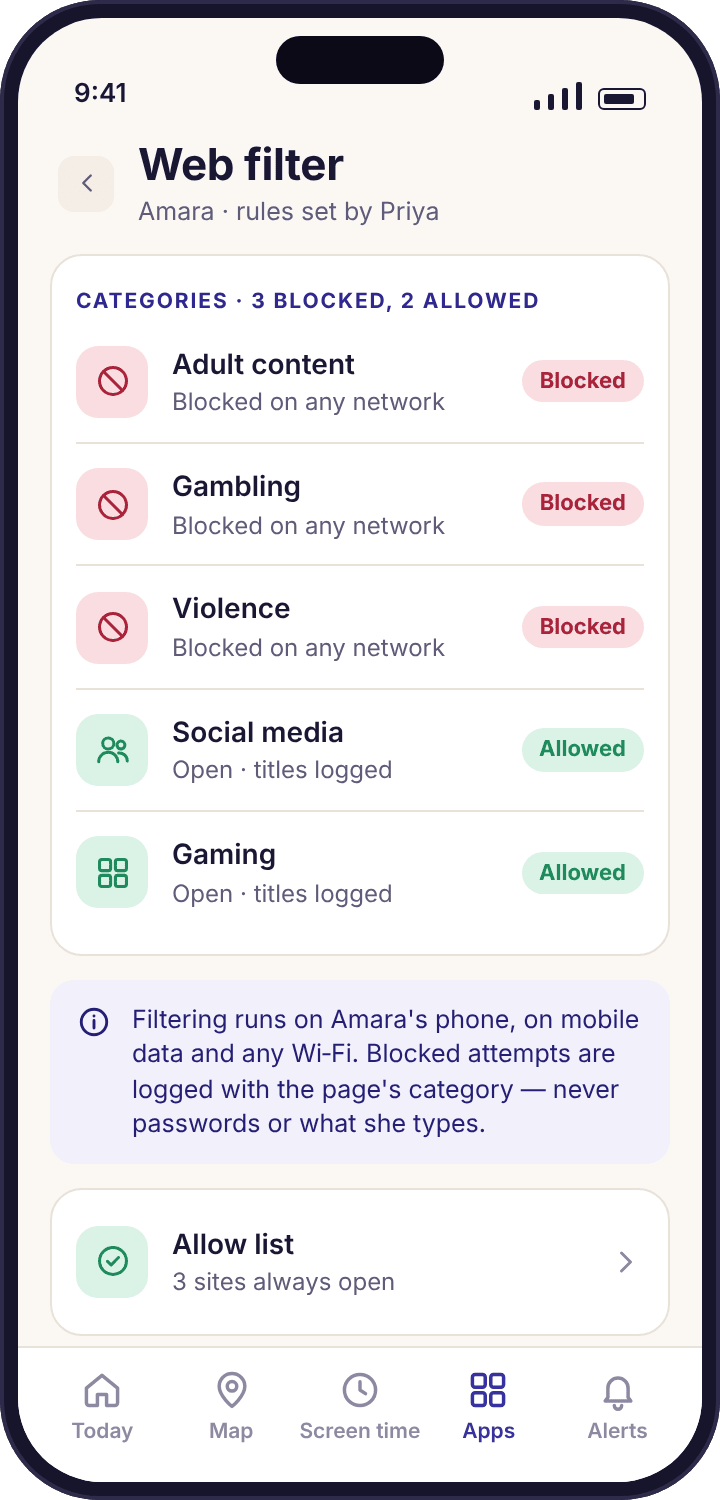
Keyword alerts, matched on the phone
A short list of words you choose is checked against notification previews on the child's phone. You get the word, the app and the time. The message stays where it is.
Keyword alerts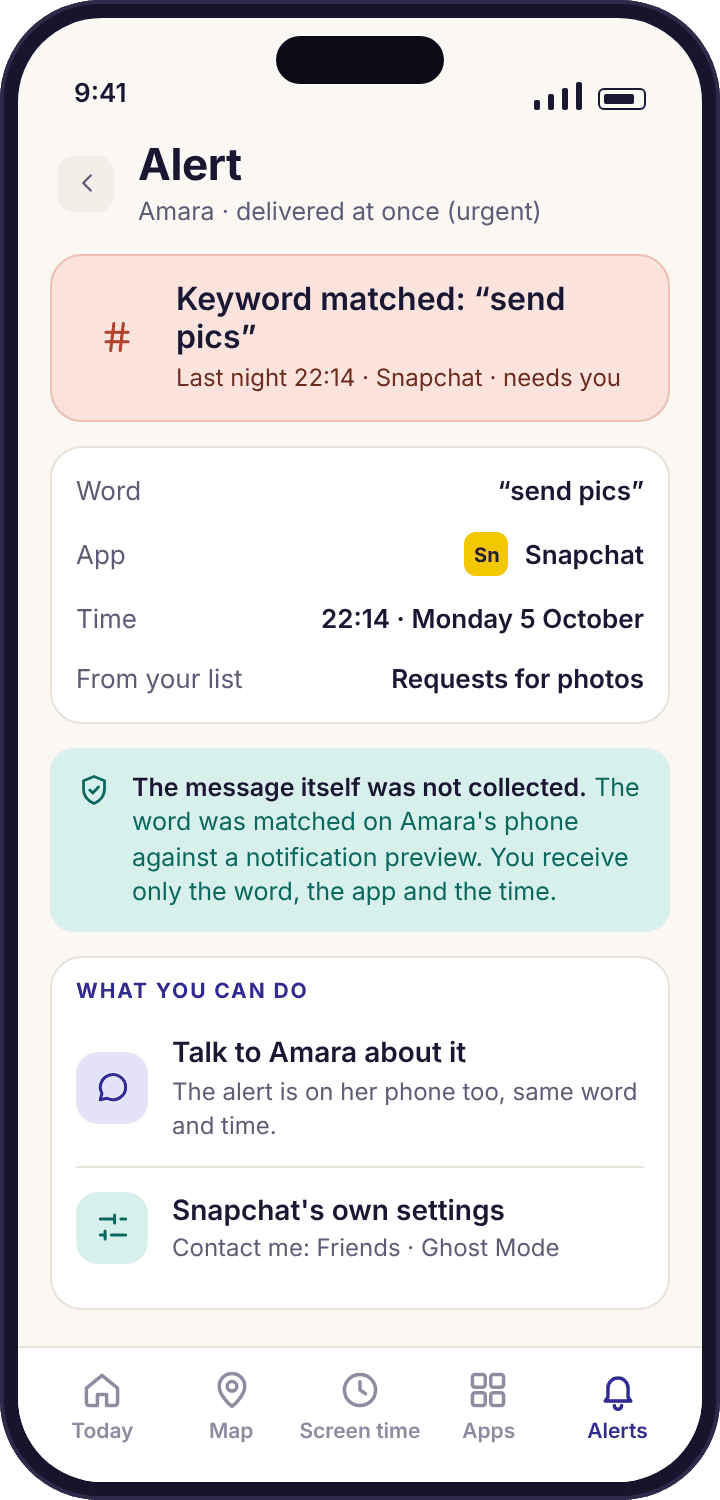
A child app with its own icon and its own screens
Your child gets a consent screen before anything is collected, a "What's shared" list that updates the same afternoon you change a rule, an "Ask for more time" button, and a note on the day a parent opened the panel. There is no version that hides.
The child app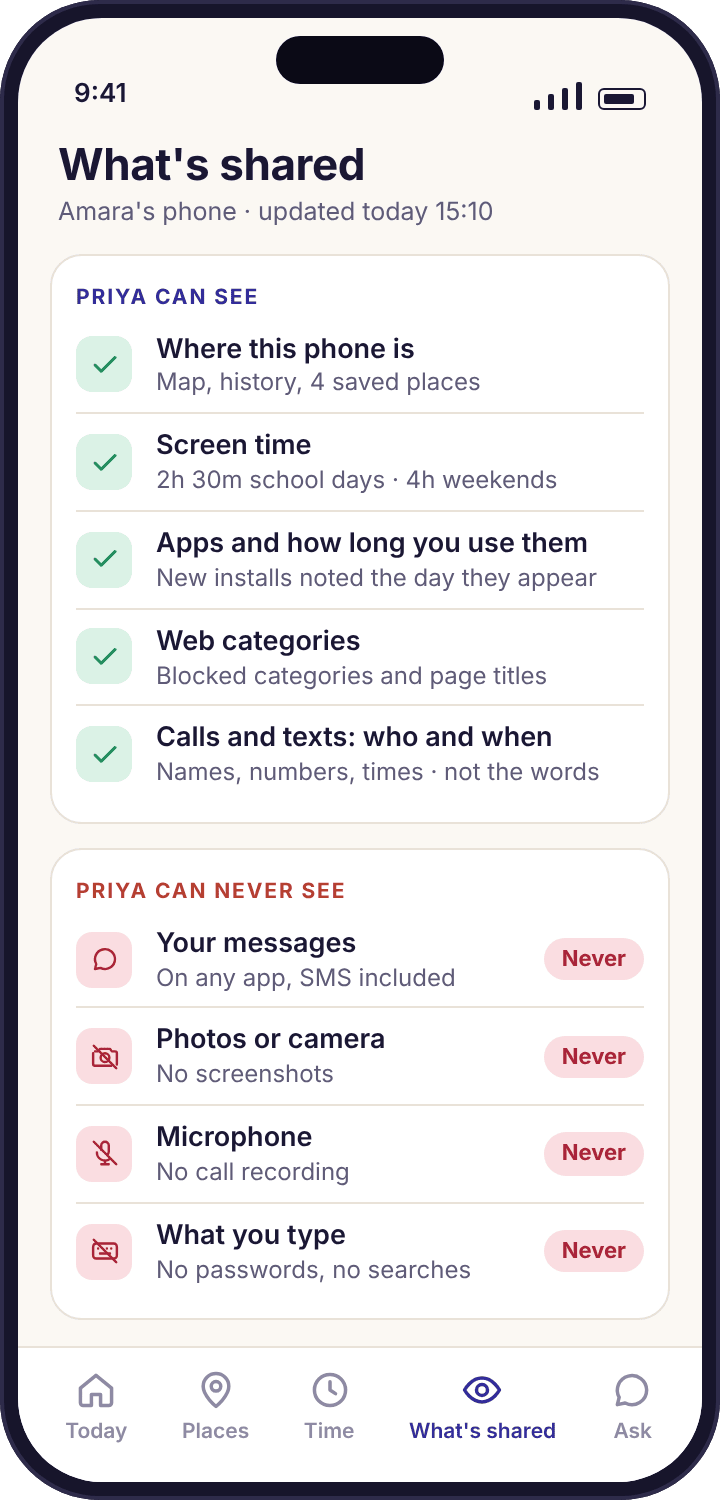
Device health, before you need it
A green, amber or red line per phone: battery, last check-in and any missing permission named exactly, so a quiet map is explained on a Tuesday rather than discovered in a panic.
Device health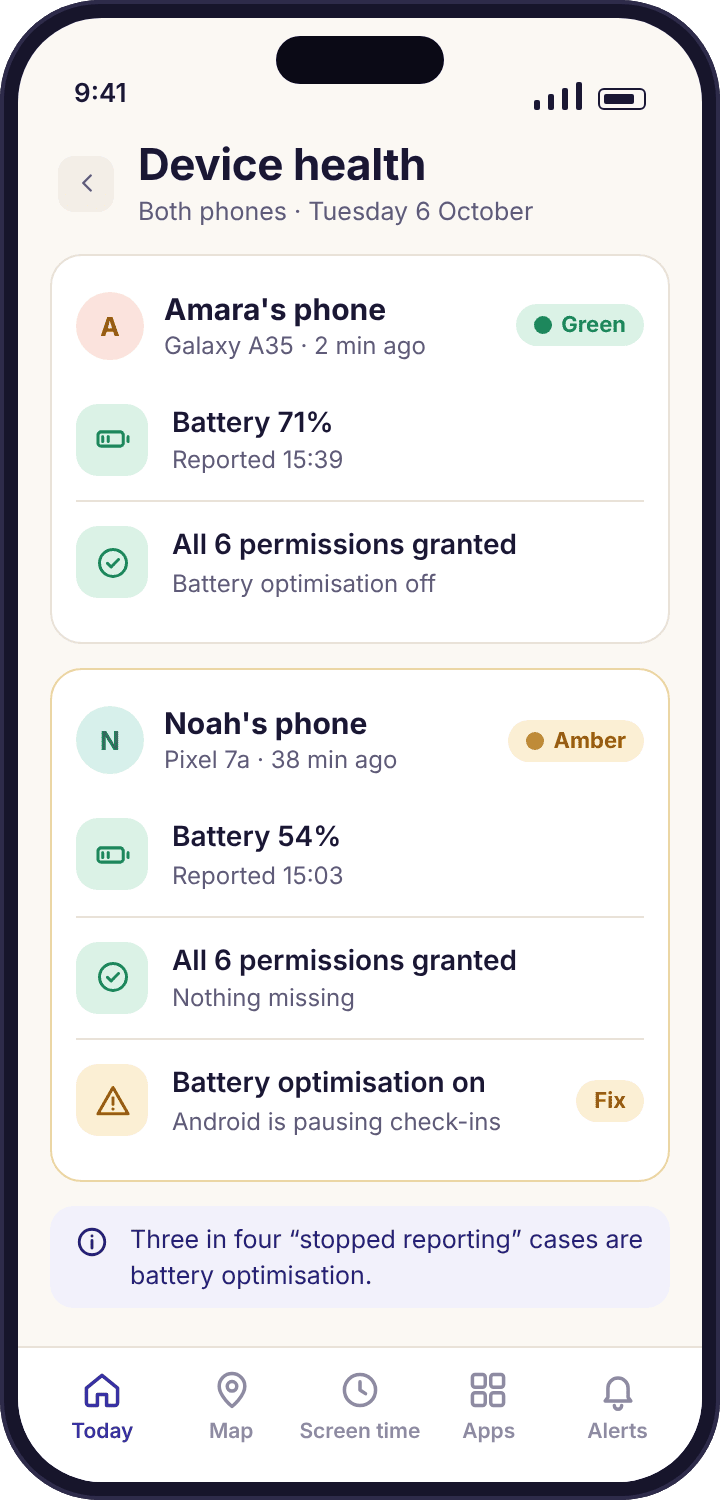
Calls and texts, the social apps, bedtime, app blocking and the rest are on the full feature list, each with the same two columns: what you see, and what you never see.
A Tuesday in the Okafor house
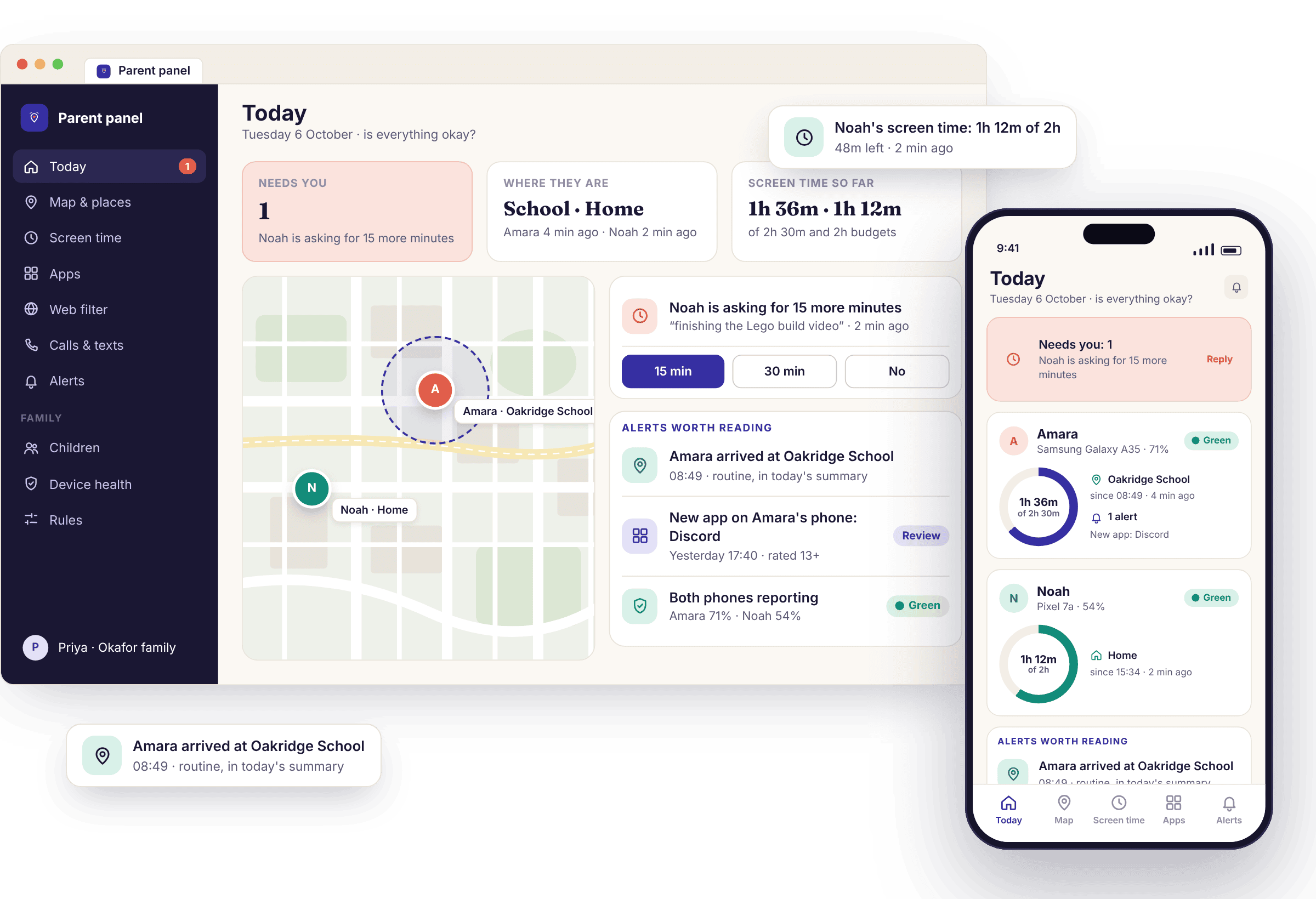
Priya has two children on one account: Amara, 13, on a Samsung Galaxy A35, and Noah, 9, on a Pixel 7a. This is what the app sent her on a school day with nothing much wrong in it, and what it did not send. Most days look like this one.
Nothing arrives, on purpose
Home is a saved place with arrival alerts only, because Priya decided she did not need to be told that the children went to school on a school morning. The departure is written into each child's location history and nowhere else. Her phone stays silent through breakfast.
The one alert worth having
Several readings in a row land inside the Oakridge School circle, which Priya set at about 150 metres so that the playing field counts. One notification: "Amara arrived at Oakridge School · 08:49". Noah's arrival four minutes later goes into the evening summary instead, because his school run is a routine Priya chose not to be interrupted by.
Flagged on the day, not read
App activity notices Discord for the first time and adds a chip to Amara's card: "New since Tuesday: Discord". The panel knows the app's name, its age rating and the permissions it asks for. It knows nothing about what happens inside it, and never will, because there are no screenshots and no keylogger to make that possible.
Inside the agreed window, so nothing fires
Oakridge School has a "leave" alert only before 15:00, the one departure rule that catches a child walking out mid-morning. Half past three is normal, so the app writes it to the history as the end of a six-and-a-half-hour stop and sends nothing. The history keeps a rolling window of recent weeks and then lets the day go.
"Needs you: 1"
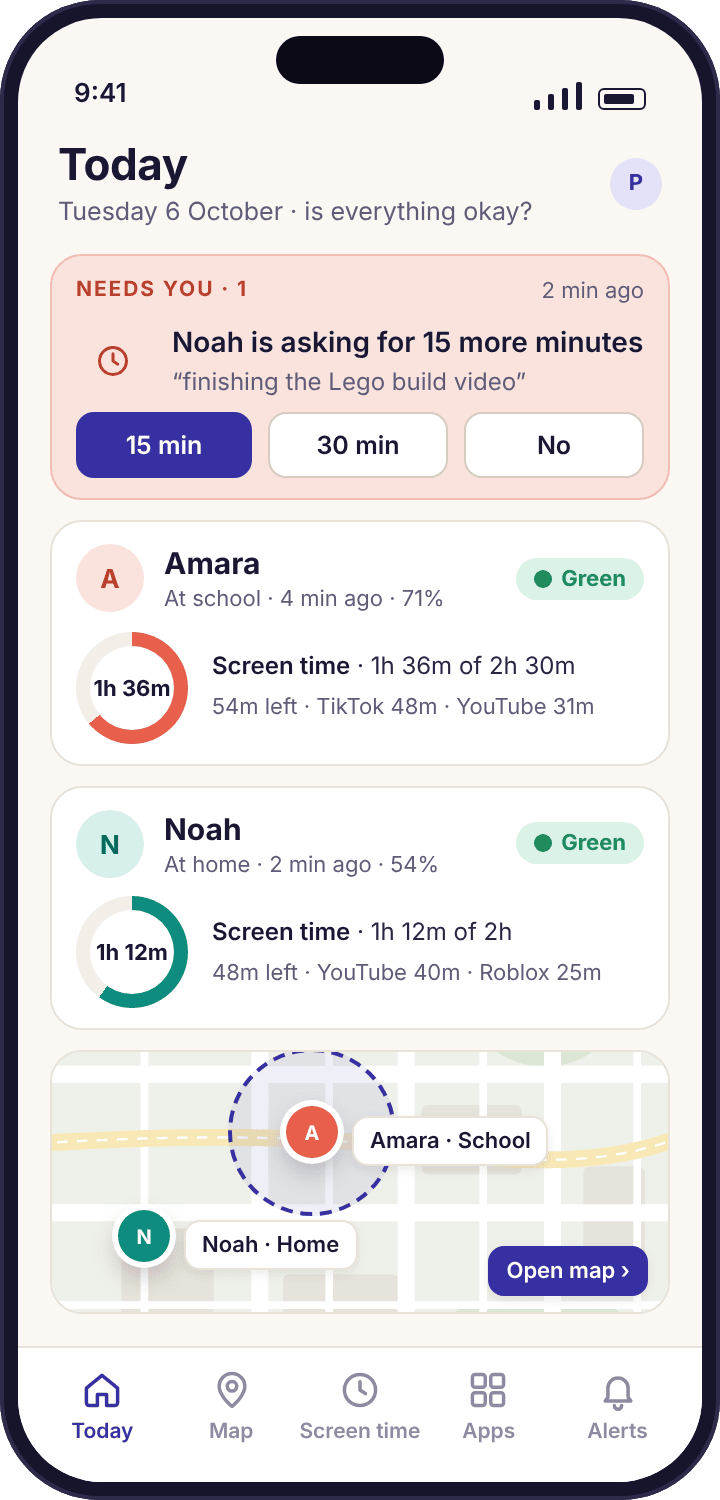
Noah's school-day budget is two hours. At 1h 50m his phone showed the ten-minute warning; at two hours his games paused while his calls, maps and the always-allowed apps kept working. He tapped "Ask for more time", chose 15 minutes and typed "finishing the Lego build video". Priya's phone shows the request with three buttons: 15 min, 30 min, No. She taps 15 min on the bus. There is a daily cap on how often he can ask, so the button rests after a few requests until tomorrow.
Five lines, read in a minute
Smart alerts hold routine events until six o'clock and send them as one card: Noah arrived at Oakridge School 08:53, Amara spent 1h 36m of her 2h 30m, Noah used all of his two hours plus the 15 you approved, one new app on Amara's phone, both phones above 40 per cent. A burst of events becomes a single message, which is why the feed still gets read in week six.
Wind-down runs on the phone, not the server
Amara's bedtime schedule is 21:30 to 07:00 on school nights and later at weekends. At 21:18 her phone showed "Phone sleeps in 12 minutes · alarm and calls still work". The schedule lives on the phone, so it would run with no signal at all. Priya's panel shows one more thing on Amara's child screen tonight: "A parent viewed the panel today." It does not say which screens.
Your child can open the app and see exactly what you can see
Most parental control software is designed around the parent's screen. The child's phone, if it shows anything, shows an icon that is easy to miss. MobileTracking turns that round. The app on the child's phone has a home screen with their name on it, today's budget, the places that have been visited today and two buttons they will use: "What's shared" and "Ask for more time".
"What's shared" is a plain list. Location: on. Screen time: on, 2h 30m on school days. Apps: on. Web categories: three blocked. Calls and texts: who and when, never what was said. Messages: never. Camera: never. Microphone: never. When Priya adds a place or tightens a limit from the panel, the list on Amara's phone changes the same afternoon. There is no delay designed to let a parent get ahead of the conversation.
- A consent screen before collection starts. Pairing pauses on the child's phone at a screen that says what Priya will be able to see and what she never will. Nothing is sent until the child taps Continue.
- "A parent viewed the panel today." The child's phone shows that the panel was opened, not which screens, so a child who knows you looked has no reason to wonder what else is hidden.
- Honest block screens. A paused app shows the rule and who set it, with an "Ask for an exception" button. It never pretends the app crashed.
If a child ever finds a hidden version of this app on the internet, it is not ours. Any site offering an invisible MobileTracking that the child cannot find is selling a scam or stalkerware, and the about page explains why we will never build one.
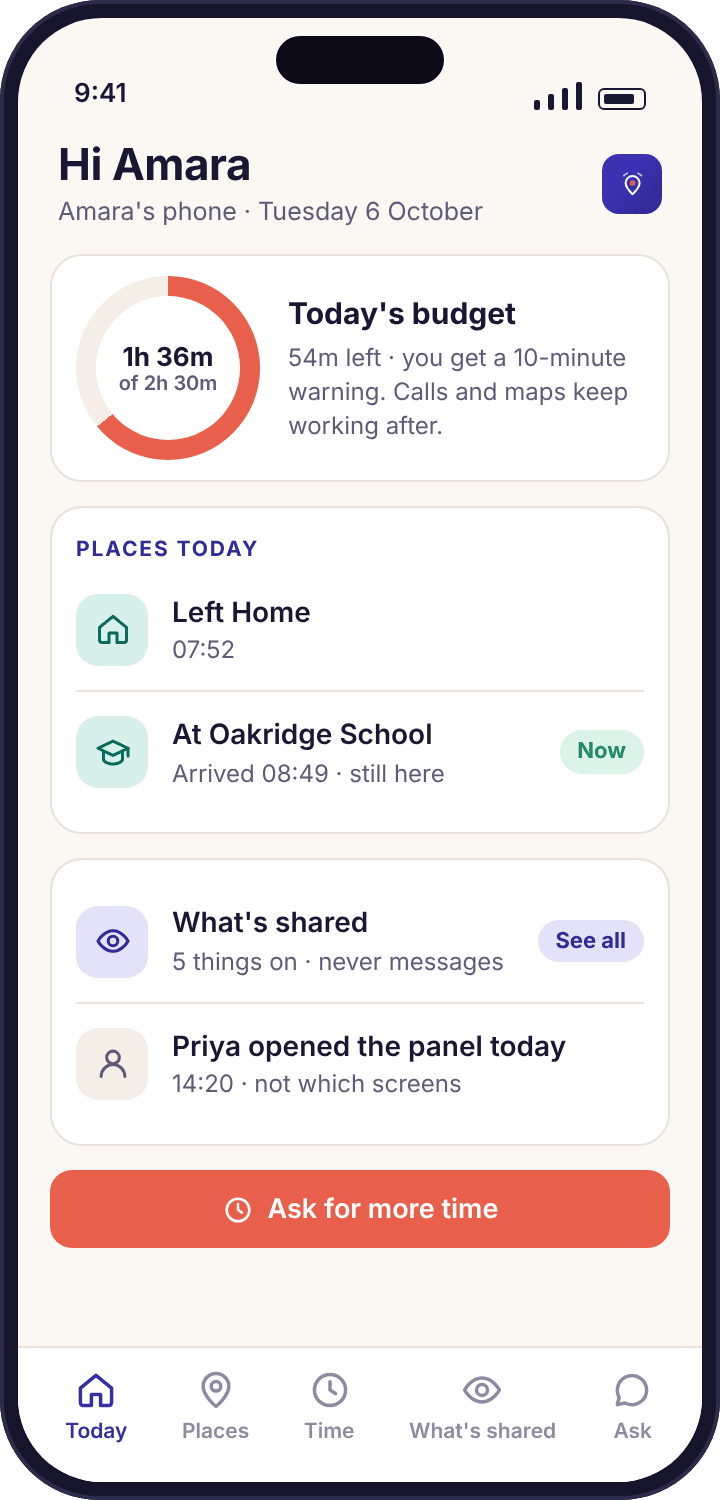
The shape of a day reaches you. The words in it stay on their phone
The whole app is built on one line: it collects the shape of activity and never the contents. Shape means names, numbers, times, durations, categories and frequencies. Who Amara called and for how long. Which app Noah used for forty minutes. How many WhatsApp notifications arrived between nine and ten. The category of a page that was blocked. Contents means what was said, what was typed, what was on the screen, and what the camera or microphone could have picked up, and none of that is collected by any build of the app at any price.
This is not a limitation we are working around. WhatsApp, Messenger and Viber are end-to-end encrypted, so any app that claims to read those chats from a phone is either lying or doing something far worse than monitoring. What an honest app can see is what appears in a notification, and that is where keyword alerts look: the matching happens on the child's phone, and only the word, the app and the time are sent to you.
If what you need is to read your child's messages, this app does not do it, and we would rather say so here than in a refund email. Our calls and SMS overview shows who and when, and nothing else.
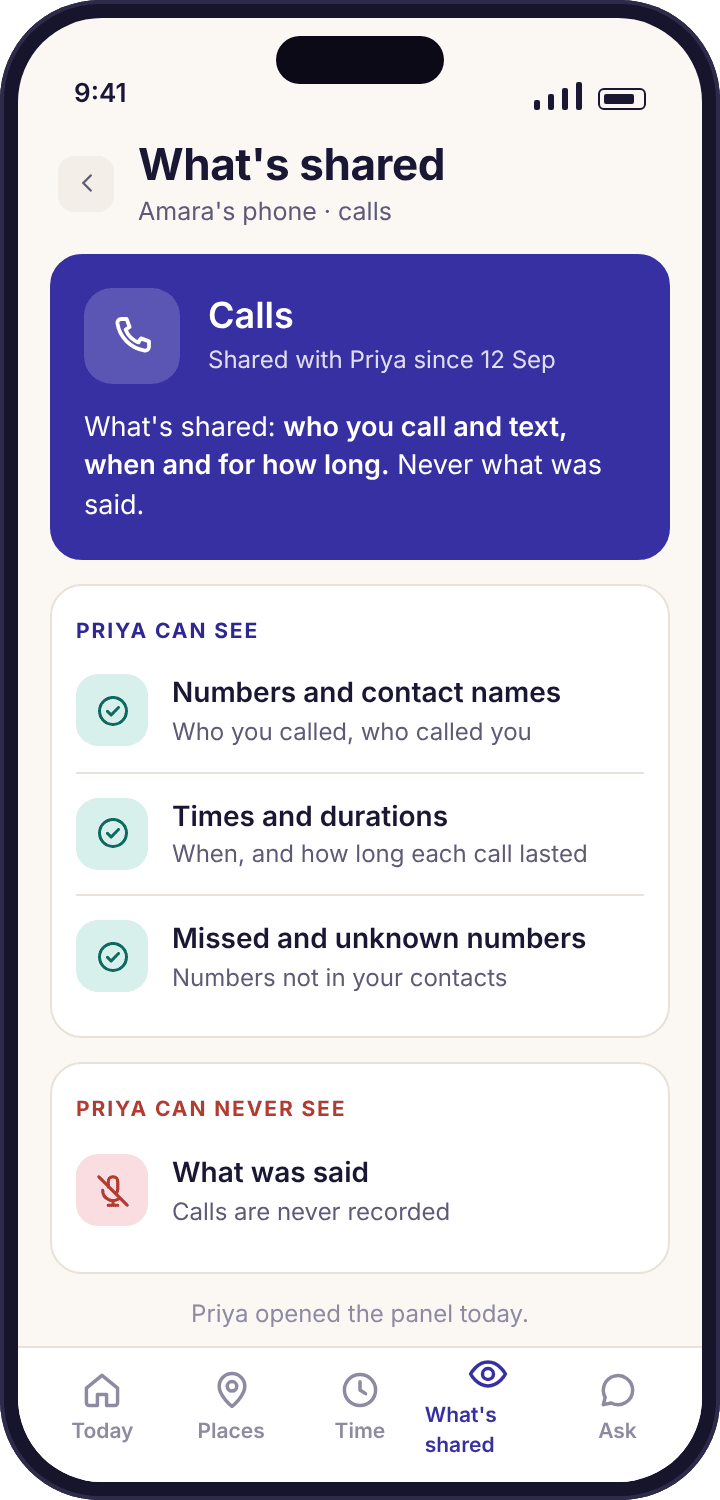
What reaches the parent panel
- Position, time and accuracy. Where each phone last settled, the minute it reported, and how wide the circle of doubt is.
- Minutes per app, day by day. Apps ranked by use, new installs flagged on the day they appear.
- Who, when, how long. Numbers, saved contact names, times, durations and direction of calls and texts, in the direct-download build.
- Categories and page titles. Which web categories were blocked, and the titles of pages visited.
- Counts and timing. How many notifications each social app produced and when, plus a matched keyword's word, app and time.
- Phone health. Battery, last check-in, missing permissions, and whether the app was removed.
What stays on the child's phone, always
- Message text. SMS, WhatsApp, Instagram, Snapchat, Messenger, Viber or anything else. Not on any plan.
- Screenshots and screen recording. The app sees nothing inside another app.
- Keystrokes, passwords and form entries. There is no keylogger, and nothing typed is collected.
- Camera and microphone. The app never opens either, and cannot be made to remotely.
- Call audio. No recording, no listening in.
- Photos, posts, DMs and followers. The gallery and the inside of social accounts are out of reach by design.
Pairing takes about ten minutes and cannot be done in secret
You create a code in the panel; your child types it into the app on their phone; the two of you grant six permissions one at a time. The code works once, for one child, and expires in about fifteen minutes, so there is no way to pair a phone you are not holding.
Create a code
Add a child with a first name and date of birth, which sets age-appropriate starting values, then press "Pair a phone" for a six-character code.
Type it in, then consent
Install from Google Play or the APK, enter the code, and read the consent screen together: what will be shared, and what never will. Watch for a zero typed as the letter O.
Six permissions, then green
Location "all the time", usage access, notification access, accessibility, battery optimisation off, uninstall protection. Declining one only switches off that feature.
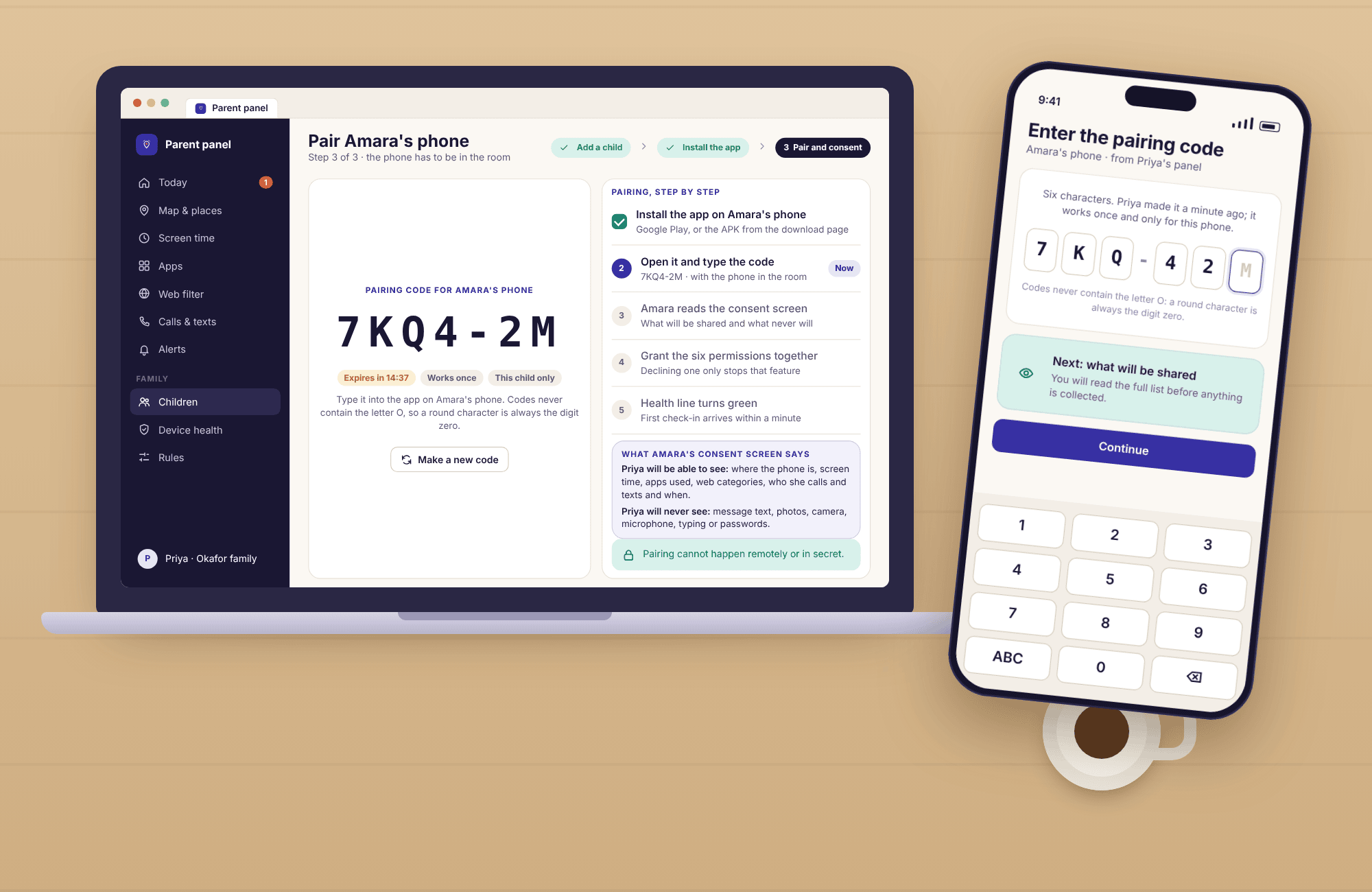
The setup and pairing guide shows every screen in order, including the Android dialogs, and the download and setup guide explains the difference between the Google Play build and the direct APK, which is the only one with call and SMS logs. If you would rather watch than read, the demo below has a paired family already in it.
A read-only demo with a full week of the Okafor family in it
The demo is the real parent panel signed into a made-up family, with seven days of realistic data already loaded: Amara's and Noah's location history, screen time, app activity, place alerts, a handful of keyword matches and one amber device-health line. Every screen opens. Nothing can be changed, so you cannot break it and neither can anyone else.
Spend five minutes in it before you decide anything. Open the Today page and see whether the three-second answer to "is everything okay?" is the one you wanted. Open Amara's week and notice how much the app does not know. Open the alerts feed and count how many lines a normal week produces; it is fewer than most parents expect, which is the point of smart alerts.
- No account needed. The demo opens from the parent panel page with one click, on a phone or a laptop.
- The child's side too. The demo includes what Amara's phone shows her, so you can see both halves of the arrangement before you propose it.
- Subscription details inside. The panel shows what each plan includes before any payment, so there are no surprises after pairing.
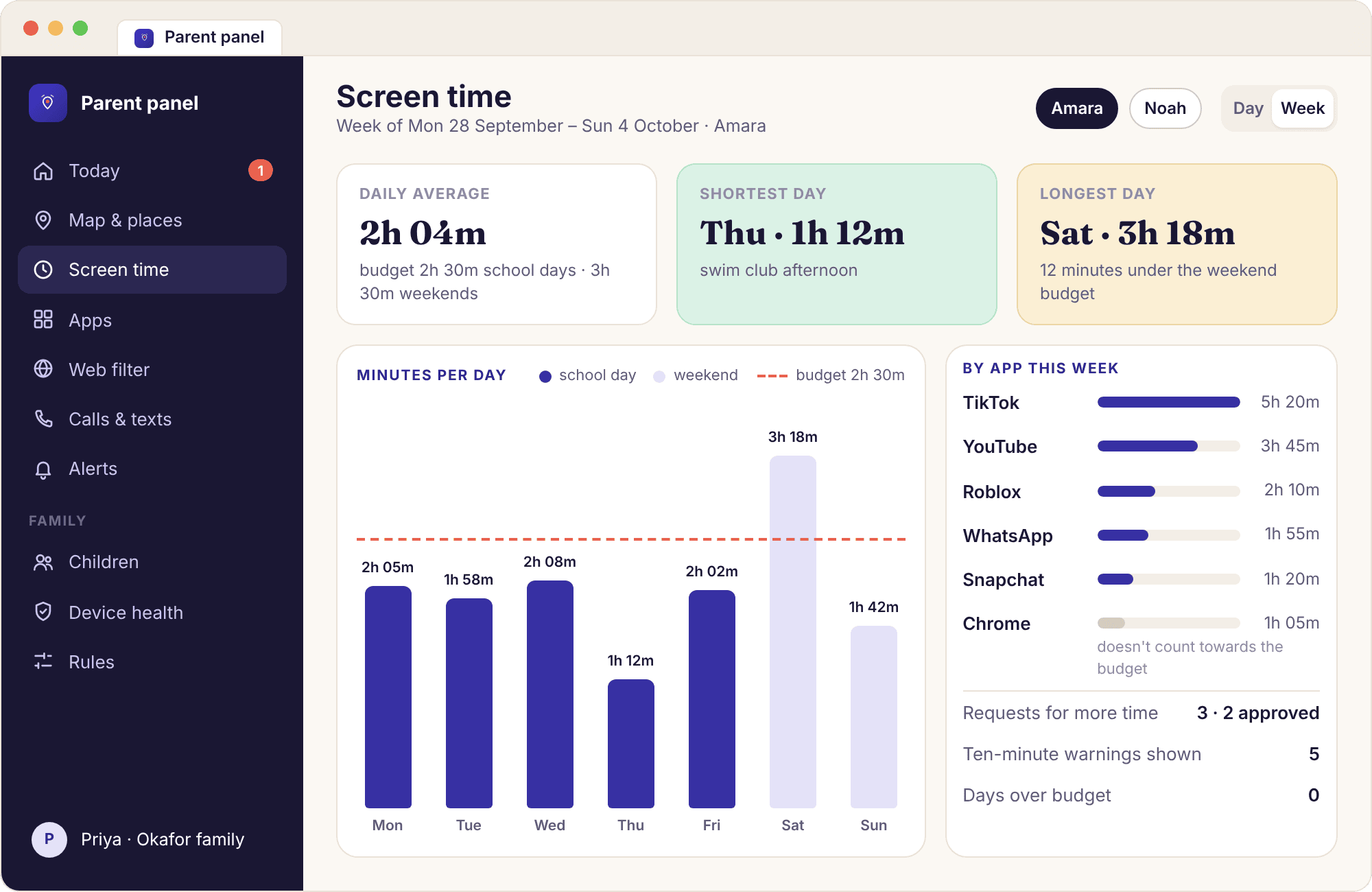
The decisions behind every screen
These are written down so that you can hold us to them, and so that your child can too. Each one costs us a feature a competitor sells.
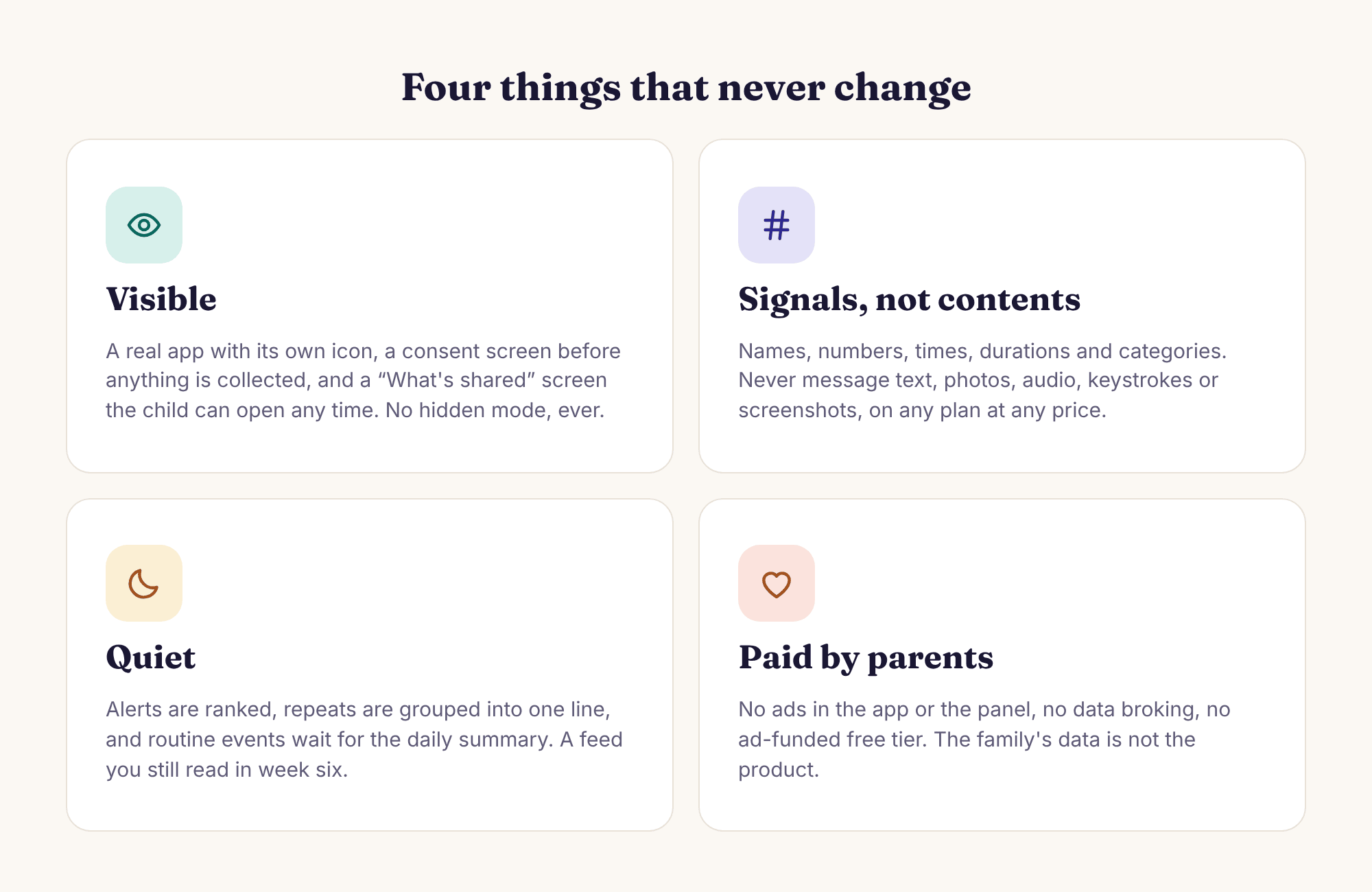
Visible, or it does not ship
The child app has an icon, a name and screens of its own. Turning on a feature updates the child's "What's shared" list the same afternoon. The app does not hide from uninstallation and does not reinstall itself; if a child removes it you get a tamper alert and a reason to talk, not a secret second copy. We will not build a version that hides, however often it is asked for, because a tool that only works when the child does not know about it is not a parental control.
Signals, never contents
Everything the app collects is a name, a number, a time, a duration, a category or a count. It never reads message text, takes a screenshot, logs keystrokes, records a call, or opens the camera or microphone. This holds on every plan at every price, and on both builds. Keyword alerts are the closest the app comes to a message, and even then the match happens on the phone and only the word, the app and the time are sent.
Quiet by default
An alert feed that interrupts you forty times a day gets muted by week three and ignored by week six. Smart alerts rank what needs a parent, group repeats into one line, hold non-urgent items during quiet hours and turn a burst of events into a single message. Routine arrivals can go into the daily summary. The goal is a feed you still read in week six, and a parent who checks the map less, not more.
Paid by parents
We are paid by families, so the app and the panel carry no advertising, no data broking and no ad-funded tier that sells what it collects. The child app contains no advertising SDK and no third-party analytics on location data. This public website shows display ads; they are separate from the product and never see family data. Family data is visible to the parent account and any invited co-parent, support access is limited and logged, and nothing is sold to anyone.
Before you install anything
An app is the last step, not the first. This is what we would do in the week before pairing a child's phone, whichever parental control you end up choosing, ours included.
Do you need an app at all
Start with what the phone already does. Google's Family Link is free, made by the company that makes Android, and for a child under 13 it handles a surprising amount: app approval before installs, a daily screen time limit, a bedtime lock, a current location on a map and content filters for Google Play. If your worry is a nine-year-old installing twelve games a week and playing them until midnight, set up Family Link first and live with it for a fortnight. You may find you are done. Samsung phones add their own Digital Wellbeing controls, and a Pixel's Digital Wellbeing screen will show a child their own usage without any parent involved at all.
Where the built-in tools run out is specific, and it is worth being able to name the gap before you fill it. Family Link shows a current location but no history, no saved places and no arrival alerts, so "did she get to school?" still means opening a map. It has no idea which apps are new since Tuesday beyond the ones it was asked to approve, no web filtering that follows the phone onto mobile data, no calls or texts overview, nothing about notification timing on social apps, and no way to tell you that the phone has quietly stopped reporting because battery optimisation switched itself back on. Its supervision also loosens sharply at 13, when a child can choose to leave. If none of those gaps is your worry, you do not need us yet.
Be equally clear about what no app fills. Nothing on the market tells you whether your child was with the phone, who they were with, or what was said in an end-to-end encrypted chat, and anything claiming otherwise should make you more worried about the app than about your child. The feature that would let you read messages does not exist here, and the social media monitoring hub says so on every per-app page before it says anything else.
What to agree with your child
The conversation is the product, and the app is the thing that makes the conversation specific. Have it before the install, not during, and have it with the phone on the table rather than in the abstract. Three things need agreeing. First, what will be shared: say the list out loud, feature by feature, and say the never list too, because "I will never be able to read your messages, and here is the screen on your phone that proves it" changes the temperature of the whole discussion. Second, who will look and how often: Priya told Amara she opens the panel most evenings and gets a message when Amara arrives at school, and that she is not going to sit watching the map. Third, what happens when a rule is crossed: a paused app is a paused app, not a punishment, and a keyword alert is a reason to ask a question, not evidence.
Let your child choose some of it. Which places get saved is the easiest thing to hand over: a child who picked Swim Club and Grandma Ngozi's argues about the radius, not about the app. Let them read the consent screen on their phone at their own pace before they tap Continue, and let them open "What's shared" whenever they like. The families who get a year out of a parental control are the ones where the child could explain the rules to a friend.
Agree one more thing: that this is for a child, on a phone the child uses, with the child knowing. The terms of service say it in legal language, but it belongs in the kitchen too. Tracking a partner, a housemate or an adult relative who has not asked is not what this is for, and depending on where you live it may be against the law.
Say the never list first
Parents tend to open with what they will be able to see. Open with what you will not: no messages, no photos, no camera, no microphone, no typing. A child who hears that first listens to the rest.
The two or three features to start with
Turn on fewer things than you want to. A newly paired child starts with no limits at all: nothing is blocked and nothing pauses until a parent sets something, and that default is deliberate. For most families the first fortnight needs three features, and only three. Save two or three places, usually Home and school, with an arrival alert on the school and nothing on the friend's house. Leave screen time recording but unlimited, so that you have a normal week to look at before you decide what a limit should be. And open the device health page once a day for the first week, because about three in four "it stopped working" cases are a phone that put the app back to sleep, and the amber line names the setting and the exact path to fix it.
For a child under 11, add app blocking with approval for new installs, so that the twelve-games-a-week problem is handled at the moment of installing rather than afterwards. For a child of 13 or so, add web filtering with three categories blocked and safe search locked, and leave social apps alone for now; what you will learn from the notification counts in week two is more useful once you have a baseline. Keyword alerts are a week-two feature at the earliest, and when you do add them keep the list to about twenty words. A long list makes noise, and noise gets muted.
Resist the rest. Bedtime schedules, per-app limits, tasks and rewards, and the calls and texts overview are all useful, and all of them are better set with a week of real data behind them. The screen time page has a day-by-day plan for the first fortnight that starts with no limit on purpose.
What to do in week one
Pair on a weekend afternoon with both devices on the table and twenty minutes clear, not on a school night at nine. Go through the six permissions together, one at a time, saying what each one powers: Location for the map, usage access for screen time, notification access for keyword alerts and social counts, accessibility for the block screens, battery optimisation off so the phone keeps checking in, and device admin so that removing the app takes deliberate steps and sends you a tamper alert. Declining any one only switches off that feature, so if your child balks at one of them, let it go for now and come back to it in a week.
Then do very little. Open the Today page each evening and read the summary. Notice the pattern of the arrival alerts: the first few days of "Amara arrived at Oakridge School · 08:49" feel like news and by Thursday they feel like weather, which is what they should feel like. Look at the screen time rings without acting on them. Look at app activity on Friday and see which three apps are the week, because it is nearly always three. If the health line goes amber, fix it together on the child's phone with the "fix together" prompt rather than from across the room.
Ask your child to open "What's shared" on day three and tell you what it says. If their list and your panel match, the arrangement is working. If they say something you did not expect, you have found a misunderstanding early, while it is still cheap. Make a note of any alert that interrupted you and did not need to, and move that alert type to the daily summary; the family dashboard page explains what the Today view surfaces and why. At the end of the week, with seven days of a normal week recorded, decide on the first screen time budget, and tell your child the number before it appears on their phone.
When to loosen it
A parental control that is never loosened is a parental control that will be removed, either by the child or by a parent tired of arguing about it. Build the loosening in from the start, and do it out loud. A reasonable rhythm is a review every school term: open the rules together, look at what fired, and remove one thing. The early-departure rule on school can go once a child has been walking home alone for a term without incident. The arrival alert on Home can go once it has become weather. Per-app limits can turn into a single daily budget, and a daily budget can turn into a conversation about what the child thinks it should be, which at 14 or 15 is usually a tighter number than the parent would have picked.
Some things loosen by age and some by trust, and they are not the same. Web filtering for adult content is an age thing: there is no term in which a 13-year-old has earned gambling sites. The friend's house, the map, the notification counts on social apps are trust things, and they should come off as trust is shown, one at a time, with the child told why. Multiple children on one account make this easier rather than harder, because Amara at 13 can visibly have fewer rules than Noah at 9, and the difference is the clearest promise you can make a nine-year-old about what 13 will look like.
The end state is worth naming. For most families, by 16 the app is either a location share the child agreed to keep and a bedtime they asked for, or it is gone. Both are success. Uninstalling the child app stops collection immediately, deleting a child removes their history, and closing the account removes everything, and we would rather you reached that point by design than by a row. If you get there and want to tell us what you would have changed, the contact page is read by people who write these pages.
Questions parents ask on this page
The short answers. The FAQ has the long ones, grouped by what you are trying to find out.
What does MobileTracking actually show me about my child’s phone?
The shape of what the phone is doing, never the contents. You see where the phone is and where it has been, how many minutes each app had today, which websites were visited by title and category, who called or texted and when, and which keywords matched a notification. You do not see message text, photos, typed words or anything inside an app. The child’s own phone lists exactly the same things on its “What’s shared” screen.
Is there any way to see the actual texts or chats?
No, and there is no setting or plan that changes that. The app never reads the words of an SMS, WhatsApp, Snapchat, Instagram, Messenger or Viber message. With the direct-download build you can see who was texted and when; with keyword alerts you are told that a chosen word appeared in a notification, along with the app and the time. The message itself stays on your child’s phone and is never sent to you.
Is there a hidden mode, or will my child always see the app?
There is no hidden mode; your child always sees the app. MobileTracking sits in the app drawer under its own icon, shows a consent screen before anything is collected, and keeps a “What’s shared” screen that lists every active feature, saved place, limit and rule. If you switch something on, your child’s screen changes the same afternoon. There is no hidden mode, and we will not build one. A tool your child can inspect is one they can argue with fairly.
How long does setting it up take, start to finish?
About ten minutes, with both devices in the same room. You create a free account, add a child with a first name and date of birth, install the app on their Android phone, and type a six-character pairing code into it. Then the consent screen appears and you grant the permissions together, one at a time. When the health line on your panel turns green, you are done. Pairing cannot be done remotely or without the phone in hand.
Do I have to pay before I can try anything?
No. A free account lets you add a child, pair a phone, open the panel and use the features included without a subscription. Some features need a paid subscription, which covers every child under one account, and the panel shows what each option includes before you are asked for a card. We are paid by parents rather than by advertisers, so there are no ads and no data sales inside the app or the panel.
Is there a way to look around before I install it on my child’s phone?
Yes. The demo is a read-only copy of the parent panel filled with a full week of realistic data for a made-up family: Priya and her children Amara, 13, and Noah, 9. Every screen opens, including the map, screen time, alerts and device health, and nothing can be changed. Spend ten minutes in it with your child beside you; many families decide which features to switch on from there.
Why choose an app my child can see, when others promise to hide?
Because a hidden app ends the conversation, and the conversation is the point. An app your child can open, read and question keeps parental control something you do with them rather than to them. Apps that promise to hide from the child are stalkerware by design; they are used against partners as often as for children, and app stores remove them. MobileTracking is built so that nobody can use it in secret, including you.
Set it up on a Saturday, with the phone on the table.
Create a free account, add your child, and pair their Android phone in about ten minutes with them beside you. Nothing is limited until you choose something, and your child can see every rule you set.
Android · Free account · Visible on your child's phone