Location history: a readable day, not a pile of pins
By Thursday evening, Amara's phone has produced a few dozen readings. Shown as dots on a map they are useless; nobody can tell from a cluster of pins whether she went to swimming. MobileTracking turns them into a short list instead: left Home at 07:52, Oakridge School from 08:49 to 15:31, a twenty-minute stop near Mill Road, Swim Club until 17:10, Home at 17:34. That list is the feature. It is kept for a rolling window of recent weeks, your child can read the same list on their own phone, and you can delete any of it whenever you choose.
Android · Visible on their phone · Kept for recent weeks only · Deletable by you at any time

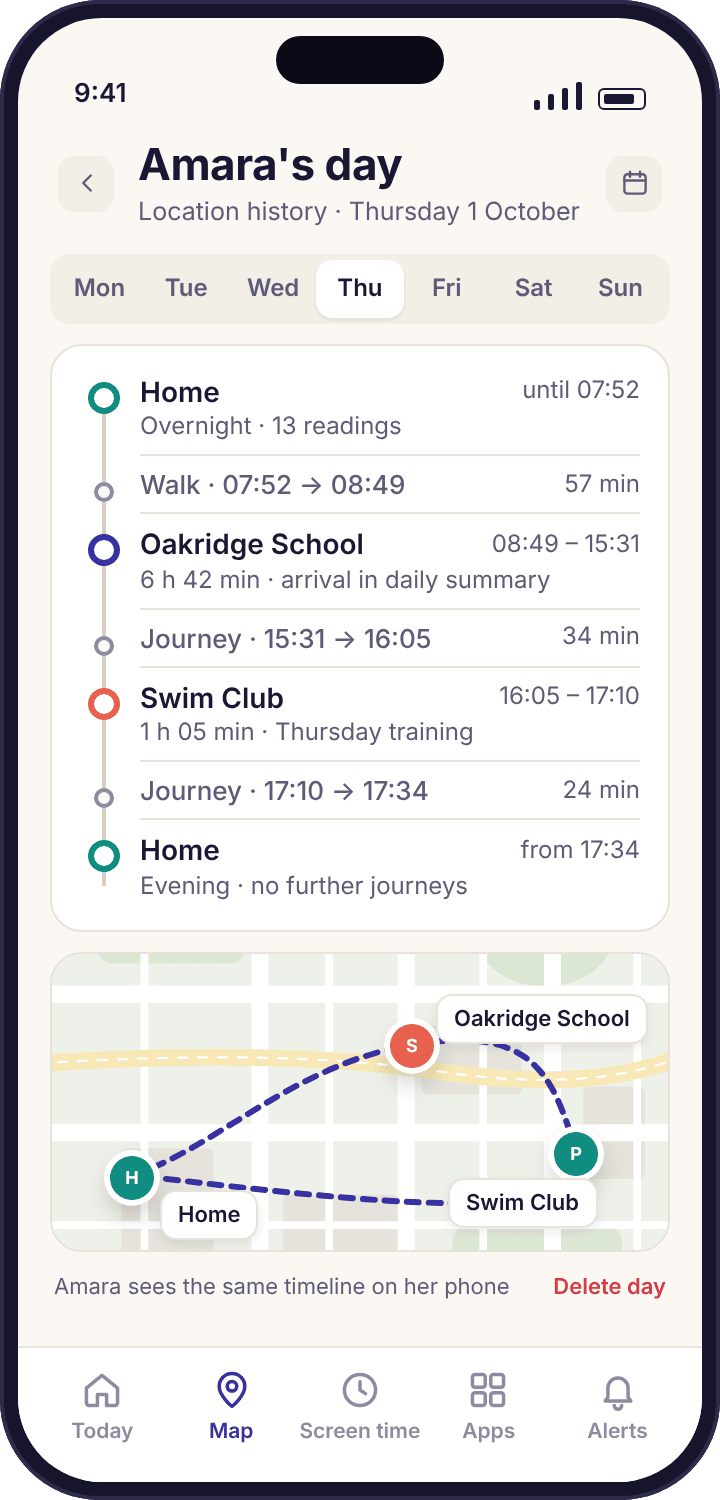
What a school day looks like once the readings become a timeline
The whole feature is easiest to understand by walking through a single ordinary day. This is Amara's Thursday, as her history screen shows it, with notes on what the app did at each step and what it chose not to do.
The day opens with a stop already running
The first line on Thursday is a continuation: "Home, since 17:34 yesterday". Overnight the phone produced almost no readings, because it did not move, and the history does not invent any. One long stop covers the night, which is how a stop should look when nothing happened.
The first journey begins
Amara leaves for the bus. The Home stop closes with its end time, and a journey line starts underneath it. A journey is drawn as a thin trail between two stops with its duration, not as a list of coordinates; you can expand it to see the trail on the map, but the timeline itself only says "57 min, on the move". The history is not interested in which pavement she used.
A stop with a name
The phone settles inside the saved circle for Oakridge School, so the stop is labelled with that name instead of a street. This is the point of saving places: the history reads "Oakridge School" rather than "near Elm Avenue", and the whole day becomes legible at a glance. The label comes from the saved place list, which is the place alerts page's business.
Lunchtime drift is absorbed into the stop
At lunch the pin wanders onto the sports field and back as the phone goes outdoors and indoors. The timeline shows none of it. The readings all fall inside the school's circle, so they belong to the same stop, and the stop simply gets longer. A pile of pins would have shown four or five dots scattered across the site; the history shows one line, 08:49 to 15:31.
The one line worth reading
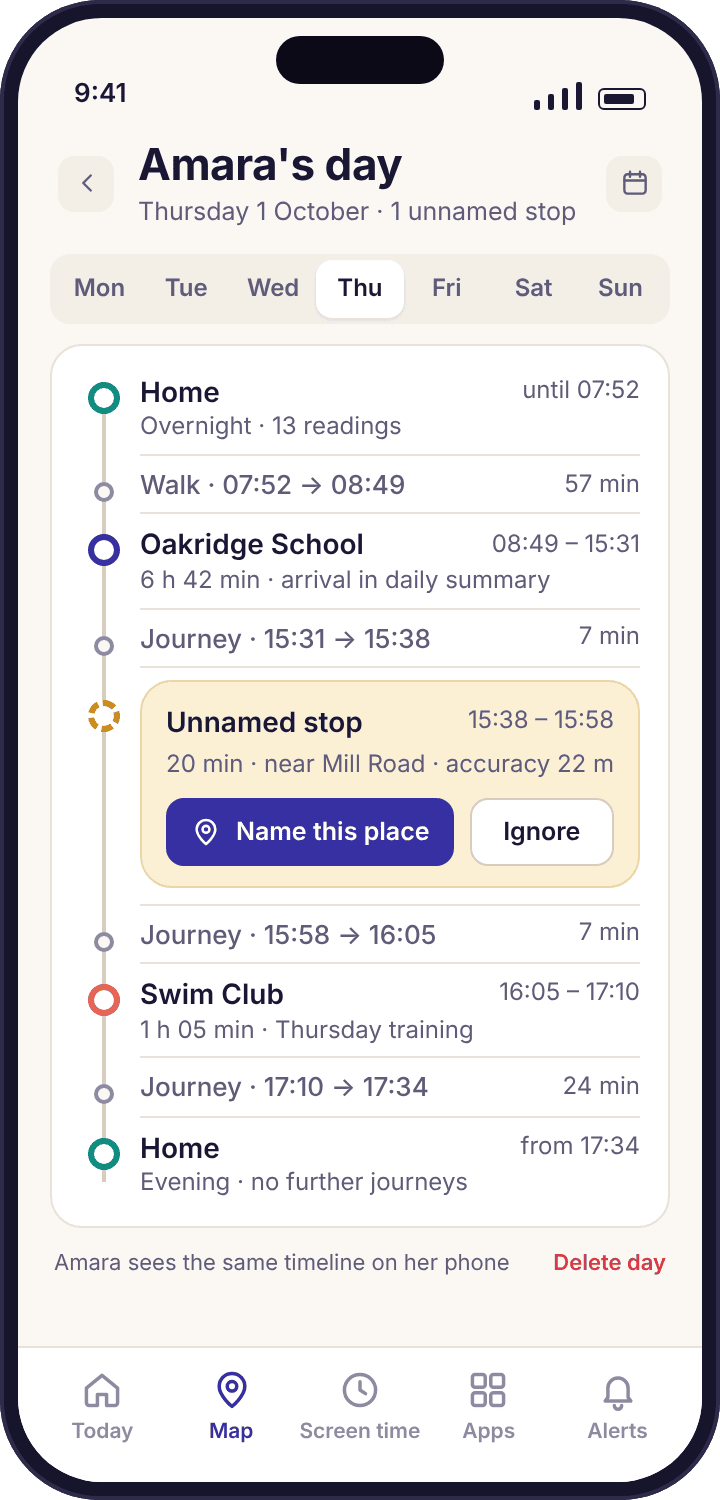
Seven minutes after leaving school, the phone settles for twenty minutes somewhere with no saved name. The history calls it "Unnamed stop · 15:38–15:58 · 20 min · near Mill Road" and offers a "Name this place" button. It does not guess what the stop is. It turns out to be the corner shop where Amara and Tyler buy crisps on swimming days, which Priya learns by asking at dinner, not by zooming in.
A second named stop
The phone sits in a locker for sixty-five minutes. Indoors in a sports hall the readings are rough, and a couple of them land in the car park, but the Swim Club circle was drawn to cover the car park, so they count towards the same stop. Nothing on the timeline hints that the phone was uncertain, because for the purpose of "was she at swimming" it was not.
The day closes, and Amara can read it too
Home closes the day. The same timeline, with the same five lines and the same unnamed stop, is on the history screen of Amara's own phone. If she opens it she sees exactly what Priya sees, including the fact that Priya looked at the panel today. There is no separate parent-only version of a child's day.
The history lets Thursday go
Some weeks later this Thursday falls off the end of the rolling window and is deleted from our servers. Nothing is archived. If Priya had wanted it gone sooner, a tap on the day and "Delete this day" would have done it the same evening, and the child app would have shown the gap.
Stops and journeys, not points
The history screen has two kinds of line and nothing else. A stop is somewhere the phone rested for long enough to count, with a start time, an end time, a duration and a label. A journey is the gap between two stops, with its length. Thursday has five stops, counting the overnight one, and four journeys, and the screen fits on one phone without scrolling. A week of Amara's life is thirty-odd lines, most of them the same as the week before.
The sameness is the feature working. When every Thursday reads Home, Oakridge School, Swim Club, Home, the one Thursday with a twenty-minute stop near Mill Road stands out without any effort from you. A map of dots never produces that effect, because every day looks like a different cloud. The timeline turns location into something a tired parent can read in ten seconds at 21:30.
- A stop expands. Tap one to see its readings on the map, the saved place it matched, and a "Name this place" button if it matched none.
- A journey expands too. The trail between two stops, with its duration. The timeline does not list every reading unless you ask.
- Named stops come from your places. Add Grandma Ngozi's as a place and every future Sunday afternoon is labelled correctly without you touching the history.
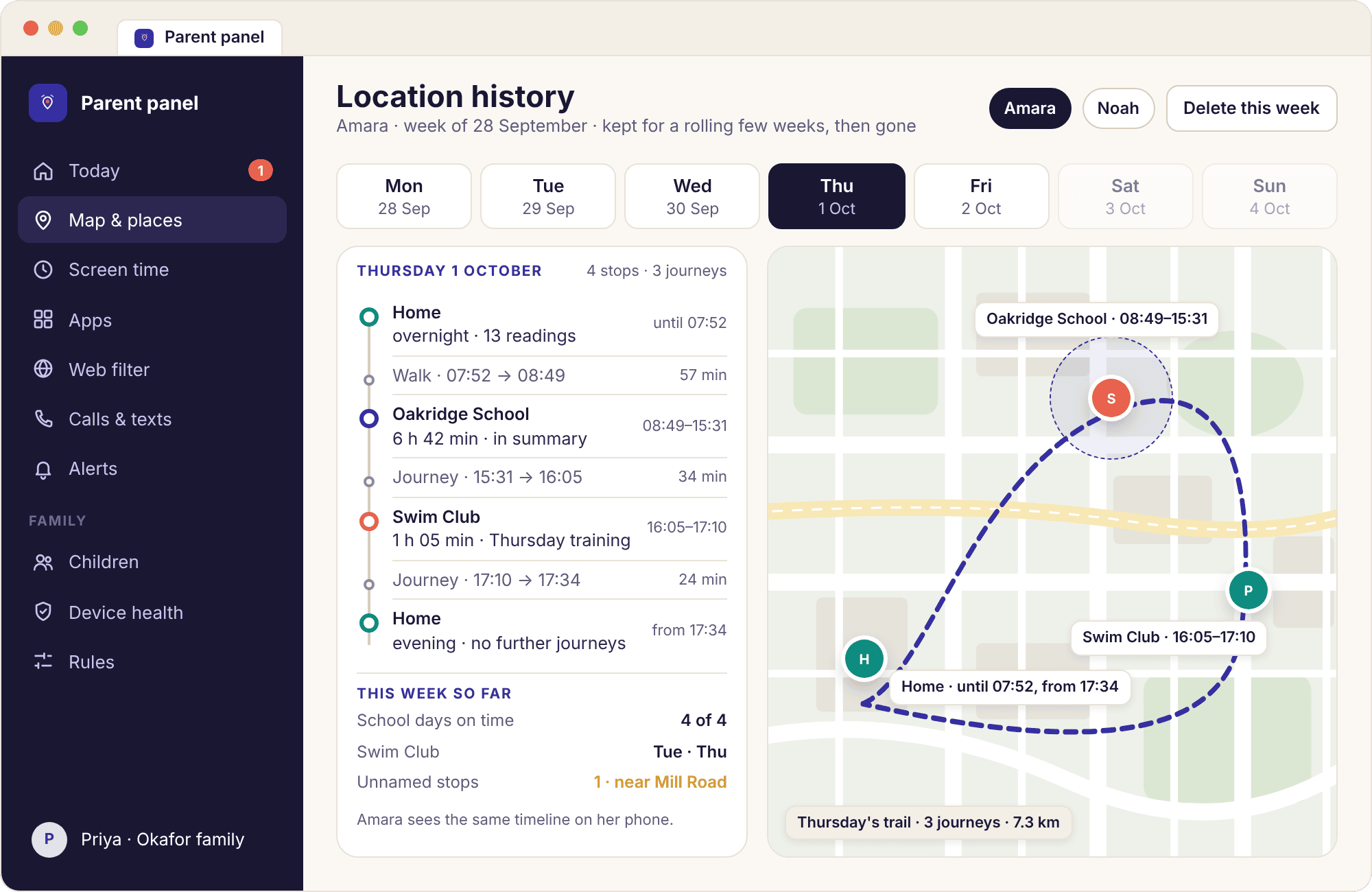
A week at a time, in the panel
On a laptop the same history gets more room. The panel's history page shows a day picker across the top, the timeline down the left and the map trail for the chosen day on the right. Click a stop and the map centres on it; click a day and the whole trail redraws. It is the better place to answer "which afternoon did she go to Tyler's", because the days sit side by side and the unusual one shows up as a different shape.
The panel is also where deleting lives in its fullest form. Any day can be removed with two clicks, a whole child's history can be cleared from the child's settings page, and every deletion is logged with the name of the parent who did it so a co-parent is not left wondering why Tuesday is blank. Deleting in the panel removes the same lines from the child's phone the next time it checks in.
What the panel does not add is any way to see further back. The window is the same rolling number of weeks whether you look on a phone or a browser, and there is no export, no "download all history" button and no archive to request. The history is a short-term aid to a conversation, not a record of a childhood.
What a group of readings needs before the timeline calls it a stop
Turning readings into a sensible list means deciding what to ignore. These are the conditions, and what the history does when each one is not met. They are worth knowing because they explain most "why isn't that on the timeline" questions.
| Condition | Counts as a stop | What you see instead | Why the rule exists |
|---|---|---|---|
| Phone rested in one spot for several minutes | Yes | A stop with a start and end time | A bus stop pause of ninety seconds is part of the journey, not a place Amara went. Short rests are folded into the journey line. |
| Readings all fall inside one saved place | Yes, with the place's name | "Oakridge School 08:49–15:31" | The saved circle decides the label. Readings that drift within it, such as the lunchtime sports field, stay in the same stop. |
| Rested, but no saved place matches | Yes, unnamed | "Unnamed stop near Mill Road" with "Name this place" | The app never guesses a business or a house from a map. A street name is the most it will offer; naming is yours or your child's to do. |
| Readings too rough to pin down | Partly | A stop with a wider marker and a "rough" tag | In a basement or a tunnel the phone cannot do better. The stop is kept but marked, so you do not read a 400-metre guess as a precise address. |
| Phone moving steadily between two stops | No | A journey line with its duration | A walk is a journey, not a place. Expanding it shows the trail, but the timeline does not clutter itself with every corner turned. |
| Phone off, flat or with no signal | No | A gap labelled "no readings", or a stop that appears later | Readings made without signal are uploaded when the phone reconnects, so a gap can fill in afterwards. Nothing is fabricated to cover it. |
| Day deleted by a parent | No | "Deleted by Priya on Friday 21:40" | The deletion itself is noted, so a blank day is distinguishable from a day the phone was off. The readings are gone. |
The threshold for "several minutes" is deliberately not a knob. Parents have asked for a slider that would make a two-minute pause count as a stop, and we have said no, because a timeline that lists every red light stops being readable, which is the only reason it exists. The location tracking page covers how rough a reading can be and why; here the only thing that matters is whether enough readings agreed for long enough to call somewhere a place.
How long the history lasts, who can read it, and how to use it without reading too much into it
The rolling window
History is kept for a rolling window of recent weeks and then deleted from our servers without anyone having to remember. The window is long enough to answer every question a parent plausibly has: which day last week did the bus run late, has Noah been going to the park after school this fortnight, when did the Mill Road stops start. It is short enough that a leak, a subpoena or a bitter divorce cannot turn it into a map of a child's whole adolescence.
We get asked for longer retention often, usually by parents who want "the record" in case they need it. In every case we have heard of, the thing they wanted was in the last fortnight. A two-year archive of a thirteen-year-old's movements has no legitimate use that a two-week one does not serve, and several illegitimate ones, so we do not build it. The privacy policy gives the retention period in writing, and if it ever changes the change will be announced before it happens, not after.
Deleting a day, a week or everything
Any parent on the account can delete history, and the deletion takes effect for everyone at once. On the phone, open a day and choose "Delete this day". In the panel, the day picker lets you select a range, and a child's settings page has "Clear location history" for the lot. Each deletion is stamped with the name of the parent who did it, which is there for co-parents rather than for us; a Tuesday that reads "Deleted by Priya" is a Tuesday nobody has to argue about later.
Three larger actions delete history as a side effect. Removing a child from the account removes their history with them. Closing the account removes everything under it. Uninstalling the child app stops collection at that moment, and what was already collected stays visible until the window drops it or you delete it. None of these can be undone, and none of them ask you to email anyone.
Who else can read it
You, any co-parent you have invited, and your child on their own phone. Support staff can look at a specific day only while fixing a problem you have reported, and that access is logged. Nobody buys it, and the child app carries no third-party analytics that could see location data.
The child's copy
Amara's phone shows her the same timeline Priya sees, under "Today's places" on the child app's home screen and in full under "What's shared". This is not a courtesy summary; it is the same list with the same unnamed stops. She can press "Name this place" on the Mill Road stop herself and call it "the shop", and the label appears on Priya's screen within the afternoon. A child who can see and annotate their own history has far less reason to resent it.
What she cannot do is delete it. Deletion is a parent action, because a history a child could wipe at will would tempt parents to install something sneakier, and the whole point of this app is that there is nothing sneaky to install. If she wants a day gone, she asks, and most of the time the right answer is yes.
A parent, on week threeShe named the stop before I asked about it. "That's the shop, we go on swimming days." I had been rehearsing how to bring it up for two days.
Reading a timeline fairly
A timeline is a list of where a phone rested. It is a very good list, better than any map of dots, and it is still only that. A twenty-minute unnamed stop is a question, and a good question needs the stop's details and nothing else: "You stopped near Mill Road for twenty minutes on Thursday, what's there?" It does not need a theory, and it certainly does not need a theory delivered before the question.
Two habits keep the history useful. Look at it by the week rather than the day, so the shape of a normal week becomes familiar and the odd one shows itself. And name places together as they appear, so the timeline fills with words your child chose instead of street names you had to decode. A history that reads "Home, School, the shop, Swim Club, Home" is one a family can talk about at dinner. A history that reads as a list of coordinates is one that gets argued about.
What the history is not for
It is not evidence, and we would rather say that plainly than have a parent find out in a difficult meeting. Readings indoors can be tens of metres out, a stop's edges are rounded to the nearest reading, and a phone's history is the history of a phone, which may have been in a locker, a bag or a friend's pocket. The timeline is built to start a conversation with a child who knows it exists, and it does that well. It is not built to settle a dispute with anyone.
It is also not for adults. The app runs only on a phone whose user tapped through a consent screen listing what would be collected, and the history screen on that phone shows the user everything a parent can see. There is no way to collect a history from someone who has not been shown that screen, and no version of the app that skips it. If the person whose movements you want to see is a partner, an employee or a relative, this is the wrong product, and the terms of service say so.
What parents ask about the timeline
How far back does the location history go?
A rolling window of recent weeks, after which each day is deleted from our servers automatically. The exact period is stated in the privacy policy. There is no archive, no export and no way to extend it, because a short window answers every question a parent has in practice and a long one would be a liability for the child if it ever leaked.
Why does the timeline show an "unnamed stop" instead of telling me where it was?
Because the phone rested somewhere that does not match any place you have saved, and the app will not guess from a map which shop or house it was. It gives you the nearest street name, the times and the duration, and a "Name this place" button. Either you or your child can name it, and the name applies to every future stop there.
Can my child delete their own location history?
No. Your child can read the whole timeline on their phone and can name an unnamed stop, but deleting is a parent action. If a child could erase a day at will, parents would be tempted towards something sneakier, and this app exists so that nothing sneakier is needed. A child who wants a day removed asks, and the answer is usually yes.
Does deleting a day remove it from my child's phone as well?
Yes. Deleting on your phone or in the panel removes the same lines from the child app the next time it checks in, which is normally within the hour. The day is replaced with a note saying who deleted it and when, so a blank day is not mistaken for a day the phone was off. The readings themselves are gone and cannot be restored.
Why is there a gap in Thursday afternoon's history?
Most gaps are a phone with no signal or no battery. Readings made without signal are stored on the phone and uploaded when it reconnects, so a gap from a train tunnel usually fills in later by itself. A gap from a flat battery stays a gap, labelled "no readings", because the app will not invent a position it does not have.
Can I see the exact route my child walked?
Partly. Expanding a journey shows the trail of readings between two stops on the map, but it is a trail of resting points taken as the phone moved, not a continuous line. Outdoors it follows the road closely; indoors or in a dense street it can wander. The history is designed around stops, and the route is there for the occasional day the route is the question.
Will my child see that I looked at their history?
They will see that a parent opened the panel today, on the child app's home screen. They will not see which page you opened or how long you spent on it. Both children have the same timeline on their own phones, so looking at it is not a secret from them in any case.
Can my child's other parent delete history without telling me?
Any invited co-parent can delete, and every deletion is recorded with that parent's name and the time, visible to both of you in place of the deleted day. So the deletion can happen without a conversation, but it cannot happen without a trace. The same log covers who named a place and who cleared a child's full history.
Does the history keep working if the phone was offline all day?
The phone keeps collecting readings offline and uploads them when it next has a connection, so a day spent out of coverage usually appears in full that evening. What the history cannot do is show you anything live while the phone is disconnected. The reading time on the live map tells you how long the phone has been out of touch.
Can I get a copy of the history as a file?
No. There is no export, no download and no email report of a child's movements, and we are not planning one. A file is the thing most likely to end up somewhere it should not, and the timeline on your phone and in the panel is where this data belongs. If you need a specific day for a conversation, it is on screen for the length of the window.
Where the history fits with everything else
The timeline is yesterday's answer; the features around it cover right now, the moment of arrival, and whether the phone is still reporting at all: location tracking, place alerts and device health.
Location history switches on once your child's phone is paired with your account, which takes about ten minutes with both devices on the table. The download and setup guide walks through every screen.
See the whole day in five lines, and let it go three weeks later.
Pair your child's phone with them next to you and tomorrow evening's timeline writes itself, named with the places you saved together.
Android · Free account · Visible on your child's phone