Track your child's location, with the time and accuracy of every reading
The live map shows where each child's phone last settled, how many minutes ago that reading was taken, and a circle showing how far the true position might be from the pin. Those three things together are the whole feature. A pin without a time is a guess, and a pin without a circle invites a parent to trust a number the phone itself does not trust. This page explains what the circle means outdoors and indoors, which single Android permission the map depends on, and how to tell a flat battery from a problem before you start worrying.
Android 8.0 or later · Visible on their phone · Permission: Location, "Allow all the time"

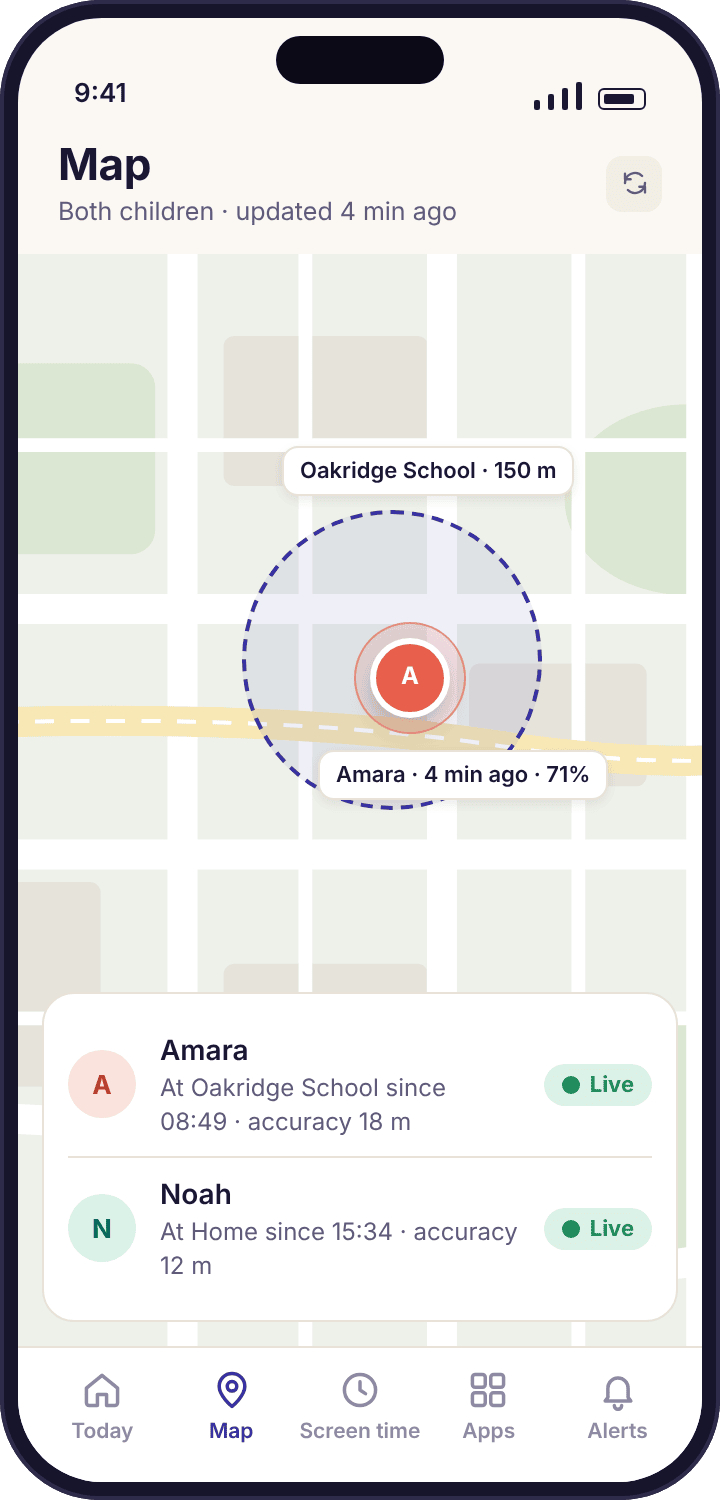
- Every reading comes with a time and a circle. "4 min ago, within 18 m" is information. A bare pin is not, so the app never shows one.
- Outdoors, a few metres. Indoors, tens of metres. A phone in a classroom can sit on the playground or the building next door, and the circle widens to say so.
- It reports where the phone settles, not every step. MobileTracking uses Android's low-power location services, so the map is a series of resting points, not a live dot crawling along the road.
- Location must be "Allow all the time". The middle option, "While using the app", looks granted and reports nothing once the app leaves the screen.
- A silent pin is usually a flat battery. The map tells you the last battery reading, and the stale banner sends you to the device health page rather than leaving an old pin looking fresh.
What the map shows, and what each part of it means
Both children appear on one map, each with a pin, a reading time, an accuracy circle and a battery level. Learning to read those four things in order takes about a week, and after that the map stops producing false alarms.
The pin is where the phone last settled
Open the map in the parent app or the panel and you see Amara at Oakridge School and Noah at Home. Under each name is the time of the reading: "4 min ago" for Amara, because her Galaxy A35 reported when it stopped moving in the science block, and a longer gap for Noah, whose Pixel has been on the kitchen counter since breakfast and has had nothing new to say.
That gap is the first thing to understand about the pin. The app does not ask the phone for its position every thirty seconds. It asks Android to tell it when the phone has moved somewhere and come to rest, which is what Android's low-power location services are designed for. A phone sitting still produces no new readings, so "40 min ago" on a child who has been in the same lesson for forty minutes is correct, not stale.
- One map, both children. Tap a pin to open that child's card with the reading time, the circle size, the battery level and the saved place the phone is inside, if any.
- Times in the child's local time. If Amara is on a school trip two time zones away, 08:49 is 08:49 where she is.
- Their phone shows that you looked. The child app's home screen says a parent opened the panel today. It does not say which screens.
The circle is the phone's own estimate of its error
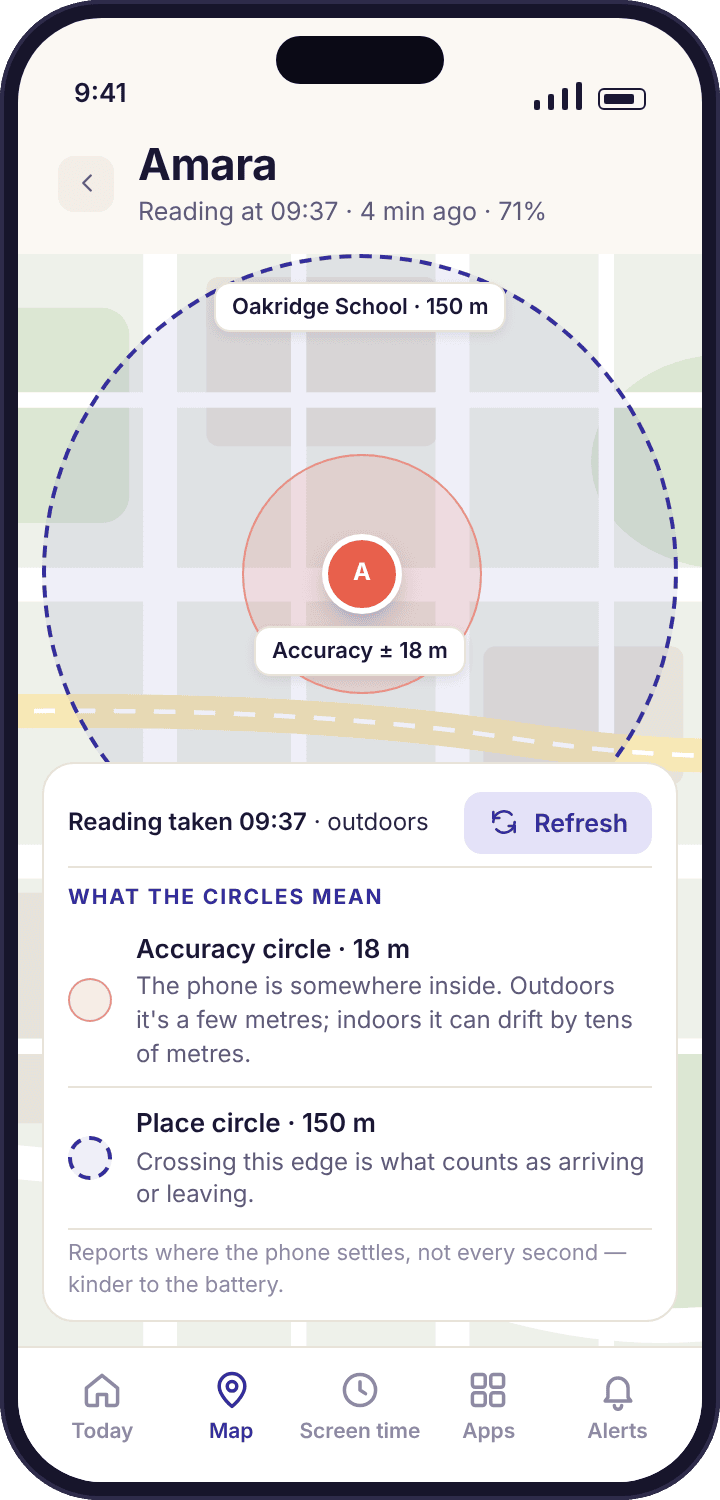
Every position Android hands to an app comes with a radius: the distance within which the phone believes the true position lies. MobileTracking draws that radius as a translucent circle around the pin instead of hiding it. An 18-metre circle at Oakridge School means the phone is somewhere inside a ring that just about covers the main building. A 140-metre circle means the phone has lost the satellites and is guessing from nearby Wi-Fi, and the pin could be on either side of the road.
Zoom in on one child and the legend under the map spells both numbers out: when the reading was taken, and how wide the circle is. A "Refresh" button asks the phone for a fresh fix now. Use it when the reading is old and you need a current one, such as the afternoon Amara is late for the bus. It costs the phone a little battery each time, which is why it is a button and not the default behaviour.
- Small circle, trust the pin. Under about 25 metres outdoors is as good as a phone gets.
- Large circle, trust the area. Inside a building, read the pin as "somewhere around here", and check the named place rather than the exact spot.
- No circle is ever hidden. Even a poor reading is shown with its real radius, so you can decide for yourself how much weight it carries.
The battery level is the number that explains most silences
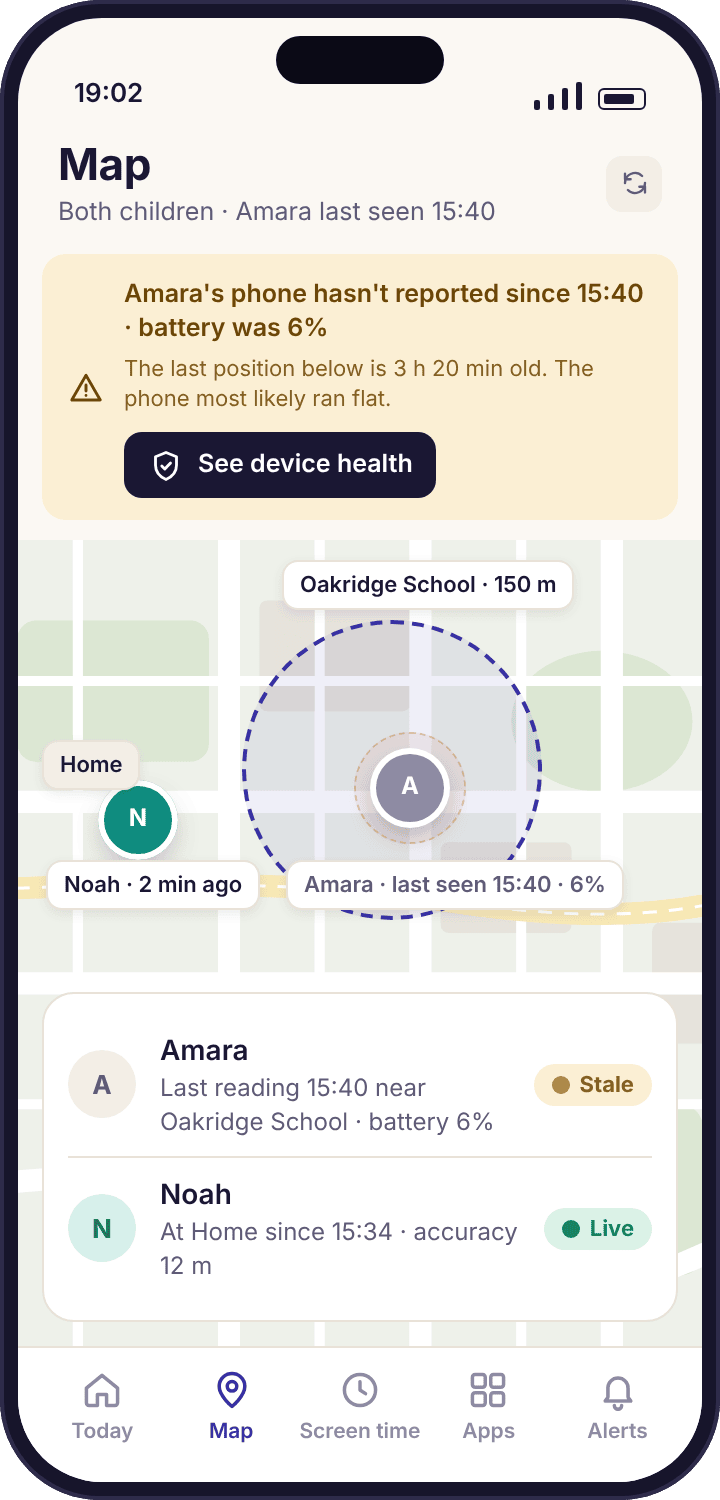
Next to the reading time sits the battery level from the same moment: 71% for Amara in the hero screen. It is there because the commonest reason a pin stops updating has nothing to do with location at all. A phone at 6% at 15:40 will be off by 16:00, and a parent who can see that number does not need to ring the school office.
When a phone has not reported for longer than expected, the map shows an amber banner across the top with the last reading time and the last battery level, and a button to the device health page. The old pin stays visible, labelled with its age, so you still know where the phone was. What the app refuses to do is let a four-hour-old position sit there looking like news.
The map cannot tell you whether the phone is with your child. A Pixel left in a locker is at school all afternoon regardless of where Noah is, and a phone lent to Tyler goes wherever Tyler goes. Keep that in mind before you draw a conclusion from any single pin.
How a phone works out where it is, and why the answer changes indoors
Android combines several ways of finding a position and hands the app the best one it has at that moment. The app reports what it is given, with the radius attached. Knowing which method produced a reading tells you how much to trust it.
| Method | Typical circle | Works indoors | Battery cost | When Android uses it |
|---|---|---|---|---|
| Satellites (GPS and its cousins) | A few metres | Rarely | Highest | Outdoors with a view of the sky: the walk to school, the bus, the park. This is what the marketing of every tracker pictures, and outdoors it is true. |
| Wi-Fi networks nearby | Tens of metres | Yes | Low | Inside buildings and in dense streets, where the phone recognises networks it can see and looks up where they are. The phone does not need to join a network for this. |
| Mobile network cells | Hundreds of metres to over a kilometre | Yes | Lowest | Rural stretches, basements, anywhere with no Wi-Fi and no sky. A fallback. The circle is drawn large so you do not mistake it for a precise fix. |
| Settled position (low-power services) | Depends on the fix beneath it | Partly | Very low | What MobileTracking asks for by default: Android notices the phone has stopped moving and reports once, rather than the app polling every minute. |
| Manual refresh | Best available right now | Partly | One burst | When you press Refresh, the phone turns on the satellite receiver for a fresh fix. Indoors it may still come back from Wi-Fi. |
A practical rule follows from the table. Outdoors, the pin is good to a few metres and the circle is small, so if the map shows Amara on the footpath by the river at 16:20 she is very probably on the footpath by the river. Indoors, the circle widens to tens of metres and the pin can hop to a neighbouring building for twenty minutes while the phone sits in the same bag. A hop like that is not a child moving. When the circle is wide, read the saved place name under the pin rather than the pin itself; the place alerts page explains why a place is drawn as a circle large enough to absorb that drift.
Dense city centres deserve a mention of their own. Tall buildings reflect satellite signals, so the phone can be handed a confident-looking fix that is two streets out. The app shows whatever radius Android reports, but a reflected signal sometimes fools the phone into reporting a smaller circle than it deserves. If a pin in a city centre makes no sense, wait for the next settled reading before you act on it. Two readings in the same spot are worth far more than one.
Location must be set to "Allow all the time", or the map only works while the app is open
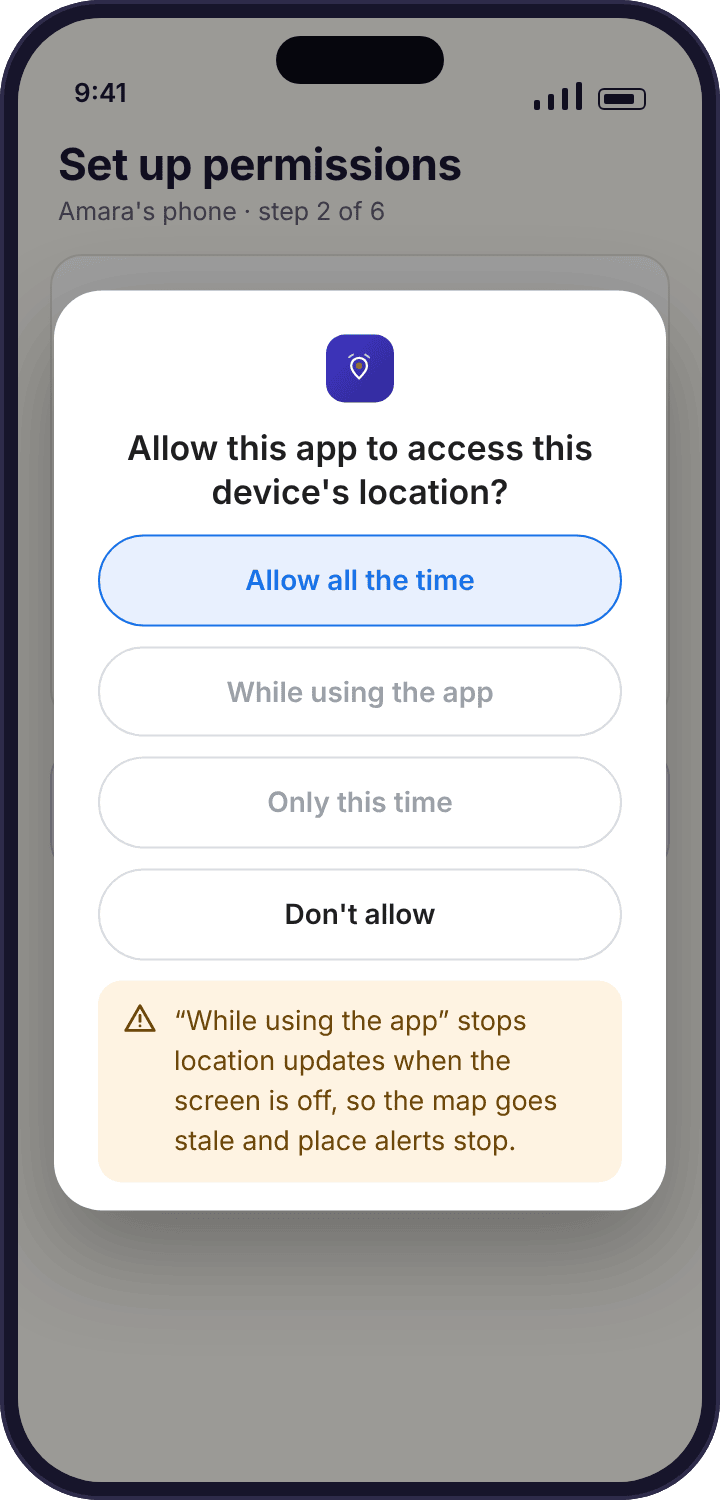
Android offers three answers when an app asks for location. "Allow all the time" lets the app receive positions while the phone is locked in a pocket, which is the only state in which a parental map is any use. "While using the app" delivers positions only while the child has MobileTracking open on screen, which for most children is never. "Don't allow" is at least obvious about what it does.
The middle option is the trap, because the permission screen lists it as granted. On recent Android versions the first dialog does not even offer "Allow all the time"; it offers "While using the app" and expects the app to send the child into Settings to upgrade it. The setup checklist on the child's phone does that, with the exact path shown, and the device health line stays amber until the upgrade is done. If you pair together, as the setup guide asks, this takes one minute and never comes up again.
- The path, if you need it later: Settings → Apps → MobileTracking → Permissions → Location → Allow all the time.
- Only location depends on it. Screen time, app limits and the rest run on other permissions. Declining this one stops the map, history and places, and nothing else.
- Samsung adds a second switch. On Amara's Galaxy, battery settings can quietly put an app to sleep; the device health page names that setting and tells you when it has flipped.
Your child sees this permission being granted and sees it listed afterwards on the "What's shared" screen, with location at the top. There is no way to grant it without the phone in your hand, and no version of the app that works around it.
Six reasons a pin stops updating, in the order they happen
A stale pin is the most common question parents send us and the least often serious. Before you conclude anything, look at the two numbers on the child's card: when the phone last reported and what the battery was at the time. Then work down this list.
The reading time keeps growing and the last battery level was low.
A flat phone. By a wide margin the commonest cause, and the one the stale banner is built around.
Fix: Nothing you can do from the panel. The map resumes on its own once the phone is charged and has moved. If the last battery reading was 6% at 15:40 and the school day ended at 15:31, that is your explanation.
The pin updates for a few hours, stops for hours, then updates again.
Battery optimisation has been switched back on. Android, and especially Samsung's One UI, re-enables it after some system updates, and the app's background reporting is throttled until it is off.
Fix: Device health names the setting and can send the child a one-tap "fix together" prompt. On the phone: Settings → Apps → MobileTracking → Battery → Unrestricted.
The pin has not moved since the day you paired the phone.
The location permission is "While using the app", or was never upgraded from it during setup.
Fix: Settings → Apps → MobileTracking → Permissions → Location → Allow all the time. The health line will have been amber since pairing day, so this is worth a look if you have never opened that page.
The pin is stuck in the same place for an hour, but the battery was fine.
Probably nothing. A phone that has not moved reports nothing new, by design. Noah's Pixel on the kitchen counter all morning will show "2 h ago" and be entirely correct.
Fix: Press Refresh if you need a fresh reading. If the fresh reading comes back from the same spot, the phone is where the map says.
A gap of an hour or two that later fills in.
No signal at all for a while: a train through a tunnel, a sports hall with thick walls, a rural footpath with no coverage.
Fix: Wait. The phone keeps its readings and uploads them when it reconnects, so the location history completes itself later. The live map shows the gap rather than inventing a position for it.
The pin stopped and device health says the app is no longer installed.
The app was uninstalled from the phone. MobileTracking does not hide from the uninstall screen, does not reinstall itself, and tells you plainly when it has gone.
Fix: Treat it as a message from your child rather than a technical fault. Something about the arrangement stopped feeling fair to them, and that conversation is worth more than putting the app back quietly.
What a family map is for, and how to keep it from running the house
Three reasons parents want the map
Most parents who open the map want one of three things, and the three want different settings. The first is reassurance on an ordinary day: did Amara get to school, is Noah back from Swim Club yet. A live map is a poor tool for this, because it has to be opened and checked. Place alerts answer it without the checking, and the map can stay closed. The second is the unusual day, when the route is new: a first solo bus journey, a school trip, a sleepover at Grandma Ngozi's in a town Amara has not walked around before. Here the live map earns its place, and the Refresh button gets used.
The third is the frightening day, when a child is late, not answering and the last reading time becomes the most important number in the kitchen. For that day, the map's honesty about its own age is what matters. A reading from 15:40 at 6% battery tells a different story from a reading from 17:55 at 60%, and the app is built so that you can see which one you are looking at before your imagination fills the gap.
If you find yourself in the second or third situation most weeks, the map is not the thing to adjust. The arrangement with your child is, and the map will only ever confirm what you already suspected.
What a position cannot tell you
A reading tells you where a phone came to rest and how sure the phone was. It does not tell you who the child was with, what they were doing, whether they were happy, or whether the phone was in their pocket at all. A pin at the Swim Club at 16:40 is consistent with Amara swimming, with Amara sitting on the bench outside with Tyler, and with Amara's bag being in the changing room while she walks to the shop. All three look identical on the map.
This is why MobileTracking reports the shape of the day rather than its contents, on the map as everywhere else. The app never takes a photo to prove where the phone is, never listens through the microphone, and never reads a message to find out who the phone was with. Those things are not switched off; they were never built. A parent who wants to know the "who" and "why" behind a pin has one good tool, which is asking.
A pin is a question, not a verdict
"You were near Mill Road at 15:40, what was that?" gets an answer. "I know you went to Mill Road" gets a door closing. The map gives you the first sentence. Nothing in it gives you the second.
What your child sees
The child app is installed under its own name and icon, and its "What's shared" screen lists location first, in plain words: where your phone is, how accurate the reading was, and when a parent last looked. When you turn location on from the panel, the line on the child's screen updates the same afternoon. The child's home screen also says "a parent viewed the panel today" on the days you open it, without saying which page.
Telling them is therefore settled; the only decision left is the wording. A version that works at thirteen is short: "I can see where your phone is on a map, with a time next to it. I don't get told every time you move. I'm not going to sit watching it, and the app tells you when I've looked." Then open the map on your own phone and show them what you see, circle and all. A child who has seen the 140-metre circle at school understands why you are not going to interrogate them about a pin on the sports field.
A parent, after the first fortnightI expected to check the map constantly. After a week I opened it twice: once when the bus was late, once because I forgot which day swimming was. The rest of the time the place alerts did the job and the map stayed shut.
Battery, data and what is stored
Because the app asks Android for settled positions rather than polling, the cost to the child's phone is small enough that most families never notice it on the battery graph. Pressing Refresh costs more, which is why it is a button. The battery level shown next to each pin lets you see the effect for yourself over a week. If a phone seems to drain faster after pairing, the usual culprit is a different app that was already running, and the device health page shows whether MobileTracking is in Android's unrestricted list.
Readings are tied to your family account and visible to you, to any co-parent you invite, and to your child on their own phone. They are kept for a rolling window of recent weeks and then dropped; the history page covers how long and how to delete a day sooner. The child app carries no advertising kit and no third-party analytics on location data, so the only places a reading goes are our servers and your screen. The privacy policy lists what the location feature stores, item by item. Uninstalling the child app stops collection at that moment.
Family Link, Find My and the rest
Google's Family Link shows a supervised child's current position and is a reasonable choice if that is all you want; it has no accuracy circle to speak of, no saved places with rules, and no reading history. Apple's Find My is excellent and only covers iPhones, which rules it out for Amara's Galaxy and Noah's Pixel. Many dedicated family locators are built around a dot that moves in near real time, which looks impressive and costs battery all day, and some of them hide themselves from the child, which we think is the wrong trade.
MobileTracking's map is slower by design and honest about its own uncertainty, and the child can always see it running. If you want the fastest-moving dot on the market, this is not it. If you want a map you can trust when it matters and ignore the rest of the time, it is.
How much of the map suits which age
The right amount of location tracking changes faster than most families adjust it. These are starting points for the Okafors' two ages and the one after.
The map for the unfamiliar day
You already know where a nine-year-old is nearly all the time. The map matters on the first walk to school without you and the first trip in another family's car.
- Map on, looked at rarely
- Explain the circle once, with the phone in hand
- Refresh only when a pickup goes wrong
The years the map is used most
Independent journeys start, and so do detours. Agree what the map is for before the first one, and show her the panel so there is nothing to find out later.
- Map on, with the "I looked today" line pointed out
- Accuracy explained, so a wide circle at school is not a row
- Reviewed together each term
A share they agreed to, or nothing
At this age the map is either an agreement or a grievance. Make it the first, and loosen it in the open as they prove the point.
- Live map by consent, and said so
- No quiet checking; the app tells them anyway
- Switch it off on a date you both pick
What parents ask about the map before they install it
How accurate is the location on the map?
Outdoors with a view of the sky, usually within a few metres. Indoors the phone falls back to nearby Wi-Fi and the position can drift by tens of metres, sometimes onto the building next door. The app draws the phone's own accuracy estimate as a circle around every pin, so you can see which kind of reading you are looking at before you trust it.
Why does the map say "40 min ago" when my child is clearly at school?
Because the phone has not moved. MobileTracking asks Android to report when the phone settles somewhere, not on a timer, so a phone that has sat in the same classroom for forty minutes produces no new reading. The time tells you how old the position is, not that anything is wrong. Press Refresh if you want a fresh fix now.
Can I see where the phone is when it is switched off?
No app can. A phone that is off, or flat, sends nothing. What the map does is keep the last reading on screen with its age and the battery level at the time, so a pin that stopped at 6% explains itself. When the phone is charged and moves again, the map picks up where it left off without you doing anything.
What does the "Allow all the time" permission do, and why does it matter?
It lets the app receive positions while the phone is locked and in a pocket. The alternative, "While using the app", only reports while the child has the app open on screen, which in practice means never. The map, saved places and history all depend on this one permission. The device health line shows amber until it is set correctly.
Does the map drain my child's battery?
Not noticeably for most families, because the app uses Android's low-power location services and waits for the phone to settle instead of polling. Pressing Refresh wakes the satellite receiver and costs more, which is why it is a manual button. The battery level shown beside each pin lets you watch the effect over a week and judge for yourself.
Will my child know their location is being shared?
Yes, and there is no setting that changes that. The app sits on their phone under its own name, the "What's shared" screen lists location at the top, and their home screen says a parent viewed the panel on the days you open it. The permission has to be granted on the phone itself, so it cannot be set up without them.
Can my child's other parent see the same map?
Yes. Invite them from the panel's family access page and they see the same pins, reading times and circles on their own phone or browser. Each press of Refresh is logged with the name of the parent who pressed it, so neither of you has to wonder who asked for the fresh reading.
Does it work if my child has an iPhone?
No. The child app runs on Android 8.0 or later only. Your own phone can be an iPhone, because the parent side is a website and an app that both work there. For a child with an iPhone, Apple's Find My and Screen Time are the right tools, and we would rather tell you that than sell you something that will not work.
Can I use this to find out where my partner is?
No, and the app is not built for it. MobileTracking is for a child you are responsible for, on a phone they know is paired, with a consent screen they tapped through. It cannot be made invisible and tells the phone's user that a parent looked. Tracking another adult without their agreement is unlawful in most countries, and the terms of service say so.
The pin jumped two streets for twenty minutes. Did my child go somewhere?
Almost certainly not. Indoors and in dense streets, a phone that loses the satellites guesses from Wi-Fi and reflected signals, and the pin can hop to a neighbouring building while the phone sits in the same bag. The accuracy circle widens when that happens. Wait for the next settled reading; two readings in one spot mean far more than one anywhere.
Where the map fits with everything else
The live map answers where a phone is right now; the pages beside it answer where it has been, when it arrived, and whether it is still reporting: location history, place alerts and device health.
Location tracking switches on once your child's phone is paired with your account, which takes about ten minutes with both devices on the table. The download and setup guide walks through every screen.
A map you can trust at four o'clock and ignore the rest of the day.
Pair your child's phone with them beside you, grant the one permission that matters, and the first reading appears before you have finished the tea.
Android · Free account · Visible on your child's phone