WhatsApp for kids: what a parent can see, and what nobody can
WhatsApp is usually the first messaging app a child asks for, because the class group lives there. This page starts with the privacy settings inside WhatsApp itself, which do more for a thirteen-year-old than any monitoring app, and then explains what MobileTracking adds on top: how long WhatsApp was open, when the notifications arrive, how many there were, and whether a word from your short list turned up in a preview. The messages themselves are end-to-end encrypted, and no app that tells the truth will show them to you.
Android · Visible on their phone · Permissions: Usage access, Notification access

WhatsApp's own settings first
Twenty minutes with your child's phone in hand, inside WhatsApp's Settings → Privacy screen, closes off most of what worries parents about the app: strangers seeing when they are online, strangers adding them to groups, and messages that vanish before anyone can ask about them. Do this together, on the sofa, before you pair anything. Menu names shift a little between versions, so the table describes what each setting does rather than the exact wording on the day you read this.
| Setting inside WhatsApp | Where it lives | Set it to | Why it matters for a child |
|---|---|---|---|
| Last seen and online | Settings → Privacy | My contacts, or Nobody | With the default, anyone who has the number can see that Amara was online at 23:50. A contact-only setting keeps her hours between her and the people she knows. |
| Profile photo | Settings → Privacy | My contacts | A face attached to a phone number is the thing you least want visible to a stranger who mistyped a digit or bought a list. |
| About | Settings → Privacy | My contacts | Children put their school, their year and sometimes their street in here. Keeping it to contacts stops it being a public bio. |
| Status | Settings → Privacy | My contacts, or chosen friends | Status updates are photos and videos that disappear in a day. Contacts only, and ideally a short list. |
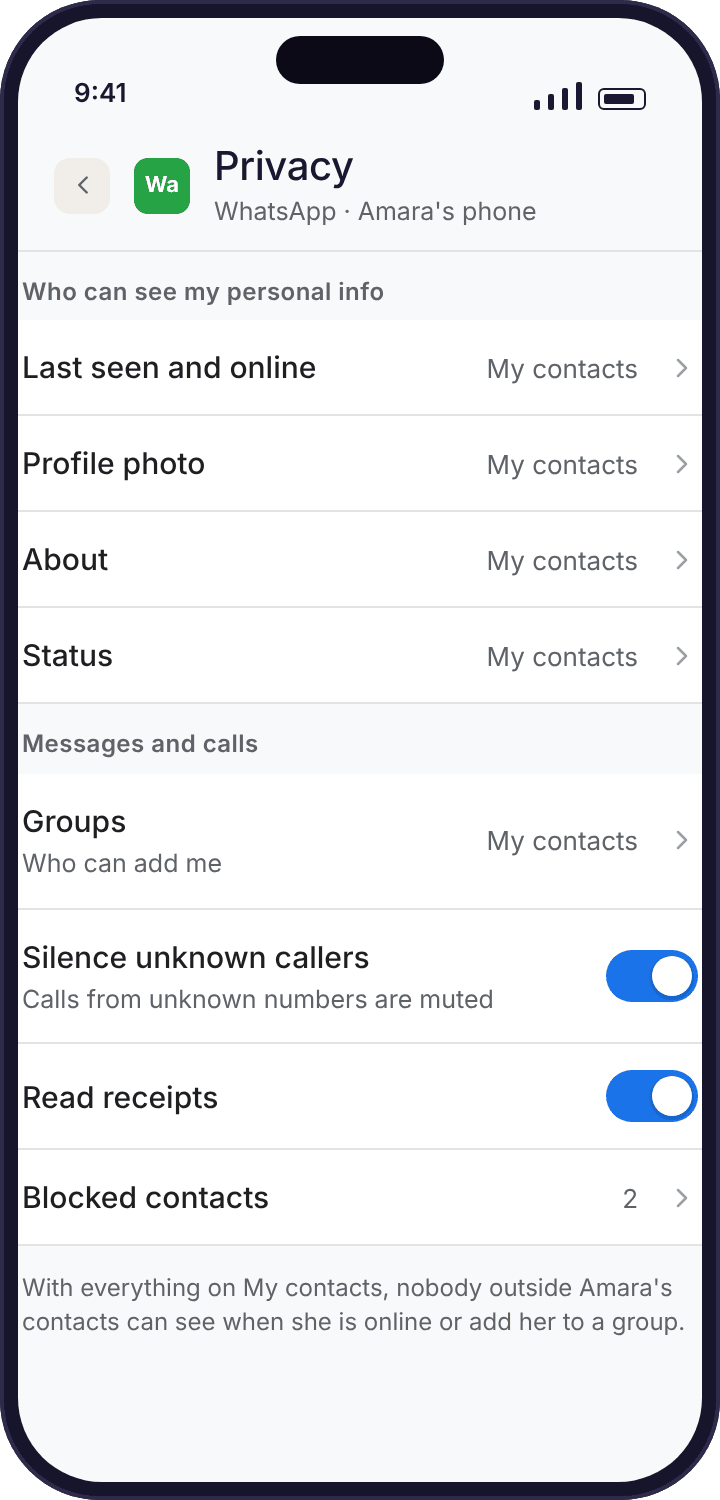
| Who can add me to groups | Settings → Privacy → Groups | My contacts | The single most useful setting for a 13-year-old. Unknown numbers get an invitation that she can ignore rather than landing straight in a group with forty strangers. |
| Blocked contacts | Settings → Privacy | Show your child how to use it | Blocking is quiet and reversible. A child who knows the three taps to block someone has a tool that works at 23:00 when you are asleep. |
| Default message timer | Settings → Privacy | Off, by agreement | Disappearing messages delete after 24 hours, 7 days or 90 days. Nothing wrong with the feature; just know that a chat your child wants to show you later may be gone. |
| Silence unknown callers | Settings → Privacy → Calls | On | Calls from numbers not in contacts ring silently and sit in the call list. It removes the 22:00 call from an unknown number without blocking anyone. |
| Read receipts | Settings → Privacy | Your child's choice | Blue ticks tell a sender that the message was read. Some children find switching them off takes the pressure out of replying at once. |
| Linked devices | Settings → Linked devices | Check it occasionally | WhatsApp can run on a laptop through a linked browser. That use happens off the phone, so no phone-based tracker counts it. |
The age rule. WhatsApp sets a minimum age of 13 in most countries, and some regions have used 16; the figure has moved in recent years, so check the terms for where you live. Noah, at nine, is below every version of that line. If a younger child has WhatsApp on a tablet to call Grandma Ngozi, that is a decision you are making, not one WhatsApp made for you.
Minutes, timing and counts from the phone; never the chats
Once WhatsApp's own settings are sensible, the tracker gives you the shape of how it is used. Three screens cover it. Each needs one Android permission on the child's phone, granted together during pairing, and the child app's "What's shared" screen lists all three in plain words.
How long WhatsApp was open, day by day
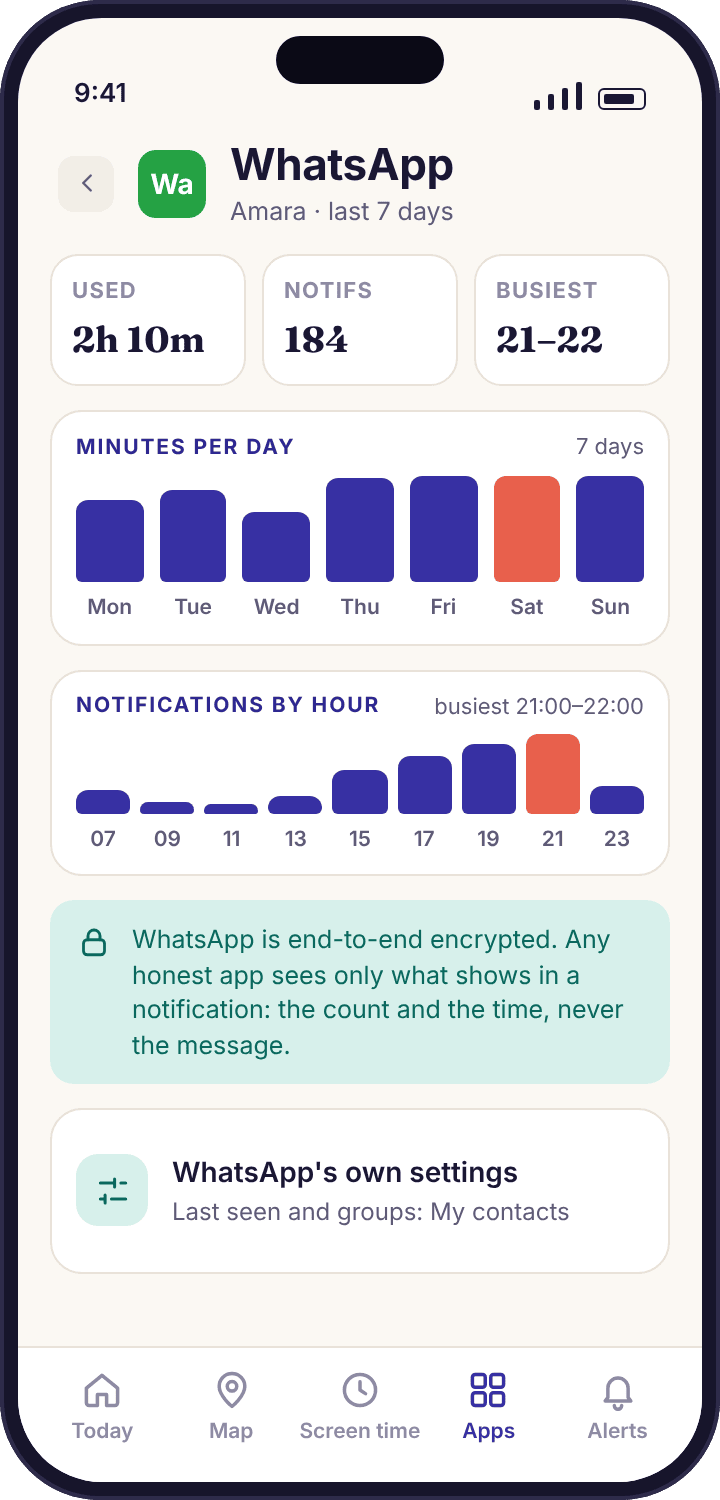
Android keeps a record of which app is in the foreground and for how long. With Usage access granted, MobileTracking reads that record and shows WhatsApp as a bar per day and a total per week. In the demo, Amara's week comes to 2 hours 10 minutes, with Thursday the heaviest day at 31 minutes. That is the figure to compare with her own guess, which is usually about half of the real one.
The number counts time with WhatsApp on screen. A voice call with the screen off still counts, because WhatsApp stays in the foreground for calls. Time on a linked laptop does not count, and neither does a message read from the lock screen without opening the app. Treat the total as a floor rather than a ceiling.
- Per-day bars, per-week total. Enough to see that Thursday is always heavy, which usually has a reason you can ask about.
- Counts toward the screen-time budget. If you set a daily budget later, WhatsApp minutes are part of it, unless you mark it as always allowed.
- No reading of what was on screen. Usage access tells Android which app was open. It does not expose a single word inside it.
When the notifications arrive, and how many
Every WhatsApp notification that reaches the child's phone is counted and stamped with the time. The count is the number that surprises parents: 184 in Amara's week, most of them from two group chats. The timing is the number that matters. Her busiest hour is 21:00 to 22:00, which is fine on a Friday and worth a conversation on a Tuesday when the bedtime schedule says the phone should be winding down at 21:30.
A count of 184 is not 184 conversations. One group with fifteen people planning a birthday produces sixty notifications in an evening without Amara typing a word. Muted groups produce none at all, so a child who has muted the class group will look quieter than they are. Read the counts as weather, not as evidence. The screen beside this row is the child's own WhatsApp privacy page rather than ours, because the two settings that change the counts most, group invitations and muting, live there and not in any tracker.
- By hour of day. A heat strip shows when WhatsApp is loud. Two notifications at 02:14 are more useful to know about than sixty at 17:00.
- Name of the app only. The record says "WhatsApp · 21:48". It does not say who sent it or what it said.
- Honest about gaps. If Notification access was switched off on Wednesday, the week view says so rather than drawing a quiet Wednesday.
A keyword alert when a preview matches your list
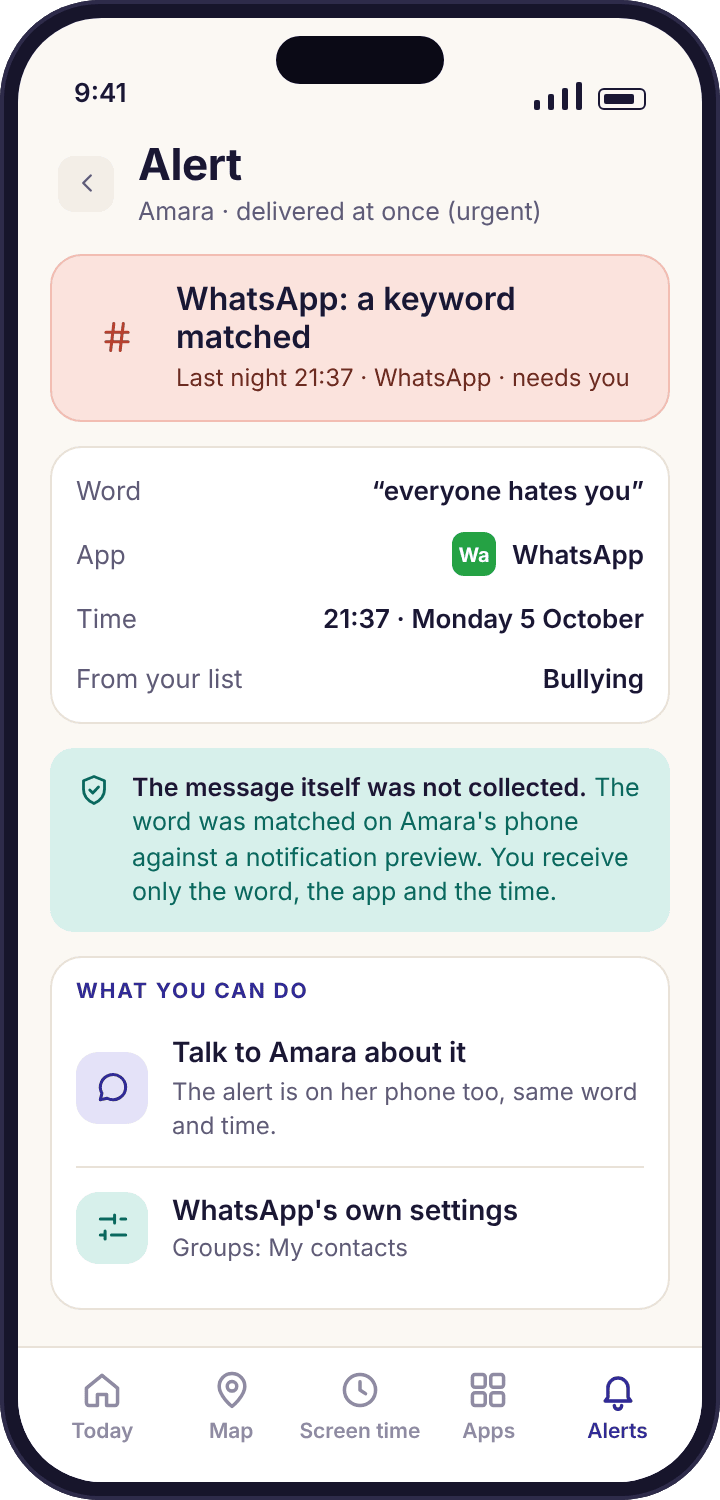
WhatsApp notifications carry a preview of the message, unless your child has turned previews off. MobileTracking checks that preview against the short list of words you chose, on the child's phone, and if one matches you get an alert that says the word, the app and the time. The preview is then discarded. The message is never uploaded, never stored, and never shown to you, because the matching finishes before anything leaves the phone.
This is the one place the tracker touches text, so it is worth being precise about the limits. It sees a preview, which is usually the first line of one message. It cannot see the reply, the message before, or anything in a chat your child opened without a notification arriving. The keyword alerts page explains the matching rules and offers a starter list of about twenty words; keep yours about that length or the alerts become noise.
- A word, not a sentence. The alert in the screen reads "WhatsApp · 21:48 · one word from your list matched". That is the whole record.
- Matching happens on the phone. No preview text reaches our servers, on any plan, at any price.
- Previews off means no matches. If WhatsApp's "Show preview" is off, notifications say only "New message" and there is nothing to match.
Three WhatsApp situations from an ordinary fortnight
Abstract descriptions of monitoring make it sound either all-seeing or useless. It is neither. These three situations, drawn from the demo family's data, show the size of what the WhatsApp view hands you and the size of what it leaves to you.
The group that fired sixty notifications in one evening
On a Wednesday, Amara's WhatsApp count jumps from a usual twenty-odd a day to ninety-four, with sixty of them between 19:30 and 21:00. The minutes barely move: 22 minutes for the day. Priya's first thought is that something has happened. Her second, after looking at the hourly strip, is that a lot of people are talking at once and Amara is mostly not answering.
At dinner the next day it takes one question. The Year 9 netball group had been added to a bigger club group, forty-three people, and they were arguing about a kit order. Amara had muted it that night. The tracker could not have told Priya any of that; it could only tell her the evening was unusually loud and that her daughter spent little time on it.
What the app did: counted and time-stamped the notifications and showed the minutes beside them. It did not name the group, the sender, or the subject. The "who can add me to groups" setting, already on "My contacts", was what kept it to a group Amara had chosen to join.
A keyword matched at 21:48 on a school night
The keyword list the Okafors agreed on has nineteen words, grouped under bullying, self-harm and requests for photos. On a Monday the parent app shows "Keyword matched · WhatsApp · 21:48" and the word is one from the photo-requests group. Priya is told the word, the app and the minute. She is not told who sent it, whether it was a joke in the class group, a song lyric, or something worse, and she cannot open the message, because it was never collected.
She does not take the phone. She waits for breakfast, says that the word came up in a WhatsApp alert last night, and asks whether everything is all right. It was a lyric, pasted into the group by Tyler, and Amara is mildly annoyed that a song set off an alert. That is a good outcome. The alert produced a conversation about what the list is for, and Amara now knows the list exists and roughly what is on it, because the child app shows her.
What the app did: matched one preview against the list on the phone, sent one line, and discarded the preview. The false alarm cost one question at breakfast. A missed real one would have cost more, which is why the list stays short and the photo-request words stay on it.
WhatsApp appears on Noah's Pixel at nine years old
On a Saturday the parent app flags a new install on Noah's phone: WhatsApp, with the note that it asks for contacts, camera and microphone. Noah is nine. A friend at Swim Club has it and the plan was to send each other videos of a dive. No notifications have arrived yet and the minutes read four, which is the time it took to install and try to sign up with a number that is not his.
Priya has three honest options and the app does not pick for her. She can block WhatsApp on Noah's phone, which shows him a plain screen naming the rule and who set it. She can allow it and set up the same privacy settings as Amara's, accepting that he is below WhatsApp's own minimum age. Or she can suggest the Swim Club videos go through a family group on her own phone instead, which is what happened. The app's job was to tell her the same afternoon rather than in a month.
What the app did: flagged the install on the day it happened, named the permissions WhatsApp requested, and left the decision where it belongs. Nothing inside WhatsApp was read, and nothing would have been.
Four reasons a WhatsApp week reads oddly, and the fix for each
Most strange-looking WhatsApp data is a permission or a WhatsApp setting rather than anything your child did. Check these four before you ask a single question, because asking about a number that turns out to be a settings problem spends trust you will want later.
Minutes look real but the notification count is zero.
Notification access was declined during setup, or Android removed it after an update. Usage access still works, so the minutes keep flowing and the counts stop.
Fix: The device health line names the missing permission exactly. On the phone it is Settings → Notifications → Device and app notifications, where MobileTracking needs to be allowed. Grant it together; the counts resume from that minute, not retroactively.
Notifications are counted but keyword alerts never fire.
WhatsApp's "Show preview" is off, so every notification reads "New message" with no text to match. Some children switch it off for privacy from friends looking over their shoulder, which is a reasonable thing to do.
Fix: Decide together. Previews on gives you keyword alerts; previews off gives your child a lock screen that shows nothing. For a thirteen-year-old with a short list, most families keep previews on and say so.
Minutes are far lower than what you see with your own eyes.
WhatsApp is linked to a laptop or tablet through Settings → Linked devices, and most of the chatting happens there. The phone-based tracker counts the phone only.
Fix: Open Linked devices on the child's phone and look at the list. Unlink the ones you did not know about, and treat the laptop as a separate conversation about where homework time goes.
Counts are enormous and the child says it is "just groups".
They are probably right. One active group produces dozens of notifications an hour, and each is counted. The count measures how loud WhatsApp is, not how much your child is involved.
Fix: Look at the minutes beside the count. Loud with low minutes is a child ignoring a group. Loud with high minutes at 23:00 is a different situation. Suggest muting the group; WhatsApp's mute lasts eight hours, a week or always.
What a parent should do with WhatsApp data, and what not to try
Why the messages are out of reach, for everyone
WhatsApp encrypts every message between the two phones involved. The keys live on those phones, so the text is unreadable to WhatsApp's own servers, to your mobile network, and to any app that is not sitting inside WhatsApp itself. The only moment a message exists as readable text outside the WhatsApp app is when WhatsApp hands Android a notification to display, and that notification contains a preview of one message, not the chat. That is the sliver MobileTracking's keyword matching works from, and it works from it on the phone, discarding the preview as soon as the comparison is done.
This is not a limitation we chose to add. It is how WhatsApp works, and it would be true of any monitoring product that respects the phone's security model. We think it is also the right amount of visibility for a parent. The shape of use, the timing, and a short list of words that should never appear are enough to notice when something has changed. The contents of a thirteen-year-old's conversations with her friends are hers.
Apps that claim to show you WhatsApp chats
You will find products that promise full WhatsApp message logs. There are only two ways to deliver that promise. One is to break into the phone's protected storage, which means rooting the device, running hidden software with accessibility abuse, or installing something that behaves exactly like the stalkerware that security researchers warn about. The other is to upload every notification preview and hope you do not notice the difference between a preview and a chat. Both are bad for the phone, bad for the child, and in many countries unlawful to use on anyone.
MobileTracking cannot be hidden from the child, and never will be. The child app has an icon, a home screen and a transparency screen that lists WhatsApp monitoring in plain words: how long, how often, when, and whether a keyword matched. If a site offers an "invisible" version of this app, it is not ours.
Your child can see the same week
The WhatsApp bars and counts on your screen are the same ones on the child's "What's shared" screen. Amara can see that Thursday was 31 minutes and 184 notifications before you mention it, which makes the conversation about Thursday much shorter.
The first week: record before you react
Pair the phone, grant Usage access and Notification access, set the WhatsApp privacy settings from the table above, and then do nothing for seven days. A single day's figure is noise. Thursday at 31 minutes means nothing until you know that most days are 15. The week view exists so that the first conversation you have is about a pattern rather than about one evening, and a pattern is something a child can agree or disagree with on fair terms.
Keep the keyword list short while you learn how WhatsApp notifications behave in your house. Twenty words is plenty. A list of two hundred matches song lyrics, slang and in-jokes every evening, and within a fortnight you stop reading the alerts, which is worse than not having them. The social media monitoring overview shows how the WhatsApp figures sit beside Instagram and Snapchat, which is usually where the real contest for a teenager's evening is.
Telling a thirteen-year-old what you can see
Say the whole truth, because it is short. "I can see how long WhatsApp is open each day, when the notifications come in and how many, and I get told if one of about twenty words shows up in a notification. I can't read your chats, and neither can the app. Here's the list of words." Then open the child app together and show the transparency screen so she can check you are not leaving anything out.
Then set the privacy settings together, with her holding the phone. A child who chose "My contacts" for groups herself will keep it there. One who had it set for her will quietly change it back the first time a friend of a friend wants to add her to something. The settings are hers to live with, so the choosing should be hers too, with you explaining what each one does.
Loosening it as she gets older
At thirteen, counts and timing and a keyword list are proportionate. At fifteen, the keyword list is often the first thing to switch off, by agreement, with the timing view kept because late-night messaging affects sleep whatever age you are. By sixteen, many families keep only the minutes, or nothing, and treat WhatsApp as the private channel it is. The app makes each of those steps a single toggle, and each change appears on the child's phone the same afternoon, so the loosening is visible too. The goal is a child who leaves home never having had a reason to hide a phone.
Questions parents ask about monitoring WhatsApp
Can MobileTracking read my child's WhatsApp messages?
No, and no honest app can. WhatsApp messages are end-to-end encrypted between the two phones, so the text is never available to a third app. What you get is the time WhatsApp was open, the number and timing of notifications, and a one-line alert if a word from your short list appears in a notification preview. The preview is checked on the phone and then discarded.
Does a WhatsApp keyword alert show me the message?
It shows the word, the app and the time, and nothing else. The alert in the parent app reads along the lines of "Keyword matched · WhatsApp · 21:48". The notification preview that triggered it never leaves the child's phone, so there is nothing for us to show you even if you asked support for it.
Can I see who my child is messaging on WhatsApp?
No. The notification record names the app, not the sender, and the tracker has no access to WhatsApp's contact list or chat list. If who they are talking to is your worry, WhatsApp's own settings do more: "Who can add me to groups" set to My contacts, and blocking for anyone who should not be in touch.
What age does WhatsApp allow, and does the app enforce it?
WhatsApp's minimum age is 13 in most countries and has been 16 in some regions at various times, so check the terms where you live. MobileTracking does not enforce it; it flags the install on the day WhatsApp appears and tells you which permissions it asked for. Whether a nine-year-old keeps it is your decision, and blocking it is one toggle.
Do WhatsApp voice and video calls count as time?
Yes, as minutes of WhatsApp use, because the app stays in the foreground during a call. You see that WhatsApp was open for 40 minutes at 20:10; you do not see who the call was with, and nothing about the call is recorded. The Calls and SMS feature covers ordinary phone calls only, not WhatsApp calls.
Why did the WhatsApp notification count drop to nothing mid-week?
Almost always a permission. Notification access can be removed by an Android update or by a child tapping the wrong thing, and the device health line will name it. The other cause is a muted chat: WhatsApp sends no notification for a muted group, so the count falls while the minutes stay the same.
Does disappearing messages mode hide anything from the tracker?
Nothing that was visible before. The tracker never saw the message text, so a message deleting itself after 24 hours changes nothing on your side. Notifications are still counted and previews are still matched. The one effect is on your child: a chat they might want to show you later may already be gone.
Will my child know WhatsApp is being monitored?
Yes. The child app's "What's shared" screen lists WhatsApp with exactly what is collected: time open, notification counts and times, and keyword matches with the word list visible. Switching WhatsApp monitoring on or off updates that screen the same afternoon, and the phone shows that a parent opened the panel today.
Can the tracker see WhatsApp on a laptop or WhatsApp Web?
No. MobileTracking runs on the child's Android phone and counts that phone only. WhatsApp linked to a browser on a laptop is invisible to it, which is why the minutes can look low for a child who chats from a computer. Settings → Linked devices inside WhatsApp lists every linked session and lets you remove them.
Is WhatsApp monitoring in the Google Play build?
Yes. The WhatsApp view uses Usage access and Notification access, both available in the Google Play build and the direct APK build alike. The only feature that differs between builds is the call and SMS log, which has nothing to do with WhatsApp.
Where the WhatsApp view fits with everything else
WhatsApp is one column in a wider picture of a child's evening, and the same counts-and-timing approach runs for every social app on the phone: social media monitoring, Instagram tracker, Snapchat tracker and keyword alerts.
WhatsApp monitoring switches on once your child's phone is paired with your account, which takes about ten minutes with both devices on the table. The download and setup guide walks through every screen.
See the shape of their WhatsApp week, not their chats.
Set WhatsApp's own privacy settings together, pair the phone, and by next week you will know when the group chats get loud, without reading a word of them.
Android · Free account · Visible on your child's phone