Facebook and Messenger: supervision tools first, then the tracker
Meta already gives parents more control over a teenager's Facebook and Messenger accounts than most people realise, and for a child under thirteen there is a separate app, Messenger Kids, where the parent approves every contact. Set those up before you install anything of ours. What MobileTracking then adds is the part Meta's tools leave out: how many minutes each of the two apps took, at what hour the Messenger notifications pile up, and a quiet alert if a word from your list appears in a preview. It will never show you a chat, a post, a friend list or a photo.
Android · Visible on their phone · Permissions: Usage access, Notification access

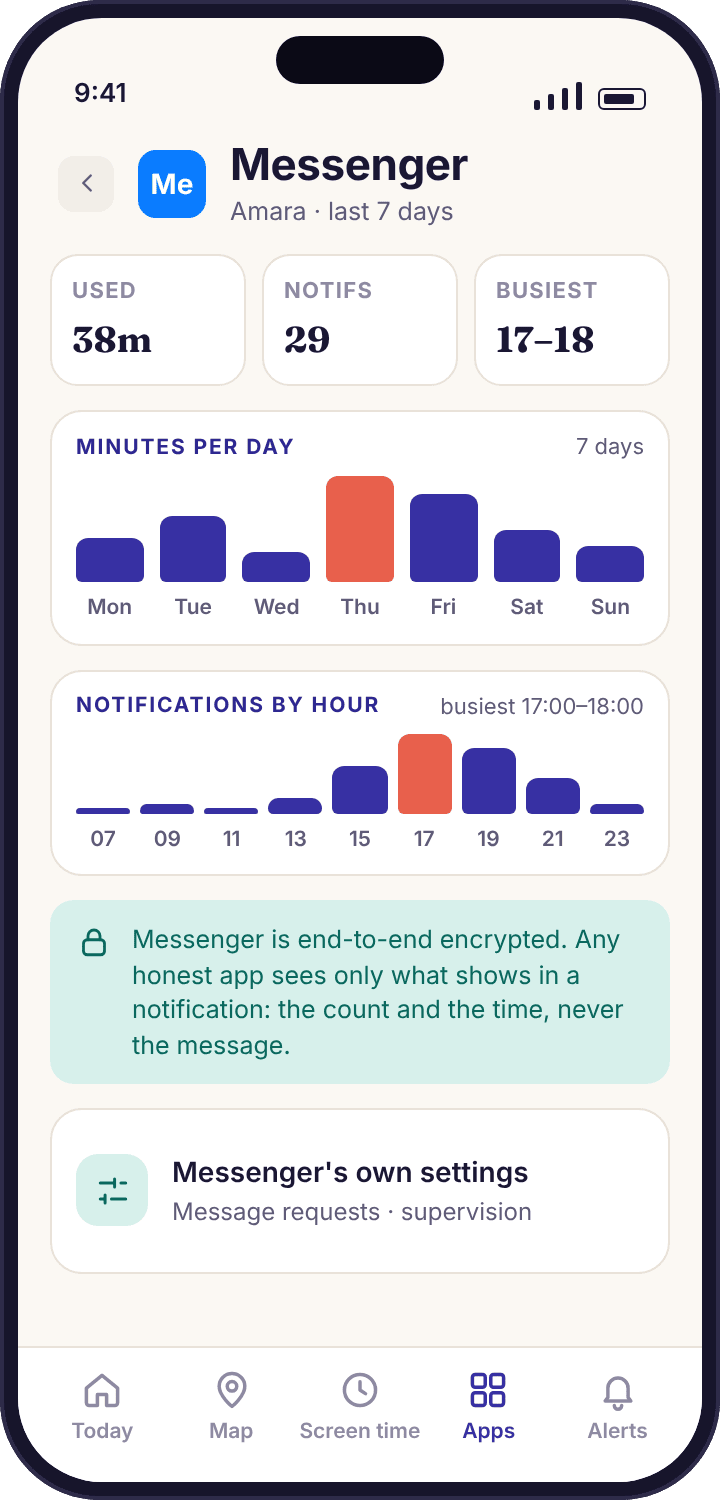
- Two apps, counted separately. Facebook and Messenger are different apps on Android, and the parent app lists them as two rows with their own minutes and notification counts.
- Meta's own supervision comes first. Message request settings, the teen defaults, and the supervision tools in Family Center cover who can reach your child. No tracker does that job better than the account settings do.
- Under thirteen means Messenger Kids. Facebook does not allow accounts below 13. For Noah, the route is Messenger Kids with a parent dashboard, not a Facebook account with a wrong birthday.
- Notification previews are the only text the app touches. Keyword matching runs on the child's phone against the preview and reports the word, the app and the time. Messenger chats are end-to-end encrypted by default, so nothing else is reachable.
- Visible on the phone. The child app lists Facebook and Messenger on its "What's shared" screen with exactly what is counted, and shows that a parent opened the panel today.
Meta's supervision tools, row by row
These are controls inside Facebook and Messenger themselves. They need your child's account, your own account, and about twenty minutes with both phones on the table. Meta renames and reorganises its settings screens often, so each row says what to look for and what it does rather than promising the exact label you will see.
The under-13 route, and the only honest one. It is a separate app that runs without a Facebook account; the parent controls it from a dashboard in their own Facebook app, approves every contact, can see the contact list and recent activity, and can set sleep hours when the app will not open. For Noah at nine it is the whole answer, and MobileTracking treats it like any other app: minutes and notification counts, nothing inside.
An account registered with a date of birth under 18 gets stricter starting settings: posts default to friends, messaging from unknown adults is limited, and some settings need a parent's approval to loosen. These only work if the date of birth is true. A child who signed up as a 24-year-old to get past the age gate has none of them, and that is a conversation to have before any monitoring.
Reached through Accounts Center or the Family Center screen in the Facebook or Messenger app. The teen sends or accepts an invitation; the parent then sees time spent, changes to the contact list, who the teen can receive messages from, and the current privacy settings. The parent does not see messages. The teen can see everything the parent sees and can end supervision, which makes it a tool for agreement rather than control.
Messenger's "how people can reach you" settings decide whether a message from a friend of a friend goes into Chats, into Message requests, or nowhere. Set friends to Chats, friends of friends to Message requests, and everyone else to no requests at all for a thirteen-year-old. A request from a stranger then sits in a folder your child can ignore, and never produces a notification.
Worth showing your child where it is. Requests from people outside their friends go there, with a "you may know" and an "other" section. Opening a request does not tell the sender it was read until the request is accepted. A child who knows this can look, decide, and delete without feeling watched by the sender.
In the Facebook app's privacy settings: who can send friend requests (friends of friends, not everyone), who can look the account up by phone number or email (friends), and who can see the friends list. The friends list is the one most parents forget; a public friends list is a map of your child's school for anyone who wants one.
Blocking on Messenger stops messages and calls; blocking on Facebook also removes the person as a friend and hides both profiles from each other. Reporting goes to Meta and does not tell the person. Teach both, and say plainly that using them is not telling tales.
Personal Messenger chats are end-to-end encrypted by default, and a chat can be set to vanish after it is read. Neither changes anything on the tracker's side, because it never had the text. What changes is that a message your child might want to show you later may be gone, so "screenshot it if it worries you" is advice worth giving early.
Do the settings with the child holding the phone. Every row above is something Amara can change back in a minute if it was done to her rather than with her. Walk through each one, say what it stops, and let her tap. The settings she chose are the settings that will still be in place in March.
The two things Meta's tools leave out: minutes and timing
Family Center shows time spent only once supervision is accepted, only for Meta's apps, and only in Meta's app. MobileTracking shows Facebook and Messenger as two rows next to every other app on the phone, from the same screen that shows screen time and location, with the hourly timing that tells you whether the problem is 17:00 or 23:40.
Facebook and Messenger as two separate rows
Android installs Facebook and Messenger as two packages, so the tracker counts them separately, and the split is informative. In Amara's demo week, Facebook is 48 minutes, nearly all of it scrolling video on Sunday afternoon, while Messenger is 1 hour 52 minutes spread across every evening. Those are different habits with different conversations attached. Lumping them into "Facebook: 2 h 40 m" would hide which one deserves attention.
Both rows show a bar per day and a weekly total. Facebook used inside a browser, at the mobile site, counts as browser time and appears under Chrome, with the page title in the web log. Messenger Kids on Noah's phone appears as its own row, usually a modest one.
- Per-app bars, per-day. Sunday's 40 minutes of Facebook video and Tuesday's 25 minutes of Messenger at 22:00 are visible as separate things.
- New install flagged. If Facebook appears on a phone that only had Messenger, the parent app says so on the day, with the permissions it requested.
- Nothing from inside either app. No feed, no posts, no likes, no friend list, no profile. Usage access gives the app's name and its minutes, and that is all it gives.
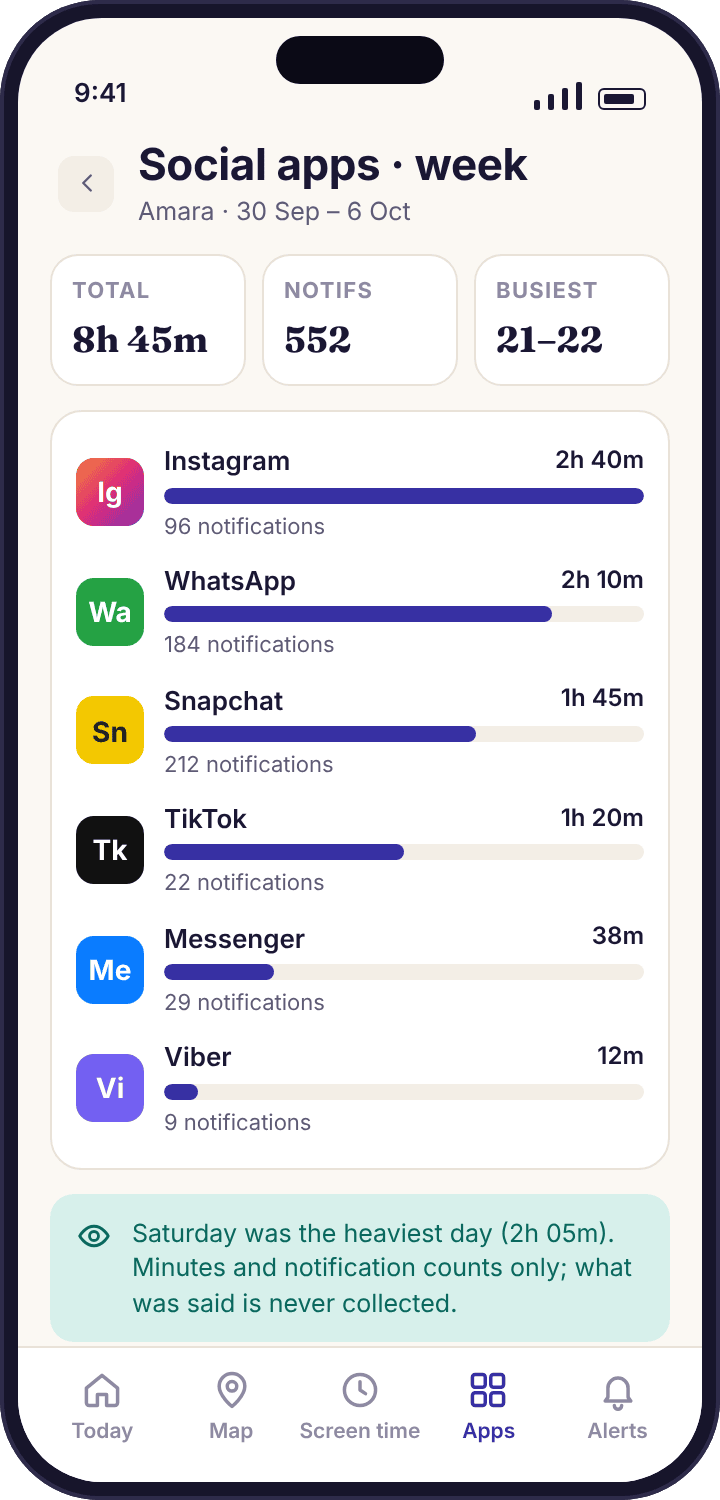
Messenger notifications by the hour
Each notification from Messenger is counted and stamped with its time. The count for Amara's week is 97, which is modest beside WhatsApp, and the hourly view puts most of them between 20:00 and 22:00. Facebook's own notifications are counted on their own row, and they are mostly the app talking to itself: a friend posted, a memory from three years ago, a suggested group. A high Facebook count usually means the notification settings inside Facebook need trimming, not that anything is happening.
What the tracker cannot see is as important. It does not know who the Messenger notification came from, because the record it keeps is the app name and the time only. It does not know whether a notification was a message, a reaction, a missed call or a "Tyler is active now" nudge. It counts and it stamps. The pattern is yours to read. The screen beside this row is Messenger's own settings page on the child's phone, shown here because the message request options on it decide which strangers can produce a notification at all, and a count only means something once that is set.
- An hourly strip per app. Messenger at 23:40 on a school night stands out without needing a single word of context.
- Muted chats send nothing. A conversation your child muted inside Messenger produces no notification, so the count is a floor.
- The gap is drawn as a gap. If Notification access drops out on Thursday, the week view marks Thursday as unknown rather than quiet.
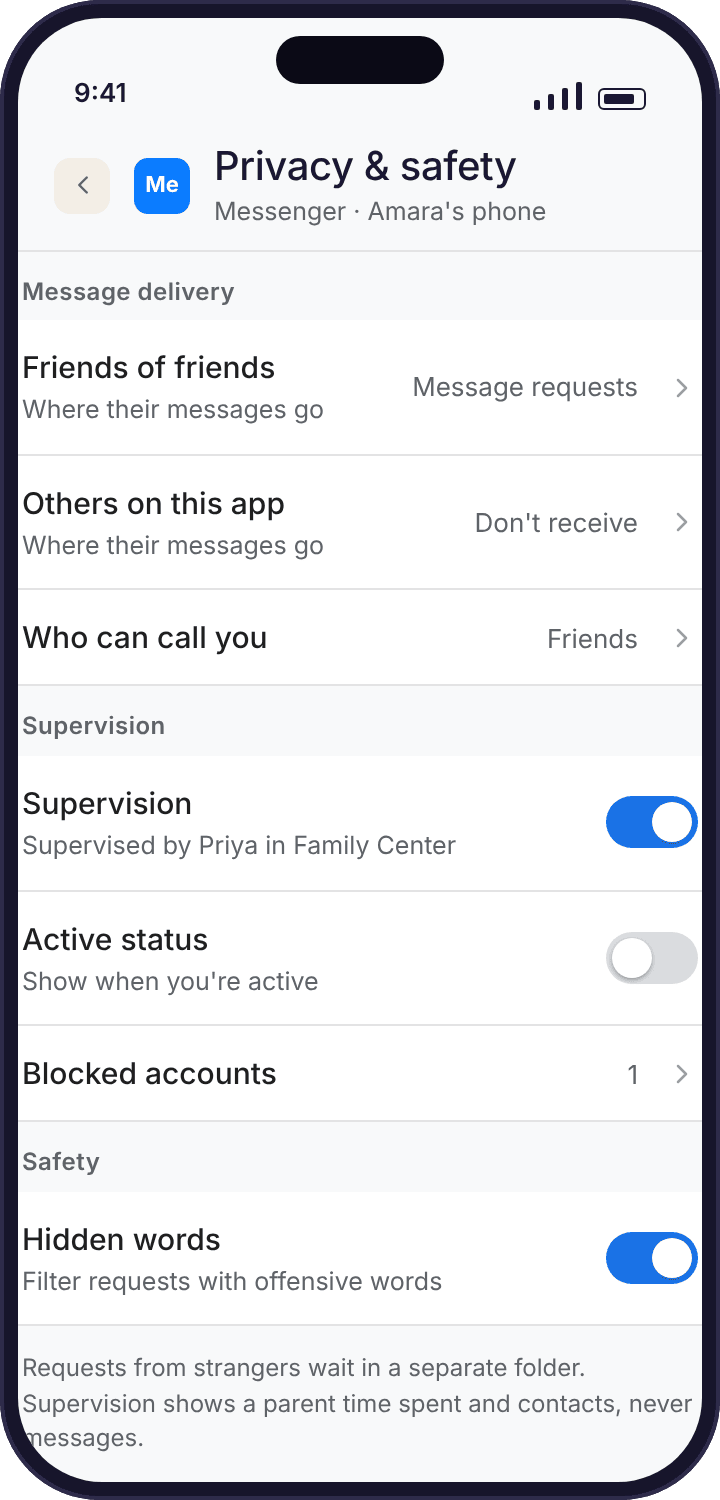
A keyword alert from a Messenger preview
Messenger's notifications normally include a preview of the message. On the child's phone, MobileTracking compares that preview with the word list you set up, and if one of the words appears, the parent app shows an alert with three facts: the word, the app, and the time. The preview itself is discarded on the phone. Nothing about the message, the sender or the conversation is uploaded, and support cannot retrieve it because it was never kept.
End-to-end encryption does not get in the way here, because Messenger decrypts the message on the phone before handing Android a notification. It does mean the preview is the only text that ever exists outside Messenger, so a word in the second line of a long message, or in a reply your child typed, is never seen. The keyword alerts page has the matching rules and a starter list; around twenty words is the sensible size.
- Matched on the phone. The comparison runs in the child app. Our servers receive "word · Messenger · 21:12" and nothing more.
- Previews off, nothing to match. If message previews are hidden in Messenger's or Android's notification settings, the alert never fires, and the week view says previews are off.
- The list is visible to your child. The child app shows the words, so an alert is never a trap. It is a line both of you knew was there.
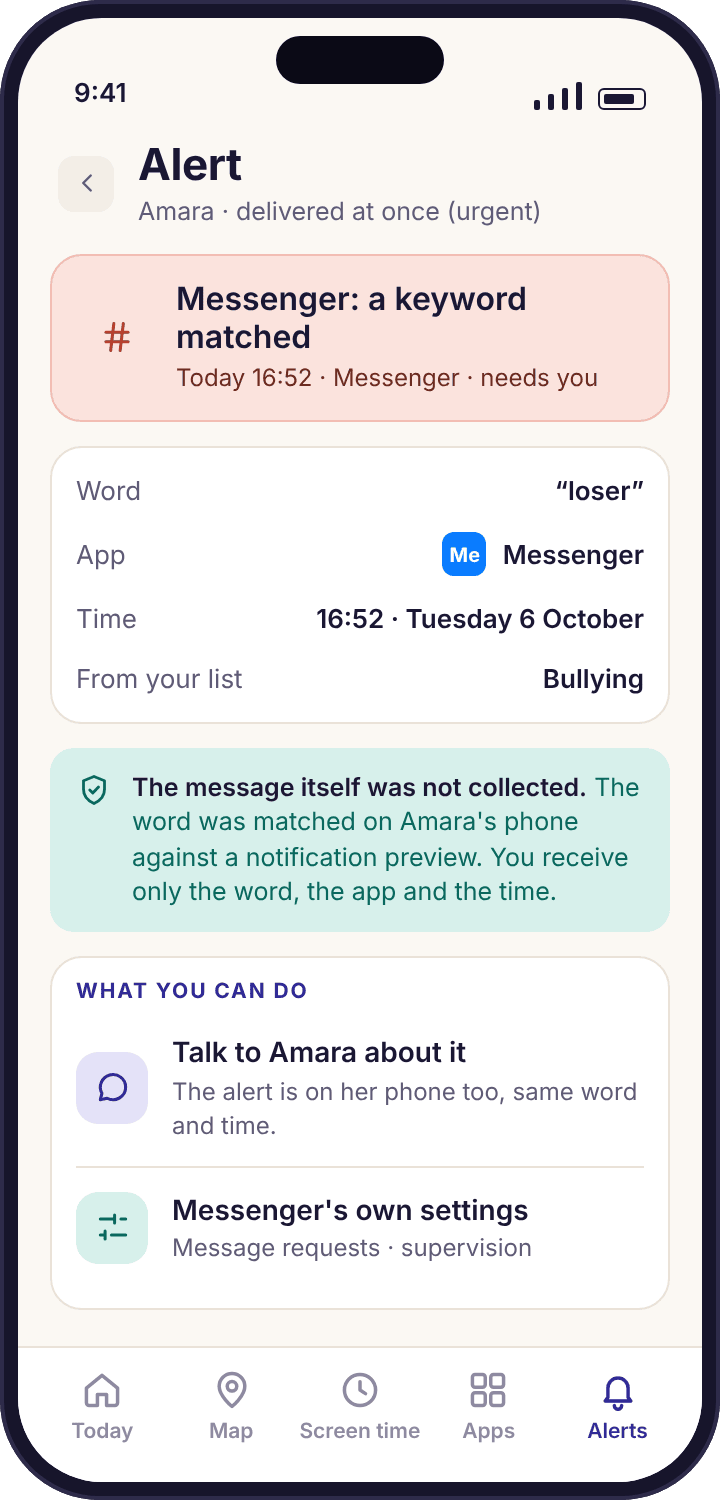
A week of Messenger, as the parent app shows it
The only way to see what this feature is worth is to look at seven ordinary days. This is Amara's demo week: one thing worth asking about, one thing worth fixing in a setting, and five days that need nothing from anyone.
A quiet start
Messenger opens four times, all after school, the longest stretch nine minutes at 16:40 while Amara waits for the bus from Oakridge School. Facebook is not opened at all. Nothing here reaches Priya's phone, and the daily summary at 18:00 lists it in one line.
The 22:00 cluster
Thirteen of the nineteen notifications arrive between 21:50 and 22:20, after the bedtime schedule has started winding the phone down at 21:30. The minutes show Messenger open for eleven of them. That is the one thing worth asking about this week, and the answer turned out to be a group planning a shared birthday present, which did not need to happen at 22:00.
Swim Club night
The phone is at Swim Club from 16:05 and Messenger is barely touched. The hourly strip is empty from 16:00 to 17:30. Days like this are why the week view exists: they are the baseline that makes Tuesday legible.
One keyword alert at 21:12
A word from the bullying group on the family list matches a Messenger preview. Priya gets "Keyword matched · Messenger · 21:12" and nothing else. She asks the next morning. It was Tyler quoting something a teacher said, and Amara is unbothered. The alert did its job by being short and by not being a secret.
Friday is loud and that is fine
The heaviest day. Notifications spread from 15:40 to 23:10 and the minutes match. A Friday with no school tomorrow and a sleepover being arranged. The week view shows it; nothing about it needs a parent, and no alert interrupts the evening.
Facebook has its day
Messenger is normal, but the Facebook row jumps to 40 minutes of its 48 for the week, between 14:00 and 15:00 at Grandma Ngozi's, mostly video. Facebook's own notifications come to 22, nearly all "someone you may know" and a memories post. This is the thing to fix in a setting: Facebook's notification preferences, trimmed to messages and tags only.
A week that reads as a week
Quiet again. The totals: Messenger 1 hour 52 minutes and 97 notifications, Facebook 48 minutes and 22. Two things to talk about, both small, both specific. Nobody read a message, and nobody needed to.
Four reasons the Facebook and Messenger rows look wrong
Before you treat a figure as a fact about your child, check whether it is a fact about a setting. These four cover nearly every support question we get about Meta's apps.
Messenger shows minutes but no notifications at all.
Notification access is missing, or Messenger's notifications are switched off on the phone, either inside Messenger or in Android's per-app settings. Minutes come from a different permission, so they keep flowing.
Fix: Device health names a missing MobileTracking permission exactly. If it is green, open the phone's Settings → Apps → Messenger → Notifications and check they are allowed. Counts restart from the moment it is fixed.
The Facebook row is huge and your child says they barely use it.
Facebook's in-app video keeps the app in the foreground for long stretches, and ten minutes of scrolling feels like two. The minutes are correct; the child's estimate is what most people's estimates are.
Fix: Show them the bar together rather than quoting it. A per-app limit on Facebook, 30 minutes on school days, settles it without an argument, and the child app shows the limit before it bites.
Keyword alerts never fire on Messenger.
Message previews are hidden. Messenger has its own preview setting and Android has a lock-screen one; either removes the text from the notification, leaving "New message" with nothing to match.
Fix: Decide with your child whether previews stay on. For a thirteen-year-old with a short, visible list, most families keep them on. If they stay off, switch the Messenger keyword rule off too, so the panel does not suggest a protection that is not running.
There is a Facebook row on a phone that should only have Messenger Kids.
A nine-year-old installed the Facebook app, possibly with an invented date of birth, possibly just to see what it is. The new-install flag will have fired on the day.
Fix: Treat the install flag as the signal. Facebook does not allow accounts under 13, so the honest routes are to remove the app and keep Messenger Kids, or to block it with a screen that says who set the rule. Either way, ask what they were hoping to do; the answer is usually a friend.
Questions parents ask about monitoring Messenger and Facebook
Can I read my child's Messenger conversations with MobileTracking?
No. Messenger chats are end-to-end encrypted by default and no third-party app that respects the phone's security can read them. MobileTracking shows how long Messenger was open, how many notifications arrived and when, and a one-line keyword alert if a listed word appears in a notification preview. The preview is matched on the phone and discarded.
What does Meta's Family Center show that the tracker does not?
Once your teen accepts supervision, Family Center shows changes to their contact list, who is allowed to message them, their current privacy settings, and time spent in Meta's apps. MobileTracking cannot see contacts or settings inside Messenger. It adds hourly timing, the same view across every app on the phone, new-install flags and keyword alerts.
Should a nine-year-old have Facebook or Messenger?
Facebook's rules do not allow an account below 13, so a nine-year-old's account exists only with a false date of birth, which also switches off the teen protections. Messenger Kids is built for that age: no Facebook account, parent-approved contacts, a parent dashboard. On MobileTracking it appears as its own app row with minutes and counts.
Does Facebook video count as Facebook time?
Yes. Reels and other video inside the Facebook app are time with the Facebook app in the foreground, so they appear in the Facebook row. Video opened in a browser counts as browser time. If video is the habit you want to limit, a per-app limit on Facebook is the tool, and the child sees it coming ten minutes before it bites.
Can the tracker tell me who sent a Messenger notification?
No. The record kept is the app name and the time, not the sender, and Messenger's contact list is not accessible to any other app. If who is messaging your child is the concern, Messenger's "how people can reach you" settings and Family Center's contact list view are the right tools, and both work without a tracker.
Do Messenger voice and video calls appear anywhere?
They appear as Messenger minutes, because the app stays open during a call. A missed call produces one counted notification. There is no record of who the call was with, no duration shown separately, and no recording, on either build. The Calls and SMS feature covers the phone's own dialler only.
If my teen ends supervision in Family Center, does the tracker notice?
Not directly; the tracker has no access to Meta's account settings. What you will still see is minutes, notification timing and keyword alerts, because those come from the phone and not from Meta. Ending supervision is something Meta tells the parent about within its own app, and it is a conversation worth having rather than a setting to force.
What does my child see about Facebook and Messenger monitoring?
Both apps are listed by name on the child app's "What's shared" screen, with what is collected: time open, notification counts and times, and keyword matches with the word list shown. Nothing is collected before the consent screen is accepted, and the screen updates the same afternoon when you change a setting.
Are Facebook notifications and Messenger notifications mixed together?
No. Each app has its own row and its own hourly strip. That matters because Facebook's own notifications are mostly the app promoting itself, memories, suggested friends and "someone posted", while Messenger's are mostly people. A high Facebook count is usually a reason to trim Facebook's notification settings, not a reason to worry.
Is anything from Facebook or Messenger stored on your servers?
Only the signals: app name, minutes per day, notification times and counts, and keyword alerts as word, app and time. No preview text, no message, no post, no image and no contact name is stored, because none is collected. Deleting a child from your account removes their history; closing the account removes everything.
Where Facebook and Messenger fit with everything else
Messenger is rarely the only chat app on a teenager's phone, and the same minutes-and-timing view runs for each of the others: social media monitoring, WhatsApp tracker, Instagram tracker and keyword alerts.
Facebook and Messenger monitoring switches on once your child's phone is paired with your account, which takes about ten minutes with both devices on the table. The download and setup guide walks through every screen.
Set Meta's controls tonight, and let the tracker handle the timing.
Twenty minutes in Family Center and the message request settings, then a ten-minute pairing, and you will know when Messenger gets loud without ever opening a chat.
Android · Free account · Visible on your child's phone