Of all the games your child might be glued to, Minecraft is probably the one you should worry about least, and that is worth saying up front, because it shapes the whole of Minecraft safety. This is a game about building things out of blocks, digging, exploring, and making stuff. Teachers use it in classrooms. It has genuine creative and educational value, and the core single-player experience is about as wholesome as gaming gets. If your eight-year-old is happily building a castle by themselves on the family tablet, there is very little here to lose sleep over.
But Minecraft is not one thing, and the version that deserves a second glance is the online, multiplayer one, where your child plays with, and talks to, other people. The risk in Minecraft does not come from the blocks. It comes from who else is on the server. Understanding that distinction, single-player and local play are low-risk, public online servers are where you pay attention, is the whole of what a parent needs to grasp.
The different ways your child can play, from safest to least
Minecraft’s safety picture depends almost entirely on the mode, so it helps to know the ladder.
At the safe end is single-player: your child, alone, in their own world. No chat, no strangers, nothing to manage. This is most of what younger children do, and it is genuinely fine.
Next is local multiplayer with people you know: siblings, or friends on the same network or invited directly. Still low-risk, because everyone in the world is someone your child actually knows.
Then come Realms, which are private servers Minecraft rents to you. A Realm is invite-only, so your child plays online with a small group they choose, and you, as the account holder, control who is on it. This is the sweet spot for online play with friends: the social fun of a shared world, without the open door to strangers.
At the other end are public servers: large, open online worlds run by third parties, where your child plays alongside, and chats with, people from anywhere. This is where the real considerations live, and it is the mode worth setting up deliberately rather than stumbling into.
The practical takeaway is simple. For a younger child, keep them on single-player, local play, and Realms with known friends, and you have removed nearly all the risk without removing any of the fun. Public servers are a step to take later, and with a bit of care.
Java, Bedrock, and why it matters for Minecraft safety
Minecraft comes in two main editions, and the difference affects how you keep your child safe, so it is worth thirty seconds. The Bedrock edition is the one on consoles, phones, tablets, and Windows, and it ties into the platform’s own family and account controls, which makes parental settings more straightforward. The Java edition runs on computers, is more open, supports deeper modding, and relies more on the individual server’s own rules and moderation.
For most families with younger children, the Bedrock edition on a console or tablet is the easier one to manage, because you can lean on the device’s family controls and a Microsoft child account. If your child is on Java on a PC, you have more flexibility but also more responsibility, since the safety depends more on which servers they join and what mods they add.
The Microsoft account is your control centre
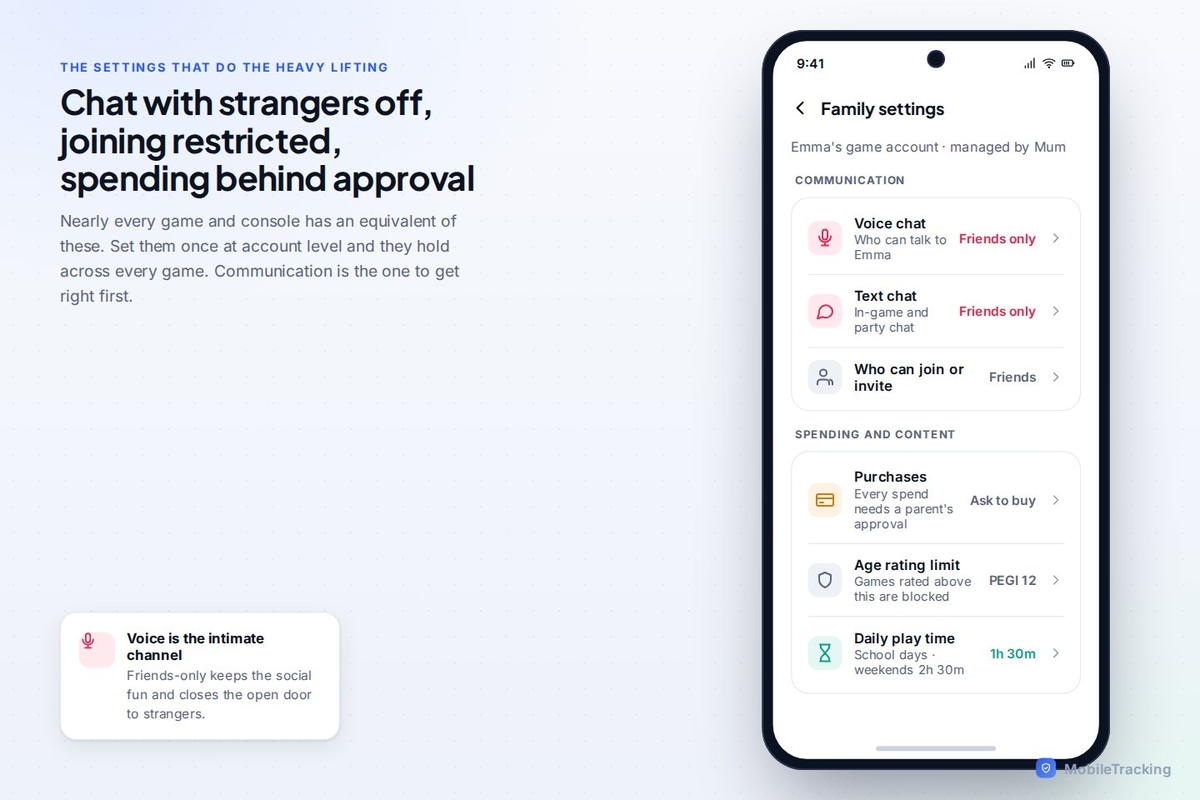
Here is the single most useful thing to set up, and many parents never do. Minecraft accounts run through Microsoft accounts, and if you set your child up with a Microsoft child account inside a family group, you get a real set of controls: you can manage multiplayer and chat permissions, approve who they add, set spending limits, and see activity, all from the parent account.
Crucially, those settings include the ability to control whether your child can join multiplayer games and communicate with other players at all. So the decision about public servers and open chat is one you can make and enforce centrally, rather than hoping your child chooses well in the moment. If you do one thing after reading this, make it this: put your child’s Minecraft under a Microsoft child account in your family group, and set the multiplayer and communication permissions to match their age.
What actually goes wrong on public servers
When there is a problem in Minecraft, it almost always traces back to a public server, and it tends to be one of three things.
The most common, and least severe, is chat exposure: on an unmoderated public server, your child can be exposed to bad language, arguments, and unpleasant behaviour from other players. It is the online equivalent of a rough public playground. Usually more grubby than dangerous, but not what you want a young child marinating in.
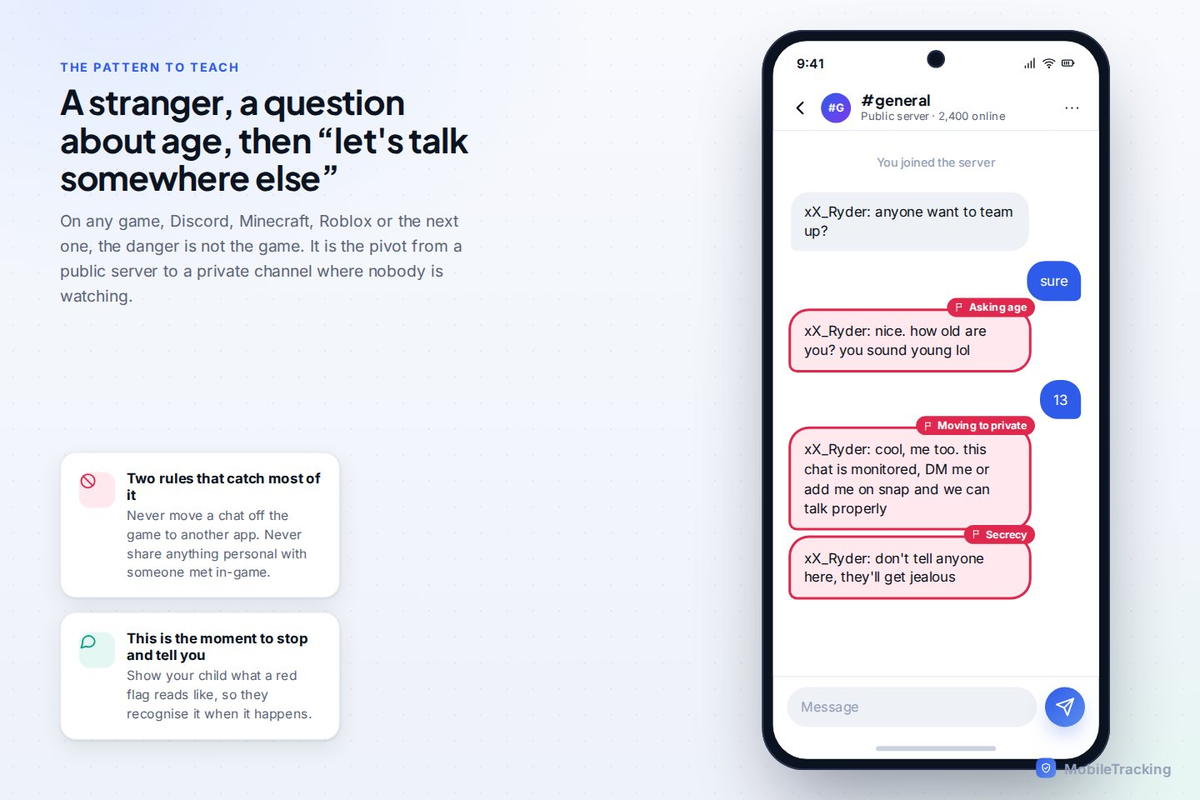
More serious is the familiar one: contact from strangers. As with any game that puts children and adults in the same chat, a public Minecraft server can be a place where an adult befriends a child and tries to move the conversation somewhere private, off the server and onto a chat app where nobody is watching. This is the risk that matters, and it is the same pattern across every online game: the danger is not the game, it is the pivot to a private channel.
Third is scams and dodgy downloads: fake “free” servers, phishing for account logins, or malicious mods and texture packs that carry malware. A child eager for a cool new feature can be talked into installing something they should not, or handing over their login for a promised reward that does not exist.
The pattern to teach is identical to the one for every other game, which is reassuring, because it means your child only has to learn it once.
Mods, add-ons and Realms: managing the extras
Part of what makes Minecraft brilliant is that it is endlessly extendable with mods (Java) and add-ons and marketplace content (Bedrock). Most of this is harmless and genuinely enriching. The care points are two: stick to reputable sources, the official Bedrock marketplace, or well-known modding communities for Java, rather than random download sites, and keep an eye on spending, because the Bedrock marketplace sells content for real money (via Minecoins) and the purchases add up.
Realms deserve a special mention because they are the underrated hero of Minecraft safety. A Realm is a private, persistent world you rent, and only people you invite can join. For a child who wants to play online with their actual friends, a Realm gives them exactly that in a walled garden you control, with no random strangers in the chat. If your child is pushing to play online with mates, steering them to a Realm rather than a public server is often the best answer you can give: it is a yes, not a no, and it happens to be the safe version.
Time, and the “just one more thing” problem
Minecraft’s open-endedness is its joy and its trap. There is always another structure to build, another cave to explore, another project half-finished, which makes it genuinely absorbing and also genuinely hard to stop. This is not a flaw you can fix with a setting, but it is one you can manage.
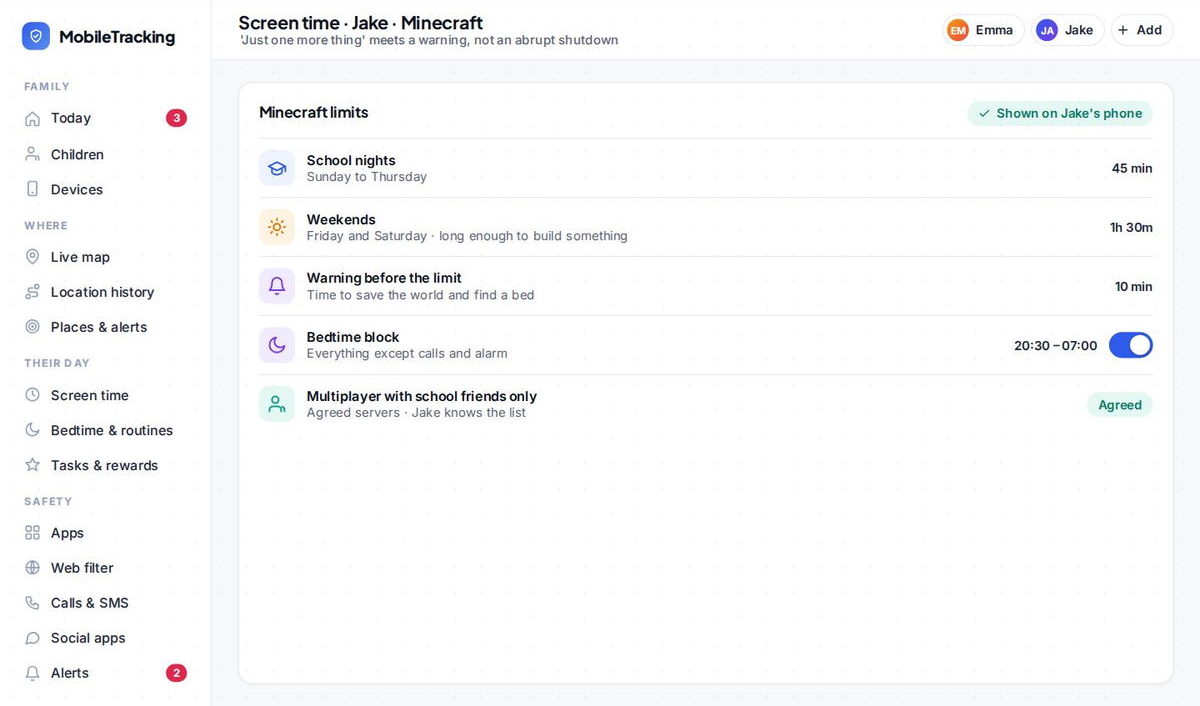
A visible daily budget works far better than a surprise cut-off, partly because Minecraft players are usually in the middle of building something they care about, and yanking them out of it mid-project feels, to them, like knocking over a sandcastle. Warn them a few minutes before the end, let them save and finish the bit they are on, and the whole thing goes smoother. The device’s screen-time tools or a family app let you set that budget so it applies calmly and consistently.
A sensible setup, by age
For a younger child, roughly up to ten, keep them on single-player, local play with people they know, and Realms with invited friends. Set the Microsoft child account so multiplayer with strangers and open chat are off. This gives them the entire creative heart of the game with essentially none of the risk, and it is plenty; younger children rarely feel they are missing out.
For an older child or young teen, you can start allowing well-chosen public servers, ideally moderated, kid-focused ones with a good reputation, while keeping the stranger-safety conversation live and the account controls in place. This is the point to teach the never-move-to-another-app rule properly, because it is the habit that will protect them across every game they ever play, not just this one.
Why Minecraft is a good game to say yes to
It is worth stepping back and remembering what Minecraft is. It rewards patience, planning, creativity, and collaboration. Children build astonishing things in it. They learn a bit of logic, a bit of resource management, sometimes their first taste of simple coding through command blocks or mods. Compared with a game engineered purely to maximise the time your child spends staring at it, Minecraft is closer to a digital box of Lego than a slot machine.
So the goal here is not to fence your child off from Minecraft; it is to let them have the good version. The good version is single-player and Realms and friends, with the Microsoft account controls set, spending capped, a sensible time budget, and one clear conversation about strangers on public servers. Do that, and Minecraft earns its place as one of the games you can genuinely feel fine about.
Where a tool like MobileTracking helps
MobileTracking works alongside Minecraft’s own account controls, not in place of them. It shows you how much time Minecraft and other games are taking, so you can keep the balance sensible, flags when a new chat app appears on the phone (the thing to watch for, since the real risk is a stranger moving your child from a game to a private messenger), and lets you set a screen-time budget that covers gaming along with everything else. Think of it as a light, whole-phone view that helps you notice changes early, sitting under the Minecraft-specific setup that does the heavy lifting.
Frequently asked questions
Is Minecraft safe for young children?
The core single-player game is very safe and genuinely creative, fine for quite young children. The safety question is really about online multiplayer: keep younger children on single-player, local play, and invite-only Realms with friends, and you remove nearly all the risk while keeping all the fun.
What is a Realm, and is it safer than a public server?
A Realm is a private online world you rent, which only invited players can join. Yes, it is much safer than a public server, because there are no random strangers, only the friends your child chooses. For online play with real-life mates, a Realm is usually the best option.
How do I control who my child plays and chats with?
Set your child up with a Microsoft child account inside your family group. From the parent account you can then control whether they can join multiplayer games, chat with other players, and who they add, along with spending limits and activity, all in one place.
Are Minecraft mods safe?
Most are, but stick to reputable sources: the official Bedrock marketplace, or well-known modding communities for Java. Avoid random download sites, which can carry malware or phishing, and teach your child never to install something in exchange for a promised reward or by handing over their login.
Can my child talk to strangers on Minecraft?
On public servers, yes, which is why they are the mode to set up carefully. On single-player, local play, and invite-only Realms, there are no strangers. Use the Microsoft account controls to manage chat and multiplayer, and teach the rule that protects them everywhere: never move a conversation off the game to a private app, and never share personal details.
Keep going
Read our guides on Roblox safety, Fortnite safety, and how much screen time is healthy by age. For trusted guidance beyond this site, ESRB is a well-regarded resource for parents: ESRB.