If you have a child under about thirteen, you have almost certainly heard the word “Roblox” shouted across your house more times than you can count. It is not a single game. It is a whole platform, a sort of digital theme park with millions of separate games inside it, nearly all of them made by other users, many of them made by teenagers in their bedrooms. That single fact, that the content is made by anyone and everyone, is the key to Roblox safety and to understanding both why kids adore it and why parents are right to pay attention.
The good news is that Roblox is not some lawless corner of the internet, and it does not have to be a source of dread. It has genuinely useful safety settings, most of which are switched off or set loose by default, and once you understand how the place actually works, setting it up well takes about fifteen minutes. This guide walks you through what Roblox is, where the real risks sit (they are not always the ones the headlines shout about), and exactly what to change.
What Roblox actually is, in plain terms
Picture an app store that is also a game. Inside Roblox, users browse thousands of individual “experiences”, which is what Roblox calls its games, and jump between them freely. One minute your child is running a virtual pizza restaurant, the next they are in an obstacle course, the next a role-play game where players act out family life or run a school. Some of these experiences are polished and wholesome. Some are thrown together in an afternoon. A small number are designed to skirt the rules and slip in content that is far too old for the platform’s core audience.
Two features run through nearly all of it and matter enormously for safety. The first is chat: most experiences let players talk to each other, and by default that can include strangers. The second is Robux, the platform’s virtual currency, which children buy with real money and spend on clothes, items, and access to parts of games. Get your head around chat and Robux and you understand ninety percent of what you need to as a parent.
The three Roblox safety risks that actually matter
It is worth being precise here, because the fear around Roblox safety tends to be vague and the actual risks are specific and manageable.
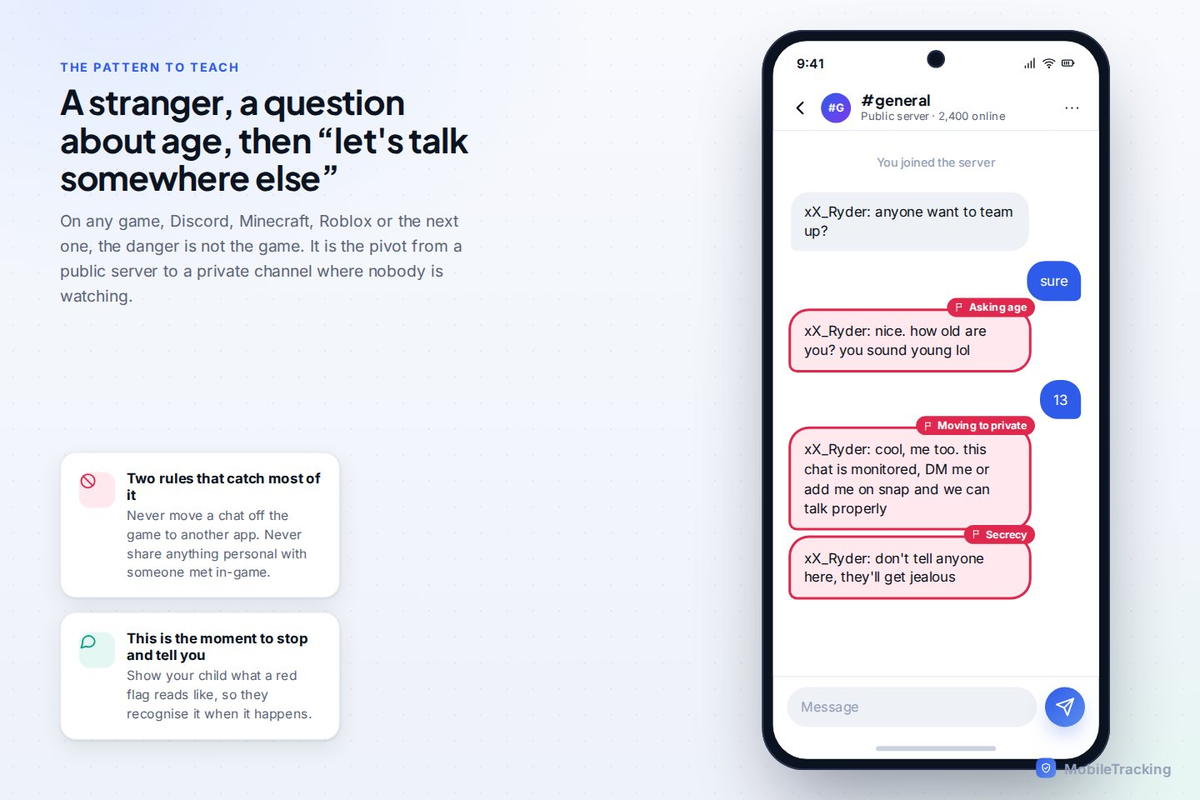
The first is contact from strangers. Because so many experiences have open chat, an adult with bad intentions can strike up a conversation with a child inside a game, then try to move that conversation to a less visible app like Discord or a private messenger. This pattern, meeting in a public game and steering toward a private channel, is the single most important thing to understand, because it is how the genuinely serious harms tend to begin. It is not unique to Roblox, but Roblox’s young audience makes it a place worth guarding.
The second is inappropriate content. Roblox works hard to moderate, but with millions of user-made experiences, some slip through: games built to look innocent that contain adult themes, and so-called “condo” games designed specifically to host content that breaks the rules before they get taken down. Your child will not usually go looking for these, but they exist, and a good filter setting keeps younger children well away from them.
The third is money. Robux is designed, like most game currencies, to make spending feel painless and abstract. Children rack up real charges buying items, and a whole side-ecosystem of scams promises “free Robux” to trick kids into handing over account details or clicking dodgy links. The spending itself is manageable with a couple of settings; the scams need a conversation.
Notice what is not on this list: the game itself. Roblox is not harmful by nature. The risks are all about who your child can talk to, what they can stumble into, and what they can spend. All three have controls.
Step one: set the account age correctly, and lock it
Everything else flows from this. Roblox tailors its safety defaults to the age on the account, so the birthdate you enter genuinely matters. For a child under thirteen, make sure the account is set with their real, correct age, because the under-13 accounts get materially stricter chat and content defaults automatically.
Then, and this is the step most parents miss, set an account PIN and a parent password so the age and the settings cannot simply be changed by the child later. Without that PIN, every setting you are about to change can be quietly undone. With it, you have a lock on the whole configuration. Roblox also lets you link a parent’s email and, for younger accounts, requires a parent’s consent to loosen certain settings, so use a parent email you actually check, not the child’s.
Step two: lock down chat and contact
This is the setting that matters most for the risk that matters most. In the account’s privacy settings, you control who can chat with your child, who can message them, and who can join them in games. For a younger child, the safest configuration is to restrict chat and messaging to friends only, or to switch off chat with people they do not know entirely.
Roblox has also rolled out stronger parental tools in the last couple of years: linked parent accounts that let you manage settings from your own phone, see your child’s friends list, and set limits, all without reading their private messages. If your child is old enough that you have allowed some chat, teach them the two rules that catch the majority of grooming attempts before they start: never move a conversation off Roblox to another app, and never share anything personal, real name, school, age, address, or photos, with someone they have only met inside a game. Those two habits, drilled until they are reflexes, are worth more than any single toggle.
The pattern below is what open in-game chat looks like when a stranger is testing the water. It is worth showing your child what a red flag actually reads like, so they recognise it when it happens rather than after.
Step three: turn on content filtering for younger children
Roblox restricts which experiences an account can access based on its age and its content settings. For younger children, tighten this so the account can only reach age-appropriate experiences, using the Content Maturity and Allowed Experiences controls, which let you cap the maturity level (from minimal up) that your child can open. This is what keeps a nine-year-old out of the games built for teenagers and well away from the rule-breaking content that occasionally slips through moderation.
No filter is perfect, and Roblox’s own moderation catches most of the worst material, but combining the platform’s filter with a correctly-aged account removes the large majority of the content risk. It is the digital equivalent of the age ratings on films: not a guarantee, but a sensible floor.
Step four: get control of the spending
Robux is where the surprise credit-card bills come from. Two moves handle most of it. First, do not store a payment card on the account that the child can spend from freely; instead, top up Robux deliberately, using gift cards or a controlled amount, so spending has a hard ceiling you set. Second, if you use a family payment setup on the phone or console, turn on purchase approvals so that every spend needs your say-so.
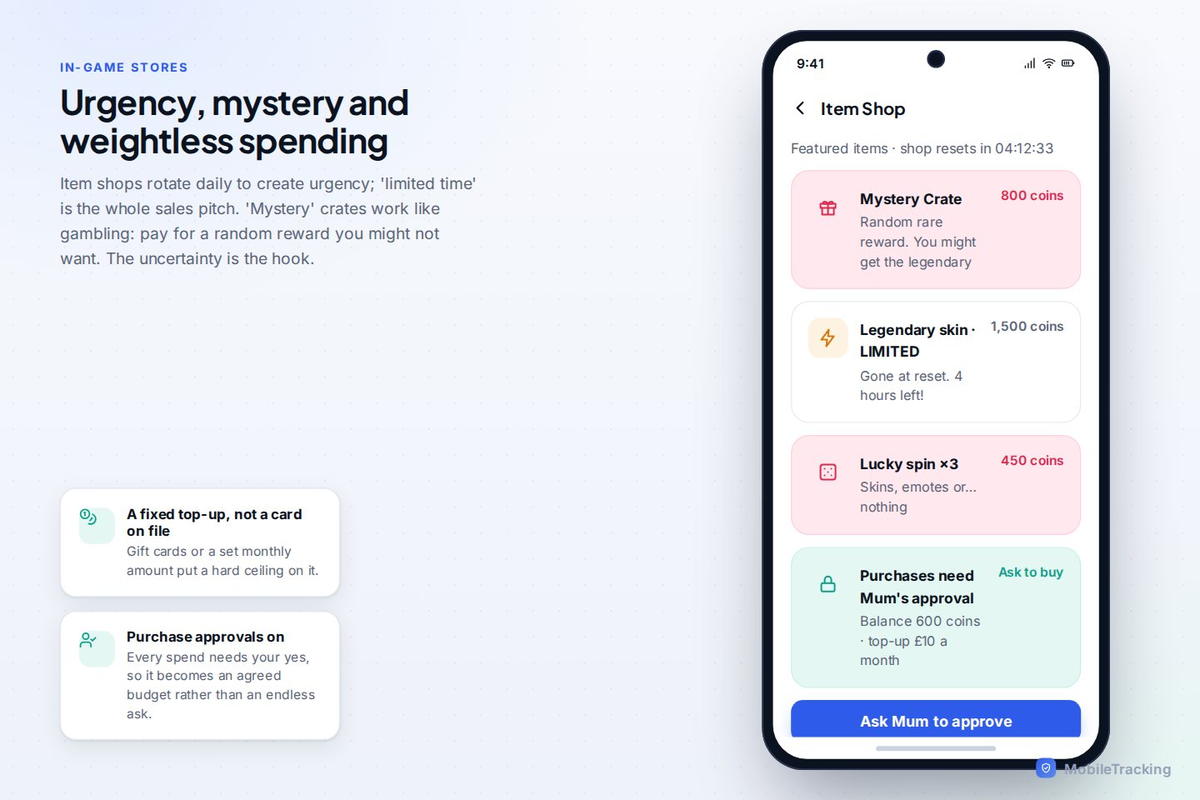
Then have the “free Robux” conversation, because this is where kids get genuinely caught out. Any website, video, or player promising free Robux in exchange for your login, or a click, or “just verify your account”, is a scam, every single time. Roblox never gives Robux away that way. A child who knows that one rule is protected against the most common trick used to steal Roblox accounts and, through them, sometimes a parent’s saved payment details.
Step five: use the built-in parental tools and time limits
Roblox has a parent’s section with real controls: you can set a monthly spending limit, review and manage your child’s account settings, and see information about their activity. Linked parent accounts extend this further. It is worth ten minutes exploring what is there, because Roblox has quietly added a lot of it, and most parents never look.
Time is the other everyday issue. Roblox is designed to be endless, there is always another experience, and children genuinely lose track of hours in it. Roblox’s own screen-time tools, combined with the device’s controls or a family app, let you set a daily budget so the platform has an off switch that is not a nightly argument. A visible, agreed limit works far better than pulling the plug mid-game, which guarantees a meltdown.
The talk that matters more than the settings
Settings handle the mechanical risks. They cannot handle the human one, which is a stranger being friendly. So the most important thing you will do is not a toggle at all; it is making sure your child knows, calmly and in advance, that if anyone online ever makes them uncomfortable, asks them to keep a secret, asks for a photo, or wants to chat somewhere private, they can come straight to you and they will not be in trouble and they will not lose the game.
That last promise is the one that counts. The reason children stay silent when something goes wrong online is almost always fear that the adult will overreact and confiscate the thing they love. If your child believes that telling you leads to losing Roblox forever, they will not tell you. If they believe telling you leads to being helped, they will. You are choosing, in advance, which of those is true.
A realistic verdict
Roblox is fine for most children, including quite young ones, once it is set up with care. It is creative, social in a way that is not all bad, and for many kids it is where their friends are. The mistake is to hand over an unconfigured account and hope, or, at the other extreme, to ban it outright and turn it into forbidden fruit your child plays at a friend’s house instead, where none of your settings apply.
The middle path is the right one: correct age on the account, a PIN so it stays that way, chat locked down to friends for younger kids, content filtering on, spending capped and purchase approvals enabled, a sensible time limit, and one honest conversation about strangers and the “free Robux” scam. Fifteen minutes of setup and one good talk, and Roblox becomes what it should be, a place your child enjoys and you do not have to lie awake worrying about.
MobileTracking’s part in this
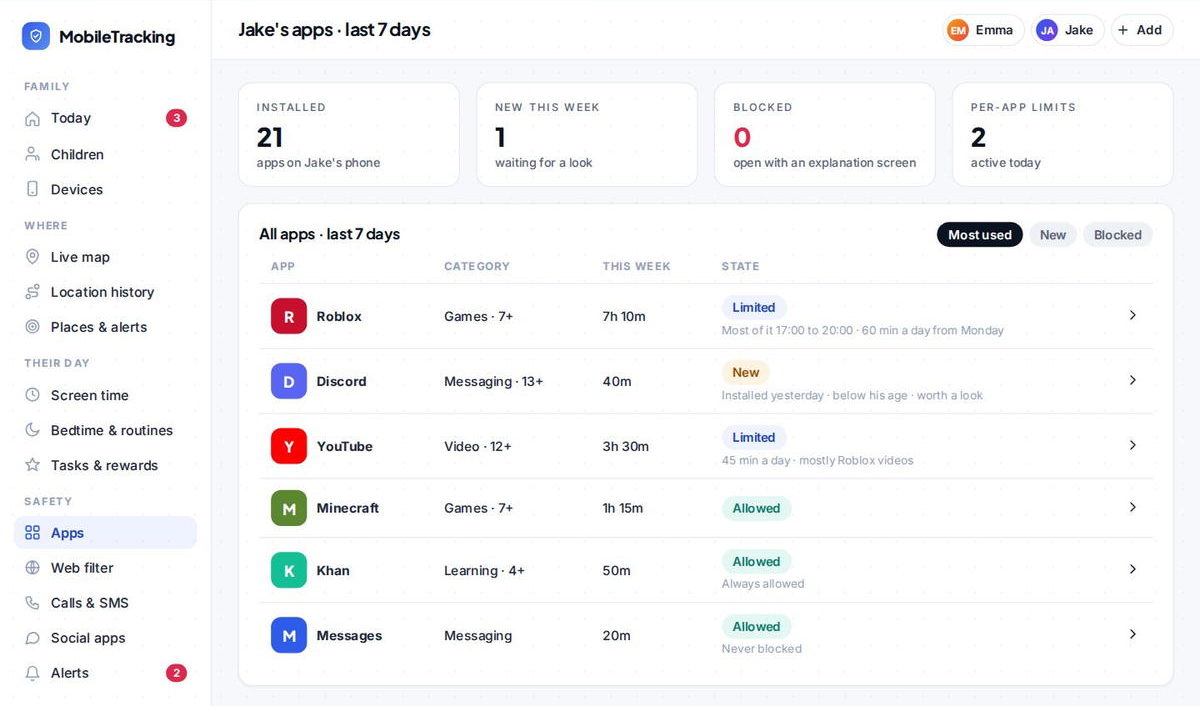
MobileTracking sits alongside Roblox’s own settings rather than replacing them. It shows you how much time your child is spending in Roblox and other apps, so a sudden spike is easy to spot, flags when a new messaging app appears on the phone (which matters, because the classic risk is a stranger steering your child from a game to a private chat app), and lets you set keyword alerts and a daily screen-time budget that covers gaming along with everything else. It is a way to keep a light, early eye on the whole picture, not a substitute for setting Roblox up properly or for the conversation that does the real work.
Frequently asked questions
What age is Roblox appropriate for?
Roblox is used by children as young as seven or eight, and it can be appropriate for them with the account correctly aged, chat restricted to friends, content filtering on and spending locked down. Without those settings, it is much less suitable for younger children. The setup matters more than the birthday.
Can strangers talk to my child on Roblox?
By default, many experiences allow chat with other players, which can include strangers. You can restrict chat and messaging to friends only, or switch off chat with unknown users entirely, in the account’s privacy settings. For younger children this is the single most important change to make.
How do I stop my child spending real money on Robux?
Do not leave a payment card stored on the account for the child to spend from. Top up Robux deliberately with gift cards or a set amount, turn on a monthly spending limit in Roblox’s parent controls, and enable purchase approvals in your family payment settings so every spend needs your approval.
Is “free Robux” real?
No. Any site, video or player offering free Robux in exchange for your login, a click, or “verifying” your account is a scam every time. Roblox does not give Robux away like that. Teach your child this one rule; it protects them from the most common way Roblox accounts get stolen.
Can I see who my child talks to on Roblox?
Linked parent accounts let you see your child’s friends list and manage their settings from your own account, without reading their private messages. Combined with restricting chat to friends only, that gives you good oversight of who they can talk to while still respecting their space.
Keep going
Read our guides on Minecraft safety, Fortnite safety, and the social apps teens actually use. For trusted guidance beyond this site, ESRB is a well-regarded resource for parents: ESRB.