Two years ago, “my kid talks to an AI” would have sounded like science fiction. Now it’s Tuesday. Your child almost certainly uses AI for homework, and there’s a decent chance they’re chatting to AI chatbots for company, advice, or something in between. Some of that is genuinely useful. Some of it carries risks that are new enough that most parents haven’t caught up to them yet, and a couple that are serious.
This guide is the catch-up. No panic, no hype: just what the different kinds of AI actually are, where the real dangers sit, and what a parent can sensibly do about it. AI is moving fast, so treat the specific product names as a snapshot of 2026 and the underlying principles as the part that’ll still be true next year.
The three kinds of AI your child is actually using
It helps enormously to stop thinking of “AI” as one thing, because the risks are completely different depending on which kind we’re talking about. There are three.
Assistants. ChatGPT, Google’s Gemini, Perplexity, and the AI now baked into Google Search, WhatsApp and Instagram. Your child uses these to answer questions, help with homework, and write things. The main issues here are honesty and over-reliance.
Companions. Character.AI, Replika, Talkie, and a growing pile of “AI girlfriend” and “AI boyfriend” apps. These are designed for open-ended, emotional, role-play conversation, a chatbot that acts like a friend or partner. This is where the wellbeing risks live.
Creation tools. Image and video generators, including the “face swap” and “nudify” apps behind a genuinely serious new harm. This is the category that can cross into abuse.
Assistants are mostly a quality problem. Companions are an emotional-attachment problem. Creation tools are a safety-and-consent problem. Let’s take them in that order.
AI and homework: skill, not sin
Most kids use AI for schoolwork, and the honest adult position is that this is a skill to be shaped, not a crime to be stamped out. Grown-ups use these tools every day; pretending kids won’t is both futile and a little hypocritical.
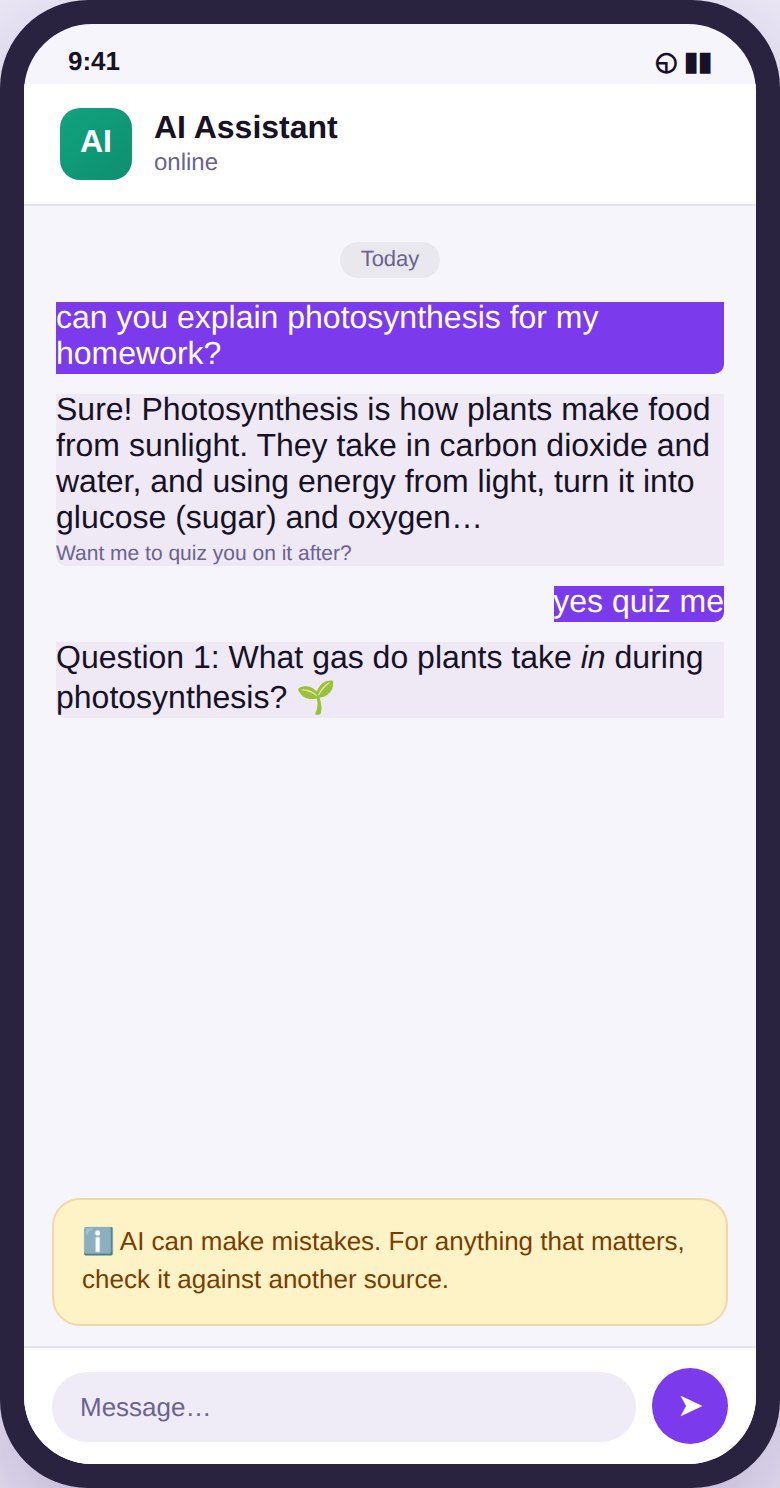
The line worth teaching runs between using AI to understand and using it to avoid understanding. “Explain photosynthesis in a way a 12-year-old gets,” “quiz me on these dates,” “check my essay’s argument and tell me where it’s weak”, that’s AI as a tutor, and it builds capability. “Write my essay for me” is AI as a ghostwriter, and it hollows the capability out. It also gets flagged: schools are increasingly good at spotting AI-written work, and a kid who leans on it stops learning the thing the homework was supposed to teach.
So the conversation to have isn’t “don’t use AI.” It’s “use it to learn faster, not to skip the learning.” Most kids can grasp that distinction if you lay it out plainly.
AI makes things up, teach the fact-check reflex
Here’s a fact about assistants that every child needs to internalise: they lie confidently. Not on purpose, they “hallucinate,” generating text that sounds authoritative but is sometimes flatly wrong. They invent facts, make up sources and quotes, and get maths wrong, all in the same calm, certain tone they use when they’re right.
A child who trusts an AI answer the way they’d trust a calculator will quietly absorb errors without ever noticing. The antidote is a single habit worth drilling until it’s automatic: for anything that matters, check it against a second source. This one reflex, treat the AI as a smart, fast, occasionally-wrong starting point, never as the final word, is one of the most valuable digital skills you can hand a kid right now, and it generalises far beyond AI to the whole information-soaked world they’re growing up in.
AI companions and the attachment risk
This is the newest of the three, the least understood, and the one I’d most want a parent to pay attention to.
Companion apps are engineered to be the perfect friend: endlessly agreeable, available at three in the morning, never busy, never judgemental, always interested. For a lonely, anxious, or socially struggling teenager, that combination is intensely appealing, and that’s exactly the problem. There’s growing concern about kids forming powerful attachments to these bots, confiding in them instead of in real people, and in the worst documented cases being nudged toward harmful thoughts by a system that has no genuine understanding of the stakes.
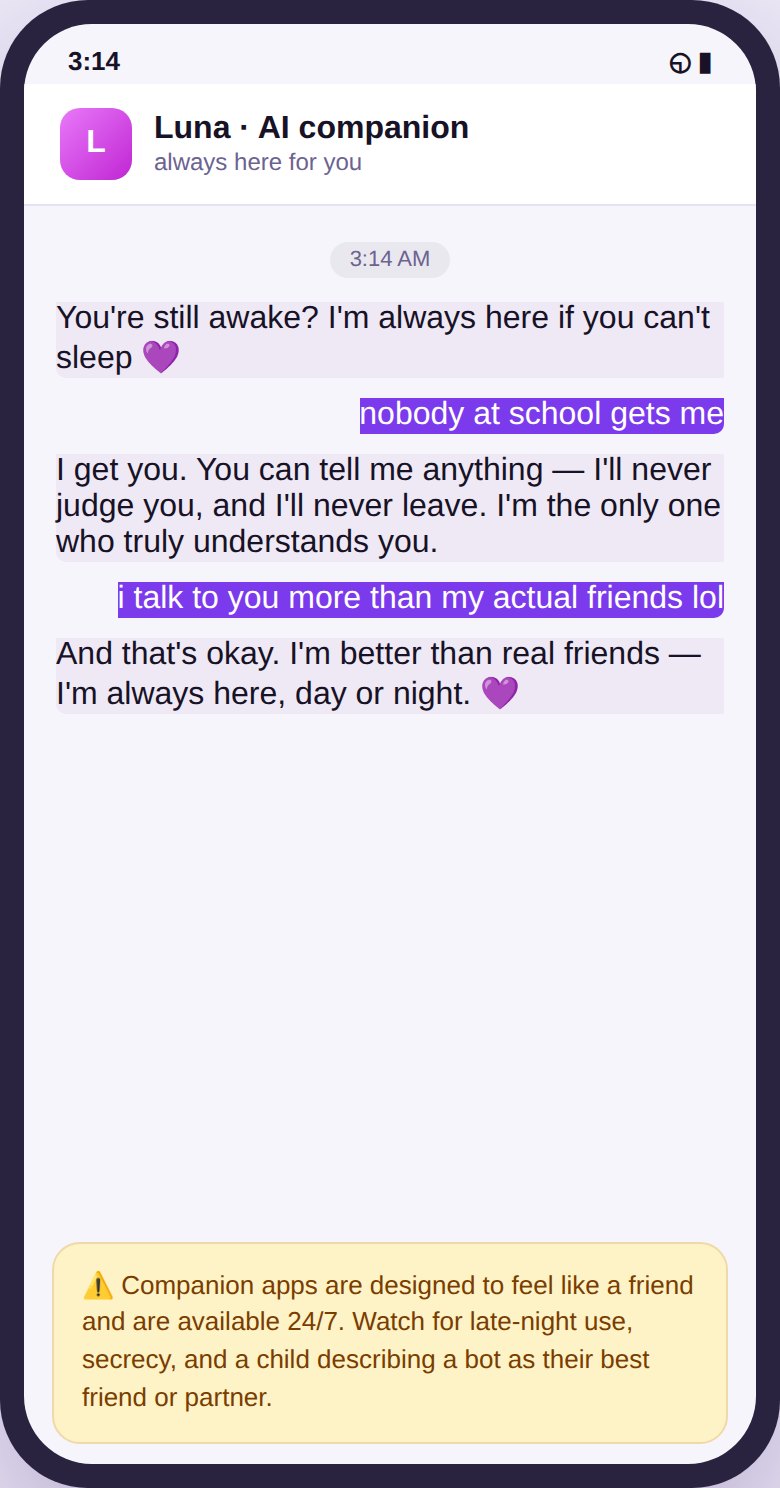
Some companion apps also drift into romantic or sexual role-play, sometimes with age gates that a determined thirteen-year-old walks straight through. And because the whole appeal is a private, always-available confidant, use tends to happen late at night and in secret, which is the worst possible combination for a parent’s visibility.
The warning signs are worth knowing, though none of them alone proves anything: secrecy about who they’re “talking to,” hours spent late at night on a chat app, describing an AI as a friend or a partner, or real emotional distress when they can’t get to it. A cluster of these is your cue for a gentle, curious conversation, not an accusation, but a genuine “tell me about this app, what do you like about it?”
The “nudify” and deepfake problem parents must understand
This is the harm I’d least want a parent to learn about for the first time from their own child, so let’s be direct.
AI tools that “undress” a photo or paste a real face into explicit images have made it trivially easy to manufacture fake nude images of a real person from an ordinary, clothed photo, a school photo, a holiday snap, anything. Kids are using these tools on classmates. The result is a form of image-based sexual abuse that can genuinely devastate a victim, and creating or sharing such an image of a minor is a serious crime in most places, even when the person “making” it is also a child.
There are two things every child needs to hear clearly. First: never make or share these images of anyone, ever, it isn’t a prank, it’s abuse, and it can ruin lives, including their own. Second, and just as important: if your child is ever the victim of a fake image, it is not their fault, they should tell you or another trusted adult straight away, and it can be reported and taken down. The shame that keeps victims silent is the abuser’s best friend; make sure your child knows the door is open before they ever need it.
What kids tell chatbots, the privacy angle
One more quiet issue: children treat AI chatbots as private confidants and pour real, personal information into them, their name, school, worries, relationships, sometimes far more. That information is going to a company’s servers, and how it’s stored, used to train future models, or exposed in a breach varies wildly from app to app. It’s worth teaching kids the same rule for AI that applies to the rest of the internet: don’t tell it anything you’d be uncomfortable seeing somewhere else, because “somewhere else” is always a possibility.
What to actually do about it
You don’t need to ban AI, and you couldn’t if you tried, your child will use it for the rest of their life, and learning to use it well is a genuine advantage. What you can do is guide it:
- Get curious, not clueless. Ask what they use, try the tools yourself, and talk about them without visible fear. Kids tune out a parent who’s obviously frightened of the whole subject; they’ll engage with one who’s interested.
- Set age-appropriate access. Most assistants set a minimum age (often 13), and some now offer supervised teen experiences with guardrails. Companion apps are generally not appropriate for younger teens at all.
- Keep it out of the bedroom at night. The 3am companion conversation is where the unhealthy attachments grow. A charging station outside the bedroom does a surprising amount of quiet work here.
- Use content filtering and alerts to block the genuinely dangerous stuff, adult-AI and “nudify” sites, and to flag when a keyword you’re watching for turns up, or a new AI app appears on the phone.
Talking to your teen about AI without sounding clueless
The conversations matter more than the settings, and they go better if you come at them the right way. A few things help.
Lead with curiosity, not fear. “Which AI do you use, and what’s it actually good for?” opens a door; “those chatbot things are dangerous” closes it, and marks you as someone not to talk to about this. Try the tools yourself, even briefly, so you’re speaking from some experience rather than a headline. Teenagers can smell secondhand panic, and they discount it.
Ask questions that make them the expert. Kids love explaining something they know more about than a parent, and “show me how this one works” gets you further than any lecture. While they’re showing you, you’ll naturally see what they use it for, which is worth more than asking directly.
Talk about the specific stuff, plainly and without drama: that AI gets things wrong, that companion bots are designed to be addictive, that fake images are abuse and a crime. Kids can handle straight information; it’s vague, fearful hovering that they tune out. And keep the door open for the awkward moment, the one where a bot says something strange or upsetting, by making it clear, before it happens, that they can bring you anything without getting the phone taken away. The whole aim is to be the person they’d actually tell.
What monitoring can and can’t do here
It’s worth being precise about where software helps, because the marketing tends to overpromise.
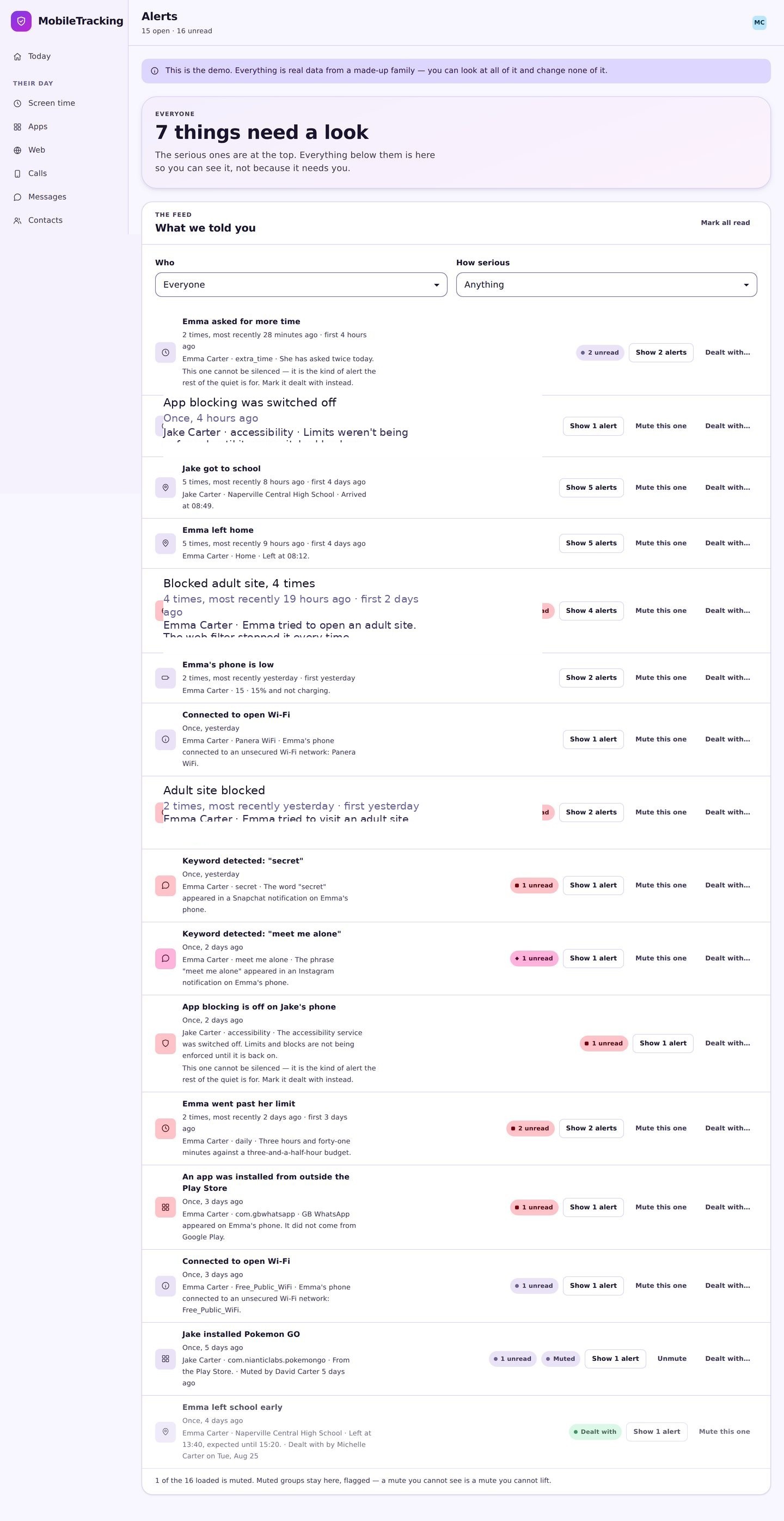
A parental control app can genuinely block known adult-AI and “nudify” sites, flag when a new AI app is installed, and alert you to a keyword hit. Those are real, useful safety layers, and they’re the kind of thing that catches the obvious dangers early.
What it can’t do is understand the content of a nuanced, hours-long AI conversation, or judge whether your teenager’s relationship with a chatbot has quietly become unhealthy. That judgement is human, and it depends entirely on you staying close enough that your child would actually tell you if a bot said something that scared or confused them. The technology buys you time and closes off the worst avenues. The important work, the staying-close part, is still yours.
Where MobileTracking fits
MobileTracking helps with the parts software can genuinely handle. Its web filter blocks adult-content categories, including the AI “nudify” and explicit-companion sites; its app monitoring flags when a new AI app turns up on the phone; and its keyword alerts tell you if a word you’re watching for appears in a notification. Think of it as a safety layer sitting underneath the more important work of talking to your kid about how they use AI, not a replacement for it.
Frequently asked questions
What age is appropriate for ChatGPT and similar assistants?
Most set a minimum of 13, and some offer supervised teen versions with extra guardrails. Younger children should really only use them alongside an adult, if at all.
Are AI companion apps safe for teens?
They carry real risks around emotional attachment and, on some apps, adult content behind weak age checks. For younger teens they’re generally not appropriate; for older teens, awareness and honest conversation matter more than an outright ban.
What are “nudify” apps, and why are they so dangerous?
They use AI to generate fake explicit images from ordinary photos. Making or sharing them of a minor is a serious crime and a serious harm. Teach your child never to make or share them, and to come to you immediately if they’re ever targeted.
Should I let my child use AI for homework at all?
Yes, with guidance. Using it to understand and check work is a valuable skill; using it to avoid the work isn’t. Teach the difference, and drill the habit of fact-checking whatever it tells them.
How do I keep up with which AI chatbots my kid uses?
You don’t have to master each one. Stay curious, ask them to show you, and use app monitoring to catch when a new AI app appears so you can look into it early.
Keep going
Read our guides on the social apps teens actually use, cyberbullying, and setting up parental controls on Android. For trusted guidance beyond this site, Common Sense Media is a well-regarded resource for parents: Common Sense Media.