Ask any parent of a school-age child what they find hardest about raising kids in the digital age, and you’ll hear some version of the same answer: it’s not knowing what’s happening when they’re not there. Their child’s phone is with them constantly — at school, at a friend’s house, in bed at 11pm — and most of what happens on it is, by default, invisible.
That gap between what parents want to know and what they can actually see is exactly what parental control apps are designed to close. But not all of them are built equally. Some offer only basic screen time management. Others focus narrowly on location tracking. A handful try to cover everything and end up doing most things poorly.
MobileTracking takes a different approach: a genuinely comprehensive feature set that covers the full range of what parents actually want to know, all accessible through a single dashboard on their own phone, tablet, or computer. The app is free for Android and iOS, and it doesn’t require a technical background to use effectively.
This article goes deep on every feature MobileTracking offers — what it does, how it works in practice, why it matters, and the kinds of situations where each tool is most useful. If you’re evaluating parental control apps and want to understand exactly what you’d be working with, this is the place to start.
![]()
The Landscape: Why Parents Need More Than Built-In Controls
Most smartphones come with some version of built-in parental controls. Android offers Google Family Link; Apple provides Screen Time and Family Sharing. These built-in tools are a reasonable starting point — they handle basics like app approvals, daily limits, and location sharing with the family group.
But they leave significant gaps.
Google Family Link, for example, doesn’t offer any visibility into what children are saying in their messages. It can’t monitor WhatsApp conversations, surface concerning content from Instagram, or alert a parent when a child searches for something worrying. Apple’s Screen Time is similarly limited: it manages usage time and content categories, but it doesn’t give parents a window into communication or social activity.
For families with younger children who’ve just started using phones, those built-in tools might be sufficient. But as children grow older and their digital lives become more complex — more platforms, more private messaging, more independence — parents often find that basic built-in controls don’t keep pace.
This is the space that dedicated parental monitoring apps occupy. MobileTracking’s feature set is designed to cover not just screen time, but the full picture of a child’s digital day — where they are, who they’re talking to, what they’re looking at, and what’s happening in the apps that take up most of their attention.
Feature 1: Filter Content and Apps
What It Does
MobileTracking allows parents to block or restrict access to specific apps and categories of websites. This works in two directions: you can prevent certain apps from being opened entirely, or you can limit the amount of time they can be used each day. On the web side, content filtering lets you block categories like adult material, gambling, or violent content, or block and whitelist specific websites by URL.
How It Works in Practice
Content filtering is one of those features that sounds straightforward but has meaningful depth in implementation. The ability to block an entire category of websites — not just a specific URL — matters because the web is vast and children encounter things through searches and links, not just direct navigation.
For younger children, the approach is often fairly restrictive: a tight whitelist of approved educational and entertainment sites, with everything else blocked. For older children, a category-based approach tends to work better — blocking adult content and gambling while leaving general internet access open, with keyword alerts catching anything concerning that slips through.
App filtering is equally useful. Social media apps during school hours, gaming apps after bedtime, certain categories of apps the family has agreed aren’t appropriate — all of these can be managed from the parent dashboard without needing to physically handle the child’s phone.
Why It Matters
Children encounter content online that nobody planned for. Studies from the Internet Watch Foundation consistently document how much inappropriate material is accessible through ordinary web searches — often through incidental rather than deliberate discovery. Content filtering doesn’t create a perfect barrier, but it meaningfully reduces the likelihood of accidental exposure, especially for younger children who don’t yet have the context to understand what they’re seeing.
Feature 2: Set Time Limits
What It Does
MobileTracking’s time limit controls allow parents to set daily caps on how long specific apps — or the device as a whole — can be used. When a limit is reached, the app or device is restricted until the next day’s allowance resets.
Time limits can be applied globally (a total daily screen time cap), by app category (e.g., social media combined), or for individual apps (YouTube limited to one hour, Roblox limited to 45 minutes, etc.).
How It Works in Practice
Setting a daily limit is straightforward through the dashboard. More nuanced is deciding what the right limits actually are, and that’s a genuinely personal calculation that varies by child, age, and circumstance.
The American Academy of Pediatrics offers general guidance: consistent limits on screen time, with media-free times and zones built into the daily routine. For children aged 6 and older, the focus is less on a specific number of hours and more on ensuring screen time doesn’t crowd out sleep, physical activity, homework, and face-to-face interaction.
MobileTracking’s time limit tool supports that philosophy. It’s not about eliminating screen time — it’s about making sure it doesn’t expand to fill every available hour by default.
One practical tip: consider setting limits slightly below what you’d actually find acceptable, and use the remaining headroom as a grace period for negotiation. Children are far more likely to respect limits they feel have some flexibility and context than ones they perceive as arbitrary.
Why It Matters
Without external limits, screen time tends to expand by default. Most apps — social media in particular — are designed using engagement mechanics that encourage continued use. The algorithms that power platforms like TikTok and YouTube are specifically engineered to be difficult to stop using. Parental time limits create a structural counterweight to that pull, especially for children who haven’t yet developed the self-regulation skills to step away voluntarily.
Feature 3: Set Custom Routines
What It Does
Beyond simple daily time limits, MobileTracking allows parents to create recurring schedules — custom routines that automatically apply different rules at different times of day. During school hours, the phone might be restricted to approved educational apps. From 4–6pm, social media is off but messaging is allowed. After 9pm, the phone goes into full lockdown mode.
These routines repeat on a weekly schedule, so once they’re configured, they run automatically without any daily effort from the parent.
How It Works in Practice
The routine builder in MobileTracking is a time-based rule system. You define windows — specific days and hours — and assign a rule set to each window. Rules can include which apps are allowed, whether internet access is on or off, and whether the device is usable at all.
For a family with a school-age child, a typical routine setup might look like:
- Weekday mornings (7–8am): Phone available for music and messaging, no social media
- Weekday school hours (8am–3pm): Restricted to educational apps only, internet paused
- After school (3–5pm): Full access with daily time limits enforced
- Homework window (5–7pm): Social media and games blocked
- Evening (7–9pm): Standard access resumes within daily limits
- Bedtime (9pm–7am): Device fully restricted
Once this is built, it runs every weekday automatically. Parents don’t need to touch the settings daily, and children know what to expect — which reduces negotiation and conflict significantly.
Why It Matters
Routine and structure are genuinely good for children, particularly when it comes to sleep. A significant body of research — including studies cited by the National Sleep Foundation — links device use in the hour before bed to reduced sleep quality and later sleep onset in children and adolescents. Screen-free bedtime routines are difficult to enforce manually every night; automating them removes the battle.
Custom routines also help children develop a relationship with technology that’s structured around the rest of their life, rather than the reverse.
Feature 4: Social Media Monitoring
What It Does
MobileTracking can access and surface messages from supported social platforms, including WhatsApp, Instagram, and Line. Parents can read message threads, see who their child is communicating with, and receive instant alerts when content that matches defined criteria — certain words, unknown contacts, potentially concerning patterns — appears in those conversations.
How It Works in Practice
Social media monitoring is one of the most technically complex features in any parental control app, and it’s worth being realistic about what it covers. MobileTracking supports a range of platforms, but the depth of monitoring available can vary depending on app versions, operating system, and the permissions granted during setup.
For WhatsApp specifically — one of the primary platforms where cyberbullying and concerning contact tends to occur — MobileTracking can surface message content and flag conversations matching alert criteria. For Instagram, the level of access depends partly on how the app is configured on the device.
In practice, most parents don’t use social monitoring to read every message their child sends. They use it for the alerts — a notification when a message contains language associated with bullying, when a contact the child has never spoken to before initiates conversation, or when something in the content raises a flag. That targeted alerting is more sustainable and less intrusive than wholesale message review.
Why It Matters
Social media is where a significant proportion of cyberbullying happens. Research from Cyberbullying Research Center shows that a substantial percentage of young people report experiencing some form of cyberbullying, most commonly through direct messaging and social platforms. Equally, inappropriate contact from adults — grooming — typically initiates through exactly these channels.
Parents can’t stand over their child’s shoulder while they use Instagram. Social media monitoring is the next best thing: a way to maintain awareness of what’s happening in those private spaces without physically hovering.
Feature 5: Discover App Insights
What It Does
MobileTracking provides information about the apps installed on your child’s device — not just that they’re there, but what they actually do, what age group they’re designed for, and what kinds of content or interactions they enable. The app also suggests age-appropriate alternatives where a currently installed app may not be suitable for your child’s age or maturity level.
Alongside this, the feature provides expert-informed prompts designed to help parents start conversations with their children about online safety — specific, practical talking points rather than generic advice.
How It Works in Practice
Understanding the apps on your child’s phone is harder than it sounds. App stores are full of tools with unintuitive names, apps that describe themselves as one thing while enabling another, and social platforms that aren’t marketed to children but have significant youth usership anyway.
App insights give parents context they’d otherwise need to research themselves. If your child has installed an app you don’t recognize, MobileTracking surfaces a plain-language explanation of what it does and flags any concerns about its suitability. This alone saves considerable time and confusion.
The conversation prompts are a particularly thoughtful addition. One of the barriers parents face in talking to children about online safety isn’t unwillingness — it’s not knowing how to start. “We need to talk about internet safety” lands very differently than “I noticed you’ve been using [app] — can you show me how it works?” The latter opens a door; the former often closes one.
Why It Matters
Common Sense Media has documented extensively how many popular apps among children are not age-rated or designed for the age groups actually using them. The gap between an app’s intended audience and its actual user base — particularly for social and communication tools — is one of the consistent challenges in children’s digital safety. App insights give parents the information they need to make informed decisions rather than having to research each app independently.
Feature 6: Track Calls and Messages
What It Does
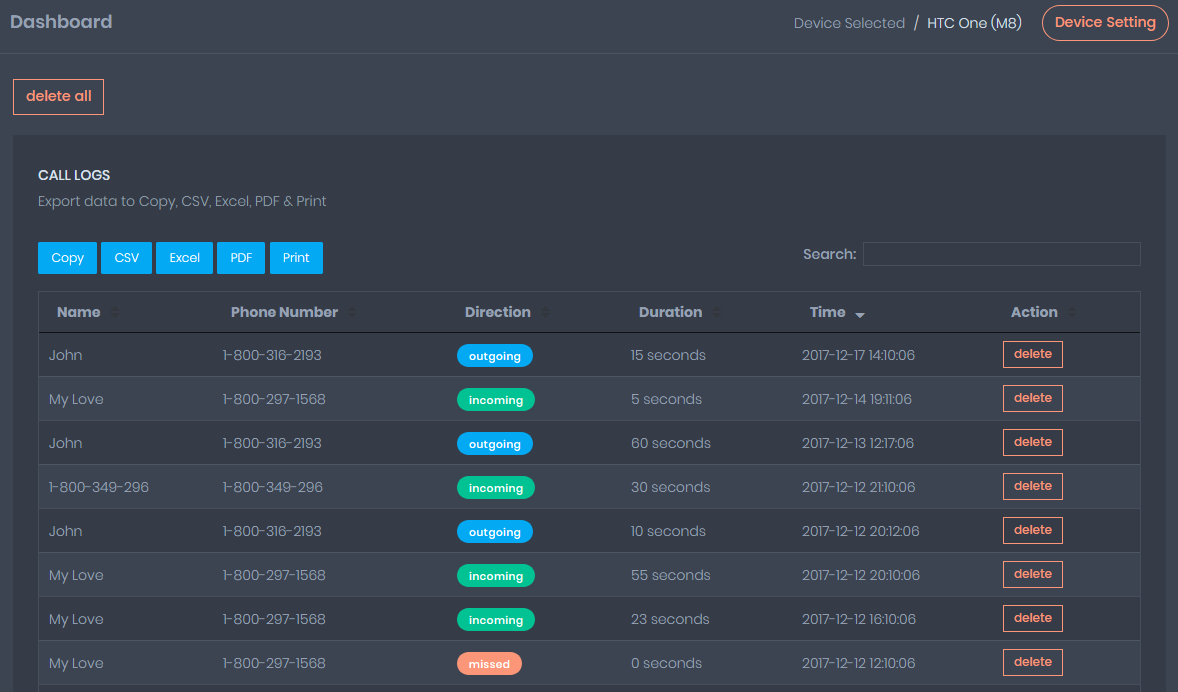
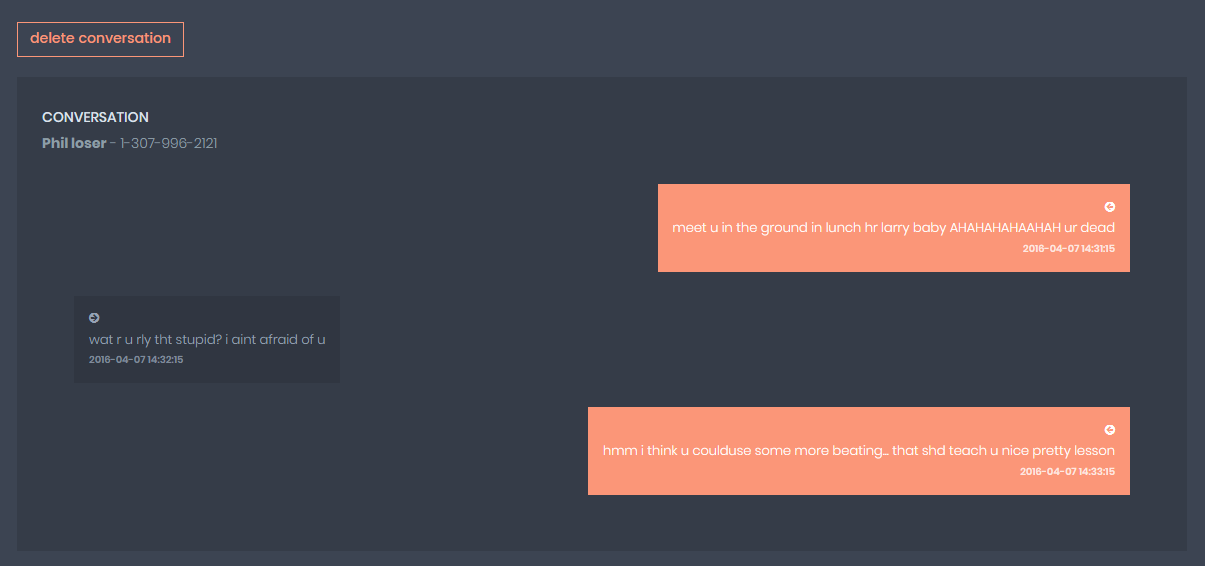
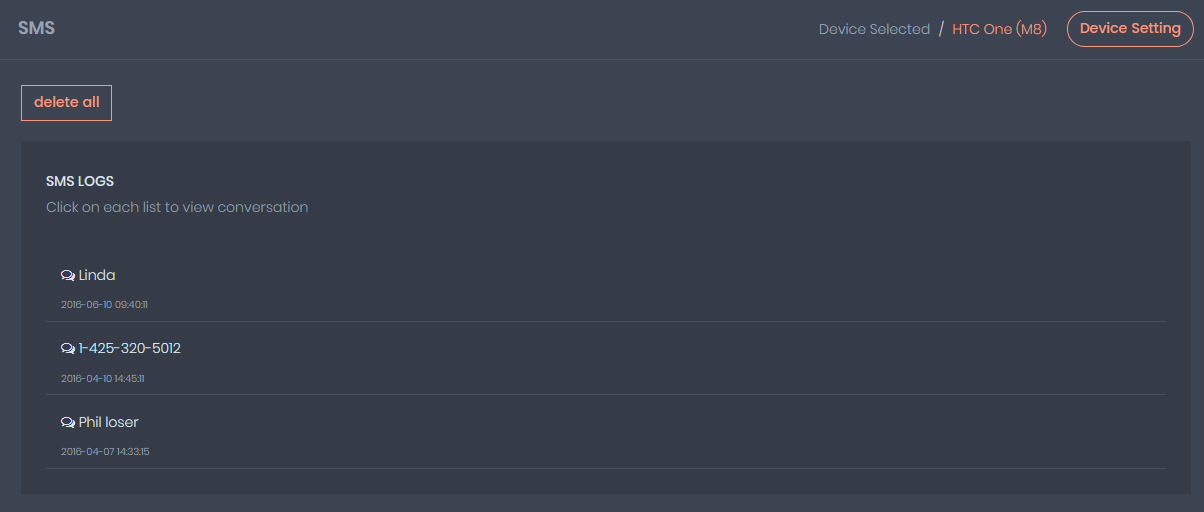
MobileTracking logs all incoming and outgoing calls on the monitored device — contact names, numbers, call duration, and timestamps. For messages, the app monitors standard SMS texts and, where supported by the platform and device configuration, messages from third-party messaging apps.
Parents can also block specific contacts directly from the dashboard, preventing calls and messages from those numbers from reaching their child’s phone.
How It Works in Practice
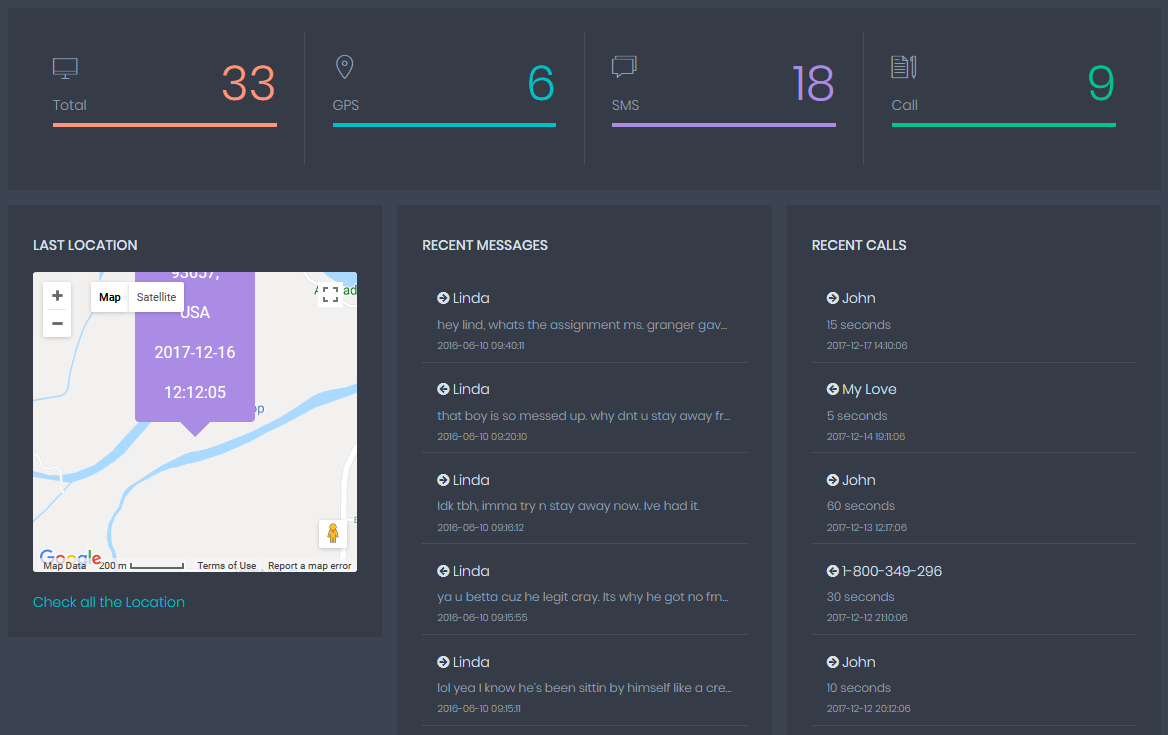
Call and message monitoring is among the most straightforward features to understand and use. The call log in the dashboard looks similar to what you’d see on the phone itself — a list of recent calls with contact information and duration. The value is in the visibility: you can spot unfamiliar numbers, see if your child is calling or receiving calls from someone they haven’t mentioned, and track patterns over time.
For messages, the focus for most parents is less on reading specific conversations and more on identifying red flags: unknown contacts initiating contact, unusual message volume at unusual hours, or conversations that seem to be happening in bursts that suggest something urgent or distressing.
The contact blocking feature is one of the most immediately useful tools available. If you’ve identified a number that shouldn’t have access to your child — a former friend who’s been bullying them, an adult contact you have concerns about, or simply an unknown number that keeps calling — you can block it from your dashboard without touching the child’s phone.
Why It Matters
Most children, particularly teenagers, are reluctant to tell parents about contact that worries or upsets them — they’re embarrassed, they don’t want to lose access to their phone, or they’ve been told by the other person to keep things secret. Call and message monitoring gives parents a way to notice these situations even when their child hasn’t come forward.
Feature 7: Locate Family
What It Does
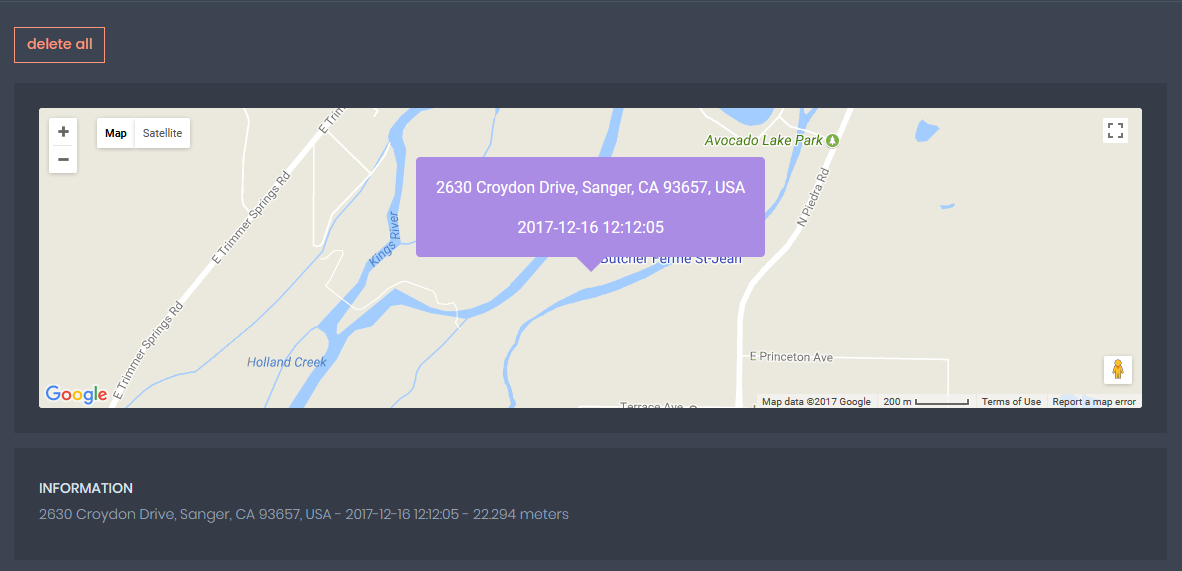
MobileTracking’s location feature provides real-time GPS tracking of monitored devices, shown on an interactive map in the parent dashboard. Beyond live location, the app keeps a location history so you can see where a device has been throughout the day.
Geofencing extends this further: you can define specific locations — home, school, a grandparent’s house, a sports facility — and receive automatic alerts when the device enters or leaves those zones.
How It Works in Practice
Location tracking in MobileTracking uses the device’s built-in GPS hardware, which provides significantly more accuracy than cell-tower or Wi-Fi-based alternatives. In most circumstances, location data is accurate to within a few meters.
Setting up geofences is done through the map interface in the dashboard. You search for or pin a location, draw a radius around it, name it, and choose your alert preferences — on arrival, on departure, or both. The alerts arrive as push notifications on your parent device, typically within a minute or two of the geofence crossing.
For families whose children walk to school, take public transport, or spend time at activities without adult supervision, geofencing essentially automates the “did you get there okay?” check-in. Instead of calling or texting to confirm, you receive a notification when the school zone lights up.
Why It Matters
Knowing where your child is sounds like a basic parenting requirement, and in many ways it is. But the reality of tracking a child’s location in real time — without constant phone calls, without relying on a child to remember to text — is a meaningful practical improvement over the alternative. Research on child safety consistently identifies parental awareness of children’s whereabouts as one of the strongest protective factors against a range of risks.
The geofencing feature is particularly valuable for the transitional age group — children old enough to travel independently but not quite at the stage where parents feel fully confident. It provides a safety net that doesn’t require constant active monitoring.
Feature 8: Call Recording
What It Does
MobileTracking can automatically record phone calls made on the monitored device and store them for the parent to listen to later through the dashboard. Recording happens without any manual intervention once the feature is enabled — calls are captured automatically and appear in the activity log.
How It Works in Practice
Call recording is configured in the monitoring dashboard and, once active, captures both sides of phone conversations on the monitored device. Recordings are saved to the cloud and can be accessed from the parent dashboard on any device or through MobileTracking Web.
This feature is typically used by parents who have a specific concern — a child who’s been secretive about a particular contact, or a situation where the parent has reason to believe something worrying is being discussed. It’s less suited to routine monitoring of every conversation and more to targeted investigation of a specific situation.
Legal Considerations
Call recording is one of the areas where legal requirements vary most significantly by location. In the United States, federal law requires consent from at least one party to a conversation (one-party consent), but many states require all parties to consent. In the European Union, call recording without consent is generally prohibited under GDPR-related regulations. In the UK, rules similarly restrict recording without consent.
Before enabling this feature, it’s essential to verify the rules in your specific location. Parents monitoring their own minor children occupy a somewhat different legal position than other scenarios, but the details matter and vary. Resources like the Electronic Frontier Foundation offer plain-language explanations of digital privacy laws that can help orient you before consulting a legal professional if needed.
Feature 9: Ambient Voice Recording
What It Does
Ambient voice recording uses the monitored device’s microphone to capture sounds and conversations in the phone’s surrounding environment — not during a phone call, but at any time, picking up what’s happening around the device.
How It Works in Practice
This is among the most advanced and contextually specific features MobileTracking offers. It captures audio from the environment where the phone is located and uploads it for the parent to review. Unlike call recording, which captures structured conversations, ambient recording captures background sound — whatever is happening in the room or space where the phone is present.
Use cases where parents have found this relevant include situations where they have serious concerns about their child’s safety and want to understand what’s happening in their environment, or cases where a child has been secretive about where they’re going or who they’re with to a degree that raises genuine alarm.
This is not a feature for general routine monitoring, and most parents won’t need or use it in ordinary circumstances. It’s a significant tool with significant implications, and it warrants careful consideration of both necessity and legality before enabling.
Important Note
The legal status of ambient recording without the knowledge of the people being recorded varies substantially by country and jurisdiction. In many places, recording individuals without their consent — even in a household context — is legally restricted. Before enabling this feature, understanding your local laws is not just advisable but necessary.
Feature 10: Multimedia File Access
What It Does
MobileTracking allows parents to view photos, videos, audio files, and documents stored on the monitored device. This gives visibility into the media your child is saving, receiving, and potentially sharing through messaging apps or social platforms.
How It Works in Practice
The multimedia access feature surfaces files stored in the device’s gallery and document storage. This includes photos taken with the camera, images received through messaging apps, videos saved from social platforms, and documents the device has downloaded.
For parents, the practical value here is most often around understanding what images and videos a child is being sent — content that arrives through messaging apps and might not otherwise be visible. Concerning images received from other people, inappropriate screenshots saved from social media, or files shared with unknown contacts — these can all appear in multimedia access.
Why It Matters
Images and videos are increasingly the currency of children’s social communication. Research has repeatedly highlighted the prevalence of image-based content — sometimes inappropriate, sometimes solicited or unsolicited — in children’s digital interactions. A parent who can see what files are on their child’s device has a meaningful additional layer of awareness about what’s entering their child’s world.
Feature 11: Monitor Activity
What It Does
MobileTracking provides a unified activity view that brings together browsing history, social media activity, app usage, and location data in a single real-time stream. Rather than navigating between separate sections for each data type, the activity monitor gives parents a chronological view of what’s been happening on the device throughout the day.
How It Works in Practice
The activity feed functions like a timeline of the device’s day: location updates, apps opened and closed, websites visited, messages received, calls made — all organized chronologically and filterable by category. Parents can scroll back through the day’s activity or jump to a specific time window they want to examine more closely.
This holistic view is useful for understanding patterns rather than individual incidents. A child who seems fine one-to-one but whose activity log shows them online until 2am every night, visiting the same anonymous forum repeatedly, presents a different picture than any single data point would suggest.
Why It Matters
Context matters enormously in parenting decisions. A single concerning search doesn’t necessarily mean something is seriously wrong. A pattern of concerning searches, late-night activity, unusual app use, and contact from unknown numbers, taken together, paints a clearer picture and gives parents better information for deciding how to respond.
Feature 12: Get Reports and Alerts
What It Does
MobileTracking generates daily and weekly activity reports — digestible summaries of how the monitored device was used over a defined period — delivered to the parent dashboard and, optionally, as email summaries. Alongside scheduled reports, the app sends real-time alerts for specific events: a geofence crossing, a keyword detected in a search or message, a call from a blocked contact, or screen time limits being reached.
Parents can also configure search alerts — specific terms or phrases that trigger an immediate notification if typed into a browser or search engine on the child’s device.
How It Works in Practice
Reports and alerts are the feature that most parents interact with most frequently, precisely because they require the least active monitoring. Once configured, they work in the background and surface information only when something warrants attention.
The weekly summary report is particularly valuable for maintaining a sense of the big picture without spending significant time in the dashboard. It typically covers total screen time and how it breaks down by app, location activity and any geofence events, communication patterns, and any alerts that fired during the period. Reading a weekly summary takes five minutes and provides a solid overview of how your child’s digital week looked.
Search alerts deserve specific attention. The ability to receive a real-time notification when your child searches for a specific term — self-harm, dangerous activities, certain substances, specific people — is one of the more powerful early warning mechanisms available to parents. It surfaces concern at the moment of curiosity, before any further action, giving parents the opportunity to respond with a conversation rather than a consequence.
Why It Matters
One of the challenges of parenting in a digital age is the sheer volume of information that could theoretically be monitored. No parent can or should spend hours each day reviewing their child’s entire digital activity. Reports and alerts solve this problem by bringing the signal out of the noise — surfacing what actually matters, when it matters, while letting normal activity pass without requiring active review.
![]()
How the Features Work Together
The real power of MobileTracking isn’t any single feature — it’s the combination. Location tracking tells you where your child is. Call and message monitoring tells you who they’re talking to. Social media monitoring tells you what’s being said. App insights tell you what tools they’re using. Screen time controls and routines shape the structure of their day. Reports and alerts bring everything together into an actionable picture.
Used together, these features give parents a genuinely comprehensive view of their child’s digital life — not to control every detail, but to maintain the kind of awareness that allows for informed, timely responses when something isn’t right.
It’s also worth noting that different features serve different purposes at different stages of a child’s development. A 9-year-old getting their first phone needs a different configuration than a 15-year-old who’s been online for years. MobileTracking’s feature set is flexible enough to serve both: you can configure it as a tight set of restrictions for younger children and gradually loosen specific controls as a child earns trust and develops the judgment to manage their own digital life.
Setting Expectations: What Parental Controls Can and Can’t Do
No parental control app — MobileTracking or any other — is a complete solution to the challenges of raising children in a connected world. It’s worth being clear-eyed about this.
These tools are significantly better than having no visibility at all. They catch things that would otherwise go unnoticed. They create structure around screen time that benefits children’s sleep and focus. They alert parents to risks early enough to respond constructively rather than reactively. That’s genuinely valuable.
What they can’t do is replace the conversations, the relationship, and the trust that are the actual foundation of keeping children safe. Research in this area is consistent: children who have open, non-judgmental relationships with their parents — where they feel comfortable coming forward when something online bothers or upsets them — are better protected than children in households with heavy monitoring but low communication.
The ideal use of a tool like MobileTracking is as a support to that relationship, not a substitute for it. The alerts and reports give parents things to talk about. The screen time limits open conversations about healthy habits. The location tracking reduces the need for anxious checking-in calls. Used well, these features strengthen the parent-child dynamic rather than straining it.
Frequently Asked Questions
Q: Does MobileTracking monitor all social media platforms? MobileTracking currently supports social media monitoring for WhatsApp, Instagram, and Line, among others. The depth of monitoring available on each platform can vary depending on the app version and device permissions. Support for specific platforms is updated as the app develops.
Q: Can I use only some features and leave others off? Yes. Every feature in MobileTracking can be enabled or disabled independently from the parent dashboard. You’re not required to activate all monitoring features — most parents configure only the tools relevant to their specific situation and their child’s age and needs.
Q: Will my child know the app is on their phone? MobileTracking can be configured to run without appearing in the device’s app list. Whether to be transparent with your child about monitoring is a parenting decision, not a technical one. Many families find that open monitoring — where children know they’re being watched and understand why — produces better outcomes than covert monitoring.
Q: Are call recording and ambient recording legal in my country? Laws on recording vary significantly by jurisdiction. In some countries and US states, one-party consent (one person in the conversation consenting) is sufficient. In others, all parties must consent. Ambient recording without consent is restricted in many jurisdictions. MobileTracking places responsibility for legal compliance with the user. Check your local laws before enabling these features.
Q: How does social media monitoring work on Instagram? Instagram’s monitoring capability in MobileTracking depends on device permissions and app configuration during setup. The app accesses message content where technically possible given the platform’s current API and security setup. As Instagram updates its platform, monitoring capabilities may shift accordingly.
Q: Does MobileTracking slow down my child’s phone? The app is designed to have minimal impact on device performance. In most cases, users don’t notice any perceptible slowdown. The main resource it uses is battery life, which can be modestly affected by the frequency of location syncing. This can be adjusted in the settings if battery use is a concern.
Q: Can my child bypass the content filters? No filter is completely bypass-proof, and a technically motivated older teenager can find workarounds to most parental control systems — using a different browser, a VPN, or accessing content through apps that aren’t filtered. Content filtering is most effective for younger children. For older children, the combination of filtering and open communication about why certain content isn’t appropriate tends to be more effective than technical controls alone.
Q: How do I get started with MobileTracking? Download MobileTracking from the Google Play Store (Android) or the App Store (iOS) on your child’s device, create a free account at mobiletracking.app, and follow the setup process to pair the devices. Most families complete the initial setup in under ten minutes.
Q: Is there a web version of the dashboard? Yes. MobileTracking Web is accessible from any browser at mobiletracking.app. It provides the same monitoring and management tools as the mobile parent app, on a larger screen.
Q: Is MobileTracking free to use? Yes. MobileTracking is free to download and use, with no subscription fee required for core monitoring features. All features described in this article are available without payment.
Final Thoughts
The features inside MobileTracking cover essentially everything a parent could reasonably want visibility into: where their child is, who they’re communicating with, what they’re looking at online, how they’re spending their screen time, and what’s happening in the social spaces that operate largely out of parental sight.
Getting that visibility used to require either technical sophistication or significant expense. The fact that a tool with this feature depth is freely available — and genuinely accessible to parents who aren’t technically minded — reflects how much the parental control landscape has changed.
The features themselves are only as valuable as how thoughtfully they’re used. Configured well, with the right balance of monitoring and transparency for your child’s age and your family’s values, MobileTracking gives you the kind of informed awareness that makes modern parenting a little less uncertain — and a lot more manageable.
Visit app.mobiletracking.app to download the app and explore these features for yourself.
MobileTracking is available free for Android devices running Android 8.0 and above, and iOS devices running iOS 15 and above. A web dashboard is accessible at mobiletracking.app. Feature availability may vary depending on device type, operating system version, and target app configurations. Users are responsible for ensuring their use of the application complies with applicable local laws.