Almost certainly not in the way you fear. Researchers who have tested thousands of apps have found no evidence of apps secretly recording conversations to sell ads, and on a current iPhone or Android phone an indicator lights up every time any app uses the microphone. The eerie ad after a chat is real, but it comes from your searches, your location, the people and Wi-Fi networks around you, and plain coincidence.
That does not mean your phone is private by default. Voice assistants do listen for a wake word, apps do collect a startling amount about you, and on a small number of phones someone has installed spyware on purpose. This guide shows you what is real, what is myth, and the five-minute checks that settle the question for your own phone.
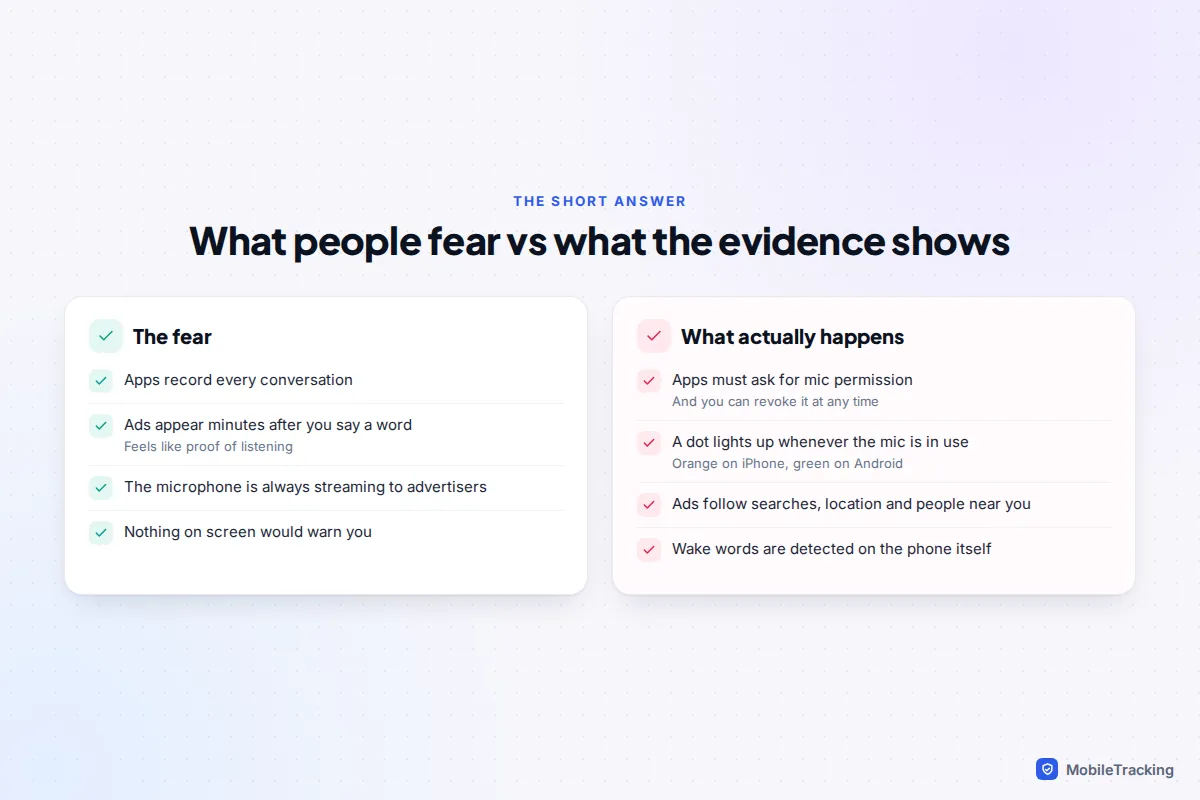
What the evidence actually shows
The most thorough public test came in 2018, when a team of US university researchers analysed more than 17,000 Android apps, including many that share data with advertisers. They ran the apps automatically and watched what left the phone. They found no app quietly switching on the microphone and sending audio away. What they did find was more mundane and still worrying: a few apps sent screenshots or screen recordings of what users were doing to third parties.
The companies people suspect most have also been asked directly. Meta said in 2016 that it does not use the phone’s microphone to inform ads, and its chief executive repeated that to the US Congress in 2018. Apple settled a US class action over Siri activating by accident for $95 million, approved by a judge in September 2025, without admitting wrongdoing. In January 2025 Apple stated publicly that it has never used Siri data to build marketing profiles, never made it available for advertising and never sold it.
There has been one genuine scare. In 2024 a leaked pitch deck from a US media company advertised “Active Listening”, claiming to target ads using voice data from devices. Google removed the company from its advertising partner programme after a review, and no evidence emerged that the product ever worked as described. The episode shows that some marketers would like to do this, not that your phone is doing it.
Why constant listening would be hard to hide
Recording and uploading hours of audio from millions of phones would drain batteries, use mobile data people pay for and show up in network tests that security researchers run all the time. It would also light the microphone indicator on every iPhone and every Android phone from Android 12 onwards, which apps on an unmodified phone cannot switch off. Advertisers simply do not need your voice when they already have your searches and location.
Check the microphone indicator in ten seconds
Both major phone systems now show a coloured dot at the top of the screen whenever an app is using the microphone or camera. It is the quickest way to know, in the moment, whether anything is listening.
- iPhone (iOS 14 and later, including iOS 18 and iOS 26): an orange dot means an app is using the microphone. A green dot means the camera, or the camera and microphone together, is in use. Swipe down from the top-right corner to open Control Centre and the name of the app that used it recently appears at the top.
- Android 12 and later: a green indicator appears in the top-right corner, often briefly showing a camera or microphone icon. Swipe down from the top of the screen and tap the green icon to see which app is using it. Samsung, Pixel and other makers draw it slightly differently, but the behaviour is the same.
A dot during a phone call, a voice note, a video call or while you are talking to Siri or Google’s assistant is normal. A dot while you are reading a news app with no video playing is worth investigating.
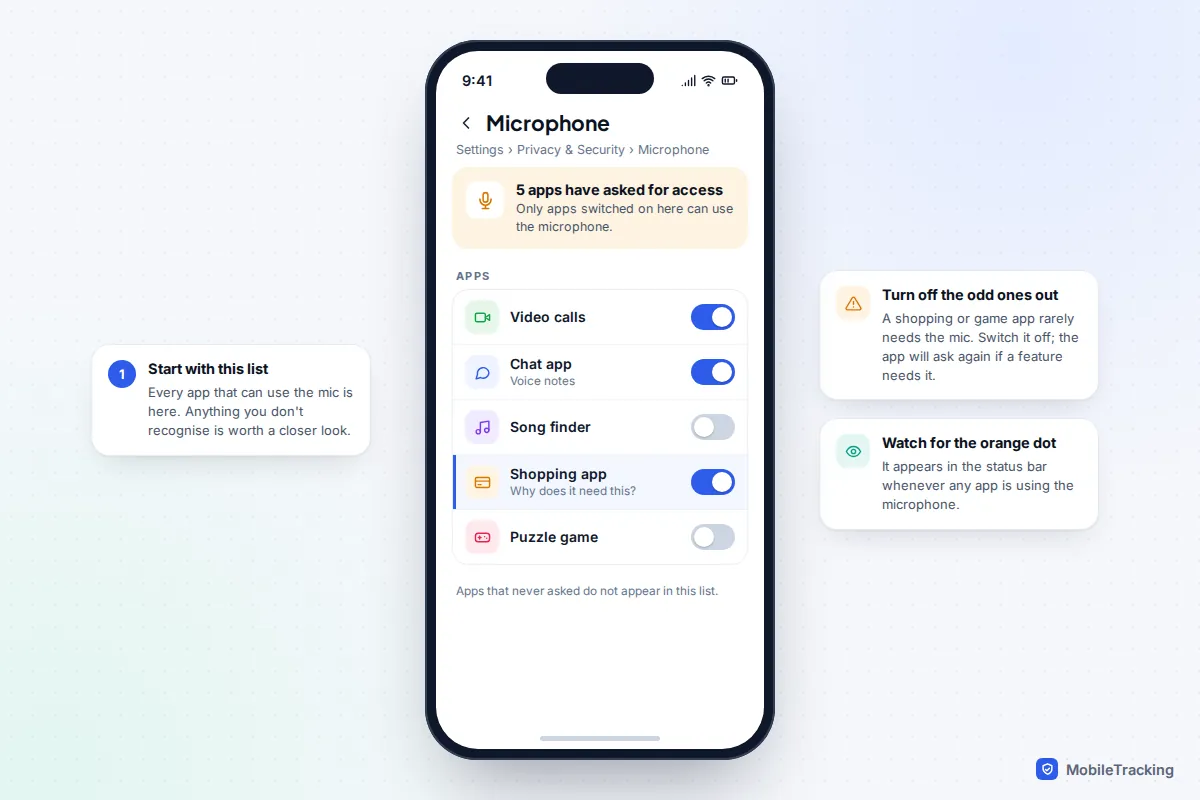
See which apps used your microphone this week
The indicator only helps if you are looking at the screen. To see what happened while the phone was in your pocket, use the built-in history. Apple and Google both have official explanations of the indicators if you want to check the details for your model.
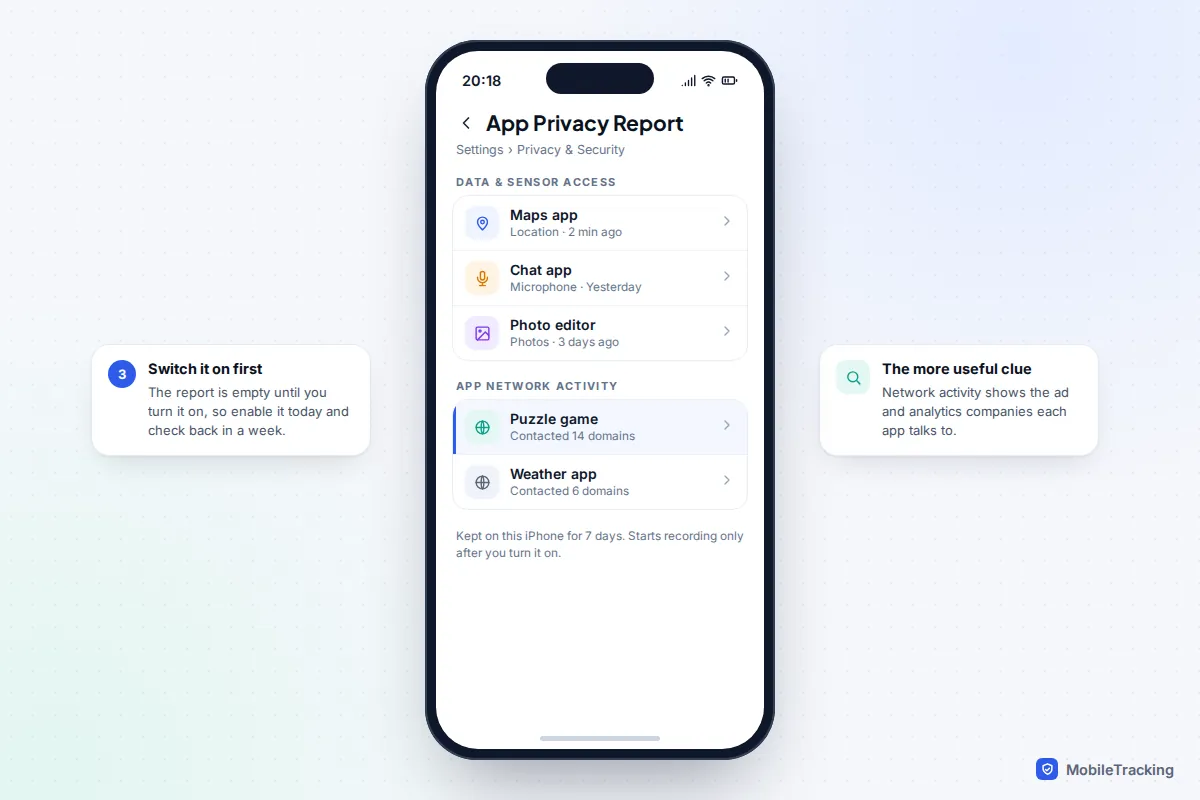
On iPhone: App Privacy Report
- Open Settings and tap Privacy & Security.
- Scroll to the bottom and tap App Privacy Report.
- Tap Turn On App Privacy Report. It starts recording from that moment, not before.
- Come back after a few days. Under Data & Sensor Access you will see when each app used the microphone, camera, location, photos or contacts over the last seven days.
The report stays on your iPhone and is encrypted. The App Network Activity section is often more revealing than the microphone list, because it shows how many outside domains each app contacts, many of them ad and analytics companies.
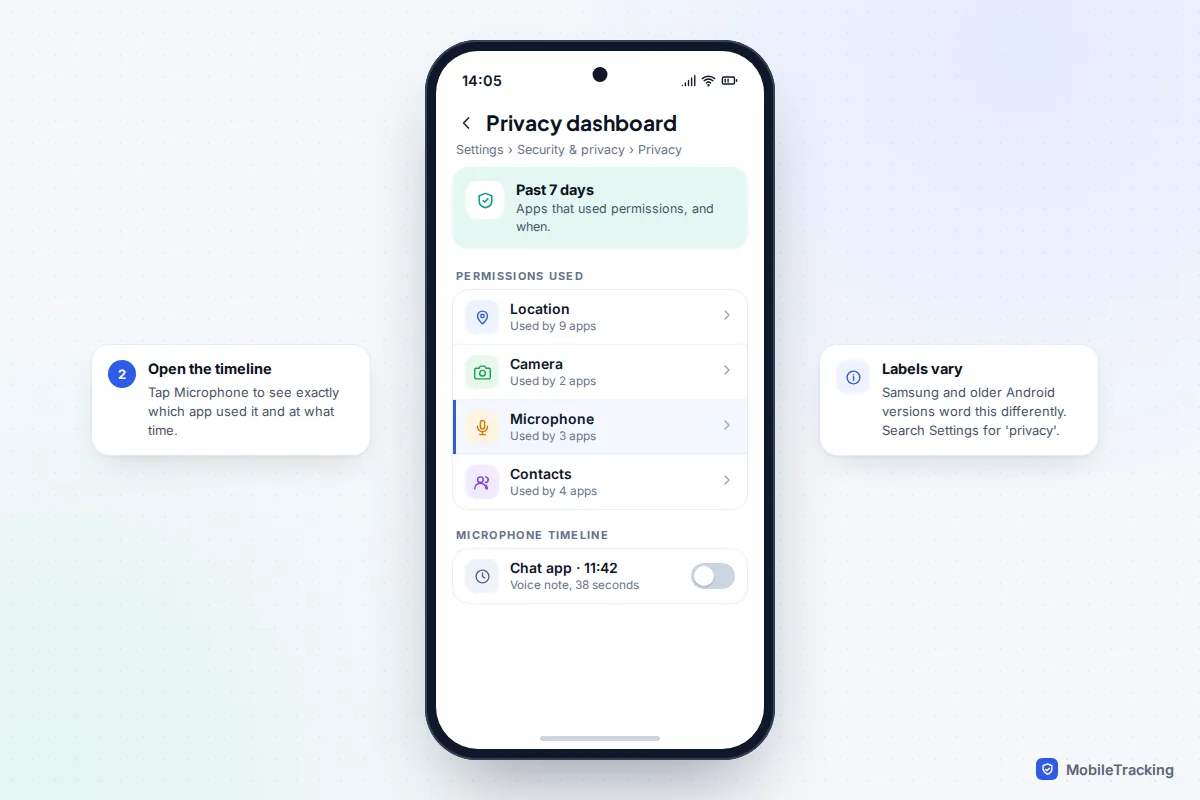
On Android: the privacy dashboard
- Open Settings and tap Security & privacy, then Privacy. On some phones it is just Privacy, and on Samsung it is Security and privacy.
- Tap Privacy dashboard.
- Tap Microphone to see a timeline of which apps used it and when.
Android 12 shows the last 24 hours. Newer versions show up to seven days, as Google’s privacy dashboard help page explains. If you cannot find it, type “privacy dashboard” into the search bar at the top of Settings.
For a fuller walk-through of both reports, see our guide to checking which apps used your camera or microphone.
So why did that ad appear?
This is the part that feels impossible to explain, so here is a typical case. Priya mentions to her sister over coffee that she fancies a new air fryer. She has never searched for one. That evening, an air fryer ad appears in her social feed.
What usually happened: her sister searched for air fryers on her own phone that afternoon. The two of them had spent an hour in the same place, their phones had been on the same home Wi-Fi at the weekend, and they have each other in their contacts. Ad platforms treat people who share locations, networks and address books as connected, and advertisers often target a buyer’s friends and household as well as the buyer. Priya saw the ad because of her sister’s search, not her own words.
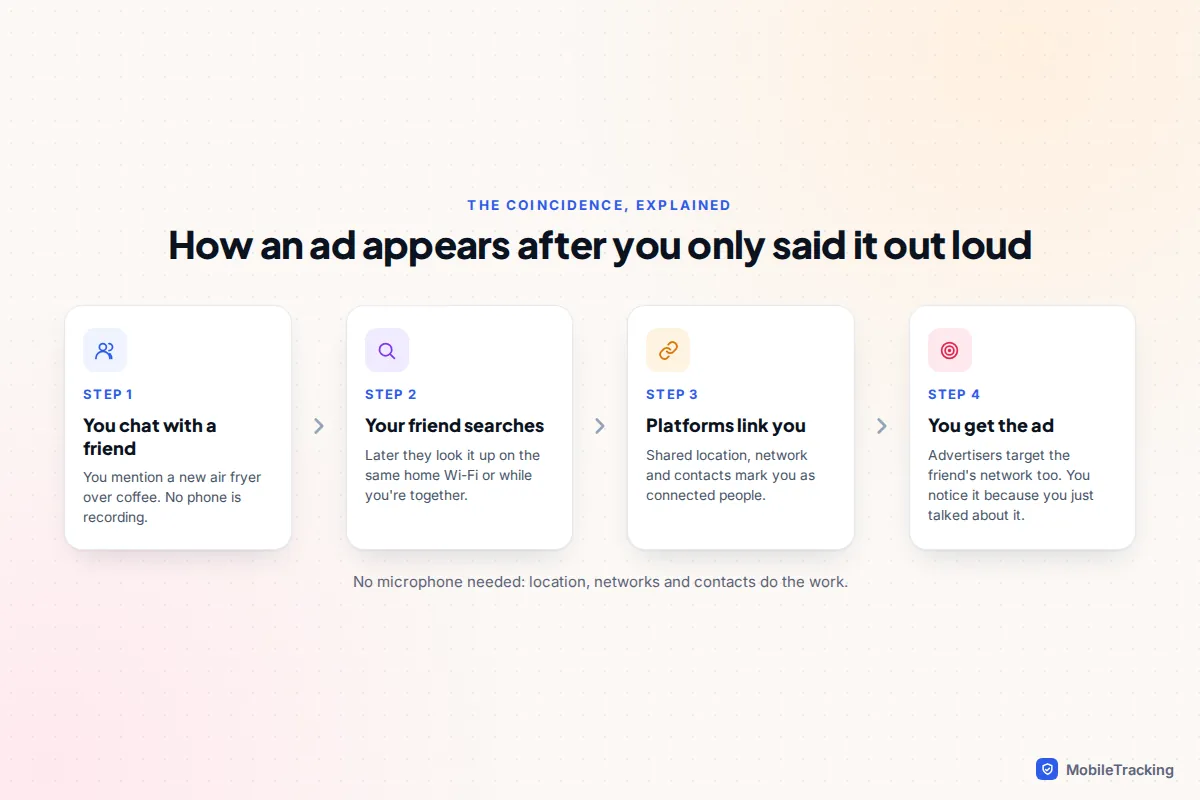
Two more things make the effect stronger. First, you already see hundreds of ads a day and forget almost all of them, but the one that matches a recent conversation sticks. Psychologists call this the frequency illusion. Second, the conversation itself often has a cause that also reached the ad system: you talked about air fryers because a friend bought one, a TV show featured one, or the season changed. The ad and the chat share a source.
What changed in late 2025
One real shift is worth knowing about. Since 16 December 2025, Meta has used people’s conversations with its Meta AI assistant, including voice chats, to personalise ads in most countries, with the UK, the EU and South Korea excluded at launch. That is not a hidden microphone: it is what you deliberately say to a chatbot. The practical rule is simple. Treat anything you type or say to an AI assistant inside a social or shopping app as information the company may use.
Where your phone really does listen
The honest answer to “is my phone listening” is yes, in one narrow way. If you have “Hey Siri”, “Siri”, “Hey Google” or a Samsung Bixby wake word switched on, a low-power part of the phone listens for that phrase. The matching happens on the device. Nothing is sent anywhere until it thinks it heard the wake word, and at that point the microphone indicator appears.
False triggers do happen, which is what the Siri lawsuit was about. A word that sounds like “Siri” can wake the assistant and a few seconds of speech may be processed. Apple says it keeps audio recordings only if you opt in to Improve Siri & Dictation, found under Settings, Privacy & Security, Analytics & Improvements. Google stores voice recordings in your account only if you have chosen to include voice and audio activity in your Google activity settings.
If this bothers you, you have three options, from lightest to heaviest:
- Leave the assistant on but switch off audio storage and delete your history. On iPhone, go to Settings, then Siri (Apple Intelligence & Siri on newer models), then Siri & Dictation History, and tap Delete. For Google, review voice and audio activity in your Google Account’s activity controls.
- Turn off the wake word only. You can still hold the side button, or say nothing and tap, to use the assistant when you want it.
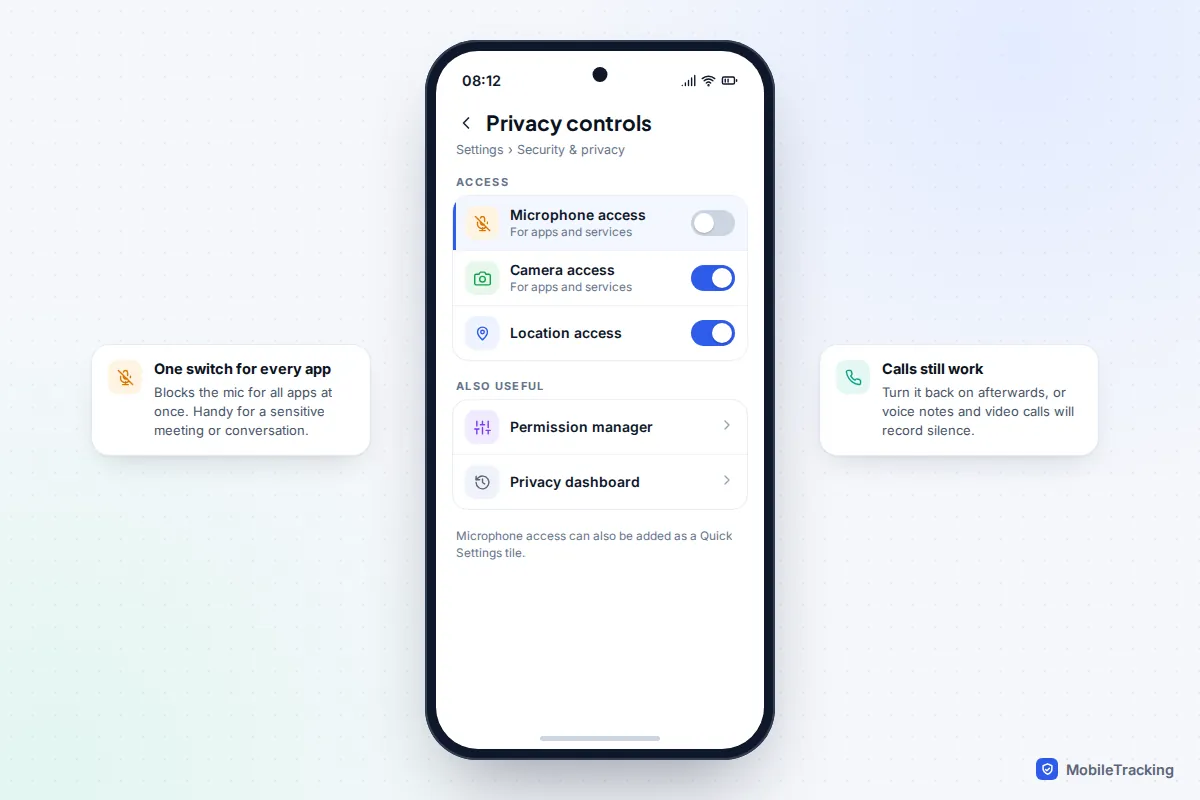
- Block the microphone entirely for a while. On many Android phones, including Pixel, there is a Microphone access switch under Settings, Security & privacy, Privacy controls, and a matching Quick Settings tile.
A five-minute privacy tidy-up that actually helps
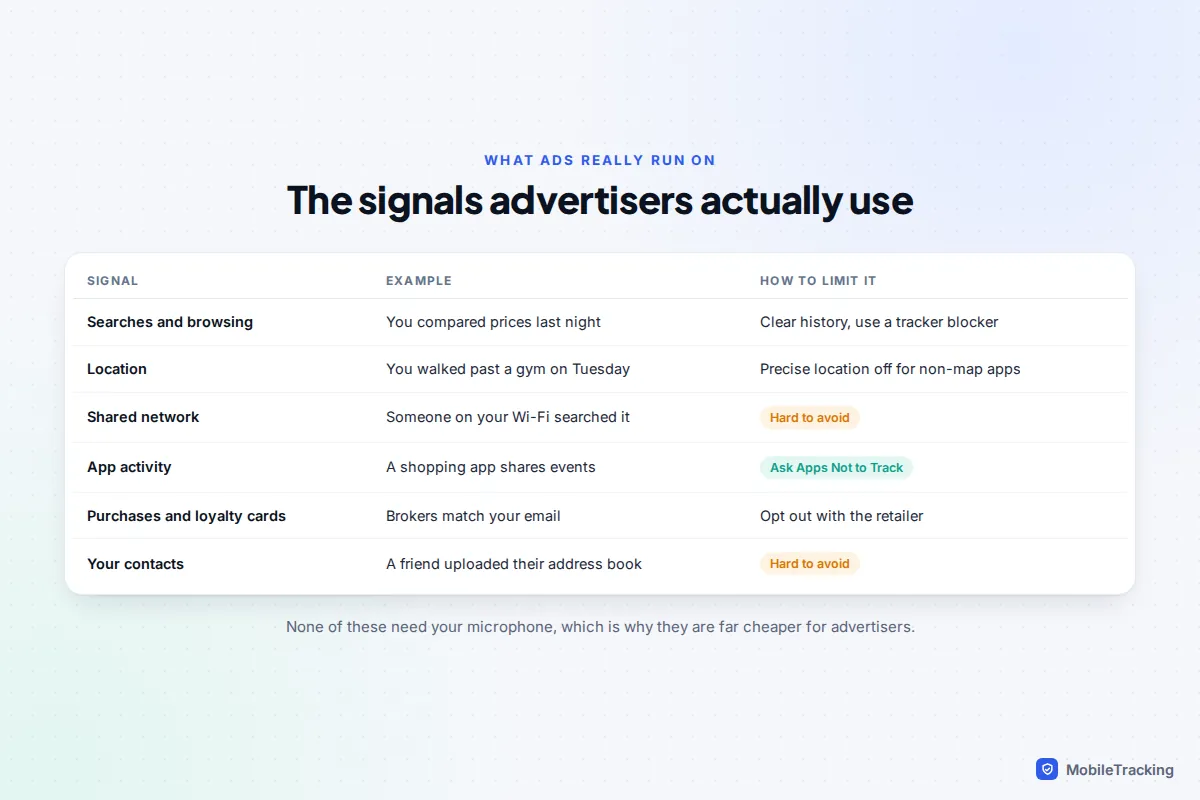
Because advertisers rely on tracking rather than listening, the steps that make a real difference are about data, not the microphone. Work through these once and repeat them every few months.
- Review microphone permission. On iPhone, Settings, Privacy & Security, Microphone. On Android, Settings, Security & privacy, then Privacy or Privacy controls, then Permission manager, Microphone (on Samsung, look under Security and privacy for Permissions). Switch off anything that has no obvious reason to hear you, such as shopping apps, torch apps and most games.
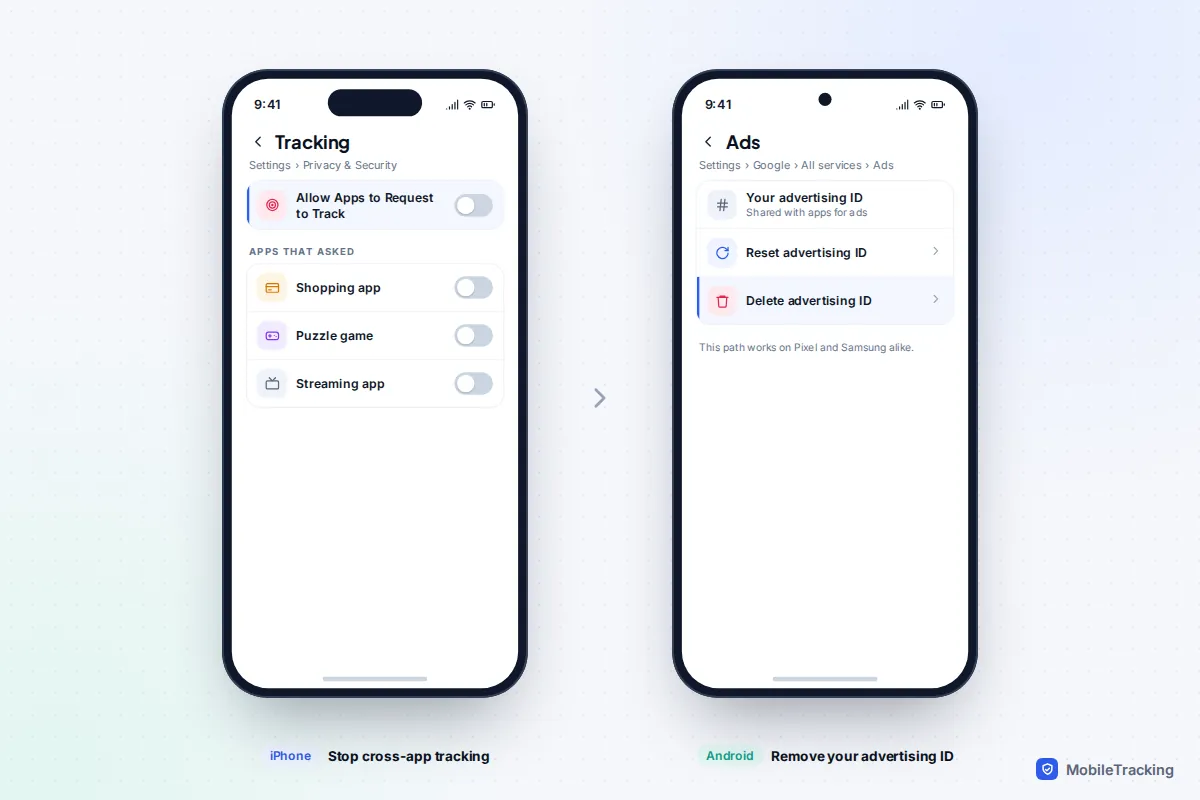
- Stop cross-app tracking on iPhone. Settings, Privacy & Security, Tracking, and switch off Allow Apps to Request to Track. Apps are then asked not to track you across other companies’ apps and websites.
- Delete your advertising ID on Android. Settings, Google, All services, Ads, then Delete advertising ID. Apps then receive a string of zeros instead of an ID that follows you.
- Turn off precise location for apps that do not need your exact position, such as weather and news. Approximate location is plenty for them.
- Clear ad interests. Google’s My Ad Center and Meta’s ad preferences in Accounts Centre both let you see and remove the topics you have been sorted into.
Our guides to opting out of app tracking and stopping an app from using your microphone cover each setting in more depth.
Common mistakes when testing your phone
Plenty of people run their own experiment: say “dog food” repeatedly near the phone for a few days and wait for ads. It feels scientific, but it is easy to fool yourself.
- Counting only the hits. You notice the one dog food ad and forget the fifty unrelated ones. Write every ad down, not just the matching ones.
- Choosing a common topic. Pet food, holidays and phones are advertised to almost everyone. Pick something obscure you would never be targeted for.
- Searching to check. The moment you look up the product “to see if ads appear”, you have told the ad system you are interested.
- Deleting the wrong apps. Removing a social app does not stop the web tracking, loyalty cards and location data that fed it.
When it might be more than ads
There is one situation where the question deserves a serious answer: someone with access to your phone has installed stalkerware. These apps can record calls, turn on the microphone and read messages. They are rare compared with ordinary ad tracking, but they are real and are often installed by a current or former partner.
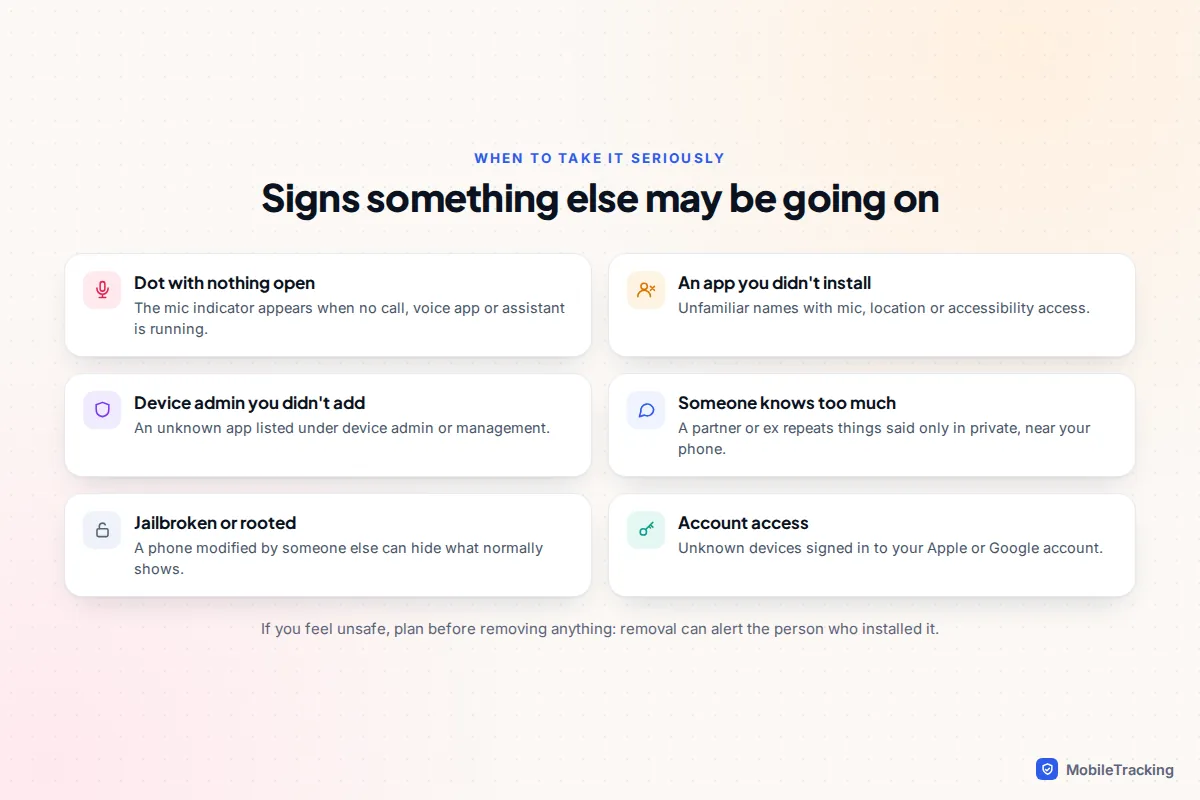
If none of those signs apply, you can relax. If some do, start with our guide on what to do if you think you have spyware, which covers safe checks for both iPhone and Android.
Frequently asked questions
Can an app use the microphone without the orange or green dot showing?
Not on an up-to-date iPhone or Android phone that has not been jailbroken or rooted. The indicator is drawn by the operating system, not by the app, so an app cannot hide it. A phone that has been modified by someone else is the exception, which is why a jailbroken or rooted phone you did not change yourself is a warning sign.
Does Instagram or Facebook listen to my conversations?
Meta has said repeatedly that it does not use the microphone for ads, and independent research has not found it doing so. The apps do use a huge amount of other data, including your activity, location and, in most countries since December 2025, your chats with Meta AI.
Should I cover or disable my microphone completely?
For most people it is not necessary. Removing microphone permission from apps that do not need it, and checking the privacy report now and then, gives you nearly all the benefit without breaking calls and voice notes.
Why do I get ads for things I only thought about?
Usually because something else triggered both the thought and the ad: a friend’s purchase, a shop you walked past, a show you watched, or a season. Ad systems are very good at predicting what people like you will want next, which can feel like mind reading.
Is my smart speaker different from my phone?
It works on the same principle: it listens locally for a wake word, then sends what follows to the company. Most speakers have a physical mute button and let you review or delete recordings in their app, so check those settings too.