
 MobileTracking Editor
GPS tracking on Android has grown from a niche tool used by fleet managers and dedicated hikers into something that almost every smartphone user interacts with daily — whether they realize it or not. Every time you open Google Maps for directions, share your location in a WhatsApp message, or get a notification that a family member has arrived home safely, GPS technology is working in the background.
But the landscape of dedicated GPS tracking apps for Android is vast and genuinely confusing to navigate. Some apps are completely free and built directly into Android. Others are free to download but layer aggressive advertising over a limited feature set. Premium apps charge monthly subscriptions but offer meaningfully better accuracy, longer location history, and features like geofencing, ambient audio, and screen time management that go well beyond a simple map pin.
This guide cuts through the noise. We tested and reviewed 13 GPS tracking apps for Android, organized across two categories: five apps that are completely free with no subscription required, and eight apps that offer free trials before requiring a paid plan. For each app, we cover what it does, who it is best suited for, its genuine strengths, and its honest limitations.
Whether you are a parent trying to keep tabs on your children’s whereabouts, an employer monitoring company devices, someone who wants to track their own activity and routes, or simply looking to locate a lost or stolen phone, at least one app in this list is designed for your use case.
Part 1: What Makes a GPS Tracking App Worth Using?
Before diving into the apps, it helps to understand the key features that separate genuinely useful GPS trackers from apps that simply show a map pin and call it done.
Real-Time Location Accuracy
The most fundamental requirement is that the app shows you where the device actually is, with minimal delay. GPS accuracy on Android can vary significantly — a well-optimized app that uses a combination of GPS satellites, Wi-Fi positioning, and cellular tower triangulation will produce updates that are accurate to within a few meters and refresh every few seconds. An app that relies solely on GPS and only updates every few minutes is significantly less useful in dynamic situations.
Location History
A map pin showing the current location is useful; a timeline showing where the device has been throughout the day is significantly more valuable. Location history allows you to review a route taken, understand patterns over time, and investigate specific incidents after the fact. The length of history stored and how it is presented varies widely between apps.
Geofencing and Alerts
Geofencing draws a virtual boundary around a specific location — home, school, a workplace, a neighborhood — and sends an automatic notification when the tracked device enters or leaves that zone. This transforms GPS tracking from something that requires active monitoring into a passive safety net that only demands your attention when something changes.
Privacy and Data Security
Location data is among the most sensitive categories of personal information. A reputable GPS tracking app should use encryption for data in transit and at rest, have a transparent privacy policy that explains exactly what data is collected and how it is used, and not sell location data to third-party advertisers. Apps with excessive advertising are worth treating cautiously in this context.
Transparency and Consent Design
Some GPS tracking apps are built around mutual, transparent location sharing — everyone in the group can see everyone else, and everyone knows monitoring is happening. Others are designed for one-sided monitoring where the tracked device may not show any indication of being tracked. Both designs have legitimate uses: mutual apps work well for family coordination and adult partnerships; monitoring-first apps are appropriate for parents overseeing young children’s devices.
Understanding which model an app uses before installing it avoids mismatches — particularly the frustration of parents who install a mutual sharing app thinking it works silently, or the discomfort of using a monitoring-focused app in situations where transparency would be more appropriate.
Customer Support and Reliability
A GPS tracking app that stops working silently — because of an Android OS update, a permissions change, or a backend service outage — is not just useless; it creates false confidence. Paid apps from established developers tend to address compatibility issues through regular updates, and they provide customer support channels when something stops working. Free apps without a revenue model often lack both. This distinction becomes important over the months and years a family relies on a tracking app for safety decisions.
Part 2: Understanding Free vs. Paid GPS Tracking Apps
A clear pattern emerges from testing: completely free GPS tracking apps and paid apps with free trials represent genuinely different tiers of functionality, not just different pricing models.
Completely free apps typically fall into two categories: built-in platform tools (Google Maps location sharing, Google Find My Device, Samsung Find My Mobile) that are maintained by large companies with no advertising model for the location feature, and ad-supported third-party apps that monetize through advertising rather than subscriptions. The built-in platform tools are generally excellent for what they do; ad-supported third-party apps often compromise on privacy, accuracy, or both.
Paid apps with free trials tend to offer more comprehensive feature sets — longer location history, better geofencing, additional monitoring capabilities, and dedicated customer support. The free trial period typically ranges from 3 to 14 days and provides enough time to evaluate whether the app’s features justify the subscription cost.
For straightforward use cases — sharing your location with a partner, finding a lost phone, basic child location checking — the free built-in tools are often entirely sufficient. For ongoing parental monitoring, employee device management, or situations where you need multiple features working together, the paid apps are typically worth evaluating.
Part 3: 5 Completely Free GPS Tracking Apps for Android
1. Google Maps — Location Sharing
Best for: Mutual, transparent location sharing between family members, friends, or partners.
Google Maps is already installed on virtually every Android phone, and most people do not realize it includes a continuous, real-time location sharing feature built into the app. You can share your current location with specific contacts for a set period — from one hour to indefinitely — or request to see someone else’s location if they choose to share it with you.
The way it works: open Google Maps, tap your profile picture, select Location Sharing, and choose who to share with and for how long. The person you are sharing with sees your Bitmoji-style icon moving in real time on their own Google Maps. The arrangement is completely mutual — both parties can see each other’s locations, both can stop sharing at any time, and both receive a notification when sharing begins.
For families who want a simple, free, no-extra-app location sharing system, Google Maps is the most accessible option available. Because it runs on Google’s infrastructure — one of the largest and most reliable cloud platforms in the world — accuracy and uptime are excellent.
What it cannot do: Store location history, send geofencing alerts when someone arrives at or leaves a specific place, or monitor anyone who has not explicitly chosen to share. It is a consent-based, mutual tool — not a passive monitoring system.
Rating: ⭐⭐⭐⭐⭐
Download: Google Play Store | Apple App Store
2. Google Family Link
Best for: Parents monitoring younger children’s Android devices with free basic controls.
Google Family Link is Google’s dedicated parental oversight platform, and for families where cost is a primary concern, it is the strongest free option available. Family Link includes GPS-based location sharing — parents can see their child’s current location on a map and set location-based alerts that fire when the child’s phone arrives at or leaves designated places like home or school.
But Family Link does significantly more than just location. It allows parents to:
- Approve or deny app downloads from the Google Play Store before they complete
- Set daily screen time limits and lock the device when limits are reached
- View which apps the child is using and for how long
- Set content filters for web browsing in Chrome
- Remotely lock the device from the parent dashboard
All of this is free, requires only a Google account for both parent and child, and is maintained by Google — meaning it receives regular updates and security patches.
The location tracking specifically uses GPS and updates frequently enough for practical parental oversight. One honest limitation is that location history is not prominently featured — you can see where the child is now and receive arrival/departure alerts, but detailed route history is limited. The platform also does not provide the kind of messaging oversight or screen mirroring that parents with more specific concerns would need.
What it cannot do: Monitor text messages or messaging app content, provide location history beyond recent activity, or track iPhones.
Rating: ⭐⭐⭐⭐⭐
Download: Google Play Store | Apple App Store
3. Google Find My Device
Best for: Locating a lost or stolen Android phone, or checking the location of a family member’s Android device if you have access to their Google account.
Google Find My Device is Android’s built-in device location service, free for all Android users. It was designed primarily for the “lost phone” scenario — you open a browser, sign into your Google account, and see your phone’s location on a map. You can also remotely ring the device at full volume (useful if it is just misplaced nearby), lock it with a custom message and callback number, or erase all data as a last resort.
For parents who have set up their child’s Android phone on a Google account they manage, Find My Device can serve as a basic location check tool. Sign into that Google account from any browser, select the child’s device, and see its current location.
The significant limitation is that Find My Device stops working when the phone is off or has no internet connection. It also does not provide the automatic geofencing alerts or location history that dedicated family tracking apps offer. It is a reactive tool — you check it when you need to — not a proactive monitoring system.
What it cannot do: Provide geofencing alerts, store location history, monitor a device that is turned off or offline.
Rating: ⭐⭐⭐⭐⭐
Access: google.com/android/find (browser) or the Find My Device app (Google Play)
4. Samsung Find My Mobile
Best for: Samsung Galaxy device owners who want a free, manufacturer-integrated location tool.
Samsung Find My Mobile is Samsung’s proprietary device tracking service, built into all Galaxy phones. It functions similarly to Google Find My Device but with some additional capabilities that Samsung has developed as part of its Knox security ecosystem.
The most notable differentiator is Offline Finding — a network of nearby Galaxy devices that can detect your phone’s Bluetooth signal and anonymously relay its location, even when your phone has no internet connection. This can extend location visibility beyond what Google Find My Device offers in scenarios where the phone is powered down or in a low-connectivity area.
To set it up: go to Settings > Biometrics and Security > Find My Mobile on the Samsung phone and toggle it on. Enable Offline Finding in the same menu. Create or sign into a Samsung account on the device. Then access smartthingsfind.samsung.com from any browser to see the device’s location.
Location accuracy is approximately 20 meters in typical conditions — adequate for general device finding but less precise than GPS-only applications in open environments. Performance can degrade in areas with tall buildings, dense tree cover, or underground parking structures.
What it cannot do: Track devices from other manufacturers, provide location history, or send geofencing alerts.
Rating: ⭐⭐⭐⭐⭐
Access: smartthingsfind.samsung.com
5. Live Mobile Location Tracker
Best for: Users who want a global, free GPS tracking solution with basic features across any Android device.
Live Mobile Location Tracker is a third-party app available on the Google Play Store that provides real-time GPS location tracking globally — it is not restricted to specific carriers or regions. The app can show the live location of a target device on a map and includes basic utilities like measuring distances between two locations and locating nearby amenities.
The location tracking accuracy in testing was reasonable in open outdoor environments, with accuracy degrading somewhat in indoor or heavily urban areas. The interface is straightforward and approachable for users who are not technically experienced.
Honest limitations: The app displays relatively frequent advertisements, which some users will find disruptive. Location history is not stored — you can see where a device is right now but cannot review where it has been throughout the day. For users who only need occasional location checks without history or alerts, this is acceptable; for more structured monitoring, it is a significant gap.
What it cannot do: Store location history, set geofencing alerts, monitor messaging activity.
Rating: ⭐⭐⭐
Part 4: 8 GPS Tracking Apps for Android with Free Trials
1. MobileTracking Parental Control
Best for: Parents who want comprehensive monitoring of their child’s Android device, combining GPS with digital activity oversight.
MobileTracking Parental Control is one of the most feature-complete parental monitoring apps available for Android. It combines GPS location tracking with a full suite of digital safety tools — making it the right choice when knowing where a child is matters alongside knowing what they are doing on their phone.
GPS and location features:
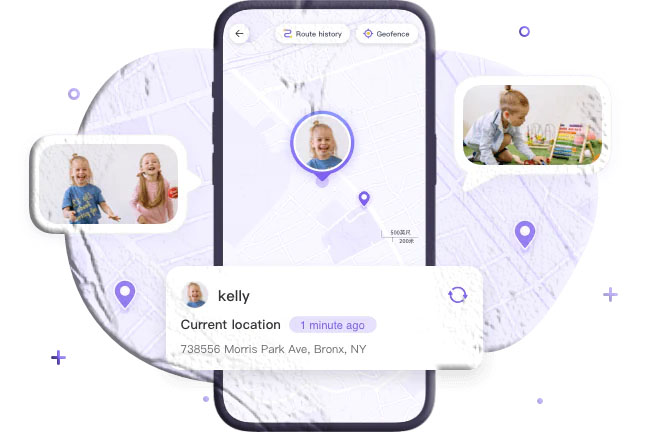
Real-time GPS tracking. See the child’s current position on a live map, updated continuously while the phone is on and connected. Uses GPS combined with Wi-Fi and cellular positioning for accuracy across different environments.
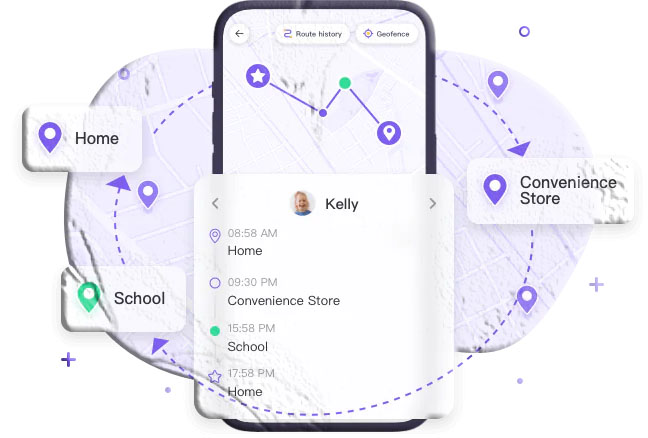
30-day location history. The app stores a detailed route history for up to 30 days, displayed on a scrollable timeline. Parents can review exactly where the child’s phone traveled on any given day — when they left home, the route taken, when they arrived at each location, and when they returned. This historical data is significantly more useful than a current-position snapshot for understanding patterns or investigating specific incidents.
Geofencing with instant alerts. Draw virtual boundaries around key locations and receive immediate push notifications when the child’s phone enters or leaves those zones. Alerts fire automatically without requiring parents to actively monitor the map — the app surfaces changes proactively.
Low-battery alert with GPS location. When the child’s battery drops below a parent-defined threshold, an alert fires to the parent’s device with the child’s current GPS coordinates attached. This provides a final location snapshot before the phone potentially powers off — solving one of the most common frustrating gaps in family location monitoring.
Digital monitoring features beyond GPS:
Screen mirroring (view the child’s screen in real time), notification monitoring (capture incoming messages from all apps), SMS keyword alerts (instant notification when specified words appear in messages), app usage tracking and blocking, ambient audio monitoring (hear the environment around the child’s device), and remote camera access for visual context.
How to set up MobileTracking:
Step 1: Download MobileTracking Parental Control from the Google Play Store on your own phone. Create an account and log in.
Step 2: On the child’s Android phone, install the MobileTracking Kids companion app.
Step 3: Open MobileTracking Kids on the child’s device. Enter the pairing code shown in your parent dashboard to link the two devices. Complete the permissions setup.
Step 4: From your parent dashboard, navigate to the Map icon for real-time location. Access History for past route data and Geofencing to configure zone alerts.
A 3-day free trial is available.
Rating: ⭐⭐⭐⭐⭐
2. Life360
Best for: Families who want mutual, all-member location sharing with driving safety reports.
Life360 is one of the most widely used family location platforms globally, with tens of millions of active users across both Android and iPhone. It operates on a mutual model where all family members in a “Circle” can see each other’s positions on a shared map — creating transparency rather than one-sided surveillance and working well for families with older children and teenagers who are beginning to have more independence.
Everyone in a Life360 circle sees everyone else’s real-time location, and each member receives notifications when others arrive at or leave designated places. This mutual visibility is one of Life360’s most practical qualities for families — parents can see the kids, but children can also see when a parent is on their way home or still at work, which reduces the need for constant check-in calls and texts.
The driving behavior reporting feature is a standout differentiator. Life360 tracks speed, hard braking, phone use while driving, and generates an overall driving score for each family member who drives. For families with teenagers who have recently started driving, this data is both practically useful for coaching and a genuine safety tool — multiple studies have found that driver awareness of monitoring correlates with safer driving behavior.
Life360 also includes an SOS emergency button that any family member can activate to immediately send a distress signal — with location — to all other circle members. In-app messaging allows family members to communicate directly within the Life360 interface without switching to a separate platform.
Life360 supports unlimited devices in a circle, is available on both Android and iOS (making it one of the better options for mixed-device families), and maintains 2–30 days of location history depending on the plan tier.
The free tier is functional but limited in location history depth and driving report detail. Paid tiers (Gold at $14.99/month, Platinum at $24.99/month) significantly expand capabilities. A 7-day trial is available on paid tiers.
Rating: ⭐⭐⭐⭐⭐
Download: Google Play Store | Apple App Store
3. Find My Kids
Best for: Parents of younger children (including those with GPS watches) who want focused, affordable location tracking.
Find My Kids is purpose-built for child location monitoring, with one notable capability that most other apps in this category lack: it supports certain GPS watches designed for children, allowing parents to track a child who is too young to have a smartphone but old enough to wear a GPS-enabled watch. This extends the app’s usefulness to younger children — typically in the 5–10 age range — who might otherwise be outside the tracking window entirely.
The location tracking itself uses GPS, GPRS, and Wi-Fi positioning simultaneously, which produces high accuracy across varied environments. The app shows the child’s current position alongside the device’s battery level — a small but practically useful detail that prevents parents from being surprised by a sudden loss of tracking. Low-battery alerts fire when the child’s device is running low, providing a final location snapshot before it potentially powers off.
The Sound Around feature activates the child’s phone or watch microphone to let parents hear the surrounding environment — useful for safety checks when location data alone is insufficient to confirm the child is okay. The SOS button on the child’s device allows immediate alerting in emergencies, and geofencing provides automatic arrival and departure alerts for designated locations.
At $2.99/month for a single device, Find My Kids is one of the most affordable paid tracking options available. The Sound Around audio feature is sold separately, which is a frustrating pricing decision — parents who specifically want audio monitoring should budget for both the base subscription and the Sound Around add-on.
Rating: ⭐⭐⭐⭐
Download: Google Play Store | Apple App Store
4. Phone Tracker and GPS Location
Best for: Users wanting a simple, shared family location tracker with custom zone alerts.
Phone Tracker and GPS Location provides reliable real-time GPS tracking for connected devices, with clean map visualization options and the ability to create custom geofencing zones that trigger notifications. Location data is kept private within the app — not shared with advertisers.
The setup requires all tracked users to install the app and be added to the same tracking group via a code, which limits its use for passive monitoring but makes it appropriate for consensual family coordination.
Rating: ⭐⭐⭐⭐
5. Where’s My Droid
Best for: Users who prioritize anti-theft protection alongside basic GPS tracking.
Where’s My Droid specializes in device theft detection and recovery. The standout feature is a system that can make a lost phone ring at full volume even when it is in silent mode, triggered remotely via text command. The Pro version adds remote photo capture using the device camera — potentially useful for identifying who has a stolen phone or what environment it is in.
For families primarily interested in parental location monitoring, Where’s My Droid’s feature set is narrower than other options. But for users whose primary concern is protecting against device theft, its anti-theft features are notably strong.
Rating: ⭐⭐⭐⭐
Download: Google Play Store
6. Geo Tracker
Best for: Outdoor enthusiasts, hikers, cyclists, and anyone who wants to record and analyze their own routes.
Geo Tracker is designed for route recording rather than monitoring others. It records GPS tracks in GPX or KML format that can be exported, shared, or viewed on a map. The app provides detailed statistics for each recorded route — total distance, duration, elevation profile, maximum speed, average pace, and more.
Notable capability: Geo Tracker can continue recording even when the screen is off, which is essential for long outdoor activities. The track recording quality is excellent for fitness and adventure applications.
For monitoring another person’s location or for family safety purposes, Geo Tracker is not designed for this use case — it is a self-tracking tool. But for personal route recording, fitness tracking, or adventure documentation, it is one of the cleanest options available.
Rating: ⭐⭐⭐⭐
Download: Google Play Store
7. Find My Phone — Family Locator
Best for: Families who want location tracking with custom arrival/departure text alerts.
Find My Phone — Family Locator provides real-time GPS tracking with a focus on customizable location alerts. Parents or users can create custom notifications tied to specific destinations — sending a text alert when a family member arrives at or leaves a designated location, rather than relying only on in-app push notifications. This is a small but practical differentiator for families who prefer SMS-based alerts over app notifications.
Location data is kept private within the app for each family group, and the interface is straightforward enough for users without a technical background.
Rating: ⭐⭐⭐⭐
8. MobileTracking Business (MDM)
Best for: Businesses and employers who need GPS tracking and device management across a fleet of company Android phones.
MobileTracking Business is an enterprise Mobile Device Management (MDM) platform rather than a consumer app, designed for organizations that need to manage, monitor, and secure a fleet of company-owned Android devices from a centralized dashboard. GPS tracking is one component of a broader device management suite.
From the GPS perspective, it provides real-time location tracking of all enrolled devices, geofencing with alerts, and complete routing history for each device — allowing managers to review where company devices were throughout any given day. This is particularly valuable for field service operations, delivery fleets, and remote teams.
Beyond GPS, MobileTracking Business allows remote app deployment, security policy enforcement, device locking and wiping, and real-time status monitoring of all enrolled devices from a web dashboard.
Rating: ⭐⭐⭐⭐⭐
Choosing the Right GPS Tracker for Your Situation
With 13 apps reviewed, the right choice depends on your specific use case:
For locating your own lost or stolen Android phone: Google Find My Device (free, immediate, no setup required beyond having a Google account signed in) or Samsung Find My Mobile (for Galaxy users, with added offline finding capability).
For simple, free, mutual family location sharing: Google Maps Location Sharing provides the cleanest mutual experience with no additional app required.
For free parental controls alongside basic child location tracking: Google Family Link covers location, app management, screen time, and content filters at no cost for Android child devices.
For comprehensive parental monitoring that goes beyond location: MobileTracking Parental Control combines GPS (including 30-day history and geofencing) with screen mirroring, notification monitoring, SMS keyword alerts, and ambient audio — the most complete single-app solution for Android.
For families with both Android and iPhone devices: Life360 is the strongest cross-platform option, with mutual location sharing, driving behavior reports, and unlimited family members in one circle.
For personal route recording and fitness tracking: Geo Tracker provides professional-grade route recording with detailed statistics for outdoor activities.
For businesses managing company devices: MobileTracking Business provides enterprise-grade GPS and device management from a centralized dashboard.
Frequently Asked Questions
What is the best free GPS tracking app for Android?
For personal use, Google Maps location sharing and Google Find My Device are both excellent free options maintained by Google. For family oversight including parental controls, Google Family Link adds app management and screen time controls alongside location at no cost. For more comprehensive monitoring of a child’s digital activity alongside location, MobileTracking Parental Control offers the most complete feature set with a free trial.
Can you track an Android phone without the person knowing?
Parental control apps like MobileTracking can operate in a mode where the companion app is not visible on the home screen of the child’s device. For parents of minor children, this is generally legally permissible. Tracking another adult’s phone without their knowledge or consent is illegal in most jurisdictions. Built-in tools like Google Find My Device and Google Family Link require Google account access and are not covert.
How accurate are GPS tracking apps on Android?
Under ideal conditions (outdoors, clear view of the sky, good cellular signal), GPS-based tracking apps typically produce accuracy within 3 to 10 meters. Indoor accuracy degrades to 20 to 100 meters or more, depending on Wi-Fi positioning quality. Apps that combine GPS with Wi-Fi and cellular positioning maintain better accuracy across varied environments than GPS-only approaches.
Will GPS tracking drain my phone battery?
Continuous GPS tracking does use battery, but modern Android devices and well-optimized tracking apps have significantly reduced this impact. Apps that combine GPS, Wi-Fi, and cellular positioning can use GPS selectively — only activating the full GPS chip when other signals indicate the device has moved significantly — which reduces battery consumption. Life360 has been noted by some users for higher battery consumption; apps that use less frequent location updates (like Google Family Link) tend to be lighter on battery.
Can I track a phone that is turned off?
Generally, no — a powered-off phone cannot transmit live location data. However, Samsung Find My Mobile’s Offline Finding feature uses a network of nearby Galaxy devices to detect a phone’s Bluetooth signal for a period after it is turned off. Apple’s Find My service has similar offline capability on iPhones. Google’s Find My Device shows the last known location before the phone powered off. For ongoing offline detection, Samsung’s Offline Finding is the strongest Android option.
Does Life360 show when someone leaves the app?
Life360 does show when a circle member’s location data has not updated recently, which can indicate the phone is off, in airplane mode, or that location access has been revoked. However, it does not send a specific alert saying “this person left the app” — location-sharing-paused scenarios appear as stale location data with a timestamp indicating when the last update was received.
Are free GPS tracking apps safe to use?
Platform tools from Google and Samsung (Google Maps, Find My Device, Samsung Find My Mobile) are safe — they are maintained by major technology companies with established privacy practices. Third-party free apps that rely on advertising revenue should be evaluated more carefully: review their privacy policy to understand what data is collected and whether location data is shared with advertisers. Reputable paid apps with free trials generally offer stronger privacy protections than fully ad-supported free alternatives.
Final Thoughts
The best GPS tracking app for your Android device depends entirely on what you are trying to accomplish. For the majority of everyday needs — finding a lost phone, sharing your location with family, basic parental location checks — the free platform tools from Google are fully adequate and require no additional cost or downloads.
For families who want ongoing peace of mind with more detailed visibility — where their child has been, not just where they are, plus alerts that fire automatically rather than requiring active monitoring — MobileTracking and Life360 are the most capable purpose-built options. They serve different models (MobileTracking for comprehensive parental oversight; Life360 for mutual family coordination) but both address the gap that free tools leave.
Whatever app you choose, take a few minutes to configure geofencing alerts for the locations that matter most to your family. The ability to be notified automatically when something changes — rather than needing to actively check — is where GPS tracking apps deliver their most practical daily value.
Note: App pricing and features may change over time. Always verify current pricing and feature availability directly in the Google Play Store or on the app’s official website before subscribing.





Add comment