
The most reliable sign that your phone is being monitored is not a hot battery or a clicking noise. It is someone knowing things they should not: where you were, who you messaged, what you searched. After that, look for things you can actually check. On an iPhone that means Safety Check, installed profiles and the devices signed in to your Apple Account. On Android it means device admin apps, accessibility services and notification access. On both, check your accounts, because shared passwords and linked devices are far more common than spyware.
This guide separates the signs that mean something from the myths, walks through each check in about 20 minutes, and explains when a factory reset is the right answer. If you think a partner or ex is watching you, read the safety section before you change anything.
Signs that matter, and the ones that don’t
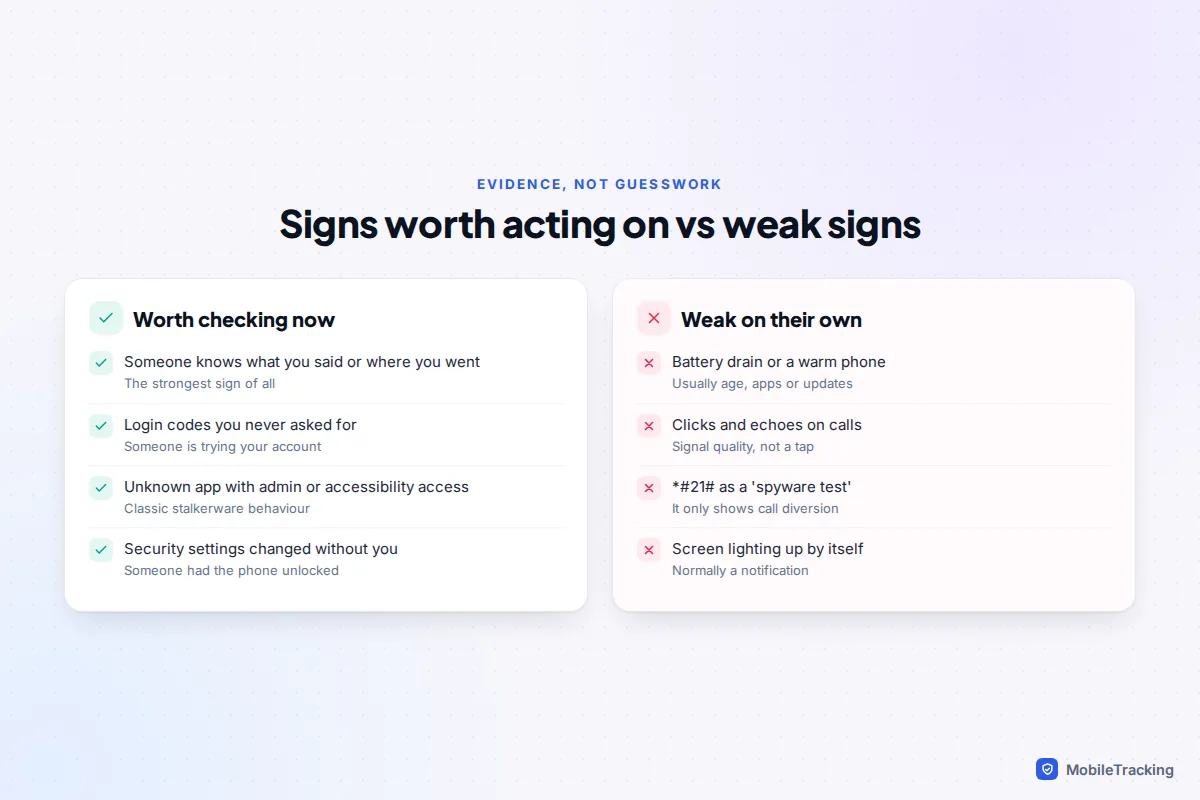
Most monitoring apps are built to stay quiet, so the “classic” symptoms are unreliable. The Coalition Against Stalkerware notes that battery drain, data spikes and higher Screen Time can be signs, but they have many ordinary causes. The table below is a fairer guide.
| What you notice | Usually means | Worth checking? |
|---|---|---|
| Someone quotes your messages or turns up where you are | Access to your accounts, location sharing, or spyware | Yes, this is the strongest sign |
| Login codes you didn’t request, or new sign-in alerts | Someone trying, or managing, to sign in to your account | Yes, today |
| An app you don’t recognise with admin or accessibility access | Possible stalkerware | Yes |
| Security settings changed that you didn’t touch | Someone has had the phone unlocked | Yes |
| Battery drain, heat, slowness | Ageing battery, a busy app, an update | Only alongside other signs |
| Clicks or echoes on calls | Network or signal quality | No, modern phone taps don’t make noise |
One myth deserves a direct answer: dialling *#21# does not reveal spyware or a “tapped” phone. On most networks it only shows whether your calls are being diverted to another number. That is still worth knowing, and we come back to it under account checks.
How to check an iPhone
An iPhone is hard to put spyware on without jailbreaking it, which is difficult on current iOS versions and is usually undone by an update. So on iPhone, most “monitoring” happens through the Apple Account instead: someone who knows your password can read synced data and see your location from their own device. These checks cover both.
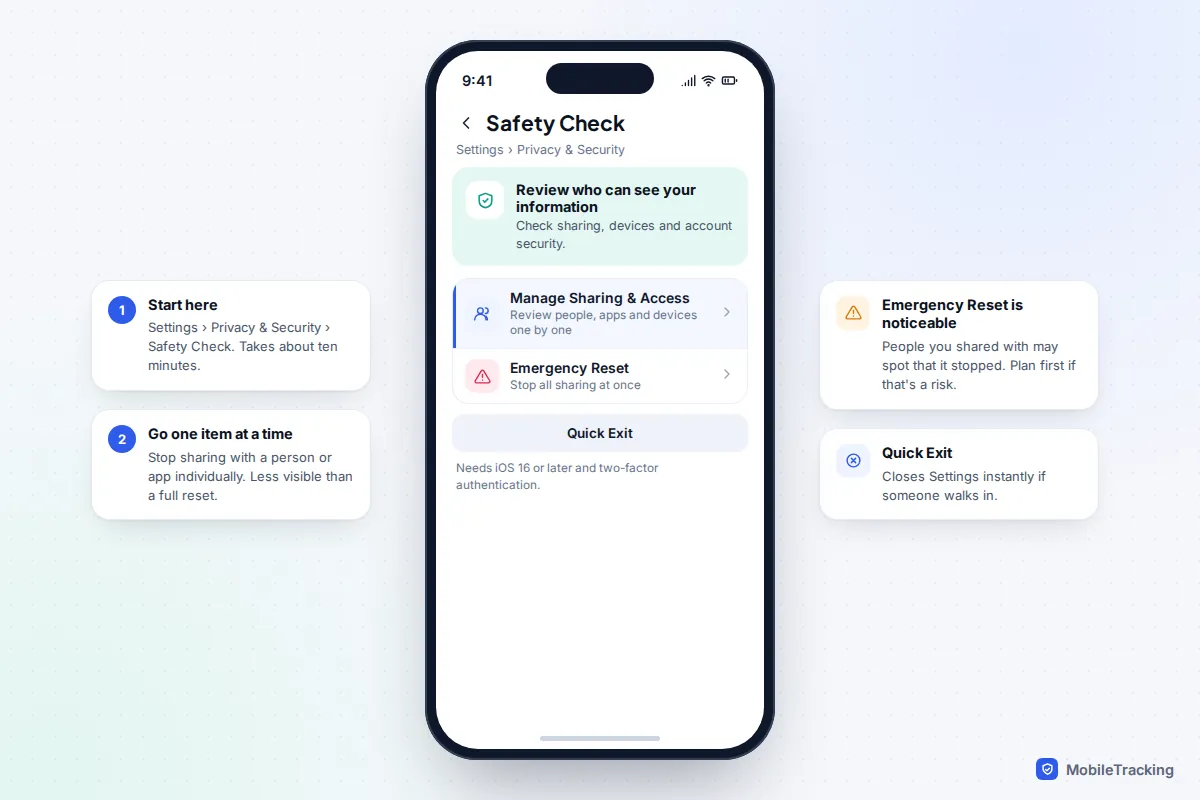
1. Run Safety Check
Go to Settings, Privacy & Security, Safety Check. It needs iOS 16 or later and an Apple Account with two-factor authentication. Choose Manage Sharing & Access to review, one by one, who you share location, photos and notes with, which apps can use your location, camera and microphone, and which devices are signed in to your account. Emergency Reset stops all sharing at once, which is quick but more noticeable to the other person. The Quick Exit button closes Settings instantly if someone walks in.
2. Look for profiles and device management
Go to Settings, General, VPN & Device Management. On a personal iPhone this is usually empty or shows only a VPN you installed. A configuration profile you don’t recognise can control settings and, as Apple warns, may allow access to data or location. If the phone is supervised by an organisation, a message saying so appears at the top of Settings. On a work or school phone that is expected; on a personal phone it is a red flag.
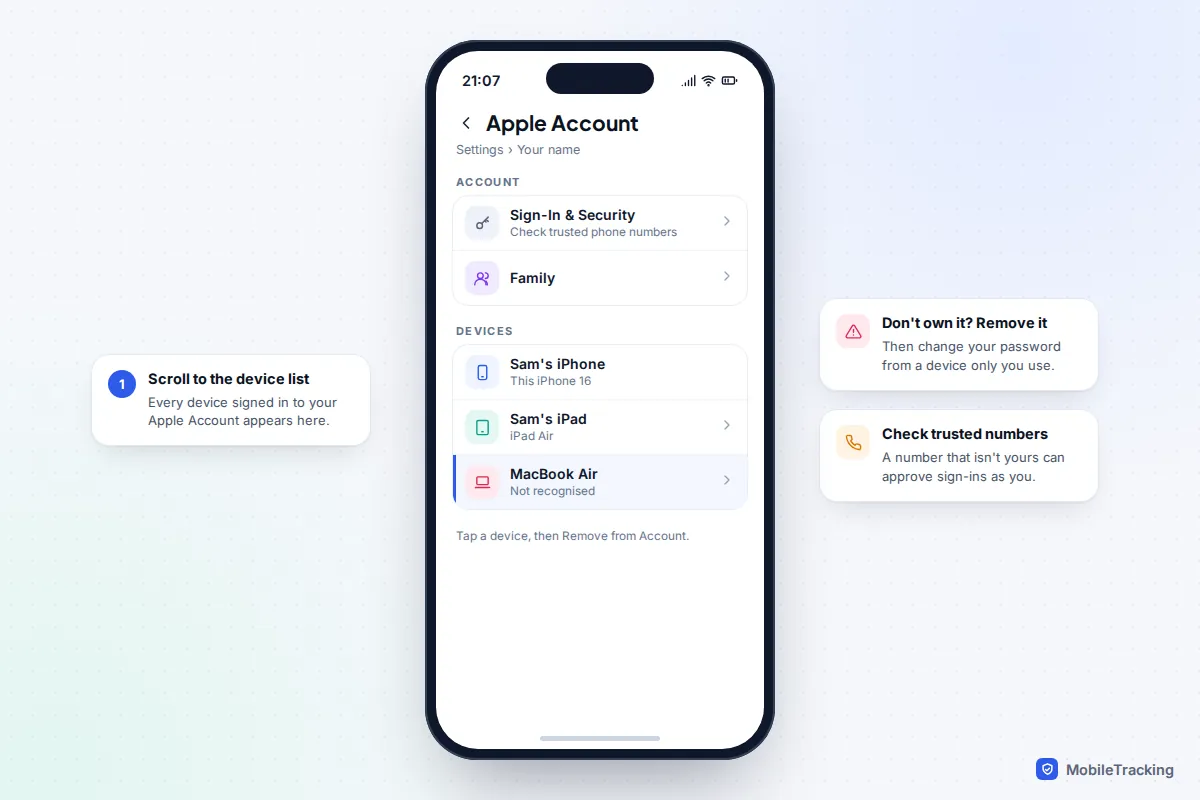
3. Check devices and sign-in details on your Apple Account
Go to Settings and tap your name, then scroll to the list of devices. Every iPhone, iPad, Mac and browser signed in to your account is there; tap one you don’t own and choose Remove from Account. Then open Sign-In & Security and check the trusted phone numbers used for two-factor codes. A number that isn’t yours means someone can approve sign-ins as you.
Finally, ask yourself whether anyone else knows your Apple Account password, or has had your unlocked phone when a code arrived. If they have, change the password from a device only you use. Our guide to spotting someone else in your iCloud covers the web-side checks.
How to check an Android phone
Android allows apps from outside the Play Store, so stalkerware is more common on Android and usually needs someone to have held your unlocked phone for a few minutes. To do its job it has to ask for powerful permissions, and that is where you can find it. Menu names differ between Pixel and Samsung; if a path doesn’t match, use the search bar at the top of Settings.
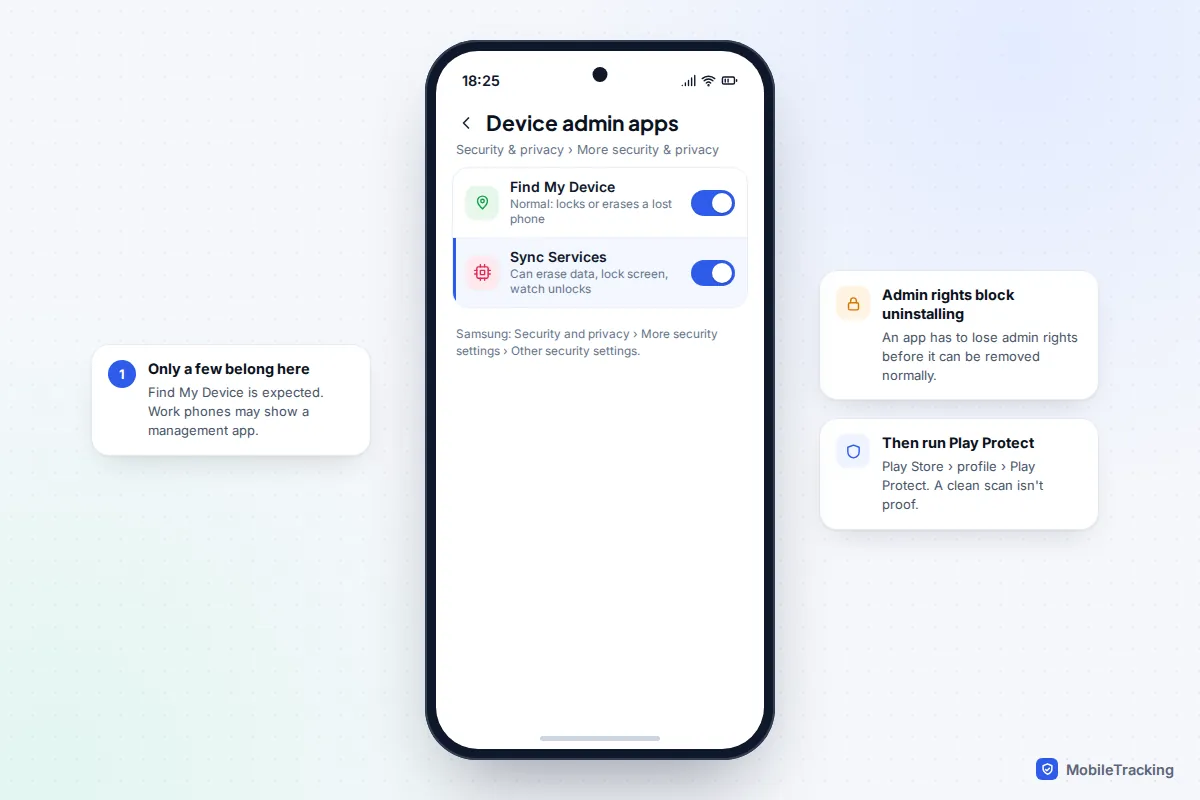
- Device admin apps. Pixel: Settings, Security & privacy, More security & privacy, Device admin apps. Samsung: Settings, Security and privacy, More security settings, Other security settings, Device admin apps. Find My Device is normal here. Most personal phones have little else.
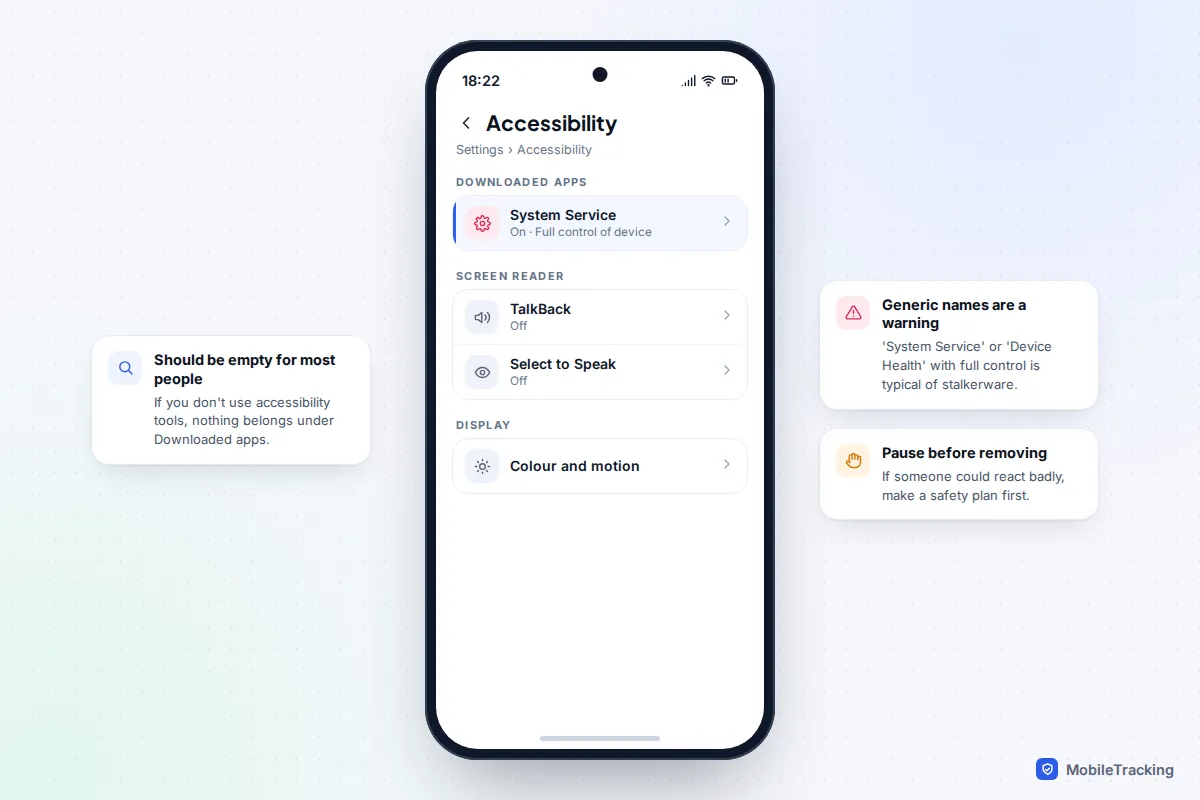
- Accessibility services. Settings, Accessibility, then Downloaded apps (Pixel) or Installed apps (Samsung). If you don’t use accessibility tools, this list should be empty. Stalkerware often hides behind names like “System Service” or “Device Health”.
- Notification access. Search Settings for “notification access”. Pixel calls it Device & app notifications; Samsung calls it Notification read, reply and control. An app here can read every message preview you receive.
- Install unknown apps. Pixel: Settings, Apps, Special app access, Install unknown apps. Samsung: Security and privacy, More security settings, Install unknown apps. Check which apps are allowed to install other apps. A file manager or browser you didn’t enable is a sign someone installed something by hand.
- The full app list. Settings, Apps, See all apps. This includes apps with no home-screen icon. Look up anything unfamiliar before you touch it.
Then open the Play Store, tap your profile picture, choose Play Protect and run a scan. Treat a clean result as reassuring but not proof: in an August to September 2025 test by AV-Comparatives and the Electronic Frontier Foundation, Play Protect detected 9 of 17 common stalkerware apps. If you are unsure, a reputable security app that detects stalkerware gives a second opinion. Our guide to detecting stalkerware on Android goes deeper, with examples of what each app looks like.
Account snooping is more common than spyware
Researchers at Cornell Tech who studied abuse involving technology found that most attacks were “technologically unsophisticated”: abusers who knew or guessed passwords, owned the phone contract, or used ordinary apps such as family locators. In their clinic for survivors, they found potential spyware, compromised accounts or risky settings for 23 of 44 people they advised. So check the accounts as carefully as the phone.
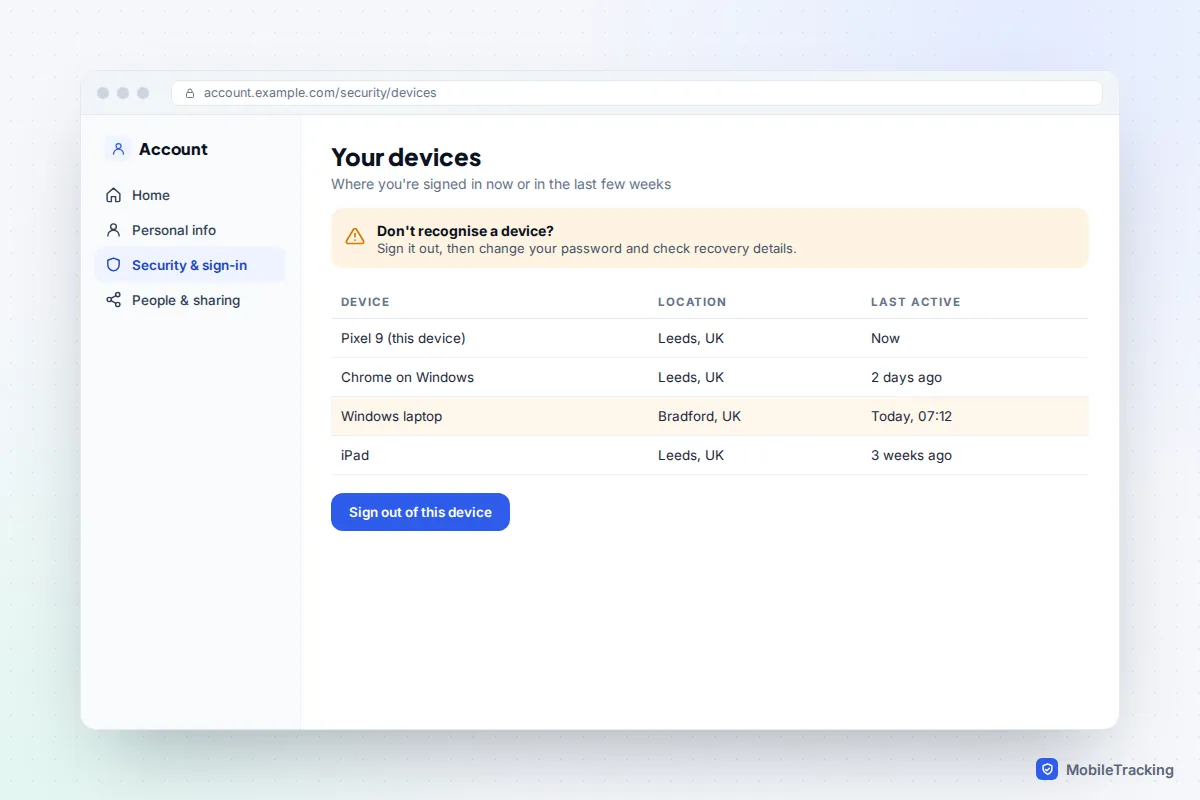
- Google Account. On any device, go to myaccount.google.com, choose Security & sign-in, then Manage all devices under Your devices. Sign out anything you don’t recognise. Check the recovery phone and email too.
- Email forwarding. In Gmail on a computer, open Settings, See all settings, and check Forwarding and POP/IMAP and the Filters tab. A forwarding rule quietly copies every email to someone else. Other email services have similar settings.
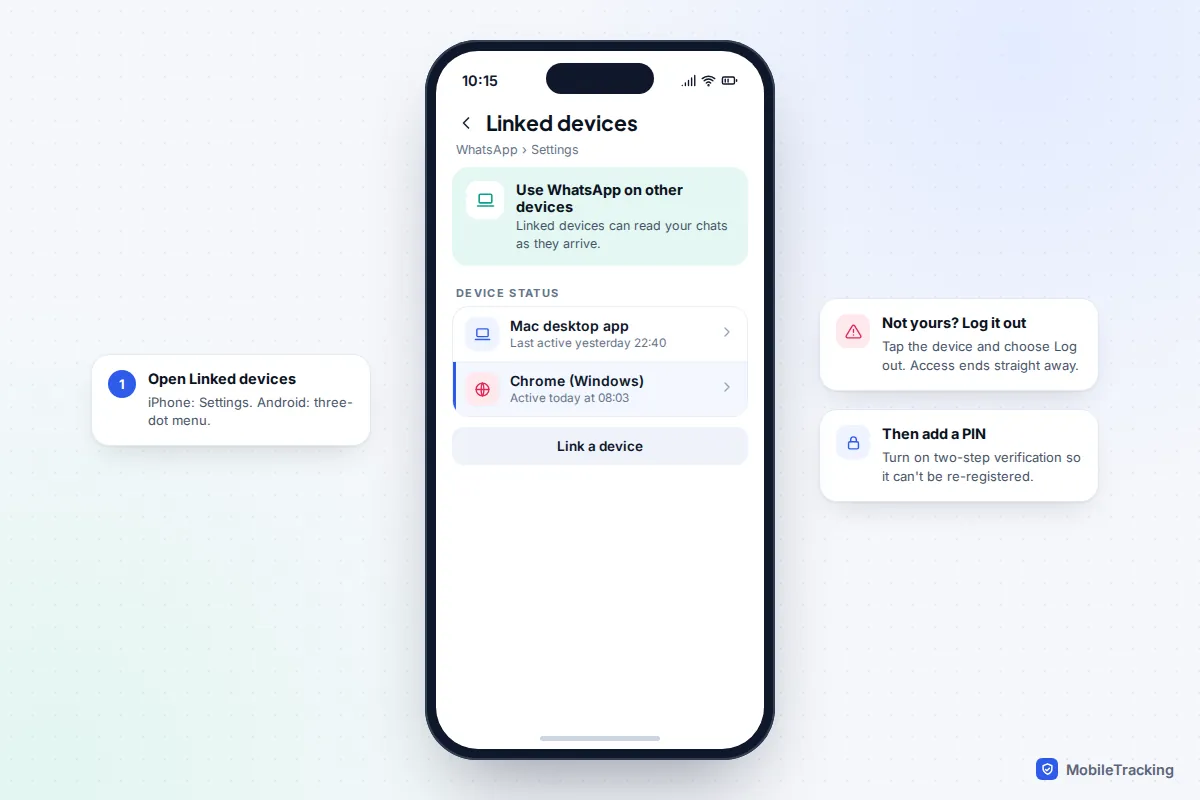
- WhatsApp linked devices. In WhatsApp, open Settings (iPhone) or the three-dot menu (Android) and tap Linked devices. A computer you don’t own here can read your chats in real time. See our guide to securing WhatsApp from snooping.
- Location sharing. Check Find My, the People tab, and Google Maps, your profile picture, Location sharing. These are built-in features, easy to switch on with your phone in hand.
- Call diversion. Dial *#21# to see whether calls are forwarded elsewhere, and check who controls your phone contract. The account holder can often see call and text logs on the bill.
Work and school phones: monitoring you agreed to
If your employer or school gave you the phone, or you enrolled your own phone in its system, it is probably managed, and that is legitimate. On iPhone you will see a profile in VPN & Device Management and often a supervision message at the top of Settings. On Android you may see a Work profile with its own tab of apps, or a note that your organisation manages the device.
Device management typically lets an organisation install and remove apps, enforce a passcode, see the device model and installed apps, and wipe work data or the whole device. On a phone the organisation owns, it may also see location or web traffic. It does not normally give access to personal messages on your own phone, though what is possible depends on how the device is set up. Ask for the device policy, and keep personal life on a personal phone. Don’t delete a work profile to “fix” monitoring; Apple advises checking with the administrator before removing any profile.
If you think someone is watching you: safety first
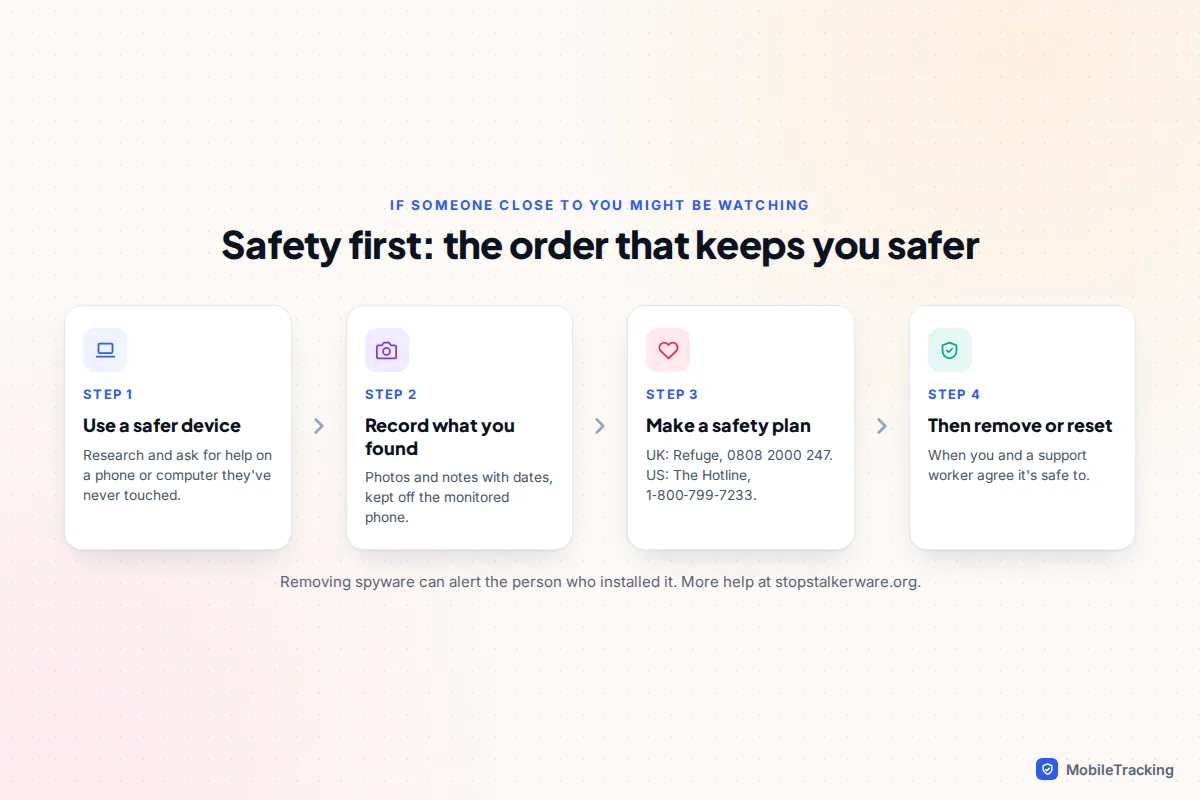
Stalkerware is almost always installed by someone close to you, and it is often part of controlling behaviour. That changes what “fixing it” means. The Coalition Against Stalkerware warns that removing monitoring software or making big changes may be noticed by the abuser and could make things worse. Removing it also deletes evidence you might need for the police.
- Use a safer device for research and support: a friend’s phone, a library or work computer, anything the person has never touched.
- Write down or photograph what you found, using another device, with dates.
- Contact a specialist service to make a safety plan before you remove anything. In the UK, the National Domestic Abuse Helpline run by Refuge is free on 0808 2000 247, 24 hours a day. In the US, The Hotline is on 1-800-799-7233.
- The Coalition Against Stalkerware keeps an up-to-date list of services and guidance at stopstalkerware.org.
Some people keep the monitored phone as a decoy for ordinary use while arranging a new, private one. A support worker can help you decide what is safest. Our guide to protecting your phone in an abusive situation covers that in more detail.
When to factory reset, and how to do it safely
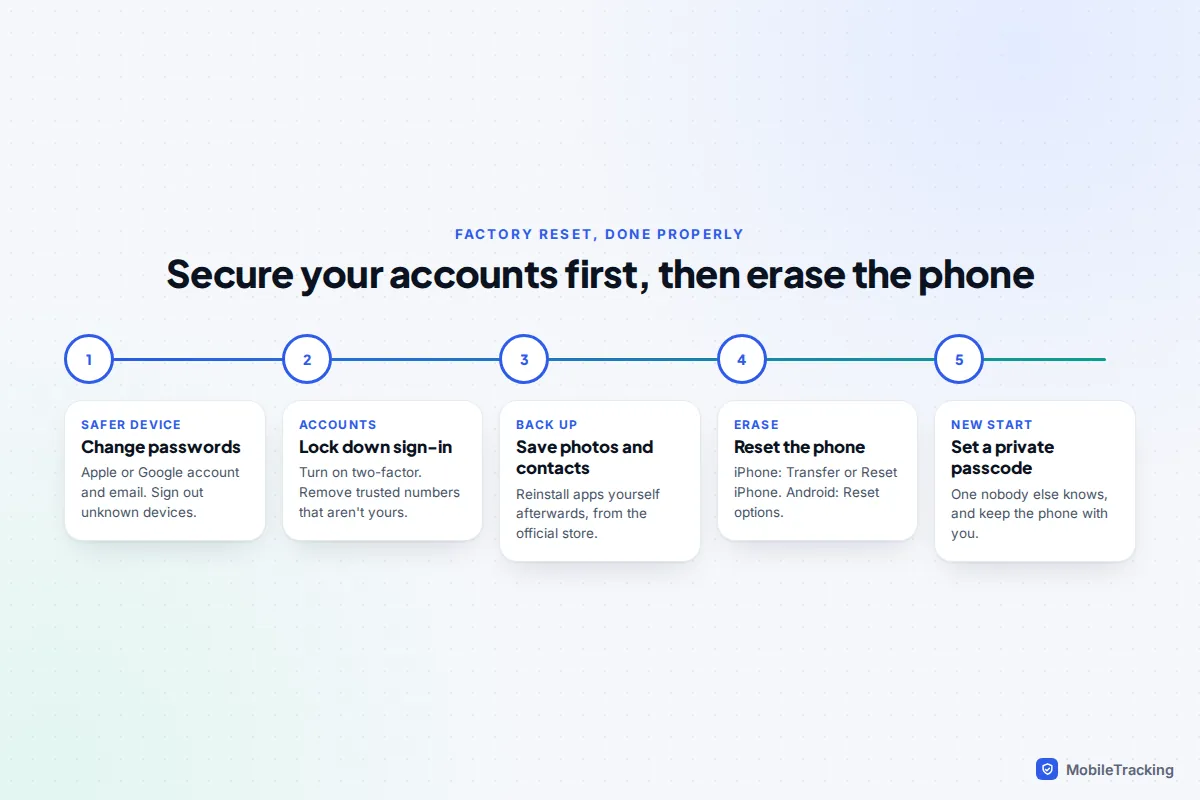
A factory reset removes apps installed on the phone, including stalkerware and unknown profiles. It is the right move when you found an app with admin, accessibility or notification access you can’t explain, when you can’t tell what something is, or when the phone was out of your hands for a long time with the passcode known. It does nothing about account access, so the order matters.
- From a safer device, change the passwords for your Apple Account or Google Account and your email, and sign out every device you don’t own.
- Turn on two-factor authentication, and remove any trusted phone number that isn’t yours.
- Back up photos and contacts to the cloud. Afterwards, reinstall apps yourself from the official store rather than restoring everything automatically.
- Reset: on iPhone, Settings, General, Transfer or Reset iPhone, Erase All Content and Settings. On a Pixel, Settings, System, Reset options, Erase all data. On a Samsung, Settings, General management, Reset, Factory data reset.
- Set a new passcode that nobody else knows, and don’t hand the phone over unlocked.
Skip the reset if the checks came back clean and nobody has had your unlocked phone. Changing passwords and removing unknown devices fixes most real cases without it.
Frequently asked questions
Can someone monitor my phone without ever touching it?
Through your accounts, yes: anyone with your Apple Account or Google password, plus a way to get past two-factor codes, can see synced data from their own device. Installing spyware on a modern phone remotely without a click from you needs expensive exploits used against journalists and activists, not the apps sold to jealous partners.
Will a factory reset remove spyware?
It removes apps and profiles installed on the phone. It does not change your account passwords or remove other devices from your accounts, which is why you secure those first.
Can my employer read my personal messages?
On your own phone with a work profile, generally not; management covers the work side. On a phone the company owns, it may see more, including web traffic. Read the device policy and keep personal chats off work devices.
Do antivirus apps find stalkerware?
Some do well. In the 2025 AV-Comparatives and EFF test, several security apps caught most or all samples, while Play Protect caught just over half. No scanner is perfect, so the manual checks above are still worth doing.
Is it legal for someone to put spyware on my phone?
Installing monitoring software on another adult’s phone without their consent is generally an offence in the UK and US, under computer misuse, interception and stalking laws. If it has happened to you, a support service or the police can explain your options.
This guide is general information, not legal or financial advice. Read our editorial policy.