
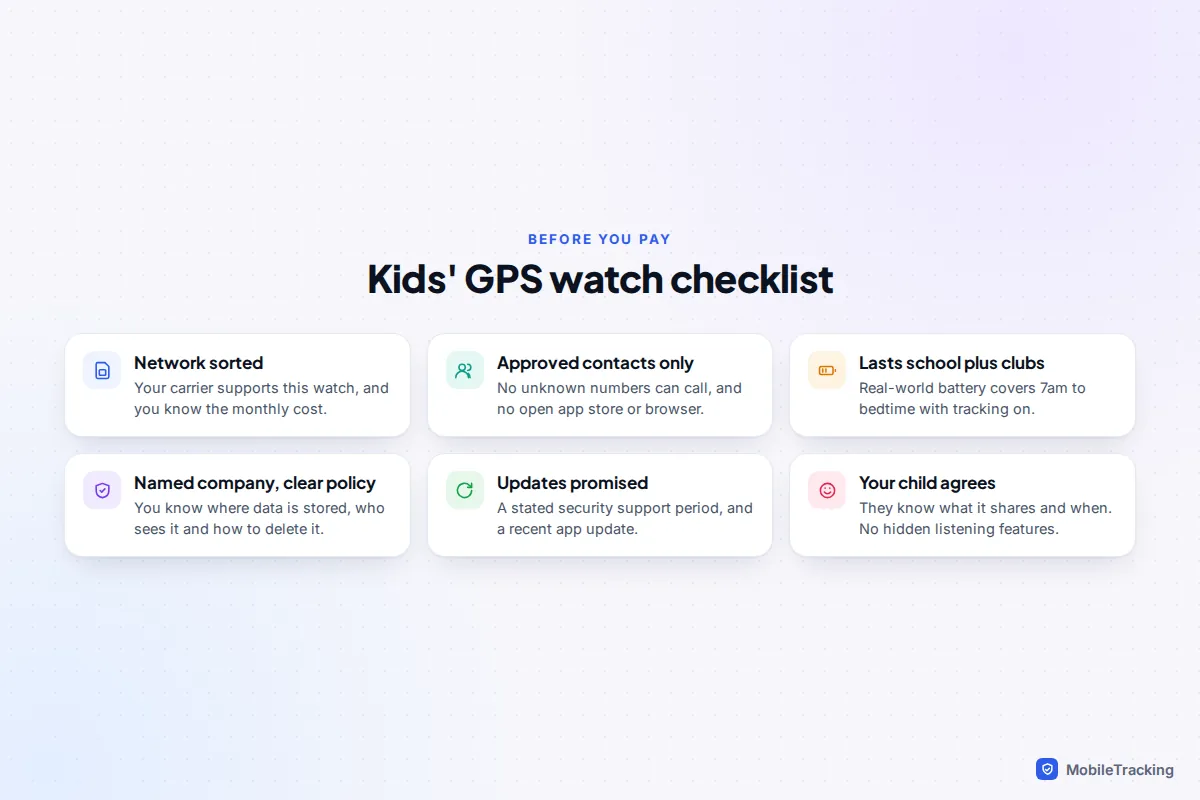
The right kids’ GPS watch is one with its own mobile connection, calls and messages limited to contacts you approve, a battery that lasts from breakfast to bedtime, and a companion app from a company you would trust with your child’s location. If your family uses iPhones, an Apple Watch with cellular set up through Apple Watch For Your Kids is the most polished option. Samsung families in the US can use a Galaxy Watch LTE with Google Family Link. Everyone else should look at an established kids’ brand with a clear plan and privacy policy, and avoid unbranded bargain watches.
Budget for two costs, not one: the watch itself and a monthly plan, which for the dedicated brands we checked sits at around £8 to £10 or $10 a month. The checklist at the end covers everything to confirm before you pay.
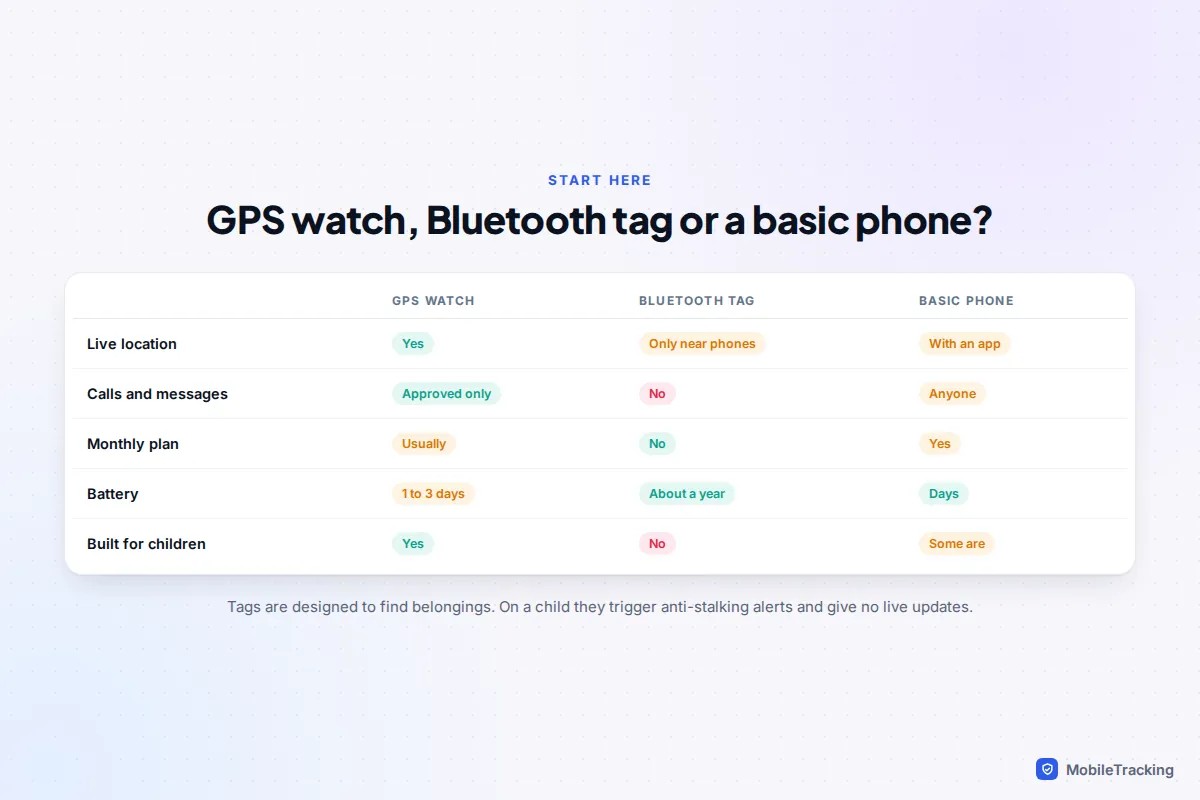
First decide: watch, tag or basic phone?
Before comparing models, check that a watch is the right tool at all.
| If your main need is… | Best fit | Why |
|---|---|---|
| Knowing a 6 to 10 year old got to school or a friend’s house, and letting them call you | GPS watch | Live location, approved contacts only, nothing to browse |
| Finding a lost school bag, bike or scooter | Bluetooth tag | Cheap, long battery, designed for belongings |
| A child who travels alone by bus or train and needs to text anyone, including the school office | Basic phone or first smartphone | Proper keyboard, calls anyone, longer battery than most watches |
| A teenager who already has a phone | Location sharing on that phone | A watch adds cost without adding much |
Bluetooth tags such as AirTag deserve a special warning. Apple has said AirTag is designed to find belongings, not people. A tag has no GPS or mobile connection of its own: it only reports a location when someone’s phone passes close enough to relay it, so you get patchy, delayed updates. Anti-stalking protections also make phones travelling near an unfamiliar tag show “unknown tracker” alerts, which is alarming for everyone when the tag is in a child’s pocket.
A basic phone is the underrated option. Many cost less than a GPS watch and run for days on a cheap pay-as-you-go SIM. If you are weighing a watch against a first phone, our guide to what age a child should get a first phone covers the readiness signs.
SIM, eSIM and what the plan really costs
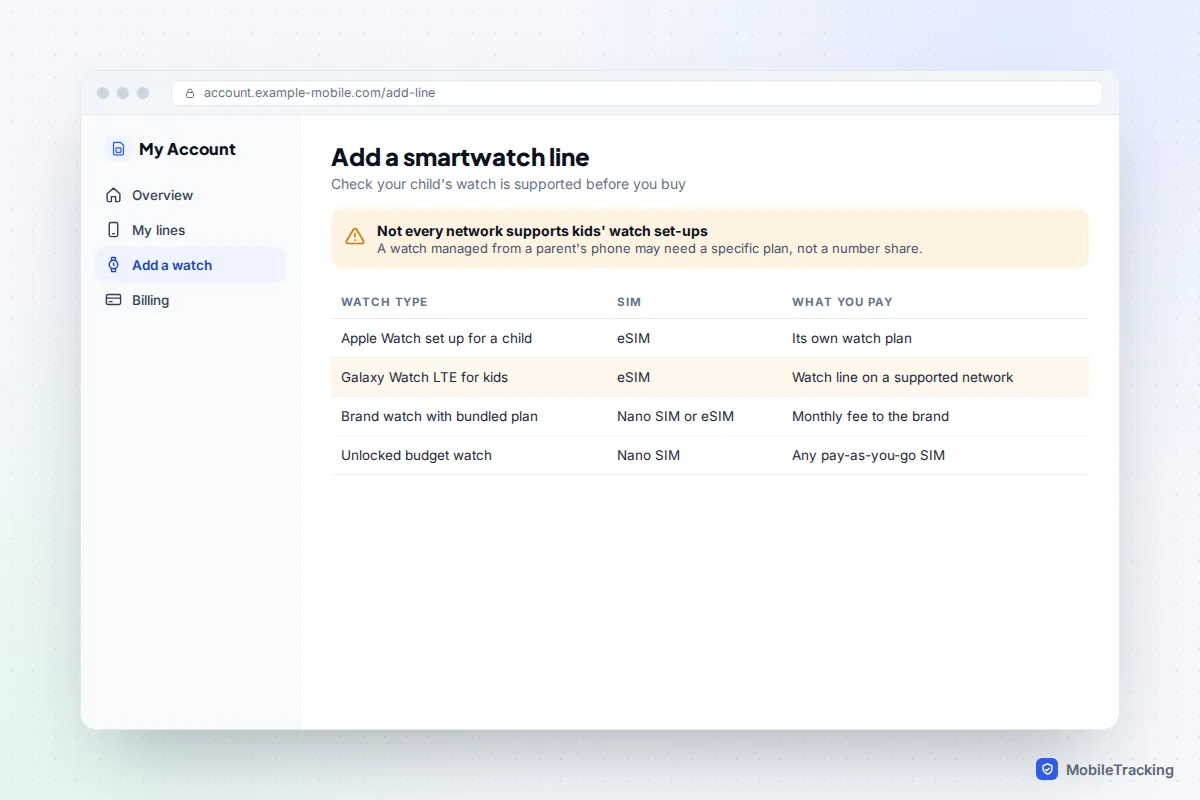
A kids’ GPS watch needs a mobile connection to send its location and make calls, so the plan is where most buying mistakes happen. Watches connect in one of three ways, and they are not interchangeable.
1. A plan bundled by the watch brand
Dedicated brands usually sell their own plan, which is the simplest route. Garmin charges $9.99 a month in the US for the Bounce 2, and £9.99 a month or £99 a year in the UK. Xplora’s UK plan for the X6Play is £7.99 a month on a 12-month minimum term, with a nano SIM included. Google’s Fitbit Ace LTE uses its own Ace Pass plan at $9.99 a month or $119 a year, with no separate carrier contract, but it only works in the US (excluding Alaska and US territories).
2. An eSIM on your own network
Apple and Samsung watches use an eSIM added to your mobile account, and only some networks support a child’s watch that is managed from a parent’s phone. In the UK, Apple lists EE and BetterRoaming as supporting Apple Watch For Your Kids, even though Three, O2 and Vodafone support Apple Watch cellular in general. Samsung’s kids’ set-up launched with Verizon, AT&T and T-Mobile in the US. A “number share” add-on that mirrors your own phone number is not the same thing and will not work for a child’s watch.
3. An unlocked watch with any SIM
Cheap unbranded watches take a nano SIM from any network. That looks flexible, but these watches often depend on generic apps with poor security records, covered below. Also check the watch supports 4G (LTE): 3G has been switched off in the UK and the US, 2G is being phased out, and an old-stock 2G or 3G watch may connect poorly or not at all.
The features that actually keep a child safe
Four features matter far more than the rest, and each has a detail worth checking.
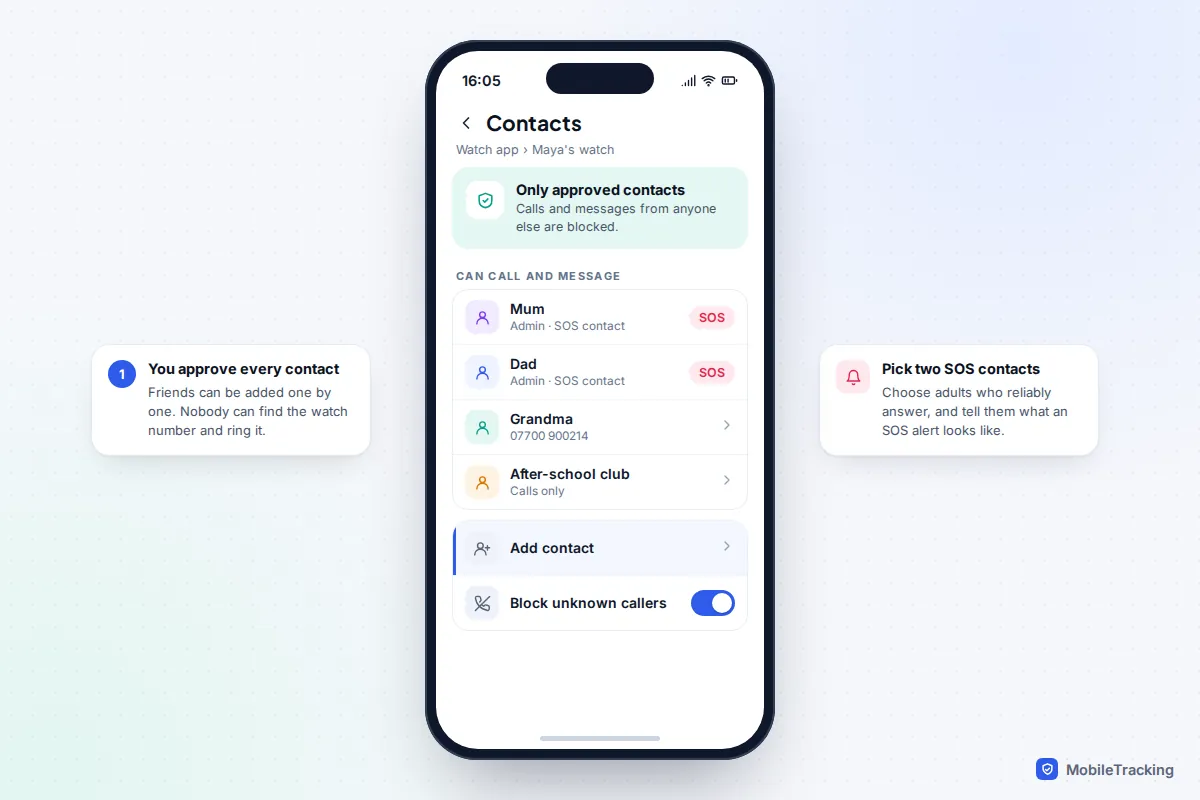
Calls and messages with approved contacts only
The watch should only accept calls and messages from people you add in the parent app. Look for a setting that blocks unknown numbers entirely rather than just sending them to voicemail. Also check the fine print: Samsung notes that its contact limits apply to Google Messages, Phone by Google and Samsung Phone, not to any other communication app installed on the watch, so approve apps carefully too.
Safe zones (geofences)
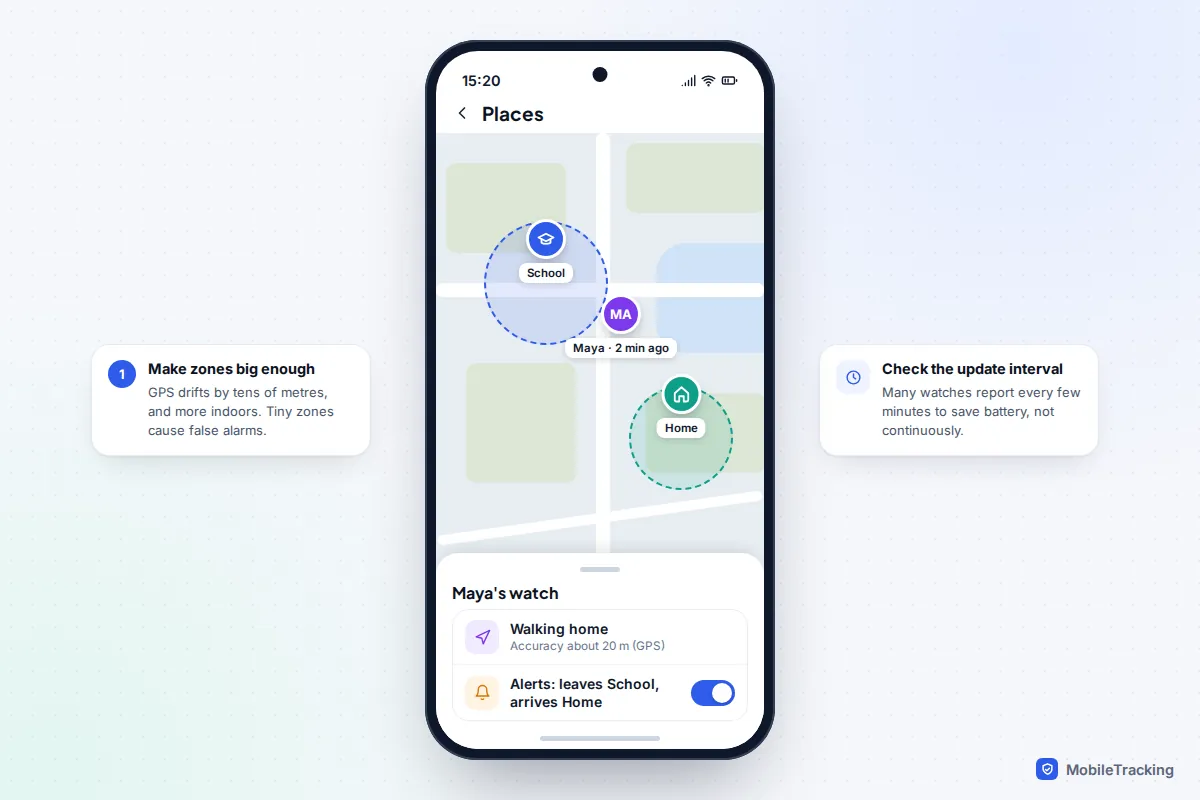
Safe zones send you an alert when the watch enters or leaves places you draw on a map, such as school or home. They are only as good as the location underneath. GPS is accurate to a few metres outdoors, but indoors a watch often falls back on Wi-Fi or mobile masts and can be tens or hundreds of metres out. Many watches also report location every few minutes rather than continuously to save battery. Our guide to setting safe zones on a kids’ GPS watch covers sizing zones so they don’t cry wolf.
An SOS button that works in every mode
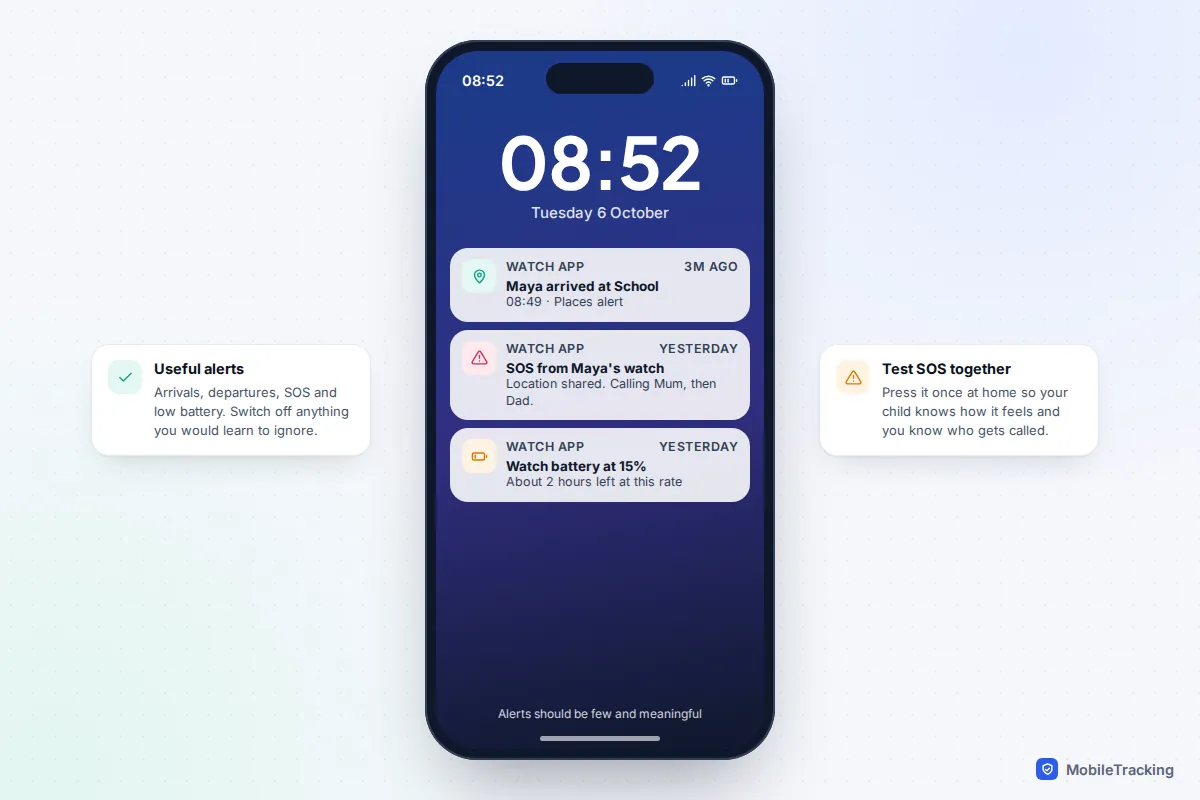
SOS usually means holding a button for a few seconds, which alerts your chosen contacts and shares the watch’s location. Xplora, for example, alerts two admin contacts after a five-second press. Check two things: that SOS still works in school mode, and what happens if nobody answers. Apple notes that Emergency SOS needs a mobile, Wi-Fi calling or satellite connection, which is true of every watch: no signal, no alert.
School mode
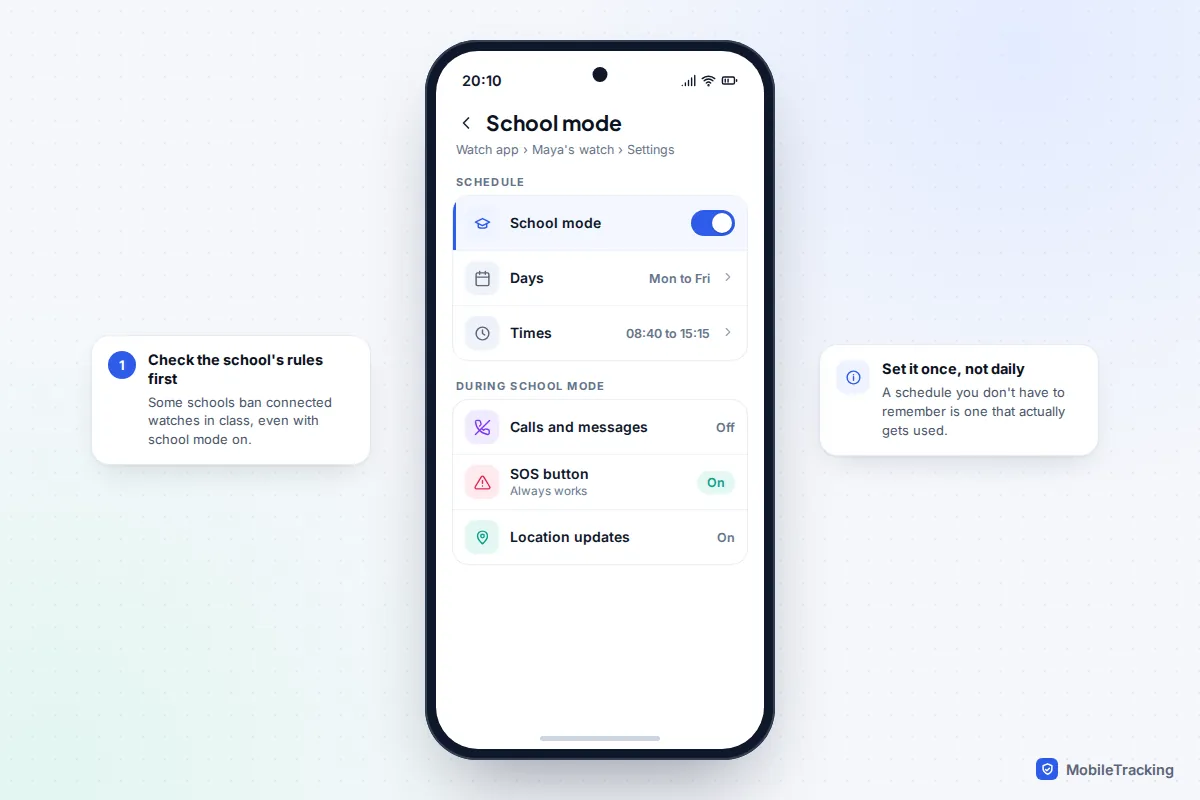
School mode (Apple calls it Schooltime) turns the watch into a plain clock during lessons. Set it on a schedule rather than switching it by hand, and check your school’s own policy, because some ban connected watches in class whatever mode they are in.
Battery life and durability: the realities
Battery claims assume light use. Frequent location updates and calls drain a small battery fast, and a watch that dies at 4pm fails exactly when you need it. A useful test is whether the watch will last from about 7am to bedtime with tracking on.
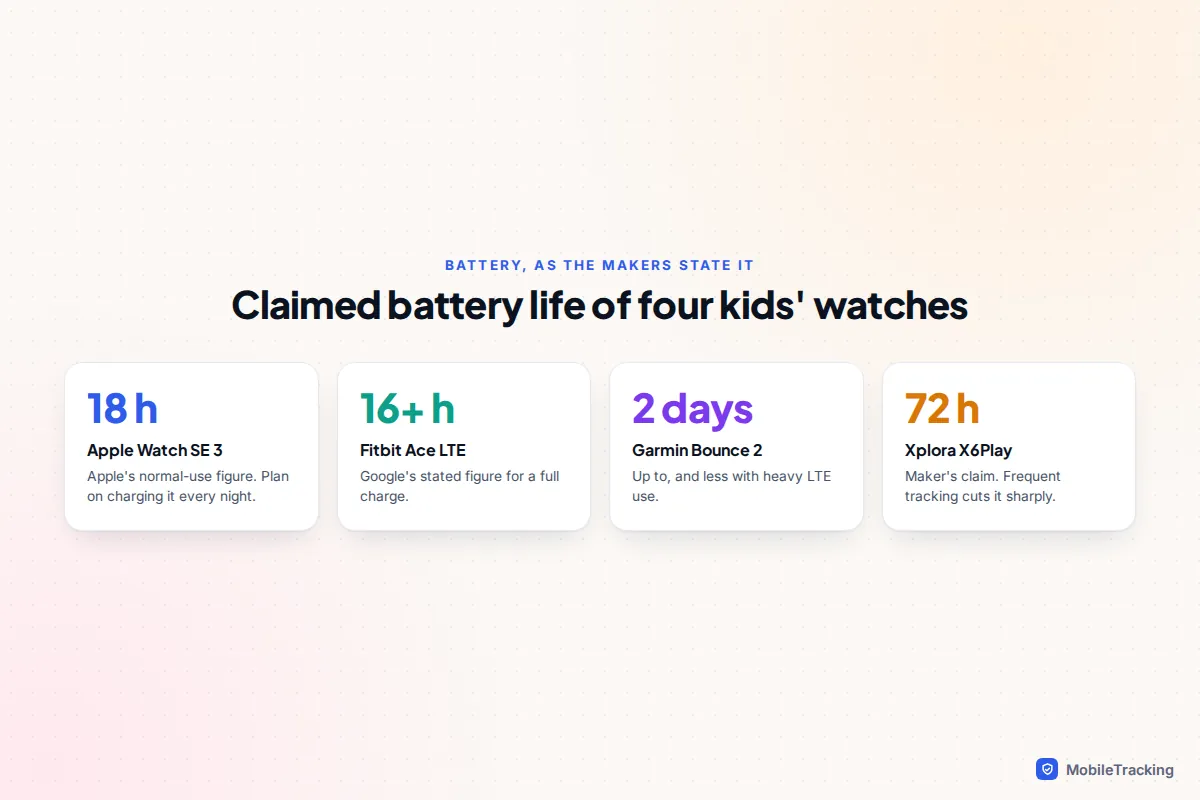
Apple quotes up to 18 hours for the Apple Watch SE 3, and Google says the Fitbit Ace LTE is designed for 16 hours or more, so both are nightly-charge devices. Garmin quotes up to two days for the Bounce 2 but warns that LTE use cuts it significantly, and one reviewer’s 12-year-old found it ran down faster than expected. Make charging part of the bedtime routine from day one.
For durability, look for a stated rating. The Fitbit Ace LTE is water resistant to 50 metres, the Garmin Bounce 2 is rated 5 ATM, and the Xplora X6Play is rated IP68. That covers hand-washing, rain and, for 5 ATM watches, swimming, but Apple’s reminder applies to all of them: water resistance is not permanent and can diminish over time, especially after knocks.
The companion app and your child’s data
A GPS watch sends your child’s location to a company’s servers many times a day. If those systems are weak, strangers may see where your child is, or worse. This has happened repeatedly.
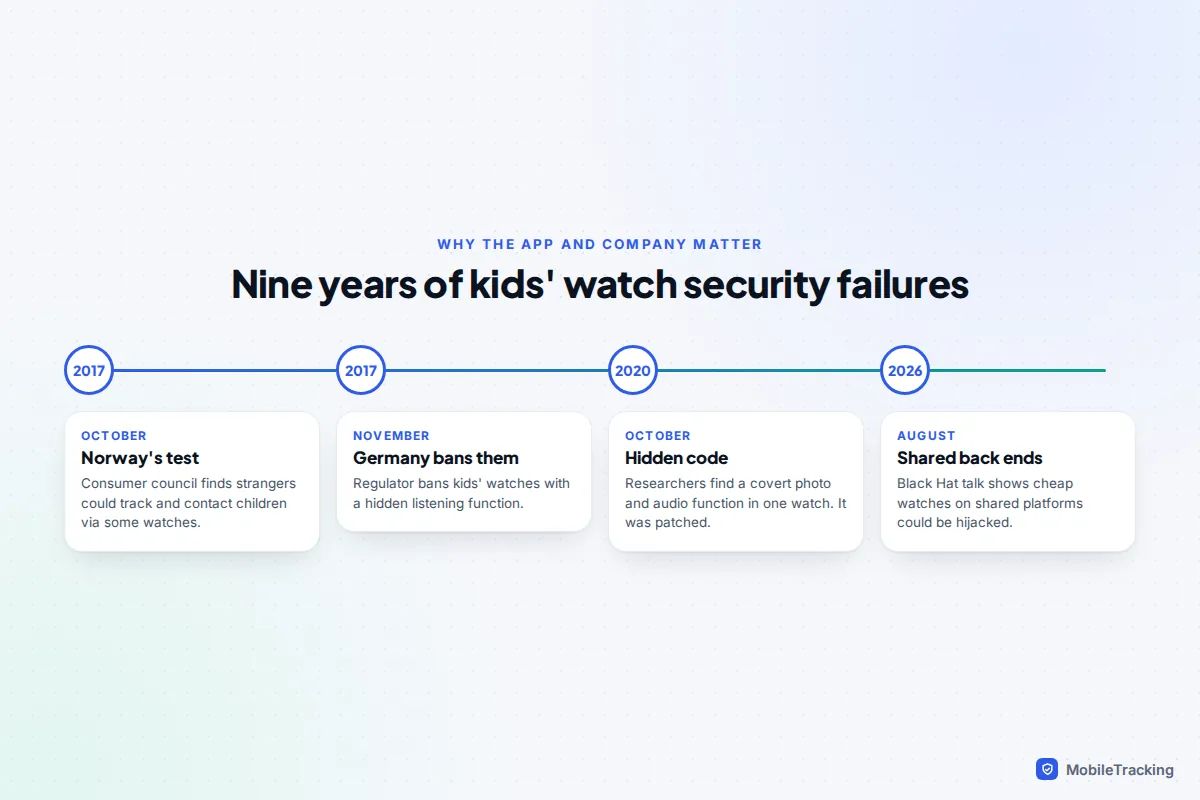
- October 2017: the Norwegian Consumer Council tested four children’s watches and found that strangers could take control of some of them to track children and contact them. SOS and safe-zone alerts were unreliable, and on some it was not possible to delete data or accounts.
- November 2017: Germany’s telecoms regulator, the Bundesnetzagentur, banned the sale of children’s watches with a listening function that let an app make the watch silently call a number. It told parents who owned one to destroy it.
- October 2020: security researchers found undocumented code in one well-known brand’s watch that could take photos and record audio when sent a special encrypted text. The company said it was unused prototype code and issued a patch.
- August 2026: researchers at the Black Hat security conference showed that watches sold under many brand names but sharing a handful of back-end platforms, including the SeTracker app, could be hijacked to locate the wearer, alter emergency contacts and switch on the microphone. The watch they demonstrated cost under $30.
The lesson is not “never buy a watch”. It is to buy from a company with a name, an address and something to lose. Before paying, look for answers to these questions in the privacy policy or support pages:
- Where is location data stored, and for how long? Google, for example, says Fitbit Ace LTE location data is shown only to parents and deleted automatically after a short time.
- Who can see the location: only adults you invite, or support staff too?
- Can you delete the account and all data yourself?
- Does the parent account support two-step verification?
- How long will the watch get security updates?
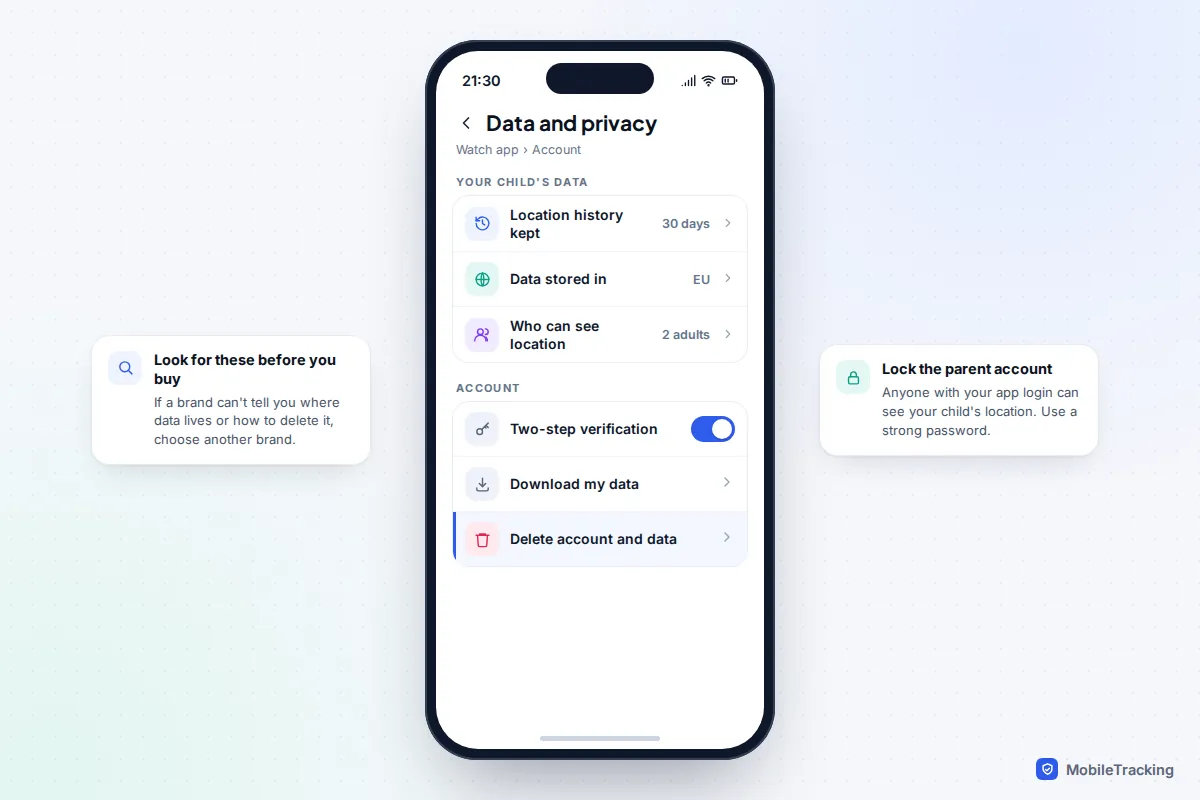
In the UK, the PSTI regulations have required connected consumer products since 29 April 2024 to avoid universal default passwords, publish a way to report security flaws and state a minimum security update period. A watch sold without that information is a red flag. The NCSC’s advice on using smart devices safely also recommends checking the support end date before you buy.
The big-brand options at a glance
Here are the main platforms, using details the makers publish. Prices change often, so treat them as a guide.
| Option | Parent needs | Where | Key facts |
|---|---|---|---|
| Apple Watch For Your Kids | An iPhone to set up and manage it | Networks that support it (UK: EE, BetterRoaming) | Apple recommends SE 3 with GPS + Cellular; Series 4 and later with cellular also work. Schooltime, approved contacts, location in Find My. |
| Galaxy Watch for kids | A compatible Samsung phone, Google Family Link | US launch: Verizon, AT&T, T-Mobile | Galaxy Watch6, Watch7 or Watch8 LTE. School time and approved contacts in Google’s apps. |
| Fitbit Ace LTE | Fitbit Ace app on iPhone or Android | US only | Ages 7+. Built-in plan, no ads or third-party apps, water resistant to 50 m. |
| Garmin Bounce 2 | Garmin Jr. app | US and UK | Approved contacts, geofence alerts, 5 ATM, up to 2 days battery. |
| Xplora X6Play | Xplora app | UK and Europe | Nano SIM plan, school mode with SOS still active, IP68. |
Apple’s option is best if your family already uses iPhones, but note that Apple says one parent’s iPhone acts as the primary manager, and not all Apple Watch features are available on a watch set up this way. Full details are on Apple’s Apple Watch For Your Kids page. If your children use Android phones as they get older, a watch is also only part of the picture: our guide to location tracking and geofencing for families explains how phone-based options compare.
Which age, and how to introduce it
Kids’ watches are mostly aimed at primary-school ages. Google sets the Fitbit Ace LTE at 7 and up, and Samsung requires parental consent for children under 13. As a rough guide, a watch suits the years when a child starts walking to school or going to a friend’s house alone but isn’t ready for a smartphone. From about 11 or 12, many children find a watch babyish and are better served by a basic phone with location sharing they know about.
Whatever you choose, tell your child what the watch shares and when you will look. “So you can call me and I know you got there” lands far better than something that feels like surveillance. Trial it together for a weekend: test a call, walk out of a safe zone, press SOS at home and see how long the battery lasts.
Sam, aged 8, starts walking the ten minutes to school with a neighbour’s child. His parents add four contacts, set a school zone with a wide radius, schedule school mode from 8:40 to 3:15, and get one alert when he arrives. After two weeks they switch off the “left home” alert because it fired every morning without telling them anything new.
Frequently asked questions
Do kids’ GPS watches work without a SIM?
Not properly. Without a mobile connection the watch cannot send its location or make calls away from Wi-Fi. Some Apple and Samsung watches can do a little over Wi-Fi, but a child’s watch is only useful outdoors with its own plan.
Can I use an AirTag instead of a GPS watch?
It is not a good substitute. Apple designs AirTag for belongings, it only updates when a phone passes nearby, and it will trigger unknown-tracker alerts on phones travelling with it. It also cannot call you.
How accurate is the location on a kids’ watch?
Outdoors with a clear view of the sky, GPS is typically accurate to a few metres. Indoors or between tall buildings, watches fall back on Wi-Fi and mobile masts, and the position can be off by tens or hundreds of metres. Always check the accuracy circle before worrying.
What if the watch battery dies?
You will see its last reported location, and nothing after that. Build charging into the evening routine, turn on low-battery alerts and agree a backup plan, such as asking a teacher to call you.
This guide is general information, not legal or financial advice. Read our editorial policy.