
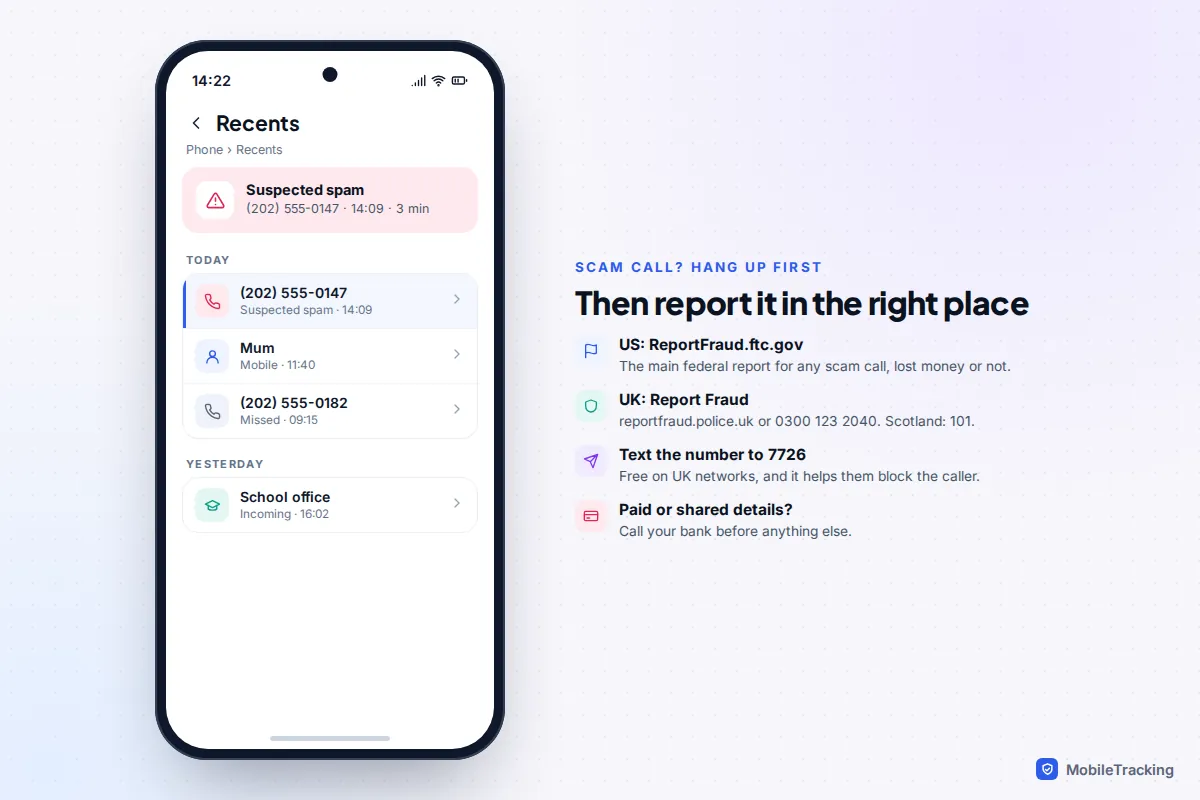
Hang up first. You never owe a caller the end of a conversation. Then report the call. In the US, report scam calls to the Federal Trade Commission at ReportFraud.ftc.gov. In England, Wales and Northern Ireland, report to Report Fraud (reportfraud.police.uk or 0300 123 2040), the police service that replaced Action Fraud in December 2025. In Scotland, call Police Scotland on 101. In the UK you can also text the caller’s number to 7726 for free, so your mobile network can investigate and block it.
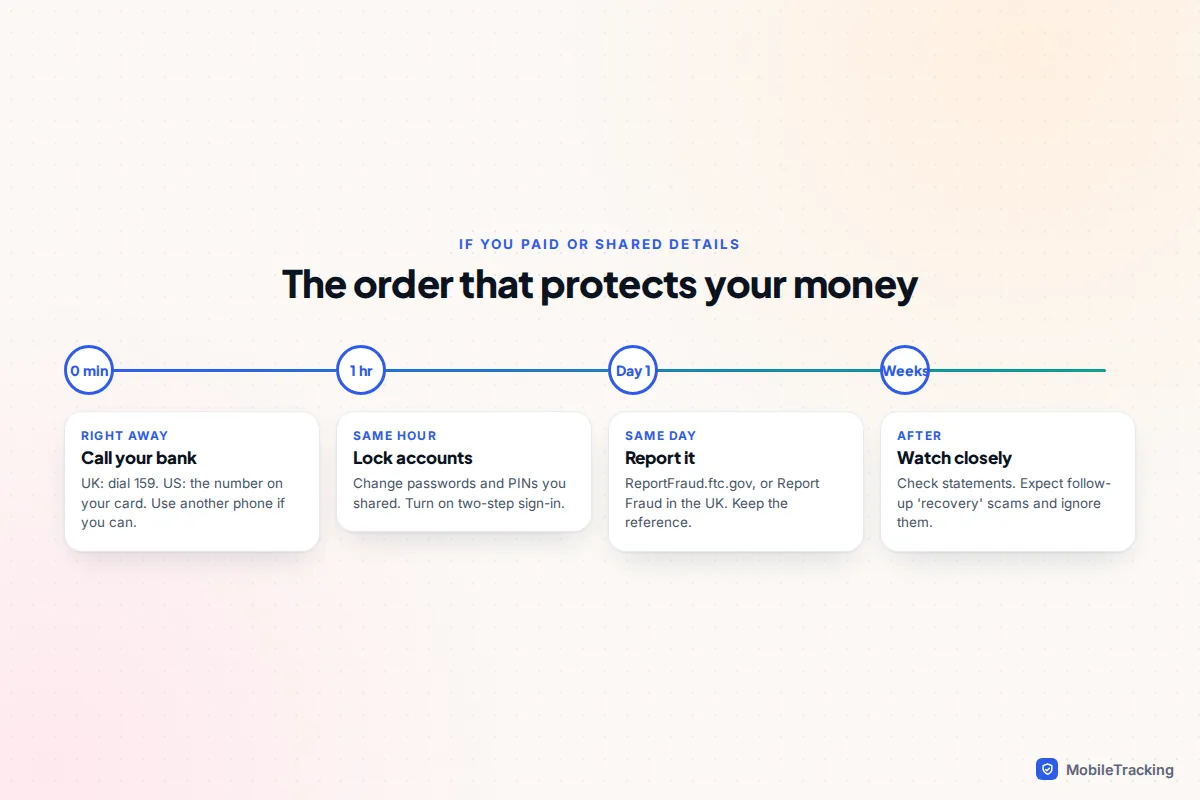
If you paid anything, or shared a card number, a password or a one-time code, the report can wait ten minutes. Call your bank first. In the UK, dial 159 to reach most major banks safely. In the US, use the number on the back of your card. This guide covers the right order, what to write down, where each kind of report goes, and how to flag the number on an iPhone, Pixel or Samsung phone.
What to note straight after the call
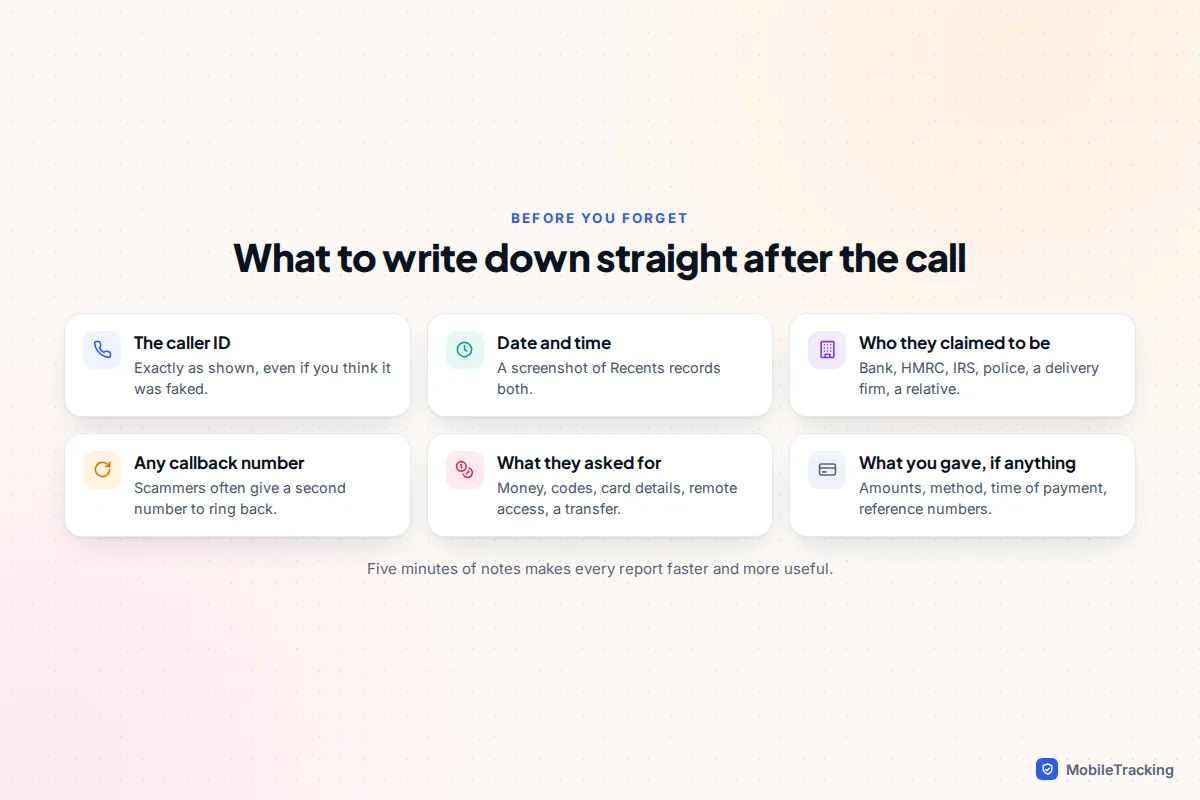
Scam calls blur quickly, especially the stressful ones. Before you do anything else, take a screenshot of your call list, then jot down the details below in your Notes app or on paper. Every reporting form asks for most of them.
- The number on your caller ID, exactly as shown. Report it even if you suspect it was faked.
- The date, time and length of the call.
- Who they said they were: your bank, HMRC, the IRS, the police, Amazon, a delivery company, a grandchild in trouble.
- Any callback number or website they gave you. These are often more useful to investigators than the caller ID.
- What they wanted: a payment, a code sent to your phone, remote access to your computer, a transfer to a “safe account”.
- What you gave them, if anything, including amounts, payment method and times.
Don’t call the number back to “check”. If it was spoofed you’ll reach an innocent person. If it wasn’t, you’re putting yourself back in touch with the scammer.
If you paid or shared details: call your bank first
Speed matters more than paperwork here. Banks can sometimes stop or recall a payment that hasn’t fully cleared, and they can freeze a card before it’s used again. A report to the FTC or police, useful as it is, won’t get money back.
- Ring your bank on a number you trust. In the UK, dial 159. It connects you to the fraud line of participating banks, including Barclays, HSBC, Lloyds, Halifax, Nationwide, NatWest, Santander, Monzo and Starling. In the US, use the number printed on your card or in your banking app.
- Use a different phone if you can. Some scammers stay on a landline after you hang up and play a fake dial tone, so a “bank” answers when you dial out. A mobile, or waiting a few minutes, avoids this.
- Change anything you shared. New passwords, new PINs, and turn on two-step sign-in for your email and bank. If you allowed remote access to a computer, disconnect it from the internet and have it checked.
- Contact the payment company if you paid another way: the gift card brand, the wire transfer service, the payment app or the crypto exchange. The FTC’s advice is to do this immediately and ask for the transaction to be reversed.
- Then file your report and keep the reference number. Your bank may ask for it.
UK readers have a real safety net. Since 7 October 2024, banks must reimburse victims of authorised push payment scams (where you were tricked into sending a bank transfer) up to £85,000, provided you report it within 13 months. Most refunds are due within five business days, though firms may deduct an excess of up to £100. US law gives stronger protection for card payments than for transfers, gift cards or crypto, which is exactly why scammers ask for those.
Where to report a scam call in the US
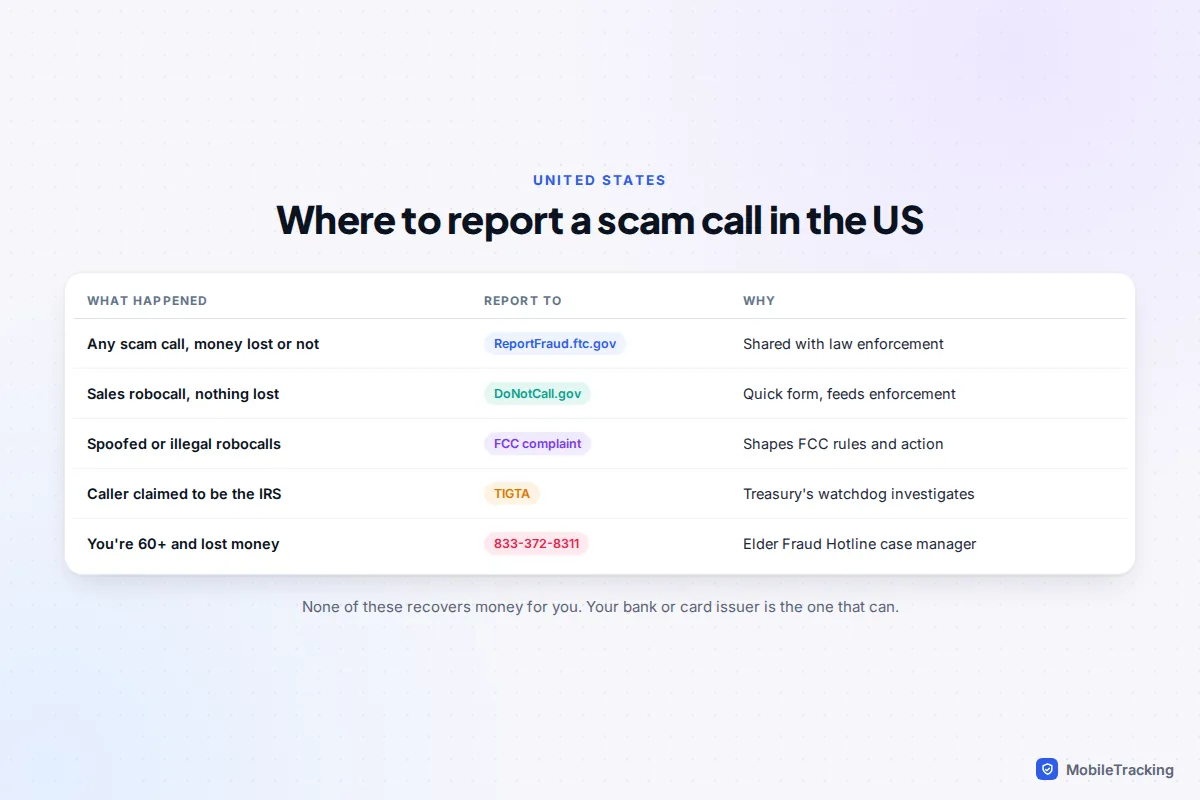
You don’t need to report everywhere. Pick the one that fits, and add a second only if it applies.
| What happened | Where to report | Notes |
|---|---|---|
| Any scam call, whether or not you lost money | ReportFraud.ftc.gov | Goes into a database used by law enforcement. You won’t usually get a personal reply. |
| An unwanted sales call or robocall, nothing lost | DoNotCall.gov | A shorter form. The FTC suggests this route when there’s no money involved and no scammer details. |
| Spoofed caller ID or illegal robocalls | FCC consumer complaint | The FCC doesn’t resolve individual complaints, but uses them for rules and enforcement. Phone: 1-888-225-5322. |
| Caller claimed to be the IRS | TIGTA (tigta.gov) or 800-366-4484 | Also email [email protected] with “IRS Phone Scam” in the subject line. |
| Victim is 60 or over | National Elder Fraud Hotline, 833-372-8311 | Weekdays 10am to 6pm Eastern. A case manager helps with reports and next steps. |
The National Do Not Call Registry is worth joining, but it only stops sales calls from companies that follow the law, and can take up to 31 days to work. Scammers ignore it, so a pushy sales call to a registered number is itself a red flag.
Your carrier also wants to hear about spam numbers. AT&T ActiveArmor, Verizon Call Filter and T-Mobile Scam Shield all let you report a number from their apps, which feeds the spam labels other customers see.
Where to report a scam call in the UK
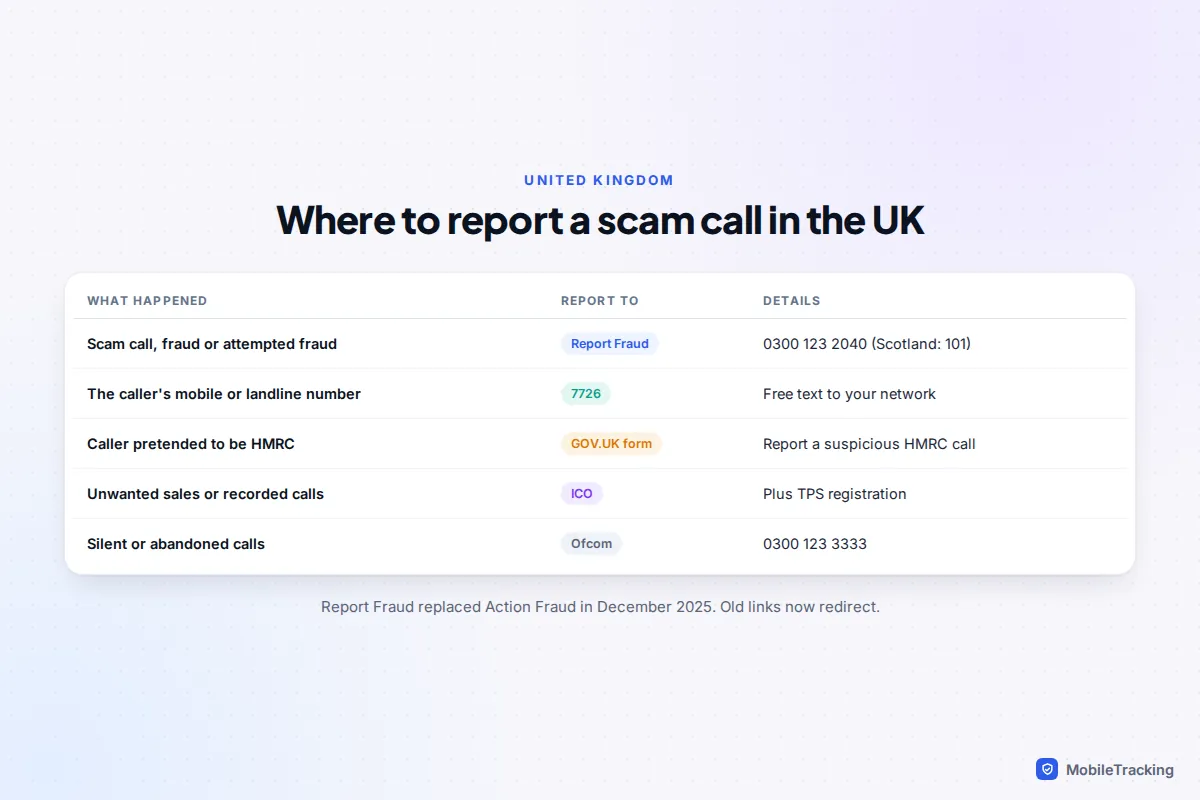
The UK’s national fraud reporting service is now called Report Fraud. It is run by the City of London Police and went live on 4 December 2025, replacing Action Fraud. Old Action Fraud links redirect to it. Report online at reportfraud.police.uk or call 0300 123 2040. If you live in Scotland, report to Police Scotland on 101 instead.
For the number itself, text it to 7726. The service is free, and it passes the number to your mobile network so it can investigate and block it. Ofcom’s instructions are simple: open your recent calls, copy or share the number, and send it in a text to 7726. Scam texts can be forwarded to 7726 in the same way.
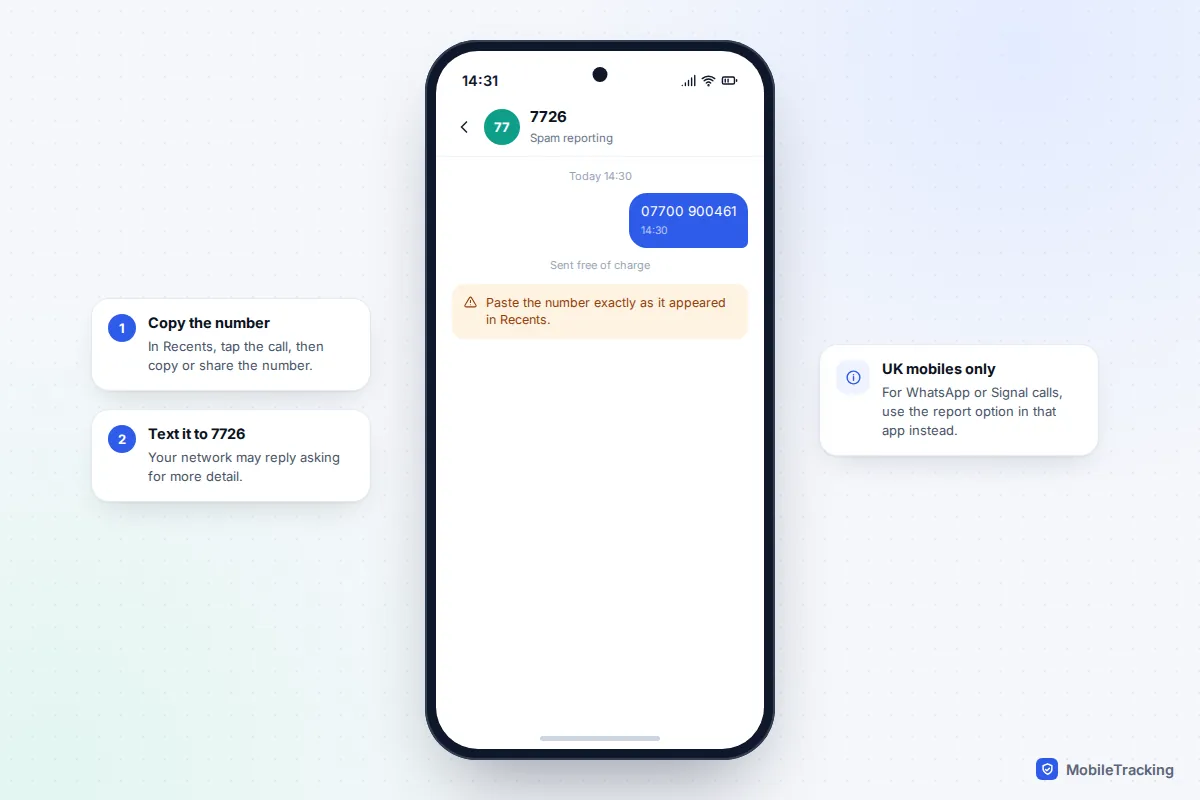
A few other UK bodies handle specific types of call:
- HMRC impersonation: use the “Report a suspicious HMRC phone call” form on GOV.UK. Forward fake HMRC texts to 60599 (normal network rates apply) and emails to [email protected].
- Unwanted sales calls and recorded marketing messages: complain to the Information Commissioner’s Office (ICO) online or on 0303 123 1113. The ICO deals with nuisance marketing, not fraud.
- Silent or abandoned calls: report to Ofcom online or on 0300 123 3333.
- Threatening calls: contact your phone provider’s nuisance calls team and the police on 101, or 999 if you feel in danger.
Registering with the Telephone Preference Service (TPS) is free at tpsonline.org.uk or on 0345 070 0707. Ofcom says it can take up to 28 days for calls to reduce. Like the US registry, it filters legitimate marketers only.
Report and block the number on your phone
Reporting in your phone app stops that number reaching you and, on Android, feeds the spam labels that warn other people. It doesn’t replace a report to the FTC or Report Fraud, but it takes seconds.
Android with Phone by Google (Pixel and many others)
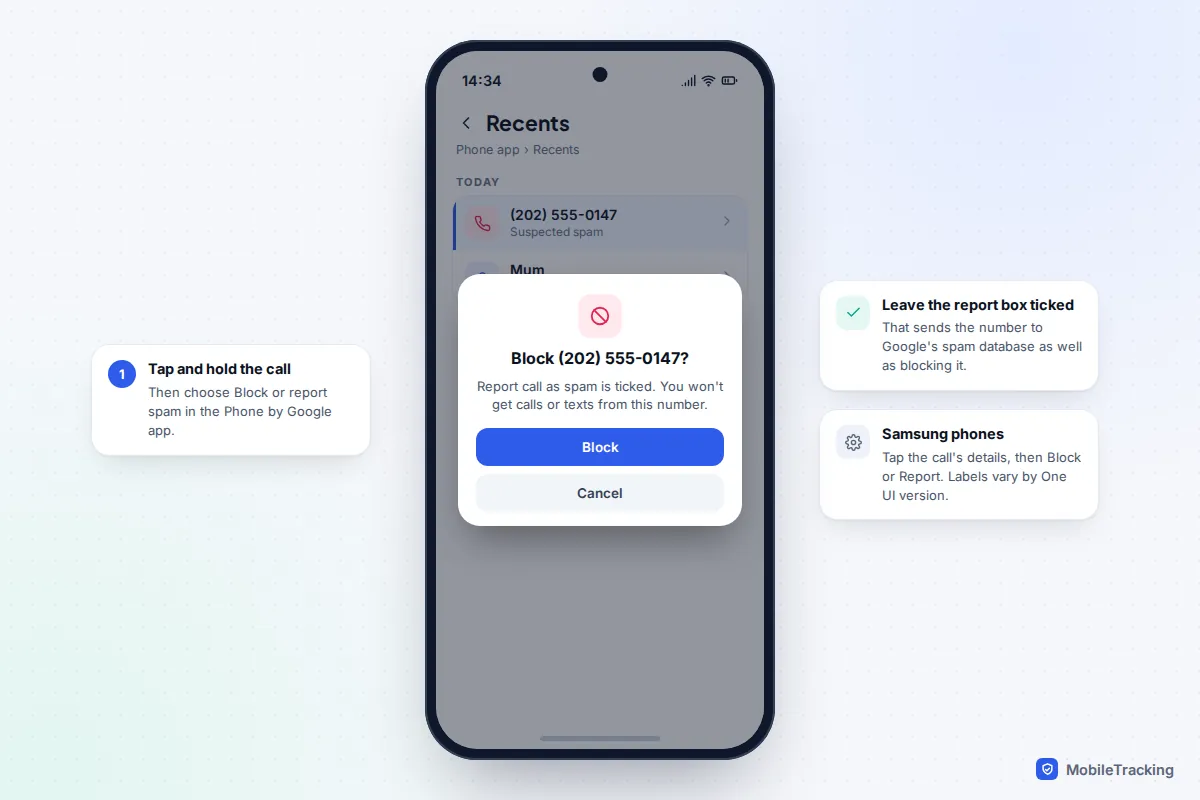
- Open the Phone app and go to your recent calls.
- Tap and hold the scam call, or tap it to open the details.
- Tap Block or report spam. Make sure Report call as spam is ticked, then tap Block.
To catch more of these calls automatically, go to Phone › More options › Settings › Caller ID and spam and turn on Filter spam calls. If you ever mark a real contact by mistake, open the call and tap Not spam, then Unblock.
Samsung Galaxy
Samsung’s Phone app uses its own spam service, called Smart Call in some regions and provided by Hiya. Turn on Caller ID and spam protection in the Phone app’s settings. After a spam call, open the call’s details from Recents and choose Block or Report. When reporting, you pick the type of spam and can add a comment. Exact labels vary between One UI versions and countries.
iPhone
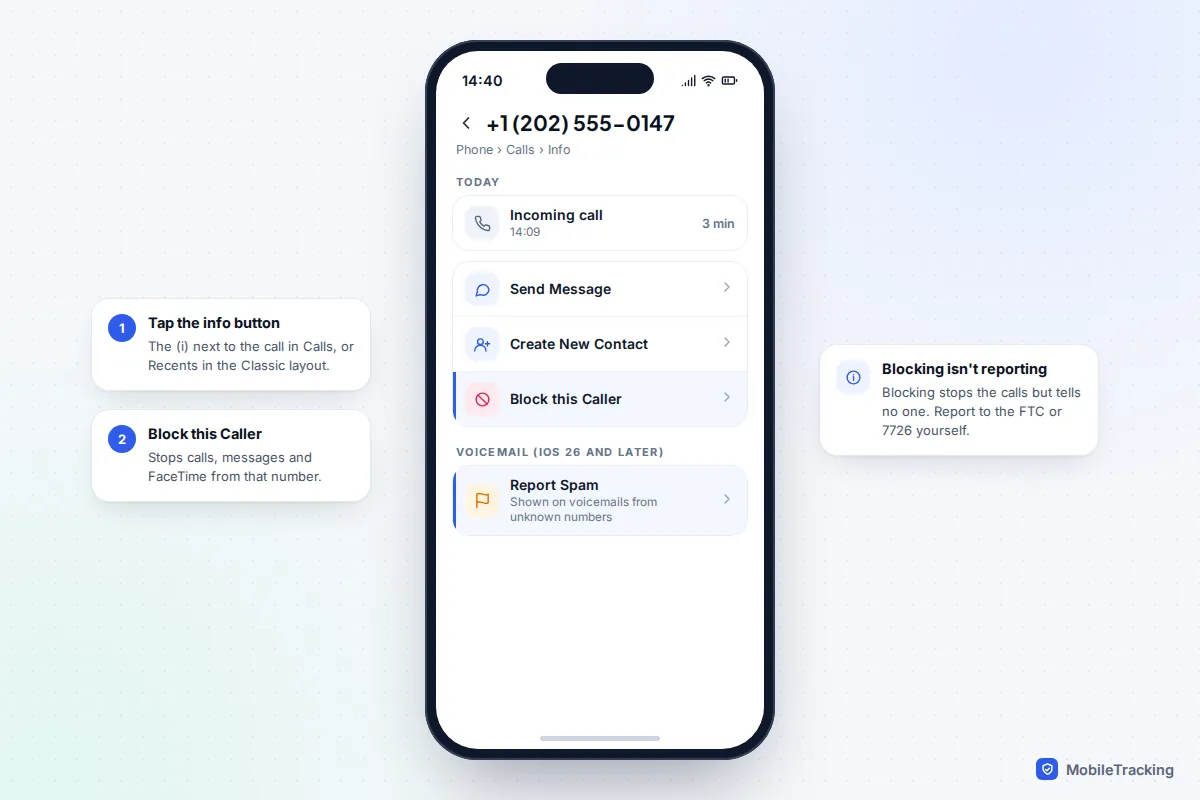
On iOS 26 and later, open Phone, find the call under Calls (or Recents if you use the Classic layout), tap the (i) button and choose Block this Caller. That stops calls, messages and FaceTime from the number. If the scammer left a voicemail, iOS 26 added a Report Spam button when you open a voicemail from an unknown number. For scam iMessages, use Report Junk under the message, or swipe left on the conversation and choose Delete and Report Spam.
To cut down future calls, go to Settings › Apps › Phone › Screen Unknown Callers and choose Ask Reason for Calling or Silence. iOS 27 also added Impersonation Risk Detection under Settings › Privacy & Security. When you opt in, supporting banking and payment apps can be warned that you may be in the middle of a scam as you try to send money. For more ways to thin out the calls, see our guides to blocking unknown callers and stopping spam calls.
Bank, HMRC, IRS and police impersonation calls
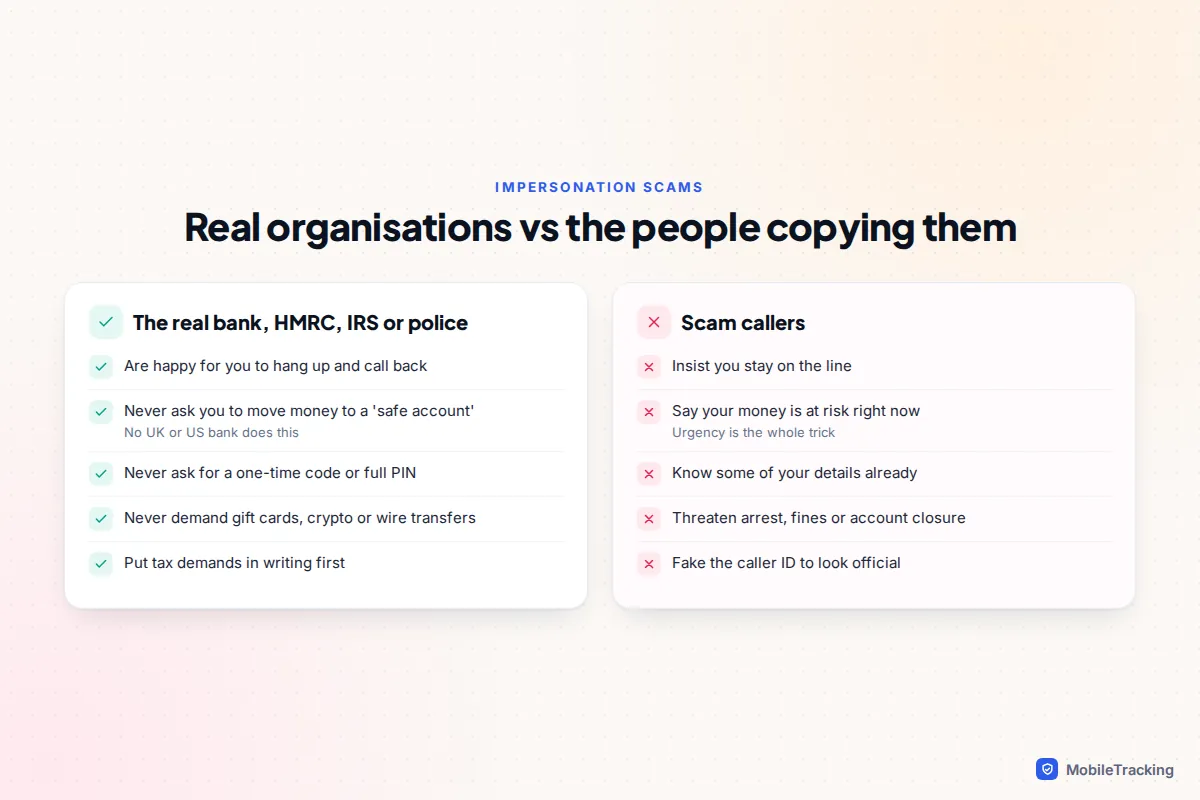
The most damaging scam calls come from people pretending to be an organisation you trust. They often know your name, your bank and part of your card number, and the caller ID may show the real organisation’s number. None of that proves anything, because caller IDs can be faked and personal details are widely leaked.
A few rules hold true for every genuine organisation:
- Banks will never ask you to move money to a “safe account”, read out a one-time passcode, or share your full PIN or online banking password.
- HMRC and the IRS don’t demand immediate payment by gift card, prepaid card or wire transfer, and don’t threaten arrest over the phone. The IRS says it won’t call out of the blue about a refund.
- Police officers will never ask you to withdraw cash, buy gold or hand your bank card to a courier as part of an investigation.
- Any real caller is fine with you hanging up and calling back on a number from their official website or your statement.
Report these calls to the FTC or Report Fraud like any other, and to the organisation being copied if it has its own channel, such as HMRC’s form or TIGTA for the IRS.
Helping an older relative who gets scam calls
Scammers deliberately target older people, who are more likely to have a landline, savings and time to answer. Take Margaret, who is 81. She gets a call from “her bank’s fraud team” saying her account is compromised and she must move her savings today. She hangs up, but is too embarrassed to tell anyone.
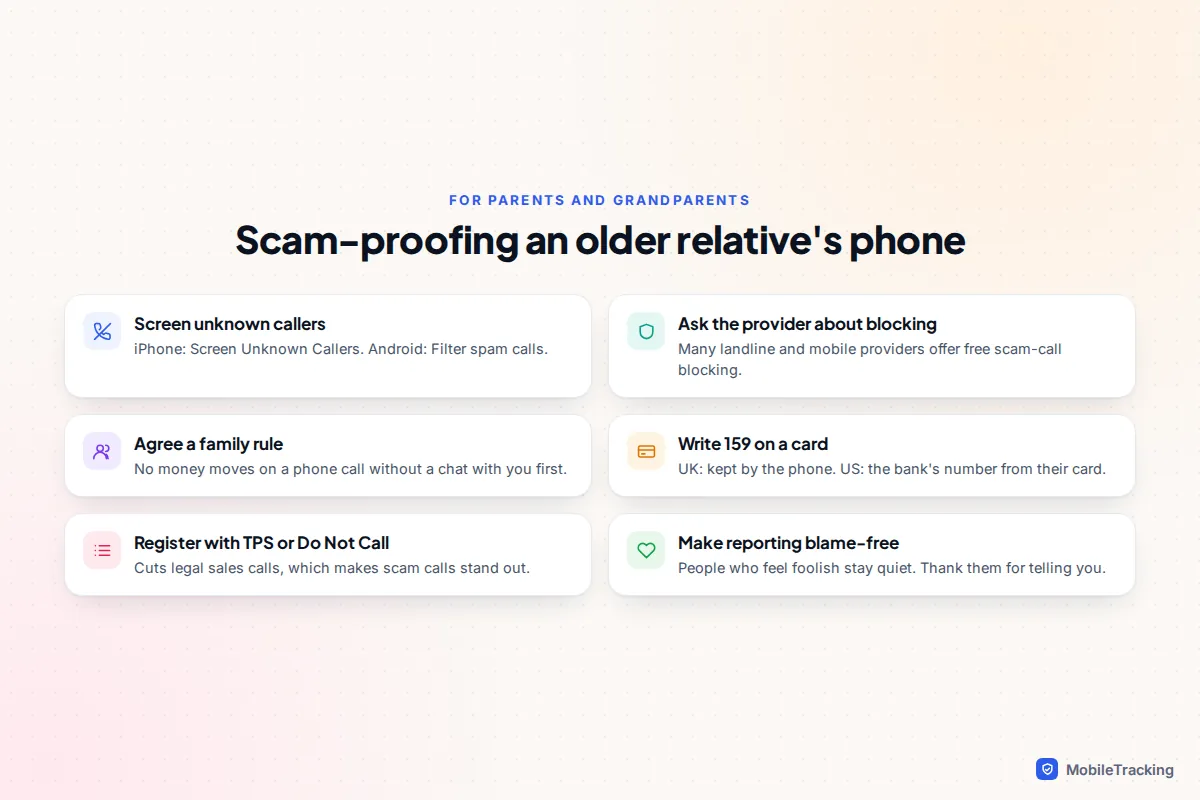
The most useful thing you can do is make it easy and blame-free to tell you. Then set up some defences together:
- Agree a simple family rule: no money moves because of a phone call without a chat with you first.
- Write 159 (UK) or the bank’s card number (US) on a card by the phone, so they never need to trust a number a caller gives.
- Turn on Screen Unknown Callers on an iPhone or Filter spam calls on Android. Ask their landline provider about free scam-call blocking.
- Register the landline with TPS or the Do Not Call Registry, so legitimate sales calls fade and scam calls stand out.
- Help them report calls afterwards. In the US, anyone 60 or over who lost money can call the National Elder Fraud Hotline on 833-372-8311.
Children and teenagers are targeted too, usually through games and social apps rather than calls. Our guide to scams that target children and teens covers those.
Common mistakes when reporting
- Only blocking the number. It feels like action, but no one else learns about the caller.
- Paying someone who offers to recover your money. “Recovery” calls promising to get your losses back for a fee are a common second scam. Real police and regulators don’t charge.
- Looking up the number on paid “who called me” sites. They rarely add anything a free spam label doesn’t. If you want to check a number, our guide to finding out who a number belongs to explains what actually works.
Frequently asked questions
Will I get my money back if I report a scam call?
Not from the report itself. The FTC, FCC, Report Fraud and 7726 collect intelligence and bring cases, but they don’t refund individuals. Your bank or card provider is the one that can, which is why you call them first. UK bank transfer victims are covered up to £85,000 if they claim within 13 months.
Is it worth reporting a call if I didn’t lose anything?
Yes. Reports of attempted scams help link calls to the same group and push networks to block numbers. In the US, the FTC suggests DoNotCall.gov for unwanted sales calls with no loss. In the UK, texting the number to 7726 takes under a minute.
What if the scammer used a real company’s phone number?
Report the number you saw anyway, and say you think it was spoofed. Many companies publish a way to report impersonation, so it’s worth telling them too. Never call the number back to confront anyone.
Does Action Fraud still exist?
No. Action Fraud was replaced by Report Fraud on 4 December 2025, and searches and links for Action Fraud now redirect to the new service. Use reportfraud.police.uk or 0300 123 2040. Scotland still uses Police Scotland on 101.
Can I report a scam WhatsApp or Signal call to 7726?
No. 7726 only handles normal phone calls and SMS texts on UK networks. For internet calls, use the block and report option inside that app, and report any fraud to Report Fraud or the FTC as usual.
This guide is general information, not legal or financial advice. Read our editorial policy.