
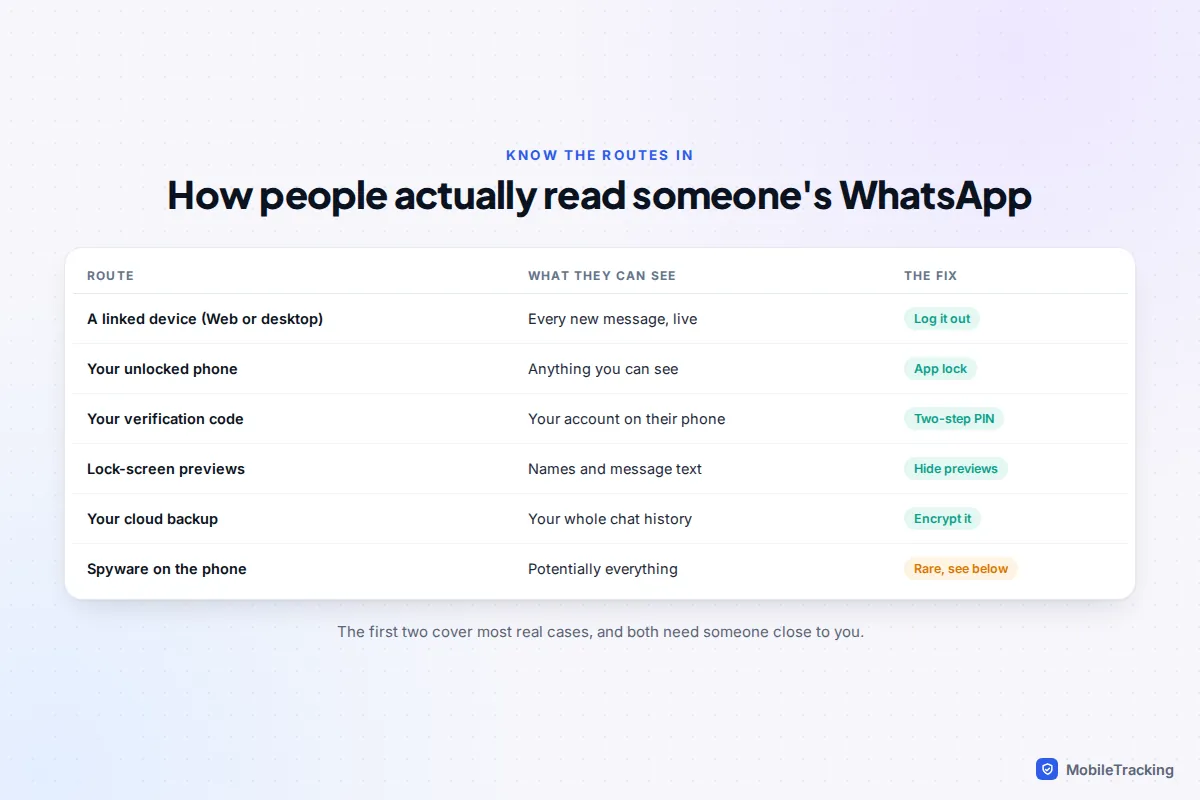
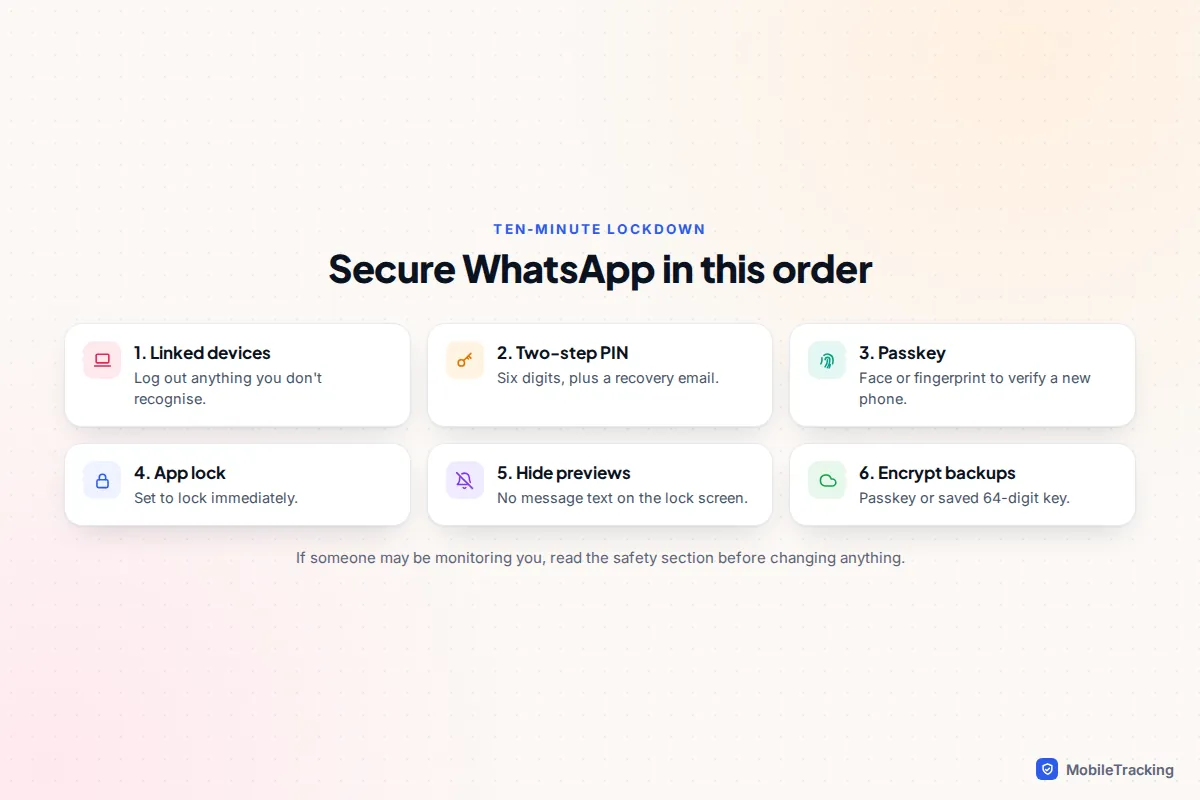
The quickest way to stop someone reading your WhatsApp is to open Linked devices and log out any computer, tablet or phone you don’t recognise. A linked device receives every new message in real time, and it is by far the most common way a partner, ex or housemate keeps reading someone’s chats. Then set a two-step verification PIN, turn on app lock, and hide message previews on your lock screen. Those four steps take about ten minutes and close the routes that matter most.
WhatsApp’s end-to-end encryption means nobody can read your messages as they travel. Snooping almost always happens at the ends instead: on your phone, on a device linked to your account, in your cloud backup, or through a stolen verification code. This guide takes each route in turn, with the settings for Android and iPhone.
Check Linked devices and log out anything you don’t recognise
WhatsApp lets one account run on your phone plus up to four linked devices: WhatsApp Web in a browser, the Windows or Mac app, an iPad, or a second phone. Linking one takes about ten seconds with your unlocked phone, by scanning a QR code. After that, the other device receives your new messages even when your phone is in your pocket.
- Android: open WhatsApp, tap the three-dot menu at the top right and choose Linked devices. iPhone: tap the You tab (called Settings on older versions), then Linked devices.
- Read the list. Each entry shows the browser or device type and when it was last active.
- Tap anything you don’t recognise, or no longer use, and choose Log out.
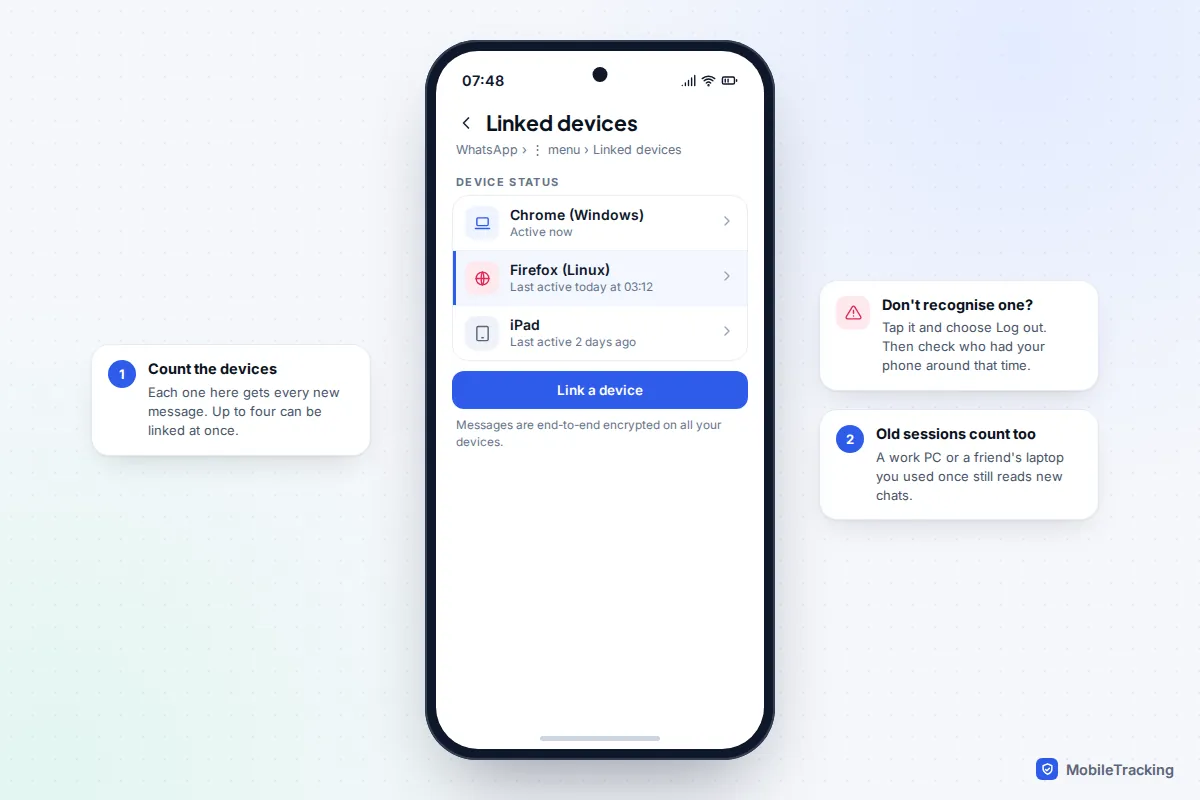
A linked device can only read messages that arrive after it was linked, plus whatever history your phone synced to it at that moment. Logging out stops new messages reaching it straight away, but it cannot pull back anything already downloaded. If you find a device you didn’t set up, think about who had your unlocked phone around the time it first appeared.
Watch for a newer trick too. In late 2025, security researchers described a scam nicknamed GhostPairing: a message from a friend’s hacked account links to a fake photo viewer, which asks for your phone number and then shows a code to type into WhatsApp. That code links the scammer’s browser to your account. WhatsApp never asks you to enter a pairing code that a website gave you, so if you didn’t start linking a device yourself, don’t type one in.
Stop account takeover: two-step PIN, passkey and the six-digit code
Linked devices share your account. Account takeover is different: someone registers your number on their own phone, which logs you out and lets them message your contacts as you. They need the six-digit verification code WhatsApp sends to your number, and they usually get it by asking.
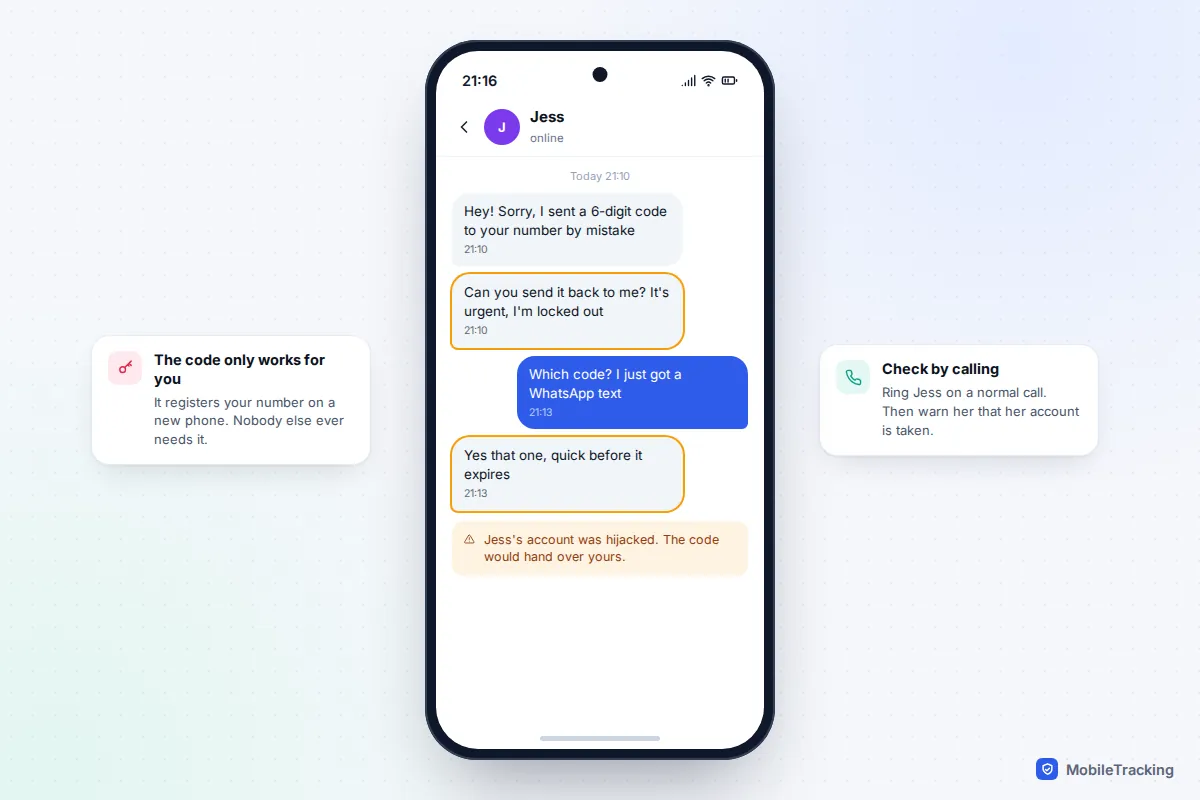
The rule is simple: never share a WhatsApp verification code with anyone, including someone claiming to be WhatsApp support, your mobile network or a friend. If a code arrives that you didn’t ask for, someone is trying to register your number. Ignore it and turn on the protections below.
- Two-step verification: go to Settings (You on iPhone), then Account, Two-step verification, Turn on. Choose a six-digit PIN that is not your phone passcode or a birthday, and add an email address when asked. From then on, anyone registering your number on a new phone needs the PIN as well as the code.
- Passkey: under Account, Passkeys, create one. It lets you verify on a new phone with your face, fingerprint or screen lock, which is harder to trick out of you than a code.
- Security notifications: under Account, Security notifications, turn on the alert that tells you when a contact’s security code changes. That happens when someone reinstalls or changes phone, and it is your cue to check it is really them.
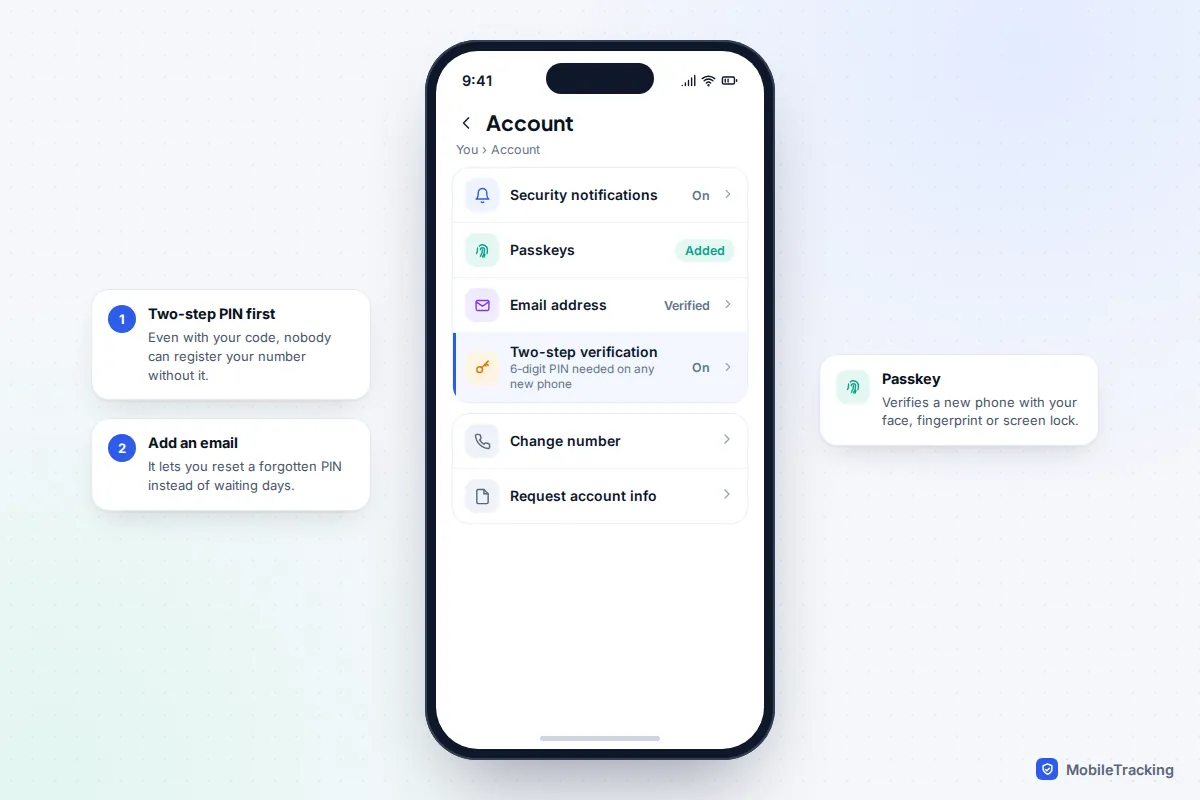
WhatsApp asks you to enter the PIN every so often so you don’t forget it. If you forget it and added an email, you can reset it from the PIN screen. If you have no email on file, you may have to wait several days before WhatsApp lets you reset it, which is a long time without your messages.
Lock the app and the chats that matter
Someone who picks up your phone while it is unlocked, or who knows your passcode, can simply open WhatsApp. App lock adds a biometric check each time the app opens.
- iPhone: You, Privacy, App lock (Screen lock on some versions), then turn on Require Face ID or Touch ID and set it to lock Immediately. iOS 18 and later can also lock any app from the Home Screen: press and hold WhatsApp and choose Require Face ID.
- Android: Settings, Privacy, App lock, then turn on Unlock with biometric and choose how quickly it locks. Samsung’s Secure Folder and Pixel’s Private space are stronger options if you want WhatsApp hidden altogether.
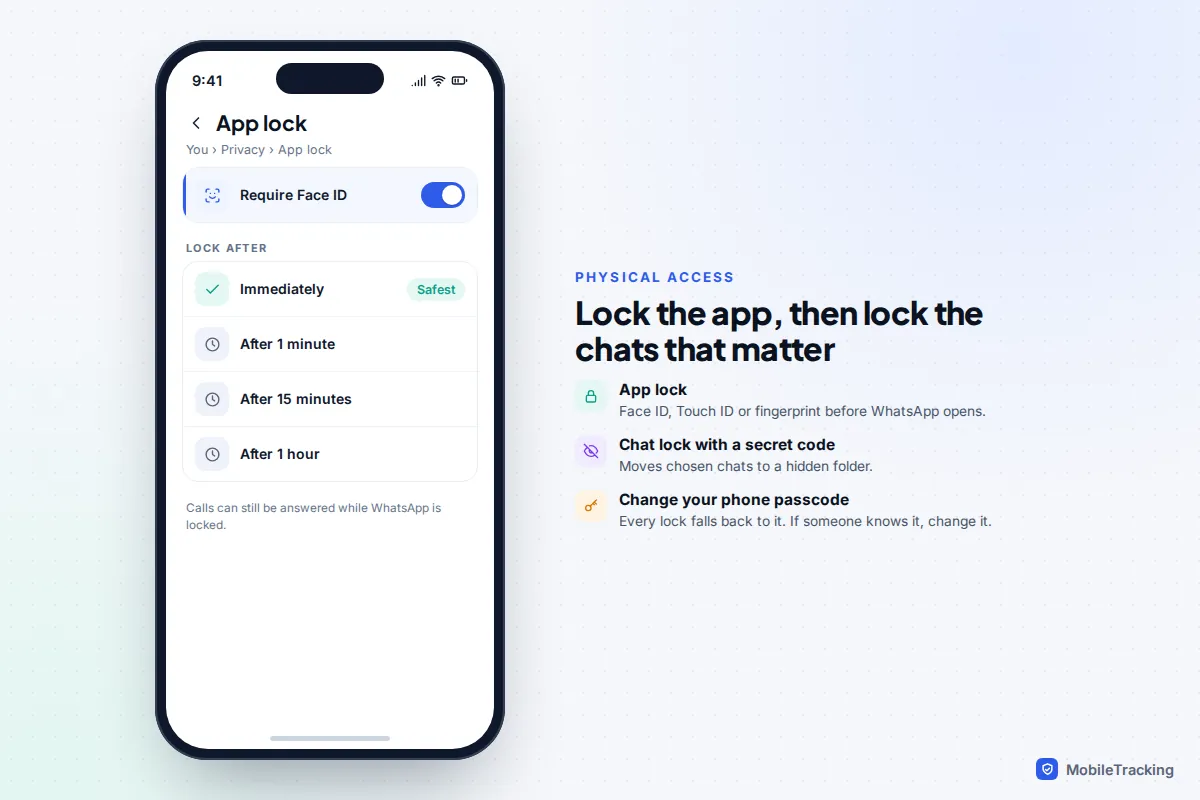
For one or two especially private conversations, Chat lock moves them into a separate folder that needs your fingerprint or face, and a secret code can hide that folder completely. Our guide to locking individual chats covers it step by step. Remember that every one of these locks falls back to your phone’s passcode. If someone knows it, change it first, and remove any face or fingerprint on the phone that isn’t yours (in your phone’s Face ID or fingerprint settings).
Keep messages from leaking out: previews, disappearing messages and backups
Hide notification previews
Lock-screen previews show the sender and the start of every message to anyone who glances at your phone on a table. On iPhone, open WhatsApp’s Settings (You), Notifications, and turn off Show preview; or, for every app at once, go to the iPhone’s Settings, Notifications, Show Previews, and choose When Unlocked. On Android the setting lives in the phone’s own settings and the name varies: on Pixels look for Sensitive notifications under Notifications, and on Samsung for Lock screen notifications then Hide content.
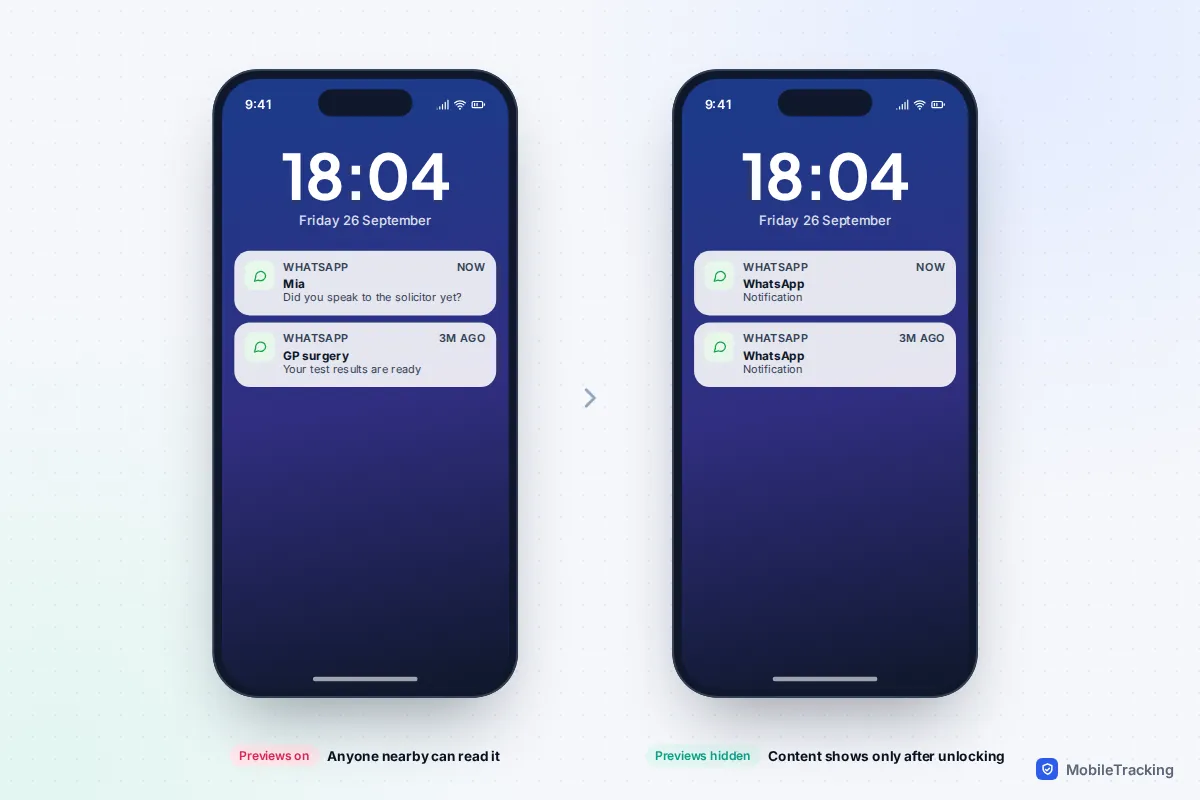
Use disappearing messages for sensitive chats
Messages that are never stored cannot be read later. In a chat, tap the contact’s name, then Disappearing messages, and choose 24 hours, 7 days or 90 days. To apply it to all new chats, set Privacy, Default message timer. It does not stop screenshots, and anyone in the chat can keep a message before it vanishes.
Turn on Advanced Chat Privacy for your most private conversations
Added in 2025, Advanced Chat Privacy is set per chat or group: tap the chat name, then Advanced chat privacy. It stops everyone in that chat exporting it, stops media auto-saving to their phones, and stops messages being used with AI features. It does not stop screenshots.
Encrypt your backup
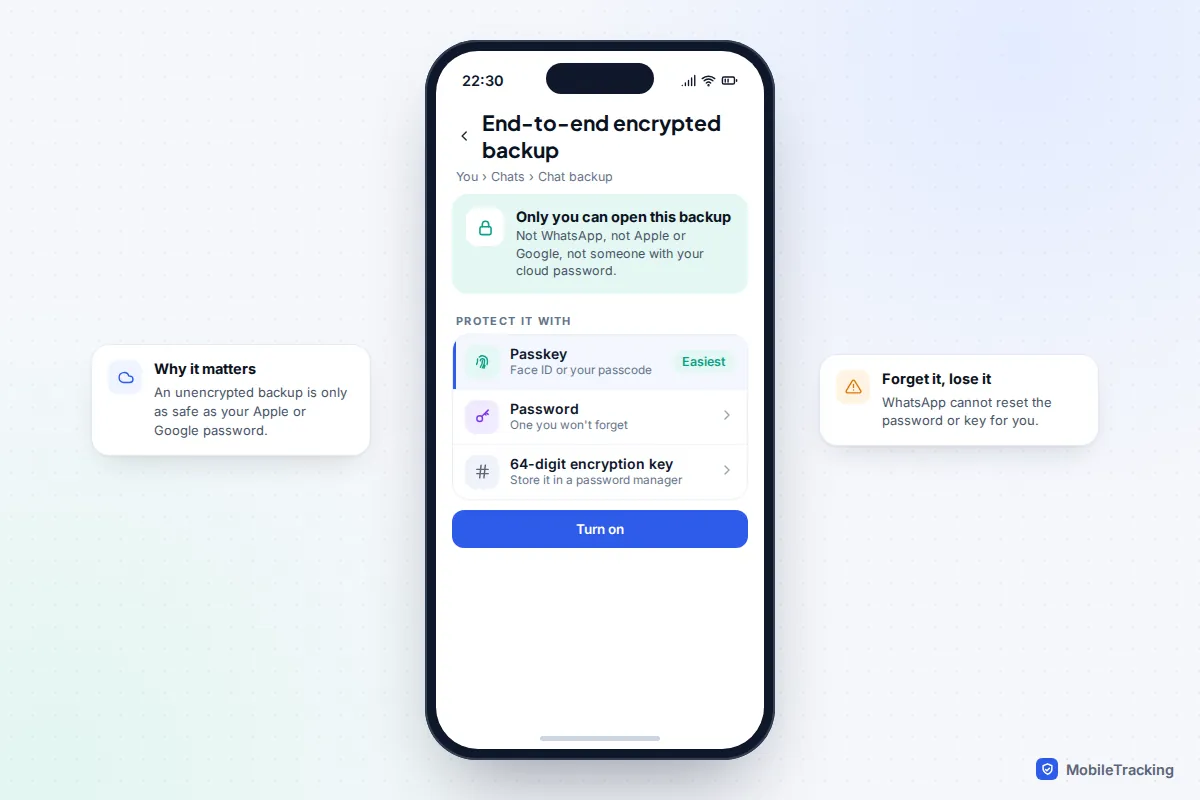
By default, WhatsApp backups in Google storage or iCloud are protected by your Google or Apple password, not by WhatsApp’s encryption. Anyone who can sign in to that account and verify your number could restore your whole history onto another phone. Go to Chats, Chat backup, End-to-end encrypted backup, and protect it with a passkey, a password or a 64-digit key.
Tighten your privacy settings
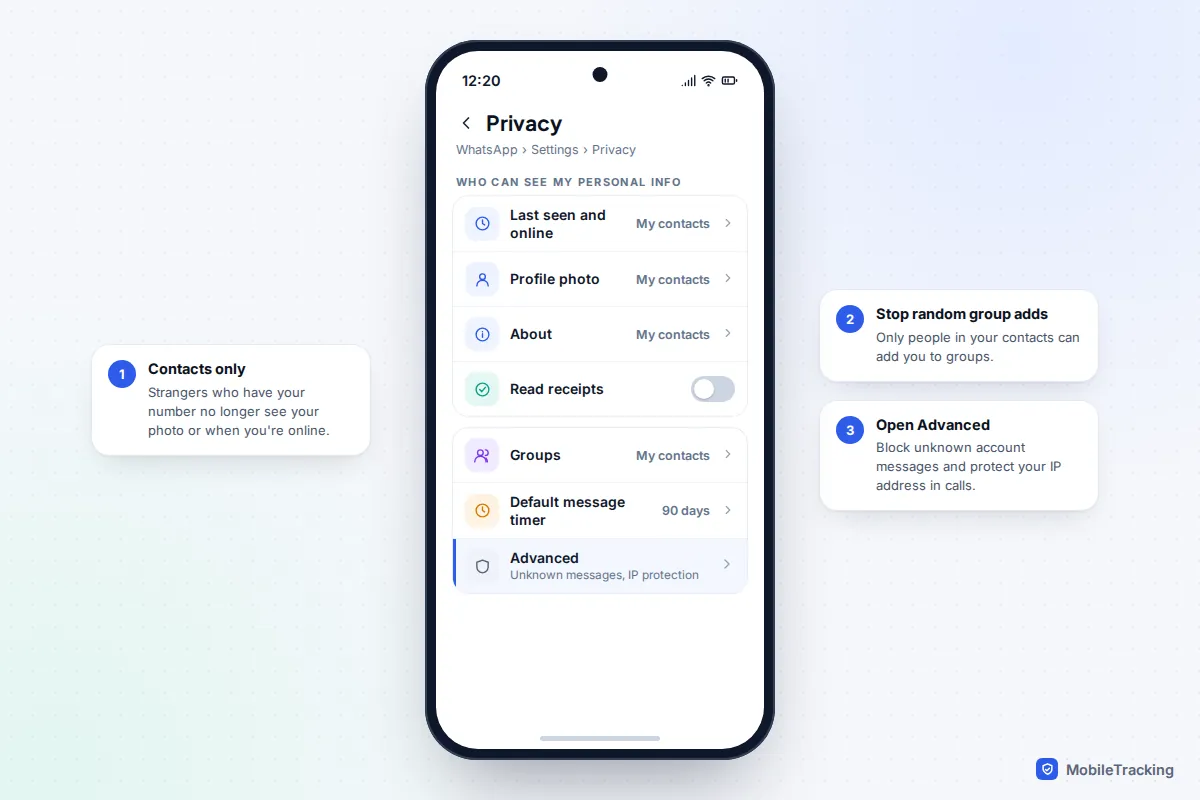
These settings control what people outside your chats can see about you, which matters most if someone is watching your activity rather than reading your messages. Open Settings (You on iPhone), then Privacy.
- Last seen and online: set to My contacts or Nobody, and set Who can see when I’m online to match. Our guide to turning off read receipts on WhatsApp explains the trade-off: if you hide yours, you can’t see other people’s either.
- Profile photo, About and Status: My contacts, or exclude particular people with My contacts except.
- Groups: My contacts, so strangers can’t drop you into a group and see your number and photo.
- Calls: turn on Silence unknown callers.
- Advanced: turn on Protect IP address in calls, which routes calls through WhatsApp’s servers so the other person cannot work out your rough location, and Block unknown account messages.
If you are a journalist, campaigner or anyone at higher risk, WhatsApp’s Strict account settings switch, added in early 2026 under Privacy, Advanced, applies the most restrictive of these at once. It turns on two-step verification, locks security notifications on, and blocks media and attachments from people not in your contacts. It was still rolling out by region at the time of writing.
Spyware: what’s real and what isn’t
Most “WhatsApp spy” apps advertised online are either scams or stalkerware that must be installed by someone holding your unlocked phone. On Android, that usually means a hidden app with accessibility or notification access that copies messages as they appear on screen. On iPhone, where installing that kind of app is much harder, the usual trick is signing in to your iCloud with your Apple Account password, so a strong, unique password with two-factor authentication shuts that route.
Nobody can read your WhatsApp from your phone number alone. The zero-click attacks you may have read about, where spyware arrived through a WhatsApp call or message with no tap needed, were built by spyware companies, sold to governments and aimed at small numbers of journalists and activists. WhatsApp has patched them and taken the makers to court. They are real, but they are not what a jealous partner or nosy colleague uses.
Signs worth taking seriously are someone knowing things only your chats contained, a linked device you didn’t add, apps you don’t recognise with accessibility access, or your phone being taken away and handed back unlocked. If that fits, our guide to what to do if you think you have spyware goes through checking and removing it.
If the person snooping is someone close to you
When a partner, ex or family member is monitoring your phone, security settings are also a safety question. Logging them out of a linked device, changing your passcode or locking WhatsApp can tell them you’ve noticed, and for some people that makes things more dangerous. You know your situation best, so it can be safer to plan first and act later.
- Use a phone, computer or library PC they have never had access to when you look for help or make plans.
- Talk to a specialist before making visible changes. In the US, The Hotline is on 1-800-799-7233; in the UK, the Refuge National Domestic Abuse Helpline is on 0808 2000 247. Both are free and confidential.
- The Coalition Against Stalkerware explains how monitoring apps work and how to get support.
Our guide to protecting your phone in an abusive situation covers these steps in more detail, including what to do if you need to leave.
Frequently asked questions
Can someone read my WhatsApp messages from another phone without me knowing?
Only if their device is linked to your account, or they have taken over your account with your verification code. A linked device shows up in your Linked devices list, and a takeover logs you out of WhatsApp on your own phone. Check the list regularly; there is no hidden way to mirror WhatsApp that doesn’t leave one of these traces or need spyware on your phone.
Can someone link a device to my WhatsApp remotely?
Linking can’t happen remotely on its own: someone has to scan a QR code with your unlocked phone, or trick you into typing a pairing code, as in the GhostPairing scam. Whatever gets linked then appears in Linked devices with its last active time, so keep your phone locked and check that list every month or so.
If I log a device out, will the other person know?
Yes, usually. WhatsApp Web or the desktop app on their side stops working and asks them to link again. That is why the safety section suggests getting advice first if the person could react badly.
Does a two-step PIN stop someone who already has my phone?
No. The PIN protects against someone registering your number on a different phone. Against someone holding your phone, you need a passcode they don’t know, app lock and Chat lock.
Can WhatsApp itself read my messages?
Personal messages and calls are end-to-end encrypted, so WhatsApp says it cannot read their content. It does hold account information such as your phone number and profile, and backups are only protected by WhatsApp’s encryption if you turn on end-to-end encrypted backup.
This guide is general information, not legal or financial advice. Read our editorial policy.