
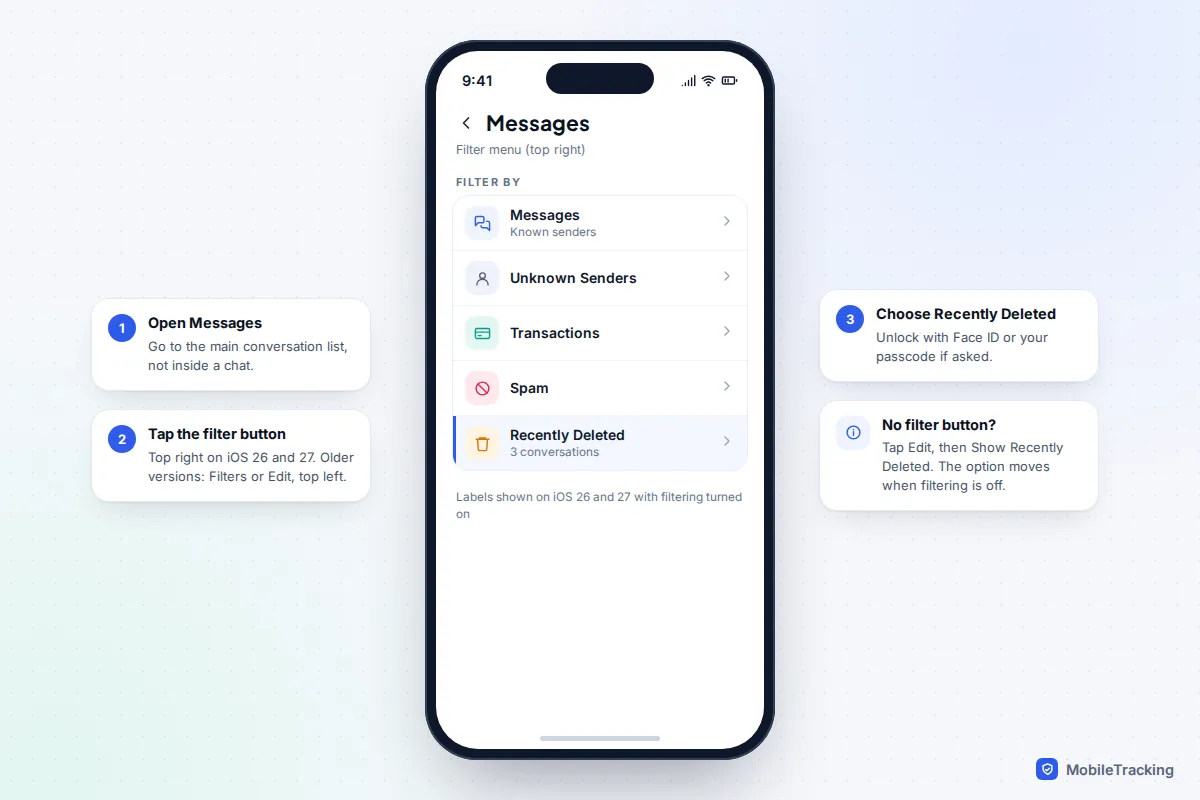
If you deleted a text in the last 30 days, you can almost certainly get it back in under a minute. Open Messages, tap the filter button at the top right (on iOS 26 and iOS 27), choose Recently Deleted, select the conversation and tap Recover. On iOS 16 to iOS 18 the same folder sits under Filters or Edit › Show Recently Deleted at the top left.
If the message isn’t there, your options narrow quickly. A backup made before the deletion can bring it back, but only if that backup actually contains your messages and you are willing to erase the phone to restore it. Your carrier can’t help, and most “recover without a backup” software promises more than it delivers. This guide takes you through every route that genuinely works, in the order worth trying, and tells you plainly when a message is gone.
Start with Recently Deleted
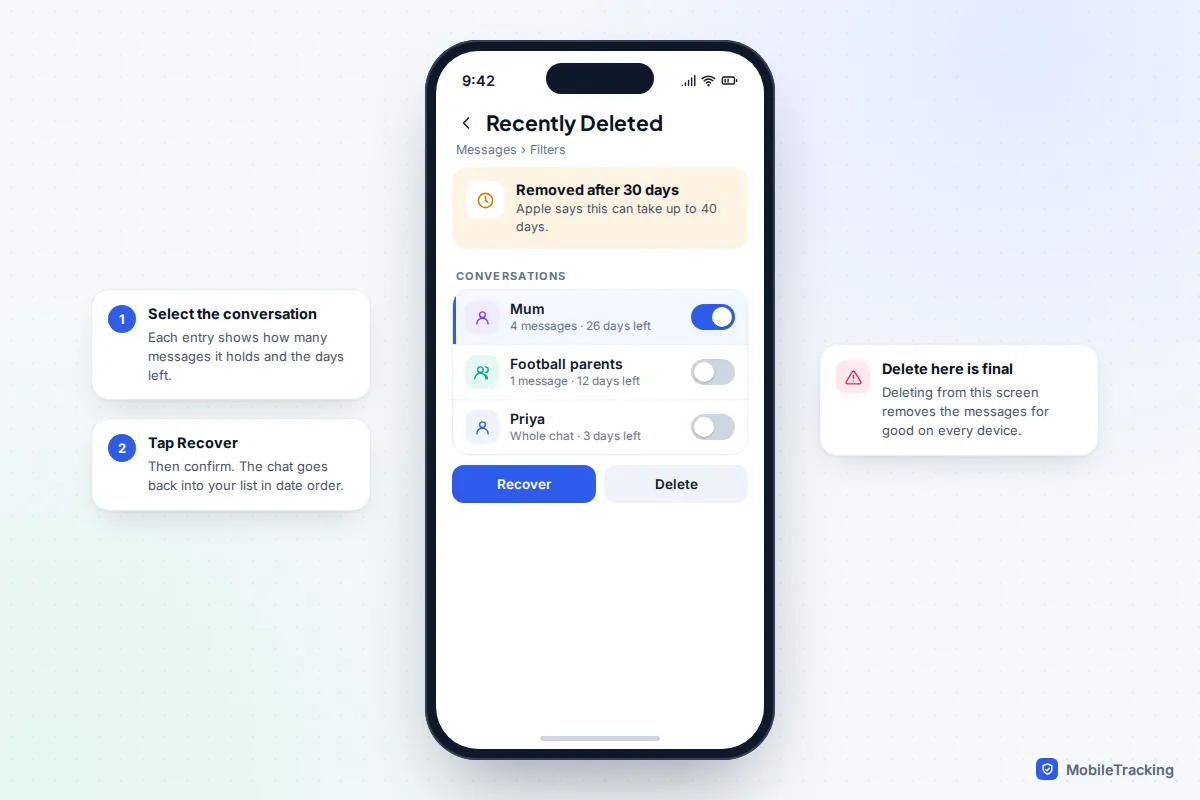
Since iOS 16, deleting a message or a whole conversation doesn’t remove it straight away. It moves to Recently Deleted, where Apple keeps it for 30 days. The on-screen note says removal “may take up to 40 days”, so you sometimes get a little longer, but treat 30 days as the real deadline.
- Open Messages and go to the main conversation list.
- On iOS 26 or 27, tap the filter button at the top right. On iOS 16 to 18, tap Filters at the top left. If you see neither, tap Edit and then Show Recently Deleted.
- Tap Recently Deleted. You may need Face ID, Touch ID or your passcode.
- Select the conversation (or several) and tap Recover, then confirm.
Recovered messages go back into the original conversation in date order, not to the top of the list, so search for the contact if you can’t see them. The list shows each conversation with the number of deleted messages in it and how many days remain.
When it isn’t in the list
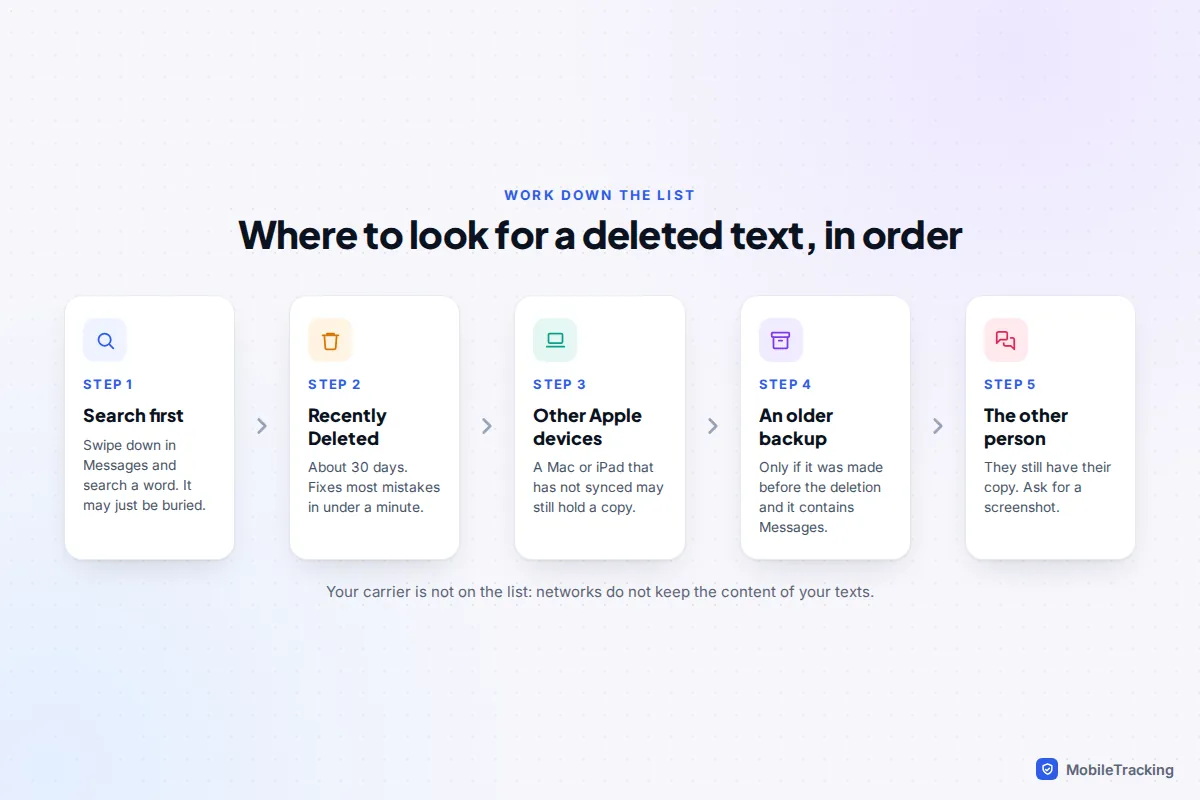
Before assuming the worst, rule out the usual non-deletions. Swipe down on the conversation list and search for a word you remember, as a thread can simply be buried. Check the Unknown Senders and Spam filters, which is where texts from numbers not in your contacts often end up on iOS 26 and later. Our guide to searching your text message history covers the tricks for finding old threads.
If you tapped Delete inside Recently Deleted, or used Delete All there to free up space, the messages skipped the 30 days and were removed at once. The same is true if someone else with your passcode cleared the folder. In that case, move on to the other devices and backups below.
How Messages in iCloud changes your options
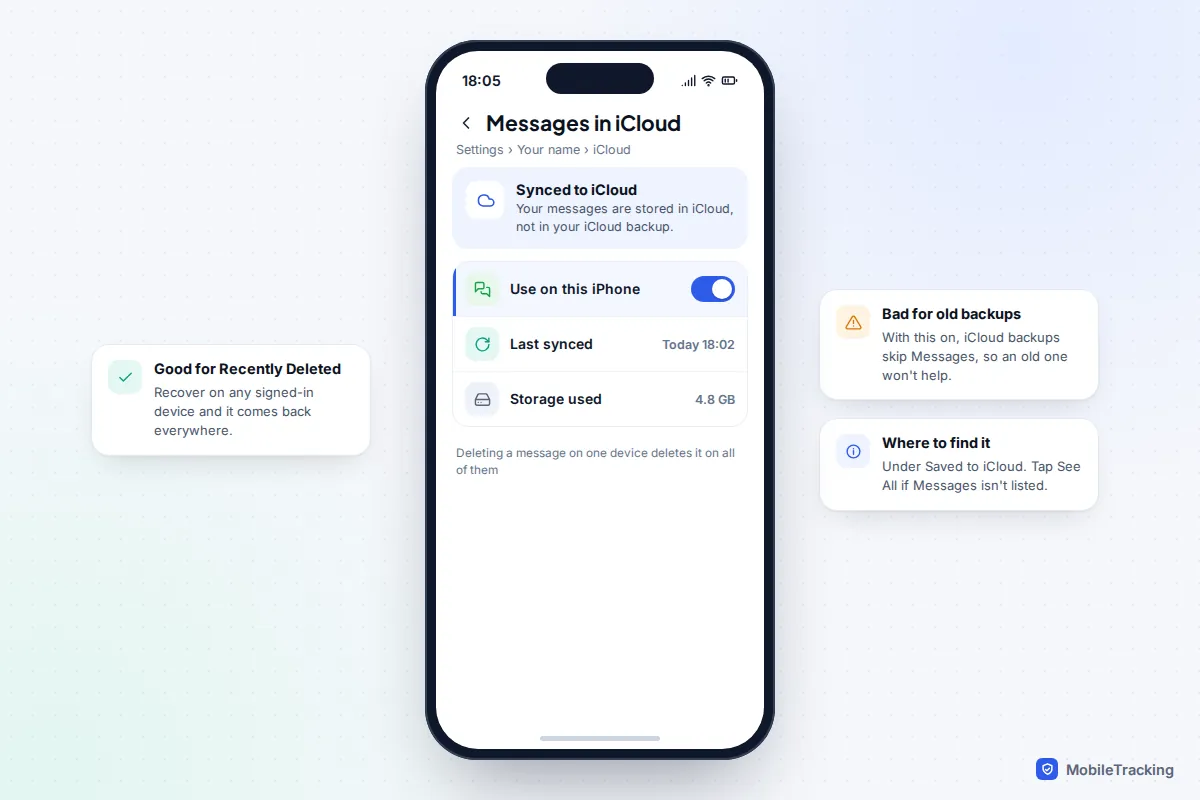
Whether you use Messages in iCloud decides almost everything else in this guide, so check it now. Go to Settings › [your name] › iCloud and look for Messages under Saved to iCloud (tap See All if it isn’t listed). If Use on this iPhone is on, your messages are stored in iCloud and kept in step across every Apple device signed in to your account.
That has three consequences:
- Deletions sync everywhere. Delete a conversation on your iPhone and it disappears from your iPad and Mac too, usually within seconds.
- Recently Deleted syncs too. You can recover from any of your devices and the conversation reappears on all of them.
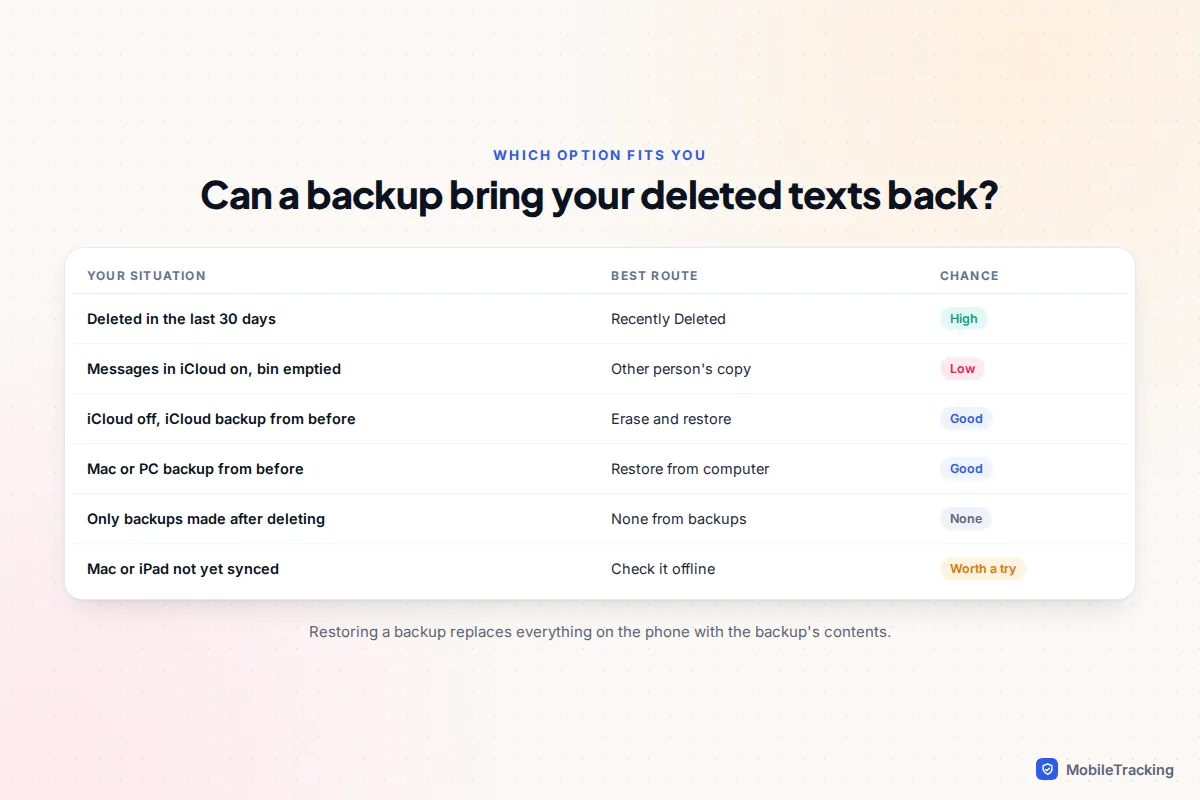
- Your iCloud backups leave messages out. Because the messages already live in iCloud, iCloud Backup doesn’t store a second copy. Restoring an older iCloud backup therefore won’t bring back a deleted text.
If Messages in iCloud is off, each device keeps its own separate history, and your iCloud or computer backups include your messages. That makes an old backup far more useful, which is why the next sections split the two cases.
Check your other Apple devices
A Mac or iPad can hold a copy your iPhone no longer has, but only in specific circumstances. With Messages in iCloud on, a device that has been online since the deletion will have removed the message too. A device that has been switched off, or kept offline, may still have it until it next connects.
- Before turning an old iPad or Mac back on, make sure it can’t connect: switch off your home Wi-Fi or take the device somewhere it has no known network.
- Open Messages and look for the conversation.
- If it’s there, take screenshots or, on a Mac, choose File › Print and save it as a PDF.
- Only then let the device reconnect. Expect the message to vanish once it syncs.
With Messages in iCloud off, the Mac or iPad keeps its own history, so a conversation you deleted on the iPhone may still be sitting there untouched. It’s worth a look before you try anything drastic. Our guide to syncing messages between two devices explains how each setting behaves.
Restoring from a backup, and what you lose
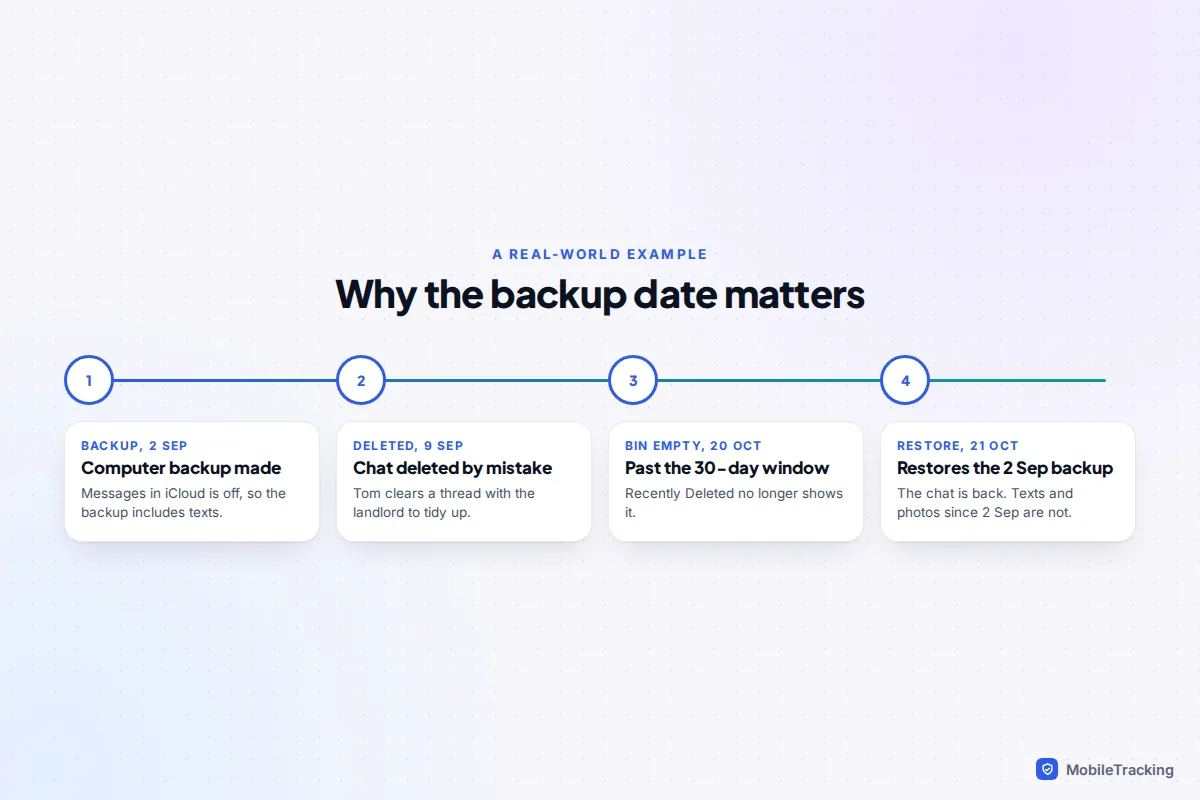
Restoring a backup is the only way to get back messages that have left Recently Deleted, and it comes with real costs. You can’t restore a single conversation. You have to erase the iPhone and put the whole backup back, so anything created after the backup date that isn’t synced elsewhere, such as new photos not in iCloud Photos, texts and app data, is replaced by the older version.
Three conditions must all be true for a restore to help:
- The backup was made before you deleted the message.
- The backup contains your messages. For iCloud backups, that means Messages in iCloud was off when it was made.
- The message was on the iPhone when the backup ran. A conversation deleted before the backup won’t be in it.
Check the backup date first
For iCloud, go to Settings › [your name] › iCloud › iCloud Backup and look at the last successful backup. iCloud keeps only the latest backup for each device, so if it ran last night and you deleted the text last week, it can’t help. For a computer backup, connect the iPhone to your Mac and open it in Finder, or use the Apple Devices app (or iTunes) on Windows, then choose Manage Backups to see the dates.
Protect what you have now
Before erasing anything, make a fresh backup of the phone as it is today, preferably to a computer. On a Mac, in Manage Backups, Control-click that new backup and choose Archive so the older restore doesn’t overwrite it. That way you can restore the old backup, save the messages you need as screenshots or a PDF, and then restore today’s backup to get everything else back.
Do the restore
- Go to Settings › General › Transfer or Reset iPhone › Erase All Content and Settings.
- Set the phone up again until you reach the Transfer Your Apps & Data screen.
- Choose From iCloud Backup or From Mac or PC, and pick the backup dated before the deletion.
- Keep the phone on power and Wi-Fi until the restore finishes. Photos and apps can take hours to come back.
If Messages in iCloud was on, a restore is a long shot even with a computer backup, because the phone reconnects to iCloud during setup and can remove the messages again as it syncs. If you try anyway, screenshot what you need as soon as the phone opens. There’s more detail in our walkthrough on retrieving deleted texts from a backup, and Apple’s own page on recovering deleted text messages lists the same routes.
Why your carrier can’t restore your texts
It’s a common belief that your mobile network keeps a copy of every text. In practice, carriers don’t offer customers any way to retrieve message content. Your bill or online account may list the date, time and number of each SMS, but not what it said.
For iMessages, the blue bubbles, the carrier never had the content at all. iMessages travel over the internet through Apple’s servers with end-to-end encryption, so they appear on your bill only as data use, if at all. The same goes for WhatsApp, Signal and other chat apps. A carrier support agent who offers to “recover your texts” is either mistaken or talking about something else, such as restoring a number to a new SIM.
The one source people forget is the other person. They still have their side of the conversation unless they deleted it too. Asking them for a screenshot is often the fastest route of all, especially for a single important message.
A straight answer on paid recovery software
Search for this topic and you’ll find dozens of desktop programs promising to recover deleted iPhone texts “without a backup”. Some are useful, but not in the way their adverts suggest.
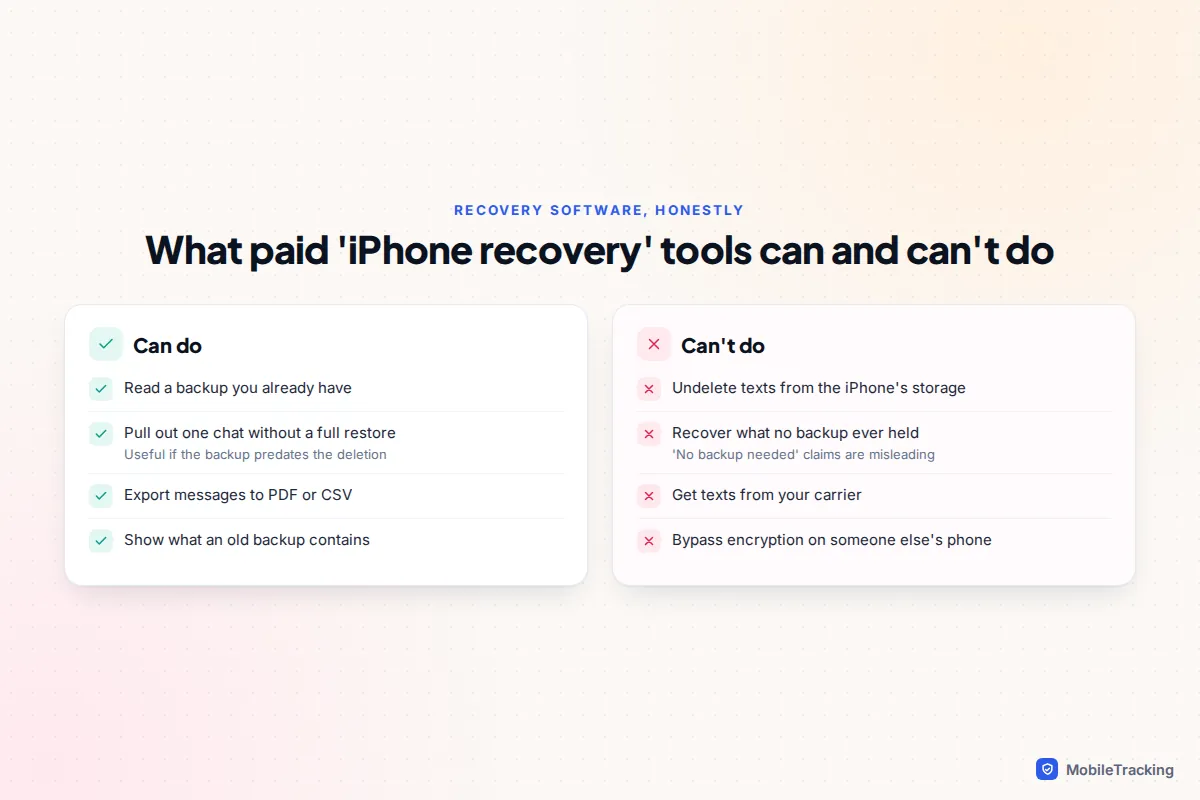
What they genuinely do well is read backups. Point one at a computer backup, or sign in to download an iCloud backup, and it can show you the messages inside and export one conversation without erasing your phone. That’s a real advantage over Apple’s all-or-nothing restore. But the backup still has to predate the deletion and contain your messages, exactly as above.
What they can’t do reliably is pull deleted texts off the iPhone itself. Every modern iPhone encrypts its storage, and deleted data is quickly overwritten or made unreadable. Occasionally a fragment of a very recent deletion survives inside the Messages database, which is what “deep scan” features look for, but results are hit and miss, and anything past the Recently Deleted window is very unlikely to be found.
If you do try one, follow a few rules:
- Only pay after the free preview shows the specific message you need, word for word.
- Never give an app your Apple Account password on a website other than Apple’s own sign-in screen.
- Be wary of subscriptions: many “one-off” recoveries renew yearly unless you cancel.
- Avoid anything that asks you to install a profile or app on the iPhone itself.
Unsend and edit: the prevention you get for free
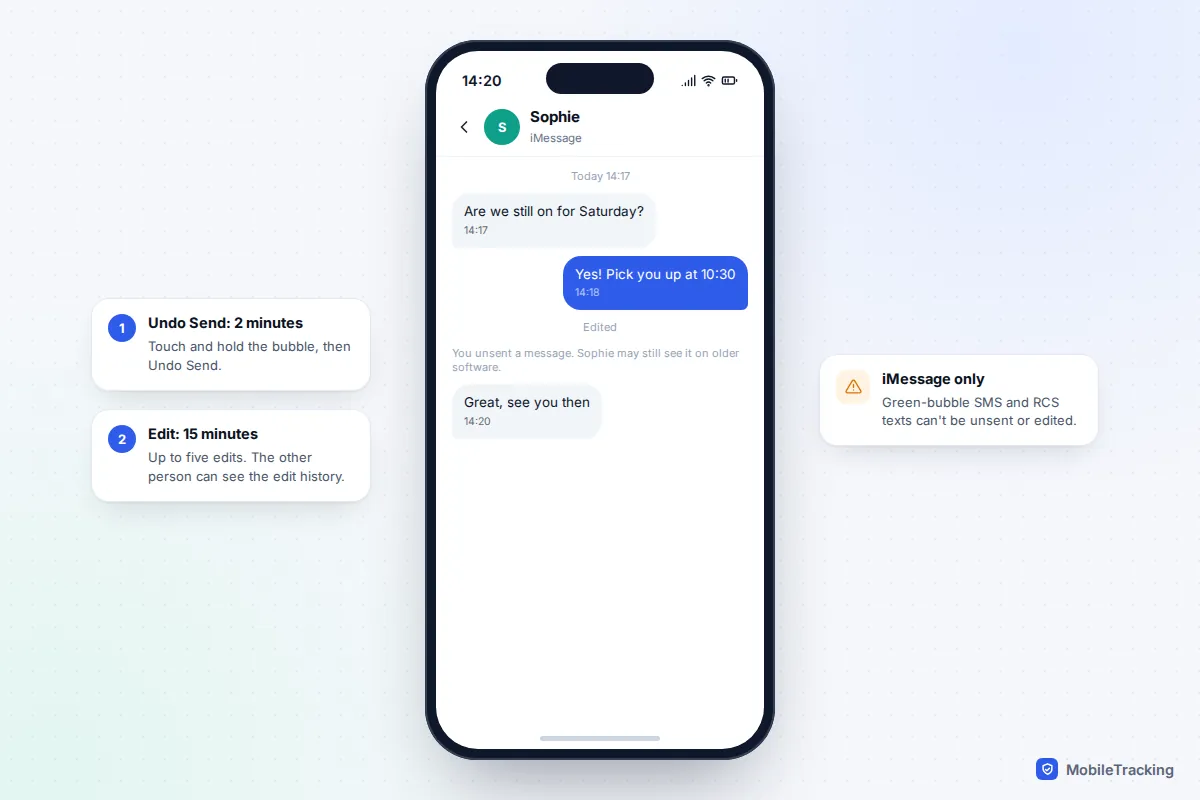
Many “deleted text” searches are really about a message you wish you hadn’t sent. For iMessages, iOS 16 and later give you two short windows:
- Undo Send: touch and hold the sent bubble and tap Undo Send within 2 minutes. The message disappears for both of you, and a note says you unsent it.
- Edit: touch and hold and tap Edit within 15 minutes, up to five times. The message shows “Edited” and the other person can tap it to see earlier versions.
Both only work for iMessage. Green-bubble SMS and RCS messages can’t be unsent or edited, even on iOS 27. If the other person is on iOS 15 or older, they still see the original text. Apple’s guide to unsending or editing messages has the full details.
A prevention checklist for next time
A few settings chosen now decide whether your next mistake is a one-minute fix or a lost conversation.
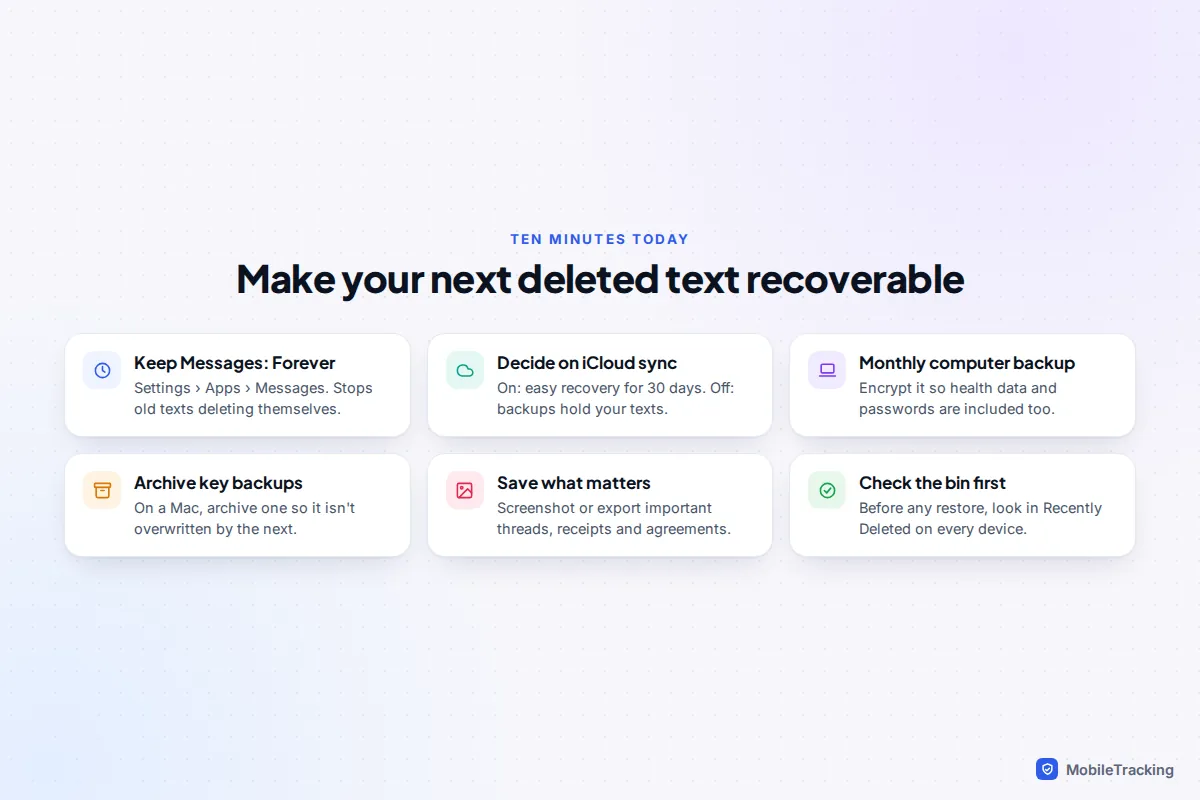
- Set Keep Messages to Forever. Go to Settings › Apps › Messages › Keep Messages. The 30-day and 1-year options delete old conversations automatically.
- Choose your sync model on purpose. Messages in iCloud gives you easy recovery for 30 days on every device. Turning it off keeps messages inside your backups instead.
- Make a computer backup every month or two. Tick Encrypt local backup so saved passwords and Health data are included, and store the password somewhere safe.
- Archive a backup before big changes such as a new phone or an update, so it isn’t overwritten.
- Save important threads outside Messages. Screenshot agreements, addresses and receipts, or print a conversation to PDF on a Mac.
- Check Recently Deleted before any restore, on every device you own.
For a full walkthrough of iCloud and computer backups, see our guide on how to back up your iPhone.
Frequently asked questions
Can I recover a text deleted more than 30 days ago?
Only from a backup made before you deleted it that also contains your messages, or from another device that hasn’t synced since. Apple’s removal can take up to 40 days, so check Recently Deleted anyway, but after that there is no setting or support request that brings it back.
Can Apple Support recover my deleted messages?
No. Messages in iCloud is end-to-end encrypted, and Apple doesn’t keep a restorable copy of deleted conversations. Apple Support can walk you through Recently Deleted and backup restores, but those are the same routes you can use yourself.
Will restoring a backup delete my newer photos?
It replaces everything on the phone with the backup’s contents. Photos stored in iCloud Photos come back because they sync from iCloud, but photos only on the phone and taken after the backup date are lost unless you back up and archive the current phone first.
If I delete a conversation, does the other person lose it too?
No. Deleting only affects your devices. The other person keeps their copy, which is why asking them for a screenshot is often the quickest fix. Only Undo Send, within 2 minutes on iMessage, removes a message from their side.
Can I recover deleted texts from someone else’s iPhone?
Not without their knowledge and permission. Their messages are protected by their passcode and Apple Account, and trying to get round that is a privacy breach and, in many places, a crime. If you need a copy of a conversation, ask the person directly.
Do deleted messages still take up iCloud storage?
Yes, until they leave Recently Deleted. If you are clearing space, delete them from Recently Deleted as well, but only once you are sure you won’t need them.
This guide is general information, not legal or financial advice. Read our editorial policy.