
The safe, legal way to check call history online is to sign in to your own mobile account. In the US, the AT&T, Verizon and T-Mobile apps and websites list incoming and outgoing calls with times and lengths under Usage. In the UK, EE, Vodafone, O2 and Three show your outgoing calls on the itemised bill in their apps and online accounts. iPhone owners can also see recent calls on a Mac or iPad synced through iCloud, while Android call history can’t be viewed in your Google account on the web at all.
What you can’t do, legally or practically, is look up someone else’s calls. Records belong to the account holder, and any website or app that promises “anyone’s call history” from a phone number is a scam. This guide covers where your own records are, who on a family plan can see what, and how to stop anyone getting into your account.
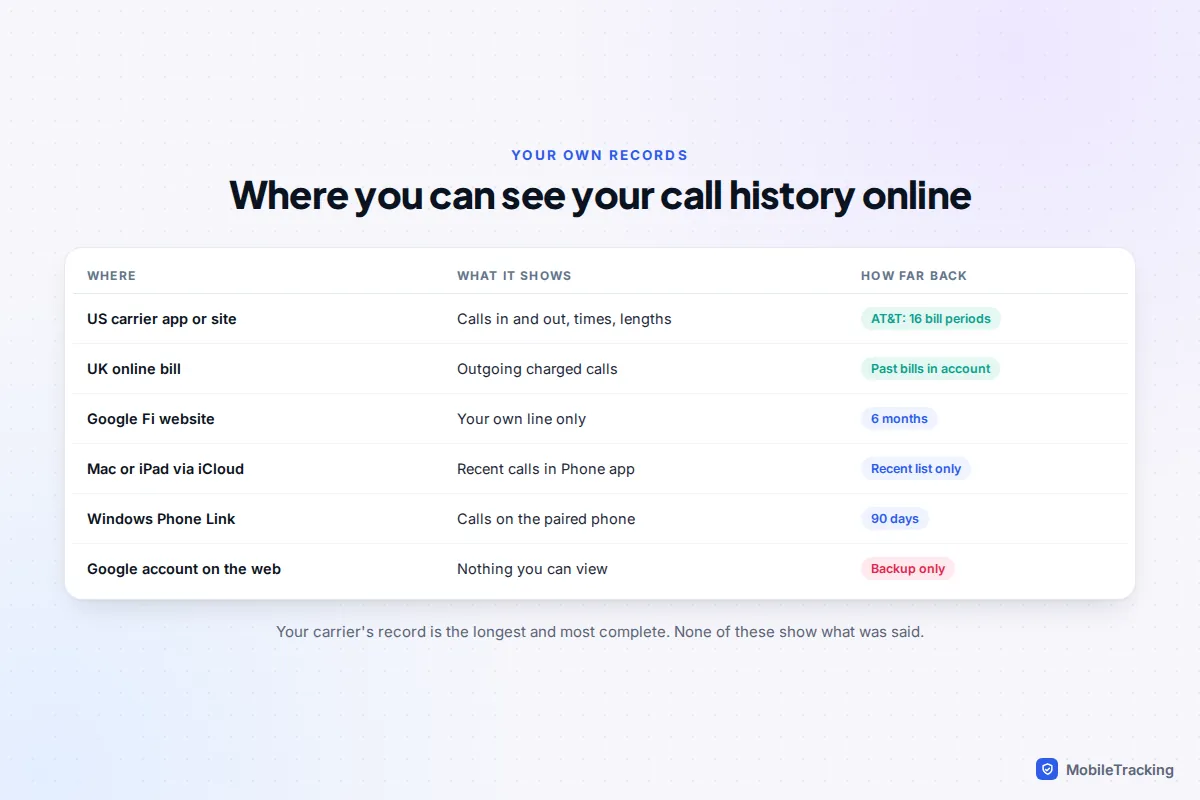
Where your call history can be seen online
There are two quite different kinds of record, and it helps to know which one you need.
- Your carrier’s record is made by the network. It lists calls that went through your number, whatever happens to your phone, and can’t be deleted by clearing the phone’s log. It’s the one to use for anything from checking a bill to proving a call took place.
- Your phone’s own log is the Recents list. It may be synced to your other devices, but it’s limited in length and disappears when you clear it.
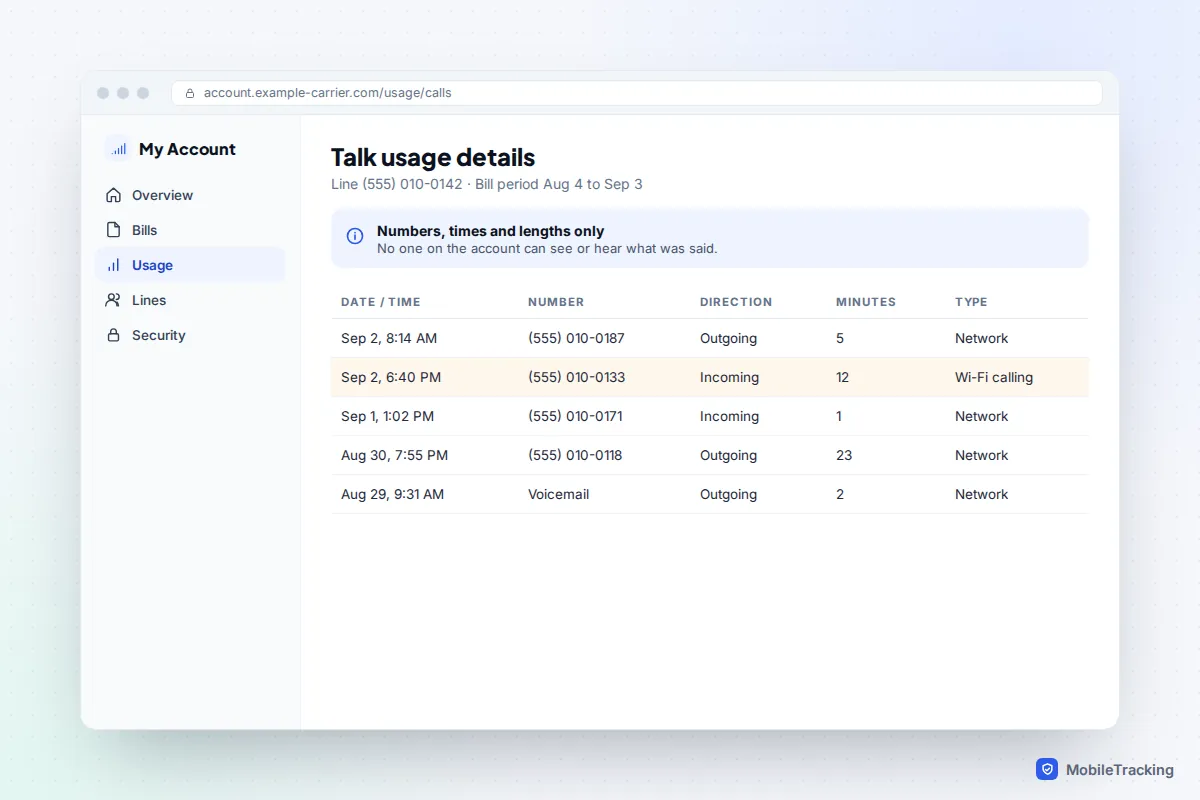
Neither holds the content of calls. There are no recordings, and a carrier account shows the number, time and duration only. Calls made through WhatsApp, FaceTime or other apps use data, so they don’t appear as calls in carrier records.
US carriers: AT&T, Verizon and T-Mobile
All three big US carriers show call details online, including incoming calls, which UK bills usually leave out. Menu names change often, so if a label differs, look for Usage.
AT&T
In the myAT&T app, tap Controls, then Usage. On the website, open the usage section, pick the wireless number, select See all details and choose Talk. AT&T says it shows all outgoing and incoming calls, with call time, length and type (network or Wi-Fi calling), for up to 16 bill periods. It also rounds usage up to the nearest minute, so a 61-second call shows as two.
Verizon
Sign in to the My Verizon app or website and open the usage section for the line. Verizon’s website shows usage for the past 90 days; for older periods, use your past bills. Verizon’s records cover whether a call or text was sent or received, the time and date, and the other number, and it shows 999-999-9999 when it can’t identify a number, often for short codes.
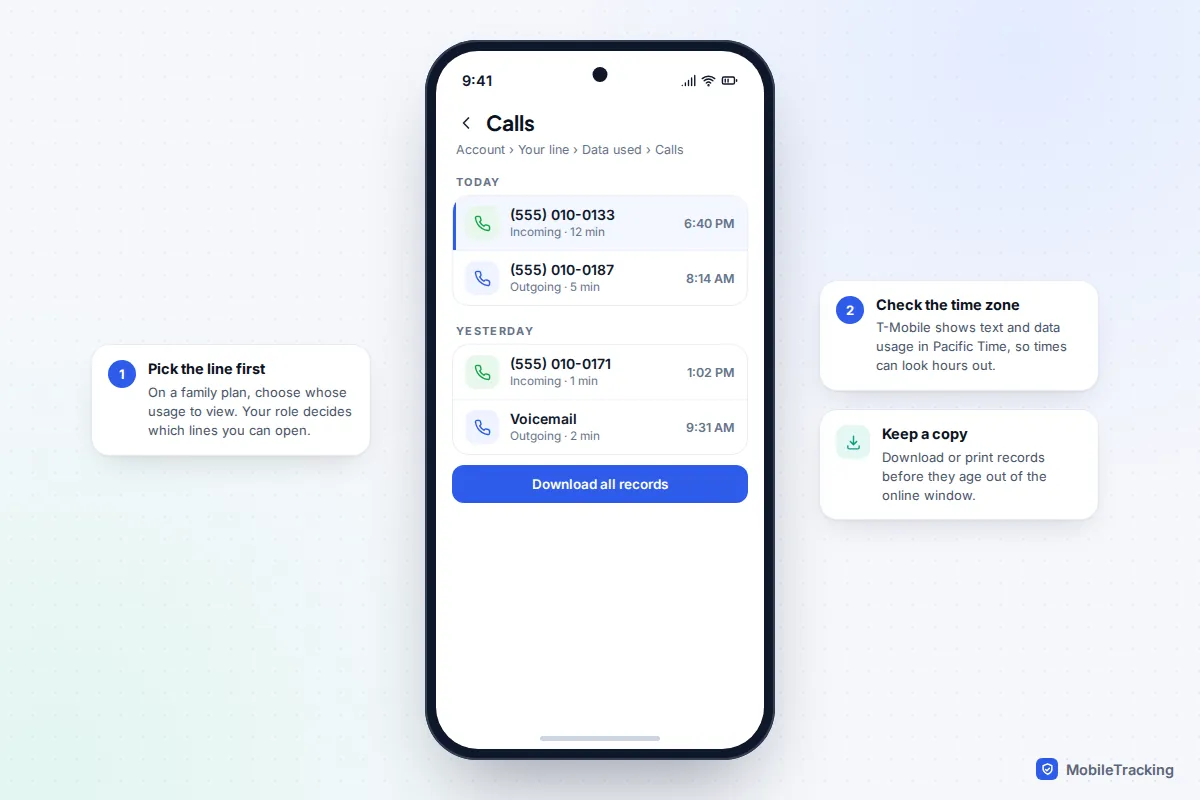
T-Mobile
In the T-Life app, open the Account tab (previously called Manage), choose the line in the People section, tap Data used and pick Calls. On T-Mobile.com, choose Usage from the top menu, then Calls and the line. You can print up to a year of records with Download all records. T-Mobile notes that data and text usage is shown in Pacific Time, so times can look hours out if you live elsewhere.
Google Fi and other providers
Google Fi keeps call and text history on its website only, not in the app: go to fi.google.com/account, then Settings › History. You’ll see the most recent six months and can download it as a CSV file. Unusually, Fi shows each member only their own history, so even a group plan owner can’t see other members’ calls. Smaller prepaid brands vary; if the app has no usage section, ask customer service what they can provide.
UK networks: your itemised bill online
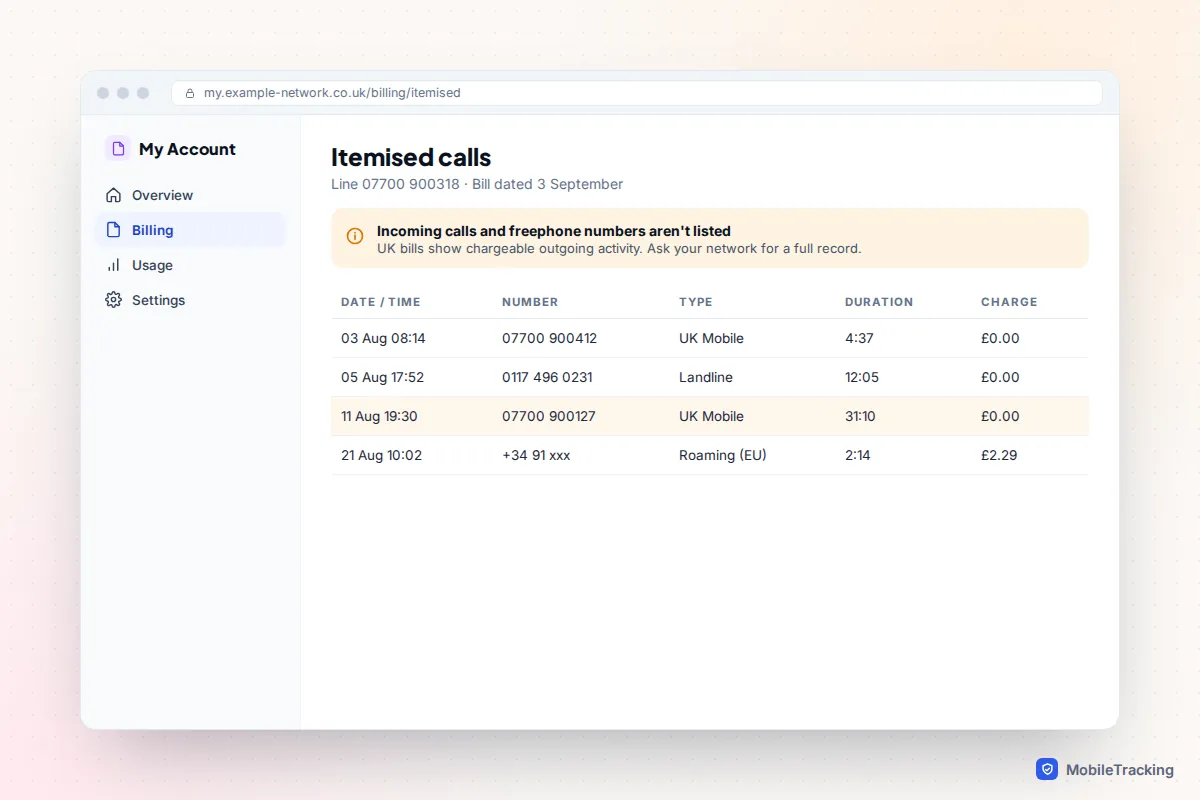
UK networks don’t usually offer a live call log. Instead, your call history is the itemised section of each monthly bill, which you can view and download in the app or online account.
- EE: in the My EE app or online, select Manage, then Billing, to view and download previous bills. A posted itemised bill is available by calling 150, but EE charges for it.
- O2: use the My O2 app or website. O2 says bills more than six months old can be downloaded as printable PDFs.
- Vodafone and Three: open the bills section of the My Vodafone or Three app, or the online account, and download the bill with its itemised pages.
Two things surprise people. UK bills normally list chargeable outgoing activity, so incoming calls aren’t shown unless you were roaming, and freephone numbers are left off by design, so a call to a helpline won’t appear. If you need a fuller record, or you’re on pay as you go and don’t get bills, ask your network, and if it won’t help, make a subject access request under data protection law; organisations normally have one month to respond. Our guide to reading a phone bill’s call details explains every column and code.
Your phone’s log on other screens: iCloud, Google and WhatsApp
Your phone’s Recents list can sometimes be seen on another device, which is handy if the phone is lost or broken.
iPhone: Mac, iPad and iCloud
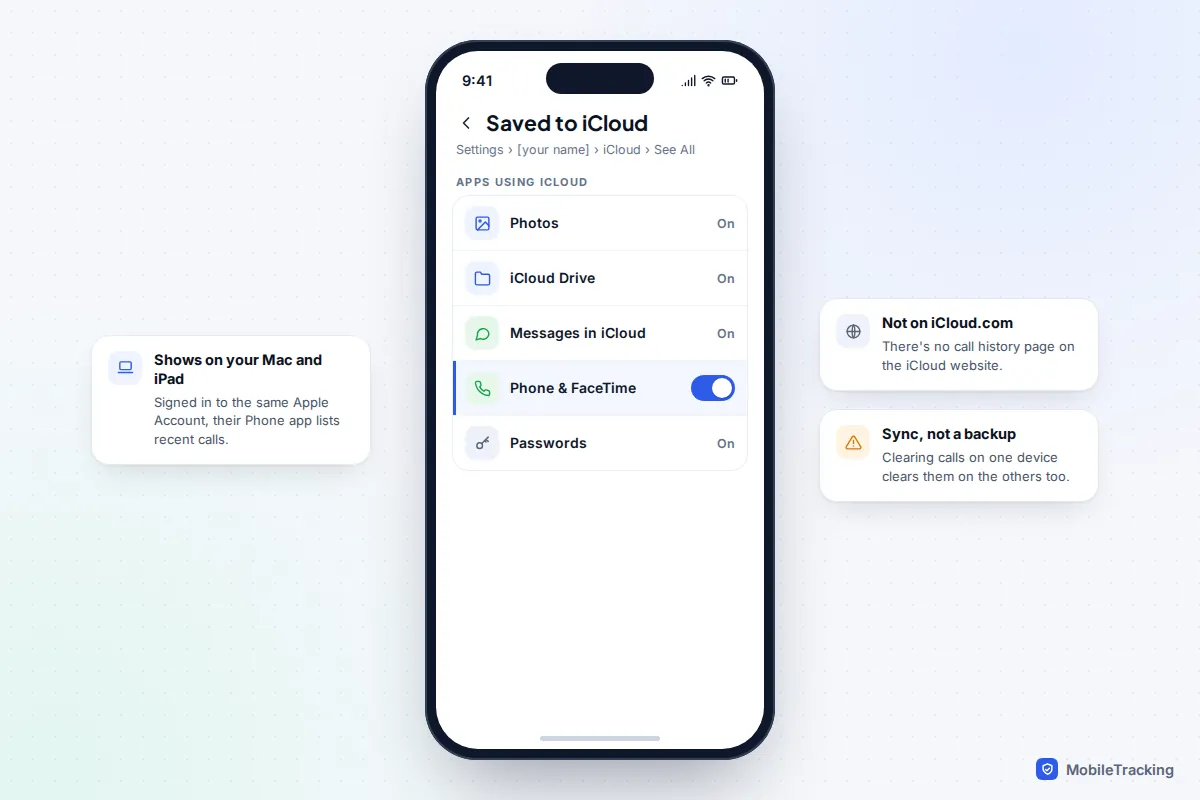
When call history is syncing through iCloud (check Settings › [your name] › iCloud › See All for the Phone and FaceTime entry), a Mac or iPad signed in to the same Apple Account shows your recent calls. Since macOS Tahoe and iPadOS 26, both have a Phone app with a Recents list. Keep in mind that this is sync, not a backup: clearing calls on one device clears them everywhere. iCloud.com has no call history page at all.
Android and Google
Google’s Android backup includes call history, but only so it can be restored to a phone during setup. There’s no page in your Google account where you can view it, and it isn’t included in a Google Takeout download. Two exceptions: calls made with a Google Voice number appear at voice.google.com, and Google Fi’s history is on its website, as above. On Windows, Microsoft’s Phone Link app shows calls from a paired Android phone or iPhone for the last 90 days.
WhatsApp and other calling apps
WhatsApp calls are listed in the Calls tab of the app and nowhere else online. They never appear on a carrier record, which only sees data use. If you’ve cleared a log and need it back, our guide to seeing cleared call history goes through backups and synced devices.
What the law allows on family plans
The rule is simple: call records belong to the account, and access follows the account holder’s permissions. That creates three situations.
- Your own line: you can always see your own usage, although on someone else’s plan your role may limit you to a summary.
- The account holder: can normally see call details for every line on the account. On Verizon, the Account Owner and Account Managers see all lines, while an Account Member sees only their own. On T-Mobile, the Primary Account Holder and Authorized Users can manage all lines, while Standard and Restricted users see their own line only. In the UK, the bill payer sees the itemisation for every line on the bill.
- Everyone else: has no right to the records, even a spouse or parent who isn’t on the account.
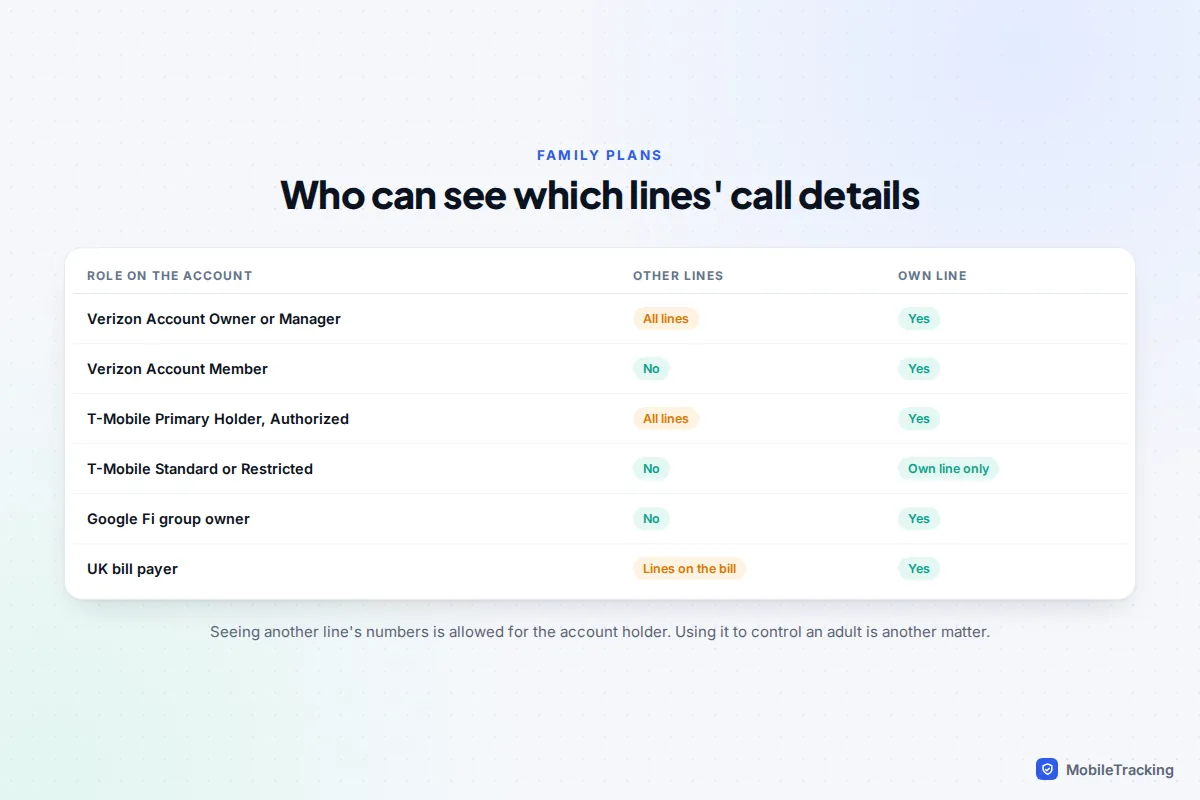
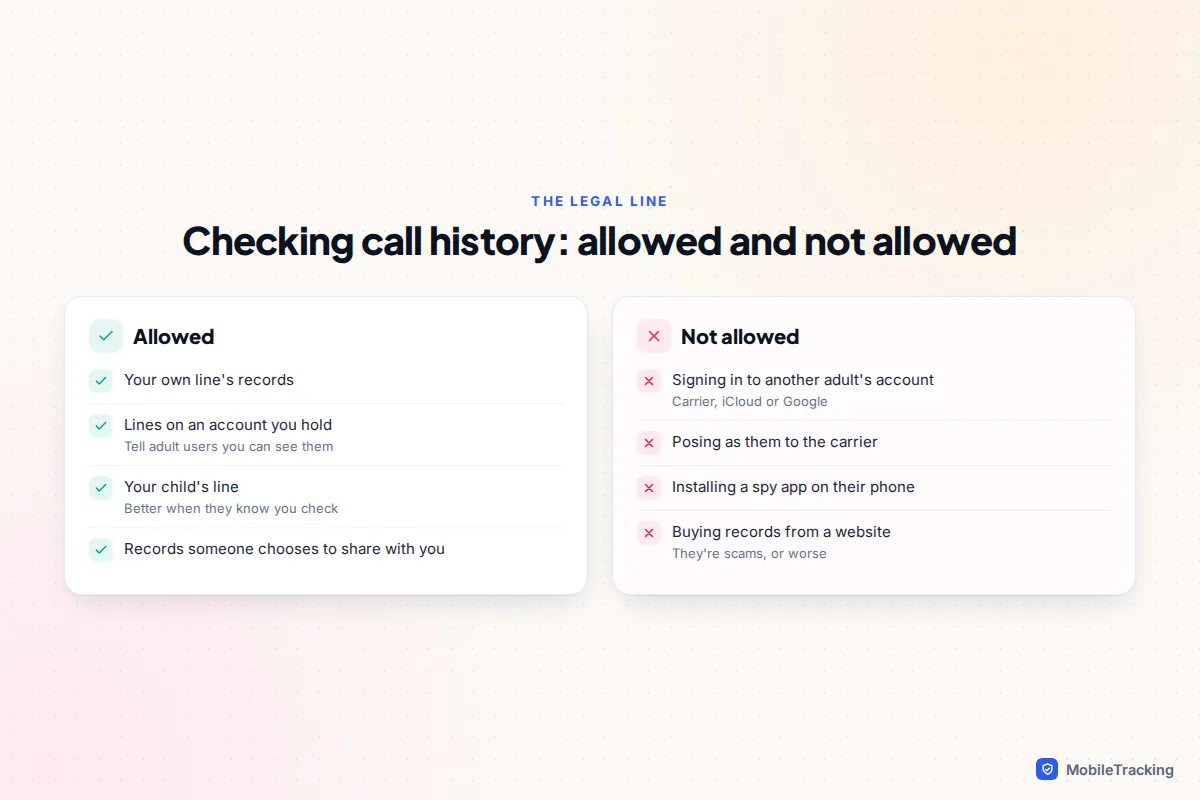
Being able to see another adult’s numbers isn’t the same as it being wise to check them in secret. If you pay for an adult family member’s line, tell them you can see its call details. With children, openness works better than surprise checks, and our guide to whether it’s legal to monitor your child’s phone covers the wider picture.
Where it becomes illegal
Getting into another adult’s records without their permission is a crime in both the US and the UK. In the US, the Telephone Records and Privacy Protection Act of 2006 makes it a federal offence to obtain someone’s confidential phone records by posing as them, using fraudulent documents or accessing their account online without authorisation, with penalties of up to 10 years in prison. In the UK, signing in to someone else’s account without permission is unauthorised access under the Computer Misuse Act 1990, and knowingly obtaining personal data without the organisation’s consent is an offence under the Data Protection Act 2018. Police and courts get records through formal legal process, not by asking the carrier nicely.
Sites and apps that promise anyone’s call history are scams
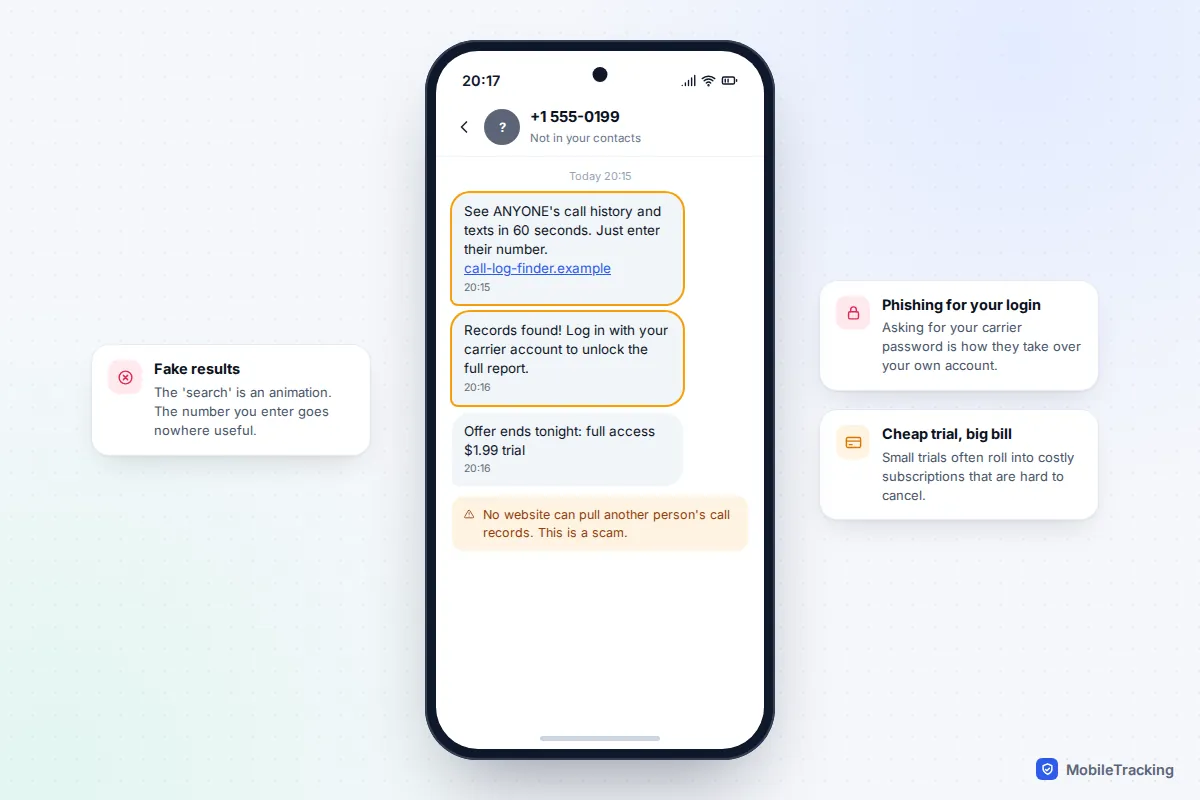
Search for “check call history online” and you’ll find sites and apps claiming to show any number’s calls and texts in minutes. They can’t. Carriers only release call records to the account holder, behind a password, or under legal process. US rules require carriers to protect online access to call details with a password that isn’t based on personal facts like a birthday, and to tell you when that password or your online account changes.
What these services actually do follows a familiar pattern:
- A fake search. You type a number and watch a progress bar “scan” records. It’s an animation.
- A paywall or survey. The “report” is locked behind a small trial fee that rolls into an expensive subscription, or a survey that harvests your details.
- A request for your login. Some ask you to sign in with your own carrier account “to verify”. That’s phishing, and it hands your account to a criminal.
- An app to install on the other phone. Anything needing secret access to someone’s device is stalkerware, illegal to use on another adult. The FTC’s guide to stalkerware explains the risks.
Our guide to phone-number tracking sites shows how to spot them. If you’ve already paid, contact your bank to stop the payments, and change your carrier password if you entered it anywhere.
Lock down your own carrier account
Because your online account holds your call history, it’s worth protecting like a bank account. Someone who gets in can read your records and, worse, move your number to their own SIM and intercept security codes. Ten minutes of setup closes most of the gaps.
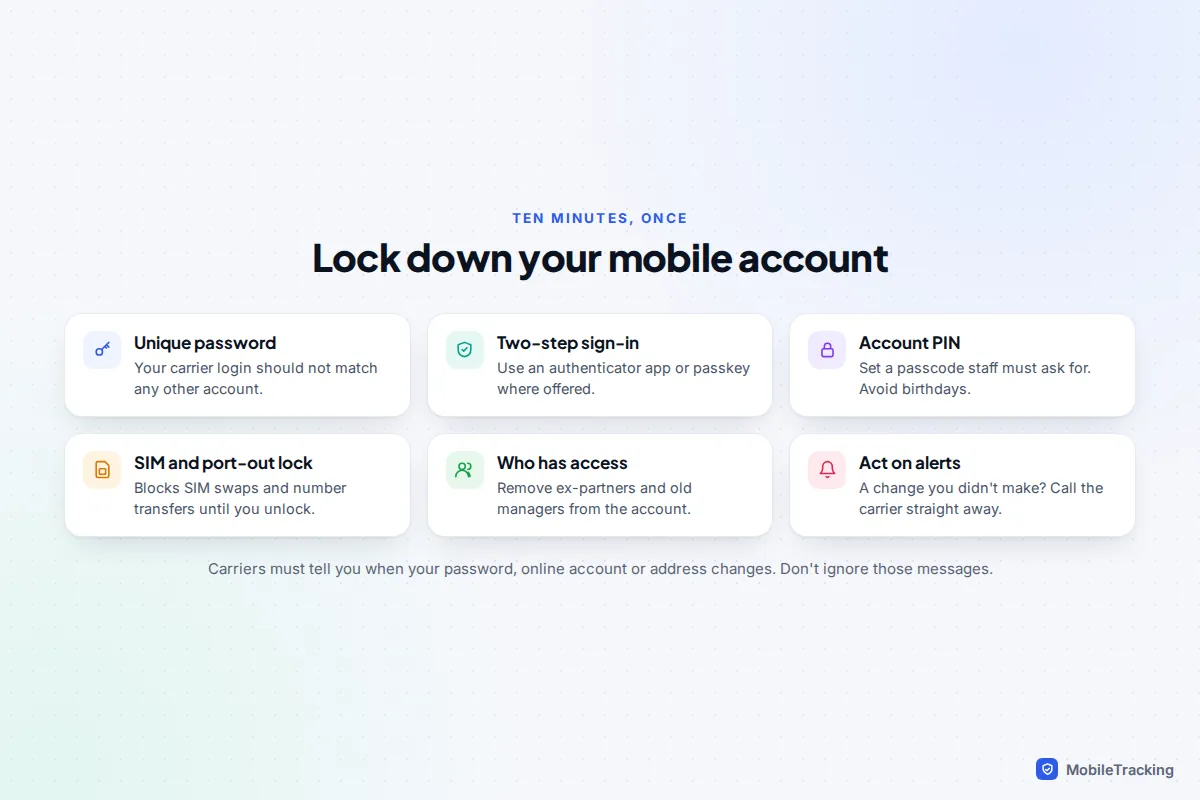
- Use a unique password for your carrier login, one you don’t use anywhere else.
- Turn on two-step verification for the app and website, preferably with an authenticator app or passkey. Our guide to turning on two-factor authentication everywhere covers the options.
- Set an account PIN or passcode that staff must ask for, and avoid birthdays or parts of your phone number.
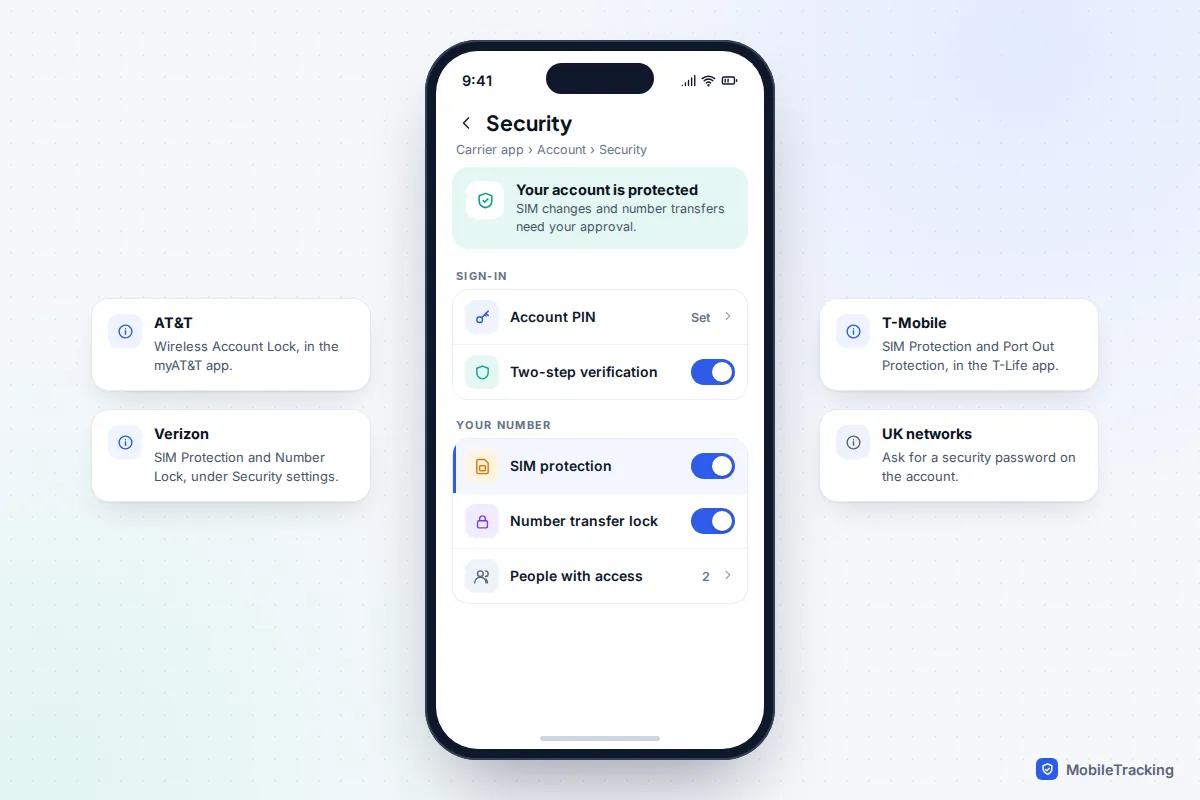
- Switch on SIM and number-transfer protection. AT&T calls it Wireless Account Lock (in the myAT&T app); Verizon offers SIM Protection and Number Lock in its security settings; T-Mobile has SIM Protection and Port Out Protection in the T-Life app. In the UK, ask your network to add a security password to the account.
- Review who has access. Remove ex-partners, former account managers and old authorised users.
- Act on alerts. If you get a notice about a password, SIM or address change you didn’t make, call your carrier straight away using the number on its website, not one from a text.
Frequently asked questions
Can I see my child’s call history online?
If you’re the account holder or an account manager, yes: the carrier’s usage page shows numbers, times and durations for their line. It won’t show WhatsApp or other app calls, and it’s worth telling your child that you can see it.
Does deleting calls on my phone remove them from my carrier records?
No. The phone’s log and the carrier’s record are separate. Clearing Recents changes nothing in your online account or on your bill.
Why can’t I see incoming calls on my UK bill?
Because UK bills list what you’re charged for, and receiving calls at home is free. Ask your network for a full call record, or make a subject access request, if you need incoming calls.
Can I see my Android call history in my Google account?
No. It’s included in your Android backup but can only be restored to a phone. Google Voice and Google Fi are the exceptions, with their own history pages.
Is it legal to check my partner’s calls on our shared plan?
If you hold the account, the carrier will show you every line’s usage. Checking it secretly can still do real harm to trust, and signing in to your partner’s own accounts, or installing an app on their phone without consent, is illegal.
This guide is general information, not legal or financial advice. Read our editorial policy.