
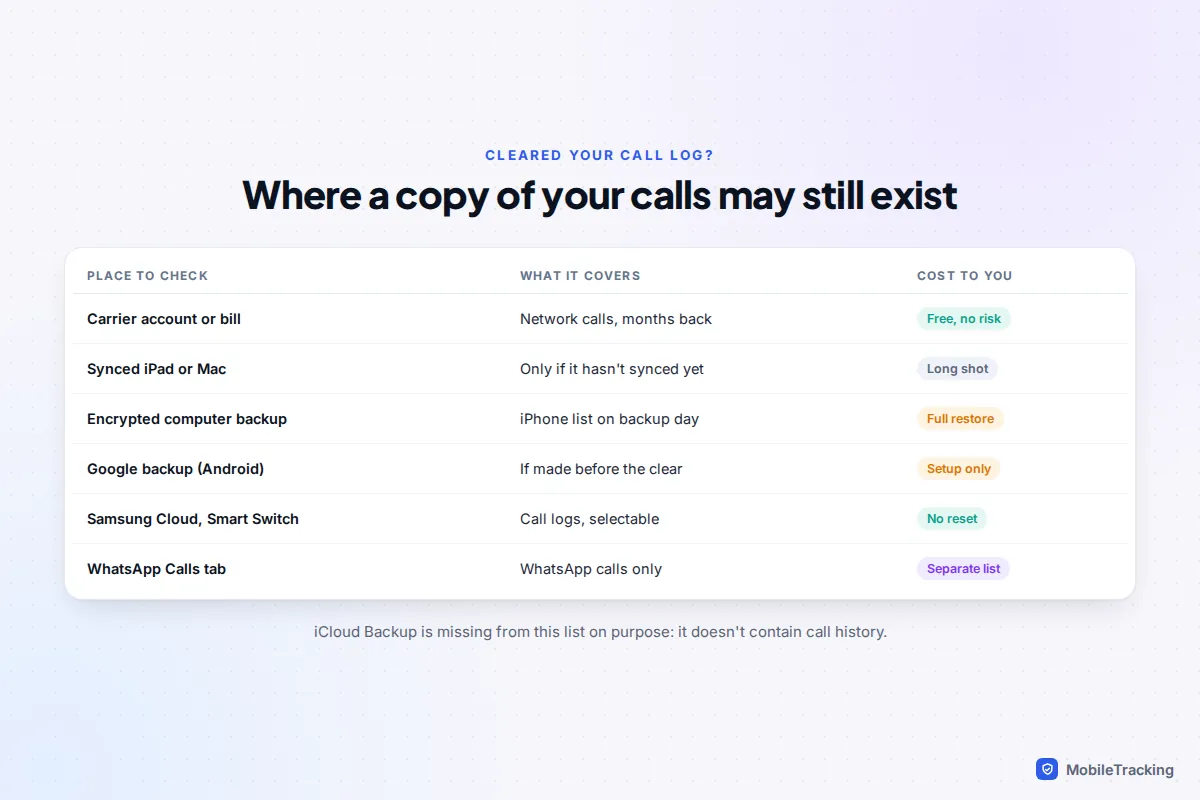
Once you clear calls from your phone’s log, there is no Recently Deleted folder to pull them back from: not on iPhone, not in the Google Phone app on a Pixel, and not on a Samsung Galaxy. What you can do is find another copy. For ordinary phone calls, the dependable copy is your carrier’s record, which you can see in your online account or on an itemised bill. The other places a copy may survive are a synced iPad or Mac, a backup made before you cleared the list, and, for WhatsApp calls, WhatsApp’s own call log.
Act quickly. Backups are overwritten, and every new automatic backup is a chance for the old list to disappear for good. This guide takes each option in turn for your own phone, with what it costs you in time and data, and the “recovery” offers to steer clear of.
First, pause anything that could overwrite a copy
Before trying to recover anything, make sure you don’t destroy the copies you have. Three minutes here can save the whole job.
- Don’t make a new backup yet. On Android, go to Settings › Google › All services › Backup (labels vary by phone and Android version) and note the time of the last backup. If it’s from before you cleared the calls, turn automatic backup off for now so tonight’s backup doesn’t replace it.
- On a Samsung, check Settings › Accounts and backup and pause any automatic Samsung Cloud backup for the same reason.
- On an iPhone, don’t connect it to a computer that backs it up automatically, because a new backup could replace the older one you need. iCloud Backup doesn’t hold call history anyway (more on that below).
- Leave other devices alone. If you have an iPad or Mac that hasn’t been switched on since you cleared the list, don’t open it yet.
Also check the calls really are gone. On iPhone, a filter in the Phone app can make the list look nearly empty, and calls from unknown numbers can sit under a separate filter. Our guide to checking call history on iPhone shows where those filters are.
iPhone: synced devices and iCloud
If Phone & FaceTime is turned on in iCloud settings, Apple stores your call history in iCloud and shows it on your other Apple devices. It’s in Settings › [your name] › iCloud › See All. Apple’s page on syncing Phone and FaceTime data with iCloud is explicit about one thing people get wrong: this data isn’t part of your iCloud Backup.
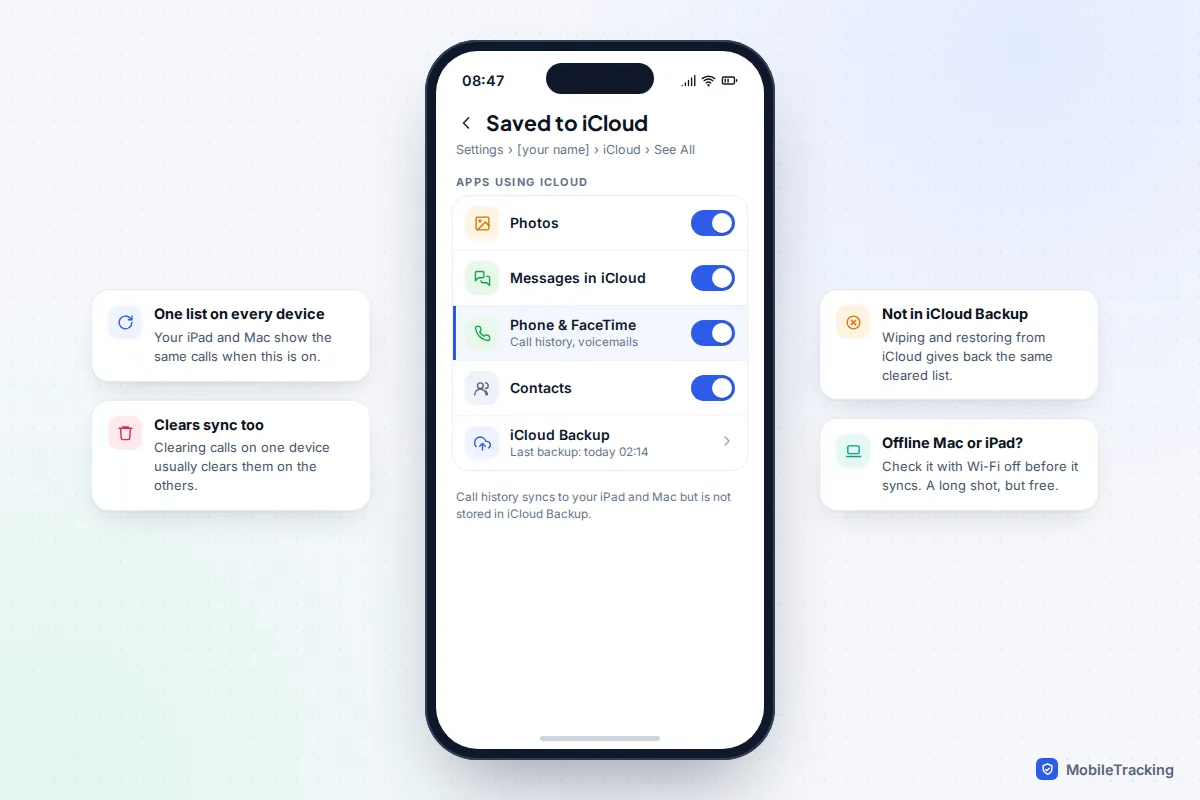
That has two consequences:
- Clearing on one device usually clears everywhere. When your iPad or Mac next syncs, the deletion follows. If one of them has been off or offline since you cleared the list, it’s worth a look, but treat it as a long shot: open it with Wi-Fi turned off, check the Phone app straight away, and take screenshots of anything you need.
- Restoring an iCloud backup won’t bring the calls back. Because call history lives in iCloud sync rather than in the backup, erasing your iPhone and restoring from iCloud gives you the same, already-cleared list. Don’t wipe your phone for this.
iOS 27, released in September 2026, didn’t change how call history syncs or add a way to undo a clear.
iPhone: restore an encrypted computer backup
The one Apple backup that does contain call history is an encrypted backup on a computer. Apple’s page about encrypted backups lists call history among the things encrypted backups include and unencrypted backups leave out. If you’ve been backing up to a Mac with Finder, or to a Windows PC with the Apple Devices app or iTunes, with “Encrypt local backup” ticked, you may have a copy from before the clear.
To check, connect the iPhone, select it in Finder (or the Apple Devices app), and open Manage Backups. Each backup shows its date, and encrypted ones have a padlock. You need one dated before you cleared the list, and you need its password.
What a restore costs you
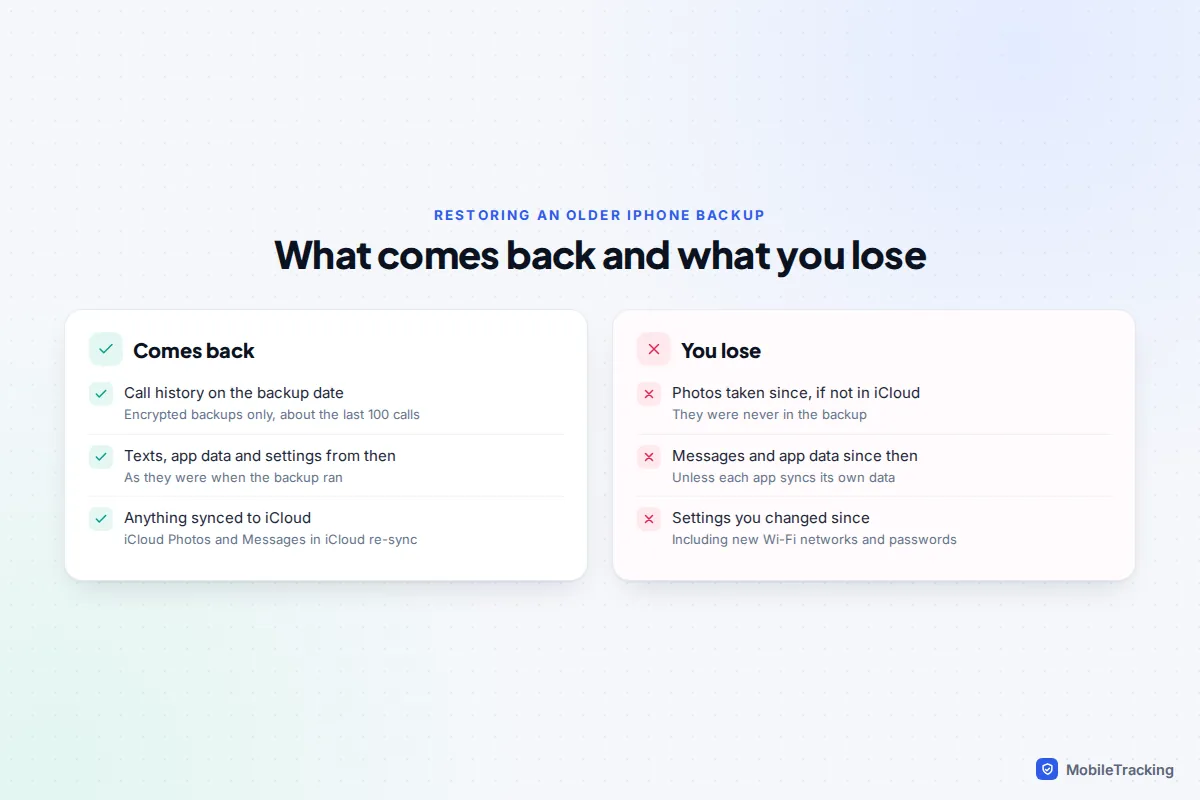
Restoring replaces everything on the phone with the contents of that backup. Photos, messages, app data and settings from after that date are lost unless they’re stored in iCloud or another service. You also have to turn off Find My before Finder will restore. The calls you get back are also the phone’s own limited list, roughly the last 100, not your whole history.
The safer way: back up, look, then put today’s phone back
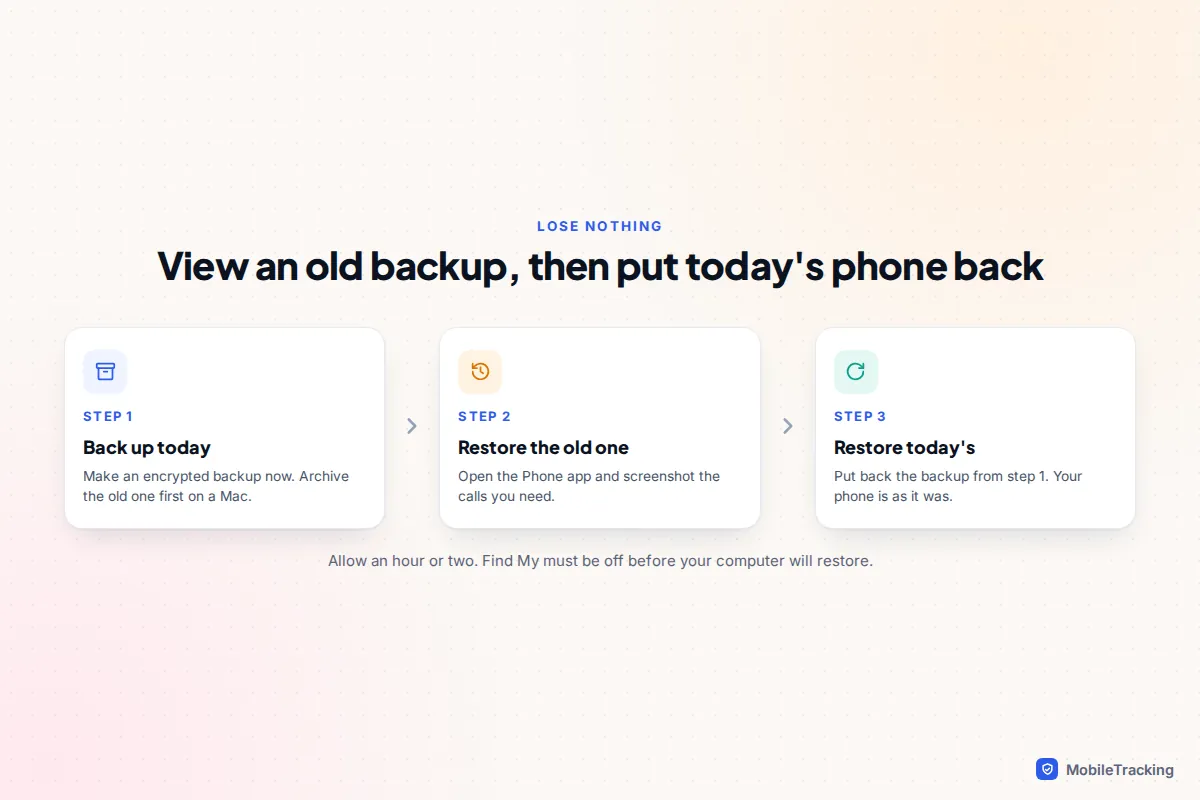
- Make a fresh encrypted backup of the phone as it is now, so today’s data is safe. On a Mac, you can archive the old backup first so the new one can’t replace it: Control-click it in Manage Backups and choose Archive.
- Restore the older backup and open the Phone app. Screenshot or note the calls you needed.
- Restore the new backup you made in step 1. The phone returns to how it was this morning.
It takes an hour or two, but you lose nothing. If you have a spare iPhone, you can restore the old backup to that instead and leave your main phone untouched. Keep the spare in Airplane Mode after it restores, so it doesn’t sync with iCloud and pick up the cleared list.
Our guide to recovering deleted call history on iPhone goes deeper on backup choices if you want to plan ahead.
Pixel and other Android phones: Google backup
Google’s backup for Android includes call history, along with apps and app data, contacts, device settings and SMS and MMS messages, according to Google’s Android backup help page. That makes it useful here, with two big limits.
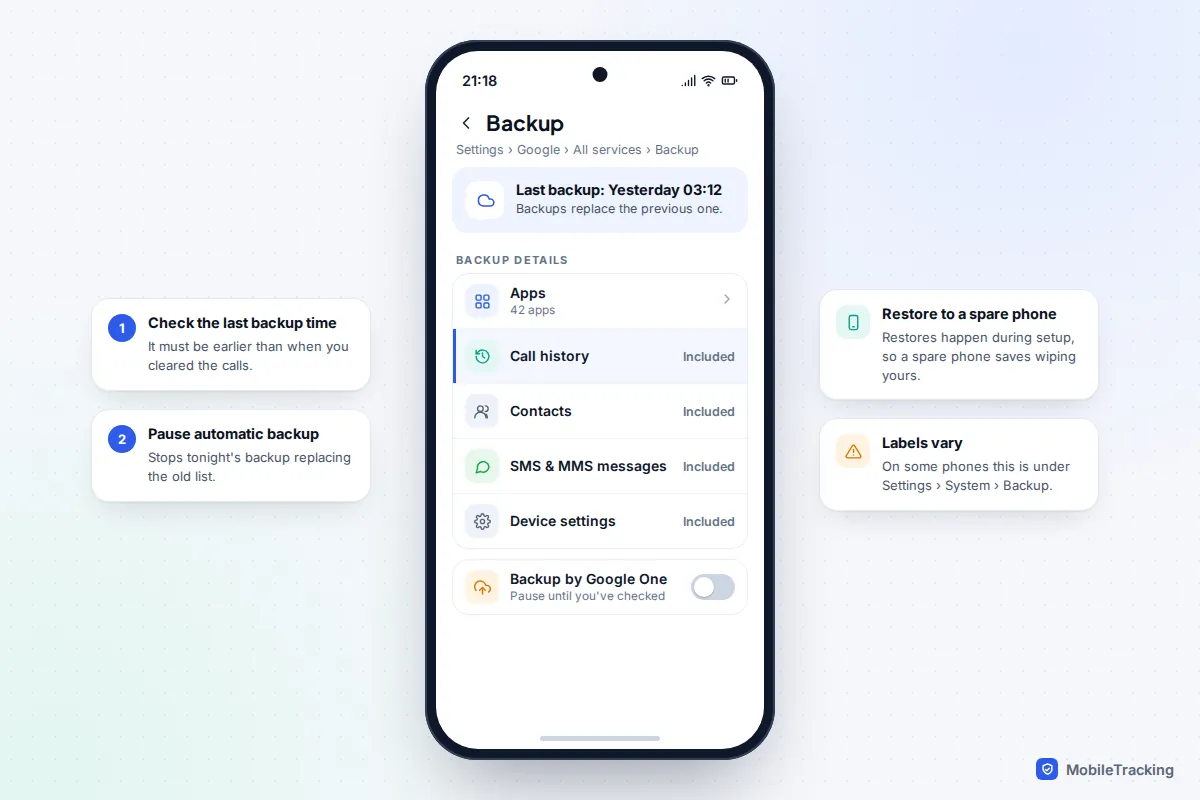
- It keeps the latest backup, not a history. The backup updates automatically, typically when the phone has been idle and charging on Wi-Fi. Once it runs after you cleared the calls, the old list is gone from Google’s copy.
- You can only restore during setup. Google restores a backup when you set up a phone for the first time or after a factory reset. There’s no “restore call history only” button on a phone that’s already set up.
So, if your last backup predates the clear and you’ve paused backups:
- Best option: set up a spare Android phone with your Google account and choose your phone’s backup when asked. Google says both phones need the same Android version, or the one you restore to needs a later version. Restoring can take up to 24 hours to finish.
- Last resort: back up everything else you care about elsewhere, factory reset your own phone and restore. Treat this as a big step, because anything not in the backup is lost.
Google also deletes a backup if the phone isn’t used for 57 days, so an old phone in a drawer may no longer have one. Our guide to recovering deleted call history on Android covers other makes.
Samsung Galaxy: Samsung Cloud and Smart Switch
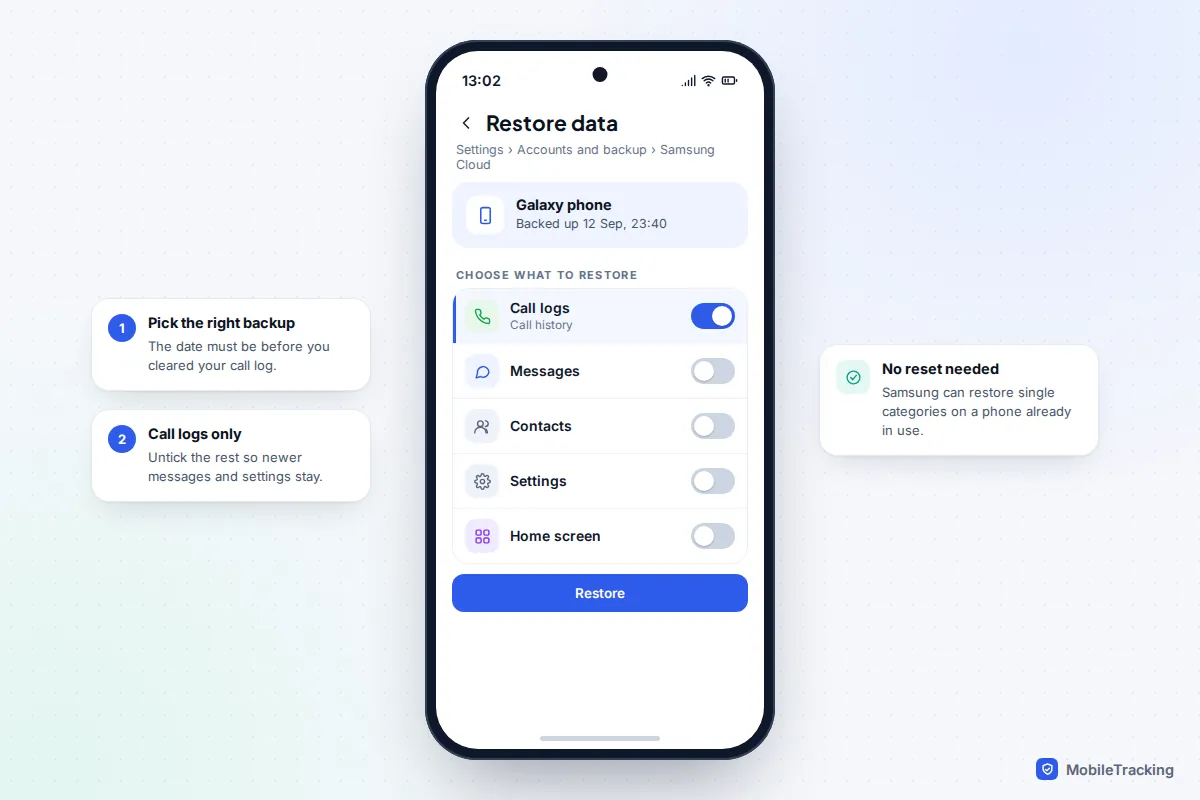
Samsung phones have a genuine advantage: you can restore just the call log, without resetting the phone. Samsung Cloud backs up call logs along with messages, contacts and settings, and Samsung’s own help pages describe choosing which content to restore.
- Open Settings › Accounts and backup, then under Samsung Cloud tap Restore data.
- Choose your phone from the list at the top and check the backup date. It must be from before you cleared the calls.
- Select Call logs only, then tap Restore.
If you back up to a computer with Smart Switch, the same idea applies: Smart Switch backups include call logs, and you can restore selected categories. Samsung’s temporary cloud backup, kept for 30 days, is another place to check if you made one before a repair or upgrade. Menu names change between One UI versions, so look for “Restore data” if the path above doesn’t match.
Your carrier’s record: the reliable copy
Clearing your phone’s log doesn’t touch the network’s records. Every call that went over the mobile network is still in your carrier account, and it usually goes back much further than the phone ever did.
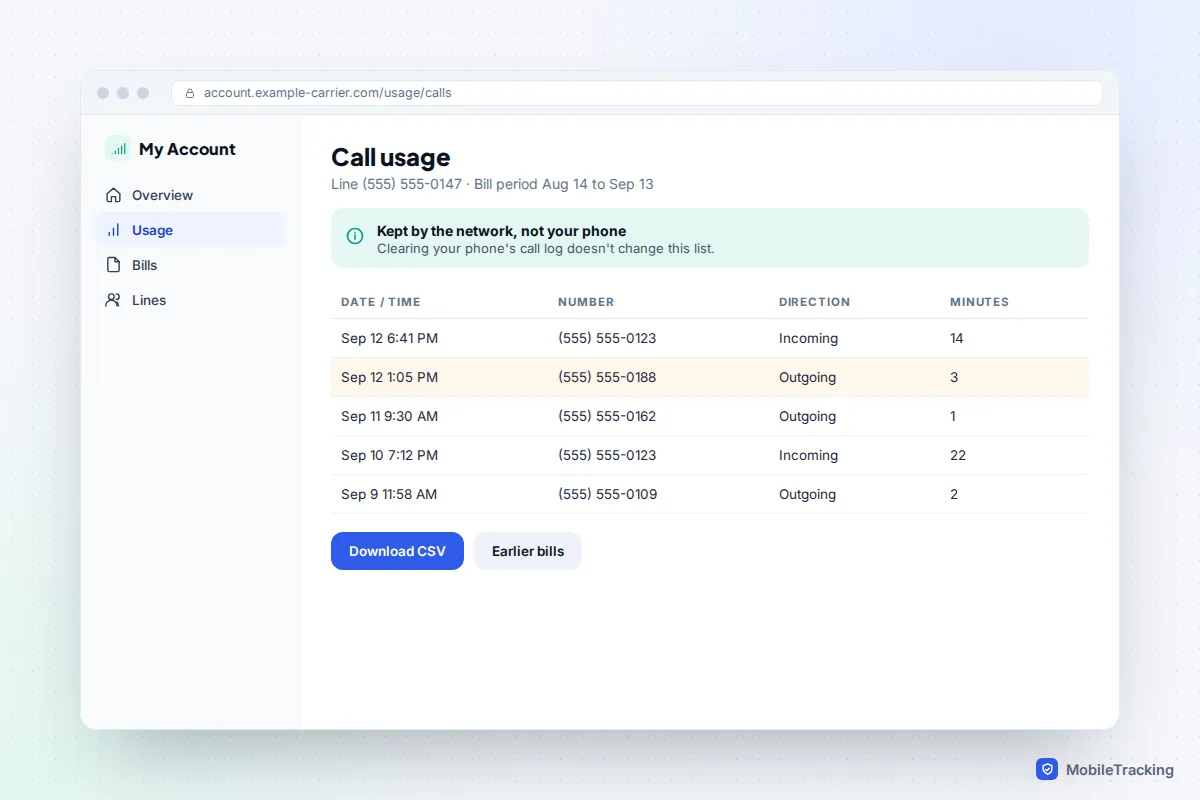
- US carriers show both incoming and outgoing calls. AT&T shows usage for up to 16 bill periods, T-Mobile lets you print up to a year of records, and Verizon’s website shows the past 90 days of usage.
- UK networks itemise the calls you pay for, which normally means outgoing calls only, and freephone numbers are left off. Ask for a full call record if you need incoming calls, or make a subject access request.
Our guide to reading a phone bill’s call details explains each column and code, and getting call logs from your carrier covers requesting older records.
WhatsApp and other app calls are separate
WhatsApp keeps its own call list in the Calls tab. On iPhone, WhatsApp calls usually appear in the Phone app’s history as well, so clearing the Phone app’s list doesn’t clear WhatsApp’s, and clearing WhatsApp’s doesn’t clear the Phone app’s. Check both.
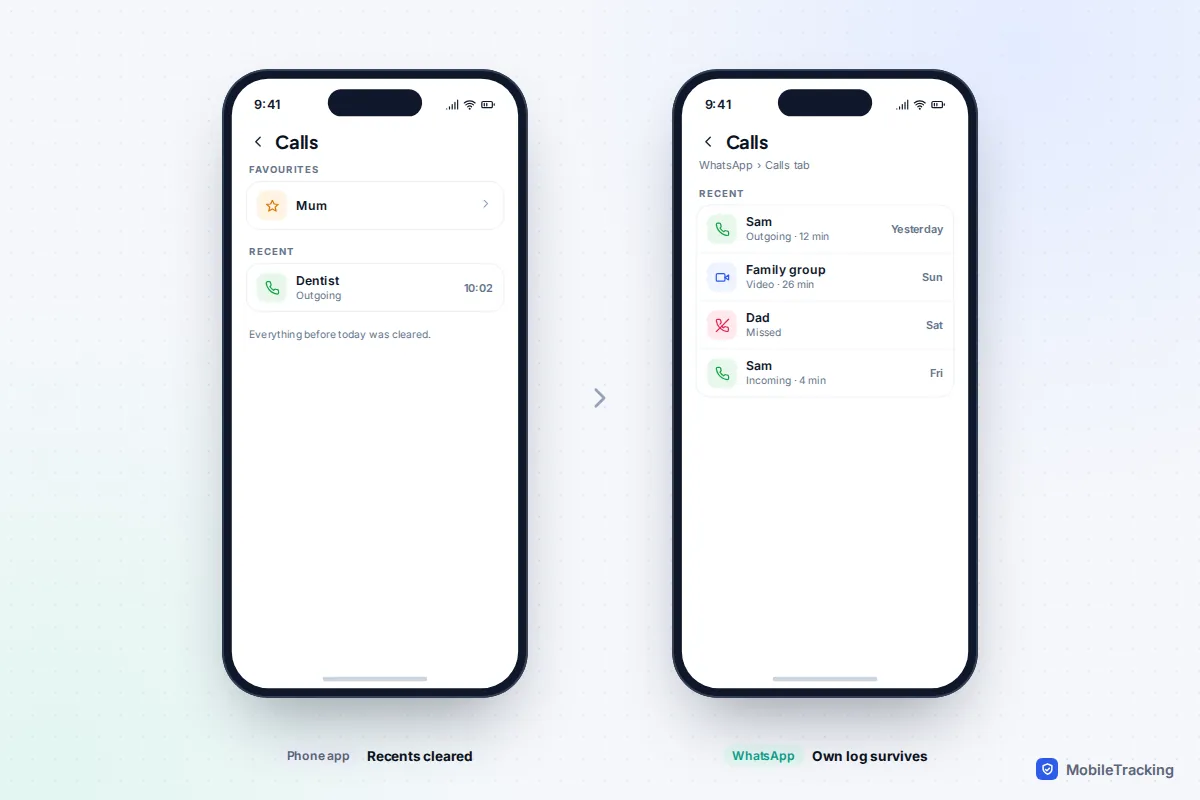
If you cleared WhatsApp’s own call log, the options are narrower. WhatsApp chat backups to Google Drive or iCloud are overwritten each time a new one is made, and restoring one means reinstalling WhatsApp. If your last chat backup was made before you cleared the log, restoring it can bring back the call entries saved with it, but you’ll lose any chats sent or received since that backup. Recent versions of WhatsApp also show a small call entry inside the chat itself, which may still be there after the Calls tab is cleared. FaceTime calls follow the iPhone rules above, because they sync with the Phone & FaceTime setting.
Recovery apps and “call history” websites: what’s real
Search for this topic and you’ll find paid tools promising to recover deleted call logs. Be sceptical. On iPhone, most of these programs read an existing computer or iCloud backup, which you can restore yourself for free, and they can’t find calls that aren’t in any backup. On modern Android phones, storage is encrypted and apps can’t dig through deleted data without root access, which itself carries security risks. Many tools show a free “scan” that appears to find records, then charge before they’ll show anything.
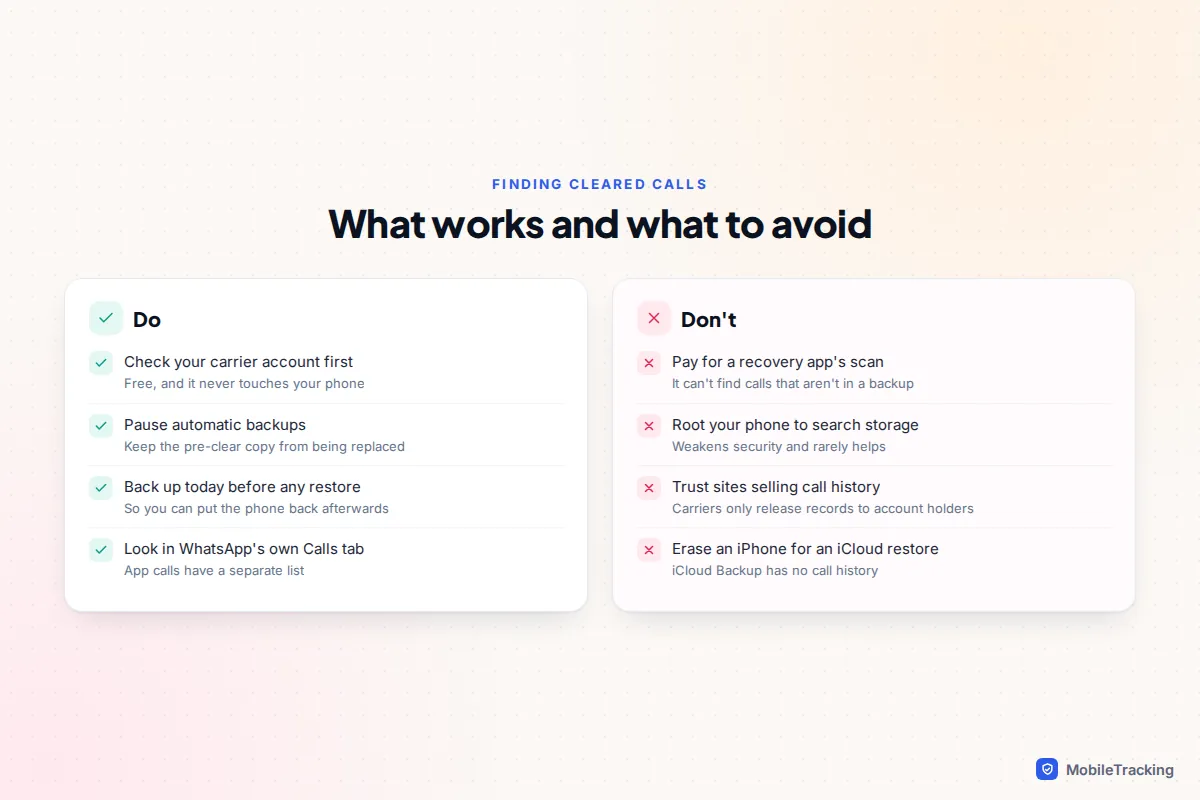
Websites offering to show “anyone’s call history” from a phone number are worse. Carriers release call records only to the account holder, or to authorities with legal process. Our guide to phone-number tracking sites explains how these sites work and what they really sell.
Common mistakes to avoid:
- Letting an automatic backup run after you clear the list, which overwrites the only copy.
- Erasing an iPhone to restore an iCloud backup, which doesn’t contain call history.
- Restoring an old backup without first backing up the phone as it is today.
- Assuming calls are gone when a filter or the Unknown Callers list is hiding them.
Frequently asked questions
Is there a Recently Deleted folder for calls?
No. iPhone, the Google Phone app and Samsung’s Phone app all delete call log entries straight away. Only other copies, such as backups and carrier records, can help.
Does clearing call history remove calls from my phone bill?
No. Your carrier’s records are separate from your phone and aren’t affected by anything you delete on the device.
Can I restore only call history on an iPhone?
Not with Apple’s tools. A restore is all or nothing, which is why backing up first and restoring today’s backup afterwards is the safest approach.
How can I keep a longer call history in future?
Make regular encrypted backups to a computer, and download your carrier’s call records or itemised bills every few months. On Samsung, keep Samsung Cloud backups turned on.
Can I see calls someone else cleared from their phone?
Not without their involvement. The methods here are for your own phone and accounts. If it’s your child’s line on your plan, the account’s usage details show calls, and it’s best to be open with them about that.
This guide is general information, not legal or financial advice. Read our editorial policy.