
The quickest way to find your phone’s IMEI is to open the Phone app, type *#06# on the keypad and read the 15-digit number that pops up. It works on iPhones and on almost every Android phone, with or without a SIM card inside. If you have a dual-SIM or eSIM phone you will see two numbers, and you should write both down.
If the phone is already lost or stolen, you can still get the IMEI from the box, your Apple Account or Google’s Find Hub, or your carrier. The rest of this guide shows every route, explains what the number actually does, and clears up the myths, because an IMEI is very useful for blocking a stolen phone but it cannot tell you where the phone is.
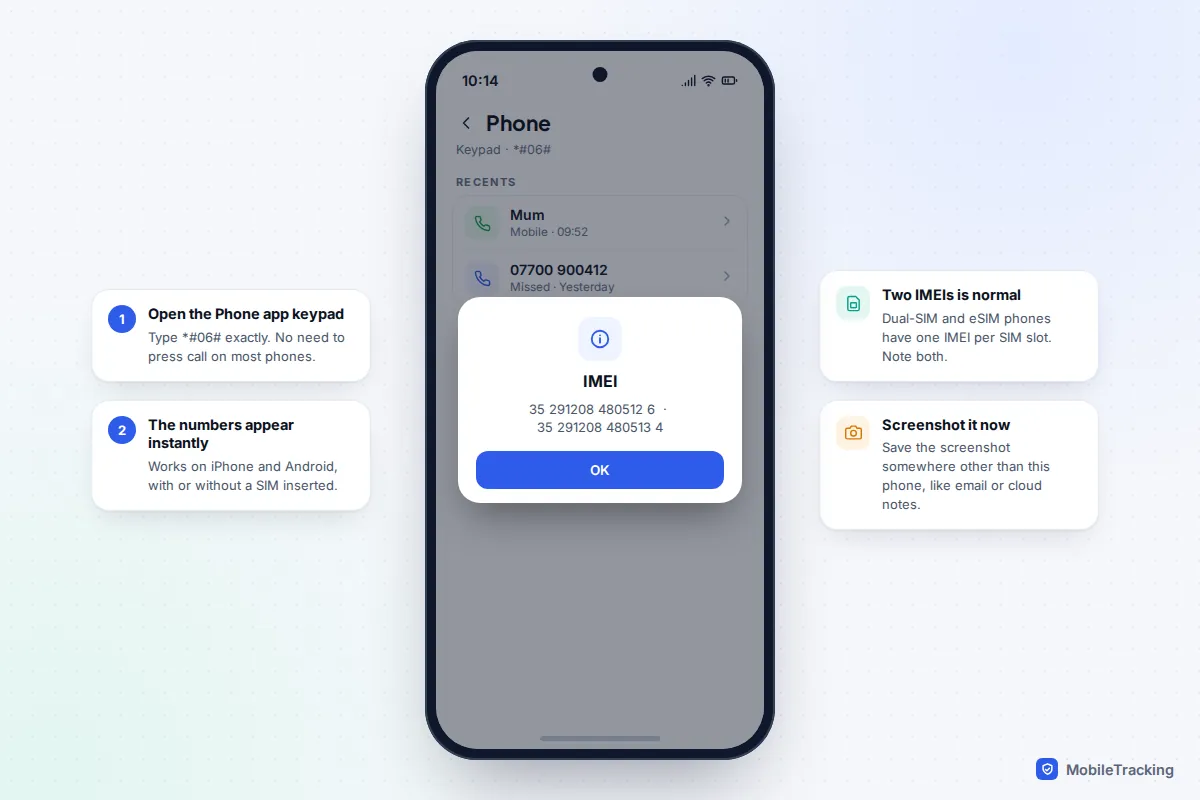
The fastest method: dial *#06#
This shortcut has been part of the mobile standards for decades, which is why it works almost everywhere. On an iPhone, open Phone, tap Keypad, and type *#06#. A screen appears straight away with the IMEI, and on newer models the EID and a second IMEI as well. On most Android phones the number appears as soon as you type the final hash, without pressing call.
A few things to know before you copy it down:
- Two IMEIs is normal. A phone that supports two SIMs (physical plus eSIM, or two physical slots) has one IMEI per slot. Carriers and police may ask for either, so record both.
- Ignore the extra digits. Some Android screens show an IMEI SV (software version), which is 16 digits. The IMEI itself is always 15.
- No SIM, no problem. The IMEI belongs to the phone, not the SIM, so the code still works in a drawer phone with no SIM card.
Take a screenshot and email it to yourself. A screenshot that only lives on the phone is no help once the phone is gone.
Where to find the IMEI on an iPhone
If you would rather not use the keypad, or you want to copy the number neatly into a form, Settings is the next best place. These steps are the same on iOS 18 and iOS 26.
- Open Settings and tap General.
- Tap About.
- Scroll down past the storage and software details. The IMEI sits in the SIM section, and dual-SIM models list a second number, usually labelled IMEI2.
- Touch and hold the number to copy it, which Apple suggests for pasting into support or registration forms.
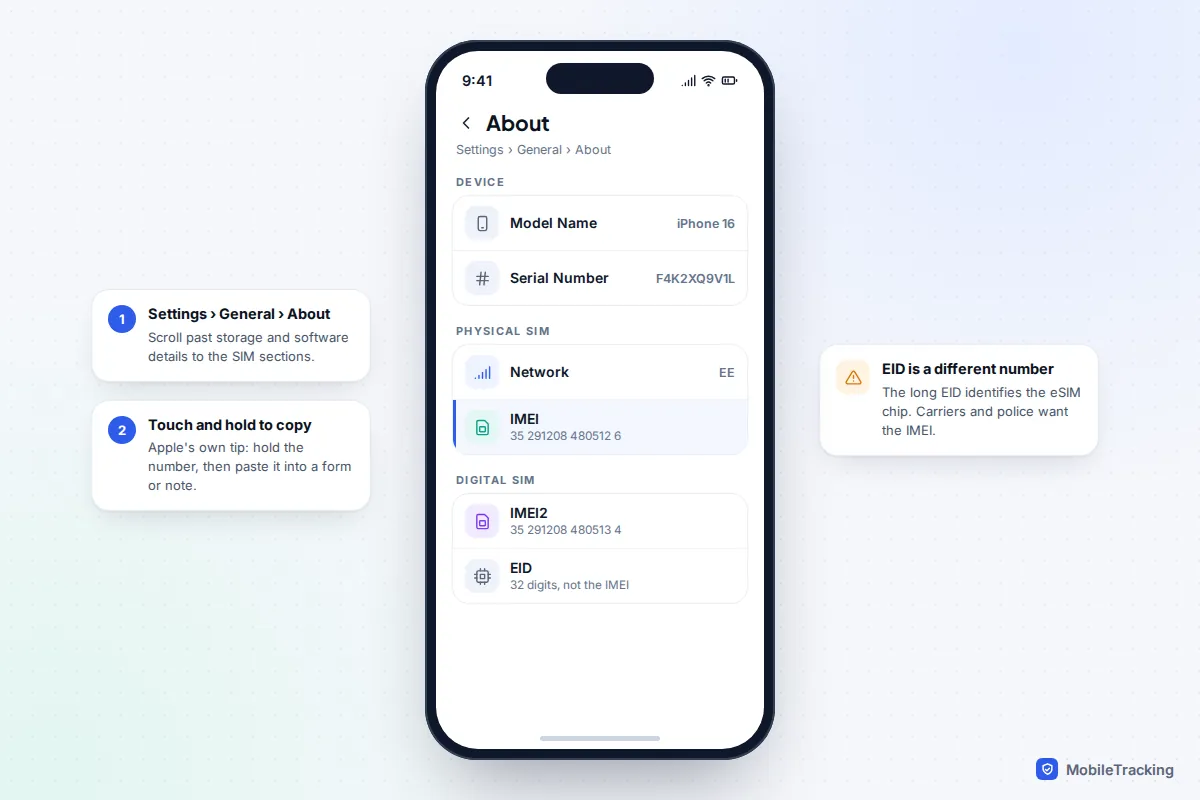
Apple lists several other places the number appears, which matter when the screen is broken:
- SIM tray: iPhone 6s through iPhone 13 (including SE 2nd and 3rd generation) have the IMEI printed on the SIM tray. iPhone 14 and later models do not have an IMEI engraving at all.
- Back of the phone: iPhone 5, 5c, 5s, SE (1st generation), 6 and 6 Plus have it engraved on the back.
- Before setup: on a phone that is still on the Hello screen, tap the small Info button in the bottom-right corner.
- From a computer: connect the iPhone to a Mac (Finder) or a Windows PC (Apple Devices app or iTunes), click the phone’s name, then click the phone number line to cycle through the IMEI and other identifiers.
- On the web: sign in at account.apple.com, open Devices and choose the phone. This is the one to remember if the iPhone has gone missing.
Apple’s own page, Find the serial number or IMEI on your iPhone, has pictures of each tray and engraving if you are unsure which model you have.
Where to find the IMEI on Android: Pixel, Samsung and others
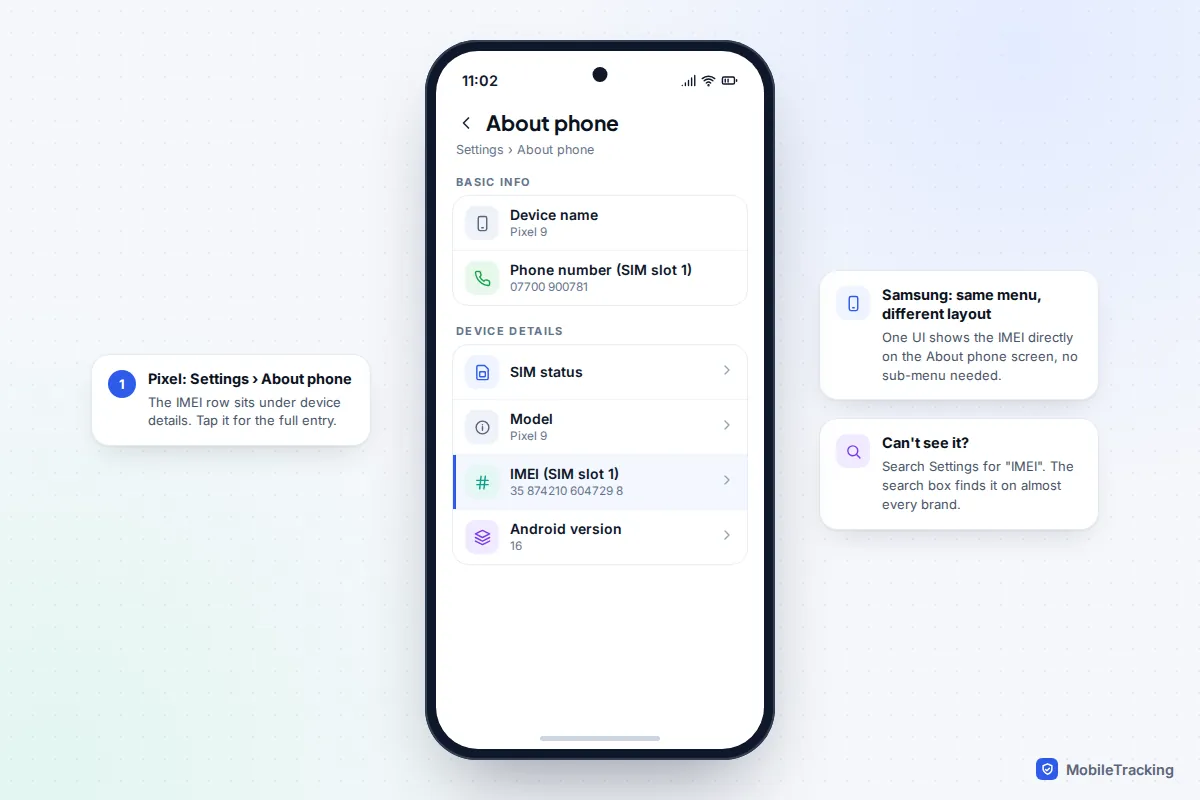
On Android the IMEI lives in the About phone screen, but manufacturers arrange that screen differently, so the exact row you need moves about.
Google Pixel (Android 15 and 16)
- Open Settings and scroll to the bottom.
- Tap About phone.
- Look under the device details for IMEI. On dual-SIM setups there is an entry per SIM slot. Tap it if the number is cut short.
Samsung Galaxy (One UI 7 and 8)
- Open Settings and tap About phone.
- The IMEI is shown on that screen, with a second entry on dual-SIM models. Layouts vary a little between One UI versions, so scroll the whole page if you don’t see it at the top.
Samsung also prints the IMEI in small text on the back of some models and on the original box, and its Samsung Members app lists it under the Support tab. On other brands (Motorola, OnePlus, Xiaomi and so on) the quickest route is to type IMEI into the search bar at the top of Settings, which jumps straight to the right screen.
How to find the IMEI when you no longer have the phone
This is the situation most people are in when they first search for their IMEI: the phone has been stolen, left in a taxi or dropped in a river, and the carrier or police want the number. You have more options than you might think.
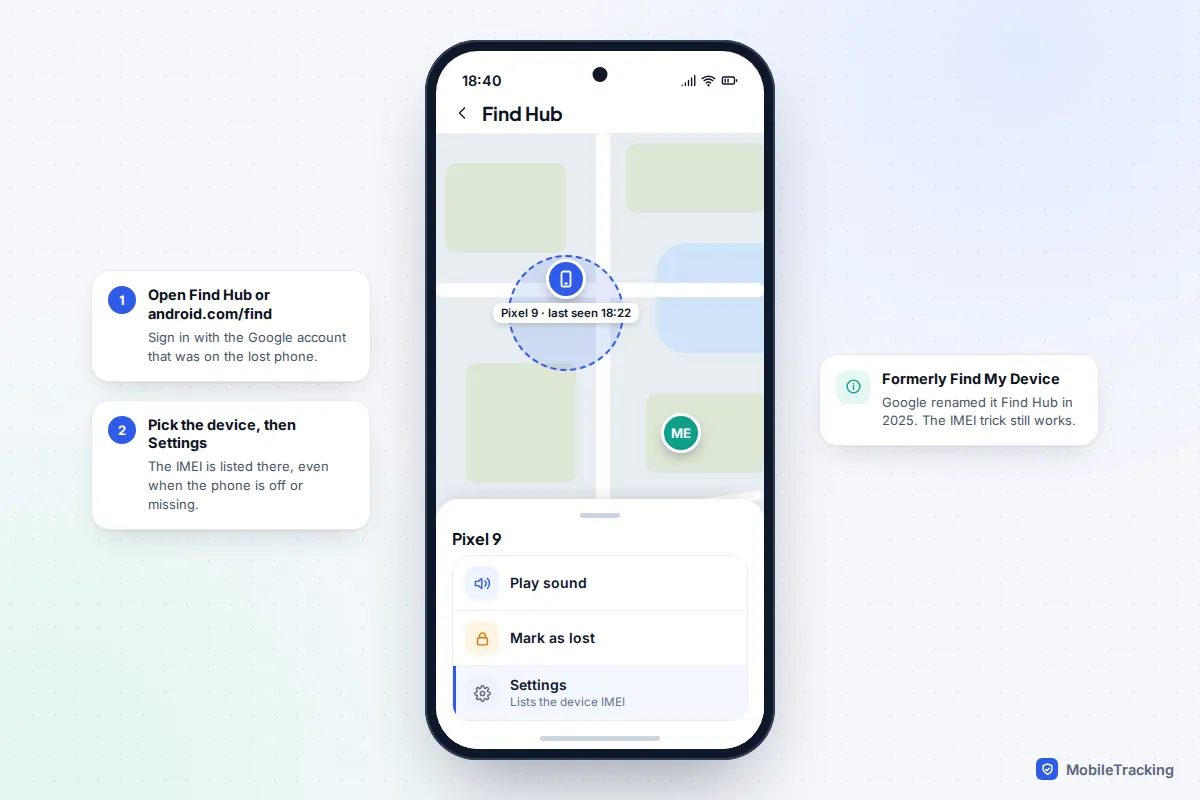
For an Android phone: use Find Hub
Google renamed Find My Device to Find Hub in 2025, but the IMEI lookup is still there. According to Google’s help page for lost Android devices, you can open the Find Hub app (or go to android.com/find in any browser), sign in with the Google account that was on the phone, choose the device and select Settings. The IMEI is listed there even if the phone is switched off.
For an iPhone: use your Apple Account
Go to account.apple.com on any computer or phone, sign in, open Devices and choose the missing iPhone. The IMEI is shown alongside the model and serial number. If you use two-factor authentication and your only trusted device is the missing iPhone, you may need a trusted phone number to receive the code, which is one more reason to keep one set up.
Paper trail options for any phone
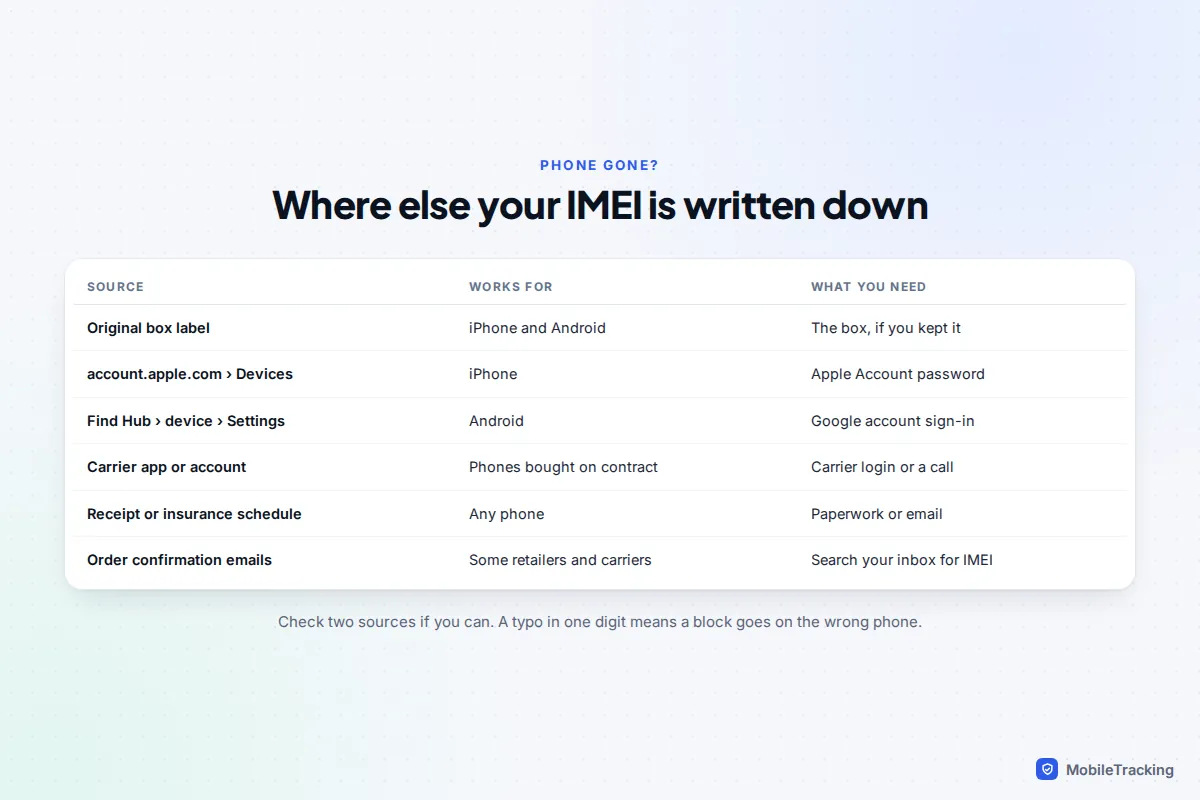
The barcode sticker on the original box carries the IMEI. Phones bought on a contract are usually recorded against your account, so your carrier’s app or customer service can read it back to you after security checks. Insurance schedules often include it, and some retailers put it on the receipt or order confirmation, so searching your email inbox for “IMEI” is worth thirty seconds.
What the 15 digits actually mean
IMEI stands for International Mobile Equipment Identity. It is a unique serial number for the radio part of your phone, and every time the phone connects to a mobile network it tells the network its IMEI. That is the key to why the number is useful: the network can recognise the handset regardless of which SIM is inside it.
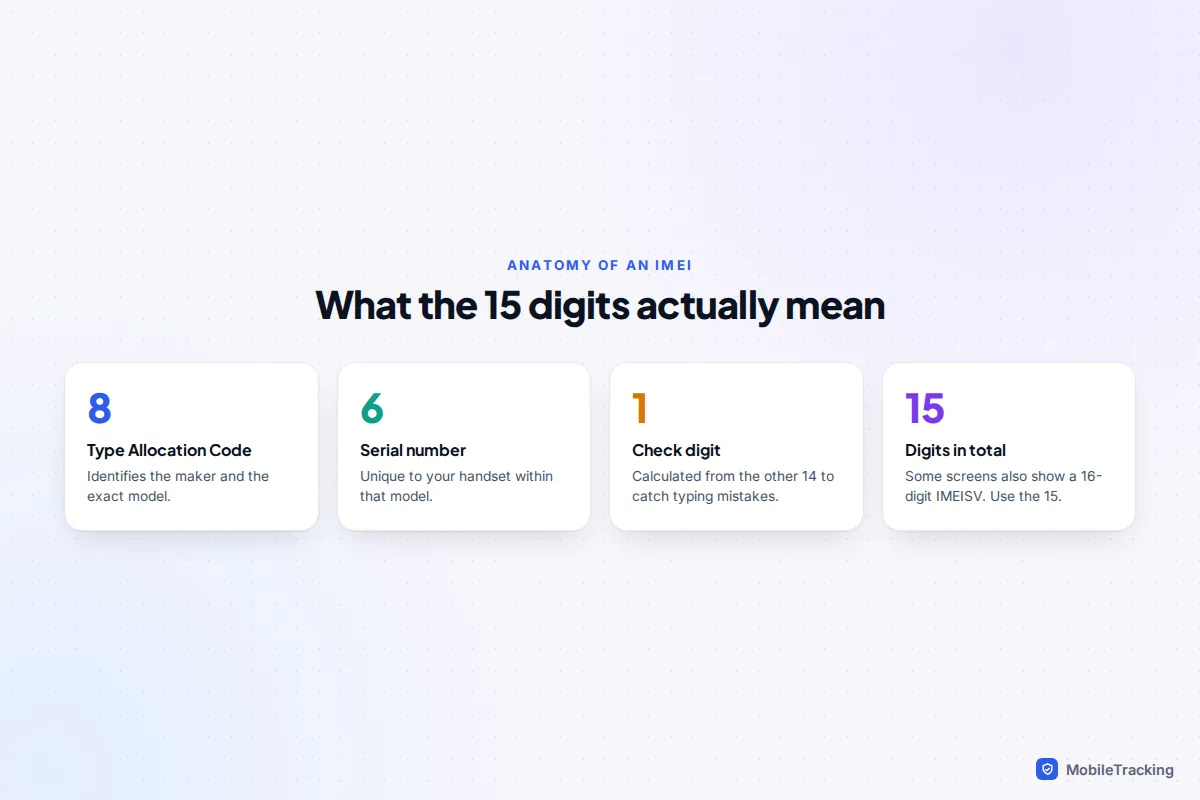
The first eight digits are the Type Allocation Code, which identifies the manufacturer and model. The next six identify your individual handset, and the last digit is a check digit calculated from the others. Your phone carries several other identifiers too, and it is easy to hand over the wrong one:
| Identifier | What it identifies | Who asks for it |
|---|---|---|
| IMEI (15 digits) | The phone handset, per SIM slot | Carriers, police, insurers, unlocking services |
| Serial number | The device, for the manufacturer | Apple, Samsung and repair shops for warranty |
| EID (32 digits) | The eSIM chip | Carriers when setting up an eSIM |
| ICCID (about 19 to 20 digits) | The SIM card or eSIM profile | Carriers when activating or swapping a SIM |
| MEID (14 characters) | The handset on older CDMA networks | Rarely needed now; it matches the first 14 digits of the IMEI on most phones |
One practical point: the IMEI is tied to the phone’s main board. A new screen or battery won’t change it, but a replacement handset or main board swap can, so check it again after a major repair.
Why your IMEI matters: four real uses
1. Blocking a stolen phone
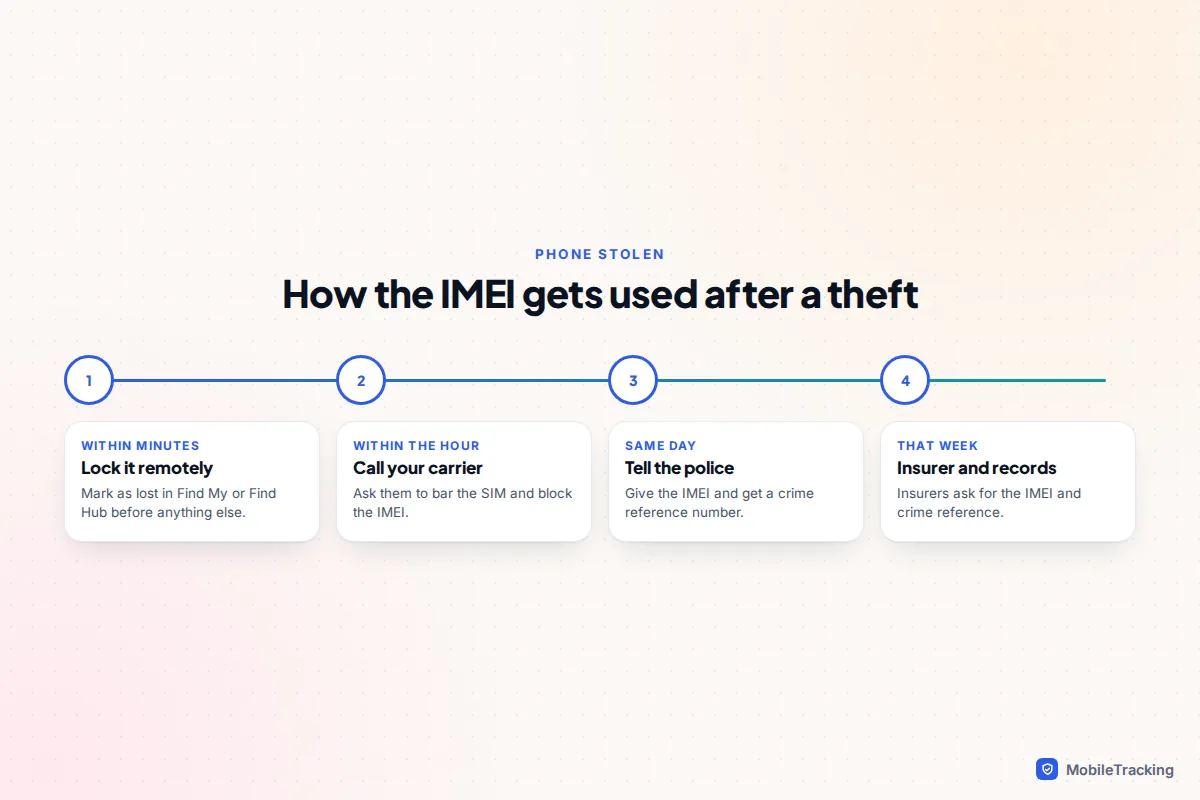
When you report a phone stolen, your carrier can bar the SIM and add the IMEI to a blocklist that is shared between networks. A blocked phone won’t connect to participating mobile networks even with a new SIM, which makes it much less valuable to resell. Citizens Advice in the UK recommends telling your network straight away, because you can be liable for calls made before you report the loss, and some networks cap that liability only if you report quickly.
2. The police report and insurance claim
Police can record the IMEI with the crime, which helps them match a recovered phone to you. In the UK you can report non-urgent theft on 101 or online. You can also register the phone on Immobilise, a free property register used by police, although that does not block the phone: only your network can do that. Insurers typically ask for the IMEI and the crime reference number before they pay out.
3. Checking a second-hand phone
Before you buy a used phone, you can check whether its IMEI has been reported lost or stolen. In the US, the CTIA Stolen Phone Checker is free and draws on reports from participating carriers worldwide. In the UK, networks and paid services such as CheckMEND offer checks. Our guide on checking a used phone before you hand over money covers the full routine.
4. Unlocking and switching carrier
Carriers use the IMEI to unlock a phone so it accepts other networks’ SIMs, and to check a phone is compatible before you move. If you are planning a switch, see how to check if a phone is carrier-unlocked.
A real-world example: Priya’s son left his phone on a train. She had written both IMEIs into a shared family note the week he got the phone, so when the transport company’s lost property desk asked for proof of ownership, she read them out and matched them to the phone in their drawer. Without the numbers, “black phone with a cracked case” would have described half the drawer.
What an IMEI can’t do: the common myths
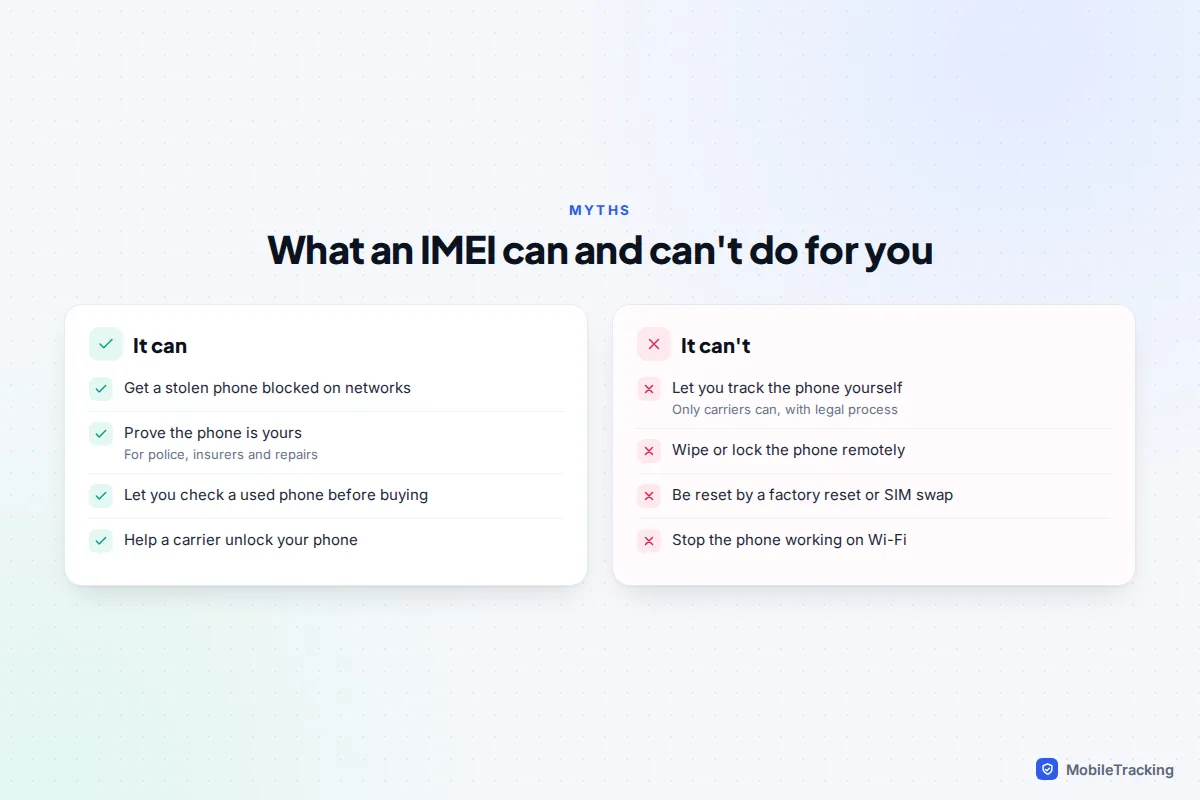
Search for “track phone by IMEI” and you will find dozens of sites promising to locate your phone for a fee. They cannot. Carriers can see which mast a phone with a given IMEI is connected to, but they only share that with police under legal process, never with the public or with a website. We explain why in more detail in finding a lost phone with just the IMEI.
A few other misunderstandings are worth clearing up:
- A factory reset doesn’t change the IMEI, and nor does swapping the SIM. That is exactly why blocking works.
- Blocking doesn’t lock or wipe the phone. The phone still works on Wi-Fi, and the thief can still try to get at your data. Remote lock and erase come from Find My on iPhone and Find Hub on Android.
- Blocklists are not universal. Most major carriers share them, but a phone blocked in one country may still work on networks in another.
- Changing an IMEI is a crime in the UK under the Mobile Telephones (Re-programming) Act 2002. A listing that says “IMEI repaired” or “new IMEI” is a red flag.
Keeping your IMEI safe, plus a two-minute checklist
The IMEI isn’t a password, and giving it to your carrier, the police, your insurer or a reputable repair shop is completely normal. Still, there is no reason to publish it. When you sell a phone, blur the IMEI in photos of the box and settings screen, because a scammer can use a clean IMEI from a genuine listing to make a stolen or cloned phone look legitimate.
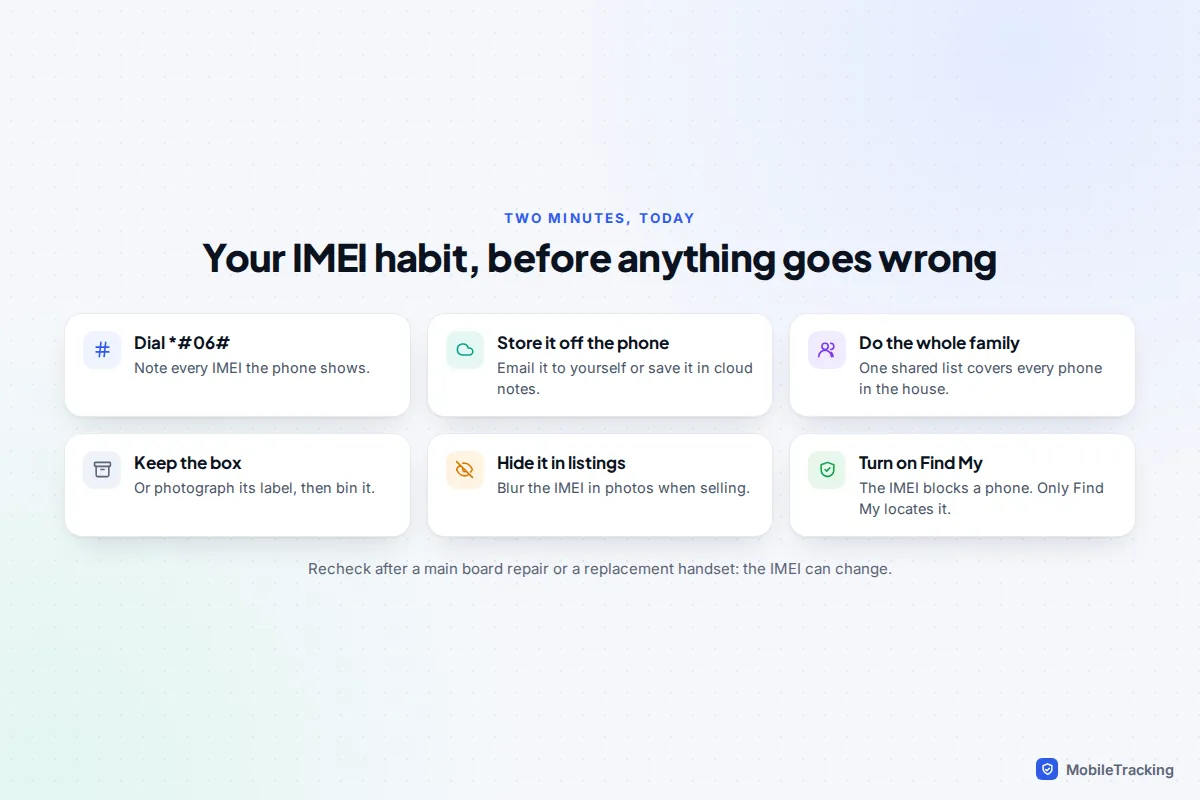
Do this now, while the phone is in your hand:
- Dial *#06# and note every IMEI shown.
- Store the numbers off the phone, in email, a password manager or a cloud note.
- Repeat for everyone in the household, including children’s phones and tablets with SIM slots.
- Keep the box, or photograph its label before recycling it.
- Check Find My (iPhone) or Find Hub (Android) is switched on, so you can lock and locate the phone as well as block it.
If the worst happens, our guide to finding a stolen phone and protecting your data walks through the order to do everything in.
Frequently asked questions
Is *#06# safe to dial?
Yes. It only displays information stored on the phone and doesn’t place a call or change any settings. It is free and works without a signal.
Can someone do anything harmful with my IMEI?
Not much on its own. They cannot track your phone, read your messages or take over your accounts with it. The main risk is fraud around resale, such as using a genuine IMEI to make a dodgy phone look clean, which is why it is sensible not to post it publicly.
Why does my phone show two different IMEI numbers?
Because it supports two SIMs, either two physical slots or a physical SIM plus an eSIM. Each slot has its own IMEI. When you report a theft, give your carrier both.
Does a tablet or smartwatch have an IMEI?
Only if it has mobile data. A cellular iPad, Android tablet or LTE smartwatch has an IMEI, usually in Settings under About. Wi-Fi-only models have a serial number instead.
Can I unblock a phone after I get it back?
Usually, yes. Call the carrier that placed the block, prove ownership and ask them to remove it. Allow a few days for the change to reach other networks.
Will the police track my phone if I give them the IMEI?
Don’t count on it. Police record the IMEI so they can return the phone if it turns up, and for serious crimes they can request network data, but routine phone thefts rarely get that treatment. Your best tracking tool is Find My or Find Hub, set up before the phone goes missing.
This guide is general information, not legal or financial advice. Read our editorial policy.