
You can recover a deleted Instagram account only if you act within 30 days of the deletion request. Log in with your usual username and password, choose to keep the account when Instagram asks, and the deletion is cancelled with your posts and followers intact. After those 30 days, Instagram permanently deletes the account, and neither you nor Meta’s support team can bring it back.
Plenty of accounts that look deleted aren’t, though. A deactivated account comes straight back when you log in, and a suspended or disabled account can often be restored by appeal if you move before the deadline on your screen. If a hacker deleted it, the 30-day window still applies, but you’ll need to recover access first. Start by working out which situation you’re in, because each has a different fix.
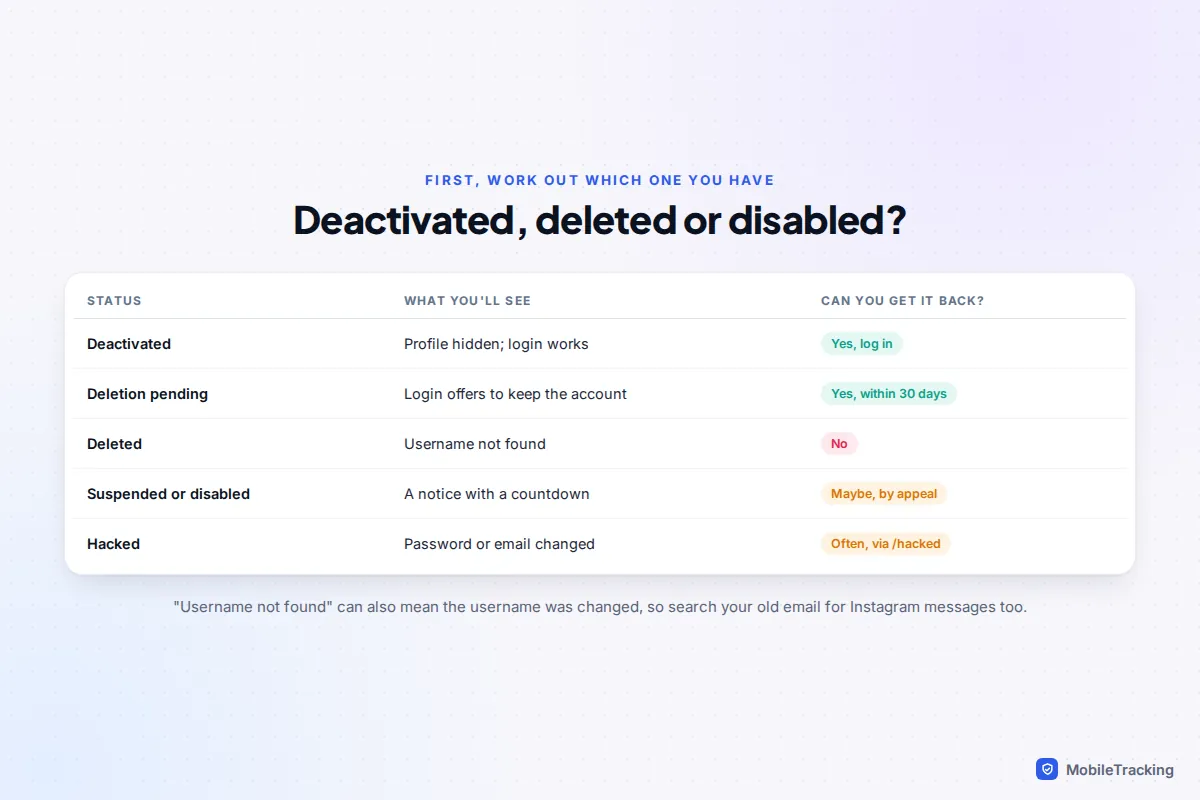
First, work out what happened to the account
Try logging in on the Instagram app or at instagram.com, and pay attention to exactly what appears. The message you get tells you which of these you’re dealing with:
- Deactivated: you, or someone with your password, temporarily hid the account. Logging in works and brings everything back.
- Deletion pending: someone asked for the account to be deleted less than 30 days ago. Logging in shows a prompt asking whether you want to keep it.
- Deleted: the 30 days have passed. Instagram says the username or account can’t be found.
- Suspended or disabled: Instagram removed the account for breaking its rules, or thinks it did. You see a notice explaining why, usually with an option to disagree and a countdown.
- Hacked: your password doesn’t work, or you’ve had emails saying your email address or phone number changed.
One trap: “user not found” can also mean the username was changed, perhaps by a hacker. Try logging in with your email address or phone number instead of the username, and search your inbox for messages from Instagram. Those emails often show the current username or a link to undo a change.
Cancel a deletion within the 30-day window
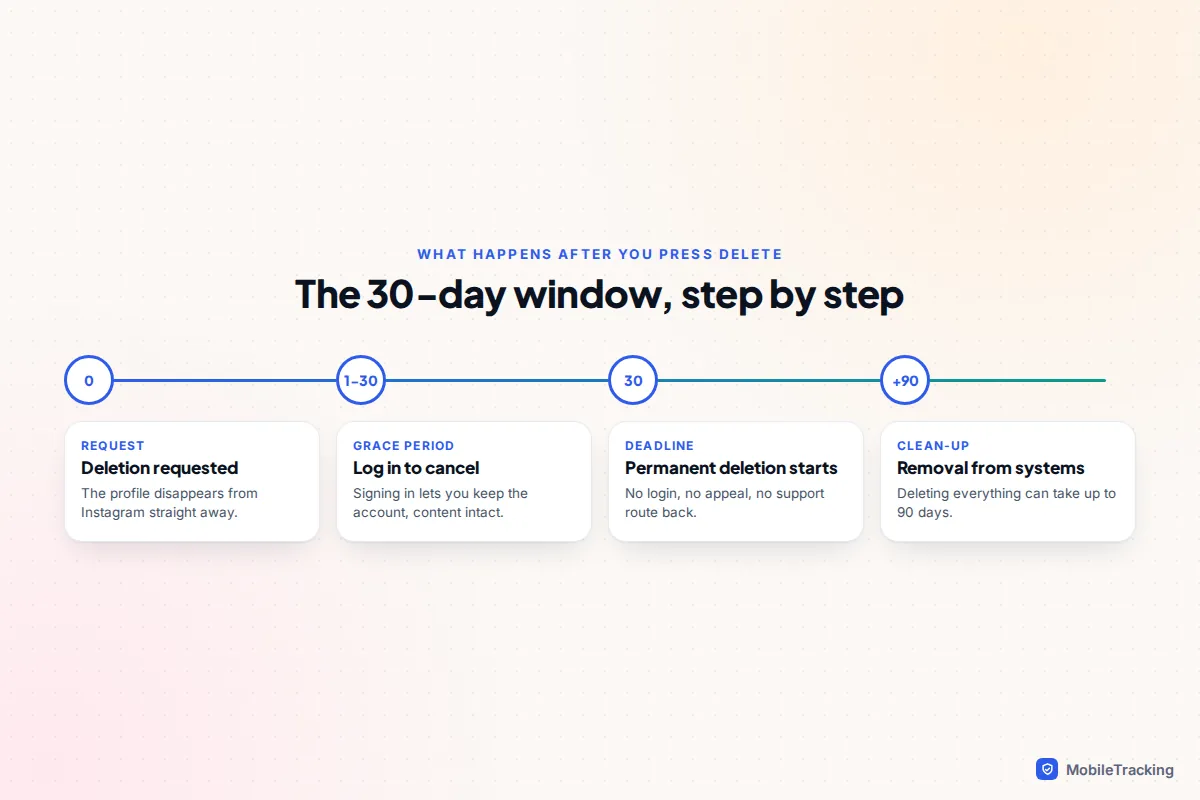
When an account is deleted, Instagram hides it immediately but waits 30 days before permanently removing it. That delay exists precisely so people can change their minds, and it’s the only reason recovery is possible at all.
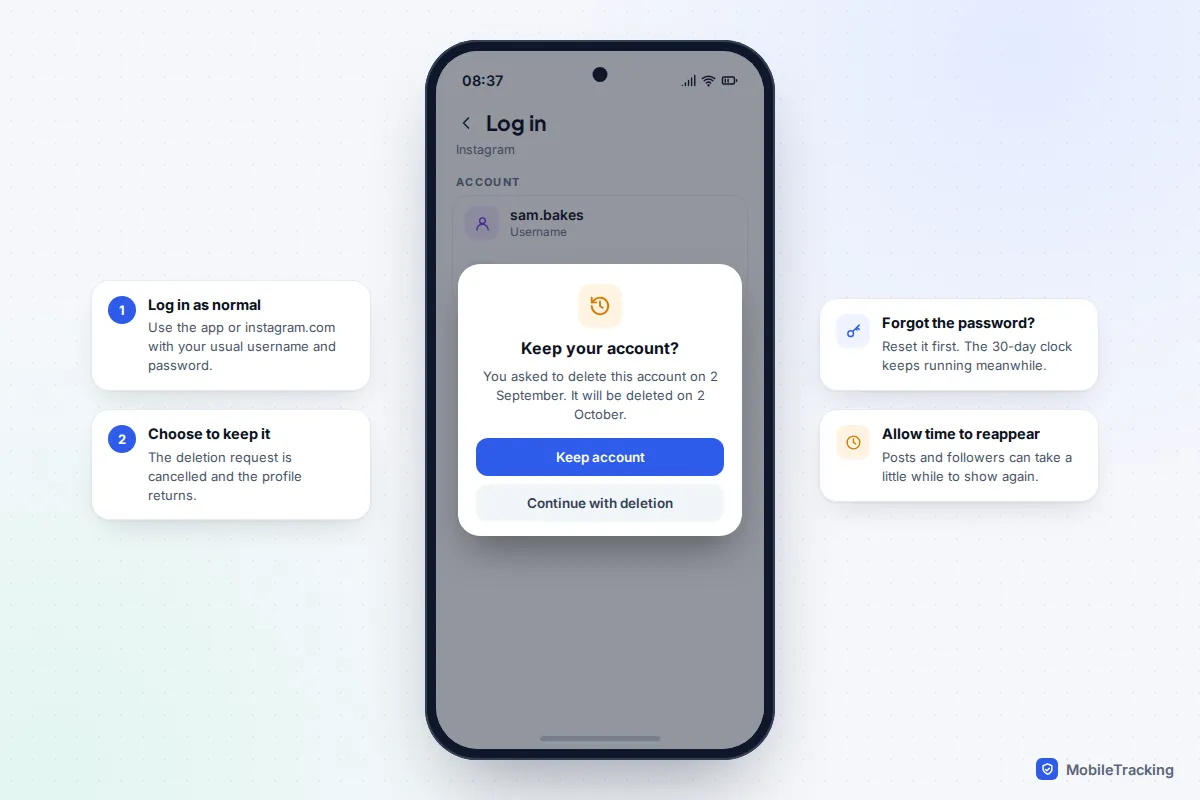
- Open the Instagram app, or go to instagram.com in a browser.
- Log in with the username, email address or phone number and password you used before.
- When Instagram tells you the account is scheduled for deletion, choose the option to keep it.
- Give it a little time. Your profile, posts and followers should reappear, though it can take a short while before everything shows again.
If you’ve forgotten the password
Tap Forgotten password? on the login screen and request a reset link by email or text. Once you’ve set a new password, log in and cancel the deletion as above. Do this promptly: the 30-day clock keeps running while you sort out access, and on day 31 a password reset won’t help.
Instagram’s help page on deleting or deactivating your profile sets out the timings. Meta says that once permanent deletion begins, it can take up to 90 days to remove everything from its systems, but that time isn’t a second chance. The account can’t be restored during it.
Deactivated accounts: just log back in
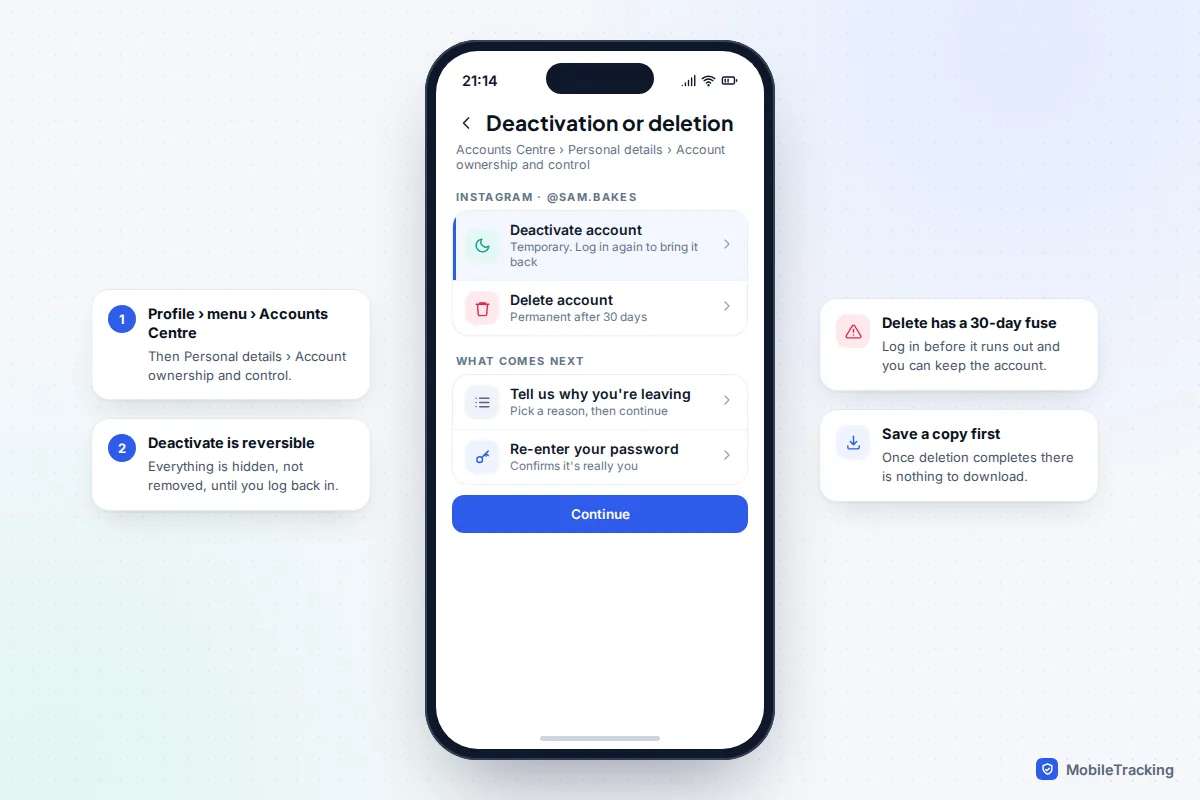
Deactivation is Instagram’s temporary option. Your profile, photos, comments and likes are hidden, not removed, and there’s no time limit: the account waits until you return. To reactivate, simply log in. Instagram limits how often you can deactivate (roughly once a week), so if you deactivated recently you may not be able to repeat it straight away.
Both options now live in Accounts Centre. In the app, go to your profile, tap the menu, then Accounts Centre › Personal details › Account ownership and control › Deactivation or deletion. It’s worth knowing the route, because it’s also how someone else would have deleted your account if they had your password. If you’re taking a break rather than leaving for good, deactivate instead of deleting.
Suspended or disabled accounts: appeal before the deadline
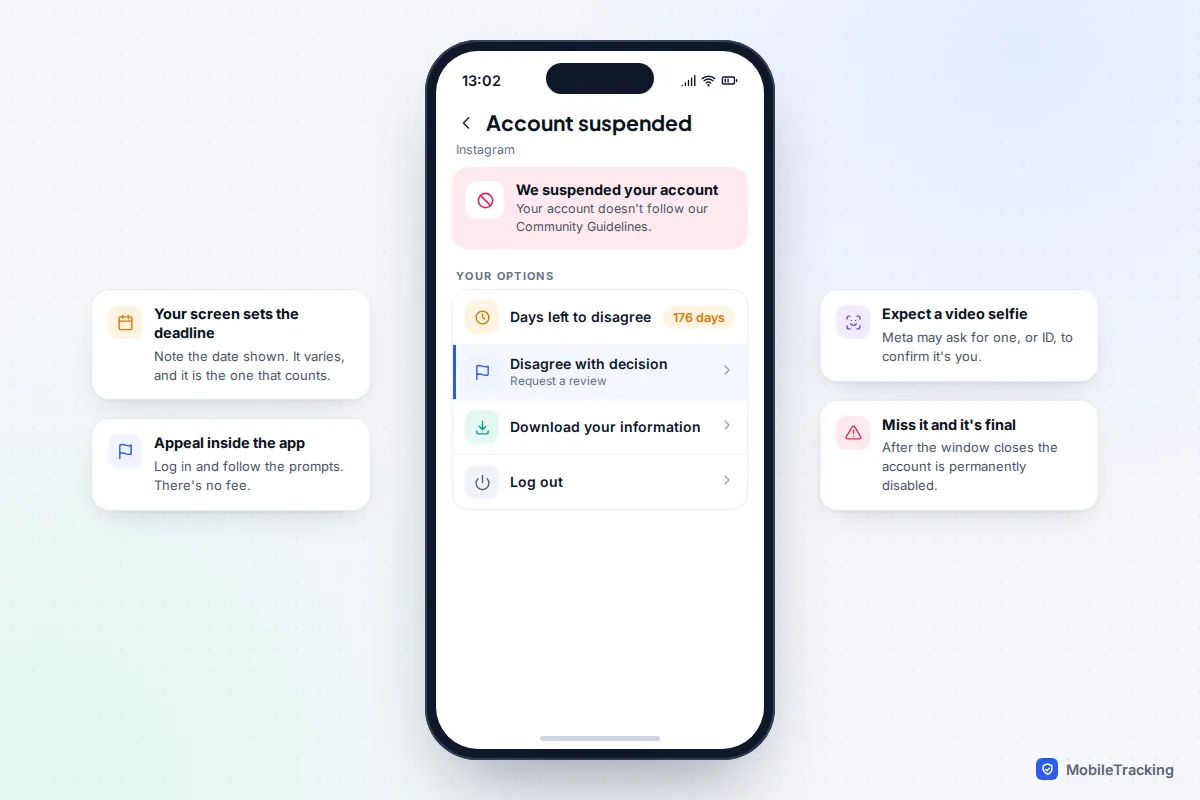
If Instagram suspended your account for breaking its Community Guidelines, or believes it did, logging in shows a notice instead of your feed. It will usually say how many days you have left to disagree with the decision. The countdown is commonly 180 days, but the date on your own screen is the one that counts, so note it down. If you don’t request a review before it runs out, or the review goes against you, the account is permanently disabled.
- Log in on the app. The suspension notice should appear.
- Tap Disagree with decision (or similar wording such as Request a review).
- Follow the prompts. Meta may ask you to confirm your identity with a video selfie or photo ID. Use good light and keep your face clearly visible.
- Submit, then keep an eye on your email and the app for the outcome.
Appeals are free, and there’s no special form that works faster than the in-app route. Instagram’s page about disabled accounts explains the process. If the account was disabled because Instagram believes the owner is under 13, the review usually asks for proof of age, which is something a parent may need to help with.
A locked account is different again. If Instagram spotted suspicious activity, it may lock the account and ask you to confirm it’s yours with a code or selfie. That’s a security check, not a punishment, and following the steps usually unlocks it the same day.
Hacked, then deleted: recover access first
Some attackers delete an account after taking it over, or request deletion to spite the owner. The account then sits in the same 30-day window as any other deletion, so the job is to get back in fast enough to cancel it.
- Check your email for a message from [email protected] saying your email address was changed. If it’s genuine, use its link to revert the change and secure the account.
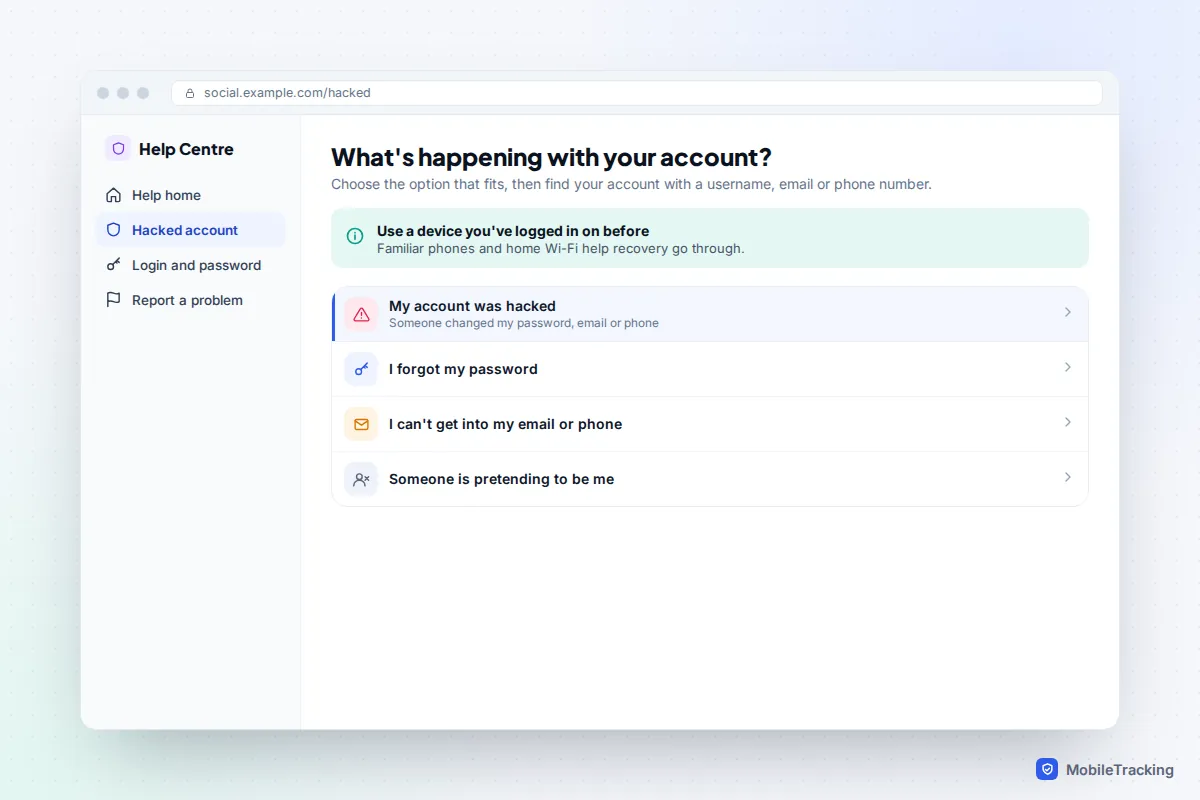
- If that doesn’t work, go to instagram.com/hacked (type it yourself rather than clicking a link) and choose the option that fits, such as your account being hacked.
- Find your account with any username, email or phone number that has ever been linked to it. Use a phone or computer you’ve logged in on before, if you can.
- Complete any identity check Meta asks for, set a new password, then log in and choose to keep the account.
If your email was hacked too, secure that first, or the attacker can simply reset Instagram again. Our guides to recovering a hacked Instagram account and spotting a hacked email account cover both in detail.
What’s lost when deletion completes, and how to keep a copy
Once the 30 days are up, the account is gone. That includes your profile, posts, reels, stories archive, followers, following list and saved items. Messages you sent may stay in other people’s inboxes, usually shown under a generic “Instagram User” name, and anything someone else reposted from you stays on their account. Your old username may be released, and you can’t count on getting it back if someone else claims it first.
Take one real-world situation. Ellie, 15, deleted her account after a falling-out with friends, then three weeks later wanted her photos back. Because she was still inside the 30 days, logging in restored everything. Had she waited another ten days, the only copies left would have been the ones on her phone’s camera roll. For individual posts rather than whole accounts, see our guide to recovering deleted Instagram posts, which covers the separate Recently Deleted folder.
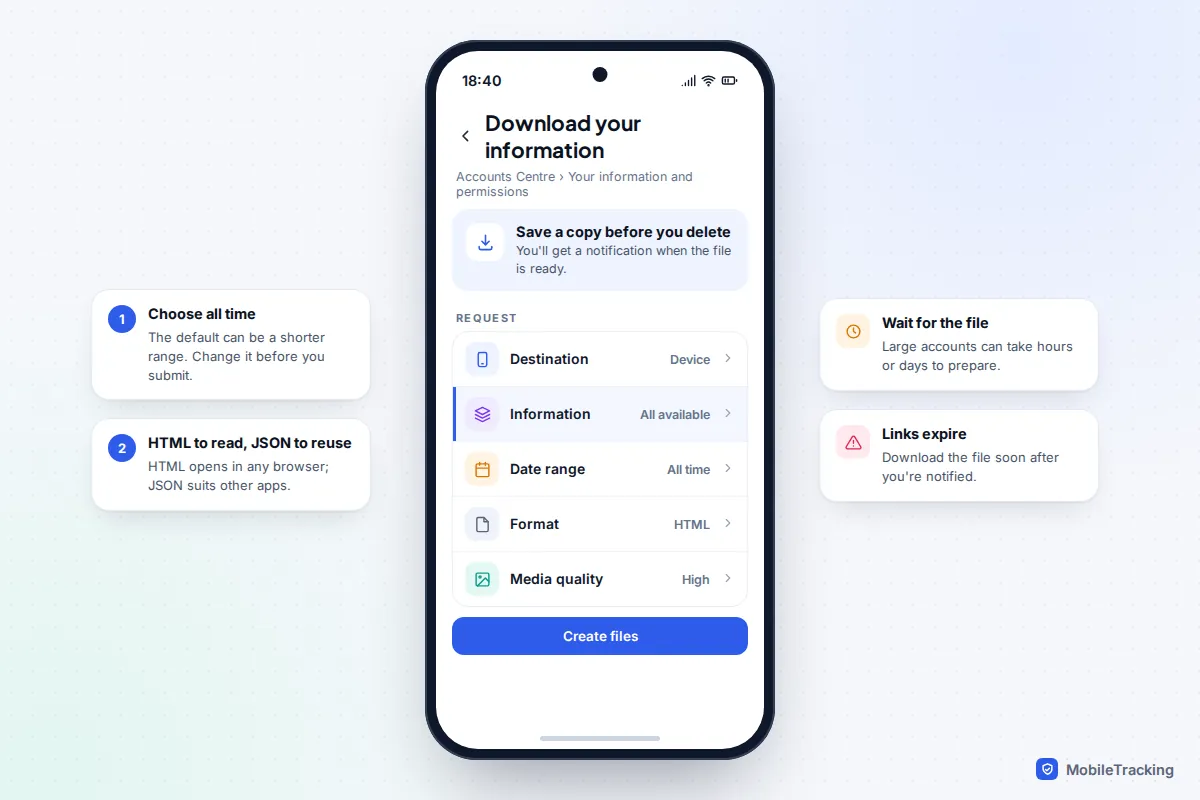
The only reliable insurance is a copy made beforehand. In Accounts Centre, go to Your information and permissions › Download your information (some versions label it Export your information), choose your Instagram account, select all available information and an all-time date range, and pick HTML to read it in a browser or JSON to reuse it elsewhere. Instagram notifies you when the file is ready, which can take hours or days for a large account, and the download link only lasts a few days.
Avoid “recovery” scammers
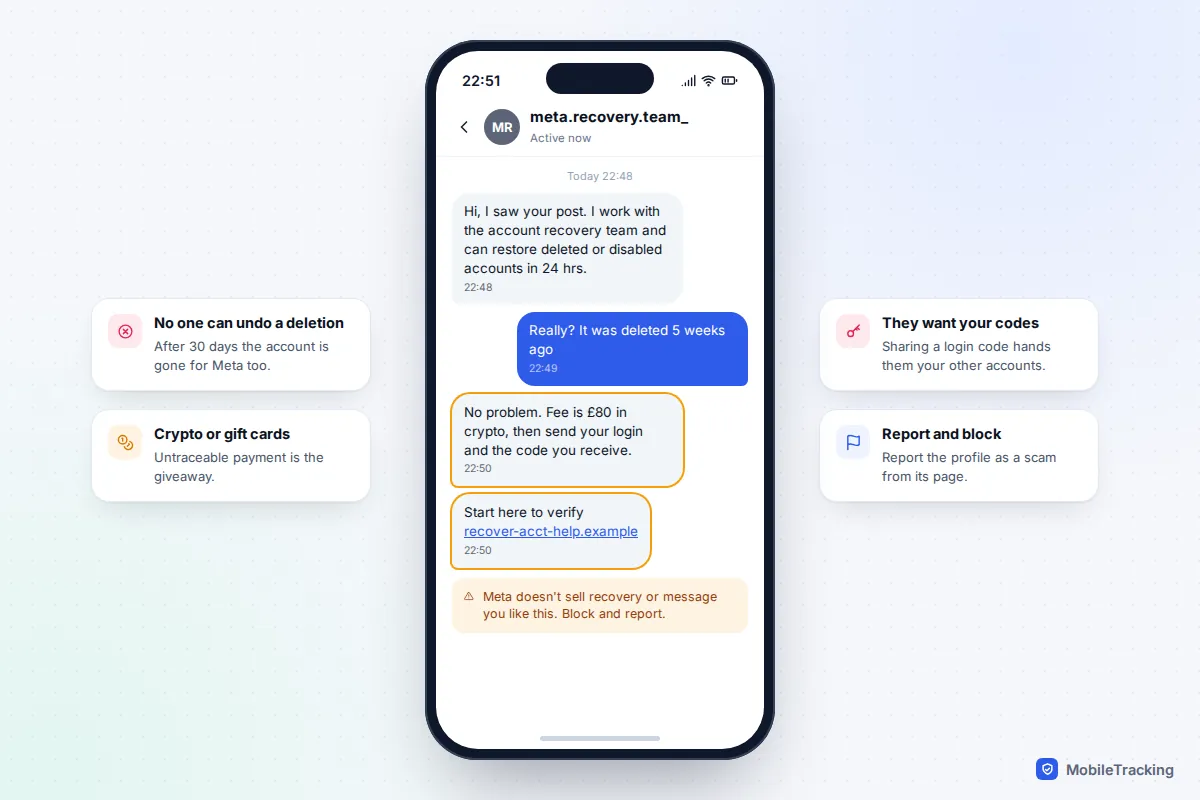
Post publicly that you’ve lost your Instagram and you’ll quickly get messages from “recovery experts”, “Meta agents” or “ethical hackers” promising to restore it for a fee. They can’t. No outside person can restore a deleted account or overturn a suspension, and Meta doesn’t charge for recovery or contact people through random DMs offering it.
These scams usually want payment in crypto or gift cards, and often ask for your password or the login code Instagram sends you. Hand over a code and they can take over whatever you still have, including the new account you’ve just set up. Block and report the profile, and never share a code with anyone.
How to stop it happening again
Most lost accounts come down to one of three things: a rash decision to delete, a weak or reused password, or recovery details that were out of date when they were needed. A few minutes now fixes all three.
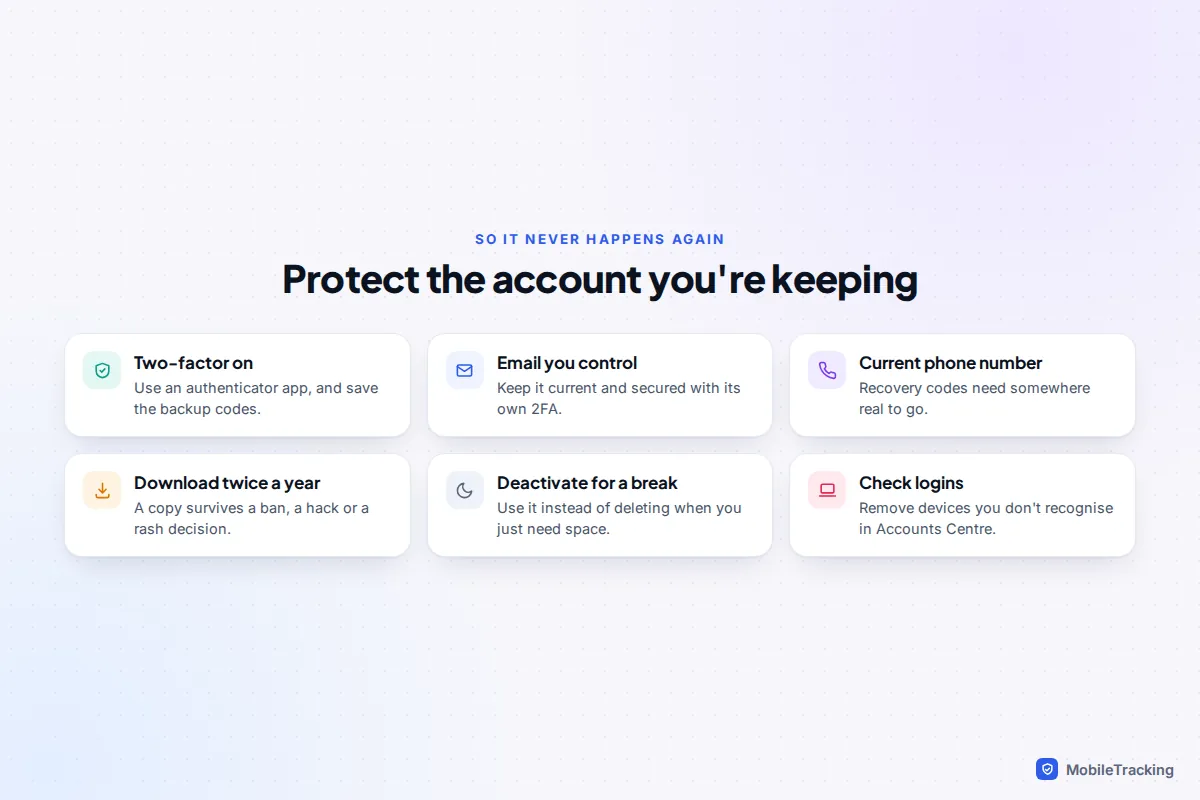
- Turn on two-factor authentication in Accounts Centre under Password and security, ideally with an authenticator app, and store the backup codes somewhere safe. Our guide to two-factor authentication everywhere explains the options.
- Keep your email and phone number current, and secure that email with its own strong password and two-step verification.
- Download your information twice a year, or before any big change such as a new phone.
- Check where you’re logged in under Password and security, and remove devices you don’t recognise.
- Deactivate rather than delete when you want a break. It’s the version you can undo whenever you like.
Frequently asked questions
Can Instagram support restore an account deleted more than 30 days ago?
No. After the 30-day window, deletion is permanent and Meta can’t restore the account or its content. Anyone who says otherwise, including people claiming to work for Meta, is trying to scam you.
How do I know if my account is deleted or just deactivated?
Try logging in. A deactivated account opens normally and reappears. An account pending deletion asks whether you want to keep it. If Instagram says the account doesn’t exist and you’ve checked your email and phone number too, the deletion has most likely completed.
Someone else deleted my account. Can I still get it back?
Yes, if you’re within 30 days. Recover access through the password reset or instagram.com/hacked, then log in and choose to keep the account. Change your password and turn on two-factor authentication straight away.
Can I create a new account with the same email address?
Once the old account is permanently deleted, you can normally sign up again with the same email address or phone number. You’ll start from scratch, with no followers, posts or messages carried over, and your old username may not be available.
Will my followers be notified if I delete or deactivate?
Instagram doesn’t send followers a notification. They’ll simply find that your profile no longer appears. If you restore the account within the window, your followers return with it.
This guide is general information, not legal or financial advice. Read our editorial policy.