
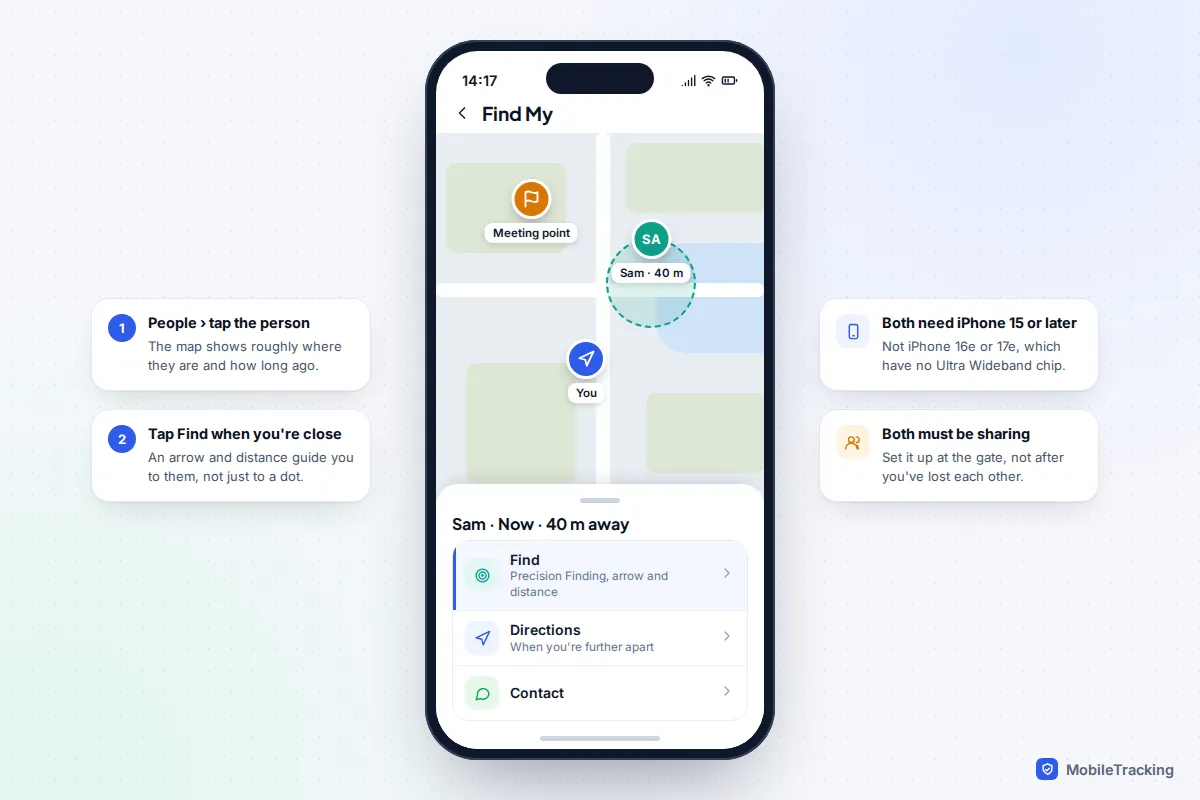
The quickest way to find each other in a crowd is to decide how before you get separated. At the entrance, agree one fixed meeting point, turn on location sharing that ends tonight, and make sure every child knows what to do if they can’t see you. If you do get split up, send a short text rather than calling, check Find My or Google Maps, and go to the meeting point. If both of you have an iPhone 15 or later, the Find button in Find My will point you straight to the other person once you are close.
Phones help, but they are at their weakest exactly when you need them: thousands of people on the same masts, location dots that lag by minutes, and batteries that die by the evening fireworks. So start with a plan that works without technology, then add the settings.
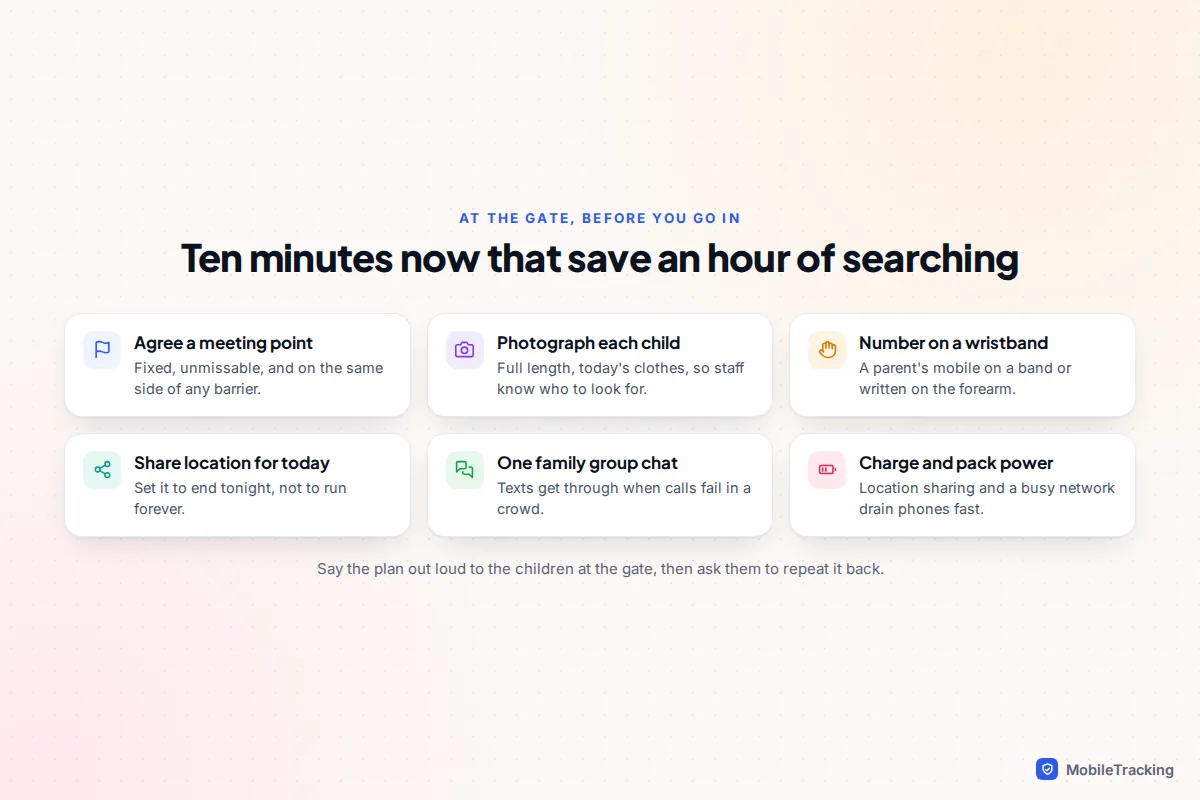
Before you go in: the ten-minute plan
Do this at the gate. Children remember what they saw and heard there far better than a talk at home.
- Agree a meeting point and point at it together (more on choosing one below).
- Take a photo of each child, full length, in today’s clothes. In a panic, most parents can’t remember whether it was the blue hoodie or the green one.
- Put a phone number on young children. A silicone ID wristband, a label inside a coat cuff, or a number written on the forearm in felt-tip pen all work. Use a parent’s mobile, not the home landline, and avoid putting the child’s name on the outside where strangers can read it.
- Start location sharing for today only between the adults and any older children with phones.
- Set up one group chat for everyone in your party, so a single message reaches all of you.
- Check batteries. Start at 100% and carry a charged power bank and short cable.
Finish by asking a child to tell you the plan back in their own words. That is how you know it went in.
Choose a meeting point that actually works
“Meet at the entrance” fails at most big venues, because there are several entrances and they all look alike. A good meeting point is fixed, unique, easy to describe, and reachable without passing through a barrier.
- Theme parks: a named landmark such as a particular fountain, statue or ride sign. Avoid anything that moves, like a food truck, or that closes early.
- Festivals: a numbered tower, a named bar or a signed first-aid tent. Flags and tents in the crowd move or blur together after dark, so pick something that stays lit.
- Stadiums: a numbered gate or block, outside the turnstiles. Once you are out, stewards usually won’t let you back in.
- Airports: somewhere on the same side of security. Once one of you is airside, the other can’t simply walk through to find them. An information desk or a particular café works well.
Add a time rule for older children and teenagers: “If we lose each other, meet there on the hour.” It removes the question of how long to wait, and it still works if every phone in your group has died.
Share location for the day, then let it end
Time-limited sharing is the right tool for a day out. It shows everyone where the others are without leaving a permanent share running afterwards. Make sure it runs both ways: if you share with your teenager but they don’t share back, they can find you but you can’t find them. For the details of every duration setting, see our guide to sharing your location for a set time only.
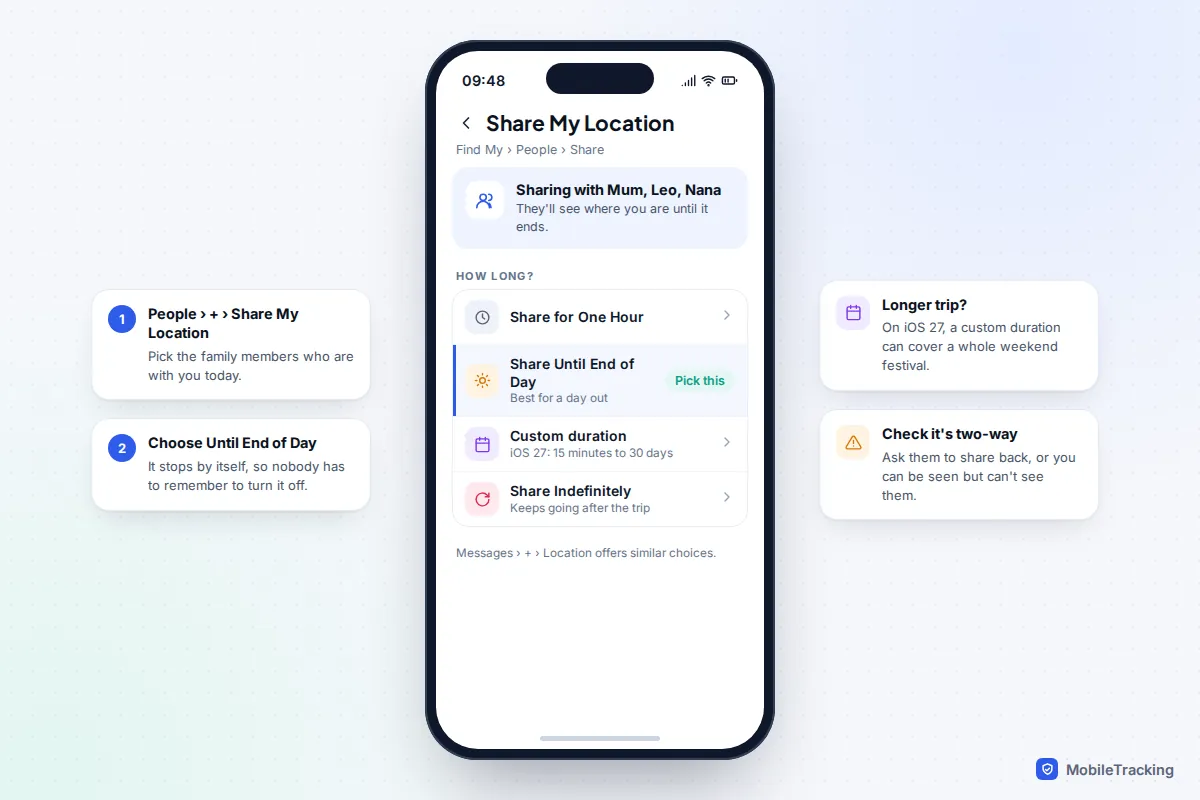
iPhone: Find My
- Open Find My and tap People.
- Tap +, then Share My Location, and choose the people who are with you.
- Choose Share Until End of Day. The other presets are Share for One Hour and Share Indefinitely. On iOS 27 you can also set a custom duration, from 15 minutes up to 30 days, which suits a weekend festival.
You can do the same from a conversation in Messages by tapping + and then Location. iOS 27 also added a Hide Location option, which temporarily pauses your location for chosen people and shows them “No Location Found”. If a teenager’s dot vanishes, it may be this setting rather than a problem.
Android, or a mix of Android and iPhone
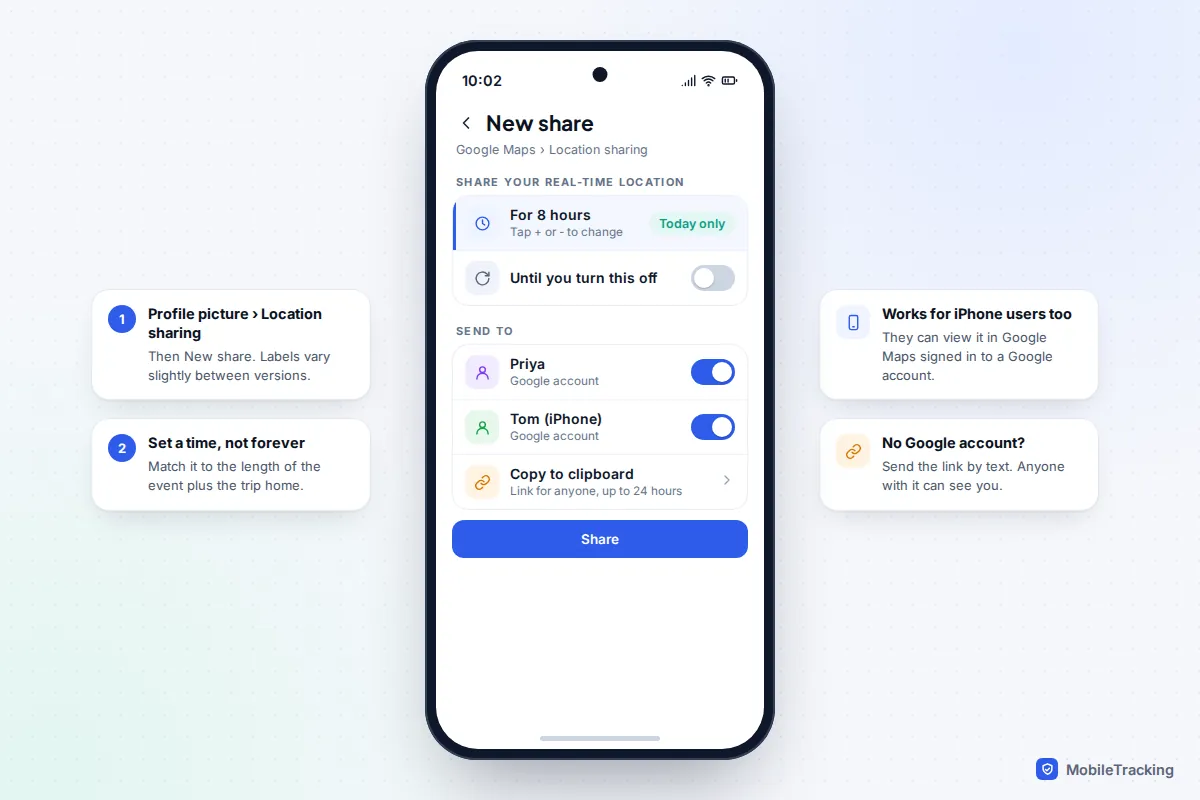
Google Maps location sharing works on both platforms, which makes it the simplest choice for mixed families. Open Google Maps, tap your profile picture, then Location sharing and New share. Set the duration with the plus and minus buttons, pick people who have a Google account, and tap Share. If someone has no Google account, Copy to clipboard creates a link you can text them, which Google limits to 24 hours. Remember that anyone who gets that link can see you.
On Android, the Find Hub app shows the same shares and offers one hour, until the end of the day, until you stop, or a custom duration. Tapping a person and then Get directions opens a walking route to them in Google Maps. Google’s page on finding friends and family with Find Hub has the current steps.
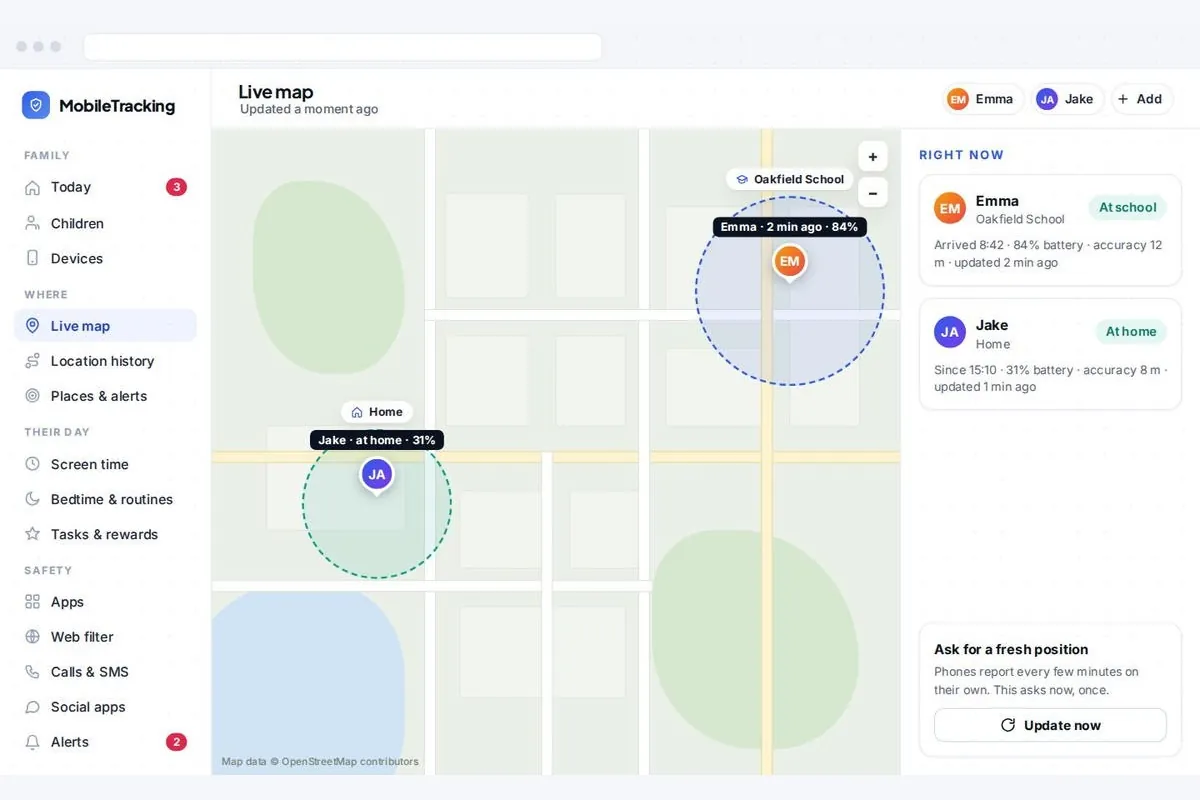
For younger children who carry an Android phone every day, a transparent family app such as MobileTracking shows their location on a parent dashboard in any browser, and the child can see that the app is there. Talk it through with them first.
When you’re close: Precision Finding and landmarks
A location dot only tells you someone is roughly over there. If you and the other person both have an iPhone 15 or later and are sharing locations, Find My can do better: open People, tap the person and, once you are near enough, tap Find. The screen shows an arrow and a distance, and turns green when you’re heading the right way. Apple’s guide to using Precision Finding to meet up with a friend walks through it.
There are limits. It needs Apple’s second-generation Ultra Wideband chip in both phones, so it won’t work with an iPhone 14 or earlier, and it isn’t available on the iPhone 16e or iPhone 17e, which have no Ultra Wideband at all. Ultra Wideband is also switched off in a few countries by regulation. When you are further apart, use Directions instead. Android phones have no equivalent for finding people, although Find Hub offers it for some item tags.
Without Precision Finding, words do the work. Tell the other person what you can see: “Under the big screen, left-hand side, by the red bins.” Two people both walking towards each other’s dot often cross in the crowd, so agree that one waits and one moves.
Why phones struggle in crowds, and how to cope
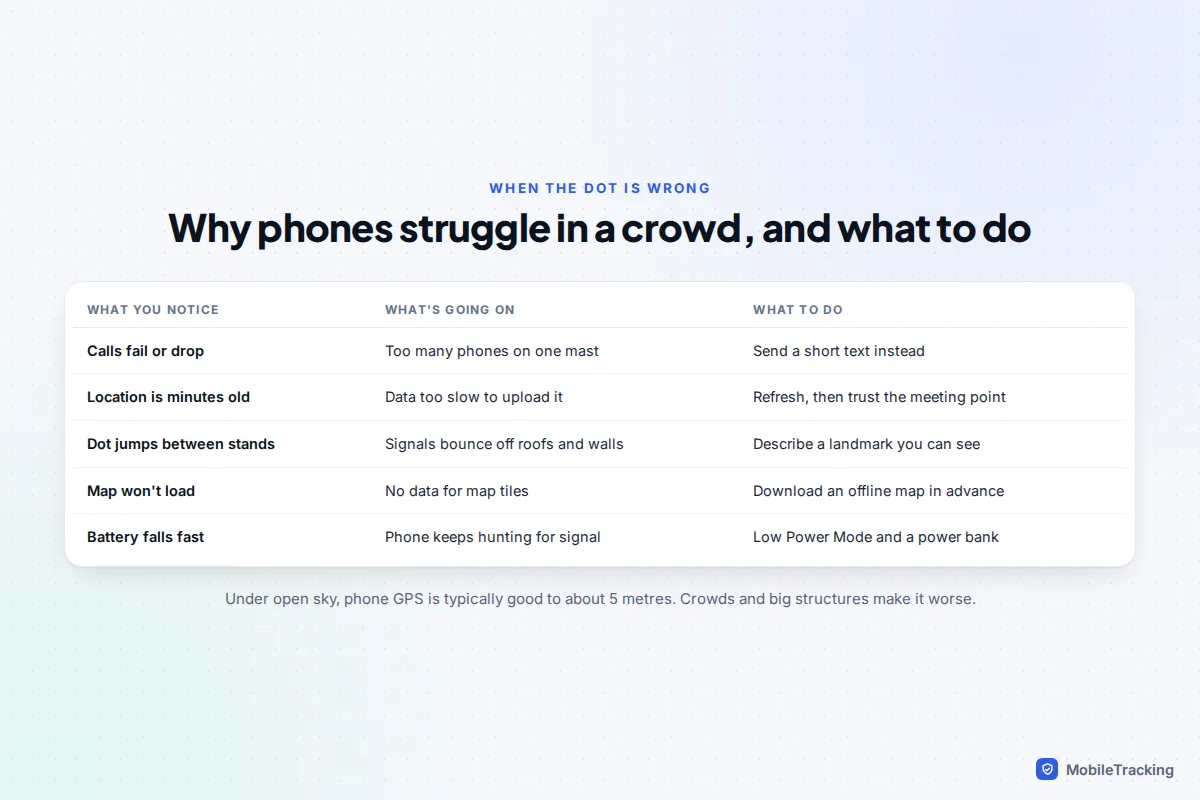
Phone GPS is typically accurate to about 5 metres under open sky, according to the US government’s GPS site. At a stadium or a covered market, stands, roofs and walls block and reflect satellite signals, so the dot can jump by tens of metres. We explain the causes in more depth in how accurate phone location tracking really is.
The bigger problem is the network. When tens of thousands of people share the same few masts, calls fail first. Data slows to a crawl, which means your phone may know where it is but can’t upload that position, so others see a location from several minutes ago. The FCC’s tips for communicating in an emergency make the same point: in many cases a text will go through when a call won’t.
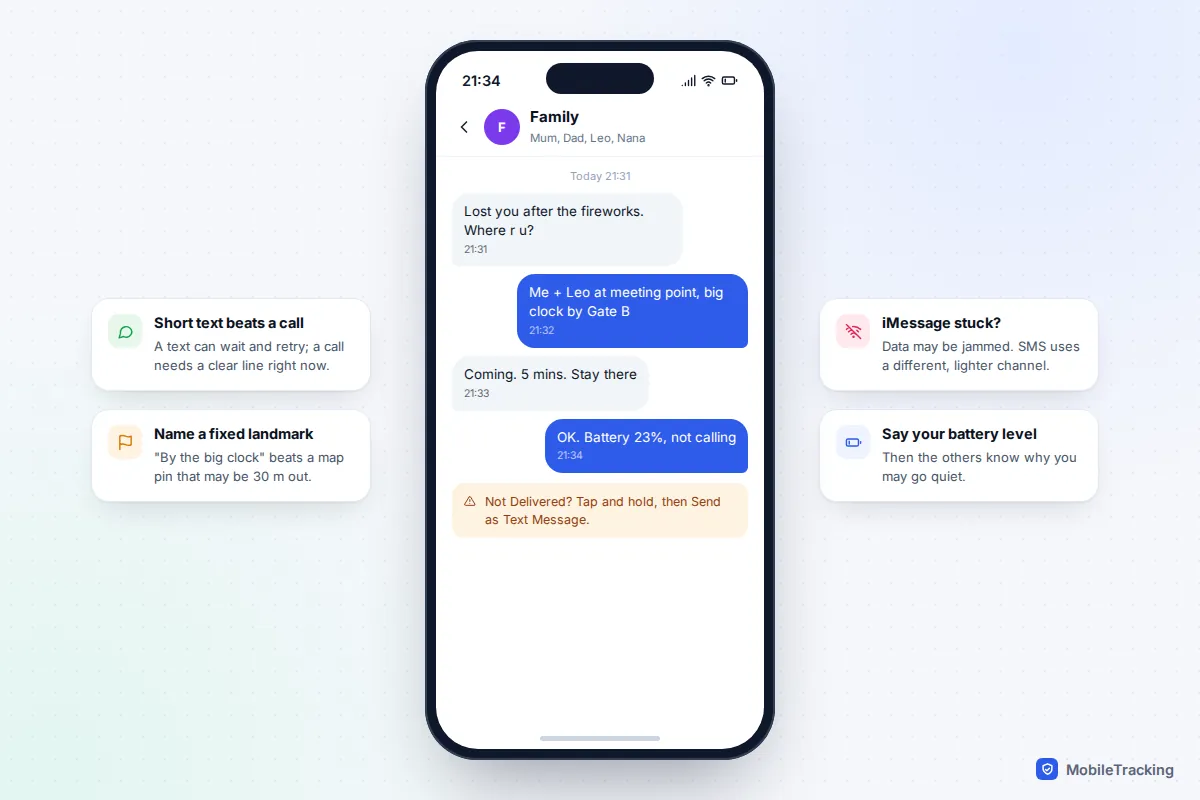
- Text, don’t call. Keep it short and specific. A text can queue and retry, while a call needs a clear line at that moment.
- If iMessage or WhatsApp is stuck, those need data. On iPhone, touch and hold a message that won’t send and choose Send as Text Message to send it as ordinary SMS.
- Download an offline map of the area the day before. In Google Maps, tap your profile picture, then Offline maps. Apple Maps has had offline maps since iOS 17, under your profile picture too. GPS works without data; the map itself is what needs downloading.
- Connect to venue Wi-Fi if there is any. It takes pressure off mobile data and can let Wi-Fi Calling work when the network doesn’t.
- Turn on Low Power Mode or Battery Saver by mid-afternoon. It slows background tasks but doesn’t stop location sharing.
Children without a phone: wristbands, tags and watches
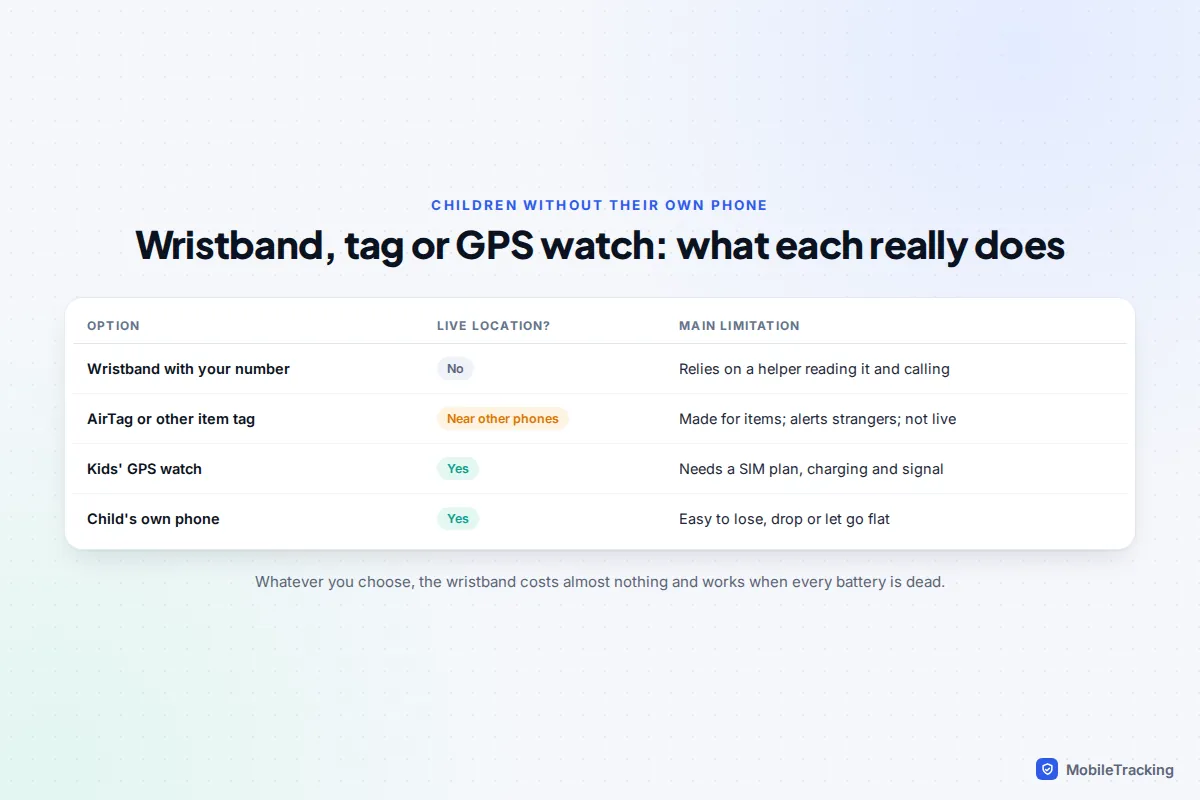
Most under-tens at a theme park won’t have a phone. The wristband with your number does the most important job; everything else is extra.
Item trackers such as an AirTag or a Galaxy SmartTag are popular with parents, and in a busy park they can update often, because they report through the many phones nearby. They are not live GPS, though, and Apple says AirTag is made for belongings, not people. They also have anti-stalking features that matter here. An AirTag that has been away from its owner for a while plays a sound, typically 8 to 24 hours after separation. iPhones and Android phones alert people when an unknown tracker seems to be travelling with them, so a tag in your child’s pocket can set off alerts on strangers’ phones if it moves with them for a while. If you use one, share the tag with the other parent in Find My, sew or zip it into a pocket, and choose a holder that a toddler can’t open, because coin batteries are dangerous if swallowed.
A kids’ GPS watch gives live location and calls to a few approved numbers, but needs its own SIM plan, a charge and signal, which puts it in the same crowd trouble as a phone. Our guide on choosing a kids’ GPS watch covers what to look for.
What to teach your children
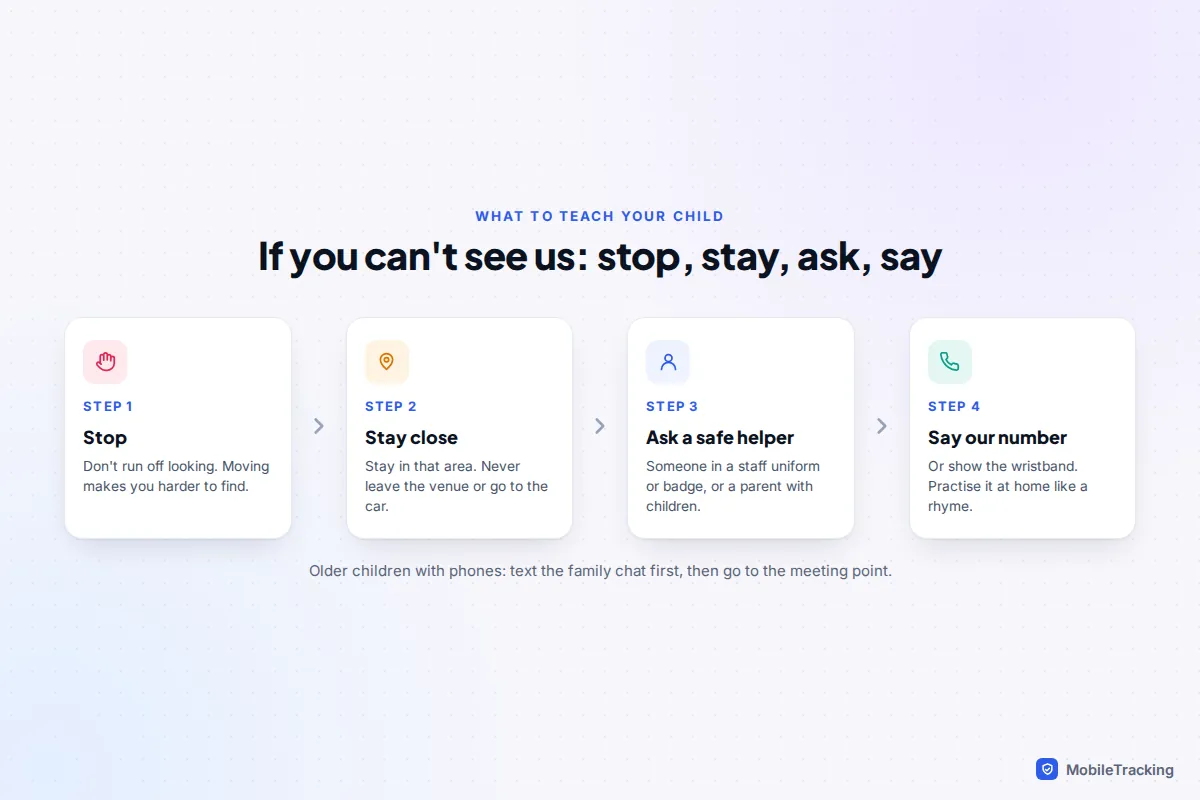
A child who knows exactly what to do is found faster than one with any gadget. Keep the rules short enough to say in one breath.
- Stop. Don’t run around looking for us. We will come back to where we last saw you.
- Stay in the area. Never leave the venue, go to the car or get on a bus or train to look for us.
- Ask a safe helper. Someone who works there, in a uniform or with a name badge, or a mum or dad who has children with them. These are the people most likely to help properly.
- Say our number or show your band. Practise the number at home as a rhyme or a song until they can say it without thinking.
Older children with phones get a slightly different plan: text the family chat first, then go to the meeting point and stay there.
If someone is missing: the first ten minutes
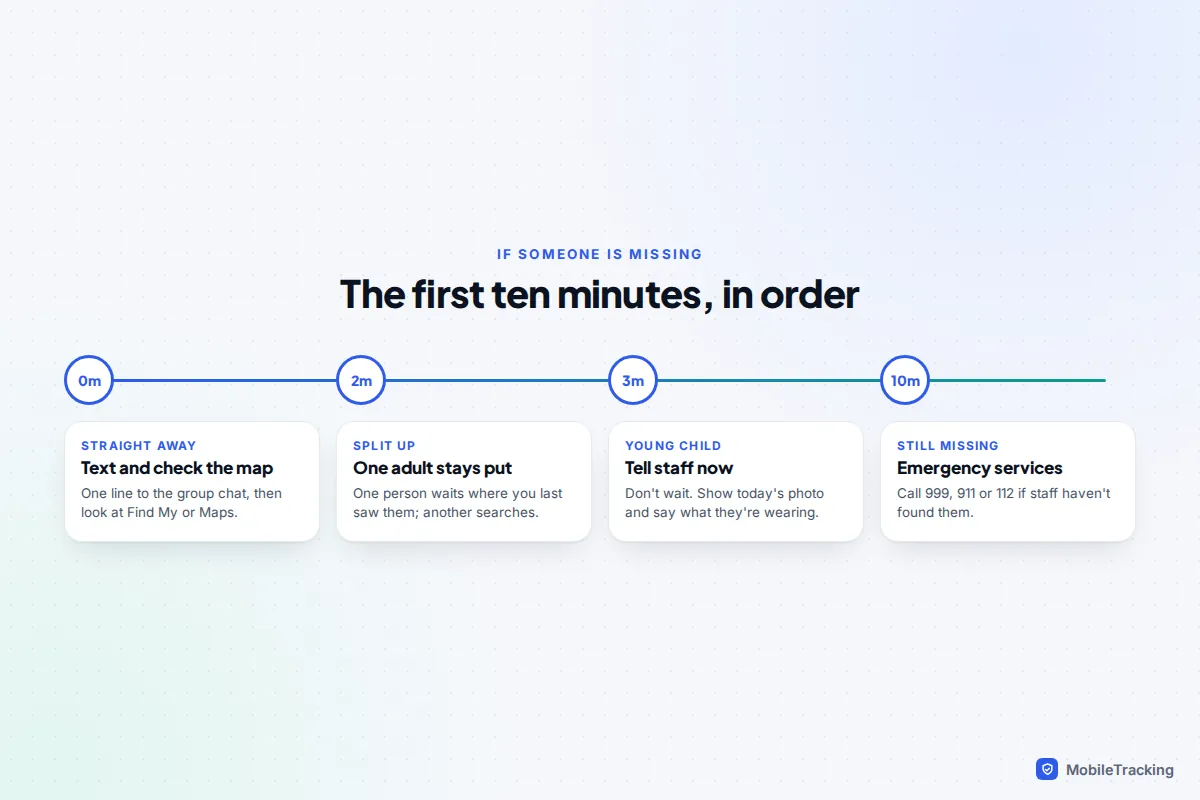
Most separations end within minutes. Treat a missing young child as urgent anyway.
Here is how it played out for one family. At a festival, eight-year-old Leo slipped away during the fireworks. His mum texted the family chat and checked her phone, while his dad stayed exactly where they had been standing. A steward radioed a description from the morning photo. Leo, who had stopped and asked a woman with a pushchair for help, was taken to the welfare tent, where staff rang the number on his wristband. It took about fifteen minutes, and none of it depended on Leo having a phone.
- Straight away: send one text to the group chat and check Find My or Google Maps.
- Split up sensibly: one adult stays where the person was last seen, another goes to the meeting point.
- Within a few minutes for a young child: tell staff, show the photo and describe their clothes.
- If staff haven’t found them: call emergency services (999 or 112 in the UK, 911 in the US, 112 in Europe).
Frequently asked questions
Can I see my child’s location if they don’t have a phone?
Only through something they carry: a GPS watch gives live location, and an item tracker reports whenever phones pass nearby. Without either, the wristband and the plan you agreed are what help staff reunite you.
Does Precision Finding work between an iPhone and an Android phone?
No. Finding a person with Precision Finding needs both people on an iPhone 15 or later, sharing locations in Find My. Between iPhone and Android, use Google Maps location sharing and directions, then describe a landmark.
Should I put an AirTag on my child?
Some parents do, but it is designed for belongings and isn’t live tracking. If you use one, hide it securely in clothing or a bag, share it with the other parent, and don’t rely on it instead of the wristband and a plan.
Why does my family member’s location show them somewhere they aren’t?
Usually the location is several minutes old because the network is too busy to upload it, or the GPS signal is bouncing off buildings. Check the time shown under their name, and go to the meeting point if it’s old.
What if my teenager wants to explore a festival alone?
Agree a meeting point, check-in times and a sharing duration together. Asking for a text at set times often works better than watching their dot, and they are more likely to keep sharing if it ends when the event does.
This guide is general information, not legal or financial advice. Read our editorial policy.