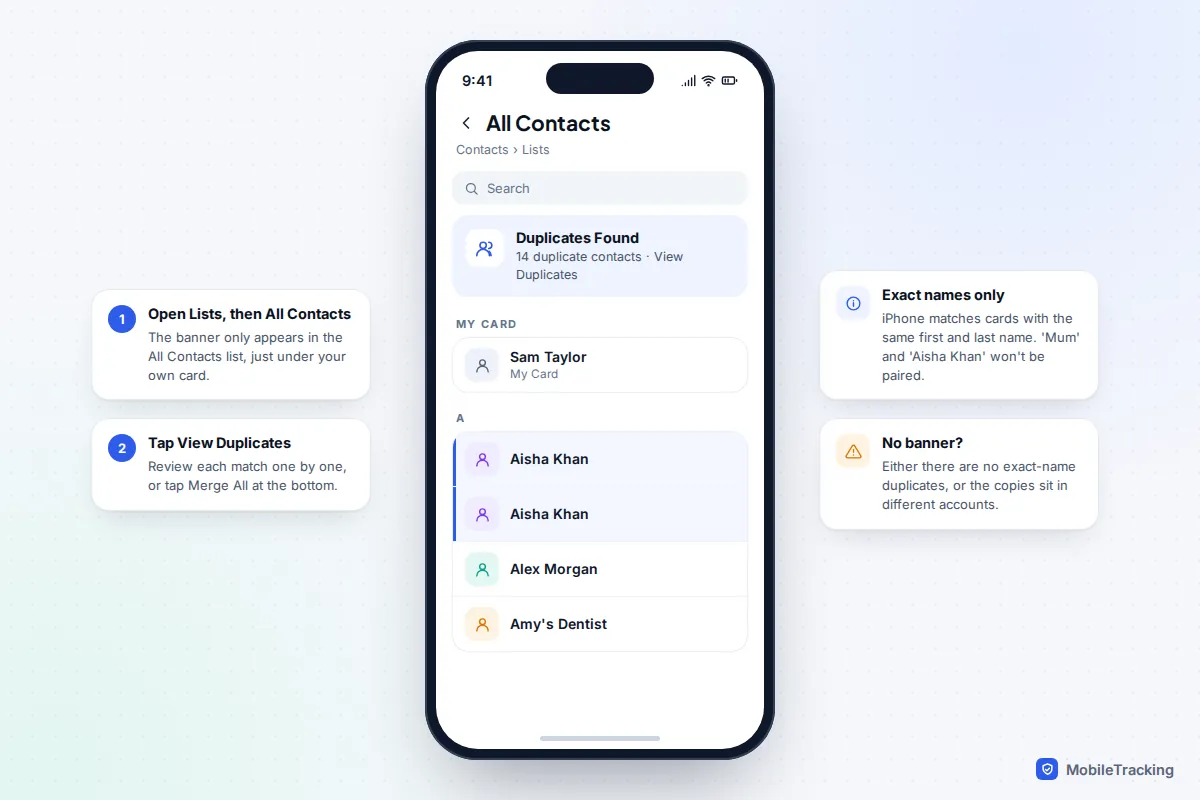
On an iPhone, open Contacts, tap Lists, then All Contacts. If the phone has spotted cards with the same name, a Duplicates Found banner appears under your own card: tap View Duplicates, then Merge All. On Android, open the Google Contacts app and go to Fix & manage > Merge & fix > Merge duplicates. On a Samsung Galaxy using Samsung’s own Contacts app, go to menu > Manage contacts > Merge contacts.
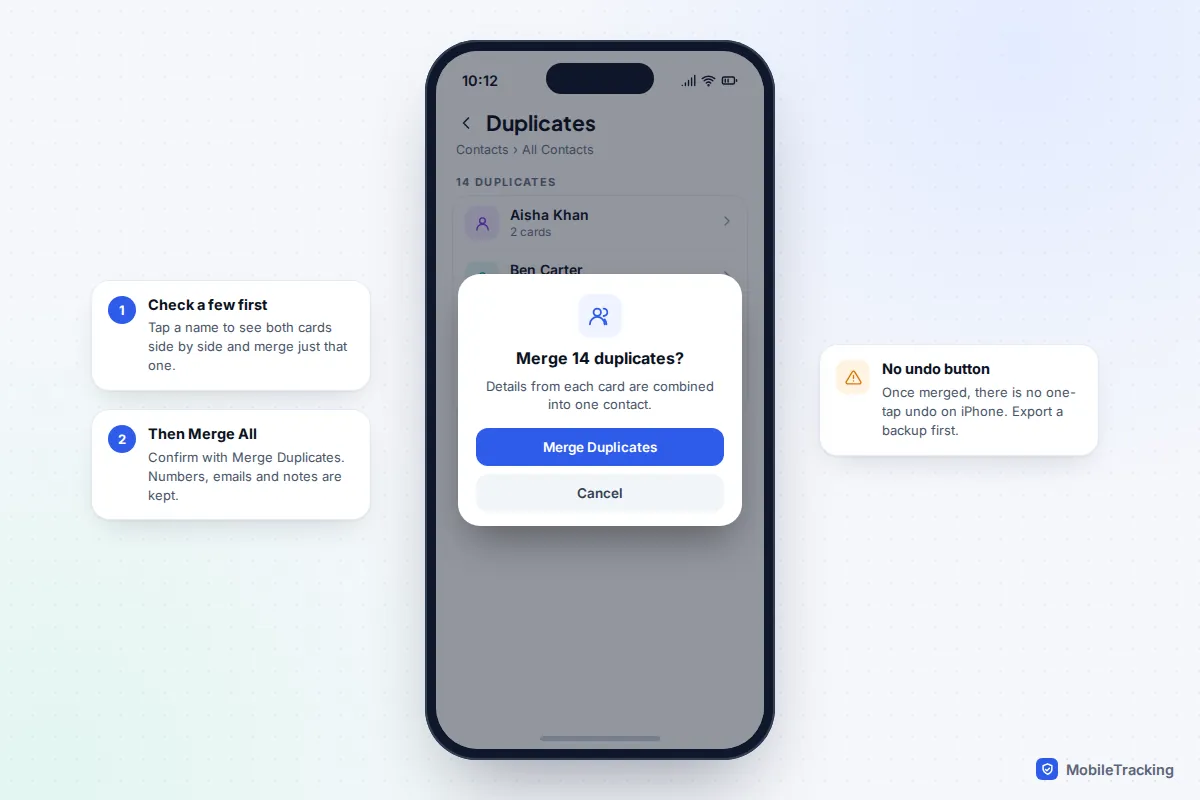
Two things make the difference between a clean address book and one that doubles again next week. First, export a backup copy (a vCard file) before you merge anything, because iPhone and Samsung have no undo button. Second, find out why the duplicates appeared. Nine times out of ten it is two accounts, such as iCloud and Google, both syncing the same people, and merging alone will not stop that.
Why you have duplicate contacts in the first place
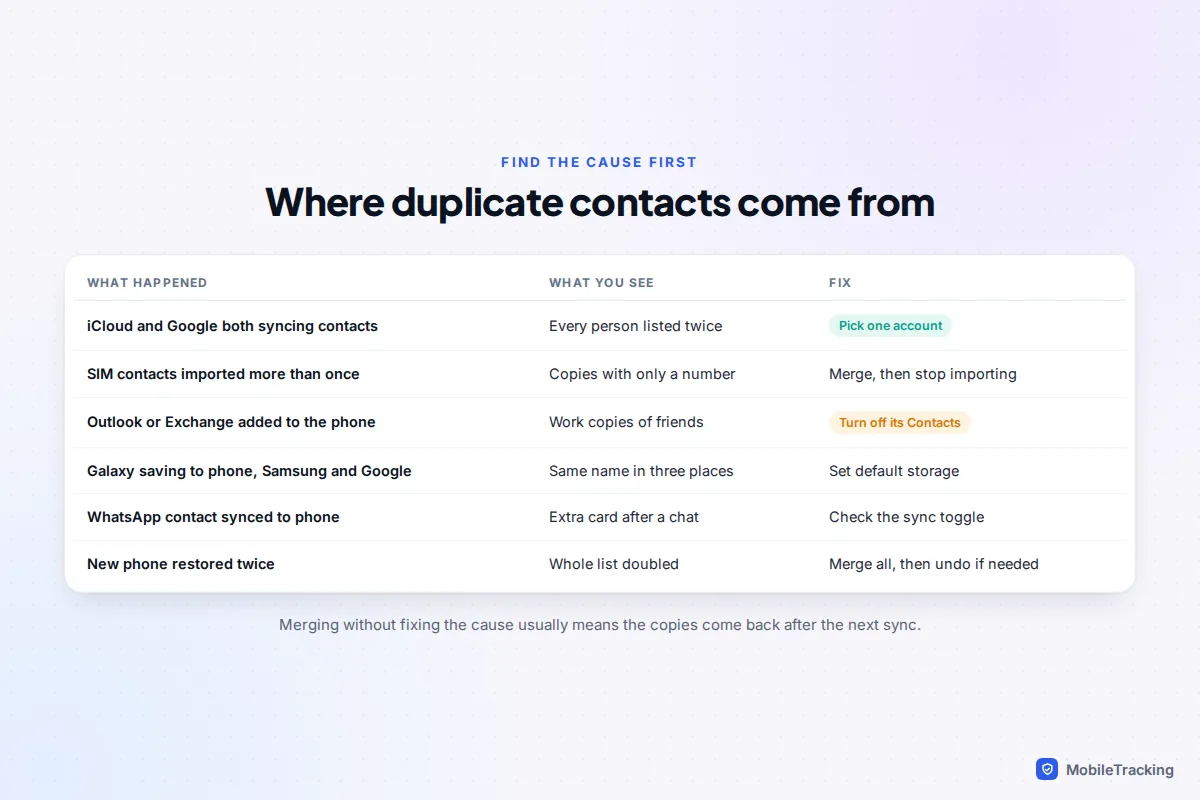
Your phone’s Contacts app is a window onto several address books at once. An iPhone can show contacts from iCloud, a Gmail account, a work Exchange or Outlook account and the SIM card all in one list. A Samsung Galaxy can hold contacts in phone storage, your Samsung account, one or more Google accounts and the SIM. When the same person lives in two of those places, you see them twice.
The usual culprits are:
- Two cloud accounts syncing contacts. You added your Gmail account to an iPhone and left Contacts switched on, so every person already in iCloud now appears again from Google.
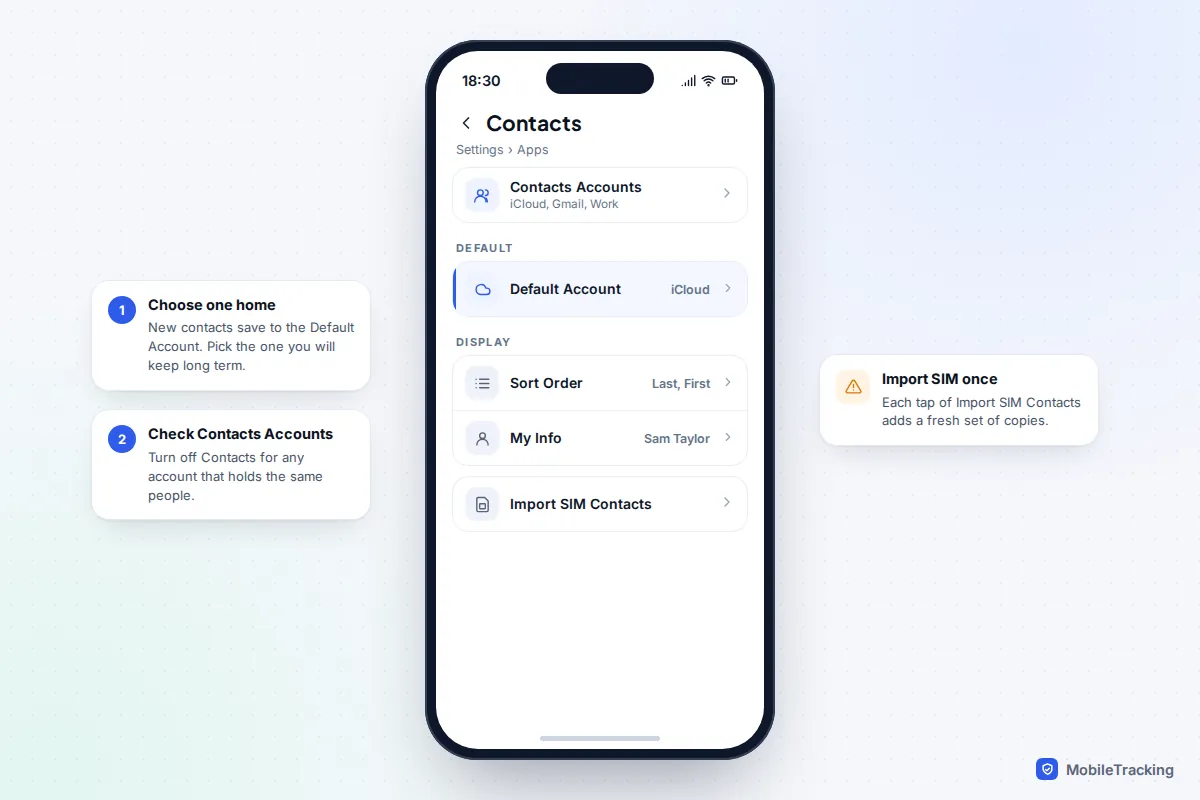
- SIM imports. On iPhone, Settings > Apps > Contacts > Import SIM Contacts copies the SIM’s numbers into your default account every time you tap it. Two taps, two sets of copies.
- Work email apps. Microsoft notes that Outlook for iOS’s Save Contacts option can leave duplicates in the iPhone Contacts app when its syncs don’t finish, which happens more with large contact lists.
- Samsung’s three homes. Galaxy phones may save new contacts to the phone, the Samsung account or Google depending on what you picked when you first saved one.
- WhatsApp. Since late 2024, WhatsApp lets you save a contact inside the app with a Sync contact to phone toggle. With the toggle on, a new card lands in your phone’s address book, sometimes alongside one you already had under a different name.
- Restoring or transferring twice. Setting up a new phone from a backup and then also importing a vCard file doubles the whole list. If you are about to switch phones, our guide to moving your data to a new phone covers how to avoid this.
A quick way to check: on iPhone, tap Lists in Contacts. You will see each account listed separately with its own count. If iCloud and Gmail each hold roughly the same number of contacts, you have found your cause.
Back up your contacts before you merge
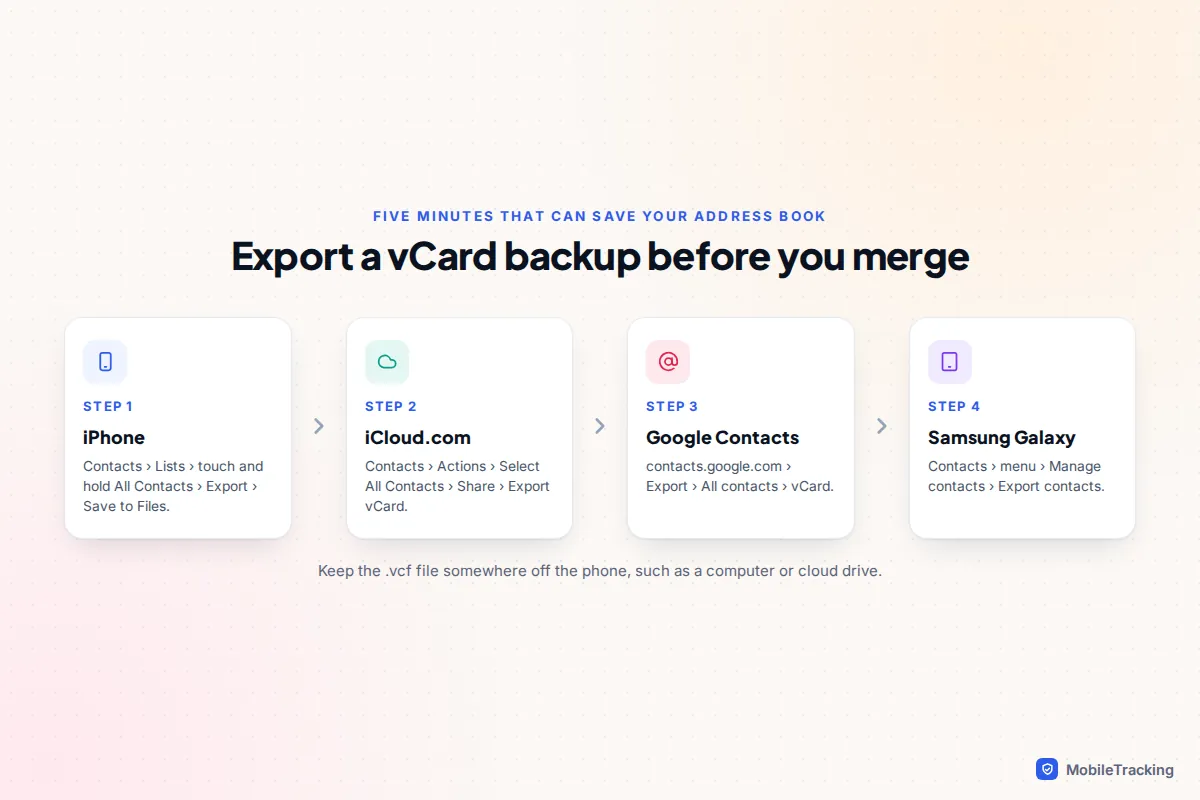
A merge rewrites contact cards across every device linked to that account. If an automatic match pairs the wrong people, for example two relatives who share a name, you want a copy you can fall back on. A vCard file (.vcf) is the universal format every phone and contacts service can read, and making one takes a few minutes.
- iPhone: open Contacts, tap Lists, touch and hold All Contacts (or a single account’s list), tap Export, then save the file to Files or send it to yourself.
- iCloud.com: sign in, open Contacts, click the Actions button, choose Select All Contacts, then click the Share button and Export vCard.
- Google Contacts: at contacts.google.com, click Export, choose all contacts and the vCard format.
- Samsung: in Contacts, open the menu, tap Manage contacts, then Export contacts (older One UI versions show Import or export contacts first). Choose where to save the .vcf file.
Keep the file off the phone, on a computer or in cloud storage. Do not import it again “just to be safe” once the merge is done: importing a vCard adds every contact as new, which recreates the duplicates you just removed. For a fuller safety net, see how to back up your iPhone or back up an Android phone.
How to merge duplicates on iPhone, Mac and iCloud.com
iPhone (iOS 16 and later, including iOS 26 and 27)
- Open Contacts, or the Contacts tab in the Phone app.
- Tap Lists at the top left, then All Contacts.
- Look under your own card (My Card) for Duplicates Found, and tap View Duplicates.
- Tap a name to compare the cards and merge just that one, or tap Merge All and confirm.
The iPhone only pairs contacts with identical first and last names. “Dad” and “Dad Mobile” will not be flagged, nor will “Aisha” and “Aisha Khan”. It also leaves alone cards that live in different accounts: if the same person is in iCloud and Gmail with the same name, iOS already shows them as a single unified entry in your list, so they never appear as duplicates here.
Link two cards by hand
For duplicates the iPhone misses, open one of the cards, tap Edit, scroll down and tap link contacts, choose the other card, then tap Link and Done. The two now display as one person. To undo it, open the card, tap Edit, tap the red minus beside the card under Linked Contacts and choose Unlink.
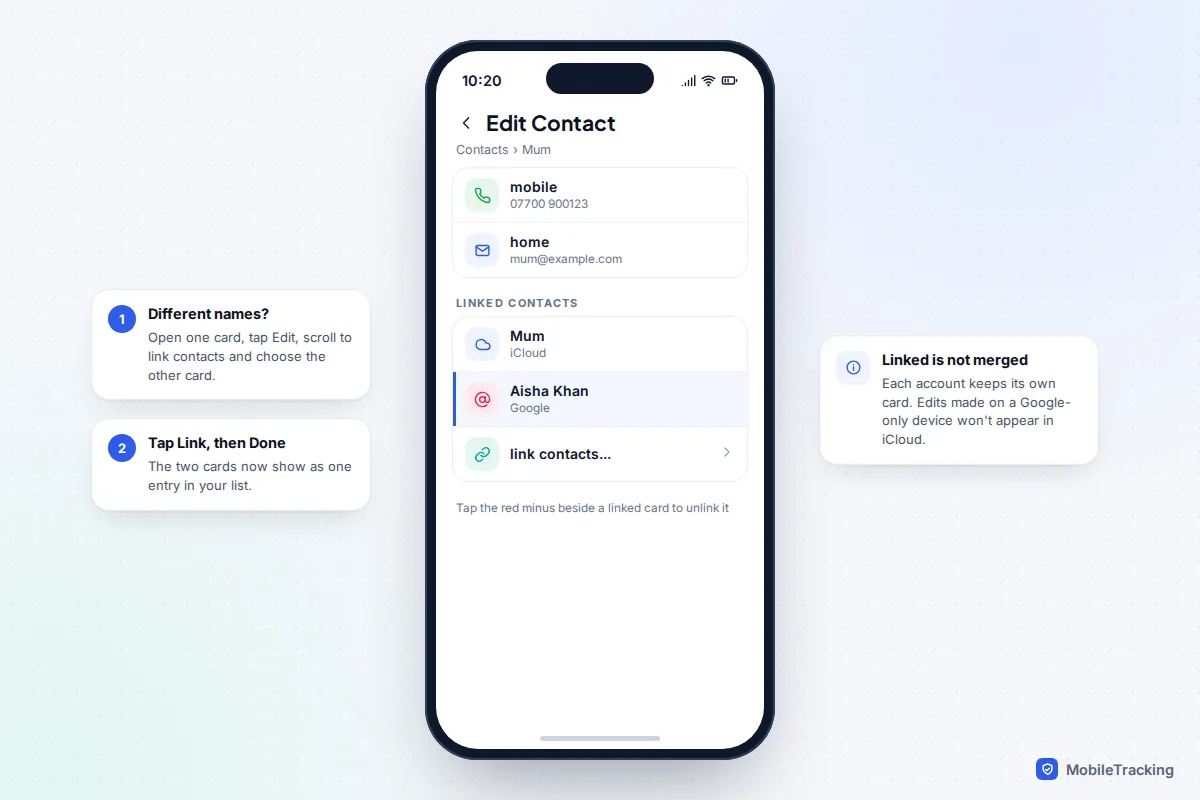
Mac and iCloud.com
The Contacts app on a Mac has a stronger tool: choose Card > Look for Duplicates, then click Merge. Apple suggests repeating it until nothing more is found. Because Mac Contacts syncs with iCloud, the result appears on your iPhone within a few minutes.
iCloud.com has no merge button. You can compare cards there and delete the spare one, which is fine for a handful of duplicates but slow for hundreds. What iCloud.com does offer is a safety net, covered in the undo section below.
How to merge duplicates in Google Contacts
Pixel phones and many other Android handsets use the Google Contacts app, and anything saved to your Google Account also shows at contacts.google.com. Merging in either place changes both.
On Android
- Open the Contacts app and check the account shown top right is the one with the duplicates.
- Tap Fix & manage, then Merge & fix.
- Tap Merge duplicates. This option only appears when Google has found likely matches.
- Tap Merge on each suggestion, or Merge all.
To combine two cards Google did not suggest, tap More (three dots), then Select, tick both contacts, and tap More > Merge.
On a computer
At contacts.google.com, open Merge & fix from the left-hand menu, then click Merge or Merge all. To merge manually, tick the contacts and click the merge icon at the top. Google’s own merge duplicate contacts help page has the current layout.
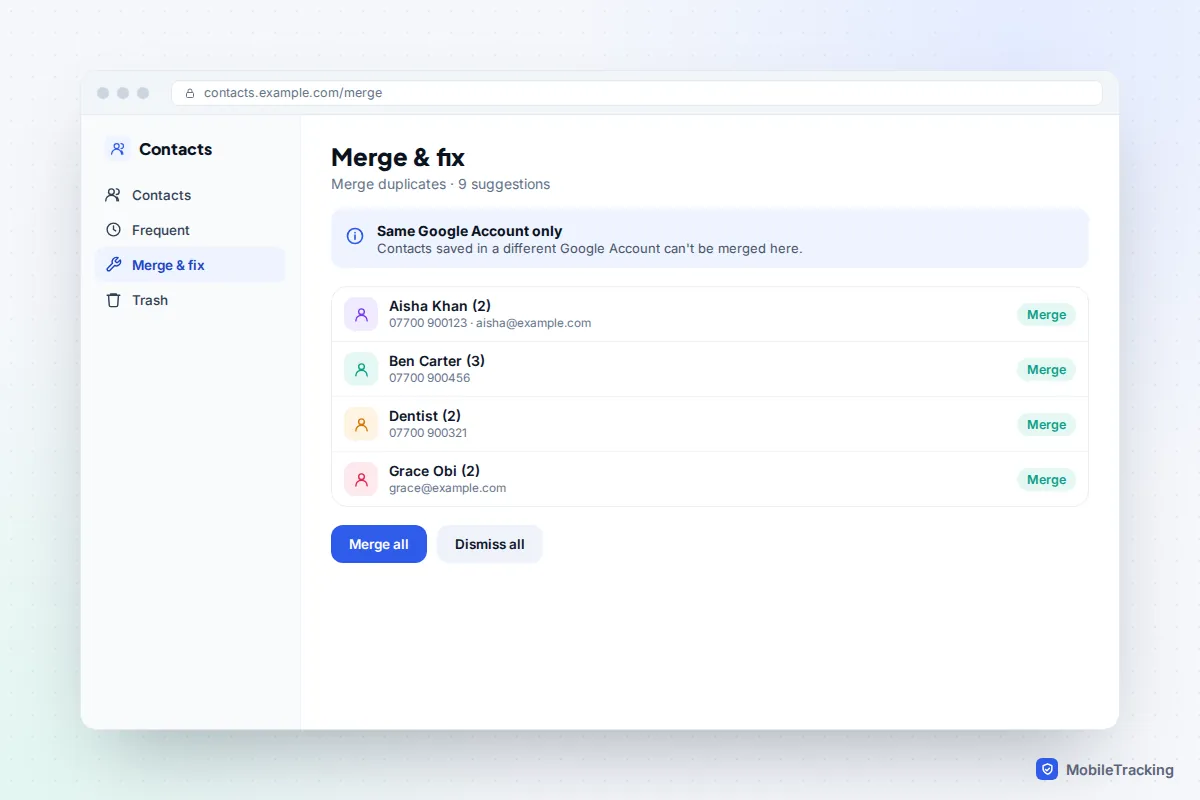
One limit matters: Google cannot merge contacts saved in two different Google Accounts. If a personal Gmail and a work Google account both hold the same person, merge within each, then stop one of them syncing contacts to your phone.
How to merge duplicates on a Samsung Galaxy
Samsung’s Contacts app has its own merge tool, and it handles contacts stored on the phone, in your Samsung account and in Google.
- Open Contacts and tap the menu (three lines; its position varies by One UI version).
- Tap Manage contacts, then Merge contacts.
- Choose whether to match by duplicate numbers, emails or names.
- Tick the groups you want to combine and tap Merge.
Start with numbers. Matching by number catches “Dad” and “Dad Mobile”, which share a number but not a name. Go through the list rather than selecting everything: a shared landline can link a whole household into one card if you are not careful.
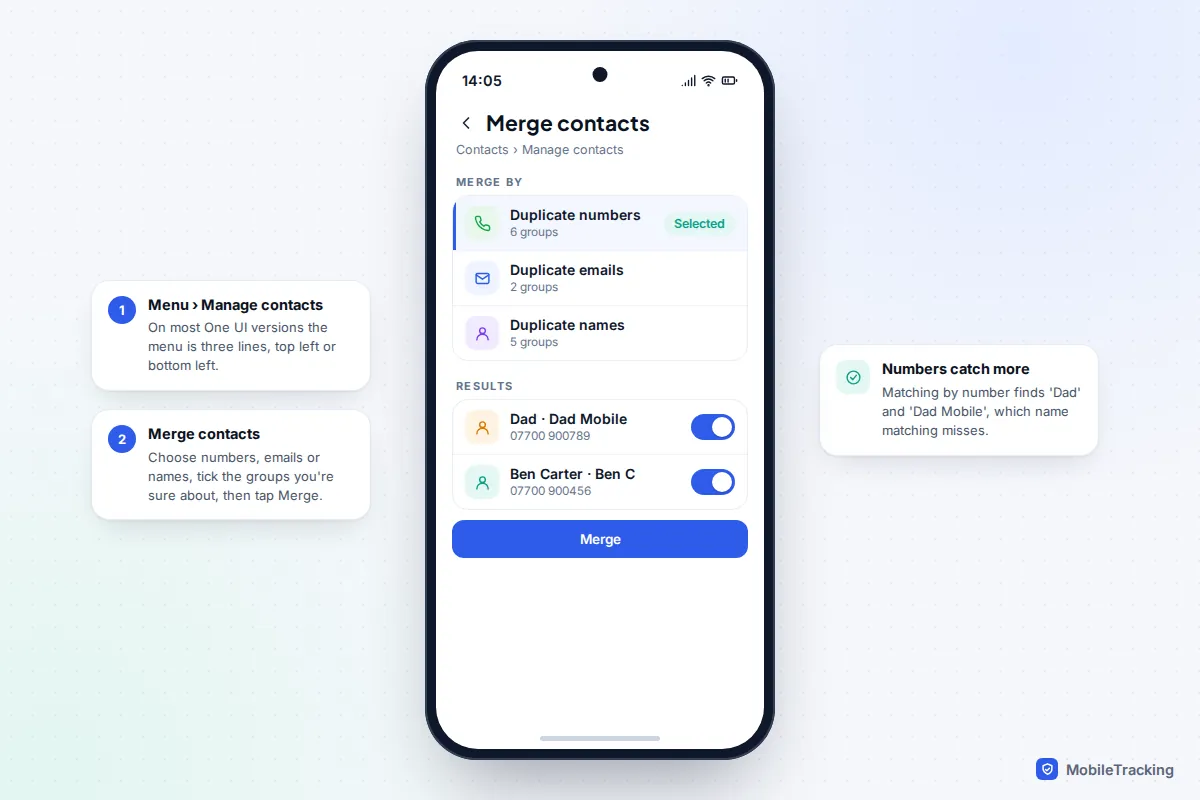
Before merging on a Galaxy, open Manage contacts > Contacts to display and choose All. If only one account is being shown, the merge tool cannot see duplicates hiding in the others.
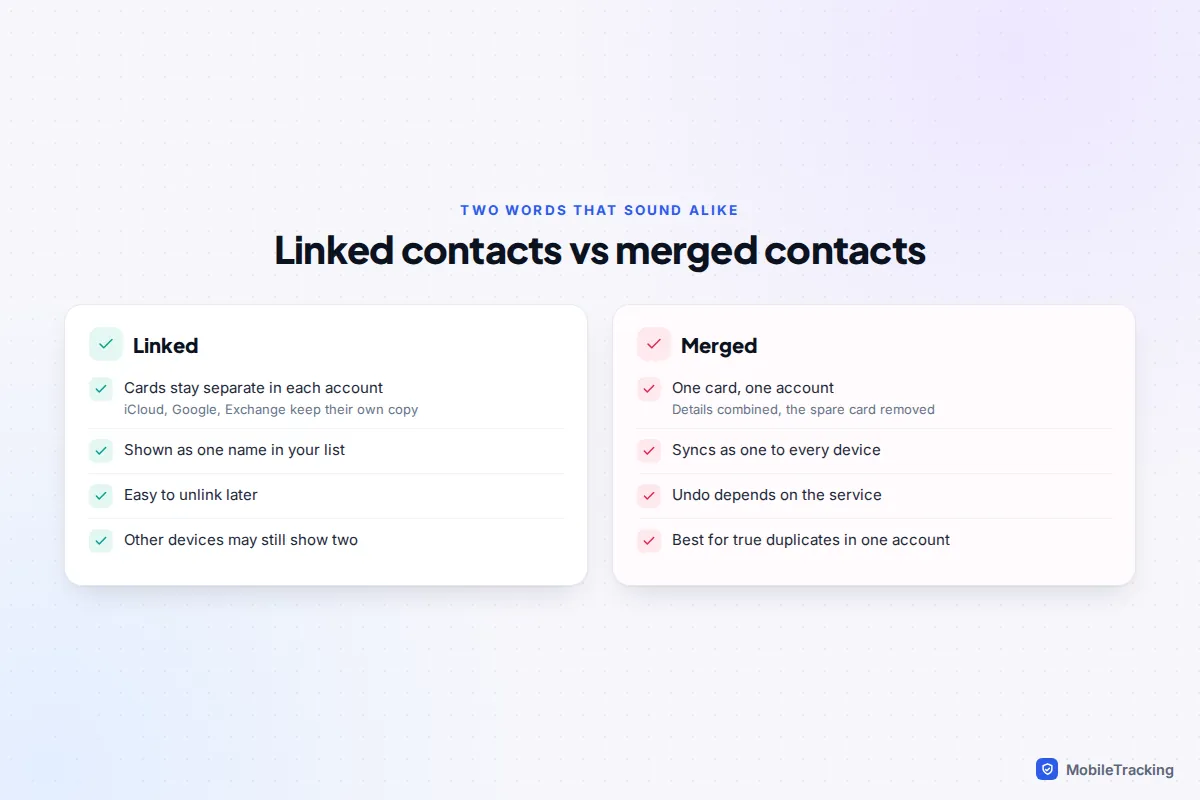
Linked contacts vs merged contacts
These terms get used interchangeably, but they do different things, and knowing which one happened explains a lot of confusing behaviour.
| Linked | Merged | |
|---|---|---|
| What happens to the cards | Both stay, one in each account | Combined into one card; the spare is removed |
| What you see on this phone | One entry | One entry |
| What other devices see | Possibly two entries | One entry |
| Easy to reverse? | Yes, unlink at any time | Only with a backup or a service’s undo |
| Best for | Same person in two accounts, or under two names | True copies in the same account |
Here is where it trips people up. Say Leo links his iCloud card for “Mum” with a Gmail card for his mother’s full name on his iPhone. His iPhone shows one entry. His Android tablet, which only sees Gmail, still shows the Gmail card on its own, and his Mac, which only sees iCloud, shows “Mum”. Nothing is broken; linking only ever tidies the view on one device.
Stop duplicates coming back: choose one home for your contacts
The lasting fix is to keep all your contacts in one account and make it the default for new ones. Pick the account you are most likely to keep: iCloud if you plan to stay with Apple devices, Google if you use Android or might switch.
- iPhone: go to Settings > Apps > Contacts > Default Account and choose it. The option only appears when more than one account syncs contacts. Then open Contacts Accounts, tap each other account and turn off Contacts if it duplicates the same people.
- Google Contacts app: tap your profile picture, then Contacts app settings > Default account for new contacts.
- Samsung: Contacts > menu > Manage contacts > Set default storage location. Samsung also offers a move option under Manage contacts to shift phone-only contacts into your Google or Samsung account.
- WhatsApp: when you add someone, check whether Sync contact to phone is on. Leave it off if the person is already in your address book.
Changing the default only affects new contacts. Existing ones stay in the account they were saved to, so if you want everything in one place, export the second account’s contacts as a vCard, import them into your chosen account, merge, and then switch the second account’s contact sync off.
How to undo a merge that went wrong
What you can recover depends on where the contacts are stored.
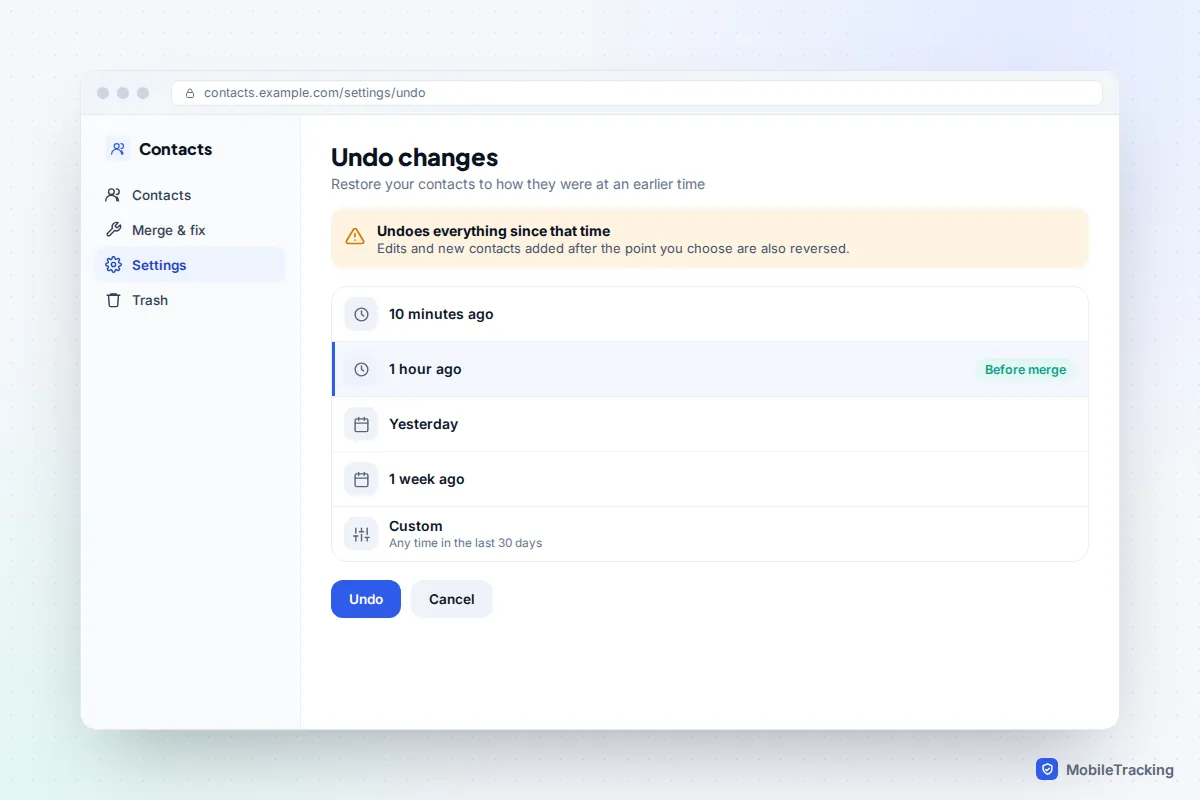
- Google Contacts: the most forgiving. On a computer, open Settings > Undo changes; on Android, tap your profile picture, then Contacts app settings > Undo changes. Choose a time before the merge, anywhere in the last 30 days, and confirm. This reverses every change since then, not just the merge, so note any contacts you added afterwards. Deleted contacts also sit in Trash for 30 days. Google explains both in its edit or delete contacts help page.
- iCloud: at iCloud.com, scroll to the bottom, select Data Recovery, then Restore Contacts and pick a date before the merge. The earlier version replaces your contacts on all devices, and iCloud saves your current contacts first so you can switch back. Apple describes this in its guide to restoring deleted contacts.
- Linked contacts on iPhone: open the card, tap Edit and unlink.
- Samsung phone-storage contacts: there is no undo for a merge. Your vCard backup is the fallback. Deleted (not merged) contacts may be in Recycle bin in the Contacts menu for a limited time.
If you have to restore from your own vCard, delete the damaged contacts first (or restore into an account you have emptied), then import. Importing on top of the existing list gives you a second set of duplicates.
Frequently asked questions
Why doesn’t my iPhone show “Duplicates Found”?
Either there are no cards with exactly the same first and last name in one account, or you are looking at a single account’s list rather than All Contacts. Duplicates saved under different names need linking by hand, or a Mac, which finds more matches with Card > Look for Duplicates.
Will merging contacts delete phone numbers or photos?
No. A merge keeps every number, email address, address and note from all the cards and combines them into one. If two cards had different photos, one will be kept, so check a couple of important contacts afterwards.
Can I merge an iCloud contact with a Google contact?
Not directly. They live in different services, so iPhone can only link them. To end up with a single card, move everyone into one account (export a vCard from one, import into the other), merge there, and stop the other account syncing contacts.
Are duplicate-cleaner apps safe to use?
Some are, but they need full access to your address book, which holds other people’s personal details. The built-in tools on iPhone, Mac, Google and Samsung cover most cases for free. If you do use an app, read its privacy policy and check the permissions it asks for.
My contacts doubled after I set up a new phone. What happened?
Usually the phone restored contacts from one source (a backup or an account sign-in) and you then imported them again from another, such as a SIM or a vCard. Run the merge tool, then check which accounts are syncing contacts so it doesn’t repeat.
This guide is general information, not legal or financial advice. Read our editorial policy.