
Most “No SIM” errors clear with three quick steps: restart the phone, turn airplane mode on and off, then power off and reseat the SIM card in its tray. On an iPhone, also open Settings › General › About while on Wi-Fi, which triggers any pending carrier settings update. If the message is still there, borrow a SIM from someone on any network and try it in your phone. That one test tells you whether the fault is your SIM or account, or the phone itself.
If your phone has no SIM tray at all, as with every iPhone from the 14 onwards sold in the US, “No SIM” means there is no active eSIM on the phone, and the fix is in Settings or with your carrier rather than inside the tray. The sections below cover every version of the error, in the order worth trying them.
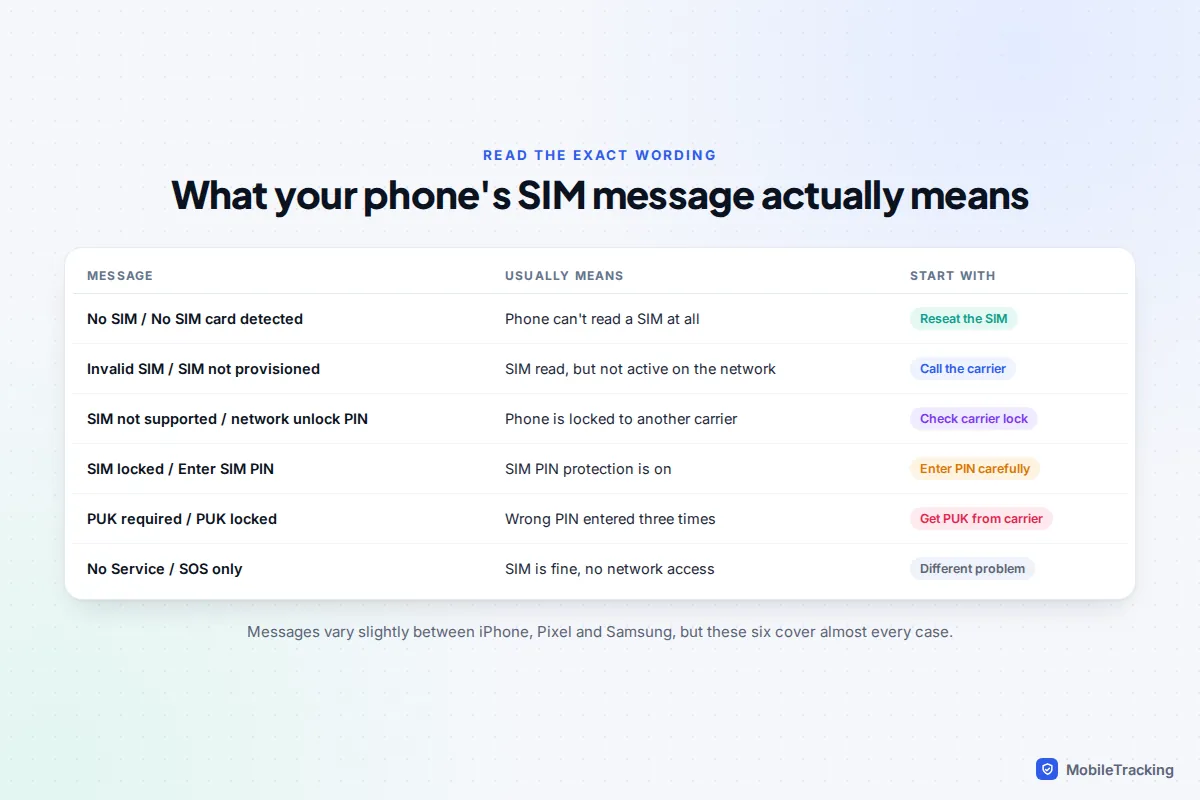
Read the exact message first
Phones use several similar-sounding messages, and each points somewhere different.
- No SIM or No SIM card detected: the phone cannot read any SIM. The card is loose, dirty or damaged, an eSIM is switched off or missing, or the reader is faulty.
- Invalid SIM or SIM not provisioned: the phone reads the card, but the network won’t accept it. That usually means a new SIM not yet activated, a replaced SIM, or a suspended line.
- SIM not supported (iPhone) or a request for a SIM network unlock PIN (Android): the phone is locked to a different carrier.
- No Service or SOS only: the SIM is fine but the phone can’t use the network. That is a coverage, account or blocked-device issue rather than a SIM fault.
If you see a request for a PIN or PUK code, stop and read the PIN and PUK section before typing anything.
Quick fixes that solve most cases
Work through these in order. Each takes under a couple of minutes.
- Restart the phone. A normal power off and on makes the phone search for the SIM from scratch.
- Toggle airplane mode. Turn it on from Control Centre or Quick Settings, wait fifteen seconds, then turn it off. This restarts the cellular radio without a full reboot.
- Update carrier settings on iPhone. Connect to Wi-Fi, open Settings › General › About and wait a few seconds. If your carrier has published new settings, a prompt appears asking you to update. If nothing appears, you are already up to date.
- Install system updates. On iPhone use Settings › General › Software Update. Android phones get carrier configuration with system updates, so check Settings › System › Software updates on a Pixel or Settings › Software update on Samsung.
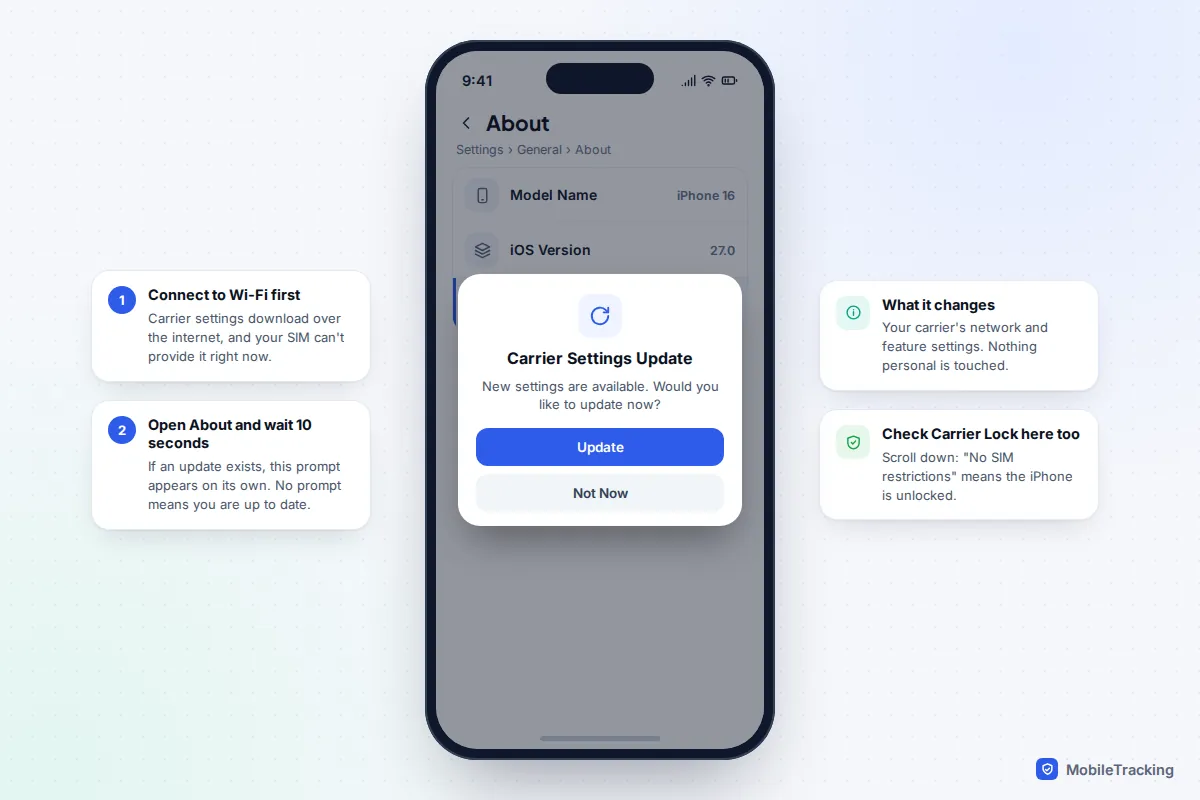
Apple’s own checklist for ‘invalid SIM’ or ‘no SIM’ on iPhone follows the same order, and it also suggests checking with your carrier that your plan is active, which is the step people most often skip.
Reseat, clean and check the physical SIM
A SIM card only needs to shift a fraction of a millimetre to lose contact, and a drop is enough to do it. Reseating it properly is the single most effective fix for a physical SIM.
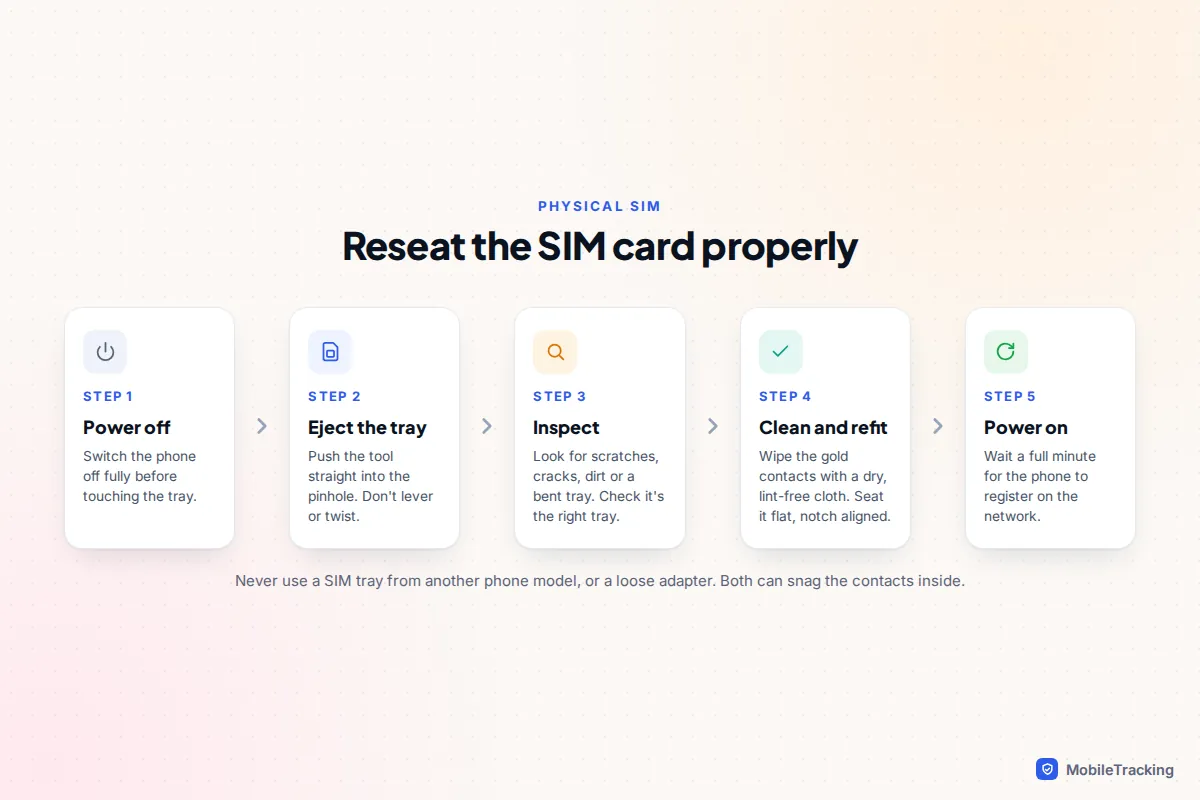
- Power the phone off. Phones detect SIMs most reliably at start-up.
- Eject the tray. Push the SIM tool or a straightened paper clip straight into the pinhole beside the tray. Don’t use a needle or earring stud, which can snap off inside.
- Inspect the card and tray. Look for a cracked card, scratched or dirty gold contacts, or a bent tray that lets the SIM sit unevenly.
- Clean and refit. Wipe the contacts with a dry, lint-free cloth. Lay the SIM flat in the tray with the cut corner matching the tray’s shape, then slide it in the same way it came out.
- Power on and wait a minute before deciding it hasn’t worked.
Three things cause repeat problems. Trays are model-specific, so a tray borrowed from another phone may look right but hold the card out of line. A SIM that was cut down by hand, or sits in a loose adapter, can catch on the reader’s contacts. And a SIM that is many years old may not be fully compatible with newer network features, which is worth mentioning to your carrier. In all three cases, a replacement SIM from your carrier is cheap or free and keeps your number.
eSIM problems and dual-SIM settings
An eSIM is a digital SIM profile stored on a chip inside the phone. There is nothing to reseat, so “No SIM” on an eSIM phone means the profile is switched off, missing, or not activated by the carrier.
Check whether the eSIM is still there
On iPhone, open Settings › Mobile Service (called Cellular on US iPhones). Every SIM and eSIM on the phone is listed. Tap yours: if it is listed but off, turn on Turn On This Line. On a Pixel, go to Settings › Network & internet › SIMs, tap the SIM and check Use SIM. On Samsung, open Settings › Connections › SIM manager and switch it on.
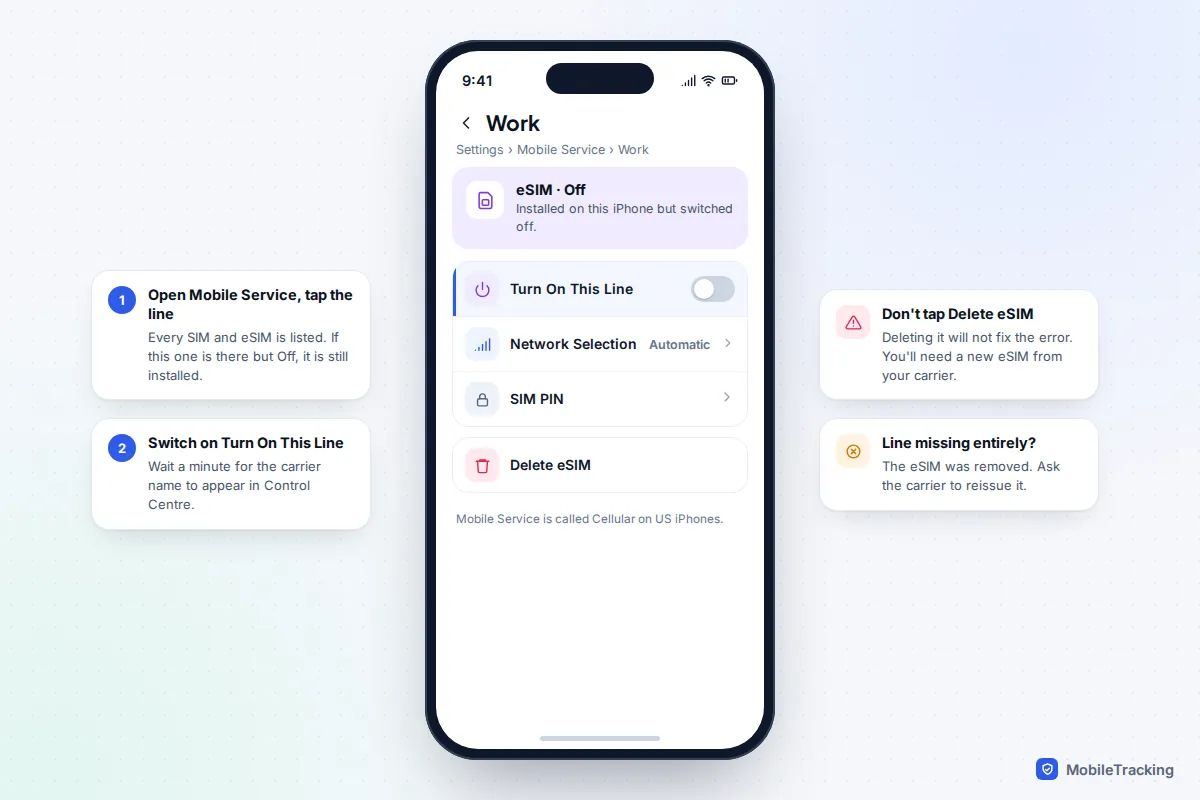
If the line isn’t listed at all, the eSIM has been removed. That happens after an erase that didn’t keep the eSIM, a failed transfer to a new phone, or someone tapping Delete eSIM. The phone cannot restore it by itself. Your carrier has to issue a new one, usually through its app, a QR code by email, or in a shop with ID. Some carriers also support transferring an eSIM directly from your old phone during setup. See our guide on how to use an eSIM for the details.
Is your phone eSIM-only?
If there is no pinhole tray on the edge of the phone, it is eSIM-only, and all the physical-SIM advice above can be skipped. Which models these are depends on where the phone was bought, not where you are now.
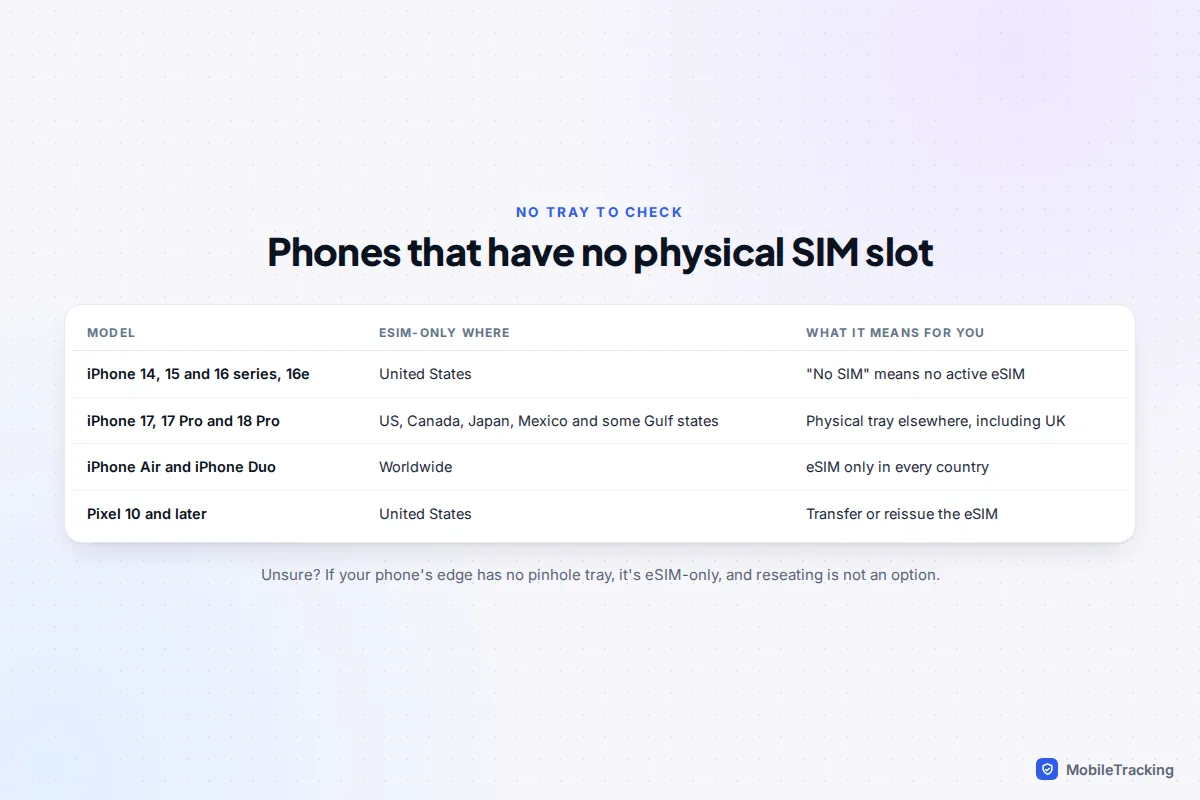
- Every iPhone 14, 15 and 16 model and the iPhone 16e sold in the United States.
- iPhone 17, 17 Pro and 18 Pro models sold in the US, Canada, Japan, Mexico, Guam, the US Virgin Islands and six Gulf states (Bahrain, Kuwait, Oman, Qatar, Saudi Arabia and the UAE). Models sold in the UK and Europe keep a tray.
- iPhone Air and iPhone Duo, in every country.
- Pixel 10 and later sold in the US, according to Google.
Dual-SIM settings
A phone with two lines can show one as missing when it is simply switched off, or when mobile data is set to use the line that is off. Check that the right SIM is on and chosen for calls, messages and data.
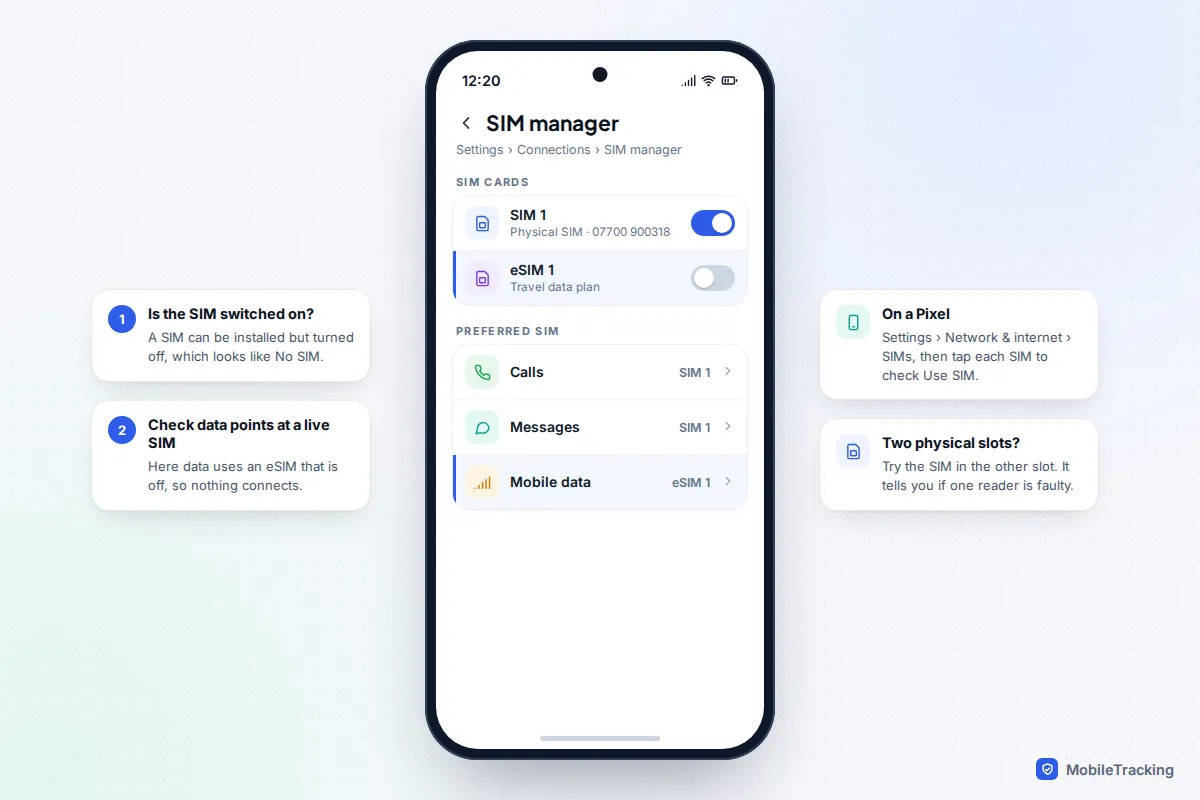
On an Android phone with two physical slots, move the SIM to the other slot. If it works there, one slot’s reader is faulty, and you can keep using the working one while you arrange a repair.
Reset network settings, especially after an update
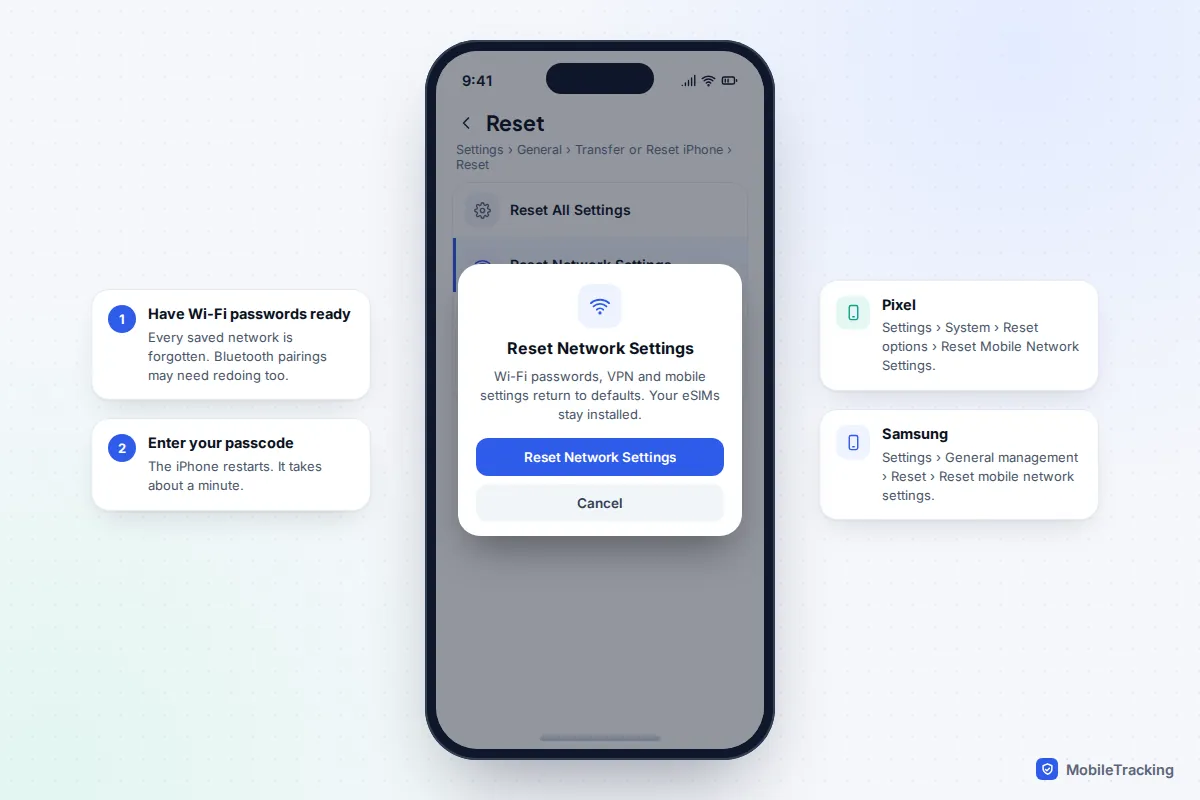
If the error started straight after a software update, or none of the steps above helped, reset the network settings. This clears carrier, APN and Wi-Fi configuration back to defaults without touching your photos, apps or messages.
- iPhone: Settings › General › Transfer or Reset iPhone › Reset › Reset Network Settings. Your eSIMs stay installed. Saved Wi-Fi passwords and VPN settings are removed.
- Pixel: Settings › System › Reset options › Reset Mobile Network Settings. Wi-Fi and Bluetooth have a separate reset option, which you don’t need here.
- Samsung: Settings › General management › Reset › Reset mobile network settings, choose the SIM if there are two, then tap Reset settings.
One update-related case catches out owners of second-hand iPhones. If a phone was “unlocked” with a thin adapter under the SIM, or a special unlocking SIM, an iOS update can stop the workaround and the phone suddenly shows SIM not supported. No reset will fix that. Only the carrier the phone is locked to can unlock it properly.
SIM PIN and PUK: stop before you guess
A SIM PIN locks the SIM card itself, separately from your phone’s passcode. It is a good theft protection because it stops someone putting your SIM in another phone to receive your security codes. It is also the easiest way to turn a small problem into a lost SIM.
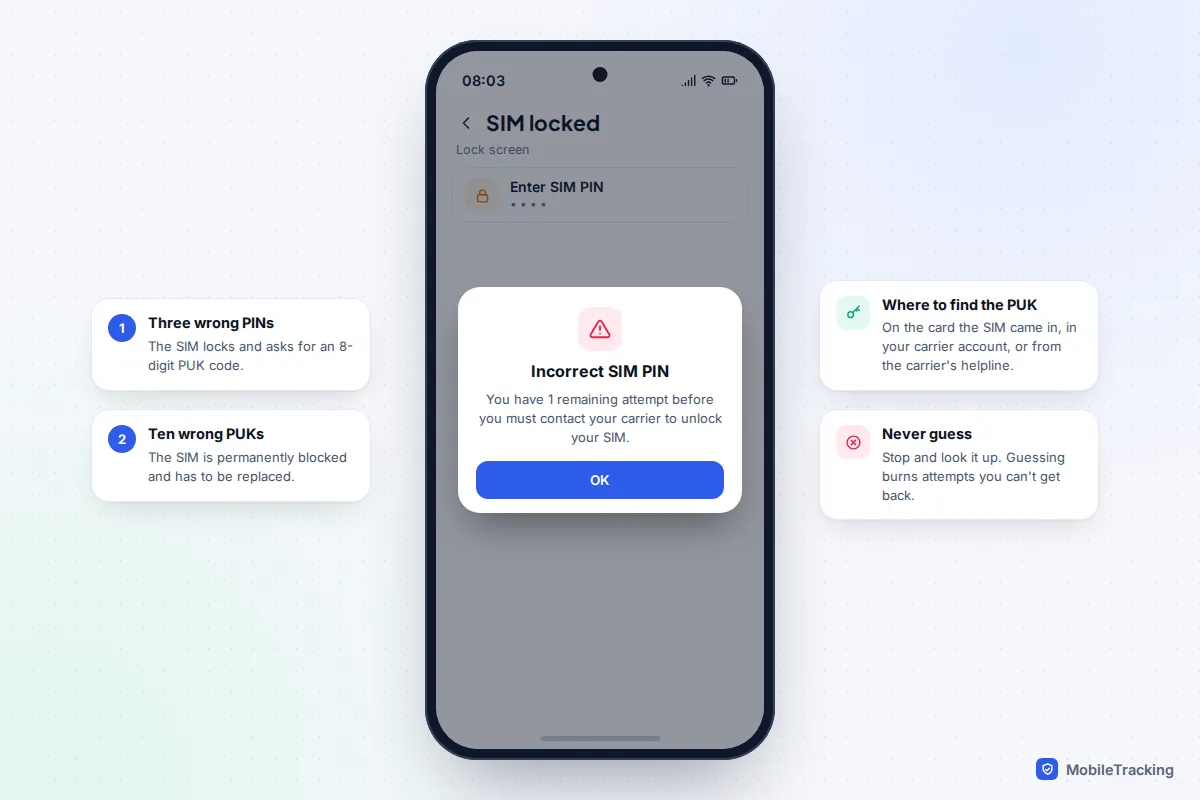
- Enter the SIM PIN wrongly three times and the SIM locks, asking for a PUK code.
- Enter the PUK wrongly ten times and the SIM is permanently blocked and has to be replaced.
- Your PUK is on the card the SIM came attached to, in your carrier’s app or online account, or available from the carrier’s helpline once they have confirmed who you are.
Default SIM PINs vary by carrier, so look yours up rather than trying likely numbers. Once the phone works again, you can change or check the PIN in Settings › Mobile Service › SIM PIN on iPhone, or search Settings for “SIM lock” on Android.
When the problem is your account, not your phone
Plenty of SIM errors have nothing to do with hardware. Before you take anything apart, log in to your carrier’s app or website from another device, or call them.
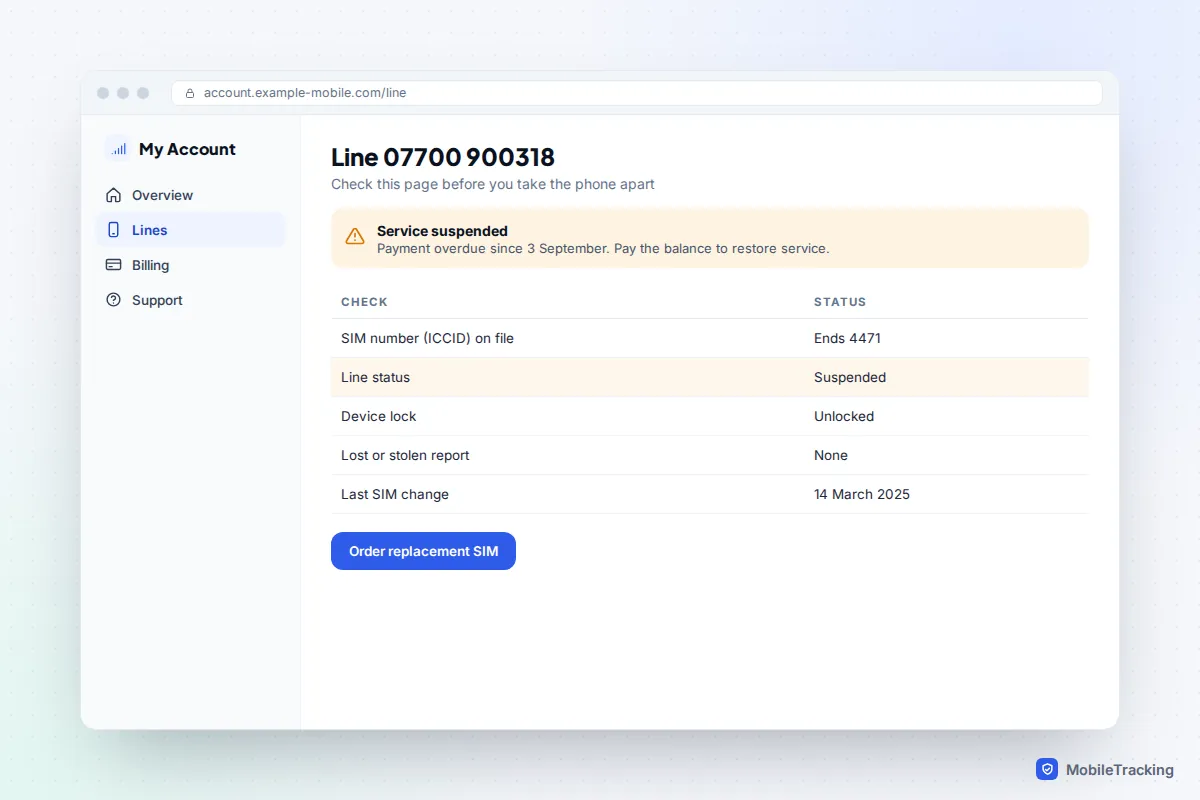
- Carrier lock. On iPhone, check Settings › General › About › Carrier Lock. “No SIM restrictions” means it is unlocked. Android has no single equivalent, but a locked phone asks for a network unlock PIN when you insert another carrier’s SIM. Our guides on checking if a phone is carrier-unlocked and unlocking it for another carrier cover the process.
- Suspended line or unpaid bill. Carriers suspend or deactivate SIMs for missed payments, and the phone then shows Invalid SIM or No Service. Paying the balance usually restores service quickly, though a SIM that has been deactivated for a long time may need replacing.
- SIM replaced or number moved. If you ordered a new SIM or moved your number to another network, the old SIM stops working as soon as the new one activates.
- Blocked device. A phone reported lost or stolen, or bought with unpaid finance, can be blocked by its IMEI. That usually shows as No Service rather than No SIM. If you bought the phone second-hand, read how to check whether a used phone is blocked.
Take one scenario seriously. If your working phone suddenly shows No Service or Invalid SIM when you haven’t changed anything, and you start getting emails about password resets or new sign-ins, someone may have moved your number to their own SIM. Call your carrier from another phone straight away and ask whether a SIM change or number transfer was made. Our guide to text-interception scams explains what to lock down next.
Find the faulty part: the swap test and the SIM reader
If you’ve got this far, it’s time to find out which piece is broken. Borrow a SIM from a friend or family member. It can be on any network if your phone is unlocked, or the same network if it isn’t.
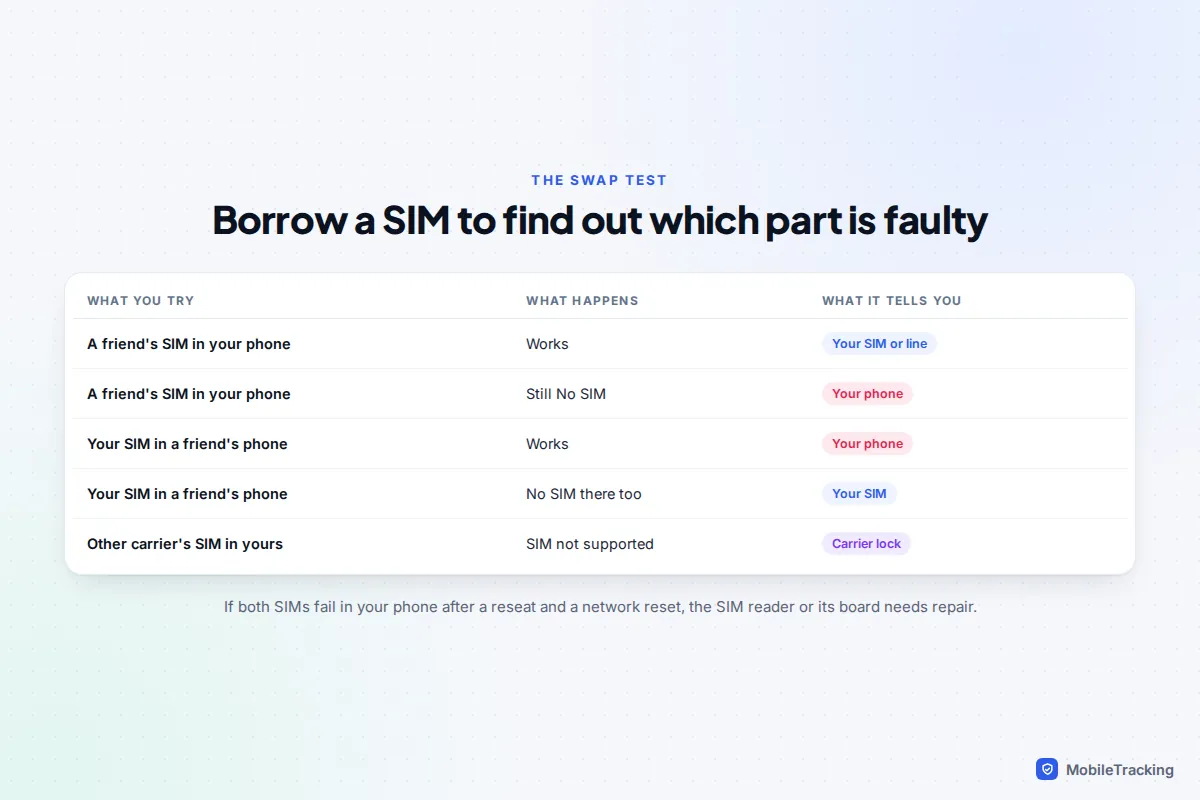
- Their SIM works in your phone: your phone is fine. Ask your carrier for a replacement SIM, or an eSIM if your phone supports one.
- Your SIM works in their phone, but no SIM works in yours: the phone’s SIM reader, tray or the board it connects to is at fault.
A faulty reader is more likely if the phone was dropped or got wet, since the tray slot is an easy way in for liquid. If your phone supports eSIM, moving your number to an eSIM is a useful workaround, because an eSIM doesn’t use the physical reader at all. It won’t help if the fault is on the main board, as the cellular hardware is shared.
For a proper fix, book a repair with the manufacturer or an authorised provider. A reader fault with no damage should be covered by the standard one-year warranty, and on many recent phones the reader is a replaceable part rather than a new board. Back up your phone before you hand it over.
Frequently asked questions
Will I lose my contacts if I take the SIM out?
Almost certainly not. iPhones and modern Android phones store contacts in your Apple or Google account, not on the SIM. The exception is an older Android phone where you deliberately saved contacts to the SIM, which you can check in the Contacts app’s settings.
Does resetting network settings delete my eSIM?
No. On iPhone, Reset Network Settings keeps your eSIMs. On Android, they are kept unless you tick an option to erase downloaded SIMs, so leave any such box unticked. Erasing the whole phone is different: iPhone asks whether to keep or erase eSIMs, so read that screen carefully.
Why did “No SIM” appear after I dropped my phone?
A knock can shift the SIM or bend the tray slightly. Power off and reseat it. If the error keeps coming back, or another SIM also fails, the drop may have damaged the reader and it needs repair.
How long does a replacement SIM or eSIM take?
A new eSIM can often be issued and downloaded within minutes through your carrier’s app or in a shop. A physical SIM by post usually takes a few days, though many carrier shops hand one over on the spot. You keep your number either way.
Can I fix a PUK-locked SIM myself?
Only by entering the correct PUK, which you get from your carrier. There is no tool or code that bypasses it, and sites claiming otherwise are not to be trusted. After ten wrong PUK attempts, the only option is a replacement SIM.
This guide is general information, not legal or financial advice. Read our editorial policy.