
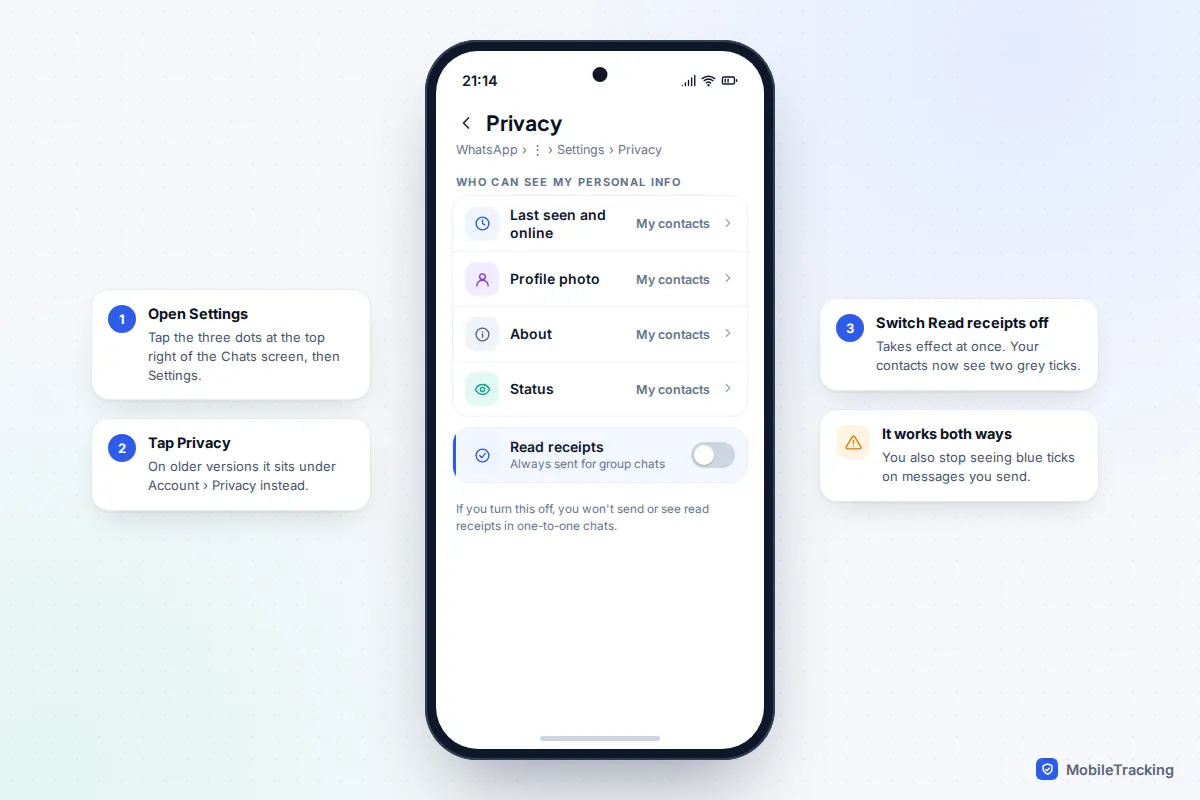
To turn off read receipts on WhatsApp, open Settings, tap Privacy and switch off Read receipts. On Android, Settings is behind the three dots at the top right of the Chats screen; on iPhone, it is the tab at the bottom right. The change is instant: people who message you one-to-one see two grey ticks instead of two blue ones, however quickly you open their message.
Two things catch most people out. First, it works both ways: with your receipts off, you stop seeing blue ticks on the messages you send, too. Second, it has hard limits. Group chats always show who has read a message, and playing a voice note still turns the sender’s microphone icon blue. This guide covers the exact steps, everything the setting does and doesn’t hide, which “read it secretly” tricks actually work, and how to talk about blue ticks as a family.
Turn off read receipts on Android, iPhone and computer
The setting belongs to your WhatsApp account rather than to one phone, so you only need to change it once. WhatsApp moved Privacy out of the Account menu a few years ago; if your screen still shows Account › Privacy, your app is out of date and worth updating anyway.
On Android
- Open WhatsApp and go to the Chats tab.
- Tap the three dots (⋮) at the top right, then Settings.
- Tap Privacy.
- Scroll to Read receipts and tap the toggle so it turns grey.
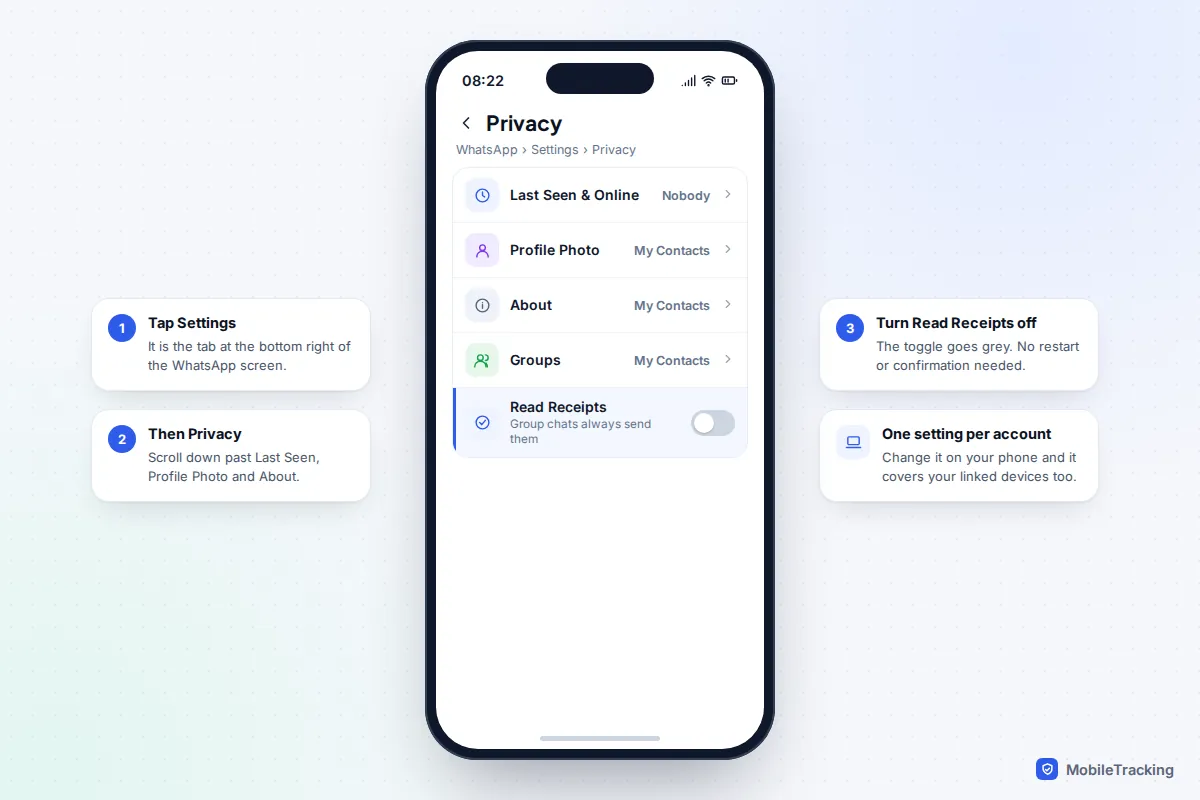
On iPhone
- Open WhatsApp and tap Settings at the bottom right.
- Tap Privacy.
- Scroll down and switch off Read Receipts.
WhatsApp’s layout is the same on iOS 26 and iOS 27, and on Android 16 and 17, because the menus come from the app rather than the phone’s system software. Samsung, Pixel and other Android phones therefore all show identical wording here.
On WhatsApp for Windows, Mac or the web
Linked devices follow your account’s privacy choices, so switching receipts off on your phone also covers what you read on a laptop. If you prefer to change it from a computer, the desktop app has the same Settings › Privacy › Read receipts option. You can confirm it has worked by asking a friend to send you a one-to-one message: after you open it, their side should stay on two grey ticks.
What it hides, and what it doesn’t
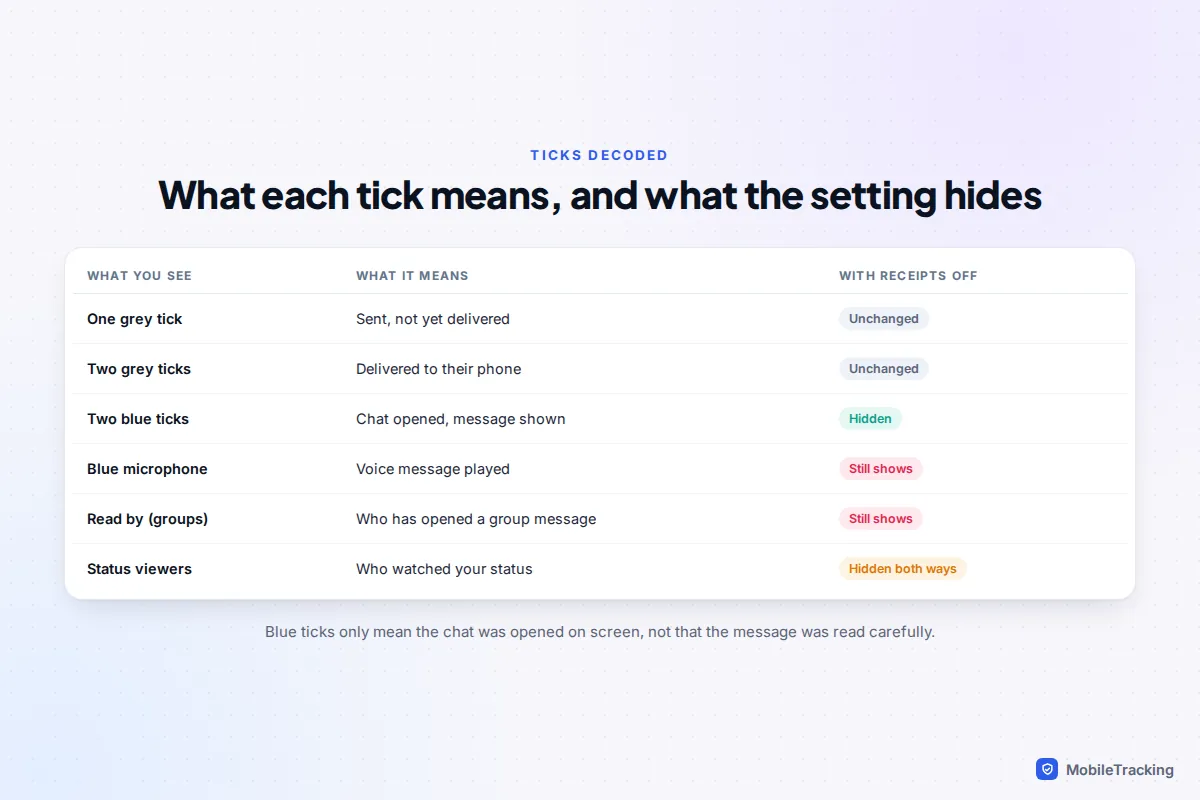
WhatsApp uses ticks to show a message’s progress. One grey tick means it has left your phone. Two grey ticks mean it has reached the other person’s phone. Two blue ticks mean they opened the chat and the message was shown on screen. Only that last step is the read receipt, and only that step changes when someone switches the setting off.
Blue ticks are cruder than they look. They say a chat was opened, not that a message was read carefully, understood or even noticed among twenty others. That is worth remembering before you take offence at a pair of blue ticks with no reply underneath.
Hidden once you switch it off
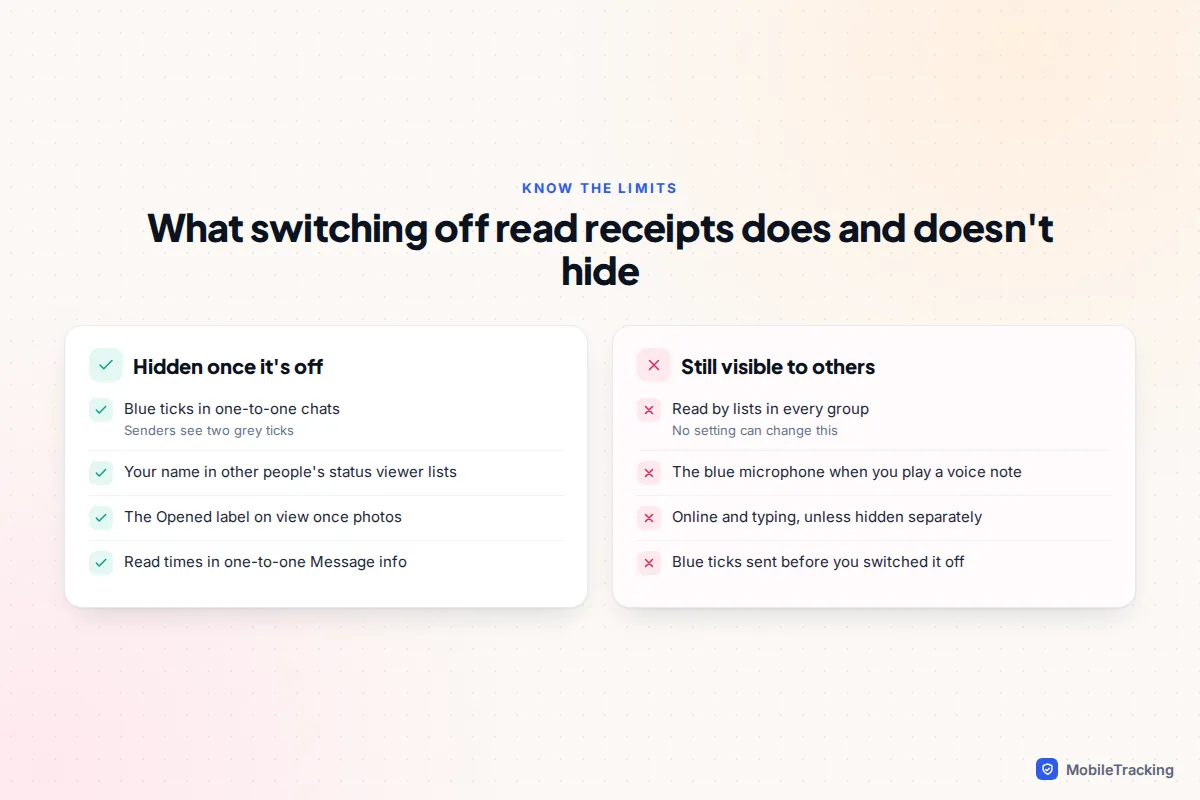
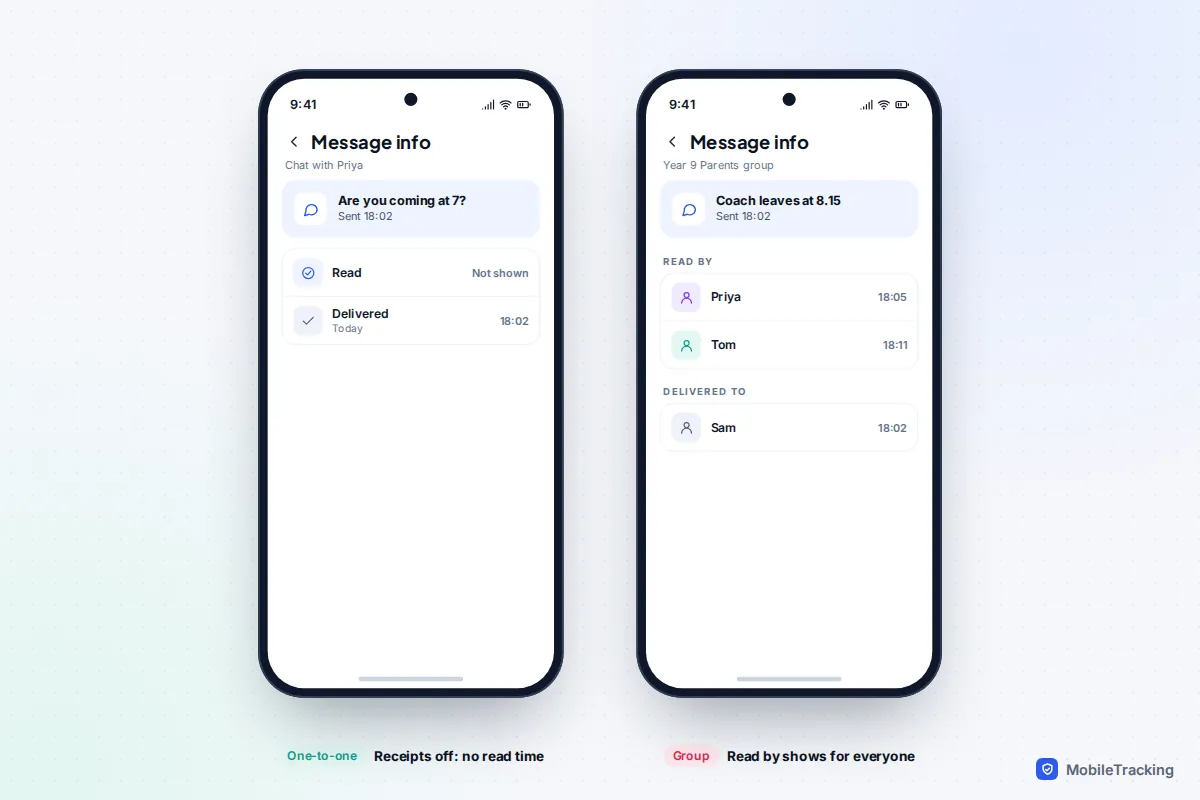
- Blue ticks in one-to-one chats. Senders see two grey ticks and a blank Read time in Message info.
- Your name in status viewer lists. You can watch other people’s status updates without appearing under “Viewed by”. The trade-off is that you can’t see who viewed yours either.
- The Opened label on view once media. WhatsApp only shows that a view once photo or video was opened when the recipient has read receipts on.
Still visible whatever you choose
- Group chats. Read receipts are always sent in groups. Anyone can press and hold a message they sent, open Info and see a “Read by” list with times. There is no setting that changes this.
- Voice messages. When you play a voice note, the sender’s microphone icon turns blue. WhatsApp’s help centre is clear that turning off read receipts doesn’t switch off these play receipts.
- Online and typing. These have nothing to do with read receipts. If someone is watching a chat when you open it, they may see “online” or “typing…” even though their ticks stay grey.
The setting is also not retroactive. Messages that turned blue before you switched it off stay blue.
The reciprocity rule, and why there’s no per-chat option
WhatsApp treats read receipts as a two-way deal. If you stop sending them, you stop receiving them. You can’t hide your own blue ticks while still checking whether your friend has read your message; the app deliberately blocks that combination so nobody gets a one-sided view. Groups are the exception in both directions: you keep seeing “Read by” lists in groups even with the setting off.
There is also no way to turn receipts off for one person or one chat. The switch covers every one-to-one conversation on your account. People often search for a per-contact option because they want space from one demanding colleague or friend, so here is what actually works instead:
- Mute the chat so you are not nudged to open it the moment it arrives.
- Archive it to move it out of your main list until you are ready.
- Use “My contacts except…” for Last seen, which does work per person (see the next section).
- Say so. “I’m off my phone in the evenings, I’ll reply tomorrow” does more than any setting.
A quick scenario shows how it plays out. Maya, 15, switches receipts off because a group of classmates keep asking why she “left them on read”. Her one-to-one chats go quiet in the way she wanted. But the class group still shows her name under “Read by” the moment she opens it, so the pressure there doesn’t change. Muting that group, and reading it when she chooses, is what actually helps.
Last seen and online: the other half of the picture
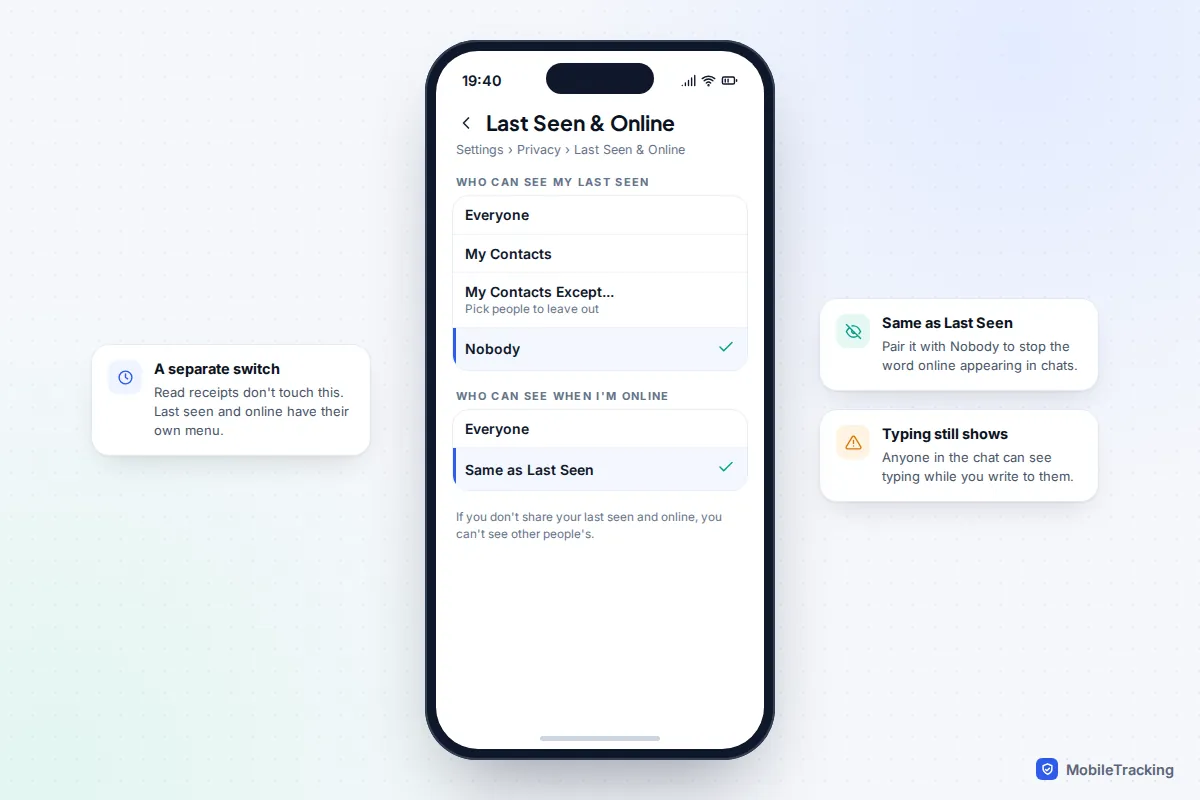
Many people turn off read receipts and then wonder how someone knew they were around. The answer is usually “last seen” or “online”. These live in a separate menu and are not affected by the read receipts switch at all.
- Go to Settings › Privacy › Last seen and online.
- Under Who can see my last seen, pick Everyone, My contacts, My contacts except… or Nobody.
- Under Who can see when I’m online, pick Everyone or Same as last seen.
Choosing Nobody plus Same as last seen stops the word “online” appearing under your name. The same reciprocity rule applies: if you don’t share your last seen and online, you can’t see other people’s. “Typing…” still appears to the person you are writing to, because it is part of the conversation rather than a status. Our guide to hiding your last seen on WhatsApp covers the per-contact options in more detail.
Reading a message without blue ticks: what works and what’s a myth
If you keep read receipts on but want to glance at one message without committing to a reply, you have a few genuine options and a couple of popular ones that don’t hold up.
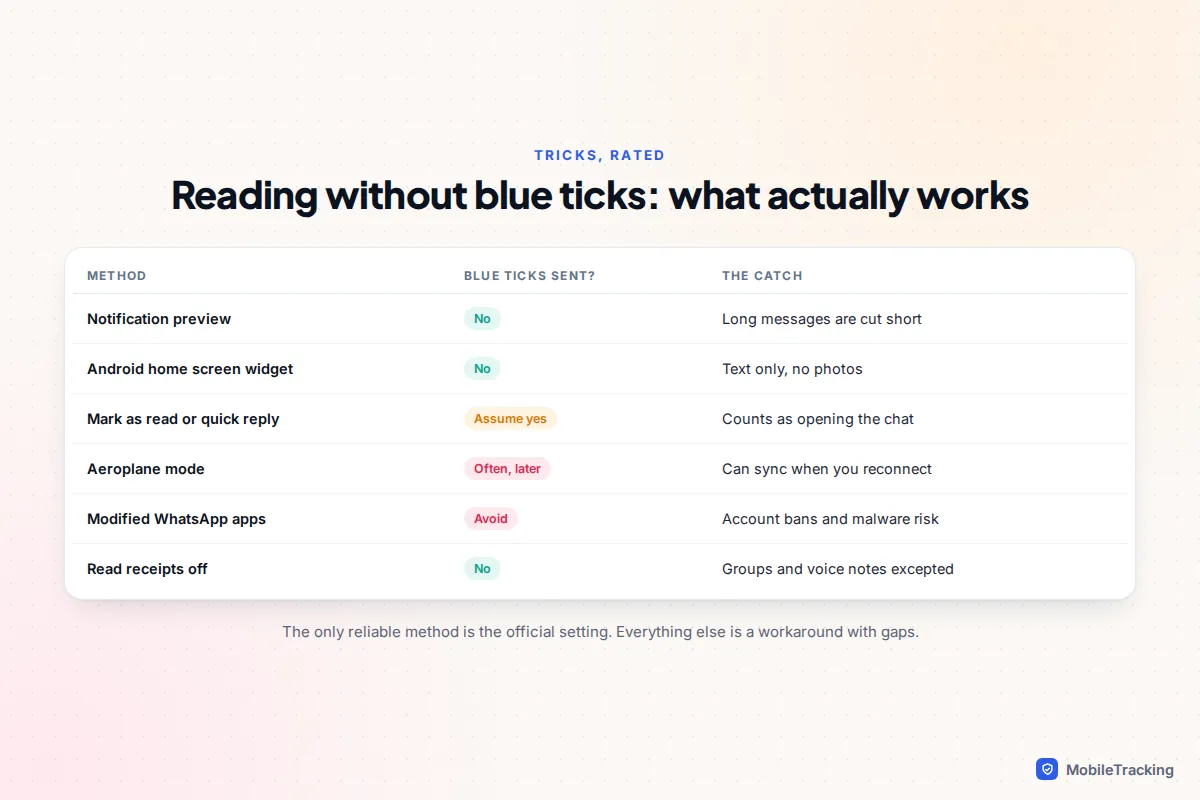
Works: notification previews
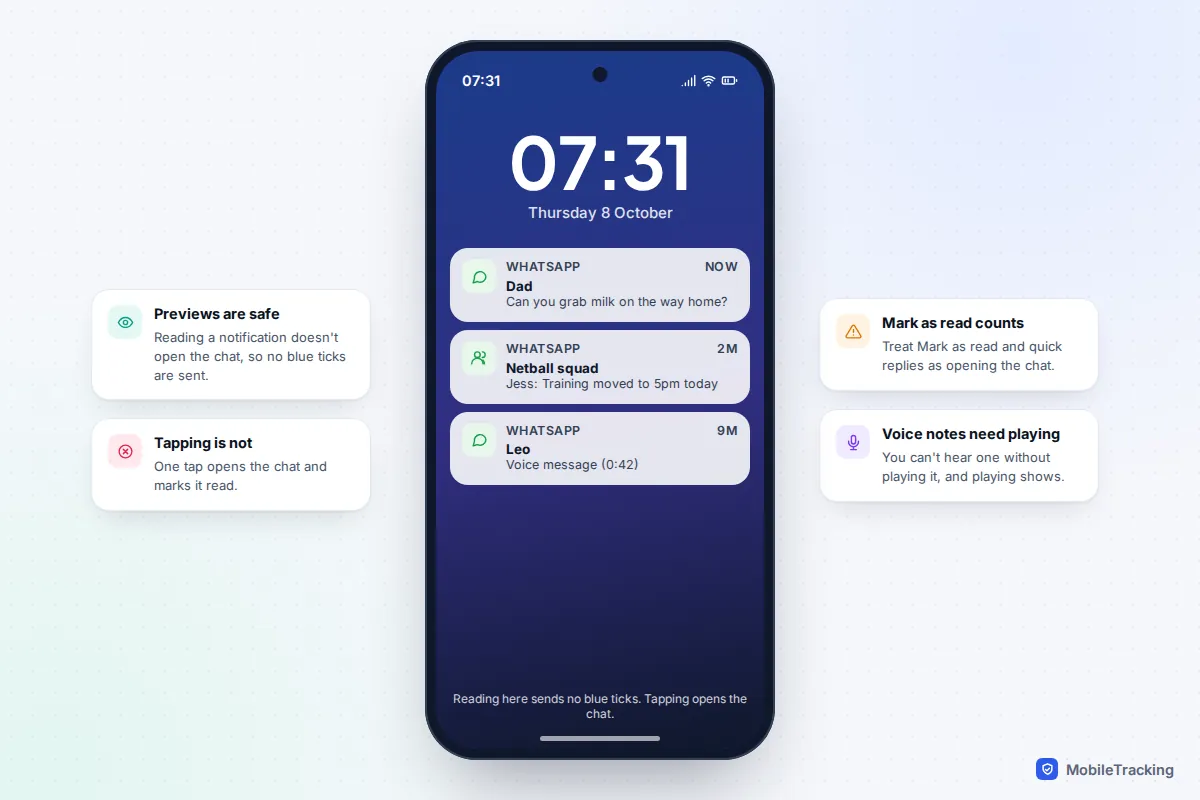
Reading a message in the notification on your lock screen or in the notification shade does not open the chat, so it sends no blue ticks. On iPhone you can press and hold a WhatsApp notification to expand it; on Android you can pull the notification down to see more lines. Long messages get cut off, photos may show only as “Photo”, and the moment you tap the notification WhatsApp opens the chat and the ticks go blue. This depends on having message previews switched on in both WhatsApp’s notification settings and the phone’s.
Works on Android: the home screen widget
Android’s WhatsApp widget shows recent incoming messages on your home screen. Touch and hold an empty spot on the home screen, tap Widgets, find WhatsApp and drag the larger message widget into place. It shows text only and, like notifications, opening a message from it opens the chat.
Counts as reading: Mark as read and quick replies
Android notifications offer Mark as read, and both platforms let you reply from the notification. Treat both as opening the chat. Replying obviously tells the other person you have seen the message, and marking as read is designed to do exactly what it says.
Unreliable: the aeroplane mode trick
The advice goes: turn on aeroplane mode, open the chat, read, close WhatsApp fully, then reconnect. The problem is that WhatsApp records locally that the chat has been read and can send that receipt once your connection returns, sometimes straight away and sometimes the next time the app runs in the background. You may just delay the blue ticks, which arguably looks worse. Treat it as a gamble, not a method.
Avoid: “blue tick hider” and modified WhatsApp apps
Unofficial versions of WhatsApp that promise “freeze last seen” or “hide blue ticks” break WhatsApp’s terms, and WhatsApp can suspend accounts that use them. They are downloaded from outside the app stores and can carry malware with full access to your chats. Our guide to securing WhatsApp from snooping explains why that access is so risky.
Troubleshooting by symptom
| What you notice | Most likely reason | What to do |
|---|---|---|
| My receipts are off but someone saw I read their message | It was a group chat, a voice note, or you were visibly online or typing | Mute the group, hide last seen and online, or read via notifications |
| I can’t see anyone’s blue ticks any more | Your own read receipts are off | That’s the reciprocity rule; switch yours back on to see theirs |
| A friend’s messages always stay on two grey ticks | They have receipts off or read through notifications | Nothing is wrong; ask them directly if it matters |
| Only one grey tick for days | Their phone is off or offline, or they may have blocked you | WhatsApp deliberately makes these look the same |
| I can’t see who viewed my status | Read receipts are off on your account | Turn them on; the list may still miss people who have theirs off |
| The Read receipts menu is under Account | An old app version | Update WhatsApp from the App Store or Play Store |
Blue ticks, teens and wellbeing: a note for families
For many teenagers, blue ticks are a source of real stress. Being “left on read” can feel like a verdict, and the expectation of an instant reply follows them into homework, dinner and bedtime. Switching read receipts off is a sensible, healthy privacy choice, not a sign that a young person is hiding something. It gives them room to reply when they are ready.
Parents are often part of the pressure too, usually for understandable reasons: you want to know a message about pick-up time has landed. Blue ticks are a poor tool for that job. They don’t tell you a message was understood, and they vanish the moment either of you turns receipts off. A simple agreement works better: urgent things are a phone call, everyday messages get a reply within an agreed window, and nobody is expected to answer after bedtime. You can fold this into a family media agreement alongside other phone rules.
It also helps to explain the limits honestly. Teens who switch receipts off sometimes assume they are invisible everywhere, then feel caught out when a group chat shows they read something. Knowing that groups and voice notes always report back avoids that surprise. For wider WhatsApp settings for younger users, including who can add them to groups, see our WhatsApp safety guide for parents. WhatsApp also began rolling out parent-managed accounts for under-13s in March 2026 in selected countries; they focus on approving contacts and groups rather than on read receipts, and they are not yet available everywhere.

Frequently asked questions
If I turn off read receipts, will people know?
WhatsApp doesn’t notify anyone. People may work it out if your messages to them always stay on two grey ticks after you have clearly replied, or if they notice they can’t see your status views, but there is no alert or label.
Can I turn off read receipts in WhatsApp groups?
No. Read receipts are always sent in group chats, and anyone can see who read their message through Message info. Muting the group or reading it through notification previews are the only ways to manage this.
Does turning off read receipts hide that I listened to a voice message?
No. Playing a voice note turns the sender’s microphone icon blue whatever your setting. You can see that a voice message arrived from the notification, but you can’t hear it without playing it.
Can I view a WhatsApp status without appearing in the viewer list?
Yes, with read receipts off your view won’t appear in their “Viewed by” list. You also lose the ability to see who has viewed your own status while the setting is off.
Will messages I read while receipts were off turn blue if I switch them back on?
Receipts are sent at the time you read, so messages you opened while the setting was off shouldn’t suddenly turn blue later. Anything you open after switching back on will send blue ticks as normal.
Is there a way to see blue ticks from others while hiding mine?
Not in the official app. The reciprocity rule is built in. Apps that claim to get around it are unofficial modified versions that risk your account being banned and your chats being exposed.
This guide is general information, not legal or financial advice. Read our editorial policy.