
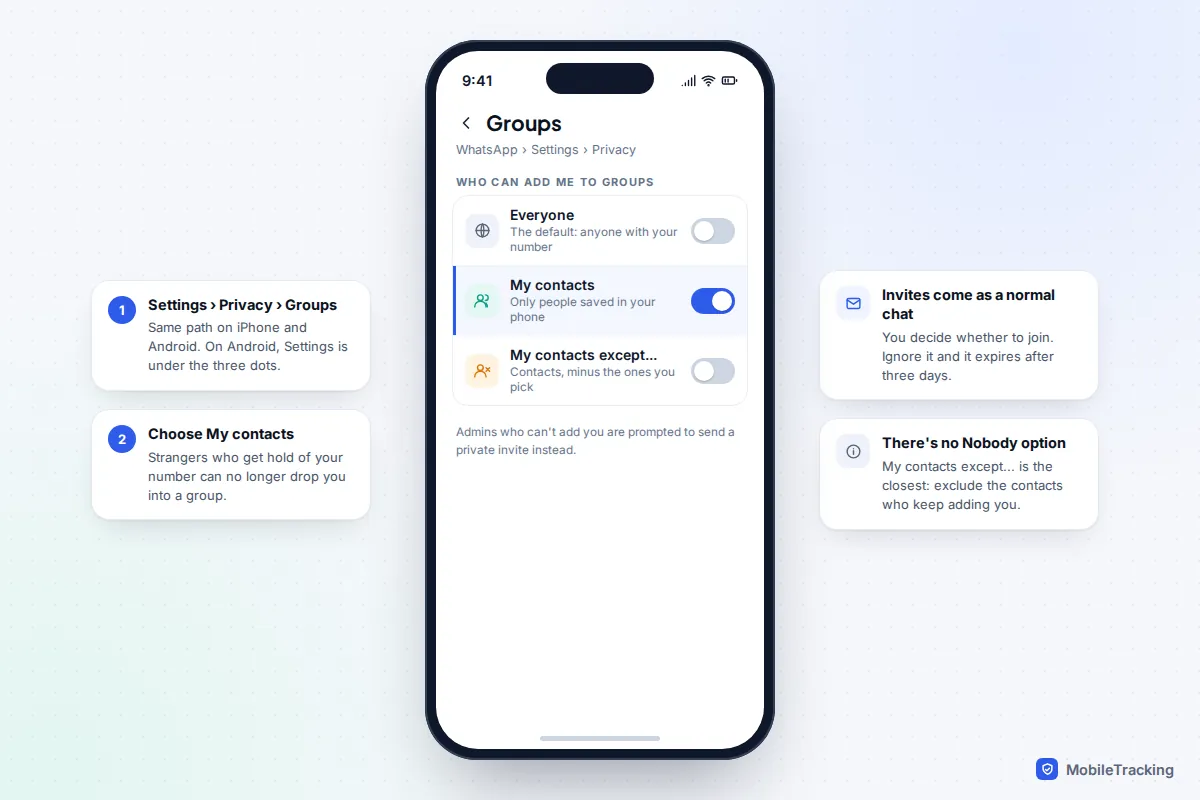
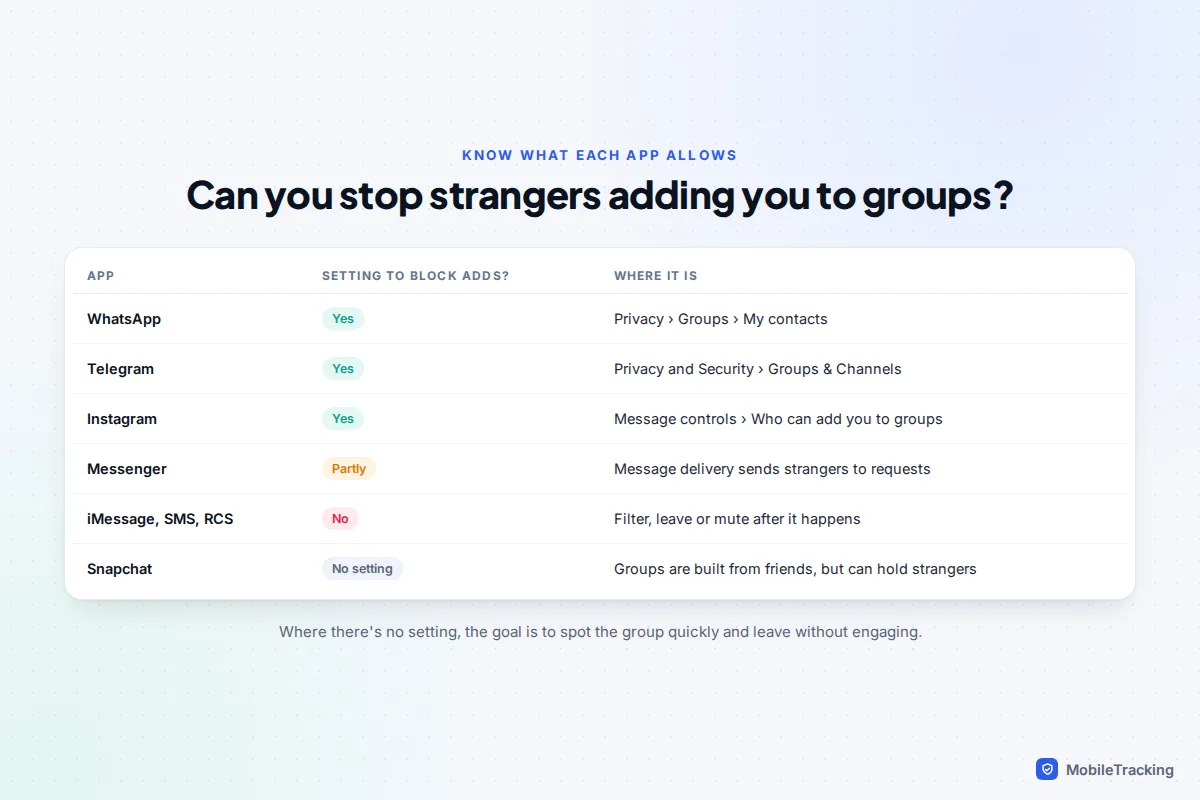
On WhatsApp, open Settings › Privacy › Groups and change Who can add me to groups from Everyone to My contacts. Strangers who have your number can then only send you a private invite, which you can ignore and which expires after three days. Telegram has the same kind of switch under Settings › Privacy and Security › Groups & Channels, and Instagram has Who can add you to groups in its message controls. Text-message groups on iPhone and Android have no such setting, so there the job is to filter, leave, block and report quickly.
Each change takes under a minute. The rest of this guide covers the apps that can’t be locked down, how to recognise the scam groups behind most random adds, and the settings worth checking on a child’s phone.
Why strangers keep adding you to groups
You weren’t picked personally. Phone numbers are bought in bulk from data leaks and marketing lists, scraped from public profiles or simply generated in sequence, then fed into groups a few hundred at a time. A group gets a message in front of hundreds of people at once, and the chatter from other “members” makes the pitch look popular.
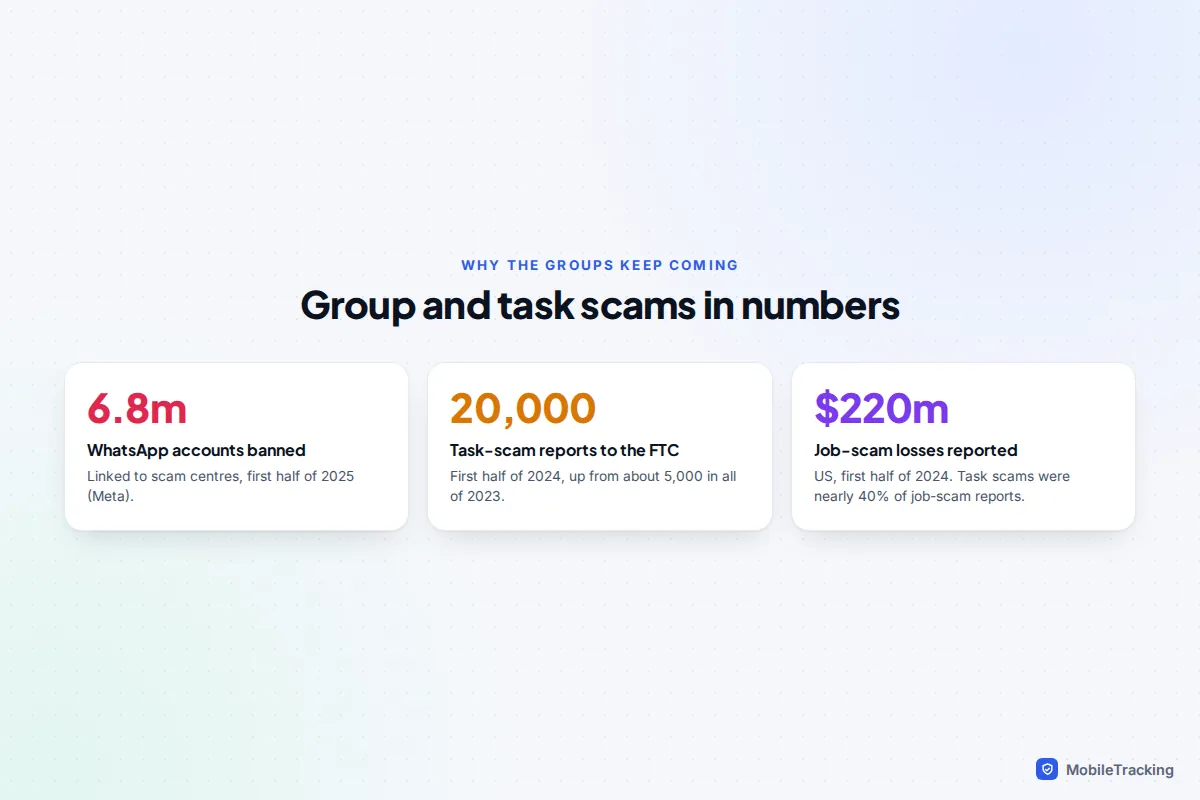
Most of these groups are the top of a scam funnel. The commonest in 2026 are fake investment clubs, “task” or remote job groups that pay you to like videos or rate apps, and crypto “signal” groups. The US Federal Trade Commission says task-scam reports went from none in 2020 to about 20,000 in the first half of 2024 alone, and Meta says WhatsApp banned more than 6.8 million accounts linked to scam centres in the first six months of 2025.
What you can do depends entirely on the app. Some let you stop the add before it happens; others only let you clean up afterwards.
WhatsApp: change who can add you
- Open WhatsApp. On iPhone tap Settings at the bottom; on Android tap the three dots, then Settings.
- Tap Privacy, then Groups.
- Choose My contacts, or My contacts except… if there’s a particular contact who keeps adding you to things.
“My contacts” means numbers saved in your phone’s address book, not people you’ve chatted with. There’s no Nobody option; WhatsApp replaced it in 2019 with the invite system. When someone who isn’t allowed to add you tries, WhatsApp prompts them to send a private invite in a one-to-one chat. You can tap it to join, or ignore it and it lapses after three days.
If a stranger still gets you into a group
Invite links are the gap: if you tap a group link someone sends you, you join yourself. WhatsApp’s answer is the safety overview, rolled out from August 2025. When someone who isn’t in your contacts adds you, you see a card showing who added you, whether anyone you know is in the group, and safety tips. Notifications stay muted until you confirm you want to stay, and you can exit without ever opening the chat.
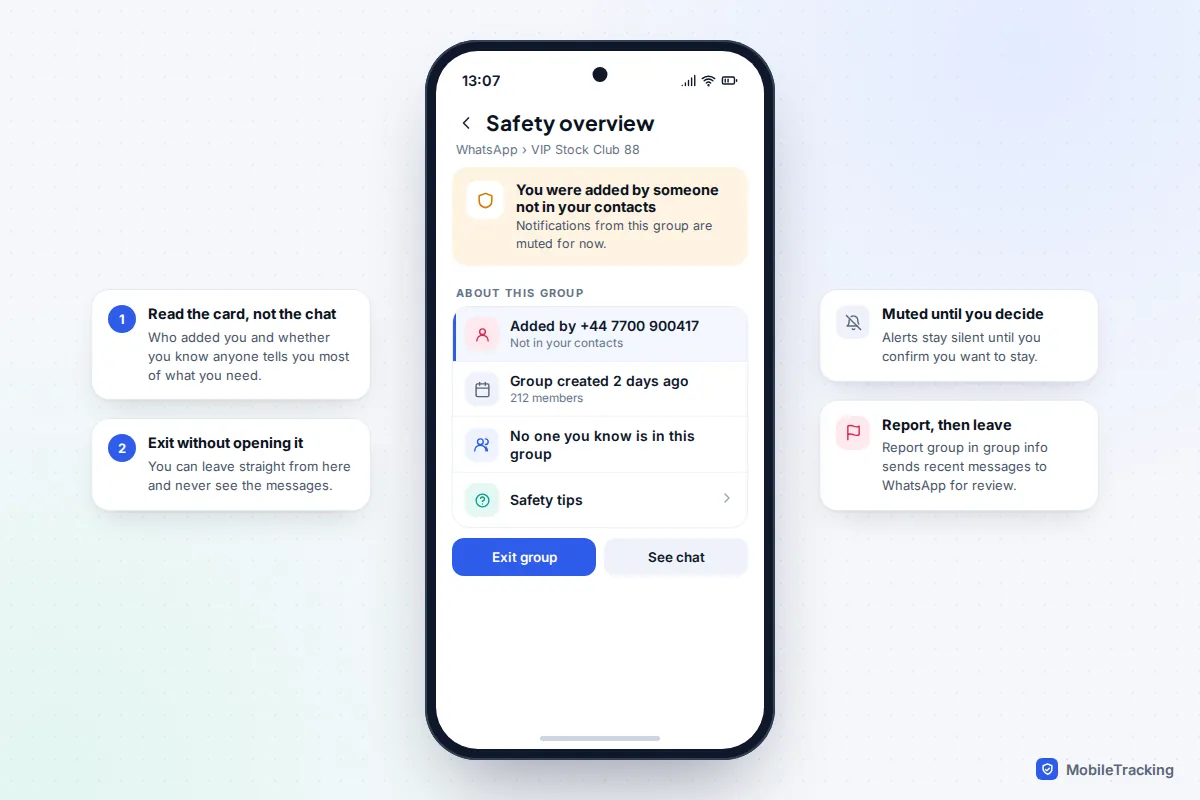
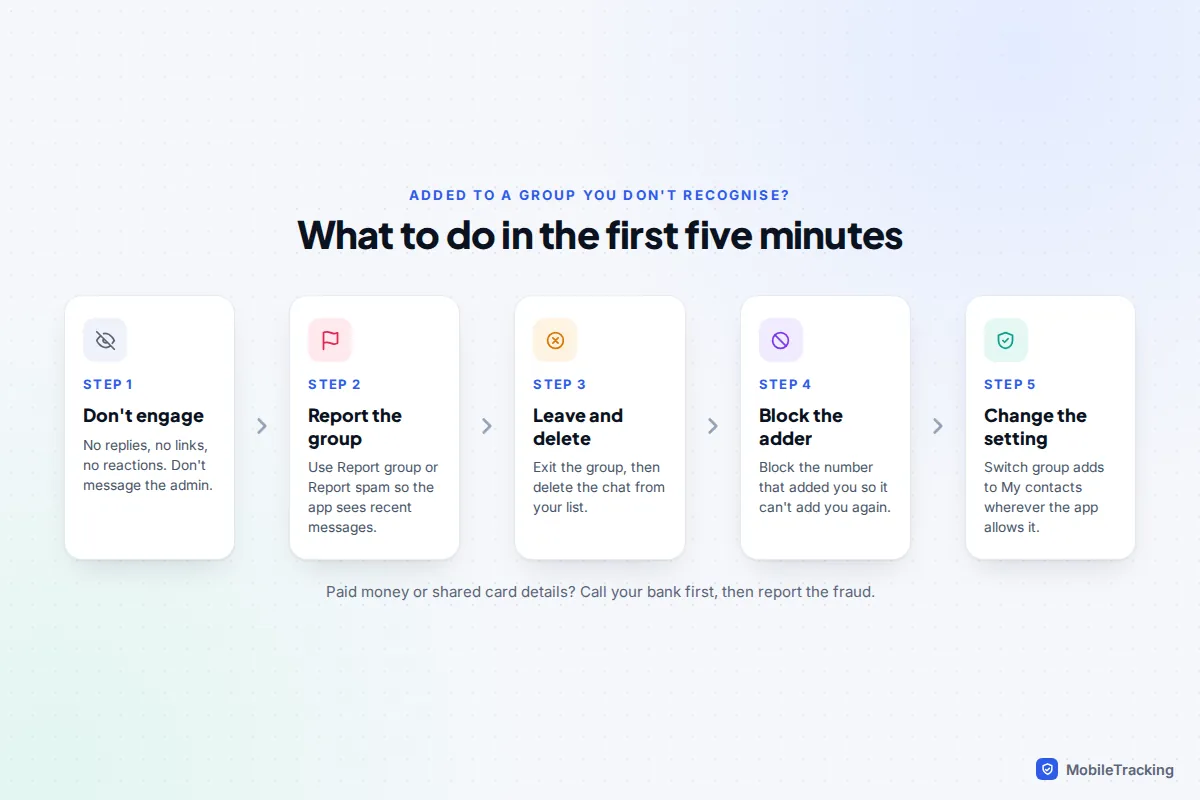
To leave and report: tap the group name, scroll down and tap Report group, which sends the most recent messages to WhatsApp and offers to exit and delete the chat. Then block the number that added you. Leaving is fairly quiet on WhatsApp: since 2022 only the group’s admins are told, not every member. Our guide to leaving a group chat quietly covers the etiquette for groups you do know.
Telegram: groups and channels
Telegram groups can hold up to 200,000 people, which makes them a favourite for crypto and “signals” schemes. The fix is in the privacy settings:
- Open Settings › Privacy and Security.
- Tap Groups & Channels (some versions label it Invites).
- Under Who can add me, choose My Contacts. Where your version offers Nobody, that’s the strictest choice.
- Use the exceptions to add a sports coach or club organiser to Always Allow, or a persistent contact to Never Allow.
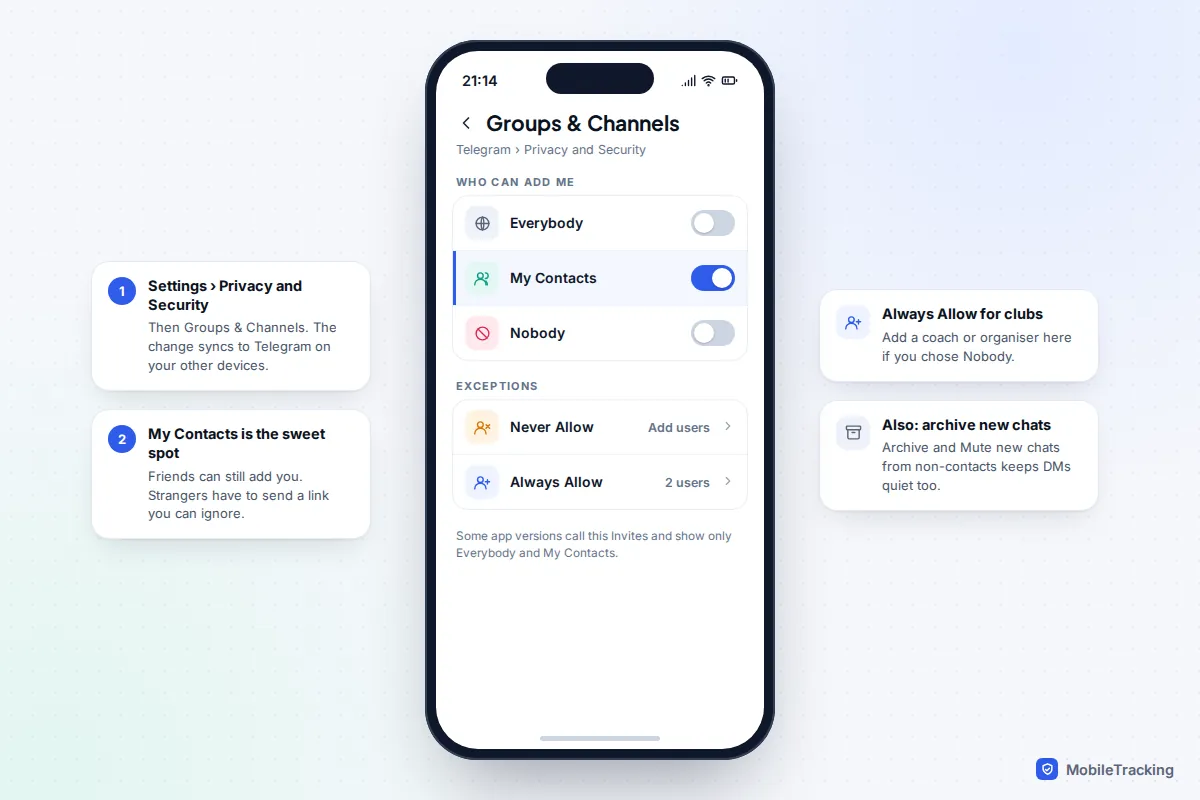
In the same Privacy and Security screen, turn on Archive and Mute New Chats from non-contacts if it’s offered to you, so one-to-one approaches from the same scammers don’t ping your phone either. If you’re already in a stranger’s group, tap its name, use the three-dot menu to Report, then Leave group. Telegram’s own FAQ says accounts reported for unwanted messages get limited to messaging only people who have their number saved.
Instagram, Messenger and Snapchat
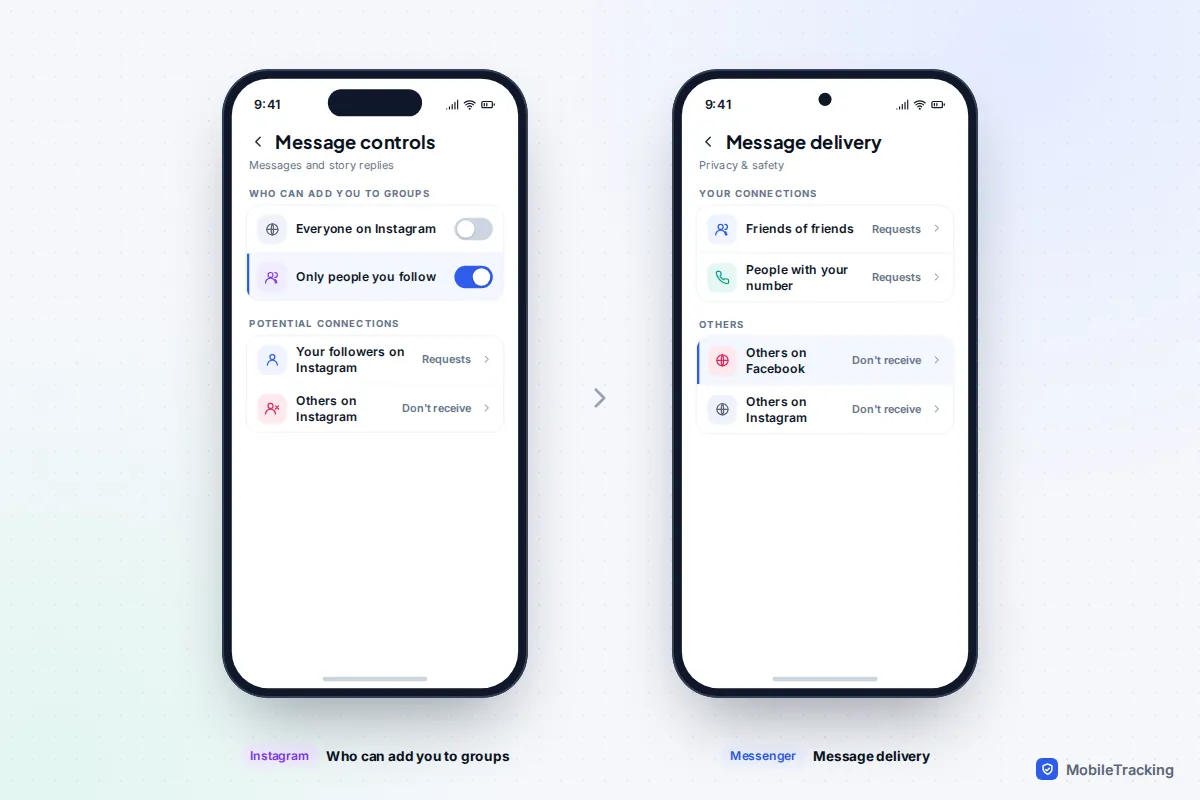
Go to your profile, tap the menu, then Settings and activity › Messages and story replies › Message controls. Under Who can add you to groups, choose Only people you follow. On the same screen you can send message requests from people you don’t follow to a requests folder or turn them off. For under-18s on Teen Accounts, Instagram applies its strictest message settings by default, so only people they follow or are connected to can message them.
Facebook Messenger
Messenger has no switch that stops a Facebook friend adding you to a group. What it does have is Message delivery, under Settings › Privacy & safety, where you decide whether each type of person (friends of friends, people with your phone number, others on Facebook, others on Instagram) lands in your chats, in Message requests, or can’t reach you at all. Setting “others” to not receive requests closes most of the stranger route. To get out of a group, open it, tap its name and choose the leave option; unlike WhatsApp, the other members see that you left.
Snapchat
There’s no group-add setting on Snapchat because groups are built from friends lists. A friend can still add you to a group containing people you’ve never met, though, and those strangers can then see your name and message the group. To leave, press and hold the group on the Chat screen and tap Leave Group. Snapchat warns that when you leave, the Snaps and chats you sent are cleared from the group, even ones others saved. Snapchat also shows teens an in-app warning when they message, or get a message from, someone they share no mutual friends with.
Text groups on iPhone and Android
Phone numbers are the weakest link, because anyone can start a text group with any number. Neither Apple nor Google lets you refuse group adds, so the aim is to keep stranger threads out of sight and make leaving quick.
iPhone (iOS 26 and later)
- Filter first: in Settings › Apps › Messages, turn on Screen Unknown Senders and Filter Spam, so messages from numbers you don’t know stop landing in your main list. Our guide to filtering messages from unknown senders explains which alerts still get through.
- Leave: tap the group name at the top, scroll down and tap Leave this Conversation. It only appears in iMessage groups with at least three other people, all on Apple devices. In SMS, MMS and RCS groups with Android users the option usually isn’t there.
- If you can’t leave: in the same screen turn on Hide Alerts, then delete the thread. Use Report Junk if it appears under the messages, and block the number that started it.
Android (Google Messages)
Since December 2025, Google Messages shows an alert card when an unknown number adds you to a group: who added you, how big the group is, whether anyone you know is in it, and group safety tips. Choose to leave from that card and you’re offered the chance to block the sender and report spam at the same time.
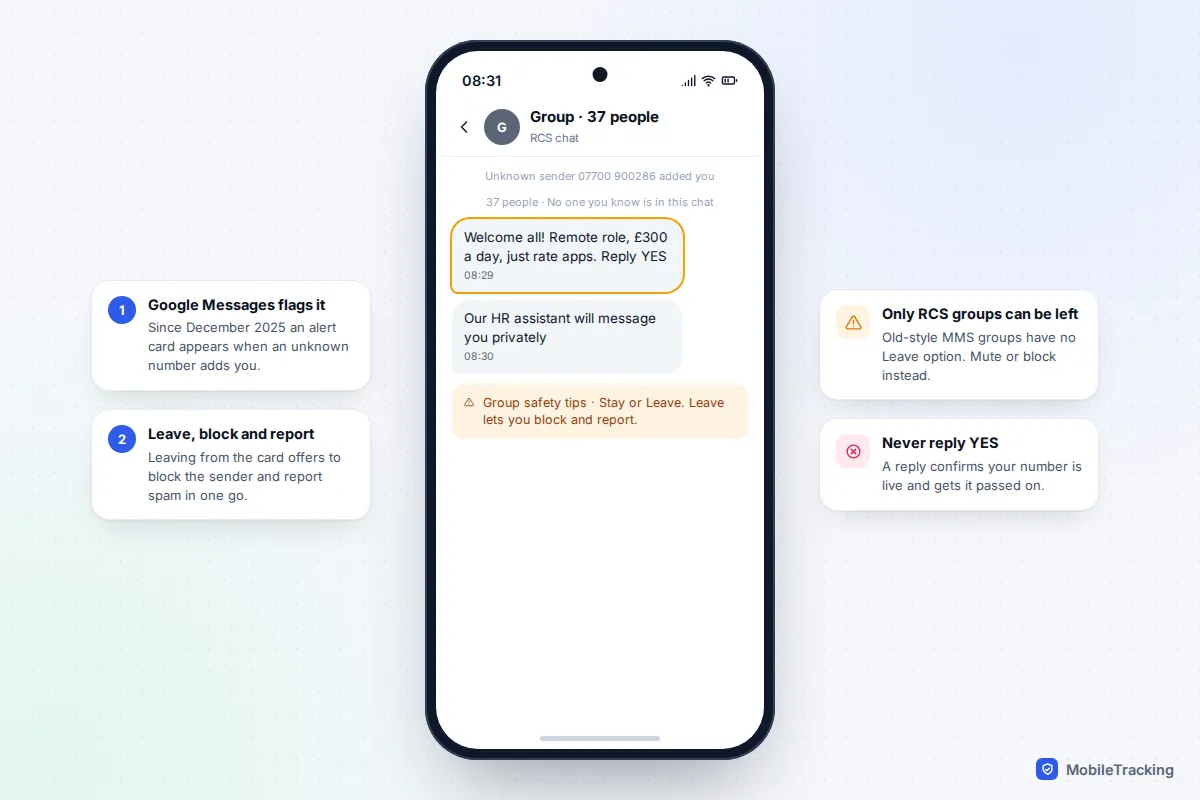
For other RCS groups, open the chat, tap the group name and choose Leave group. Older MMS groups (common when someone on an old phone or plan starts the thread) can’t be left at all: turn notifications off in the group’s details, archive it, and block and report the sender. Also check that Spam protection is on under Messages settings › Protection & safety. Samsung phones that still use Samsung Messages have similar options with different labels. If a noisy family group is the problem rather than strangers, muting a group chat without leaving is the kinder route.
Scam groups: spot them, leave, report
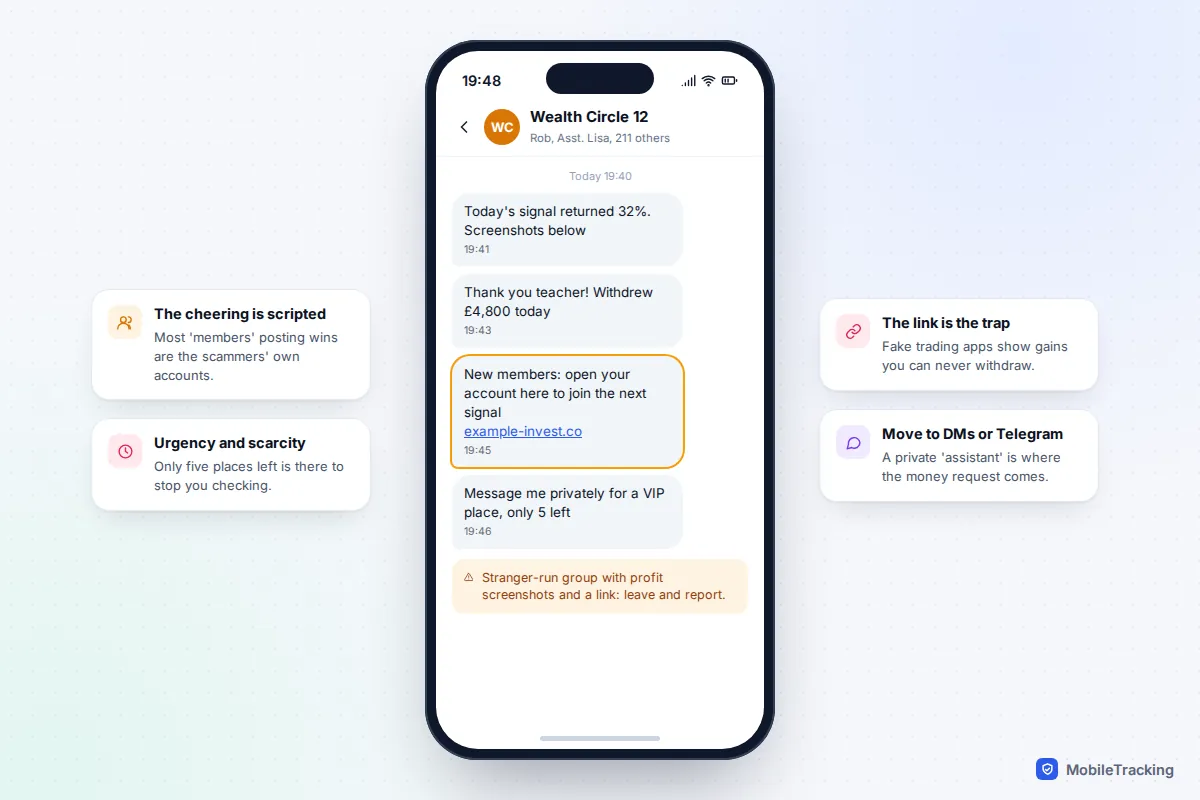
Scam groups follow a script. In a fake investment club, a “professor” posts market tips, an “assistant” offers to help you open an account, and dozens of members post screenshots of profits. Almost all of those members are the scammers’ own accounts. The link leads to a trading app that shows your money growing and then blocks withdrawals, often demanding a “tax” or “unlock fee” first.
Task and job groups work the same way with smaller steps. You’re paid a few pounds for liking videos, then asked to “top up” your account to unlock better-paid task sets. The FTC’s description of how task scams work describes the same pattern step by step.
Common mistakes
- Replying “stop” or “wrong number”. Any reply tells the sender your number is live and read.
- Leaving without reporting. A report sends recent messages to the app, which helps it shut down the whole network, not just your copy.
- Staying “just to watch”. The fake success stories are built to wear down scepticism over days.
- Trusting a group because someone you know is in it. They may have been added the same way you were.
Settings for children and teens
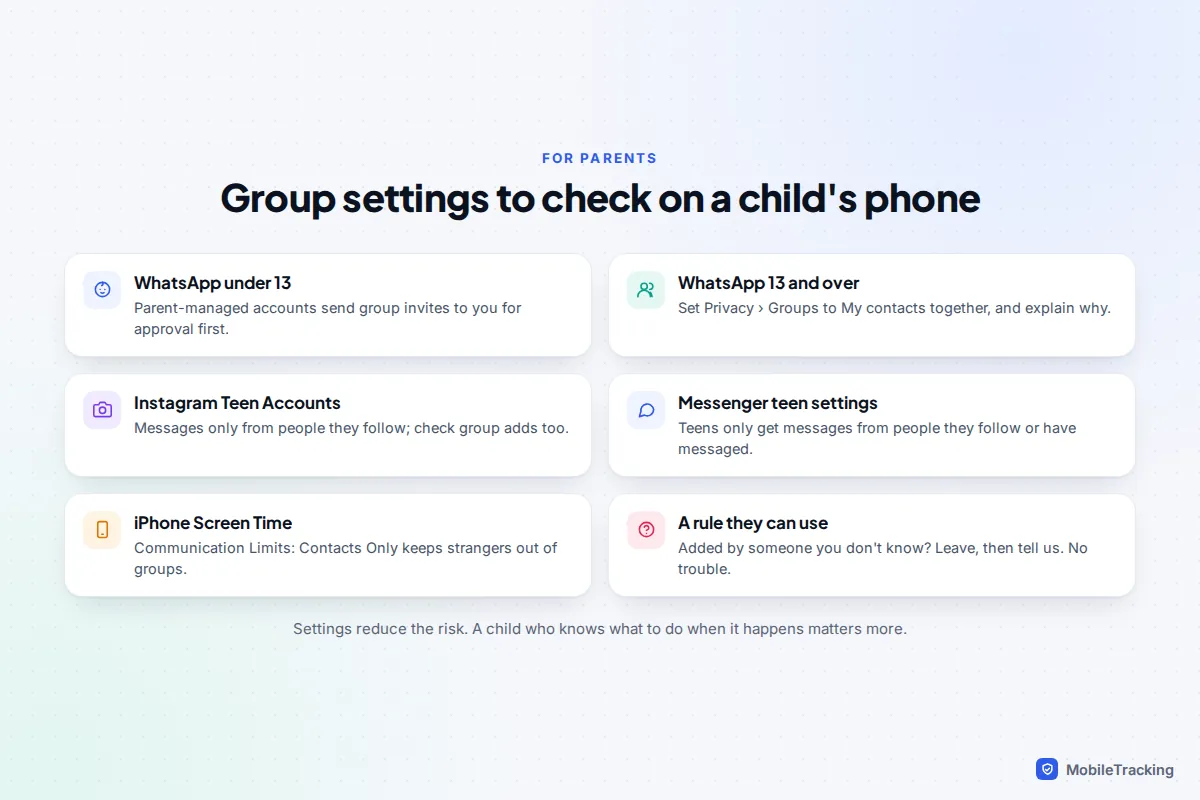
Children are added to random groups more than adults, often by a classmate who adds a whole year group, which then gets shared on to strangers. Settings help, but the most useful thing is a simple rule they can follow: if you’re added by someone you don’t know, leave, then tell us, and you won’t be in trouble.
- WhatsApp under 13: parent-managed accounts, announced in March 2026 and still rolling out, send any group invite or request from an unknown contact to the parent first. The child doesn’t see it until you approve, and the settings sit behind a six-digit PIN on your phone.
- WhatsApp 13 and over: set Privacy › Groups to My contacts together, and talk through what a scam group looks like. Our WhatsApp safety guide for parents covers the rest of the settings.
- Instagram, Facebook and Messenger: Teen Accounts mean teens only get messages from people they follow or have messaged before, and under-16s need a parent’s permission to loosen that.
- iPhone: in Settings › Screen Time › Communication Limits, Contacts Only keeps strangers out of Messages groups entirely. The middle option, Contacts & Groups with at Least One Contact, lets a stranger in if a single contact is in the group, which is exactly how year-group chats spread. It covers Phone, FaceTime and Messages only, not WhatsApp.
For the wider picture, including gaming and gift-card scams, see our guide to online scams that target children and teens.
Frequently asked questions
Why can’t I choose Nobody on WhatsApp?
WhatsApp removed it when it introduced group invites in 2019. The closest you can get is My contacts except… with every awkward contact excluded. People who can’t add you can only send an invite you’re free to ignore.
Can I stop people adding me to iMessage groups?
No. There’s no setting on iPhone that refuses group adds. You can filter unknown senders, leave iMessage groups with four or more people, hide alerts and block the person who started it. On a child’s iPhone, Communication Limits set to Contacts Only does the job.
Does leaving a group tell everyone?
It depends on the app. WhatsApp only tells the admins. Messenger, iMessage and Google Messages show the rest of the group a note that you left. Snapchat also clears the messages you sent. With a scam group it doesn’t matter, as nobody real is watching.
Is it safe to open a group I was added to?
Opening it is generally harmless. The risk comes from tapping links, downloading files, replying or moving to a private chat. On WhatsApp and Google Messages the safety card lets you decide without opening the chat at all.
How did they get my number?
Usually from a data breach, a marketing list or number generation, not from anything you did recently. Changing your settings is far more useful than changing your number, because a new number ends up on the same lists eventually.
Should I report the group or just block the person?
Do both, report first. Blocking protects you from that one account; a report gives the app the messages it needs to remove the group and the other accounts running it.
This guide is general information, not legal or financial advice. Read our editorial policy.