
Every major photo cloud keeps deleted pictures in a bin for at least 30 days, so if you act within that window you can almost always get them back. Look in Recently Deleted for iCloud Photos, Trash (Bin in UK English) for Google Photos and Google Drive, the Recycle bin for OneDrive, Deleted files for Dropbox and Trash for Amazon Photos. Select the photos and tap Recover or Restore.
One change catches people out this autumn: in September 2026 Google cut the Google Photos trash window from 60 days to 30, so older advice is now wrong. Once a bin has been emptied or its window has passed, the photos are usually gone for good, and only a few business accounts offer a second chance. This guide covers each service, the places “deleted” photos hide without being deleted, and what to try when the bin is empty.
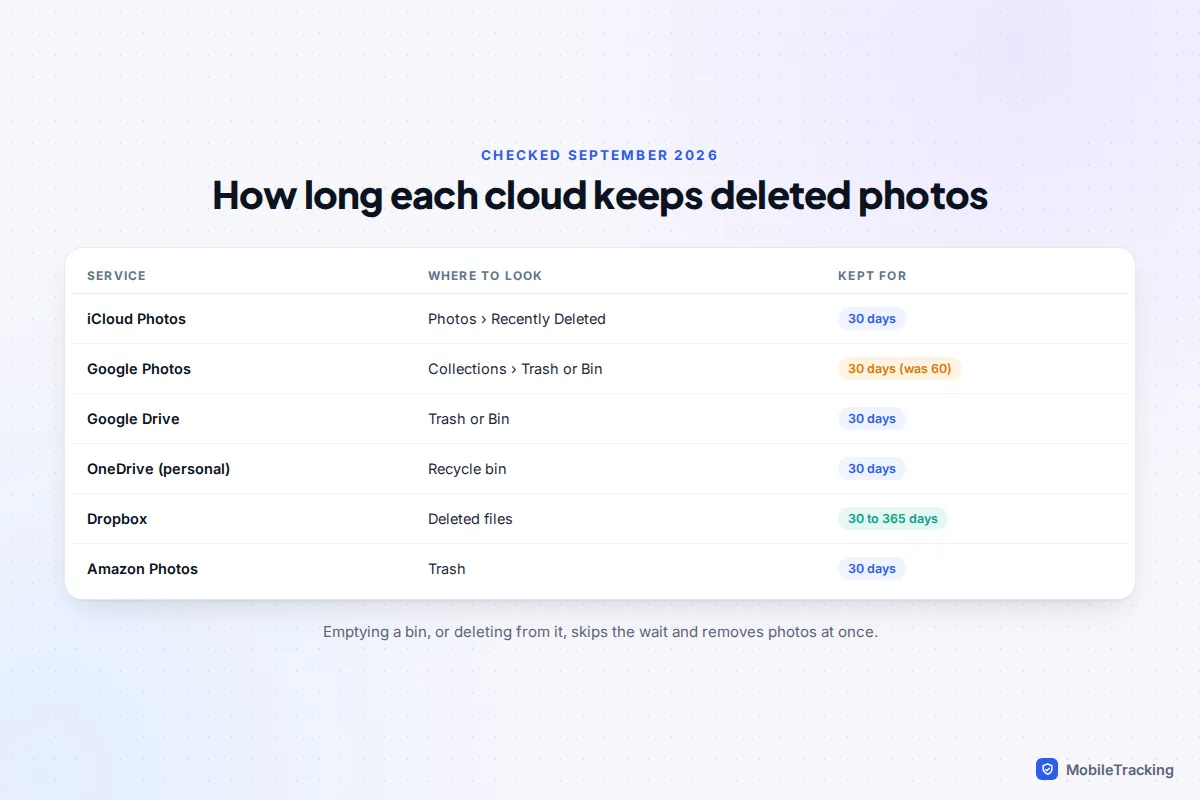
Where deleted photos go on each service
Cloud photo services sync, which means a deletion on your phone is sent to the cloud and then to every other device signed in to the same account. That is why deleting pictures “to free up space” can wipe them everywhere. The bin is the safety net that catches them on the way out.
| Service | Where to look | How long |
|---|---|---|
| iCloud Photos | Photos app: Collections › Utilities › Recently Deleted; or Photos on icloud.com | 30 days |
| Google Photos | Collections › Trash (or Bin); photos.google.com/trash on the web | 30 days (60 until September 2026) |
| Google Drive | Menu › Trash (or Bin) | 30 days |
| OneDrive, personal account | Recycle bin | 30 days, sooner if the bin is full |
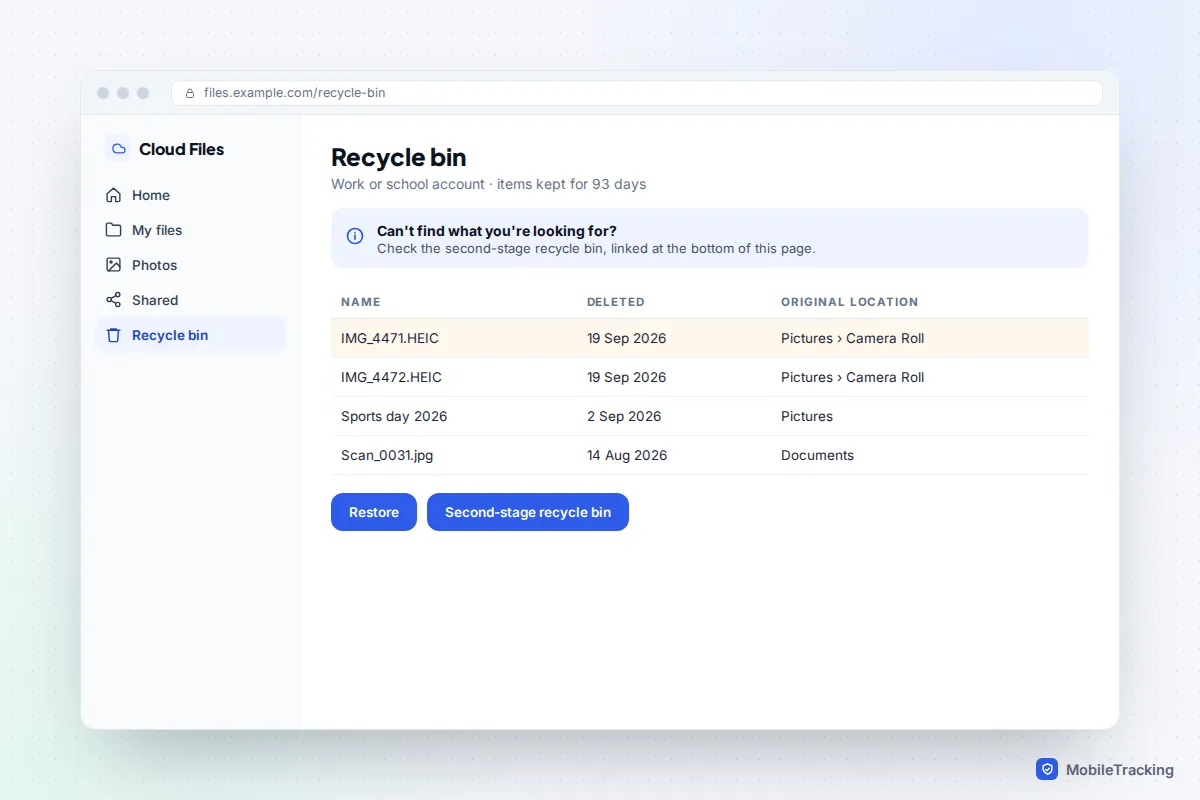
| OneDrive, work or school | Recycle bin, then second-stage recycle bin | 93 days in total, unless your admin changed it |
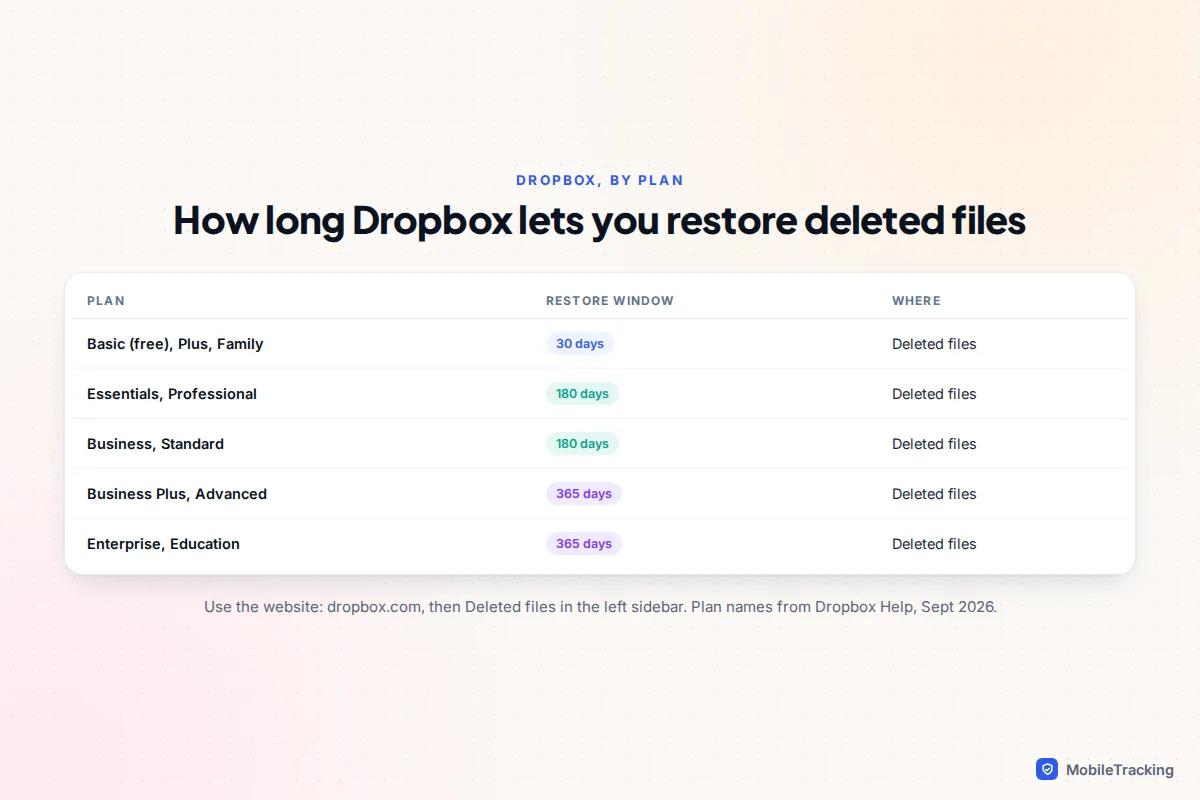
| Dropbox | Deleted files, on dropbox.com | 30, 180 or 365 days depending on plan |
| Amazon Photos | Trash | 30 days |
Two rules apply everywhere. Tapping Delete or Empty inside a bin removes photos immediately, without waiting for the countdown. And the bin only covers photos that were in that account, so first make sure you are signed in to the account the photos were actually backed up to.
iCloud Photos: Recently Deleted and icloud.com
With iCloud Photos turned on, a photo deleted on your iPhone, iPad or Mac lands in Recently Deleted on all of them, and stays for 30 days. Each item shows the days it has left.
- Open Photos and go to Collections. Scroll to Utilities and tap Recently Deleted.
- Unlock it with Face ID, Touch ID or your passcode. The album is locked by default on iOS 16 and later.
- Tap Select, choose the photos and tap Recover.
No Apple device to hand? Sign in at icloud.com, open Photos, choose Recently Deleted in the sidebar, select the photos and click Recover. If you use Advanced Data Protection, you may need to allow web access first under Settings › [your name] › iCloud › Access iCloud Data on the Web.
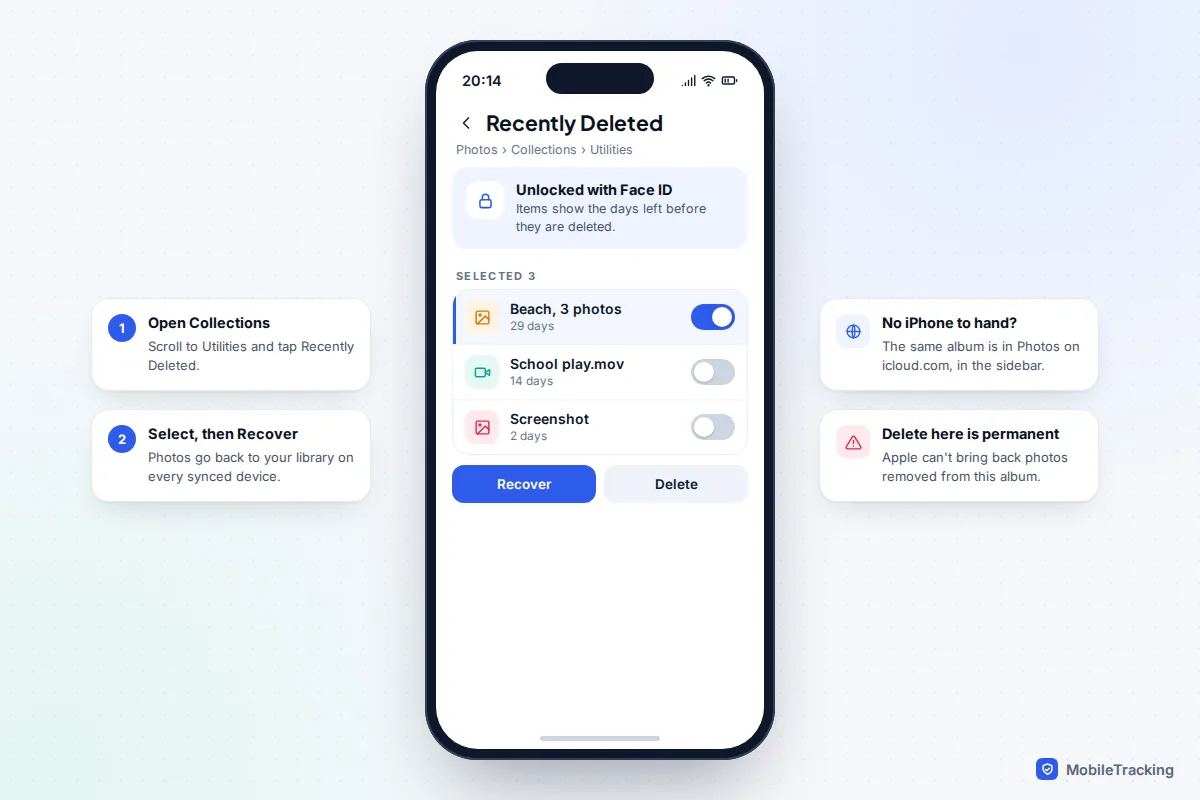
A common mix-up: the Data Recovery option on icloud.com restores iCloud Drive files, contacts, calendars and Safari bookmarks. It does not cover photos. For pictures, Recently Deleted is the only built-in route, and Apple can’t restore photos removed from it. Apple’s page on recovering deleted photos confirms the same steps.
If iCloud Photos is off, deleted photos still go to Recently Deleted on that one device for 30 days. They just don’t sync anywhere else, so check each device separately.
Google Photos and Google Drive
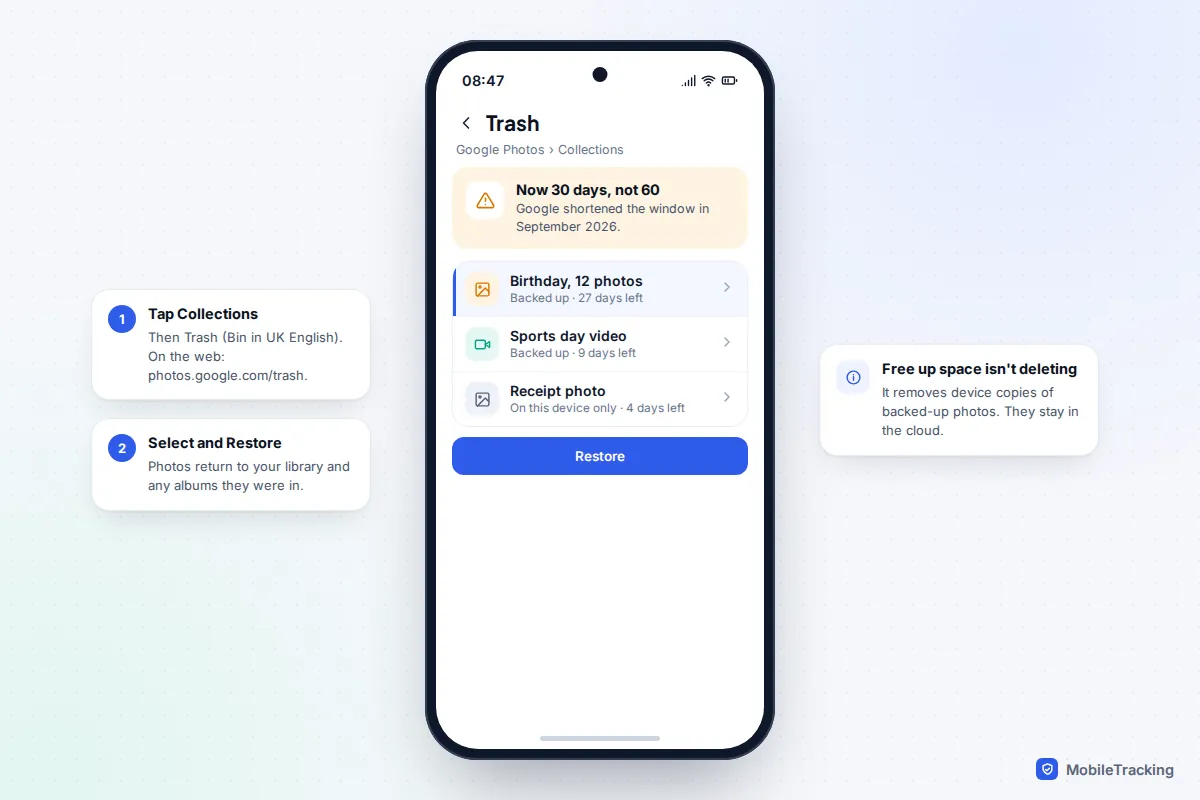
Google Photos works the same way on Android, iPhone and the web. Since early September 2026, photos and videos stay in the trash for 30 days before permanent deletion, down from 60. Google’s own help page on deleting and restoring photos now gives 30 days for both backed-up items and, on Android 11 and later, photos that were never backed up.
- Open Google Photos and tap Collections.
- Tap Trash (or Bin). On a computer, go to photos.google.com/trash.
- Touch and hold a photo to select it, add any others, then tap Restore.
Restored photos go back into your library and into any albums they were in. Before searching the trash, check the account picture at the top right: families with several Google accounts often back up to one and look in another.
Why the photo isn’t in Google Drive
Google Photos and Google Drive stopped syncing with each other in 2019. A photo deleted from Google Photos won’t be in Drive’s trash unless you uploaded a separate copy to Drive yourself. Drive’s own trash also keeps files for 30 days: open Drive, tap the menu, then Trash (or Bin), and choose Restore.
Also note that Free up space in Google Photos doesn’t delete anything from your account. It only removes the phone’s copies of photos that are already safely backed up, which is why those photos won’t appear in the trash: they never left. If the pictures were only ever on an Android phone and not backed up, our guide to recovering deleted photos on Android covers the phone’s own bins and SD cards.
OneDrive, Dropbox and Amazon Photos
OneDrive
On a personal Microsoft account, deleted files and photos stay in the Recycle bin for 30 days. Microsoft warns that if the recycle bin is full, the oldest items are deleted automatically after just three days, so a big clear-out can shorten your window. In the mobile app, tap Me, then Recycle bin, select the items and tap Restore. On the website, choose Recycle bin in the left pane.
Work and school accounts keep items for 93 days unless the organisation changed it. If you’ve emptied the recycle bin, look for the Second-stage recycle bin link at the bottom of the recycle bin page on the web. Items there can be restored until 93 days after they were first deleted. Microsoft 365 subscribers can also use Restore your OneDrive, which rolls the whole OneDrive back to a point in the past 30 days; Microsoft’s guide to restoring deleted OneDrive files covers both. Photos deleted from a synced OneDrive folder on a PC or Mac may also be in that computer’s own Recycle Bin or Trash.
Dropbox
Dropbox’s window depends on your plan: 30 days on Basic, Plus and Family; 180 days on Essentials, Professional, Business and Standard; and 365 days on Business Plus, Advanced, Enterprise and Education. The website is the most reliable place to restore: sign in at dropbox.com, choose Deleted files in the left sidebar, select the photos and click Restore. In a shared folder, any member can restore a deleted file, not just the person who deleted it.
Amazon Photos
Amazon Photos moves deleted items to Trash, where they are kept for 30 days. In the app and on the website, open the menu and choose Trash, select the photos and restore them; the exact labels vary between app versions. Be careful when deleting in the app: depending on your choice, it can remove the copy on your phone as well as the one in Amazon’s cloud.
Shared albums and shared libraries
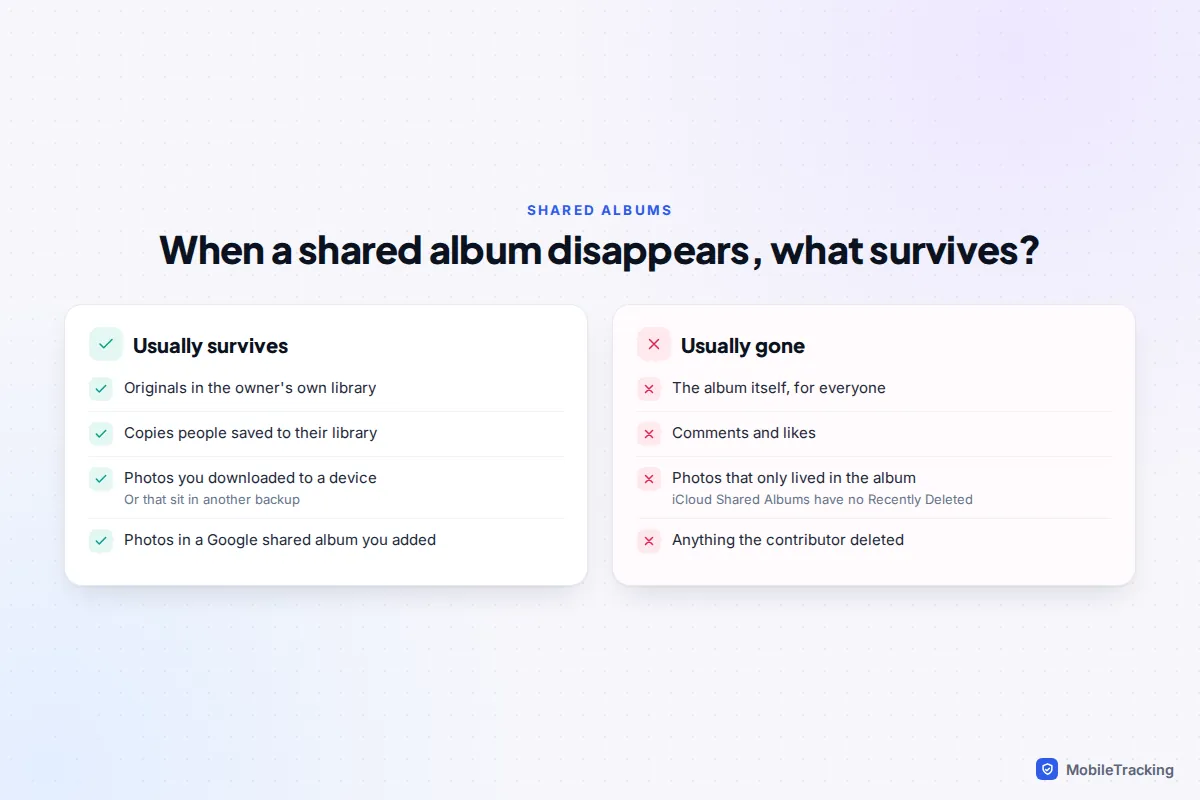
Shared albums feel like a backup, but they behave differently. An iCloud Shared Album has no Recently Deleted folder. If the owner deletes the album, it disappears for everyone at once, along with its comments and likes. Photos that people had already saved to their own library survive, and so do the owner’s originals, unless they deleted those too.
An iCloud Shared Photo Library is different again: anyone in it can delete a photo, and deleted items go to Recently Deleted for 30 days like any other. If you can’t see a photo there, ask the other members to check their Recently Deleted too.
In Google Photos, deleting a photo from your library also removes it from shared albums and conversations you added it to. If an album someone else owns vanishes, the photos you contributed are still in your own library, because they came from it.
Not in the bin? Check these first
A surprising number of “deleted” photos are simply hidden. Before giving up, work through these by symptom.
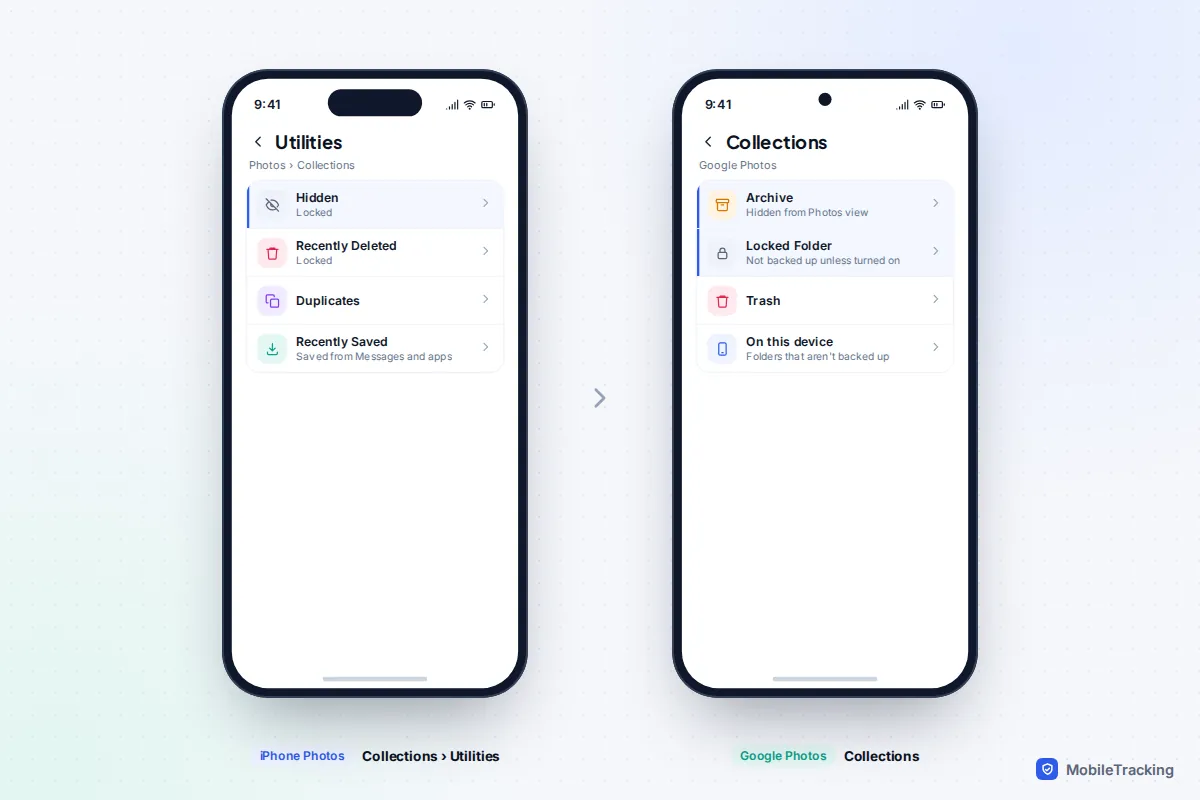
- Gone from the main view on iPhone: check Collections › Utilities › Hidden. If you use a Shared Library, switch the library view to Both Libraries from the menu in your library.
- Gone from Google Photos but not deleted: check Archive, which hides photos from the main grid, and Locked Folder, which keeps photos out of search and, unless backup for it is on, off the cloud entirely.
- Photos from a new phone missing: the old phone may never have finished uploading. Look at the old device, if you still have it, before assuming they are lost.
- Photos saved from WhatsApp or Messages missing: they may never have been in your library. Check the chat itself and iPhone’s Recently Saved collection.
- Everything gone at once: check whether you are signed in to a different account, and whether someone else has access to your account. Change your password if you don’t recognise the deletions.
A common mistake, in real life
Priya’s iPhone says its storage is full, so she deletes 2,000 old photos, assuming they’re safe in iCloud. With iCloud Photos on, those deletions sync, and the photos vanish from icloud.com too. Because she noticed within the week, all 2,000 were still in Recently Deleted and came back in one go. The right fix for full storage was Optimise iPhone Storage, which keeps full-size originals in iCloud without deleting anything. Our guide to stopping photos from filling your storage explains the safe options.
What “permanently deleted” really means
When a photo leaves the bin, the provider marks it for deletion across its systems. Copies can linger for a short time in internal backups; Dropbox, for example, says deleted files are removed from its servers within 90 days after the recovery window. But those copies exist for disaster recovery, not for individual requests, and consumer support teams can’t pull a single photo out of them.
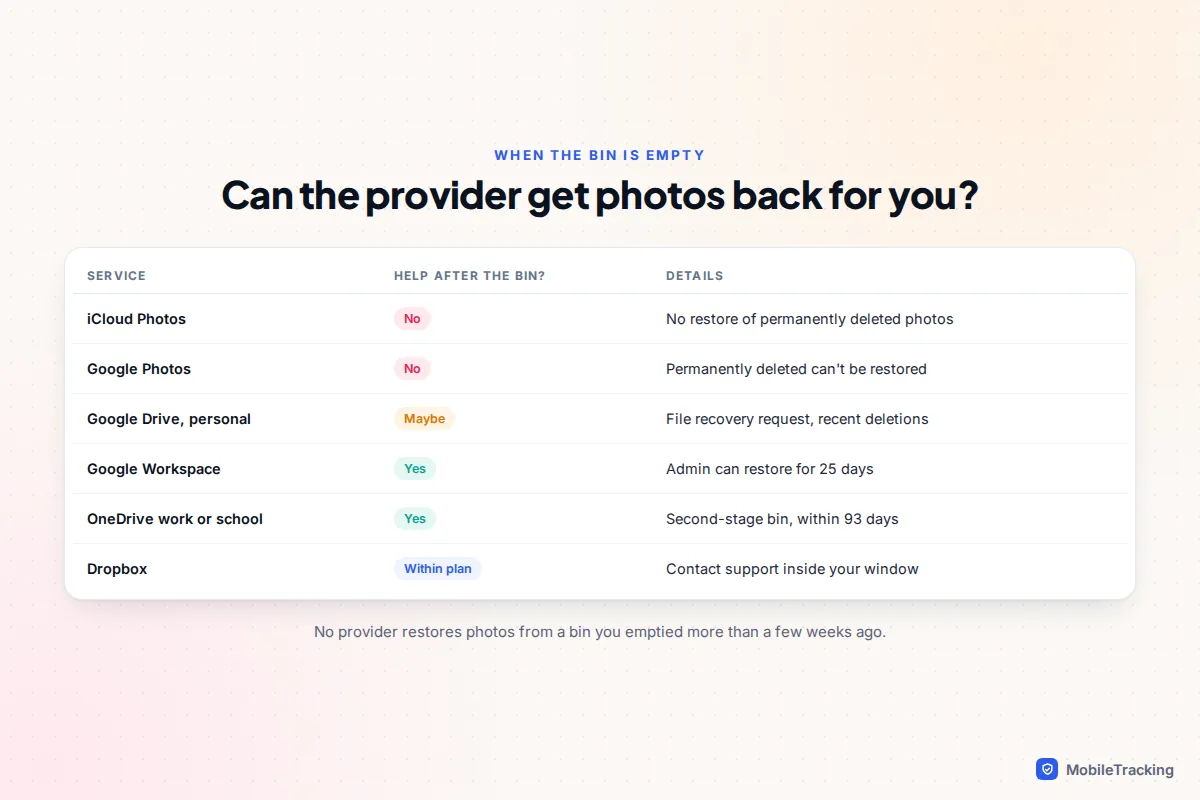
That leaves a short list of genuine second chances:
- Google Drive, personal account: Google offers a file recovery request on the Drive Help Centre when you are signed in. It is not guaranteed and only helps with recent deletions.
- Google Workspace (work or school): your administrator can restore files for 25 days after they were removed from the trash.
- OneDrive work or school: the second-stage recycle bin, within the 93-day window, or ask your IT team.
- Dropbox: contact support if something is missing inside your plan’s window.
Apple and Google Photos have no equivalent. Once a photo leaves Recently Deleted or the Google Photos trash, it can’t be restored, and recovery software can’t reach cloud servers either. What those tools can sometimes do is scan a memory card or computer drive for local copies. Our guide to recovering permanently deleted photos covers the other places copies often survive, such as old phones, computers and chat apps.
How to make the next deletion recoverable
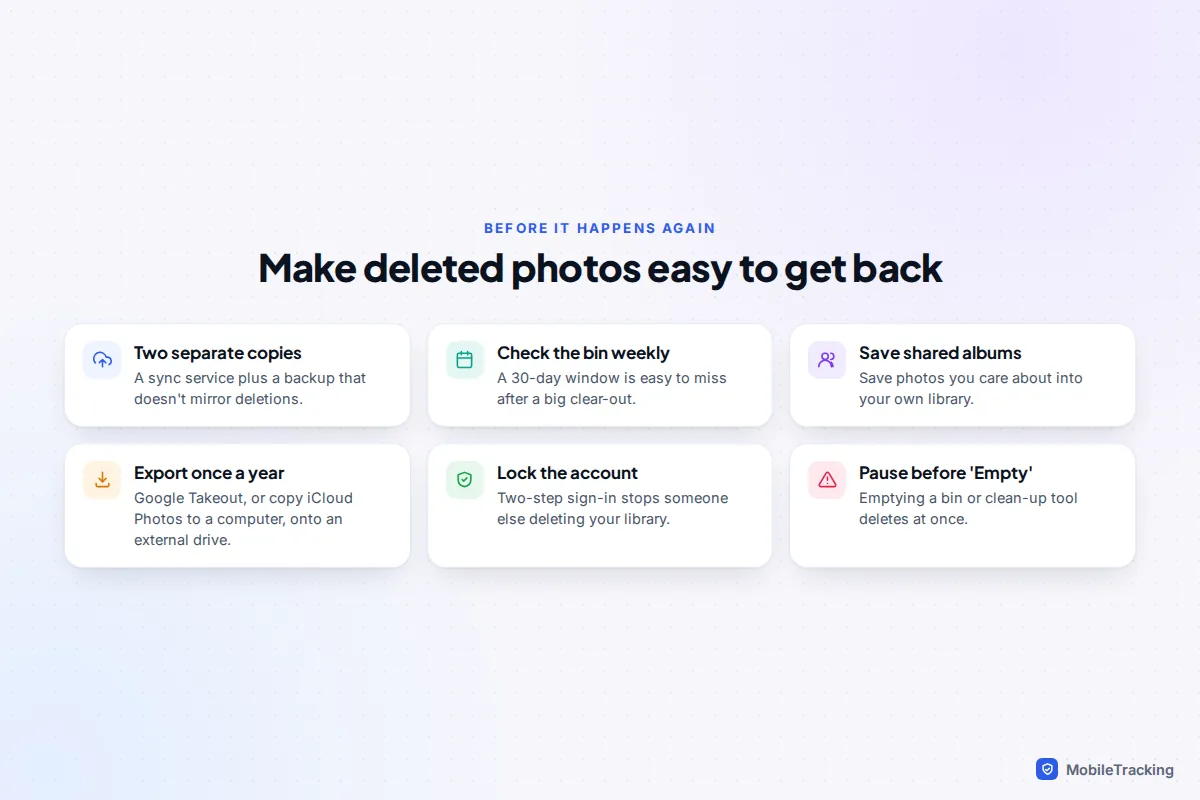
A sync service protects you against a lost phone, but not against deleting the wrong thing, because the deletion syncs too. The fix is a second copy that doesn’t mirror deletions.
- Keep two independent copies. For example, iCloud Photos plus an occasional download to a computer or external drive, or Google Photos plus a yearly Google Takeout export.
- Check the bin after any big clear-out. With 30-day windows almost everywhere, a weekly glance is enough.
- Save shared-album photos into your own library if they matter to you.
- Protect the account. Turn on two-step sign-in so nobody else can delete your library, and review which devices are signed in.
- Pause before tapping Empty, and before running phone “cleaner” apps that clear bins for you.
For choosing and setting up a backup that suits your family, see our guide on backing up your photos to the cloud.
Frequently asked questions
Can I recover photos deleted from iCloud more than 30 days ago?
Not from iCloud. Once photos leave Recently Deleted, Apple can’t restore them. Look for other copies instead: an old iPhone or iPad kept offline, a computer backup, a Mac Photos library that wasn’t syncing, or the chats you shared them in.
Did the Google Photos change affect photos already in the trash?
Google hasn’t published a detailed transition rule, so assume the 30-day limit applies to everything in your trash now. If you deleted photos in August expecting 60 days, check the trash today.
If I delete a photo from my phone, is it deleted from the cloud?
With iCloud Photos, Google Photos backup or OneDrive camera upload syncing normally, usually yes: the deletion is copied to the cloud and your other devices. Use the service’s own storage-saving option, such as Optimise iPhone Storage or Free up space, if you only want to clear the phone.
Can someone else restore photos I deleted from a shared album?
Only if they saved a copy to their own library or device before you deleted it. iCloud Shared Albums have no bin, so ask the other members whether anyone saved the photos you need.
Will a data recovery app get photos back from the cloud?
No. Recovery apps scan storage you physically have, such as a memory card or computer drive. They have no access to Apple’s, Google’s or Microsoft’s servers, and any app claiming otherwise is best avoided.
This guide is general information, not legal or financial advice. Read our editorial policy.