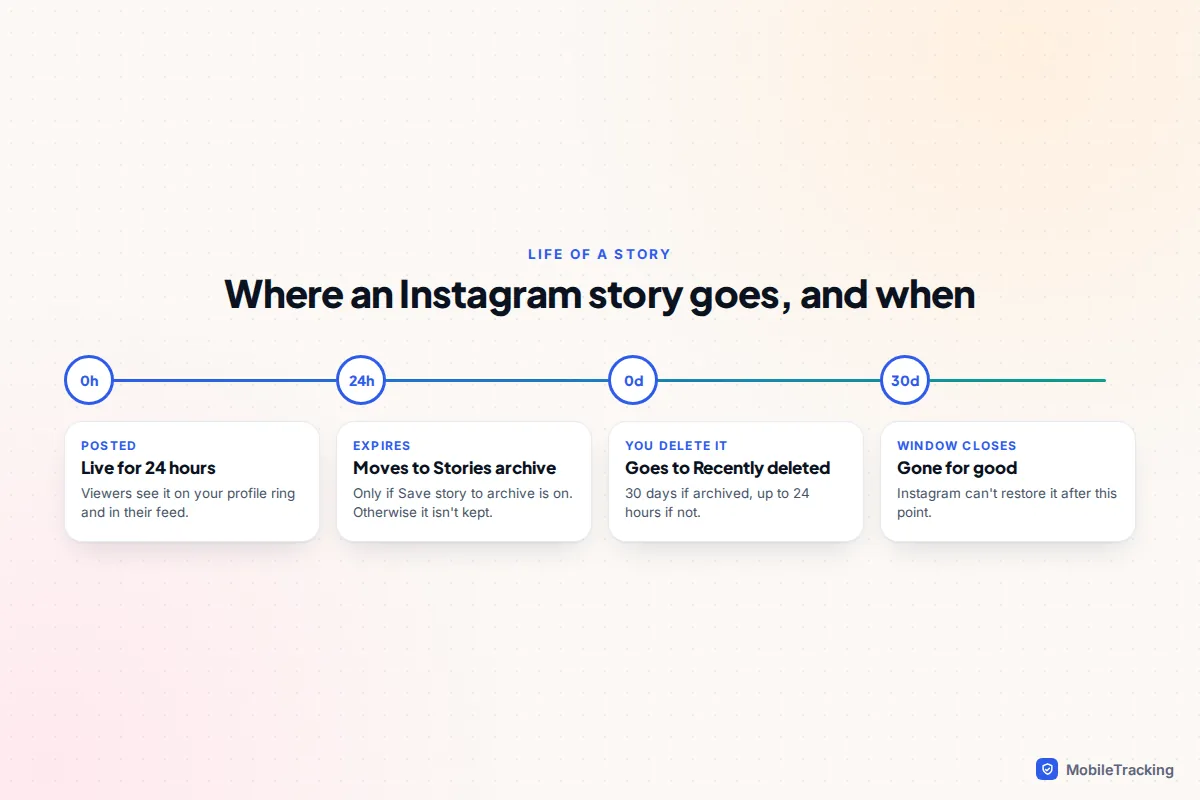
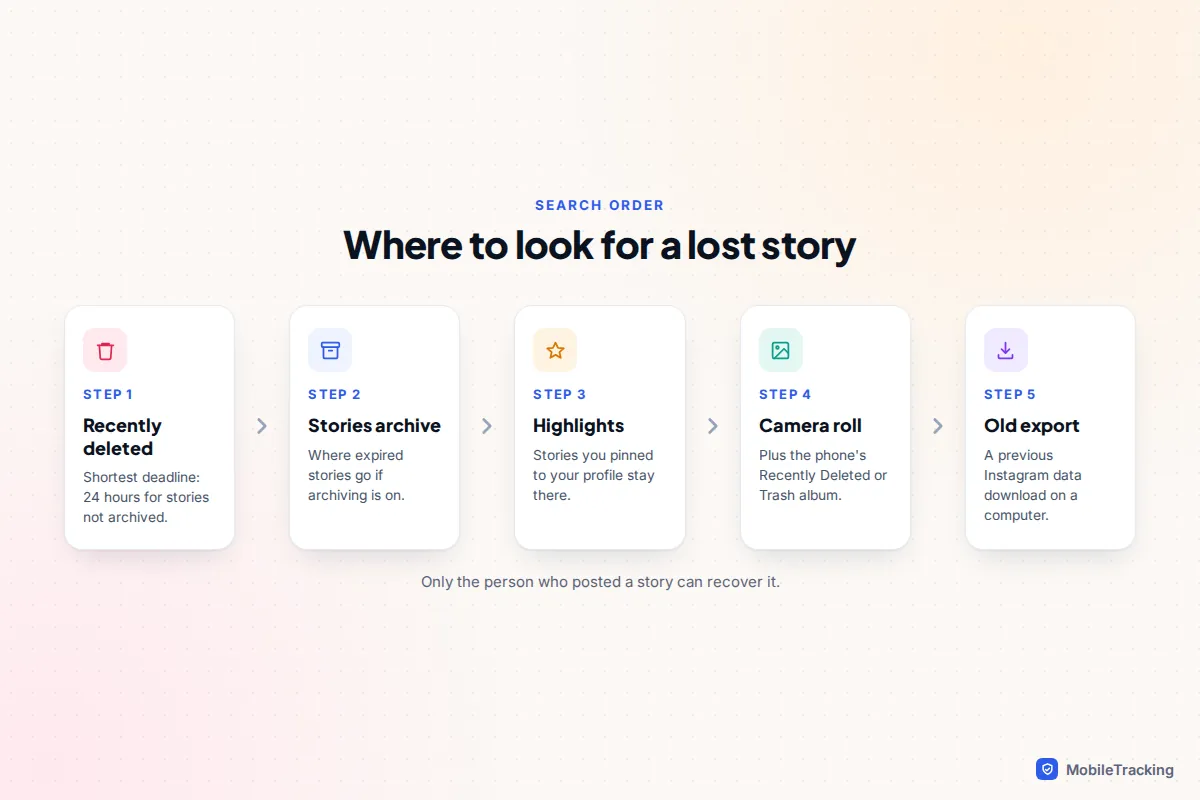
Most deleted Instagram stories can be brought back, but the clock matters. Go to your profile, tap the menu (three lines), then Your activity › Recently deleted, choose the story and tap Restore. A story that was saved in your Stories archive stays there for 30 days. A story that was not in your archive stays for only up to 24 hours, so if you deleted something by mistake this morning, stop reading and check now.
If a story simply expired after 24 hours rather than being deleted, you don’t need Recently deleted at all. Instagram saves stories to your Stories archive automatically unless you switched that off, and from there you can view, download, reshare or add them to a Highlight. The rest of this guide covers what to do when neither of those works, including camera roll copies, Instagram’s data export and what happens when an account is deleted or hacked.
Restore a story from Recently deleted
Recently deleted is Instagram’s bin. It holds posts, reels and stories you have removed yourself, and the steps are the same in the Instagram app on iPhone and Android.
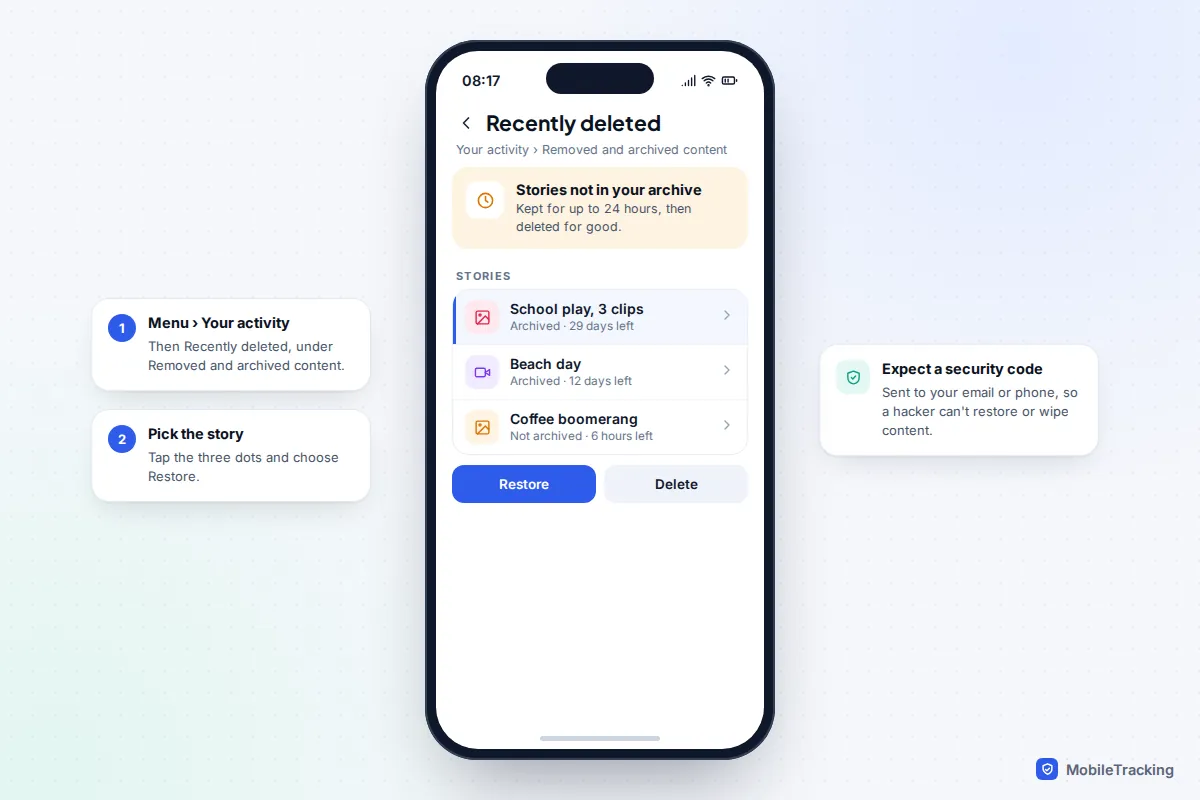
- Open Instagram and tap your profile picture in the bottom right.
- Tap the menu icon (three lines) in the top right.
- Under How you use Instagram, tap Your activity.
- Under Removed and archived content, tap Recently deleted.
- Switch to the stories view at the top, tap the story you want, then tap the three dots and choose Restore.
- Instagram may ask you to confirm with a security code sent to your email or phone. Enter it and the story is restored.
The security code is deliberate. Instagram added it so that someone who gets into your account can’t permanently wipe your content or quietly restore something you removed. If the code goes to an old email address or number, update your contact details in Accounts Centre first, then try again.
After restoring, open your Stories archive to find it. If the Recently deleted folder is empty, the story has passed its window or was never there, which leads to the most common source of confusion below.
The 24-hour rule that catches people out
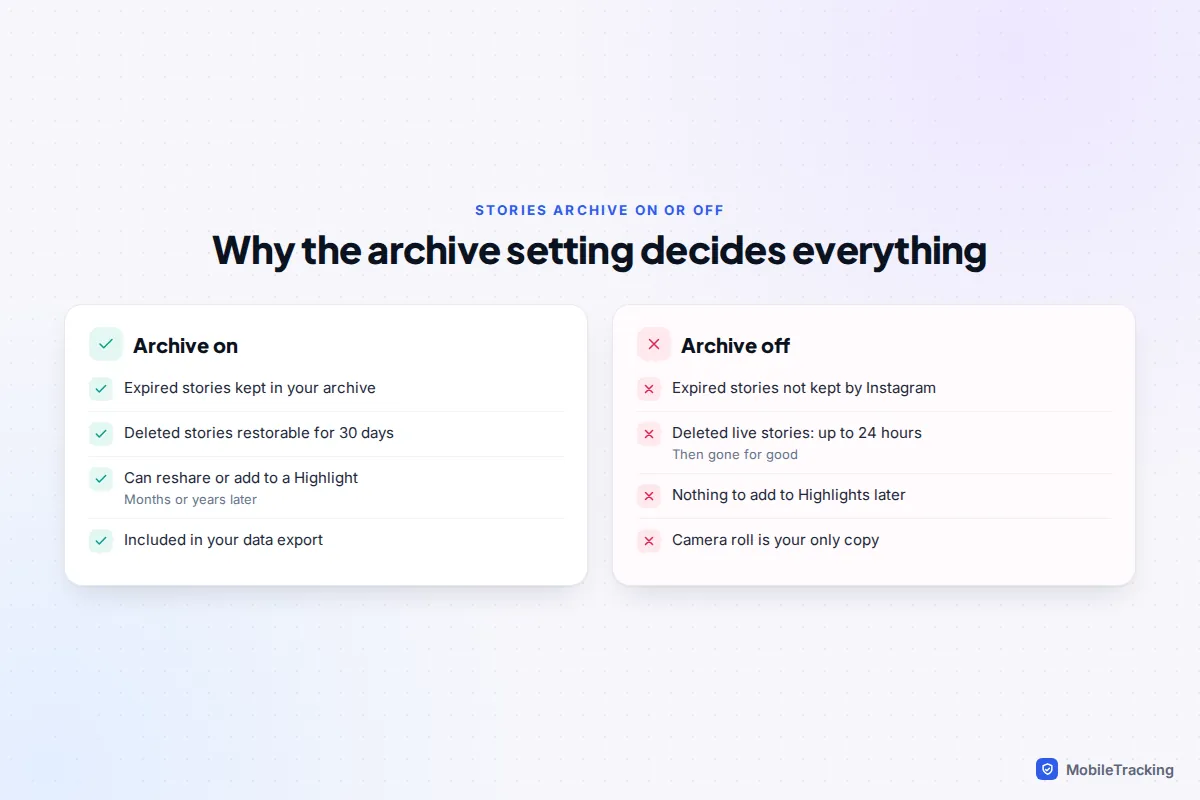
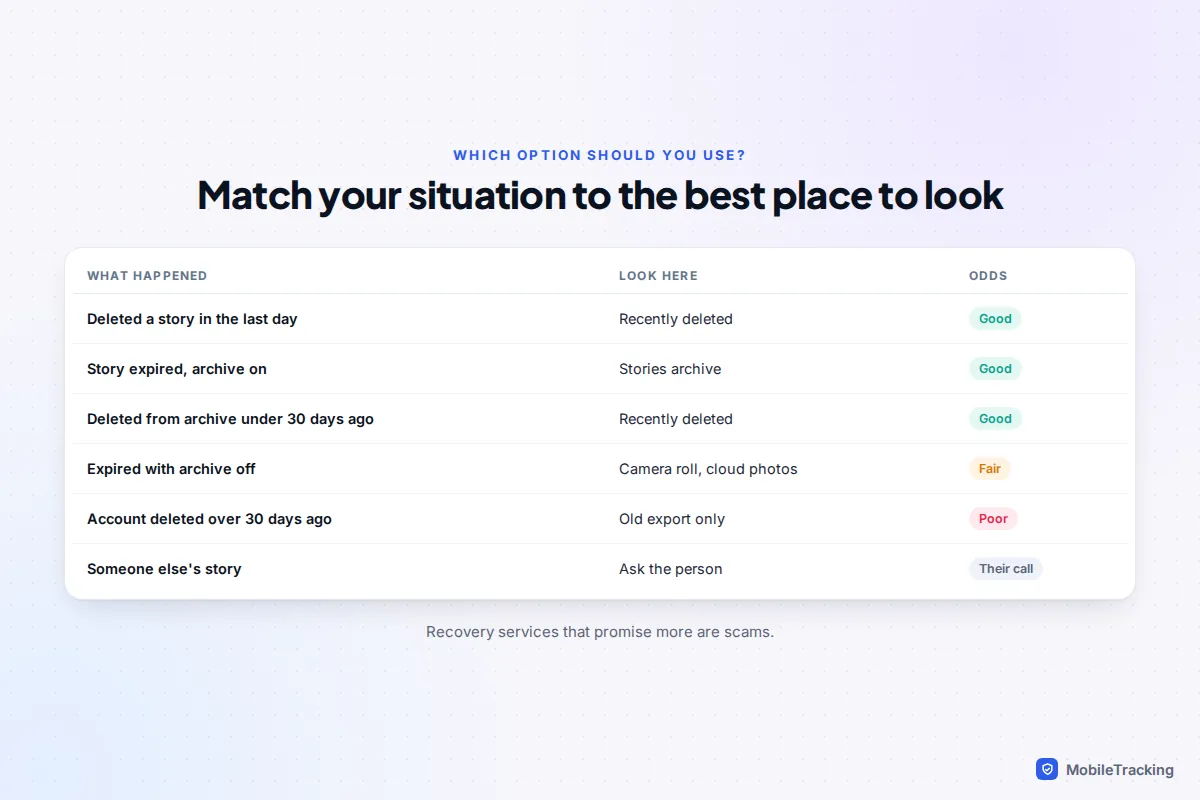
Instagram’s help centre says content in Recently deleted is removed after 30 days, “or up to 24 hours for stories that aren’t in your stories archive”. In practice, that splits deleted stories into two groups:
| How the story was deleted | Stories archive on? | Time to restore |
|---|---|---|
| Deleted from your archive (after it expired) | Yes | 30 days |
| Deleted while live, archive switched on | Yes | 30 days |
| Deleted while live, archive switched off | No | Up to 24 hours |
| Expired naturally, archive switched off | No | Not saved anywhere by Instagram |
The last row is the painful one. If your archive was off, an expired story was never kept, so there is nothing in Instagram to restore. Your only hope is a copy outside the app, covered further down.
Find expired stories in your Stories archive
Most people who search for a “deleted” story are really looking for an expired one, and it’s sitting in the archive. To open it, go to your profile, tap the menu, tap Archive, then use the menu at the top of the screen to switch to the Stories archive. You can also jump to a particular day with the calendar view, which helps if you post a lot.
From the archive you can tap a story and use the three dots to Save it to your phone, Share it again as a new story, add it to a Highlight, or delete it. Saving is the step people skip, and it’s the one that protects you from anything going wrong with Instagram later.
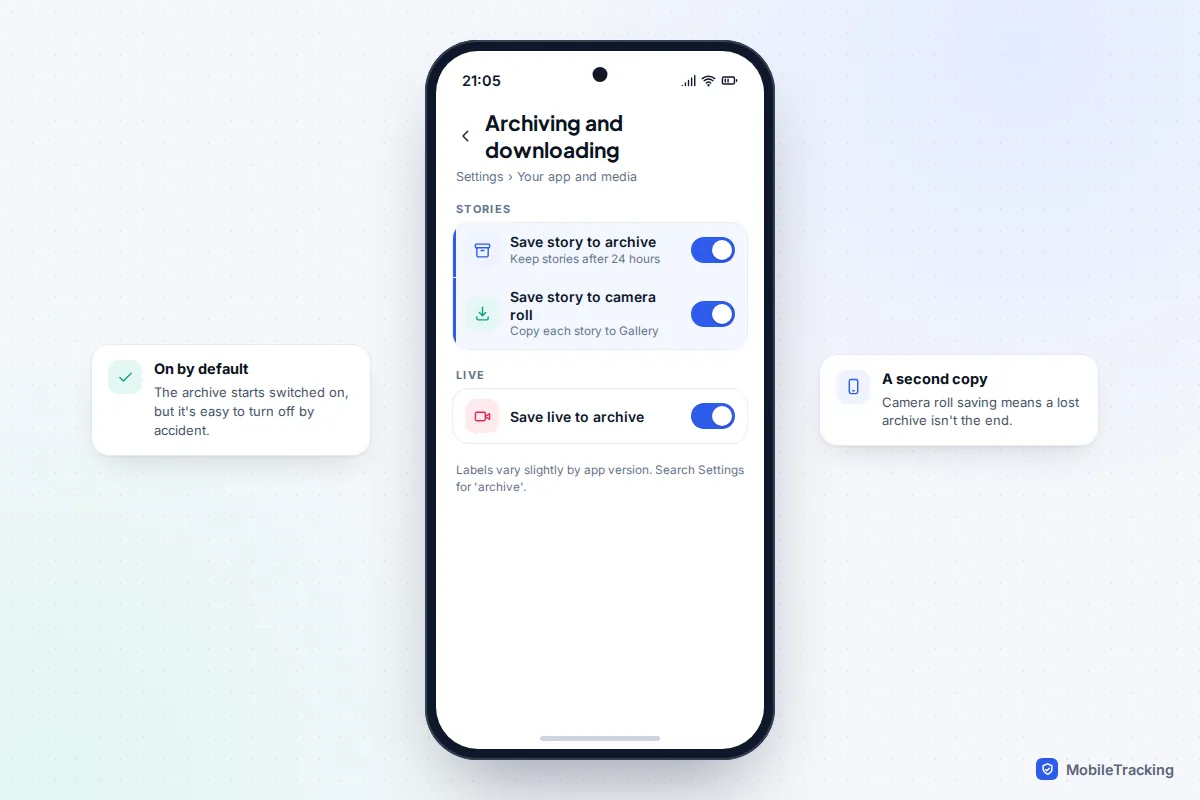
To check the archive is switched on, tap the menu, scroll to Your app and media, tap Archiving and downloading, and make sure Save story to archive is on. It’s on by default for new accounts. Labels shift slightly between app versions, so if you can’t see it, type “archive” into the search bar at the top of Settings.
Highlights, camera roll copies and your phone’s bin
Check your Highlights
Stories you added to a Highlight stay on your profile after the 24 hours are up. Removing a story from a Highlight, or deleting the whole Highlight, doesn’t delete the story from your archive, so check the archive before assuming it’s gone. Deleting a story from the archive, on the other hand, removes it from any Highlight it was in.
Check your camera roll
If Save story to camera roll (sometimes shown as gallery on Android) was switched on, every story you posted was also saved to your phone. Stories made from an existing photo or video also started life in your camera roll. Look in Photos on iPhone or in Google Photos or Samsung Gallery on Android, where Instagram usually creates an Instagram album.
If you’ve cleared those too, check the phone’s bin. On iPhone, open Photos, go to Collections, scroll to Utilities and tap Recently Deleted, which keeps items for 30 days. Google Photos keeps items in Trash (Bin) for 30 days, down from 60 since September 2026, and Samsung Gallery’s Recycle bin also keeps them for 30 days. For iCloud, Google Photos and other clouds, our guide to recovering deleted photos from the cloud has each service’s bin and deadline.
Check Facebook if you cross-posted
If your stories were set to share to Facebook as well, open Facebook and look in its own story archive. Facebook manages that copy separately, so it’s worth a look, though it may have been removed along with the Instagram one.
Download your information: a copy of your whole archive
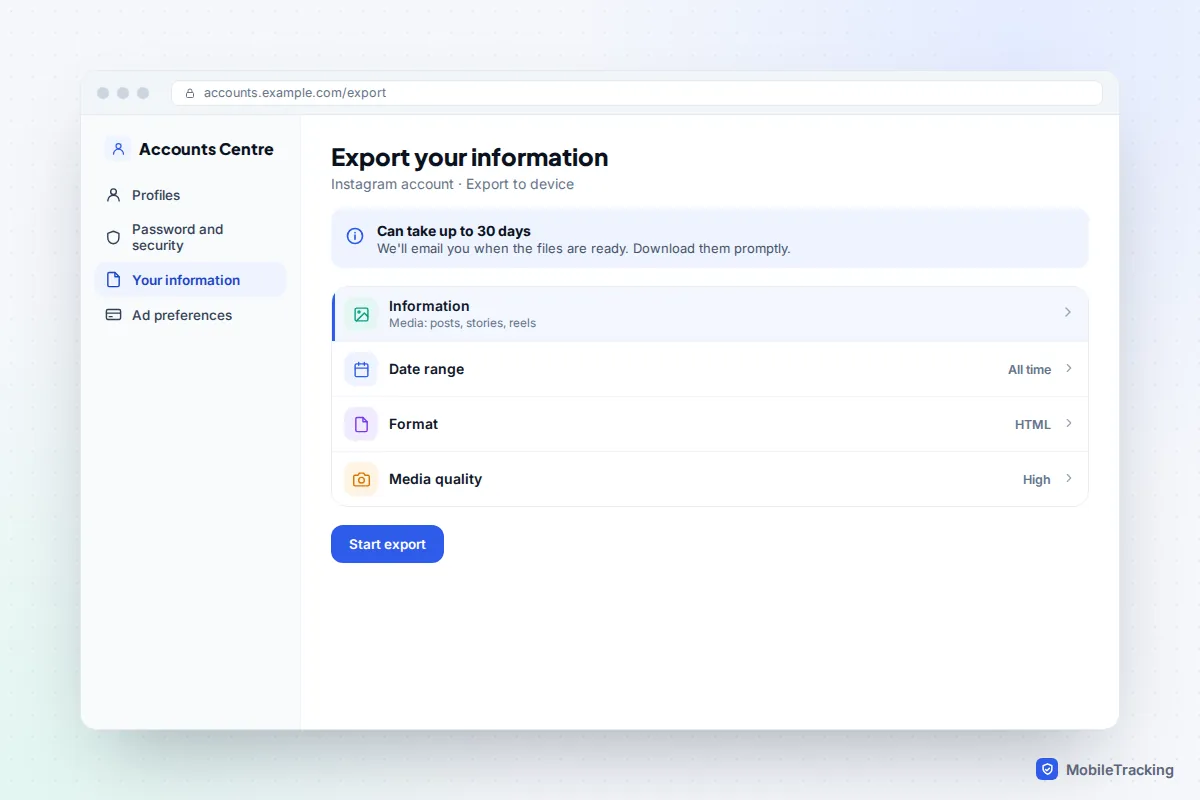
Instagram’s data export gives you every story in your archive, along with your posts, as files you keep on your own computer. It won’t bring back a story that has already been permanently deleted, because it only includes what your account holds on the day you ask. But it is the best insurance against the next loss, and it saved a lot of people in 2024, when Meta confirmed a bug had deleted some people’s Story Highlights and archives and said it couldn’t restore them.
- Tap the menu on your profile, then Accounts Centre.
- Tap Your information and permissions, then Export your information (older versions say Download your information).
- Tap Create export, choose your Instagram account and pick Export to device.
- Choose the information to include (stories are part of your media), set the date range to All time, pick HTML (easier to browse) or JSON, and high media quality.
- Tap Start export. Meta says this can take up to 30 days, though it’s often much quicker, and emails you when it’s ready.
The download link doesn’t last long, so download it as soon as you get the email. Inside, your stories sit in a media folder, grouped by month.
When recovery isn’t possible
Someone else’s story
You can’t recover another person’s deleted or expired story. Only the person who posted it has it in their archive or Recently deleted. If it mattered to you, a friendly message asking them to send it is the honest route and usually works. Avoid “anonymous story viewer” and story download sites: they can’t see deleted stories either, and many exist to harvest logins or push scam ads.
A deleted or deactivated account
If you temporarily deactivated your account, your stories and archive are hidden, not deleted, and come back when you log in again. If you asked Instagram to delete your account, you have 30 days to cancel by logging back in, and your archive comes back with it. After that the account and its stories are gone for good. Our guide to recovering a deleted Instagram account goes through the timing.
A hacked account
If someone got in and deleted your stories, get the account back first, then check Recently deleted, since items should still be there for their normal window. Our guide to recovering a hacked Instagram account covers the steps.
Troubleshooting by symptom
- Recently deleted is empty. The window has passed, or the story expired rather than being deleted. Check the Stories archive and your camera roll.
- No Stories archive option. Update the app, then look under Archive and use the menu at the top to switch views.
- An archived story shows “This story is no longer available”. The media has been removed on Instagram’s side. Look for a camera roll copy or an old export.
- The security code never arrives. Check spam and your contact details in Accounts Centre, and wait a few minutes before requesting another code.
- A restored story isn’t showing. Look in the Stories archive rather than on your profile, especially if it was posted more than 24 hours ago.
Here’s a typical case. Jess deleted a story from her daughter’s school play within minutes of posting it, because the caption had a typo. Her archive was on, so it was in Recently deleted with 30 days to spare. She restored it, saved it to her camera roll from the archive and reposted it with the caption fixed.
Prevention: set it up once
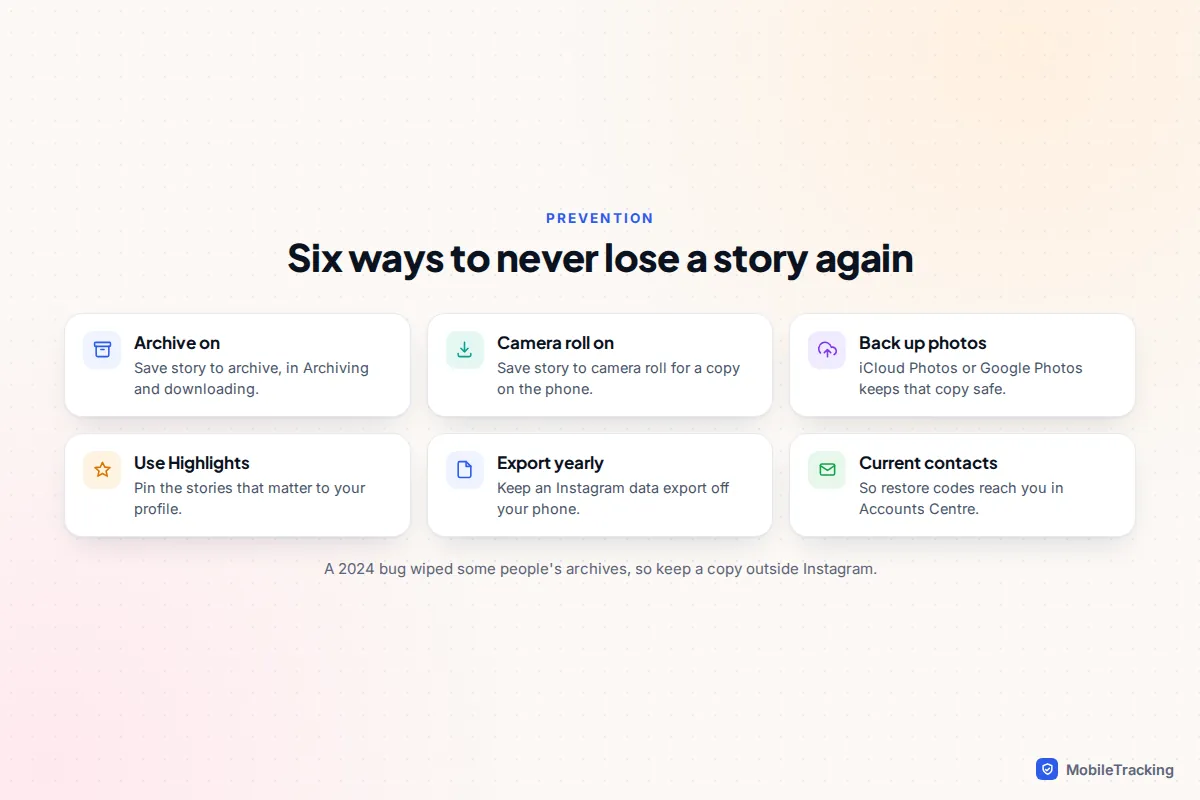
Five minutes now means you won’t have to work any of this out again. If you’re helping a teenager set up their account, this is a good thing to do together, alongside the privacy settings in our guide to Instagram supervision.
- Switch on Save story to archive in Archiving and downloading.
- Switch on Save story to camera roll as well, so every story has a copy on the phone.
- Back up your phone’s photos to iCloud Photos or Google Photos.
- Put stories you care about in Highlights, and save them from the archive.
- Request a full Instagram export once or twice a year and keep it somewhere other than your phone.
- Keep your email and phone number current in Accounts Centre, so security codes reach you.
Frequently asked questions
How long do deleted Instagram stories stay in Recently deleted?
Up to 30 days if the story was in your Stories archive, or up to 24 hours if it wasn’t. After that, Instagram deletes it permanently and it can’t be restored.
Can I recover a story that expired while my archive was off?
Not from Instagram. With the archive off, Instagram doesn’t keep expired stories. Look for a copy in your camera roll, your phone’s Recently Deleted or Trash album, or your cloud photo backup.
Does deleting a Highlight delete the stories in it?
No. Deleting a Highlight removes the collection from your profile, but the stories remain in your Stories archive. Deleting a story from the archive is what removes it everywhere.
Do Close Friends stories follow the same rules?
Yes. Close Friends stories are saved to your Stories archive and go to Recently deleted in the same way, with the same 30-day and 24-hour windows.
Can Instagram support recover a permanently deleted story?
No. Once a story has left Recently deleted, or the account deletion period has ended, Instagram doesn’t offer a way to restore it. Instagram’s own guide to recovering deleted content covers only the Recently deleted folder.
Can I see a story someone else deleted?
No. Deleted stories disappear for viewers straight away, and only the person who posted them can restore them. Third-party sites that claim otherwise can’t access deleted content.
This guide is general information, not legal or financial advice. Read our editorial policy.