
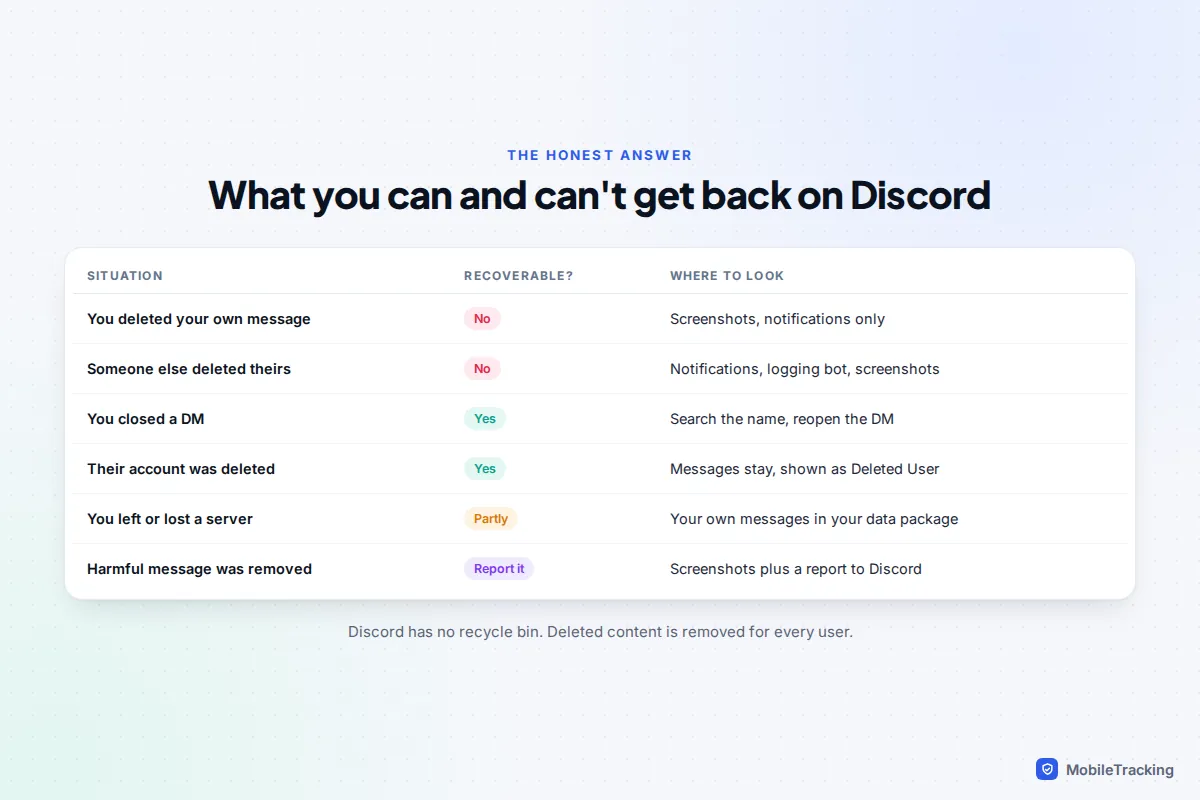
Deleted Discord messages can’t be recovered. Discord has no recycle bin, deleted messages vanish for everyone in the chat without leaving a “message deleted” note, and Discord Support can’t restore them for you. That is true whether you deleted the message or the other person did.
What you can often recover is a copy. Your Discord data package contains every message you’ve sent that still exists, which helps if you’ve left a server or lost track of a chat. Phone notifications, Discord’s missed-message emails, screenshots and a server’s logging bot can hold copies of messages that are gone. And if the deleted message was abusive or threatening, you can still report it. This guide covers each route, what it really gets you, and the “recovery” tools to steer clear of.
First, check the message is really deleted
A surprising number of “deleted” Discord messages are just hidden. Run through these before assuming the worst.
- You closed the DM. Closing a direct message only removes it from your sidebar. Search for the person’s name, or open their profile and tap Message, and the full history comes back.
- The other person deleted their account. Their messages stay in place under the name Deleted User. Discord’s own retention policy says it keeps displaying content people shared after they delete an account.
- You blocked or ignored them. In servers, messages from people you’ve blocked are collapsed behind a “blocked message” line you can tap to show. Discord’s Ignore option also hides someone’s messages. Unblock or un-ignore them to see the history again.
- You left or were removed from a server. The messages still exist; you just can’t see the channel. Rejoining, if you’re allowed, brings it back. Your own messages from it are also in your data package.
- A moderator banned the sender. When moderators ban someone, they can choose to delete that person’s recent messages, up to the last seven days. Those are genuinely gone.
- You’re searching the wrong place. Discord’s search works per server or across your DMs, not both at once. Search again from inside the right server or your DM list, adding from: and the username.
Why deleted messages can’t come back
When a Discord message is deleted, it disappears for every user at once. Discord’s help page on data packages states it plainly: a manually deleted message is no longer stored in Discord and won’t be in your package. There’s no archive, trash or undo, and no setting that keeps deleted messages for you.
Discord does keep some information for longer for safety reasons. According to Discord’s page on how long it keeps your information, account details such as email addresses are kept for 180 days after deletion for trust and safety purposes, and for up to two years if an account has been reported or flagged for breaking the rules. That retention is for Discord’s safety team and legal requests. It isn’t a way for users, parents or moderators to get deleted messages back.
The same applies to anyone claiming otherwise. If Discord itself can’t restore a deleted message for you, a website or app certainly can’t.
Get your own messages back with a data package
Discord will send you a copy of your account data, including every message you’ve sent that hasn’t been deleted. It’s the right tool when a chat is hard to reach, a server has kicked you, or you want a dated record of what you said.
- On a computer: open User Settings (the cog next to your name), go to Data & Privacy and click Request Data. You can tick just the categories you need, such as Messages.
- On a phone: tap your profile picture, then the cog, then Data & Privacy, and tap Request all of my data. On mobile you get everything; there’s no choosing categories.
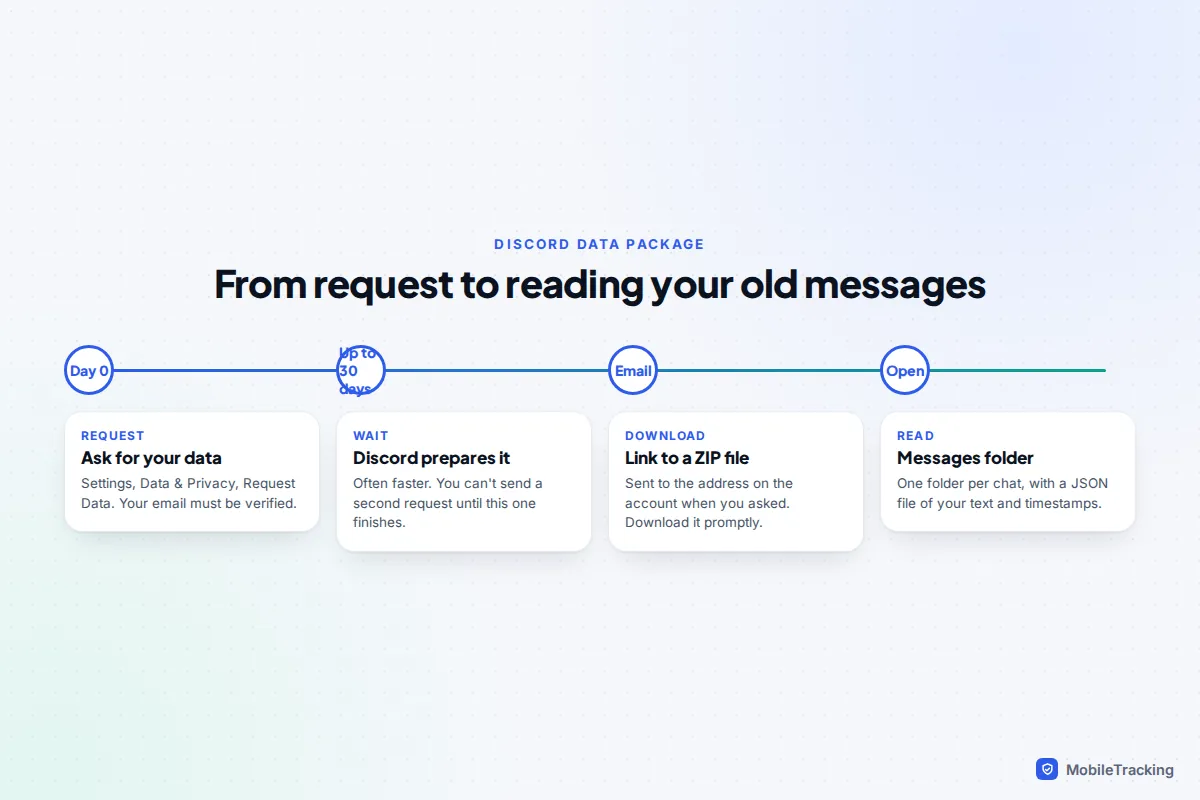
- Wait for the email. Discord says it can take up to 30 days, and the link goes to the email address on your account at the time you asked. Your email must be verified first.
- Download the ZIP file and open the Messages folder. There’s one folder per DM, group or channel, with your messages in a JSON file you can open in any text editor or browser.
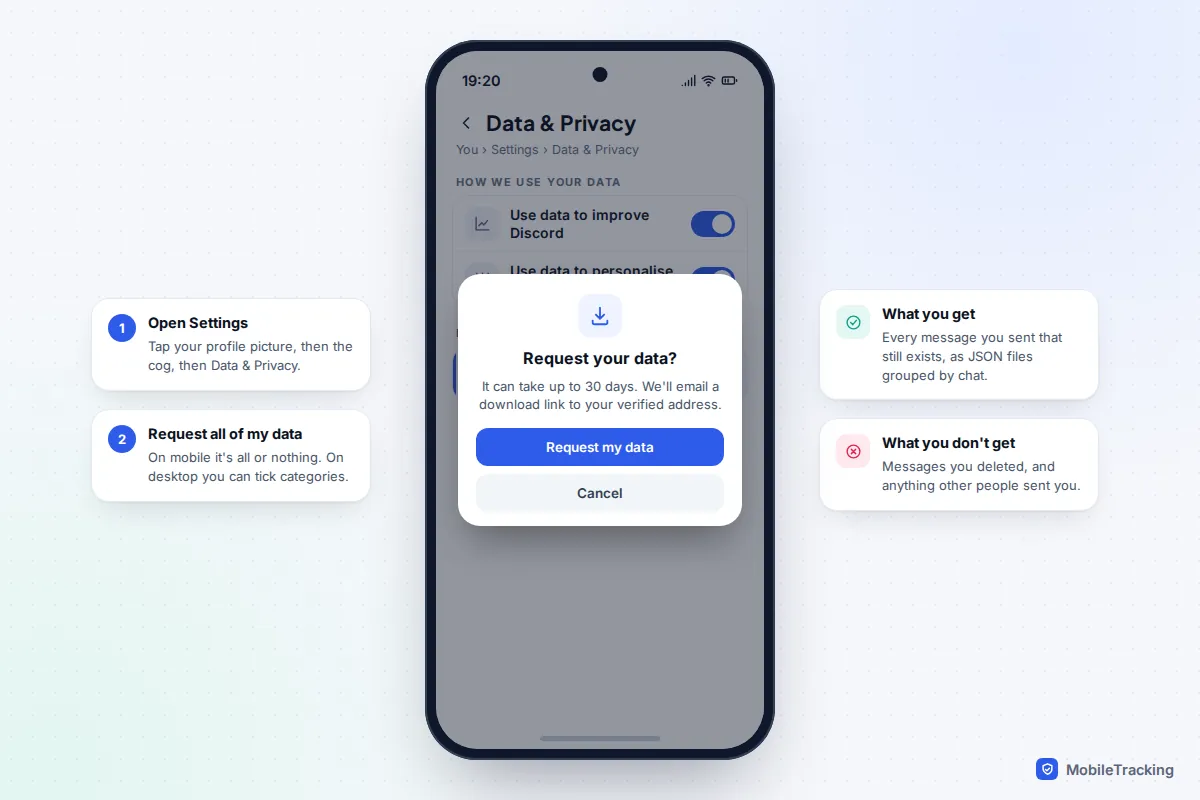
Know the limits before you wait a month. The package contains only messages you sent, not what other people sent you, so it won’t rebuild both sides of a conversation. Messages you deleted aren’t included. It also leaves out your conversations with Discord’s support and safety teams. Each message comes with its timestamp and content, plus a link to any file you attached, although older attachment links may no longer open. Discord’s guide to requesting a copy of your data has the current steps if the menus move.
Look for copies outside Discord
A deleted message may have left traces on the devices that received it. These are worth checking quickly, because most of them fade within a day or two.
Notifications on Android
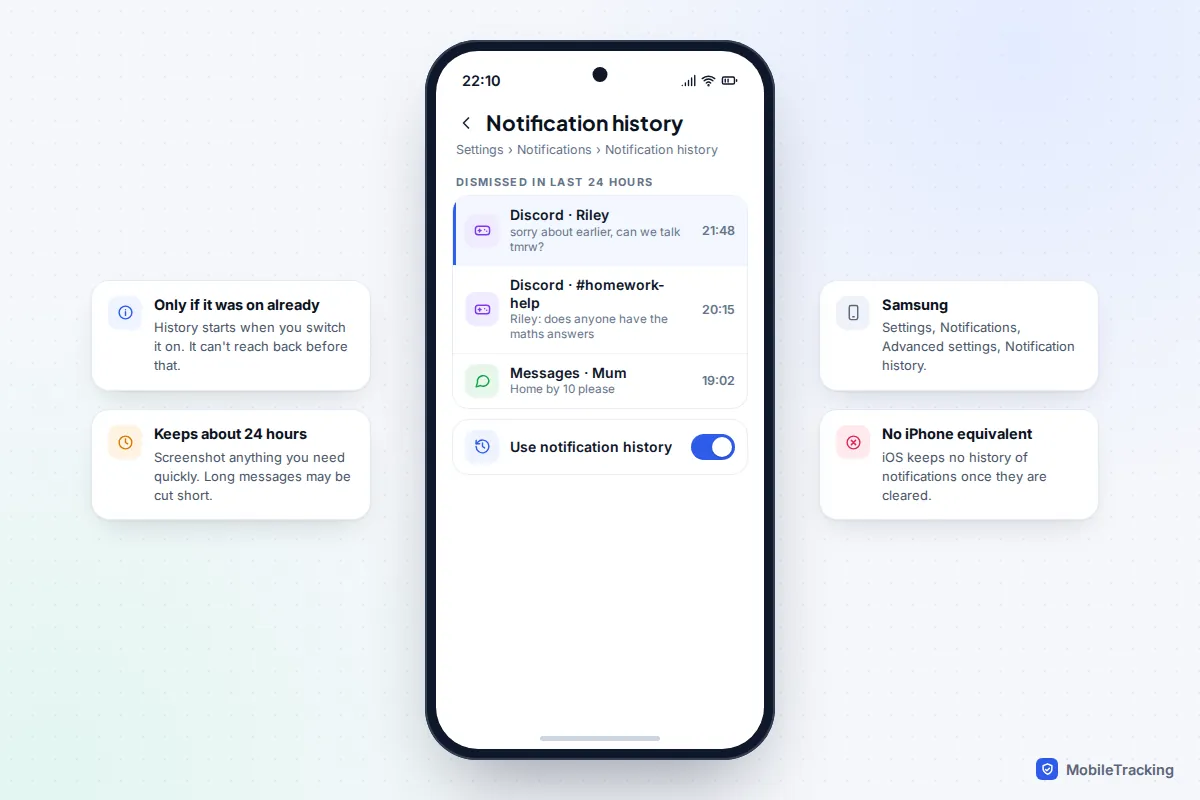
If notification history was switched on before the message arrived, you’ll find a record at Settings › Notifications › Notification history on a Pixel, or Settings › Notifications › Advanced settings › Notification history on a Samsung. It covers roughly the last 24 hours and shows the preview text, which may be cut short for long messages. If it was off, it can’t reach back. Our guide to setting up notification history on Android shows where to switch it on for next time.
iPhone, email and the other person
iPhone has no notification history. A banner you haven’t cleared may still sit on the lock screen or in Notification Centre, so screenshot it before you touch it; once cleared, it’s gone, as our guide to cleared notifications on iPhone explains. Check your email too. Discord’s Communication emails, controlled under User Settings › Notifications › Email Notifications, tell you about messages and calls you missed while away, and older ones may include a preview.
Finally, ask. Someone else in the conversation may have a screenshot, a quote in a reply, or the same notification. If the message was shared elsewhere, such as forwarded to another server or copied into a group chat, that copy is unaffected by the deletion.
For server moderators: the audit log and logging bots
If you run or moderate a server, you’ll see a little more than other members, but not the deleted text itself.
The Audit Log, under Server Settings and visible to anyone with the View Audit Log permission, records when a moderator deletes someone else’s message, including who did it, whose message it was, which channel and how many. It never shows what the message said. When people delete their own messages, no entry appears at all. Entries are kept for 45 days.
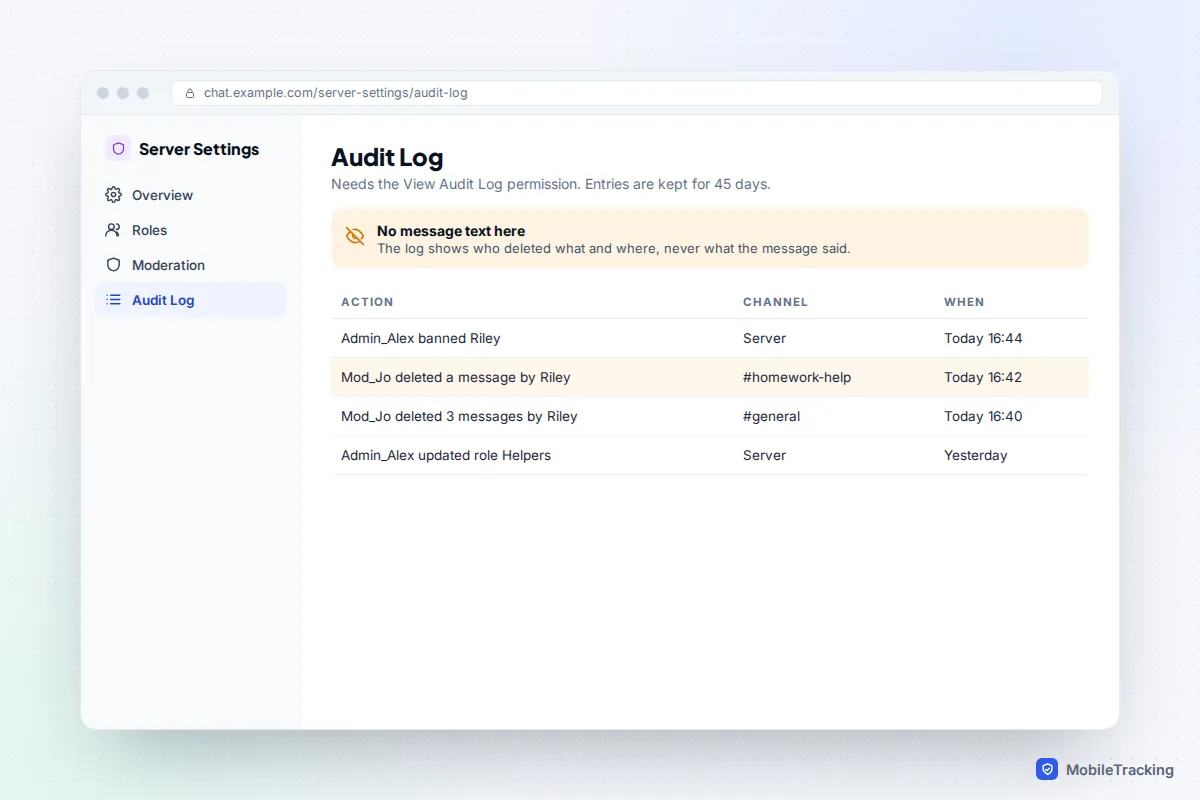
To keep deleted message text, servers use a logging bot such as Dyno, Carl-bot or MEE6, which posts a copy of each deleted or edited message to a private moderators’ channel. Three things to understand:
- It only works going forward. A bot can only log messages it saw arrive while it was in the server, and some only remember recent messages. Adding one today won’t recover yesterday’s.
- Tell your members. Logging keeps copies of things people chose to delete. Say so in your rules channel, restrict the log channel to moderators, and don’t use it to settle personal disputes.
- Use trusted, verified bots. A logging bot sees every message in the channels it can read. Give it only the permissions it needs.
Logging bots are for servers, not DMs. A bot can’t read private conversations between two people.
When the deleted message was harmful
Bullies, scammers and people grooming children often delete messages to cover their tracks. If that’s your situation, the goal isn’t recovery for its own sake but evidence, and speed matters.
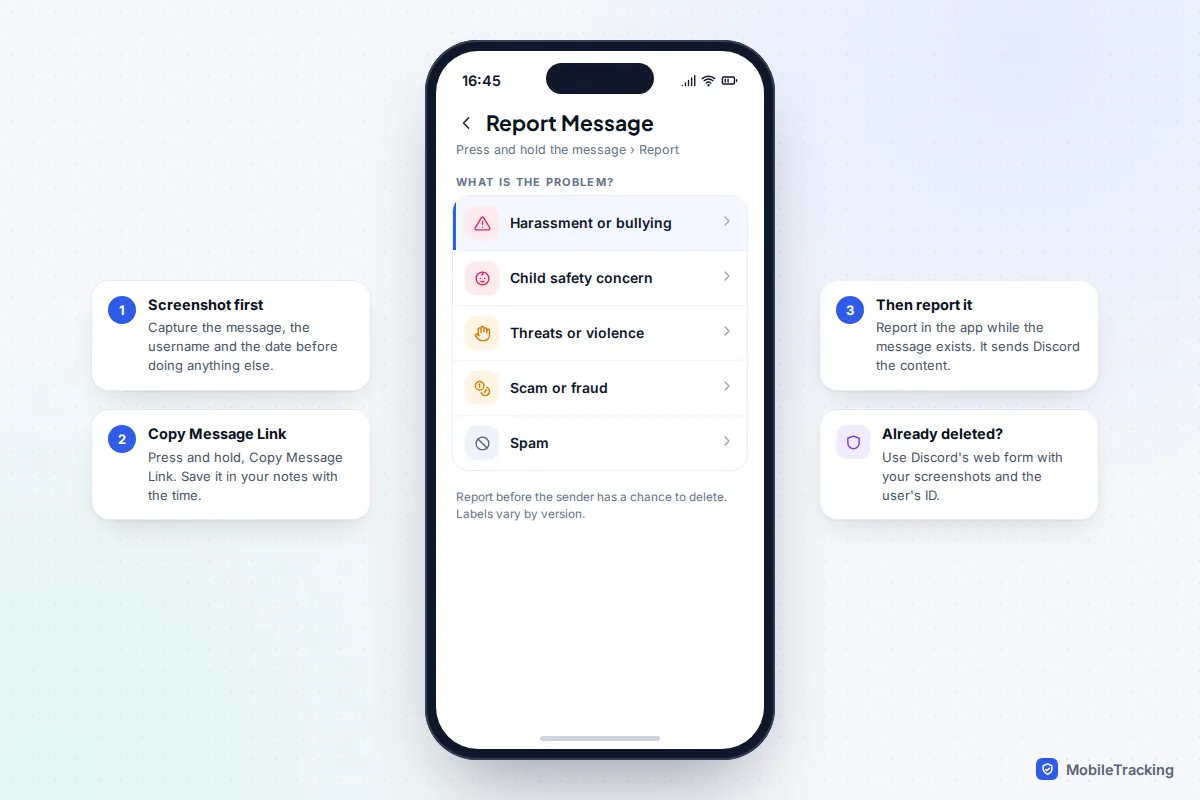
- Screenshot everything that’s still there, including the username, the date and the channel or DM, and any messages from the same person.
- Copy message links. Press and hold a message (or right-click on desktop) and choose Copy Message Link. Discord’s safety team asks for these when you report.
- Report inside the app while the message still exists: press and hold it and choose Report. Discord says it aims to handle the most serious reports, such as child safety, within 24 to 48 hours.
- If it’s already deleted, report the user’s profile instead and use Discord’s online report form, attaching your screenshots. Turn on Developer Mode in the Advanced section of Discord’s settings so you can copy the person’s user ID, which identifies them even if they change their name.
If a child is in danger or being pressured for images, don’t wait for Discord. In the UK, report to CEOP; in the US, contact the NCMEC CyberTipline; anywhere, call the police if someone is at immediate risk. Keep the evidence rather than deleting the account, and see our guides to spotting online grooming and responding to cyberbullying for next steps.
What parents can see with Family Center
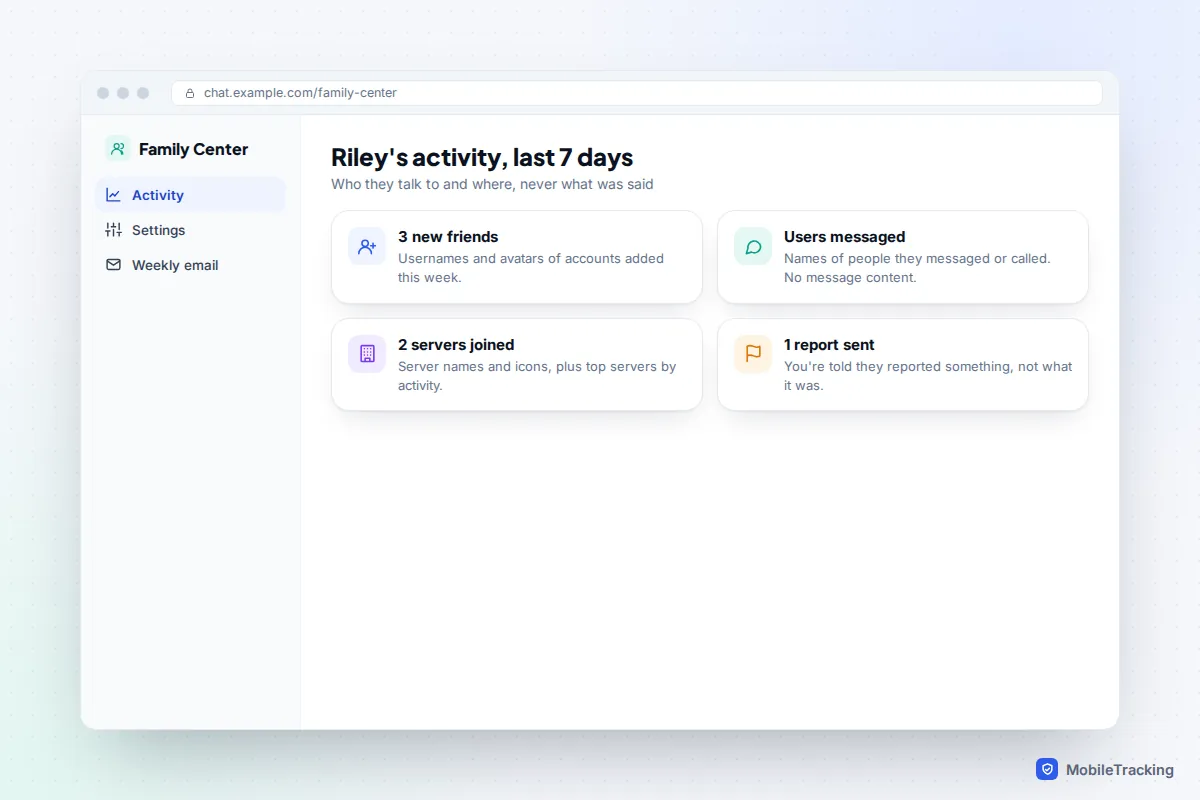
Discord’s Family Center links a parent’s account to a teen’s, with the teen’s agreement. It shows the last seven days of activity: new friends, the people your teen messaged or called, servers joined, top servers and contacts, purchases, and a notice when your teen reports something. It never shows message content, deleted or otherwise. That makes it useful for spotting a new contact who appears alongside a sudden change in mood, but it won’t recover anything. Our Discord safety guide for parents covers setting it up.
Avoid “recovery” tools and scams
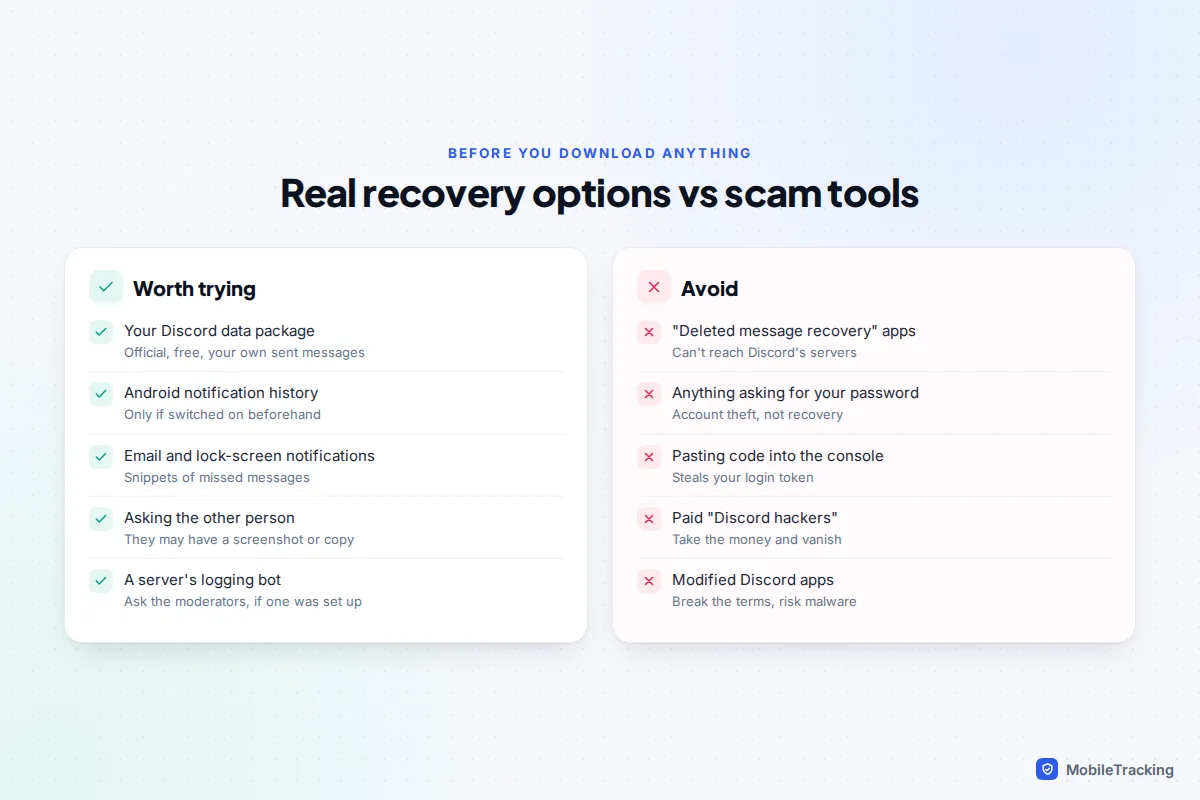
Search for this topic and you’ll find apps, websites and people promising to recover deleted Discord messages. None of them can. Deleted messages aren’t on Discord’s servers for anyone to fetch, and nothing on your phone or computer stores a hidden copy of them.
Some of these offers are just useless. Others are dangerous. A tool that asks for your Discord password, a login code or a QR scan is trying to take over your account. Instructions to paste code into your browser’s developer console are a well-known way to steal your Discord login token, which lets someone into your account without your password. Paid “Discord hackers” take the money and disappear. Modified Discord apps that promise to log deleted messages break Discord’s terms, can get accounts banned and are a common way to spread malware, and they only capture messages that arrive while they’re running anyway.
How to stop it happening again
Because nothing can reach back in time, the only real fix is to keep copies of what matters before it can be deleted. A typical example: Maya’s son was being needled in a gaming server by someone who deleted each message a few minutes later. Once they switched on notification history on his Android phone and agreed he’d screenshot anything nasty straight away, they had a week of evidence, the moderators banned the account, and Discord acted on the report.
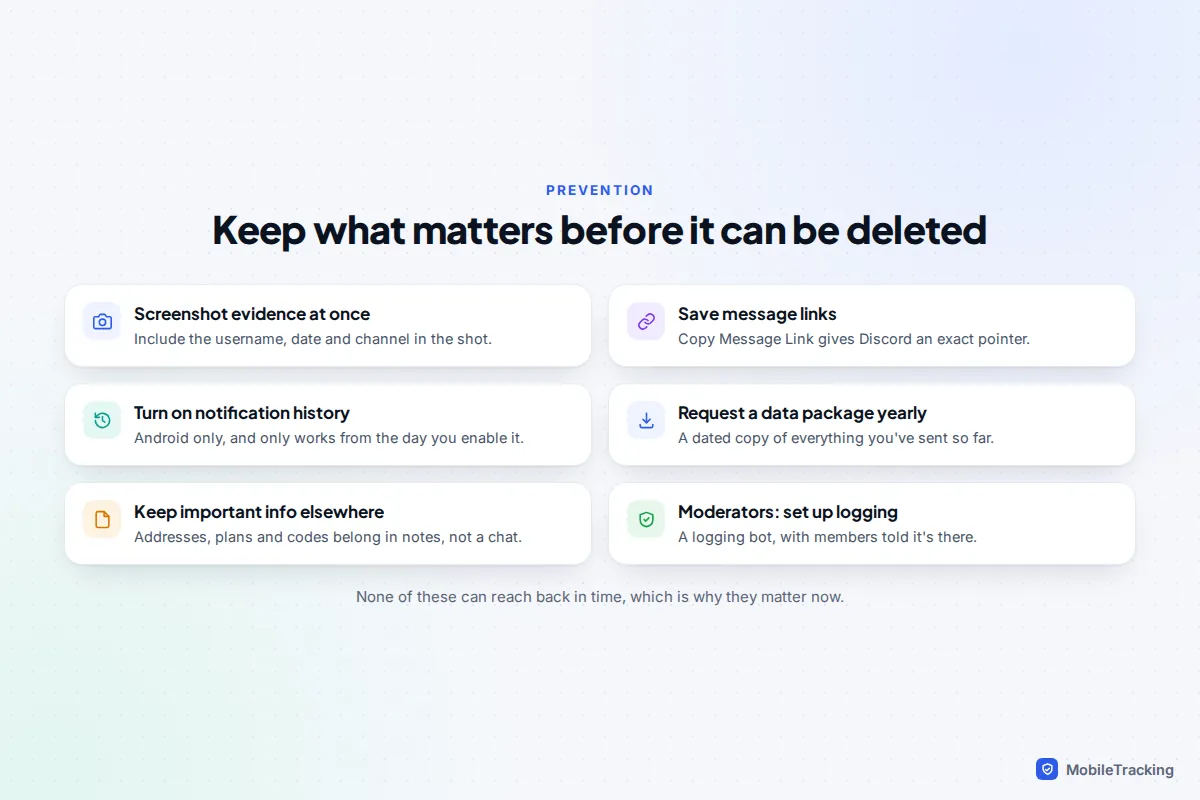
For everyday use, the simplest rule is that Discord isn’t a filing cabinet. Addresses, plans, passwords for shared games and anything else you’ll need later belong in your notes app or a document, not only in a chat someone else can delete.
Frequently asked questions
Can Discord Support restore a deleted message?
No. Once a message is deleted it’s no longer stored in a form Discord can give back to users. Support can help with reports and account problems, but not with restoring messages.
Does the other person know if I delete a message?
Discord doesn’t show a “message deleted” note, so the message simply disappears. But if they saw it, got a notification or email, or run a logging bot in the server, they may still have a copy.
Can server admins see deleted messages?
Not in Discord itself. The audit log shows that a moderator deleted a message, and whose, but never the text, and self-deletions leave no entry. Only a logging bot that was already running can show the content.
Are deleted messages in my data package?
No. The package includes messages you sent that still exist. Deleted ones, and messages other people sent you, are left out.
Can I see my child’s deleted Discord messages?
No, and Family Center doesn’t show any message content. If you’re worried, talk to your child, look at what’s still on their screen together, and report anything harmful. Be wary of any app that claims to show deleted Discord messages; it can’t.
This guide is general information, not legal or financial advice. Read our editorial policy.