
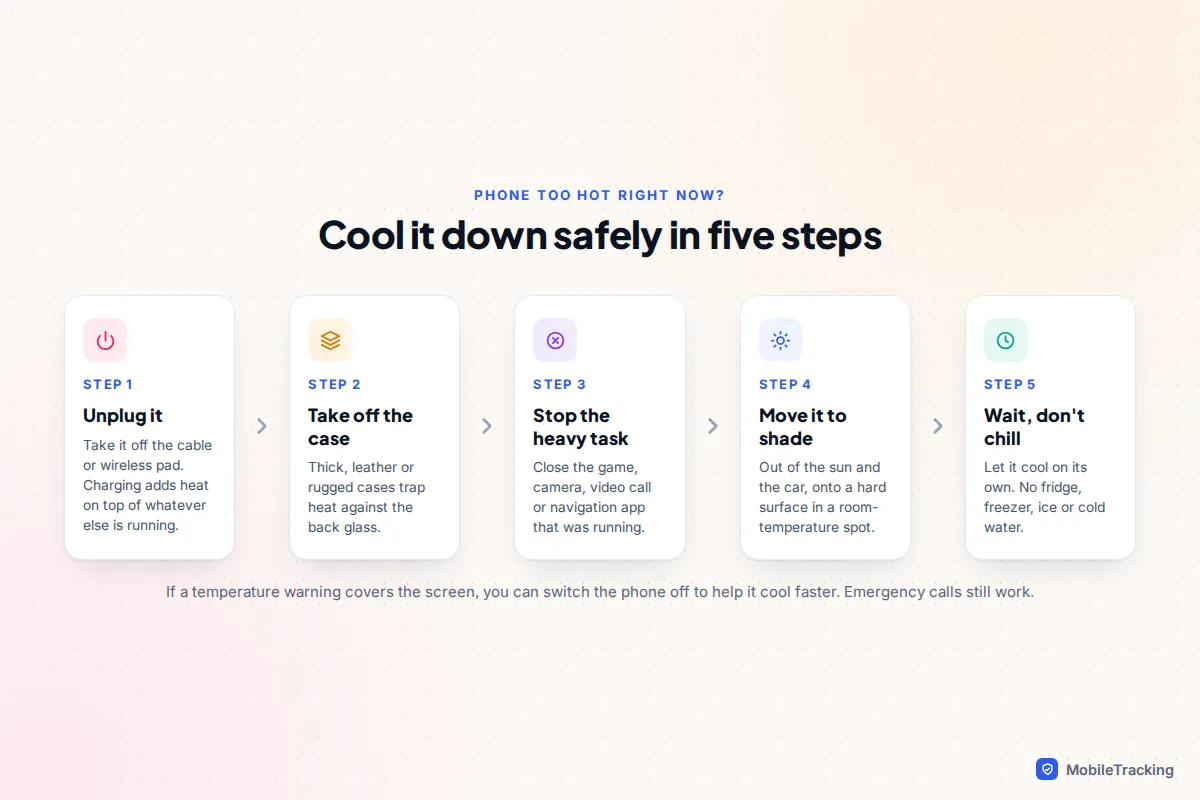
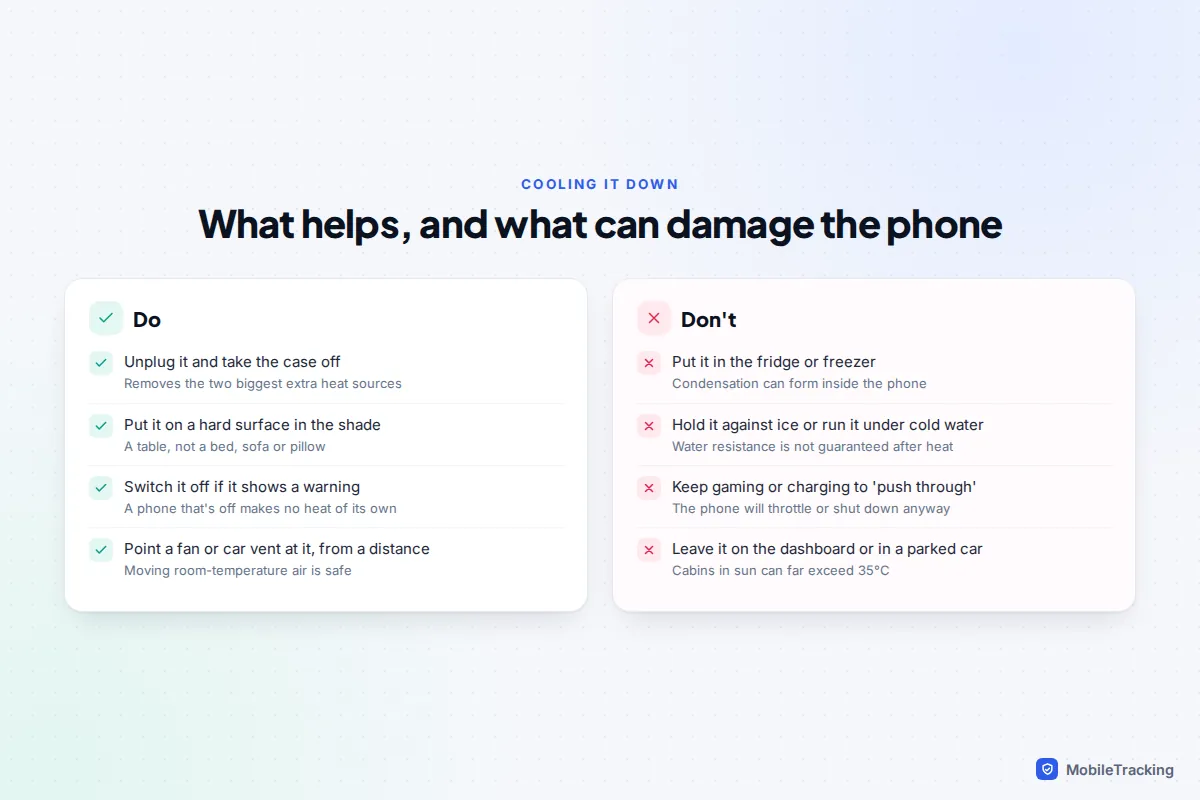
If your phone is hot right now, unplug it, take it out of its case, close whatever app was running and put it on a hard surface out of the sun. If a temperature warning is covering the screen, switch the phone off and let it cool at room temperature. Do not put it in the fridge, the freezer or cold water: the sudden change can cause condensation inside the phone.
Once it has cooled, the real fix depends on when it gets hot. Heat while charging, gaming or using sat-nav in a sunny car is usually the phone doing its job in a bad spot. Heat while it sits idle in your pocket points to a misbehaving app, a weak signal or, less often, a failing battery. This guide walks through each scenario, the settings that help on iPhone and Android, and the signs that mean you should stop using the phone altogether.
What the temperature warning means
Apple says iPhones work best at ambient temperatures between 0°C and 35°C (32°F to 95°F), and Samsung gives the same 0°C to 35°C range as normal operating conditions for Galaxy phones. Above that, especially when the phone is working hard, its sensors act to protect the battery and processor.
That protection happens in stages, and you will often notice the early ones before any warning appears:
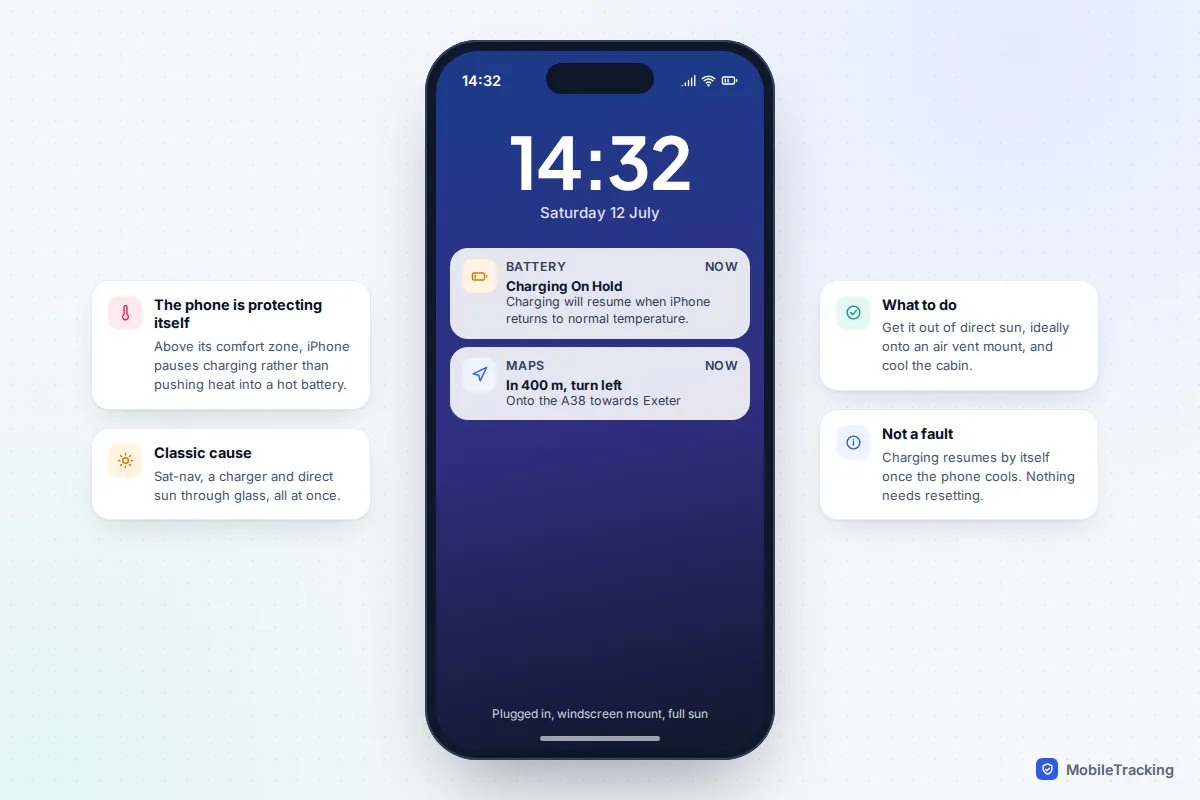
- Charging slows or stops. On an iPhone you may see a Charging On Hold notification that says charging will resume when iPhone returns to normal temperature.
- The screen dims and games feel slower as the processor is held back.
- The camera flash or camera stops working, and mobile data, 5G or Wi-Fi may be limited. Google lists all of these for Pixel phones.
- A full-screen warning appears. On an iPhone it reads “Temperature: iPhone needs to cool down before you can use it.” Samsung shows a device overheating warning and closes apps. At this stage you can usually still make emergency calls, but little else.
- The phone switches itself off. If the temperature keeps rising, it shuts down to protect itself. Leave it off until it is cool to the touch.
None of this means the phone is broken: it is refusing to run hot enough to damage itself. Apple’s page on what happens when an iPhone gets too hot or too cold describes the same behaviour.
Checking the temperature on a Pixel
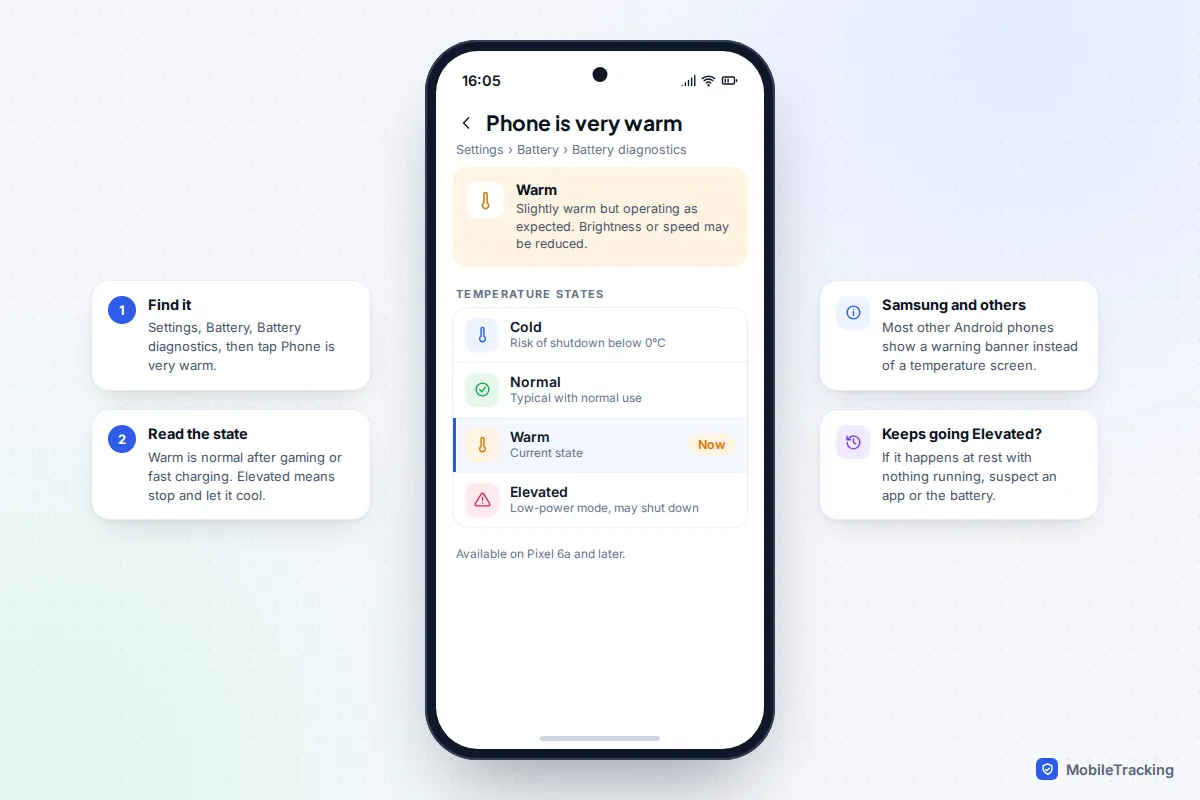
Most phones don’t show a temperature reading, but Pixel 6a and later models do. Go to Settings › Battery › Battery diagnostics and tap Phone is very warm. You will see one of four states: Cold, Normal, Warm or Elevated. Warm is expected after gaming or fast charging. Elevated means the phone has entered a low-power mode and may shut down, so stop what you’re doing. Google explains each state on its Pixel temperature help page.
Why your phone overheats: causes by scenario
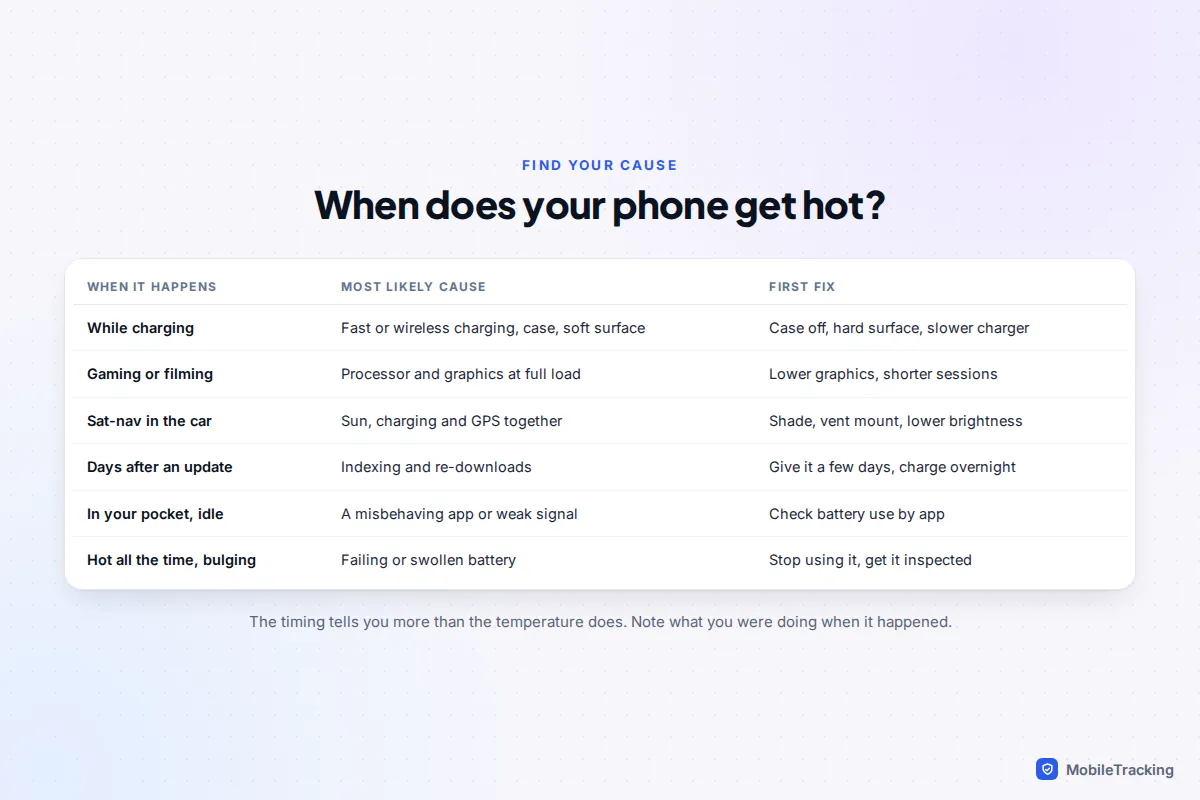
Notice what the phone was doing when it got hot, then match it to one of these.
While charging
Charging always makes some heat, and fast charging makes more. Wireless charging is warmer still, because some energy is lost as heat, more so if the phone isn’t lined up on the coil. What makes it worse:
- A thick case. Rugged, leather and wallet cases insulate the back glass, which is exactly where the heat needs to escape. Apple’s MagSafe guidance notes that if the phone gets warm, it may limit charging above 80 percent.
- Something between phone and pad. Cards, a metal ring holder or a magnetic mount plate on a wireless charger can heat up and stop charging altogether.
- A soft surface. Charging on a bed, under a pillow or on a sofa cushion traps heat.
- Using it hard while it charges. Gaming or streaming on the charger stacks two heat sources. Google specifically advises against heavy use while charging.
- A damaged cable or an uncertified charger. Samsung warns against cables with the covering peeled off.
Gaming, filming and video calls
Demanding games, 4K video and long video calls run the processor and graphics chip flat out. Warmth here is normal. If the phone throttles or warns you, lower the game’s graphics or frame-rate setting, take a break every half hour or so, and avoid playing while charging.
Sat-nav in a sunny car
This is the classic summer overheat. A phone mounted on the windscreen in direct sun, running navigation with the screen on and charging at the same time, has three heat sources and nowhere to lose them. A parked car is worse: Apple and Samsung both warn against leaving phones in cars because the cabin can get far hotter than the phone’s safe range.
Mount the phone on an air vent with the air conditioning on, or at least out of direct sunlight. Lower the brightness and, if you know the route, let spoken directions do the work. In winter, avoid a vent mount if the heater is blowing hot air straight onto the phone.
A real example: on a three-hour summer drive with the phone on the windscreen and plugged in, the screen dims and charging stops in the second hour. Moving it to the vent mount and unplugging it for twenty minutes fixes both.
For a few days after an update or a new phone
After a major system update, or when you set up a new phone or restore from a backup, the phone spends time indexing your photos, messages and files for search, re-downloading apps and processing your photo library. Apple has said this can temporarily affect battery life and thermal performance, and Google lists setting up and restoring as common causes of elevated temperature. It normally settles within a few days. Leaving the phone on charge and on Wi-Fi overnight helps it finish sooner.
A misbehaving app
If the phone gets warm in your pocket or on the desk when you are not using it, something is working in the background. Check which app is using the most battery:
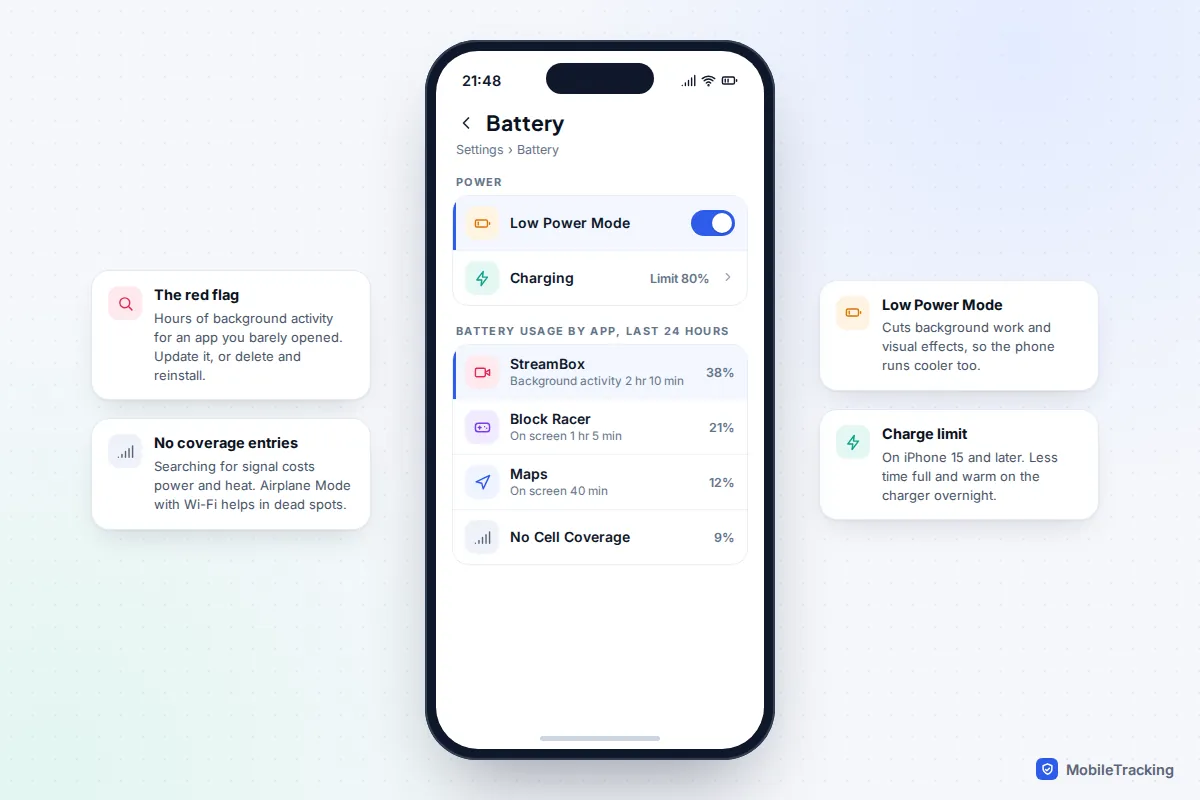
- iPhone: Settings › Battery, then scroll to the usage list. Tap an app to see on-screen time against background activity.
- Android: Settings › Battery › Battery usage (on Samsung, Settings › Battery, then the usage graph).
An app with hours of background activity you can’t explain is your prime suspect. Update it, and if that doesn’t help, delete it and reinstall. Our guide to finding what’s draining your battery goes through this list in more detail.
Poor signal and hotspot use
When mobile signal is weak, the phone boosts its radio power and keeps searching, which generates heat and drains the battery. The battery usage list may show an entry for no or low coverage. In a basement flat or rural dead spot, turning on Airplane Mode and then switching Wi-Fi back on keeps you connected over Wi-Fi with far less effort from the phone. Using the phone as a personal hotspot for hours has the same effect, especially over 5G.
iPhone settings that keep it cooler
Most of these live under Settings › Battery on iOS 26 and iOS 27. None cools a hot phone instantly, but together they cut the background work that keeps it warm.
- Low Power Mode. Switch it on from Settings › Battery or add it to Control Centre. It reduces background activity, visual effects and some processing, so the phone runs cooler as well as longer. It turns itself off once the battery charges above 80%.
- Charging limit. On iPhone 15 and later, Settings › Battery › Charging lets you set a limit between 80% and 100%. At 80% the phone spends far less time full and warm on the charger overnight. Older models have Optimized Battery Charging, which you should leave on.
- Adaptive Power. On iPhone 15 Pro and later models that support Apple Intelligence, Settings › Battery › Power Mode › Adaptive Power makes small performance adjustments, such as slightly lowering brightness, when the phone is working harder than usual.
- Background App Refresh. Settings › General › Background App Refresh. Turn it off for apps that don’t need to update when closed. Our guide to controlling background app refresh shows which apps to leave on.
- Auto-Brightness. Settings › Accessibility › Display & Text Size › Auto-Brightness. A screen stuck at full brightness is a significant heat source outdoors.
Android settings that keep it cooler
Labels vary between Samsung, Pixel and other brands, and between Android versions, but the same levers exist on most phones running Android 15, 16 or 17.
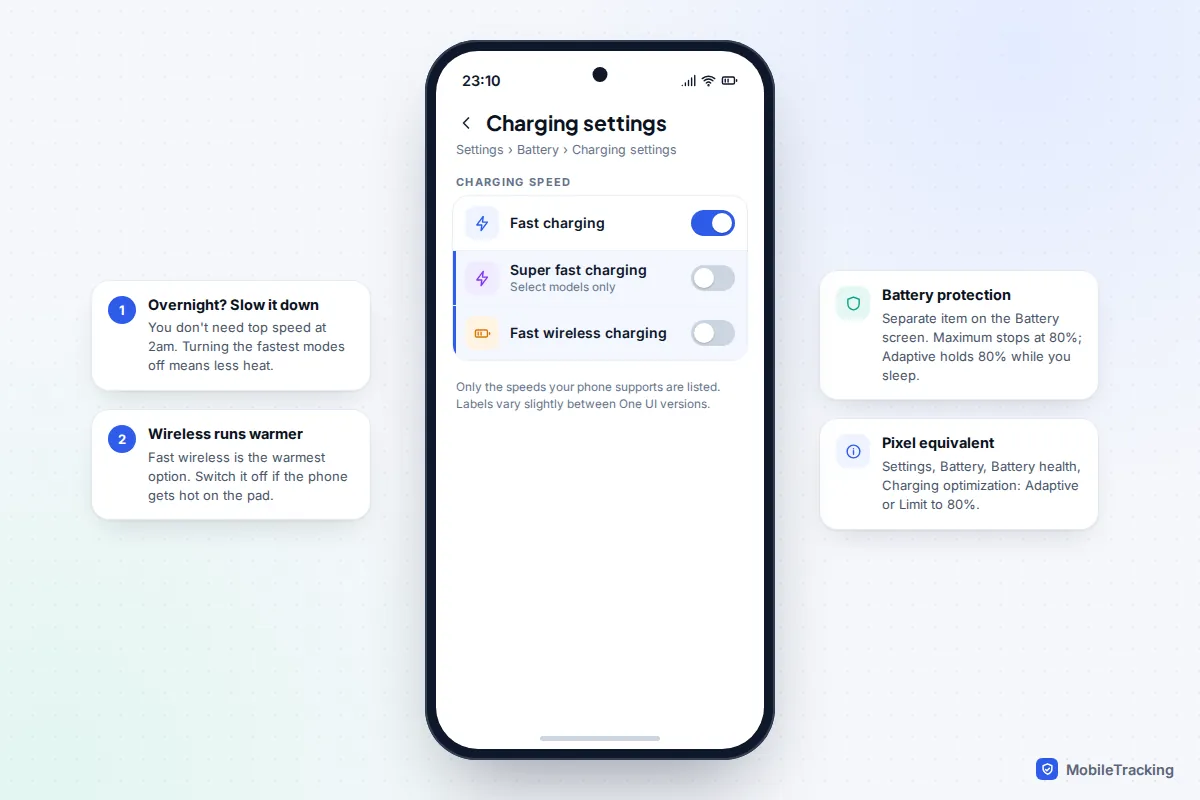
- Slow down charging when you don’t need speed. On a Samsung Galaxy, go to Settings › Battery › Charging settings and turn off Super fast charging or Fast wireless charging for overnight use. Only the speeds your phone supports are listed.
- Battery protection or charging optimisation. On Samsung, Settings › Battery › Battery protection offers Basic, Adaptive (holds 80% while you sleep) and Maximum (stops at 80%). On a Pixel, Settings › Battery › Battery health › Charging optimization offers Adaptive Charging or Limit to 80%.
- Battery Saver or Power saving. Found under Settings › Battery. It limits background activity and can lower the refresh rate.
- Refresh rate. Samsung suggests setting the motion smoothness to Standard (60Hz) instead of Adaptive if the phone runs warm. Look under Settings › Display.
- Restrict a problem app. Open Settings › Apps, pick the app, tap Battery and choose Restricted.
What not to do when your phone is hot
The urge to cool a hot phone quickly leads to some harmful ideas.
- The fridge or freezer. Moving a hot phone into cold, humid air causes condensation to form inside it, on the circuit board and around the battery connector.
- Ice packs and cold water. The same condensation problem, plus water resistance ratings are tested on new phones in controlled conditions and wear down over time. They are not a licence to run a phone under the tap.
- Carrying on. Gaming or charging through the warnings won’t work: the phone will throttle, then shut down, and the battery takes the kind of heat that ages it fastest.
- Leaving it somewhere hot “to finish charging”. A dashboard, a sunny windowsill or a bag in a parked car can push the phone well past its safe storage range.
What does help is moving air at room temperature: a desk fan, or a car vent blowing cool air.
When the heat is a battery fault
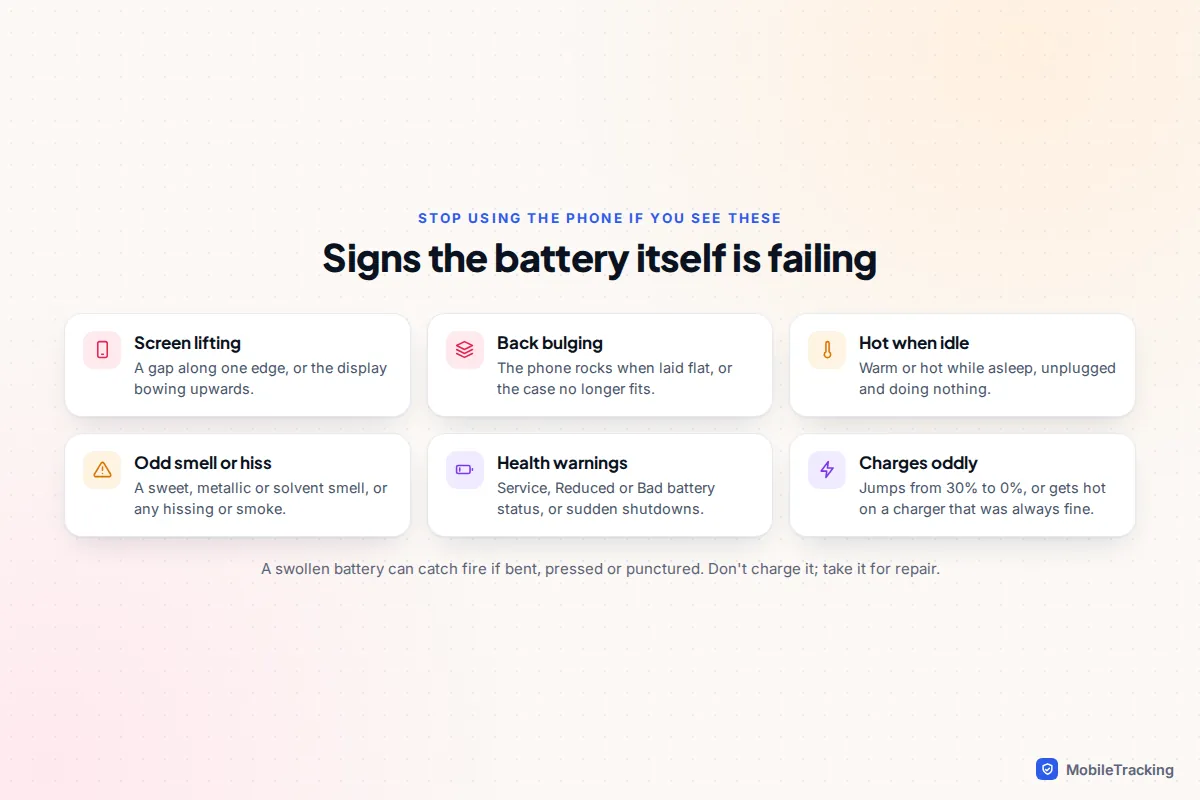
Heat also ages the battery. Apple warns that exposing a phone to ambient temperatures above 35°C can permanently reduce battery capacity. A worn battery also runs warmer under the same load. If your phone is a few years old and runs hot on light use, check the battery health: a figure below 80%, or a Service, Weak or Bad status, means replacement will help.
A swollen battery is different, and it is a safety issue. A failing lithium-ion battery can swell, and can catch fire if bent, pressed or punctured.
If it keeps overheating
Ruled out charging, sunlight and heavy use? Work through these in order:
- Update the system and every app. On iPhone go to Settings › General › Software Update; on Android, Settings › System › Software updates (Samsung: Settings › Software update). Our guide to turning on automatic updates covers the safe way to keep on top of this.
- Remove the app you suspect. Use the battery usage list from earlier. Recently installed apps are the most likely offenders.
- Try safe mode on Android. Press and hold the power button (on some phones, power and volume up), then touch and hold Power off until the safe mode prompt appears. Safe mode disables downloaded apps. If the phone stays cool, one of them is to blame.
- Get it inspected. A phone that is hot while idle after all this likely has a hardware fault. Book diagnostics with the manufacturer or an authorised repairer.

Frequently asked questions
Is it normal for my phone to get warm while charging?
Yes. Warm is normal, especially with fast or wireless charging. Uncomfortably hot, a Charging On Hold message or a charge that stops is a sign to take the case off, move it to a hard surface or use a slower charger.
What temperature is too hot for a phone?
Apple and Samsung both give 0°C to 35°C as the normal ambient range. That is the air around the phone, not the phone itself. The phone’s own sensors decide when to throttle or shut down, and they are set conservatively, so trust the warnings rather than a number.
Can overheating permanently damage my phone?
Repeated heat is the main thing that wears out lithium-ion batteries early, so frequent overheating shortens battery life. The phone’s safety shutdowns are designed to stop one-off heat from causing lasting damage to other parts.
Why does my phone get hot during calls?
Usually because of weak signal: the phone raises its transmit power to keep the call going. Calling over Wi-Fi, where your network supports Wi-Fi Calling, often helps a lot indoors.
Are phone cooling fans worth buying?
Clip-on coolers can help during long gaming sessions, but avoid one that chills the phone well below room temperature, as that can cause condensation. For everyday overheating, fixing the cause is better.
This guide is general information, not legal or financial advice. Read our editorial policy.