
To find lost AirPods, open the Find My app on your iPhone, tap Devices and choose your AirPods. If they show as nearby, tap Play Sound and follow the chirp; if the left and right earbuds are in different places, pick one at a time. No iPhone to hand? Sign in at icloud.com/find in any browser. For Samsung Galaxy Buds, open the Galaxy Wearable app and tap Find My Earbuds, or use the Samsung Find app. For Pixel Buds and many other Android earbuds, open Google’s Find Hub app.
How much the map can tell you depends on your model. Newer AirPods, Galaxy Buds and Pixel Buds can be spotted by strangers’ phones passing nearby and relayed back to you. Older earbuds only show where they last connected to your phone. The sections below explain what your earbuds can do, how to read the map, and what to do if one earbud has gone for good.
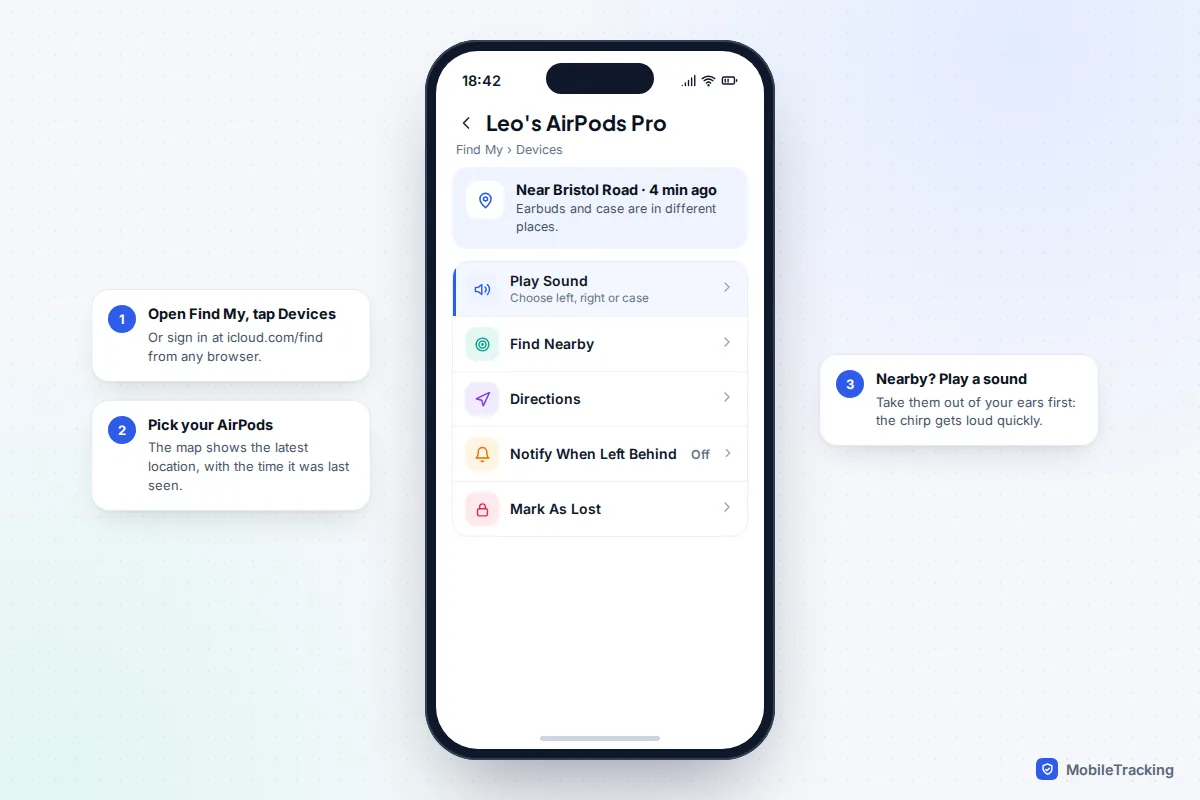
How to find AirPods with Find My
Find My works on any iPhone, iPad or Mac signed in to the same Apple Account as your AirPods. It is switched on automatically when you pair them, as long as Find My is on for your iPhone.
- Open Find My and tap Devices.
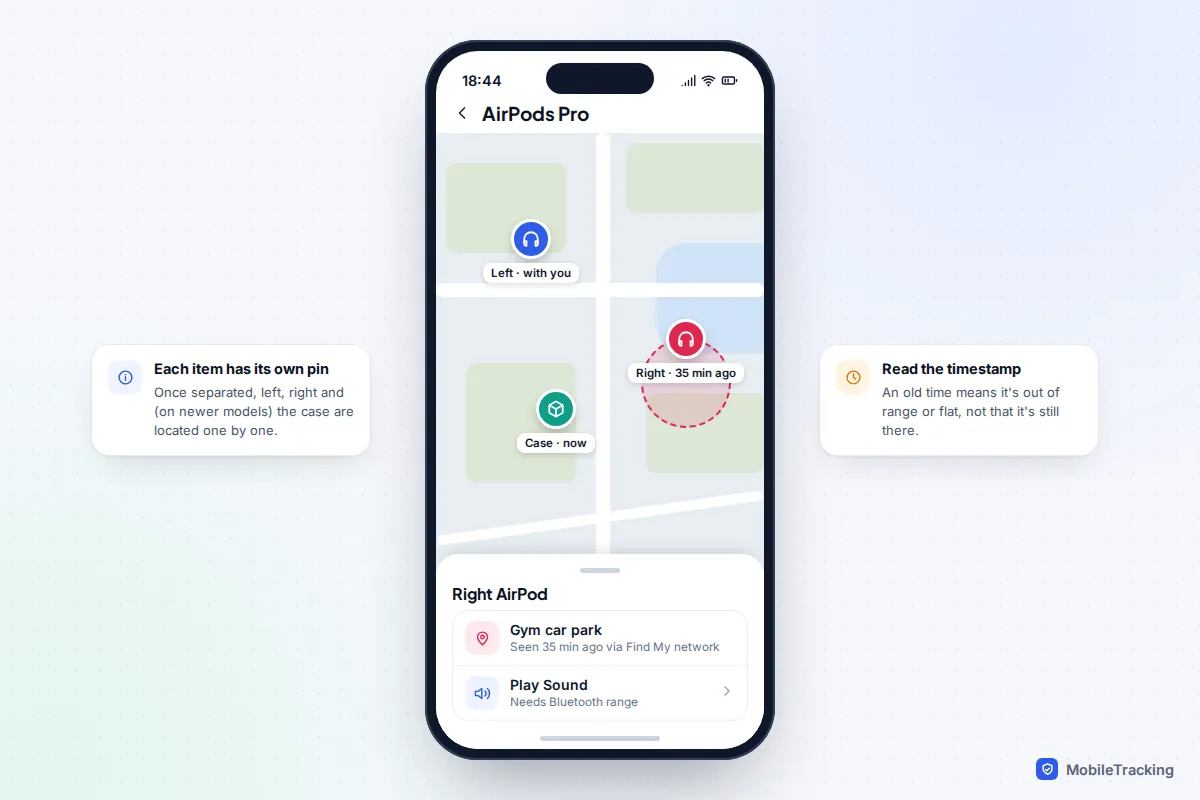
- Tap your AirPods. The map shows their location and, underneath, when they were last seen.
- If the earbuds are out of the case and apart, you may be asked to choose the left or right earbud. Newer models can also show the charging case as its own item.
- If the location is close by, tap Play Sound. Take any AirPods out of your ears first, because the sound rises quickly. Tap Stop once you find one, then play the other.
- If you can see a Find Nearby button, tap it and walk slowly while the screen guides you.
- If they are further away, tap Directions to open Maps.
On a computer, go to icloud.com/find, sign in and pick your AirPods from the device list. You can see the location and play a sound on the earbuds, but Apple notes you can’t play a sound on the charging case from iCloud.com, only from the Find My app. Apple’s own guide to finding lost AirPods with Find My has the same steps for Mac.
What your AirPods model can do
This is where most confusion comes from. Two AirPods owners can follow identical steps and see very different results, because the features depend on the hardware inside the earbuds and case.
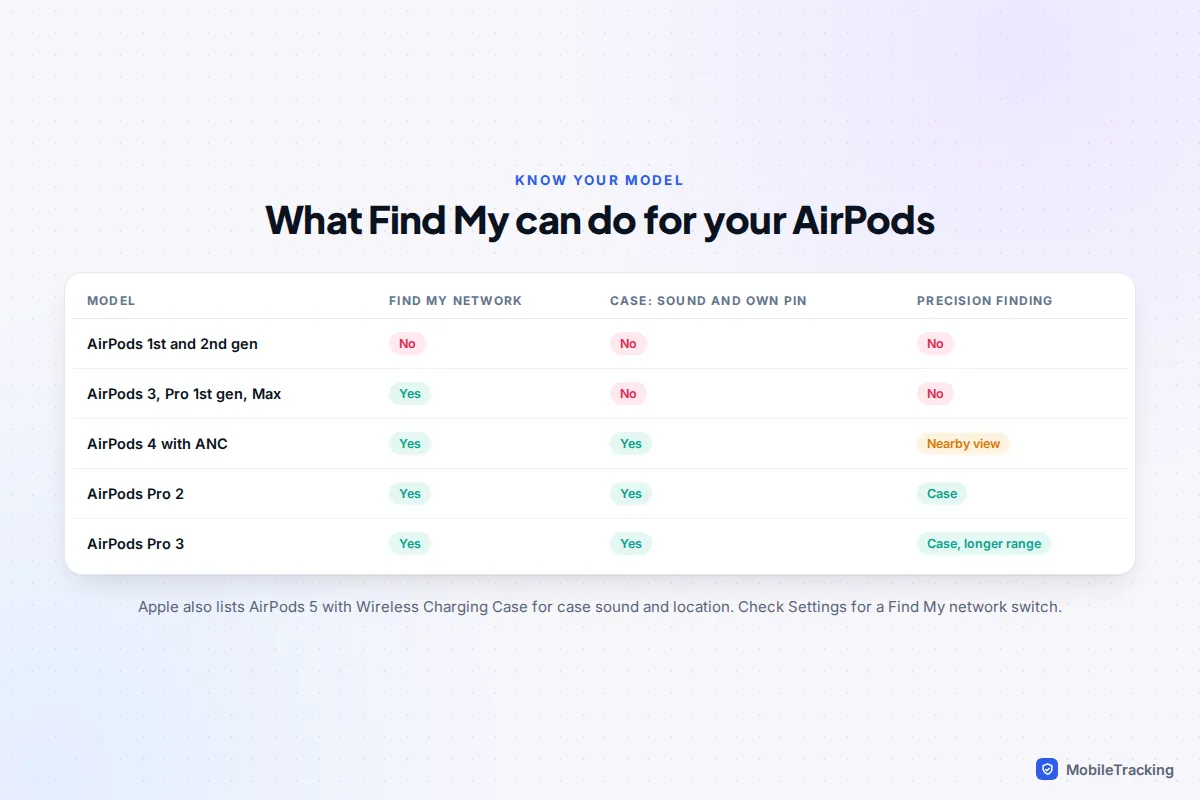
- Find My network (AirPods 3, AirPods 4 with Active Noise Cancellation, every AirPods Pro, AirPods Max): passing Apple devices can anonymously report your earbuds’ location even when they are nowhere near your phone. These models also support left-behind alerts.
- Case location and sound (AirPods 4 with ANC, AirPods Pro 2, AirPods Pro 3): the case has a small speaker and appears as its own item, so a case left on a bus can be found even without the earbuds inside. Apple’s guide also lists the new AirPods 5 with Wireless Charging Case, released in September 2026.
- Precision Finding (AirPods Pro 2 and Pro 3 cases): an Ultra Wideband chip in the case lets a compatible iPhone show an arrow and a distance. AirPods 4 with ANC get a simpler proximity view instead.
- AirPods 1st and 2nd generation: no Find My network. You’ll see the location where they last connected to your device, and you can only play a sound when they are within Bluetooth range.
Not sure what you have? Connect your AirPods, open Settings and tap their name near the top. The model is listed there, and if you see a Find My network switch, your earbuds support it. Make sure it is on.
Using Find Nearby and Precision Finding
Once you are within Bluetooth range, roughly 10 metres and often less through walls, the search changes from “which street?” to “which cushion?”. Find Nearby connects to the earbuds or case and tells you whether you are getting closer.
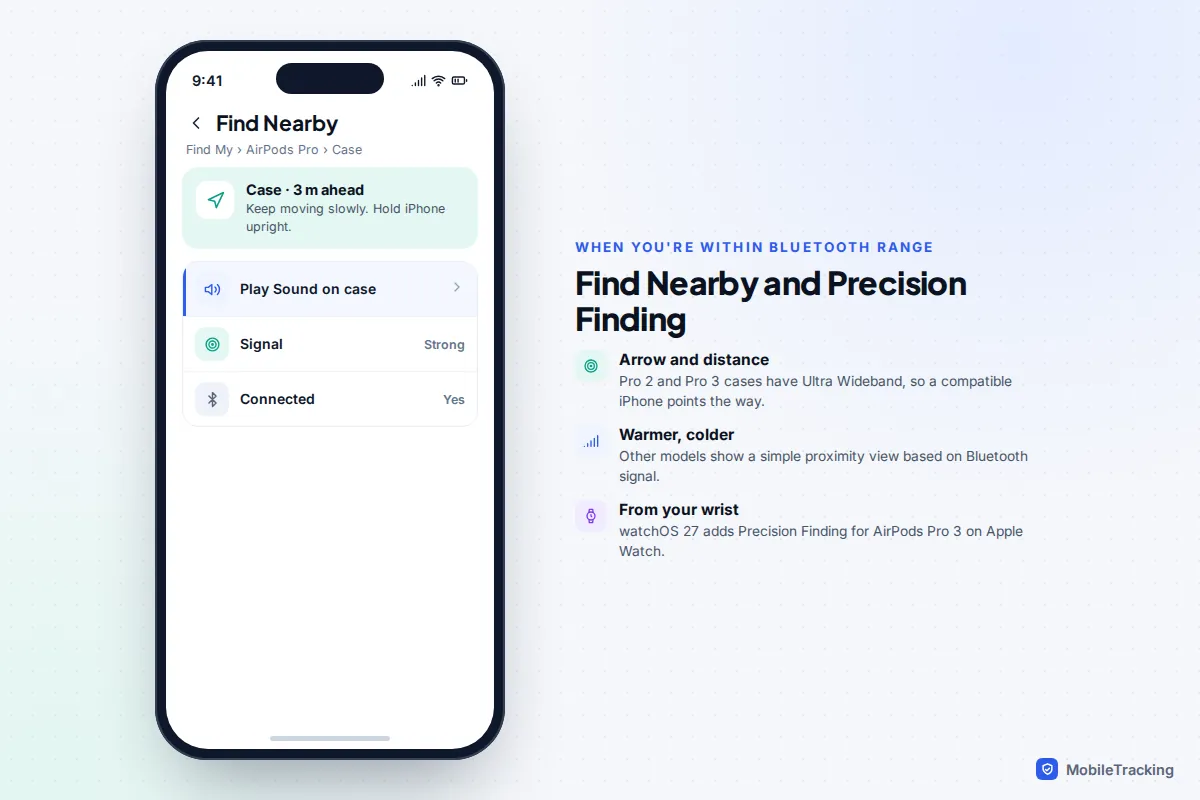
For the arrow-and-distance view you need an iPhone with an Ultra Wideband chip, which most models from iPhone 11 onwards have (iPhone SE and iPhone 16e do not). Apple says the longer-range Precision Finding of the AirPods Pro 3 case works with iPhone 17 models and iPhone Air. With iOS 27 and watchOS 27, you can also use Precision Finding for AirPods Pro 3 from an Apple Watch, handy when your phone is in a locker.
A few practical tips from searches that go well:
- Turn off music, the TV and the washing machine before you press Play Sound. The earbud speaker is small.
- Play the sound more than once from different spots in the room. Sound bounces off sofas and car seats.
- Older AirPods can’t make a sound from inside a closed case, and a case without a speaker never makes one, so check bags and pockets by hand.
When they are out of Bluetooth range
The map always shows a time next to the location, and that time matters more than the pin. Here is how to read it.
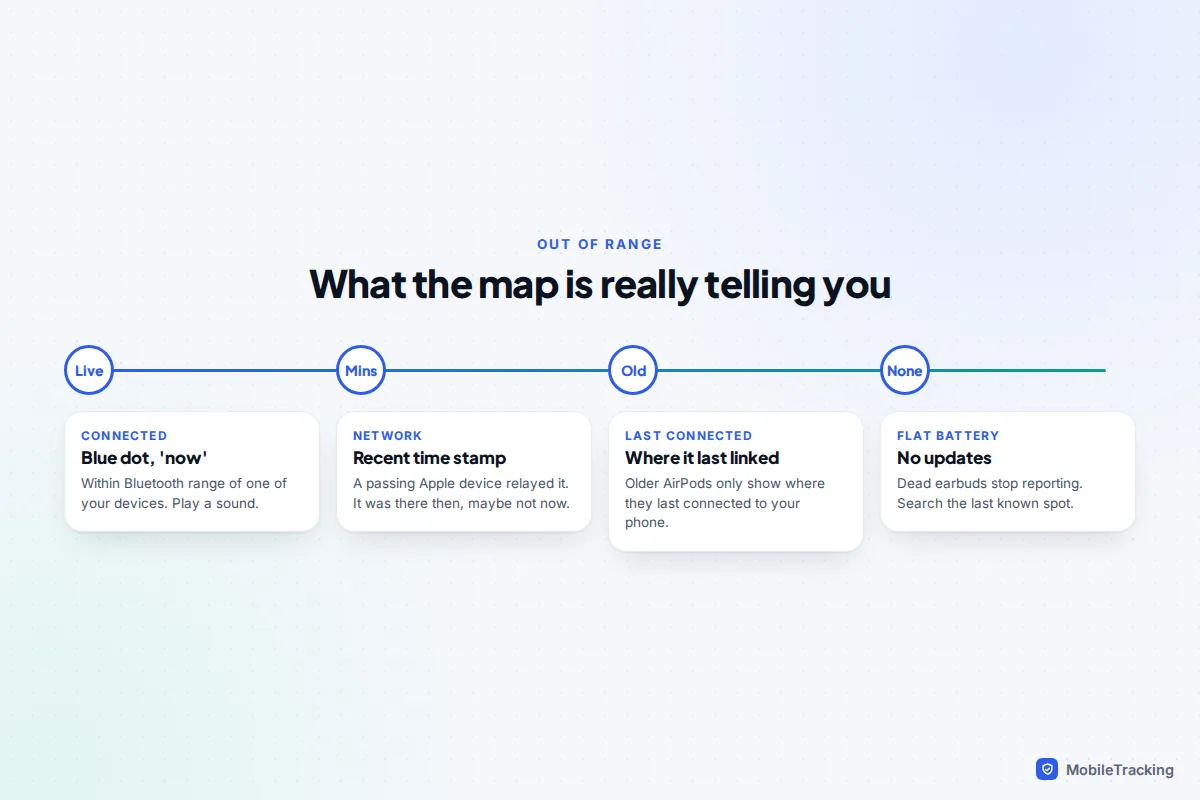
- “Now” or a minute ago: they are within range of one of your devices. Play a sound.
- A recent time, far from you: a passing Apple device picked them up. They were there at that time.
- An old time: either nothing has passed by since, or the battery has gone flat. Dead earbuds and cases stop reporting completely.
If they are somewhere public, turn on Mark As Lost (labelled Lost Mode on some versions). You can add a phone number or email for the finder and get a notification when the AirPods are located again. Then ring the venue: gyms, cinemas, trains and coffee shops keep lost-property boxes, and a quick call with the time you were there works better than a vague description.
Samsung Galaxy Buds: Galaxy Wearable and Samsung Find
Galaxy Buds are found from a Samsung Galaxy phone signed in to your Samsung account. The Samsung Find app replaced SmartThings Find with One UI 6.1 in 2024, and you can also use it at samsungfind.samsung.com from any browser.
- Open the Galaxy Wearable app and tap Find My Earbuds, or open Samsung Find and choose your Buds.
- If they are connected, tap Ring and Start. You can stop one earbud ringing once it is found and keep the other going.
- If they are not connected, use the map, tap Navigate to get directions to the last location, then Search nearby when you arrive.
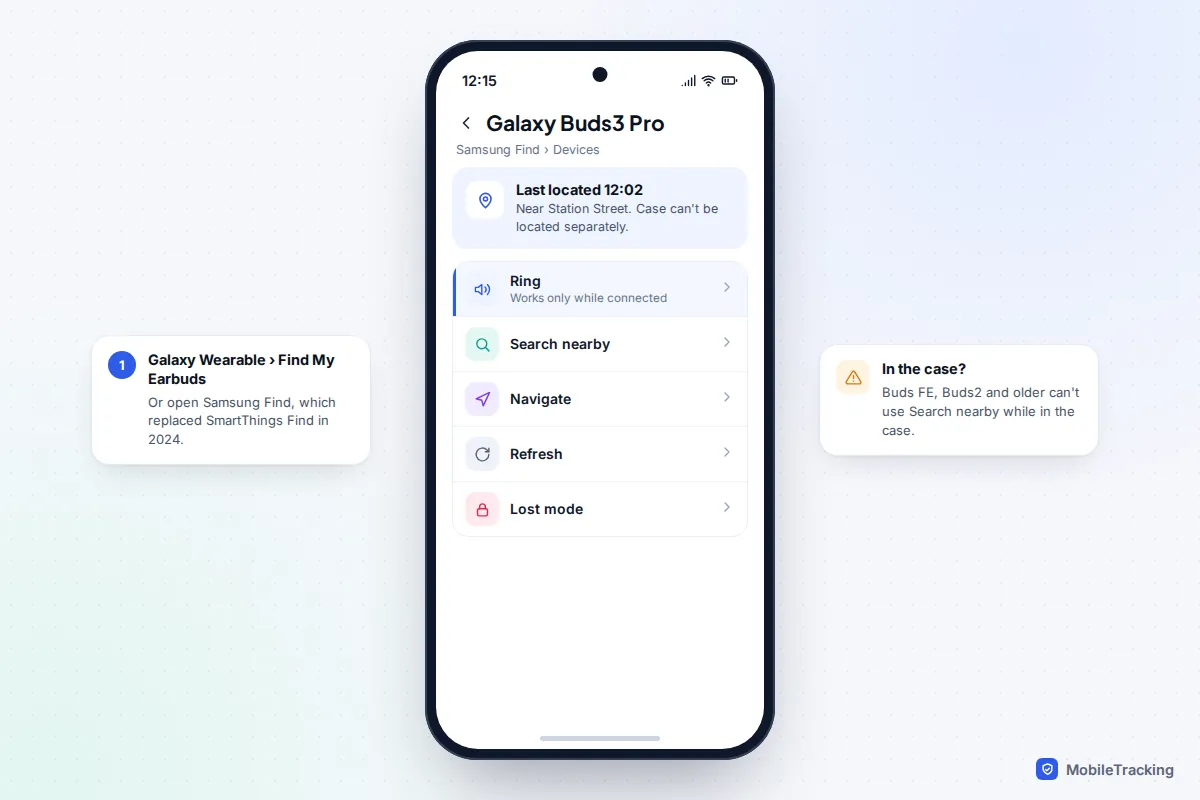
Samsung is upfront about the limits, and they are worth knowing before you spend an hour searching. The charging case can’t be located on its own. Ring works only while the earbuds are connected to your phone over Bluetooth. Galaxy Buds FE, Buds2 and earlier models can’t use Search nearby while they are inside the case. And if both the earbuds and the case are completely flat, they can’t be located at all. Samsung’s page on finding lost Galaxy earbuds has the latest steps.
Pixel Buds and other Android earbuds in Find Hub
Google’s Find Hub (renamed from Find My Device in 2025) can locate Pixel Buds and a growing list of other earbuds that use Google Fast Pair, including models from Sony, JBL, Nothing and OnePlus. Disconnected earbuds are found through Google’s crowdsourced network of Android devices.
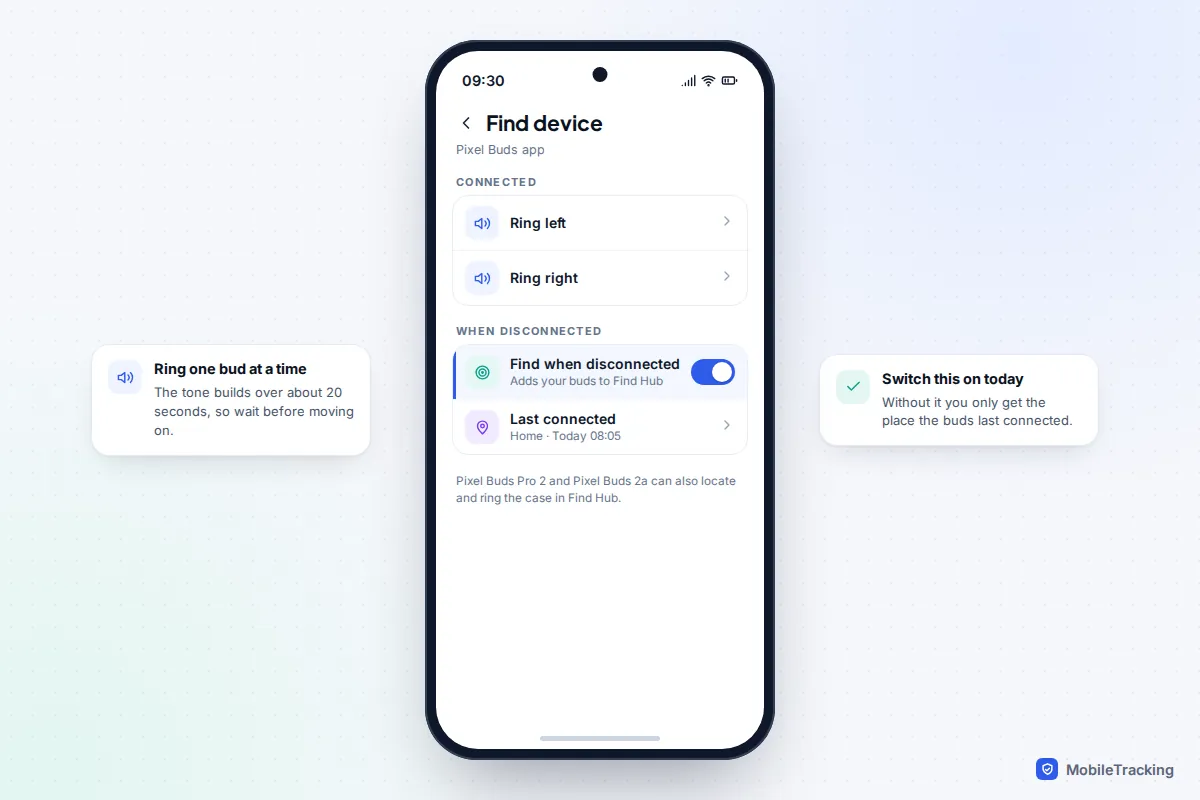
For Pixel Buds, open the Pixel Buds app, tap Find device and make sure Find when disconnected is set up. Google says Pixel Buds Pro 2 and Pixel Buds 2a can locate and ring both earbuds and the charging case in Find Hub, while older models (Pixel Buds Pro, A-Series and the 2020 model) locate the earbuds only. When they are connected you can tap Ring left or Ring right; the tone builds over about 20 seconds. Google’s help page on finding your Pixel Buds lists the requirements, including Android 9 or later with location turned on. Our guide to using Find Hub on Android covers the app itself.
For other brands, open the maker’s companion app and look for a “find” or “locate” option. Many can only show where the earbuds last connected to your phone and ring them when they are in range, so if yours also appear in Find Hub, use that instead.
Lost one earbud or the case: replacement options
If the search fails, you don’t need a whole new pair. All three big makers sell or supply single parts.
- AirPods: order a replacement left or right AirPod or case through the Apple Support app or Apple’s AirPods service and repair page. The fee depends on the model and country. AppleCare+ for headphones covers damage and battery service, not loss.
- Pixel Buds: the US Google Store lists single earbuds and cases. In October 2025 a Pixel Buds Pro 2 earbud was $70 and a case $95, and a Pixel Buds 2a earbud $55.
- Galaxy Buds: single earbuds are supplied through Samsung service centres. Once you have one, put both in the case and hold the touch areas of both earbuds for more than seven seconds until the lights flash, which couples them.
Be wary of single earbuds from auction sites. Some are counterfeit, some are used, and a genuine AirPod from someone else’s set may still be linked to their Apple Account, which Apple says must be removed by the previous owner before it can be paired to a new account.
If your earbuds were stolen
Be realistic here. Earbuds are not phones: there’s no passcode, no remote wipe and nothing that stops a thief listening to music through them.
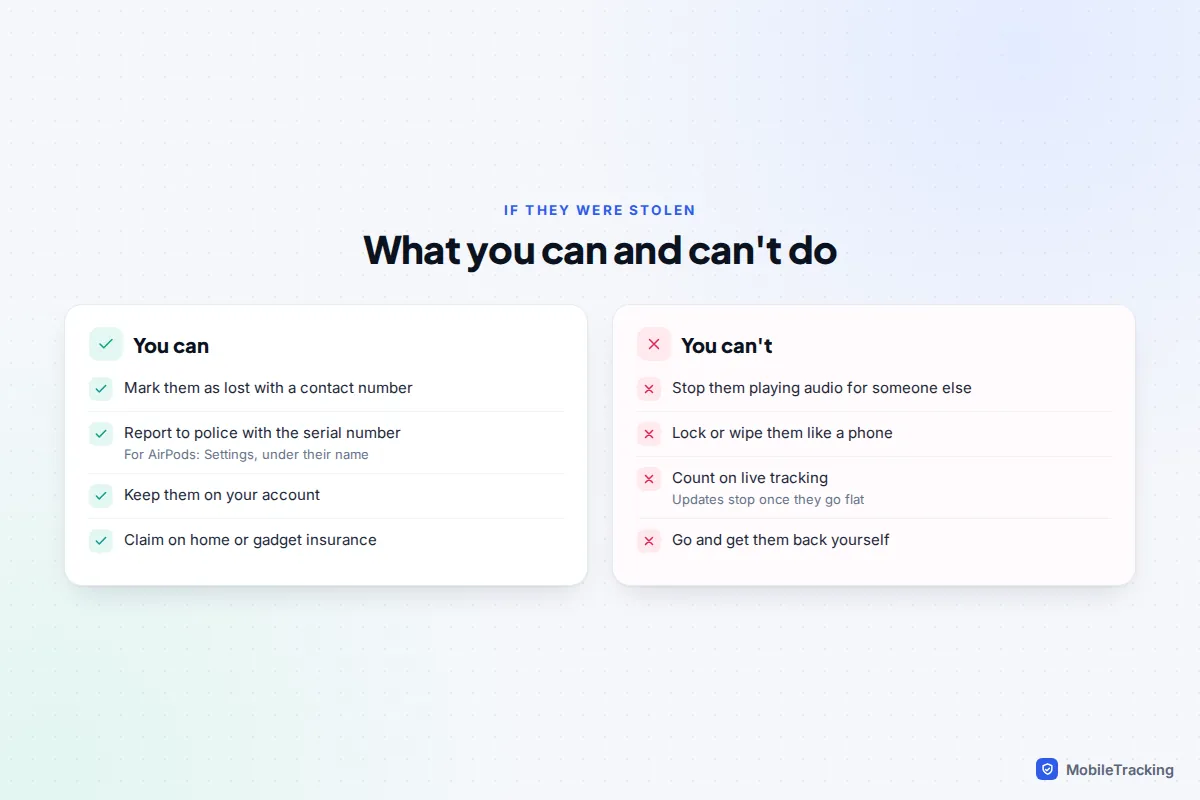
- Mark them as lost in Find My, Samsung Find or Find Hub, with a contact number.
- Keep them on your account. Don’t remove them from Find My. Apple ties supported AirPods to your Apple Account (it calls this Find My Lock), which stops someone adding them to their own Find My.
- Report the theft to the police with the serial number. For AirPods it is in Settings under their name; for Galaxy Buds, look in the About earbuds section of Galaxy Wearable or on the case.
- Check your insurance. Home contents or gadget cover sometimes includes earbuds, and insurers will ask for the police reference.
If your phone went too, deal with that first: our guide to finding a stolen phone and protecting your data walks through it.
Set up now so you can find them next time
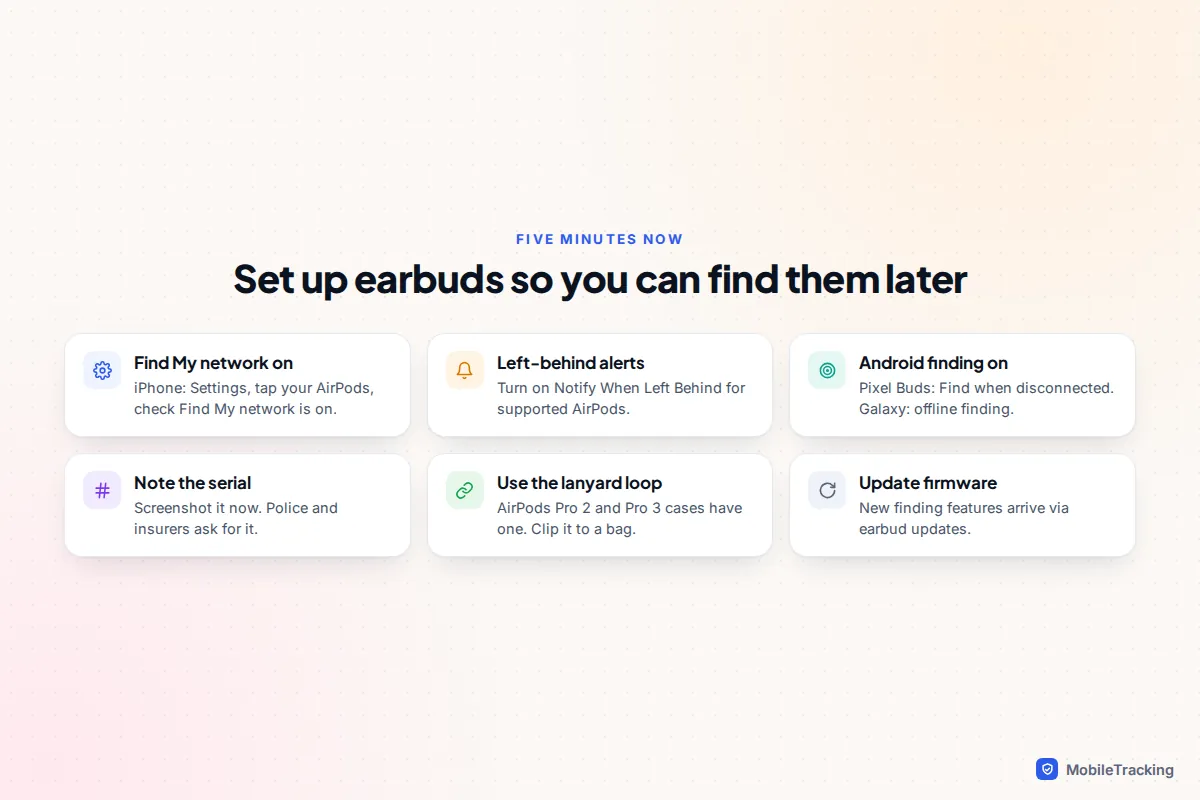
Almost every failed search comes down to a setting that was never switched on. Take five minutes now.
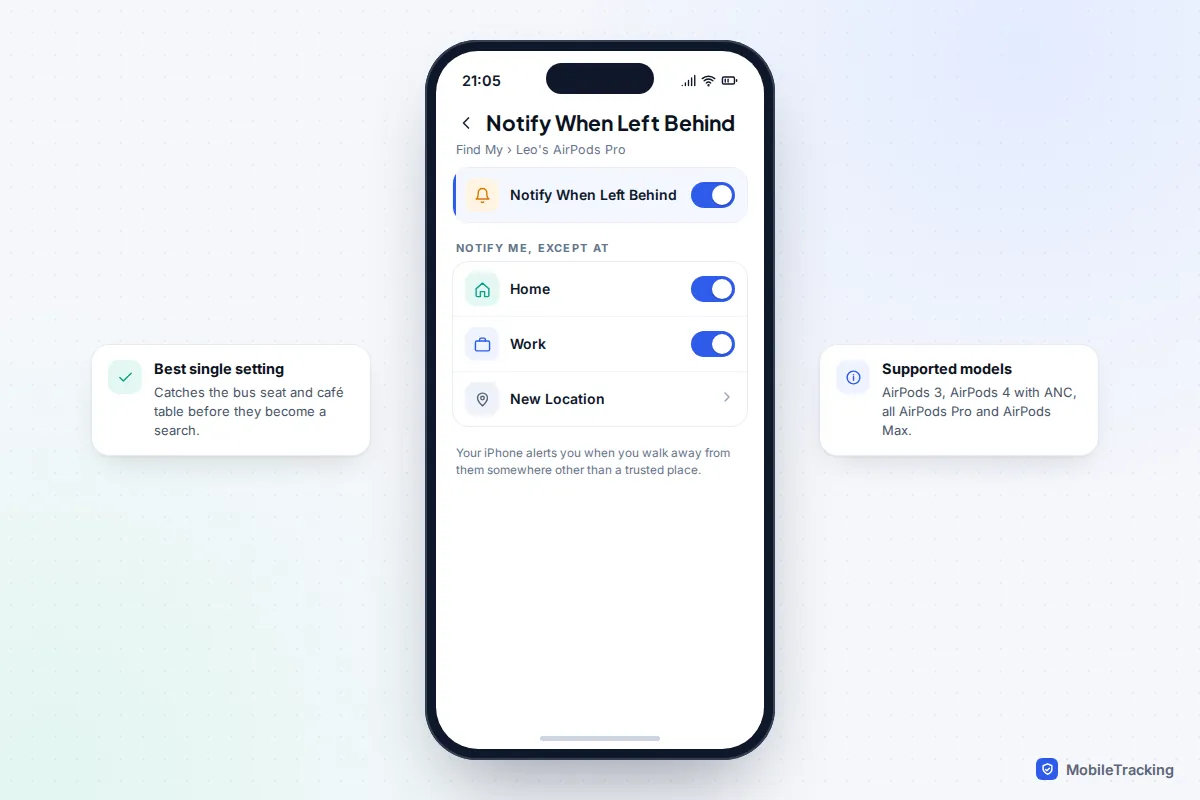
- Left-behind alerts: in Find My, tap your AirPods, then Notify When Left Behind, and turn it on. Under Notify Me, Except At, add home and work. Your iPhone then warns you as you walk away from them anywhere else.
- Find My network: check the switch in Settings under your AirPods’ name.
- Android: set up Find when disconnected for Pixel Buds. On a Galaxy phone, check that Allow this phone to be found and Offline finding are on under Lost device protection in Settings (labels vary by One UI version).
- Lanyard loop: AirPods Pro 2 and Pro 3 cases have one. Clip the case to a bag strap.
- Firmware: earbuds update themselves while charging near your phone; keep them charged overnight near it occasionally.
The same habit protects your phone: our guide to turning on Find My before you lose your phone covers the settings for iPhone and Android. And if your earbuds keep dropping their connection, which also makes them harder to find, see fixing Bluetooth connection problems.
Frequently asked questions
Can I find my AirPods if they are dead?
You’ll see the last location reported before the battery ran out, but no updates after that and no sound. Go to that spot and search by hand. Newer cases with a speaker can still help if the case has charge even when the earbuds don’t.
Can I find AirPods with an Android phone?
Not through the Find My app, which is Apple-only. You can sign in at icloud.com/find in a web browser, on a computer or a phone, to see their location and play a sound on the earbuds.
Can I find just the AirPods case?
Only with AirPods 4 with ANC, AirPods Pro 2, AirPods Pro 3 and, according to Apple, AirPods 5 with Wireless Charging Case. Older cases have no speaker or finding hardware of their own.
Can someone else use my lost AirPods?
They can listen through them, yes. What they can’t do is add supported AirPods to their own Find My while they are still linked to your Apple Account, which is why you should never remove them from your account after a loss.
Why does Find My show my AirPods in the wrong place?
The pin is where they were last detected, not necessarily where they are now. If the time stamp is old, they have probably run flat or nothing has passed nearby since. Search the last recorded spot first.
This guide is general information, not legal or financial advice. Read our editorial policy.