
Start with one zone, not ten: make bedrooms screen-free overnight by charging every phone, tablet and laptop in a shared room, and give your child a cheap alarm clock so the phone has no job to do upstairs. Add the dinner table next, then one short “transition” zone, such as the car on the school run or the first half hour after school. Back the rules up with a bedtime schedule on each device and on your Wi-Fi, and follow them yourself, because children copy what adults do far more than what adults say.
That order matters. Bedrooms at night protect sleep, and they are the easiest zone to enforce, since a phone on the kitchen worktop is either there or it isn’t. This guide covers which zones are worth the effort, how to set up a charging station that actually gets used, the iPhone, Android and router settings that support you, how to handle pushback at each age, and a short agreement you can copy.
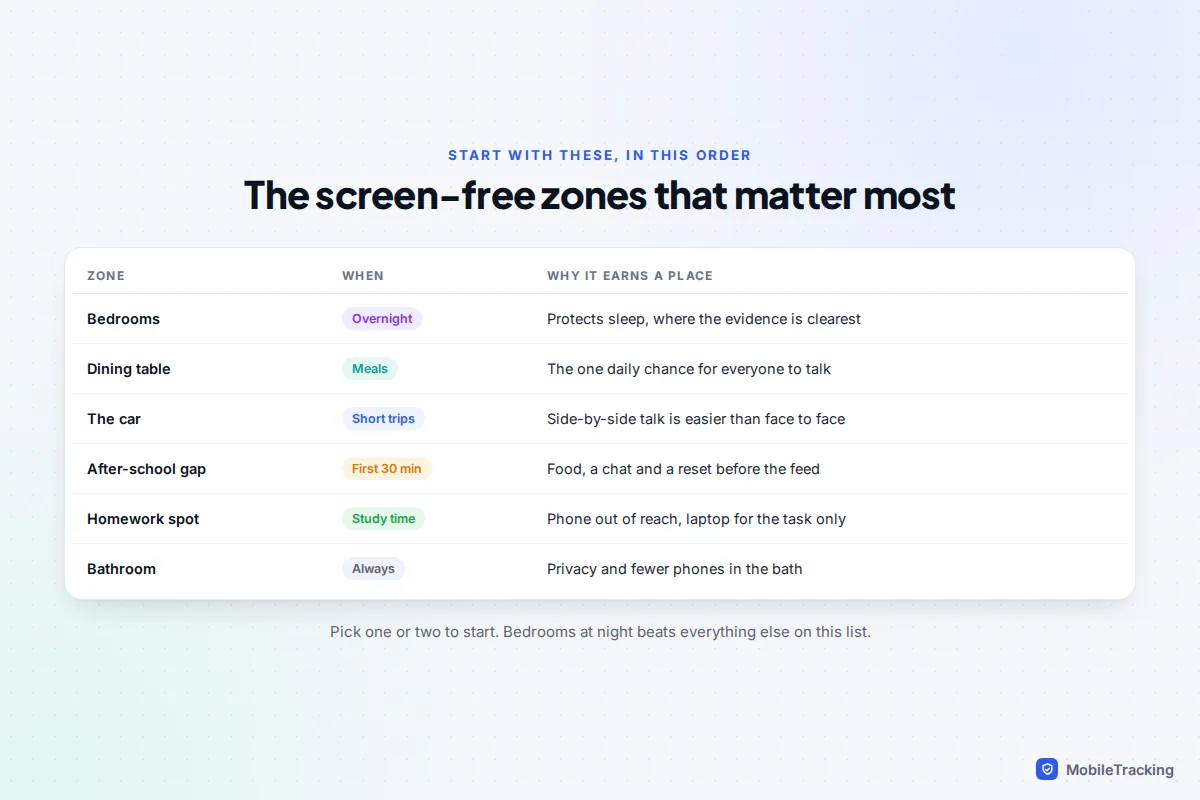
Which screen-free zones matter most
A zone works when it is tied to a place or a moment everyone can see, rather than a vague idea of “less screen time”. “No phones upstairs after 9pm” is easy to check. “Be sensible with your phone in the evening” is not, and it turns every night into a negotiation.
Here is how the common zones compare, from most to least important for most families:
- Bedrooms overnight. The highest payoff and the one official guidance names directly. If you only do one thing, do this.
- The dining table. Often the only time the whole household sits together, and the second zone official advice names.
- The car on short trips. Teenagers often talk more side by side, without eye contact, so the school run is a good conversation slot.
- The first 30 minutes after school. A snack, a chat and a reset before the phone comes out.
- The homework spot. Not “no screens”, since homework is often online, but the phone in another room while the laptop is open to the task.
Pick one or two to start. Families that launch five zones on a Monday usually abandon four of them by Friday.
Why bedrooms at night come first
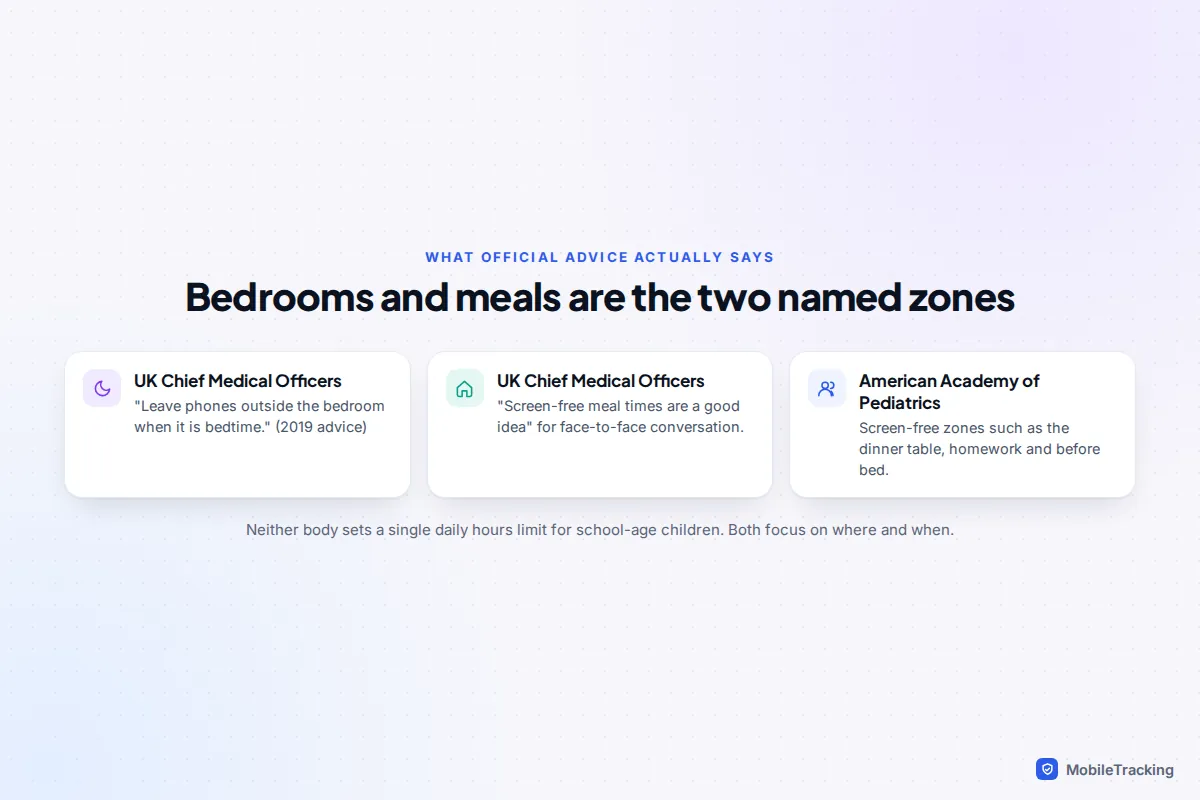
The evidence on screens and children is messier than headlines suggest, but sleep is the area where it points most clearly in one direction. The UK’s Chief Medical Officers, in their 2019 advice for parents, kept it to a single line: “Leave phones outside the bedroom when it is bedtime.” The same advice says “screen-free meal times are a good idea”. You can read the full UK CMO commentary on screen time on GOV.UK. In the US, the American Academy of Pediatrics’ Family Media Plan suggests screen-free zones “such as the dinner table, during homework and before bed”.
Research on specific night-time habits backs this up. A 2023 analysis of 10,280 US 10 to 14-year-olds in the Adolescent Brain Cognitive Development (ABCD) study found that having a TV or internet-connected device in the bedroom was linked to more trouble falling or staying asleep. So was leaving a phone’s ringer on overnight, and using a phone after waking in the night. Studies like this show associations rather than proof of cause, but the practical lesson is simple: a phone that is not in the room cannot buzz, tempt or fill a 2am wake-up.
Our guide to phones and kids’ sleep goes deeper into how much sleep children need and what late-night use does to it.
Set up a charging station that actually gets used
A charging station turns “no phones in bedrooms” from a rule into a habit. The phone has a home, and putting it there becomes part of getting ready for bed, like brushing teeth.
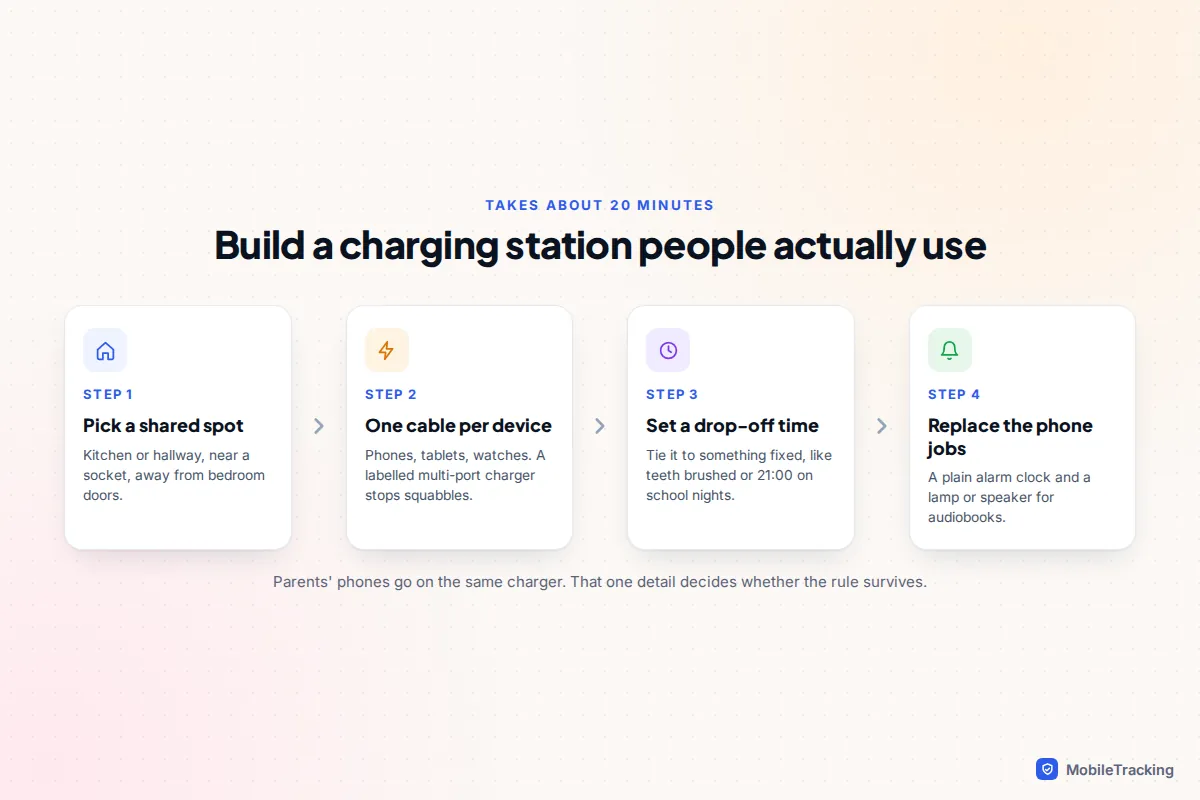
- Choose a shared spot. The kitchen, hallway or landing works, as long as it is near a socket and not right outside a bedroom door where the buzz carries.
- Give every device a cable. A multi-port USB charger with labelled cables stops arguments about who gets the fast one. Include tablets, handheld consoles, e-readers with apps and smartwatches, which are phones in all but name for many children.
- Tie drop-off to something fixed. “Phones on the charger when you’ve brushed your teeth” is easier to follow than a clock time, though a clock time works well for teenagers. Make it earlier on school nights than at weekends.
- Replace the jobs the phone was doing. Buy a simple alarm clock, a lamp for reading, and a small speaker or old MP3 player for children who fall asleep to audiobooks or music.
- Put your own phone there. If the adults’ phones sleep downstairs too, the rule is fair and harder to argue with.
“I need my phone for my alarm” is the objection you will hear most, and it is a fair point until there is another alarm. A basic battery or plug-in alarm clock costs very little and ends the argument. The same goes for “I use it for music to sleep”: an audiobook on a speaker or an old device with no internet does the job without the notifications.
Back the zones up with device and Wi-Fi settings
The charger does most of the work, but settings help on the nights when a phone “accidentally” goes upstairs, and they cover laptops that stay in bedrooms for homework.
iPhone and iPad
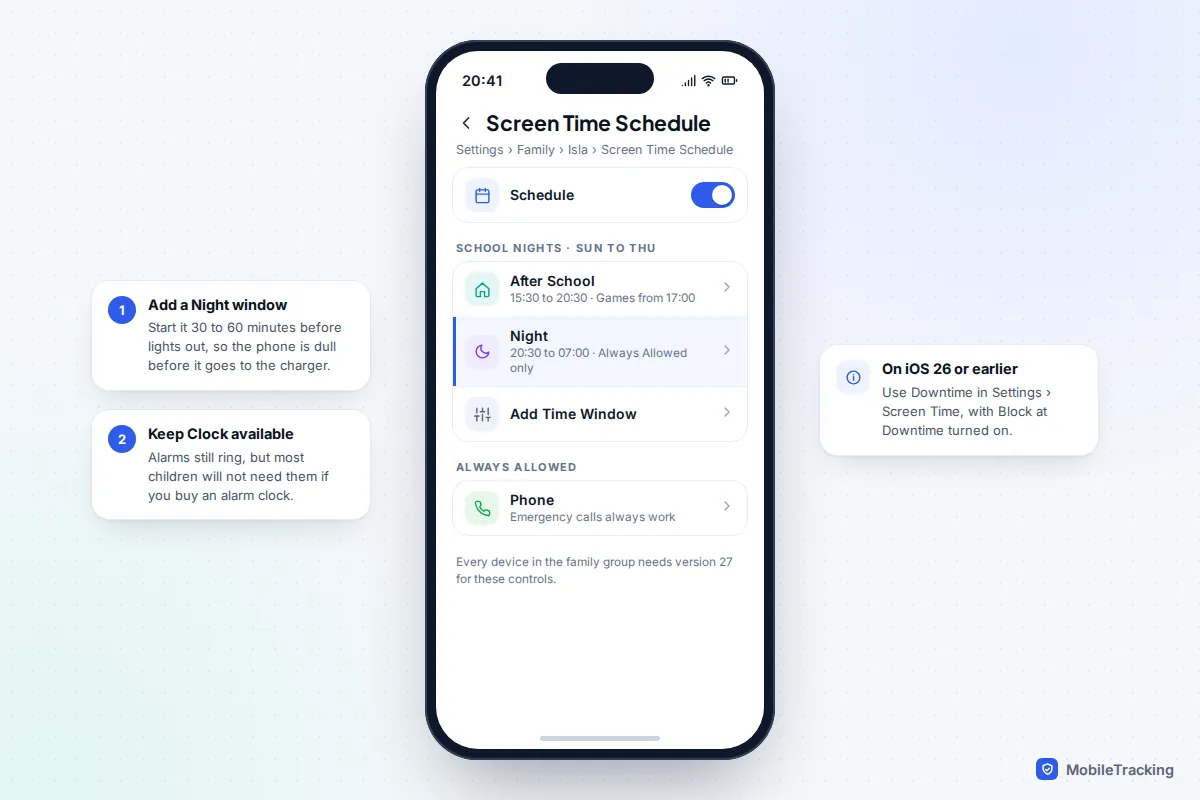
iOS 27, released on 14 September 2026, replaced Downtime for children with the Screen Time Schedule. Go to Settings › Family › your child › Screen Time Schedule, add a schedule for school nights and create a Night time window, for example 20:30 to 07:00, that leaves only Always Allowed apps such as Phone available. The new controls need every device in your Family Sharing group on version 27. If one can’t update, use the older route: Settings › Screen Time › your child › Downtime, with Block at Downtime switched on so your child can’t just tap to ignore it.
Android phones and tablets
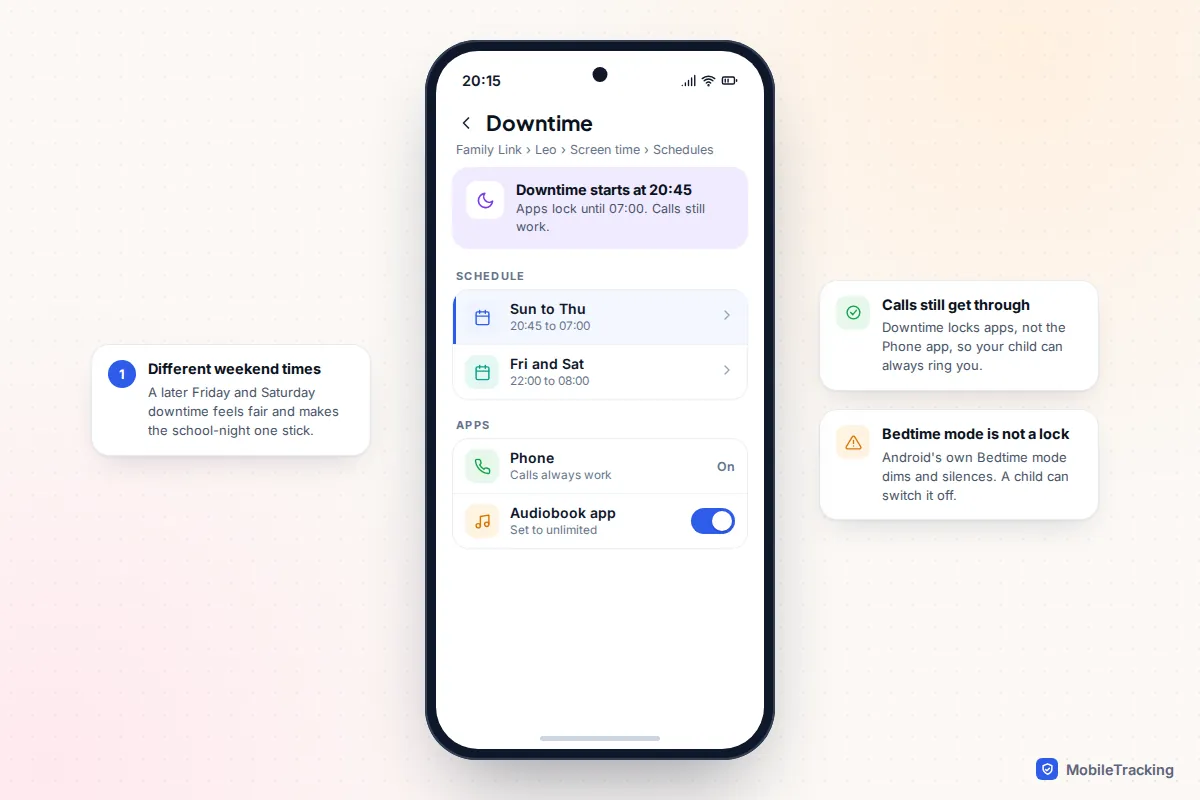
On Android, including Samsung Galaxy, use Google Family Link. Open the app, choose your child, then Screen time › Schedules › Downtime, and set different times for school nights and weekends. Calls still work during downtime, and you can mark an audiobook or music app as unlimited if it belongs in the bedroom. Android’s own Bedtime mode (Settings › Digital Wellbeing & parental controls on a Pixel, or Modes and Routines › Sleep on a Samsung) greys the screen and silences notifications, but your child can switch it off, so treat it as a wind-down rather than a lock. Our guide to blocking apps at bedtime has the full steps for every device.
Your home Wi-Fi
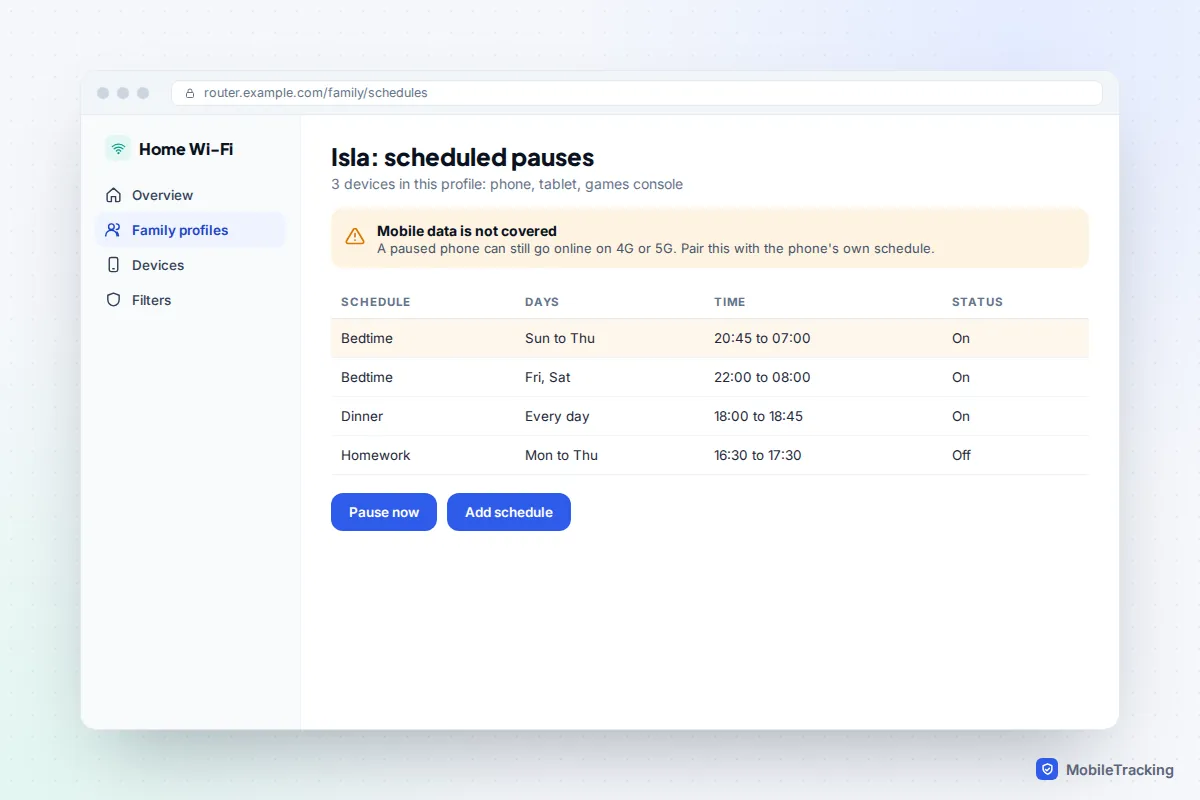
Most router and mesh Wi-Fi apps let you group a child’s devices into a profile and pause the internet on a schedule. This is the best tool for devices with weak parental controls, such as some games consoles, smart TVs and older laptops. It has one big gap: a phone on mobile data carries on as normal, so Wi-Fi schedules support phone rules rather than replace them. Our guide to router filtering and family Wi-Fi covers the settings for common providers.
Family apps with bedtime routines
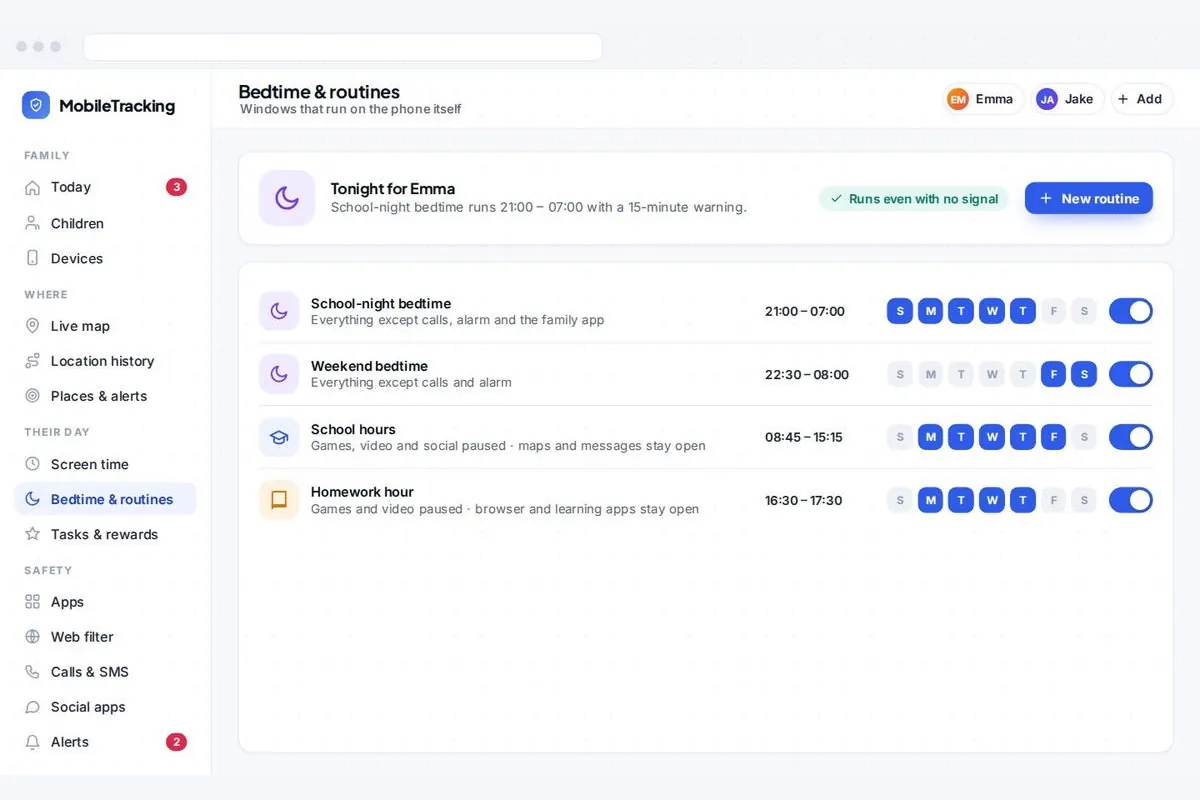
Some family apps combine bedtime, school hours and homework windows in one schedule you run from your own phone. A transparent family app such as MobileTracking runs these routines on a child’s Android phone, with the child app visible on the device and without reading messages, and the parent panel works in any browser.
Meals, the car and the after-school gap
These zones rely more on habit than settings. The simplest approach for meals is that phones stay on the charger, not in pockets or face down on the table, because a phone within reach still pulls attention. If someone is waiting for an important call, say so at the start of the meal and step away to take it.
For the car, agree a rule by journey length. Short everyday trips are talk or music time, and anyone can choose a song. On long journeys, many families allow screens after the first half hour or after a planned stop. Headphones keep game sounds from distracting the driver.
The after-school gap is the zone parents most often forget. Children come home tired and hungry, and a phone offers instant relief. Children who go straight from the school gate to a feed often find it hard to stop later. Asking for the first 30 minutes to be phone-free, with a snack and a chance to talk, gives you the best conversation window of the day. It also makes the later switch-off easier, because the evening didn’t start with a scroll.
Adults go first
If the adults in the house take phones to bed, check work email at dinner and scroll at the traffic lights, children notice. A rule that only applies to them feels like a punishment, and teenagers are quick to point out the double standard.
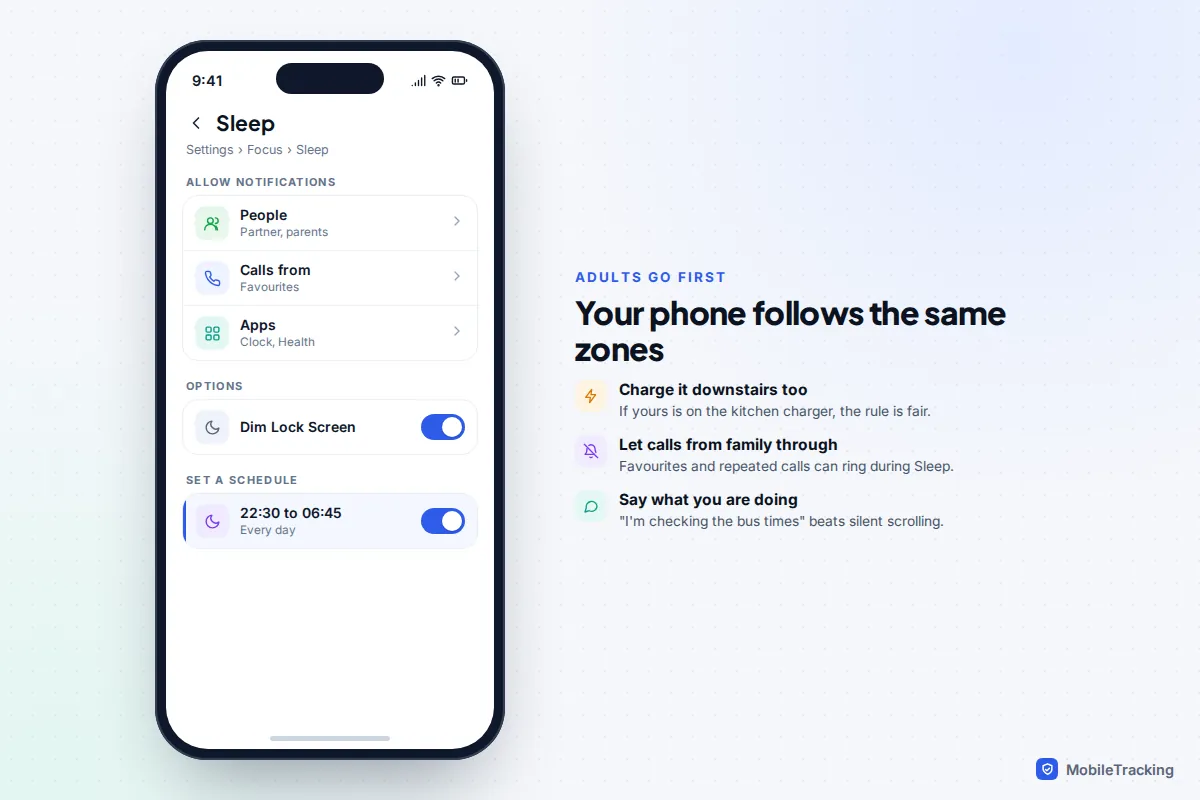
Three changes make the biggest difference. First, charge your phone on the same station. If you worry about missing an emergency call from an elderly parent, set up a Sleep Focus on iPhone (Settings › Focus › Sleep) or Do Not Disturb on Android that lets calls from favourites through, and keep the volume up downstairs. Second, narrate your phone use: “I’m paying the gas bill” tells a child that the phone is a tool you pick up for a reason. Third, when you break a rule, say so and fix it.
Handling pushback and exceptions by age
Resistance is normal. Younger children push back in the moment; teenagers push back on the principle, often with good arguments.
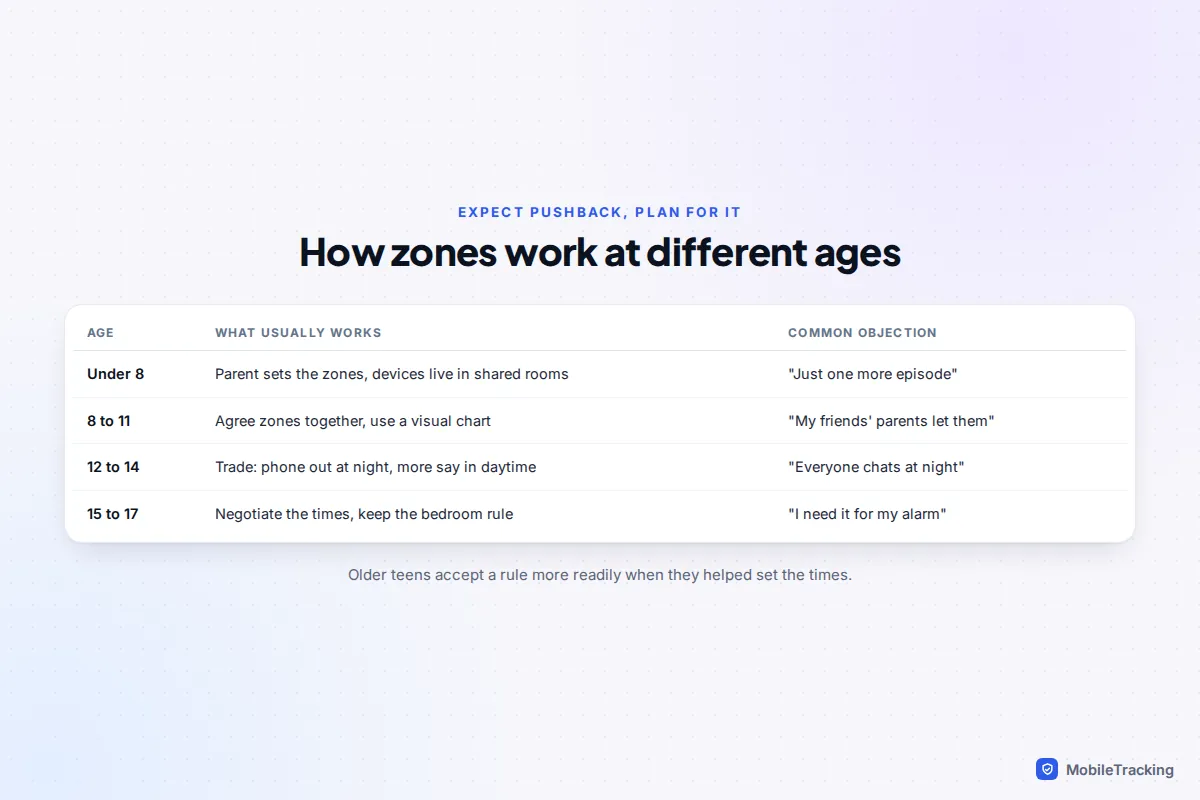
- Under 8: you set the zones. Keep devices in shared rooms full stop, and use a visual routine (bath, book, bed) so the tablet going away is just part of the sequence.
- 8 to 11: agree the zones together and write them down. This is the age of “my friends’ parents let them”, so it helps to talk to other parents; many families find more support for bedroom rules than they expected.
- 12 to 14: trade. Hold firm on phones out of the bedroom at night, and give more freedom elsewhere, such as a later weekend drop-off time. The worry here is missing out on the group chat. Remind them that friends’ messages will still be there at 7am.
- 15 to 17: negotiate the times but keep the principle. Older teens respond best to the sleep evidence and to being treated as partners. Offer a trial: two weeks with the phone downstairs, then compare how they feel.
Sensible exceptions
Rules without exceptions tend to collapse the first time real life gets in the way. Agree these in advance:
- Homework: laptops can be used in a bedroom for schoolwork before the cut-off time, with the phone elsewhere.
- Calls: a teenager can take a call from a parent, grandparent or separated parent at any time; video calls with family abroad in a different time zone count too.
- Medical needs: glucose monitors, epilepsy alerts and similar apps stay with the child, every night, no discussion.
- Travel and sleepovers: away from home, the phone can stay with them for safety, with the understanding that it is for contact, not scrolling.
Put it in writing: a screen-free zones agreement
A written agreement stops the same argument being replayed every evening, because everyone agreed the times when they were calm. Keep it to one page, use your family’s own words, and have everyone sign it, adults included.
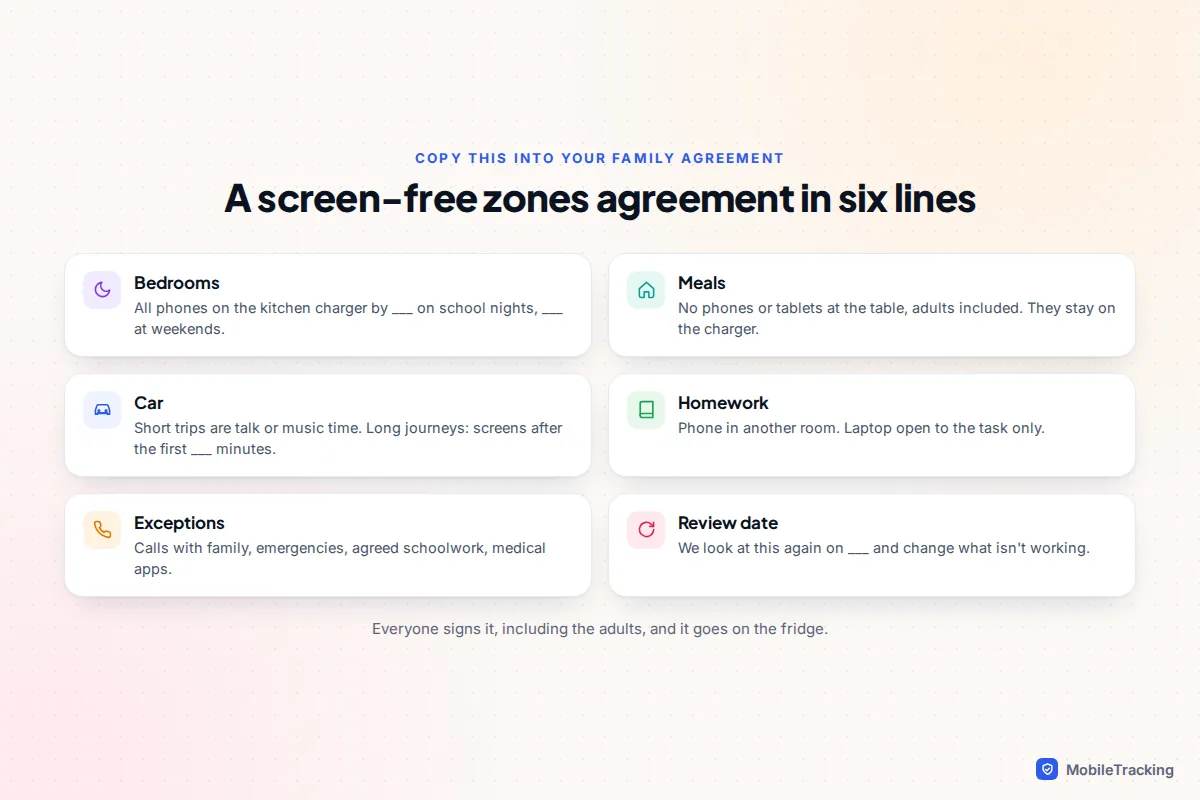
A good agreement answers five questions: which places and times are screen-free, when devices go on the charger, what the exceptions are, what happens if a rule is broken, and when you will review it. Consequences work best when they are small and linked to the rule, such as an earlier drop-off time the next night, rather than a week-long ban that nobody can enforce. Our family media agreement template has a full version that also covers apps, gaming and online safety.
Common mistakes that sink screen-free zones
- Forgetting other devices. The phone goes downstairs but the tablet, laptop or handheld console stays upstairs.
- Different rules for adults. Nothing undermines a zone faster than a parent scrolling at the table.
- No review. A rule set for a 10-year-old won’t fit a 14-year-old. Put a review date in the agreement and keep it.
Frequently asked questions
What time should phones go on the charger?
There is no official time. A practical rule is 30 to 60 minutes before your child should be asleep, so they have time to wind down. For many primary-age children that means around 7:30pm to 8pm, and for teenagers on school nights often 9pm to 10pm, with a later time at weekends.
What if my teenager says they need their phone as an alarm?
Buy a simple alarm clock. It is the single most effective step for making the bedroom rule stick, because it removes the only practical reason for the phone to be there. If they really want their phone alarm, alarms still ring during Screen Time and Family Link schedules, but the phone should still charge out of reach.
Does a Wi-Fi pause stop night-time phone use?
Not on its own. Pausing Wi-Fi stops devices using your home internet, but a phone with mobile data can still go online over 4G or 5G. Use Wi-Fi schedules for consoles, TVs and laptops, and the phone’s own schedule (Screen Time or Family Link) for phones.
My child sneaks the phone back upstairs. What now?
Stay calm and look at why. It is often the group chat, fear of missing out or anxiety at night. Talk about that directly, add a device schedule so the phone is locked overnight even if it moves, and consider an earlier drop-off the next night as a small, fair consequence.
This guide is general information, not legal or financial advice. Read our editorial policy.