
To drop a pin, open your maps app and touch and hold the exact spot on the map for about a second. In Google Maps on Android or iPhone a red “Dropped pin” appears with its coordinates; tap the card at the bottom, then Share. In Apple Maps, touch and hold the map, and a “Dropped Pin” card slides up with a Share option. On a computer, click the spot in Google Maps, then click the small card that appears and choose Share.
A pin is the right tool when someone needs to find one fixed spot: a field gate, a festival meeting point, the side entrance of a hospital. It is a snapshot, so it gives nothing away once sent. Below: each app step by step, the other formats a place can take, what a pin reveals about you, and how to give your location in an emergency.
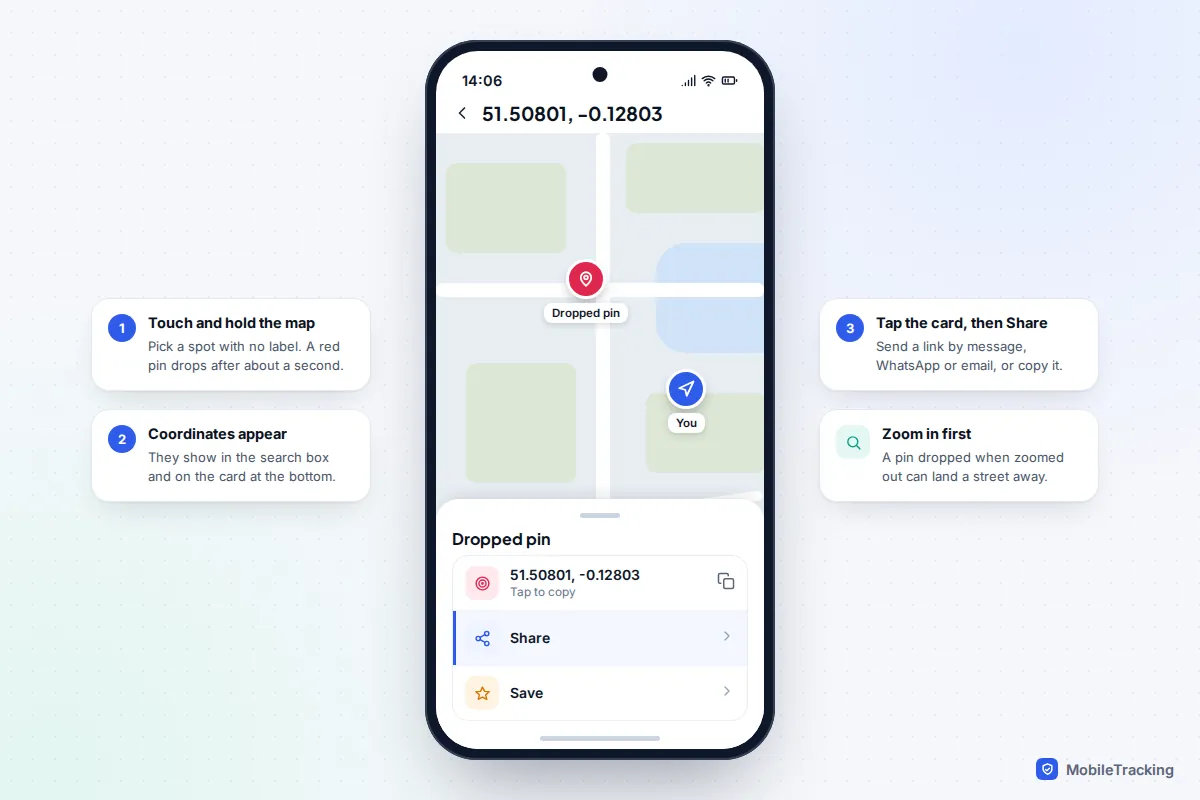
Google Maps on Android and iPhone
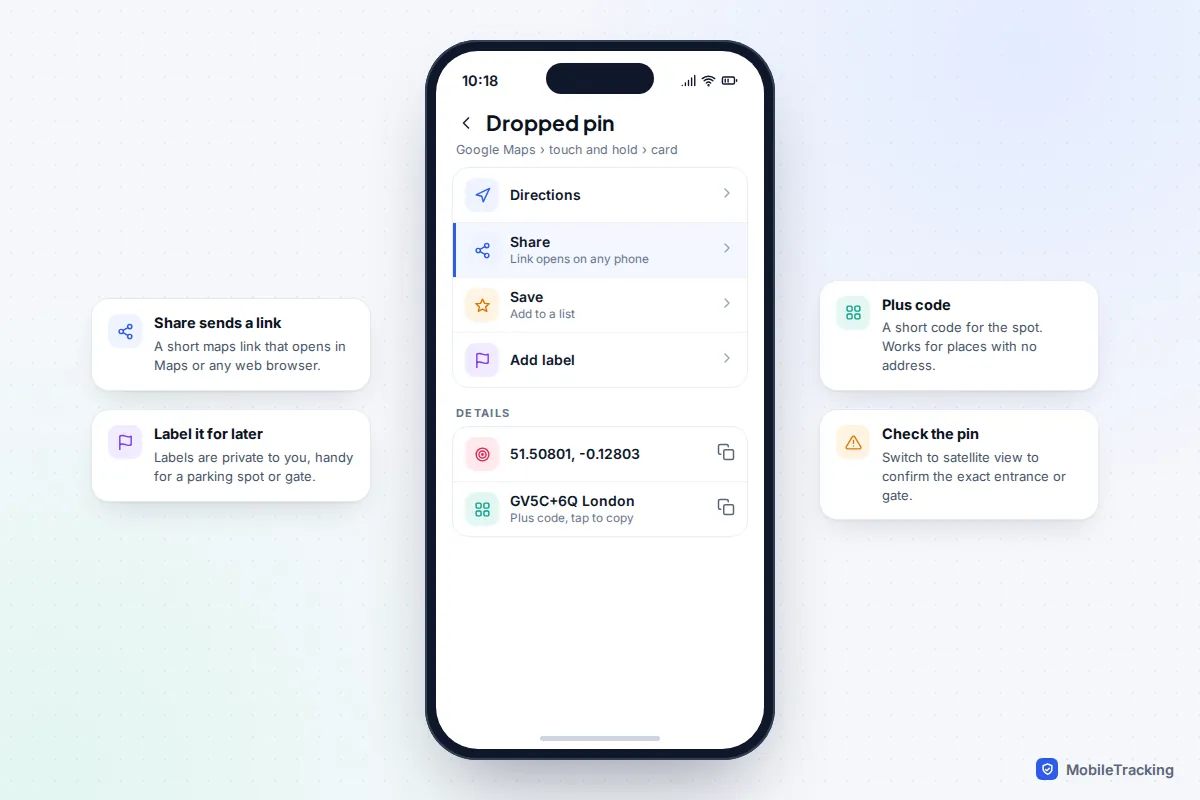
Google Maps works the same way on both platforms, which makes it the easiest choice when you are sending a place to a mix of iPhone and Android users.
- Open Google Maps and zoom in until you can see the exact spot, ideally the building or path itself.
- Touch and hold an area of the map that isn’t already labelled. A red pin drops and the coordinates appear in the search box.
- Tap the Dropped pin card at the bottom to open its details.
- Tap Share, then pick WhatsApp, Messages, email or Copy.
The other person receives a short maps link that opens in Google Maps if they have it, or in a web browser if they don’t. Google retired its general goo.gl link shortener in 2025, but it confirmed that links created through Google apps, including Maps sharing, keep working.
Getting the pin in exactly the right place
If you touch a labelled shop or landmark, Google Maps selects that place instead of dropping a pin, which is fine if the place is what you mean. For a car park corner or a trailhead, tap the layers button and switch to Satellite so you can see paths, gates and entrances. You can’t drag a Google Maps pin once dropped; just touch and hold again in the right spot and the old pin disappears.
Saving and labelling
From the same card you can tap Save to add the pin to a list or Label to give it a private name, such as “Grandma’s back gate”, for places you’ll need again.
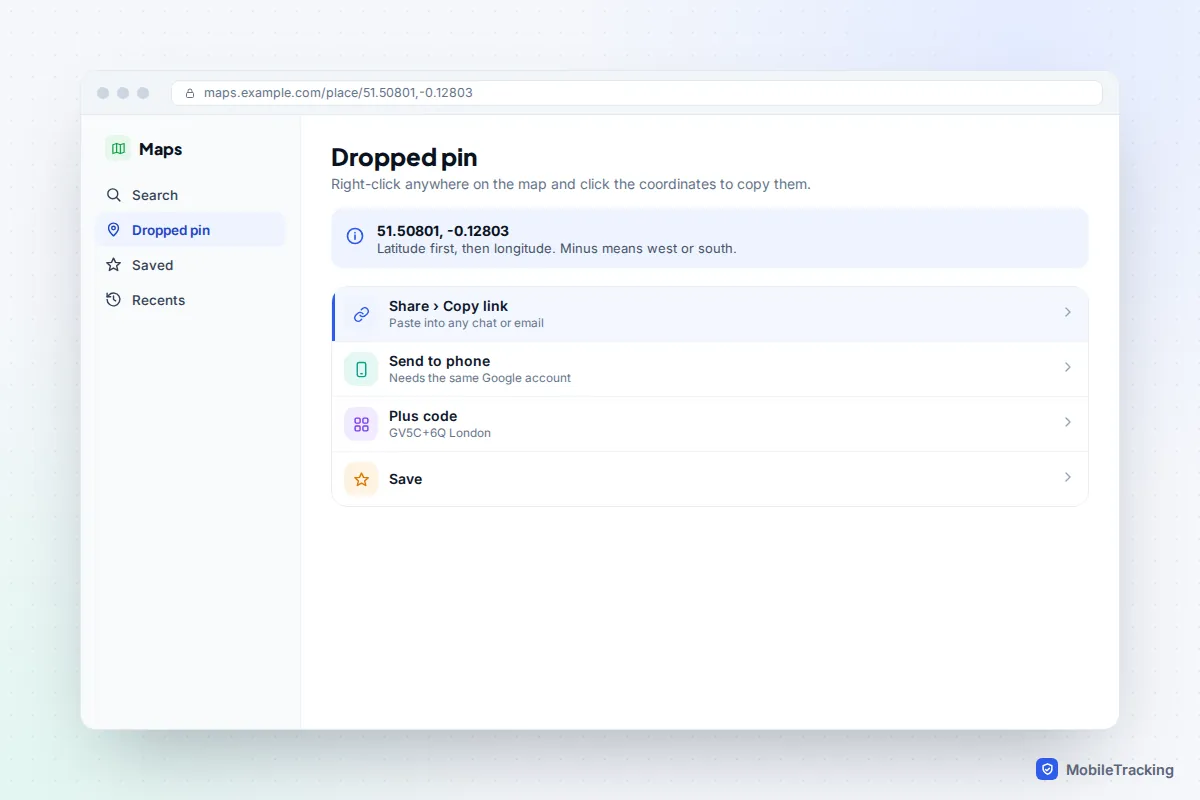
Google Maps on a computer
A bigger screen makes it easier to place a pin precisely.
- Open Google Maps in your browser and click the spot. A small card with the coordinates appears at the bottom of the map.
- Click that card. A panel opens on the left with the dropped pin.
- Click Share, then Copy link, and paste it wherever you need it. Or click Send to phone if you’re signed in with the same Google account on your phone.
If you only want the coordinates, right-click the spot. The latitude and longitude appear at the top of the menu, and clicking them copies them. Google’s page on finding and entering coordinates lists every format Maps accepts.
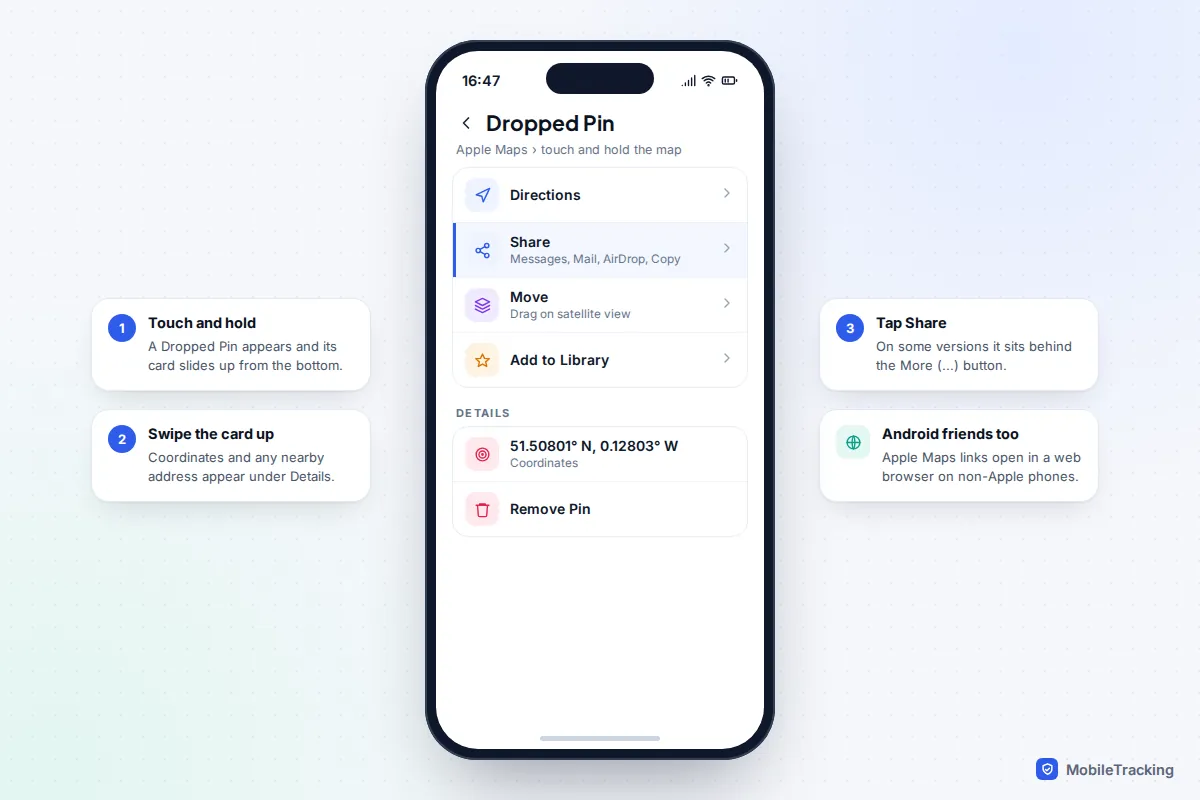
Apple Maps on iPhone
Apple Maps uses the same gesture. The main difference is that you can move the pin after dropping it.
- Open Maps and touch and hold the spot. A Dropped Pin appears and its card slides up.
- To adjust it, tap Move on the card (the map switches to satellite view), drag the map under the pin, then tap Done.
- Swipe the card up to see the coordinates and the nearest address, if there is one.
- Tap Share and choose Messages, Mail, AirDrop or Copy. On some versions Share sits behind the More (…) button on the card.
To pin where you are standing, touch and hold the Maps icon on your Home Screen and choose Mark My Location. To keep a pin, add it to your Library from the card; to get rid of it, open the card and tap Remove Pin. Apple’s guide to marking places with pins covers the same steps for iPad. This works the same on iOS 26 and iOS 27; iOS 27’s Maps changes focused on Flyover imagery, local suggestions and offline maps rather than pins.
Sending to Android users is fine: since April 2025 Apple Maps links open in their phone’s browser.
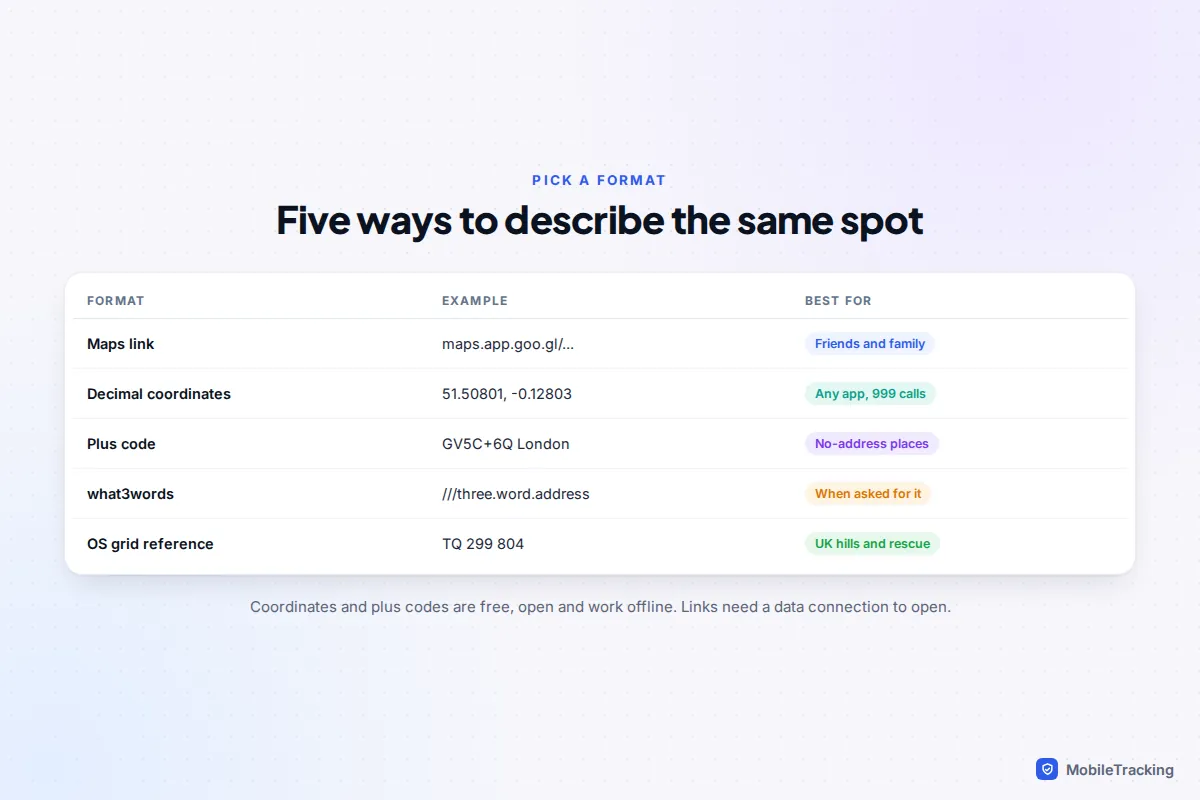
Coordinates, plus codes and what3words
A link is the friendliest way to share a place, but it needs a data connection to open. Plain text is sometimes better: over a crackly phone call, on a paper form, or for someone with a weak signal.
Coordinates
Coordinates are two numbers: latitude (north or south) first, then longitude (east or west). In decimal form, a minus sign means south or west, so 51.50801, -0.12803 is in central London. Every maps app understands them: paste them into the search box and the spot appears. Five decimal places pin a spot to roughly a metre; four decimal places narrow it to around 11 metres, which is usually still enough to find someone.
Plus codes
Plus codes are Google’s free, open system of short codes for any spot on Earth, such as GV5C+6Q London. A standard plus code covers an area of about 14 by 14 metres. They are useful for places with no street address, and they work offline: with no signal, Google Maps shows the full-length version with an area prefix instead of a town name. To find one, drop a pin, tap the card and tap the plus code to copy it. Google’s help page on plus codes has more detail.
what3words
what3words divides the world into 3-metre squares and gives each one a unique combination of three dictionary words. The app is free and many UK emergency services accept it. It is a proprietary system rather than an open standard, and neither Google Maps nor Apple Maps shows these addresses. Its limits in emergencies are covered below.
Sending a pin in WhatsApp, Messages and Google Messages
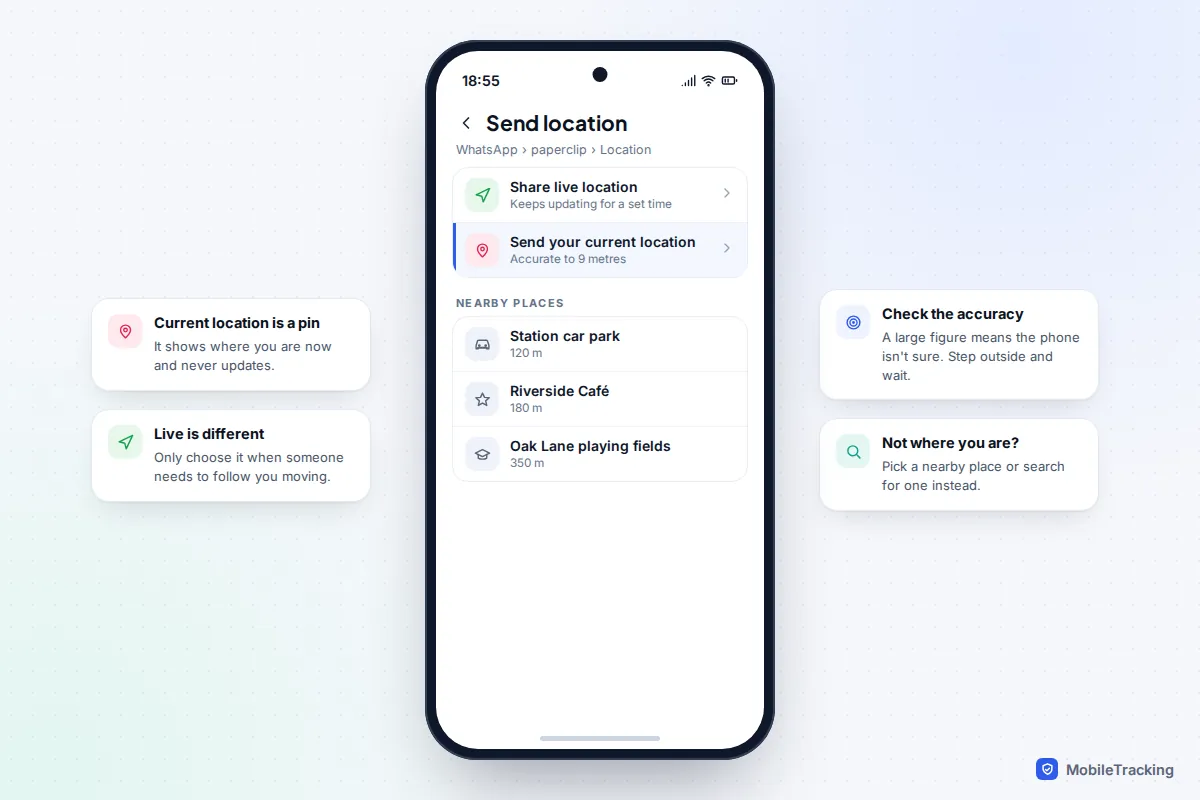
Most messaging apps can send a pin directly, right next to the live location option, which is where people slip up. In Google Messages, + › Location sends a pin and Real-time location is the live version.
- Open the chat and tap the paperclip (Android) or + (iPhone), then Location.
- Tap Send your current location for a one-off pin where you are. WhatsApp shows how accurate the fix is; a big figure means your phone isn’t sure yet.
- To send somewhere else, pick from the nearby places list or search for a place.
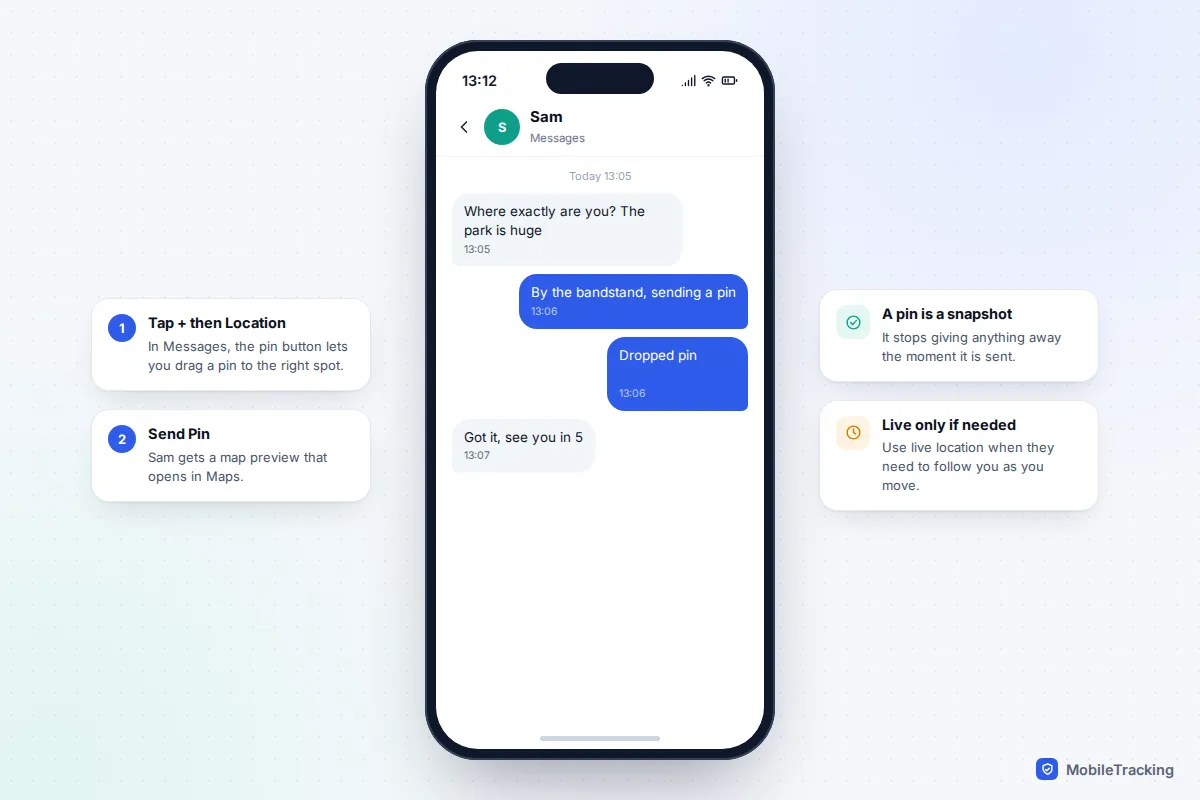
iPhone Messages
Tap +, then Location. Tap the pin button, drag the pin to the right spot, then tap Send Pin. The Share button in the same view starts live sharing instead, which is a different thing.
Pin or live location?
| Situation | Send | Why |
|---|---|---|
| Meeting point at a park, station or festival | Pin | The spot doesn’t move, so a pin is enough |
| Directions for a delivery driver or tradesperson | Pin | A stranger never needs to see where you go next |
| Friends walking towards you in a crowd | Live, 15 minutes to 1 hour | They can follow a moving dot |
| Walking home late | Live, until you arrive | Someone notices if you stop moving |
| Selling something online | Pin of a public place | Keeps your home address out of it |
For the live options and how to stop them properly, see our guide on sharing live location in a message. If you’re trying to reunite a group at a big event, finding family in a crowded place has more ideas.
Accuracy: why a pin can end up in the wrong place
A dropped pin is exactly where you put it. The errors creep in elsewhere. When you send your current location, the phone has to work it out from GPS, Wi-Fi and mobile masts, and indoors or between tall buildings it can be tens of metres out. The pale circle around the blue dot shows how unsure the phone is; if it is wide, step outside or near a window and wait 20 to 30 seconds before sending. Our guides on how accurate phone location really is and why location goes wrong indoors explain what’s happening.
The other common mistake is sharing an address rather than a pin. Maps often place an address at the middle of a building or on the road outside, which is useless for a farm, a large school campus or a block of flats with the entrance round the back. Drop the pin on the actual door, gate or parking space, and add a short note such as “blue door next to the bike shed”.
Privacy: what a pin or link gives away
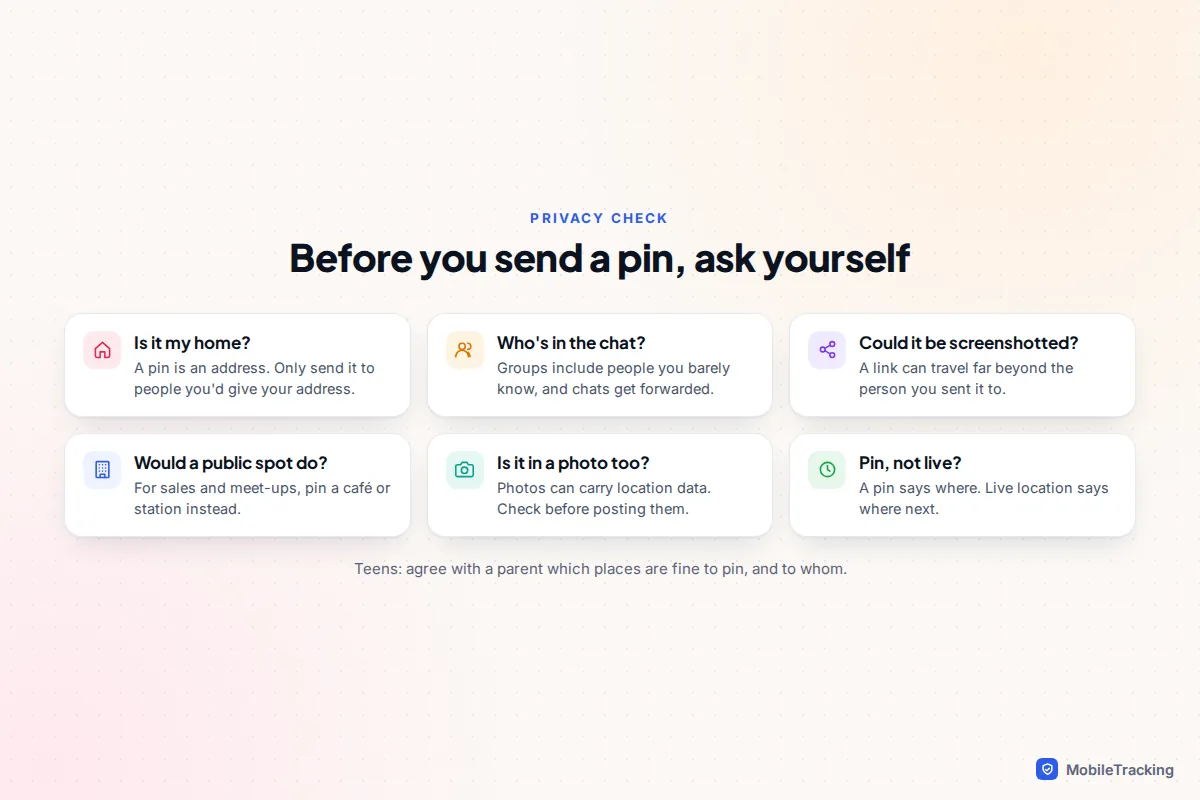
A pin on your home is your address, and it is more precise than a written one. Once sent, a link can be forwarded, screenshotted or posted elsewhere, and you can’t recall it. A few habits keep this in proportion:
- Think about the audience. A pin in a family chat is fine. The same pin in a 200-person school or club group reaches people you’ve never met.
- Use a public spot with strangers. For online sales, lifts from people you don’t know, or first meet-ups, pin a café, station or supermarket car park instead of your door.
- Check your photos too. Photos can carry location data in their details, and a picture of your front garden with a street sign does the job of a pin anyway.
- Prefer a pin to live location unless someone genuinely needs to follow you.
With children and teens, agree which places are fine to pin (a friend’s house, for a parent collecting them) and which never go in public posts or games (home, school, a regular club). Our explainer on your child’s digital footprint covers the wider picture.
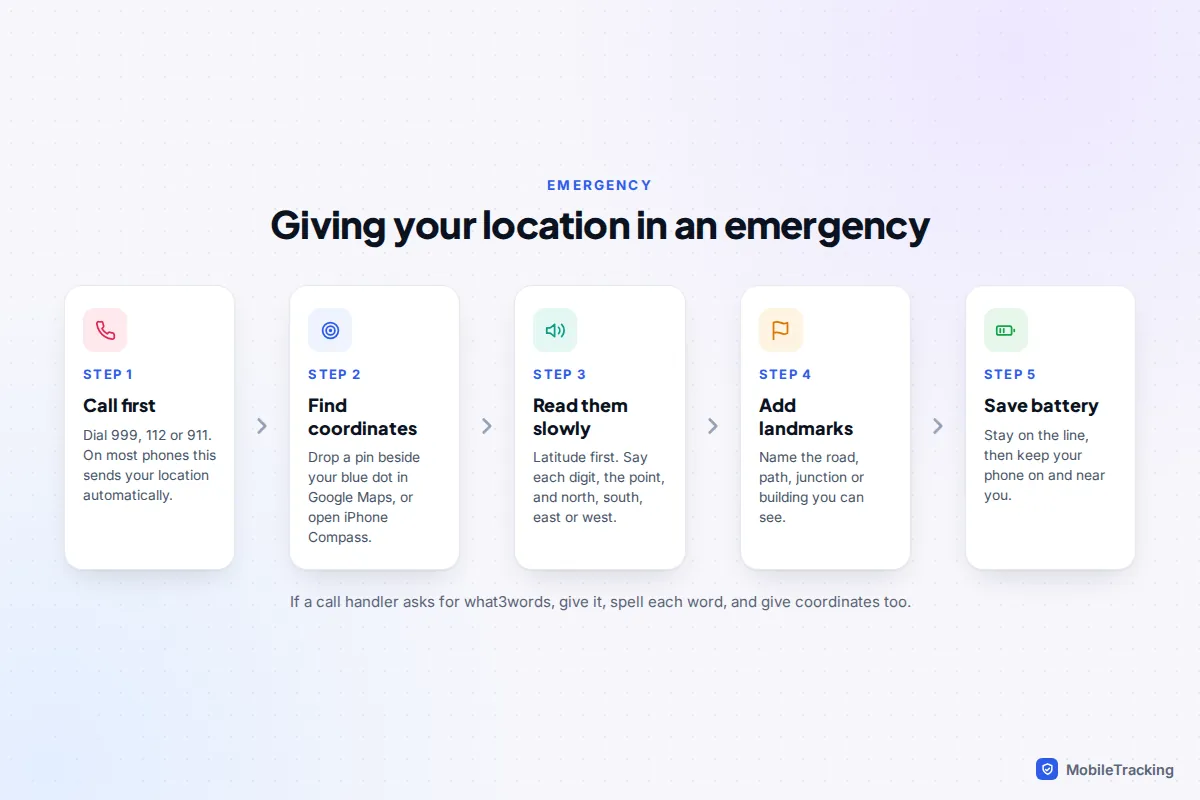
In an emergency: getting your location to 999, 112 or 911
Call first; don’t spend precious minutes composing a message. In the UK, the EU and over 40 other countries, iPhones (iOS 11.3 and later) and Android phones use Advanced Mobile Location: when you call the emergency number, the phone automatically switches on location for a moment and sends its best position to the emergency service, usually far more precisely than the old mast-based method. In the US, many 911 centres also receive a location from the phone, but coverage varies, so be ready to say where you are.
If you’re asked for your location and don’t know the address:
- Get coordinates. In Google Maps, touch and hold the map right beside your blue dot; the dropped pin shows its coordinates in the search box. Tapping the blue dot itself and swiping up shows your plus code. On iPhone, the Compass app shows your latitude and longitude at the bottom of the screen.
- Read them slowly. Latitude first. Say each digit, the “point”, and north or south, east or west, rather than “minus”.
- Add what you can see: road names, a footpath sign, a pylon number, a landmark.
- Stay on the line, then keep your phone switched on and save battery in case they call back.
Some recent iPhones and Pixel phones can also contact emergency services by satellite where there’s no mobile signal, in the countries where that feature is offered. Texting 999 in the UK only works if you’ve registered with the emergencySMS service in advance, which is intended for people who are deaf or have speech difficulties.
what3words in emergencies: useful, with known limits
Many UK police, fire and ambulance services accept what3words, and call handlers may ask you for it. It can help, but its limits are well documented. In 2021 Mountain Rescue England and Wales reported that teams had been given incorrect what3words locations 45 times over 12 months, with spelling mistakes and local accents among the causes. A security researcher’s analysis the same year found that similar-sounding combinations, including singular and plural versions of the same word, can point to places near each other. what3words has acknowledged that similar combinations can occasionally be close together.
So if you use it: open the app and wait at least 30 seconds for your position to settle before reading the words, spell each word out, and check that the place shown in the app matches where you are. Then give coordinates or a description as well. In the UK hills, mountain rescue teams generally prefer an OS grid reference with its two-letter prefix plus a description; the what3words app can show a grid reference in its settings, and the free OS Locate app shows one too.
Frequently asked questions
Can someone open my pin if they don’t have Google Maps or an iPhone?
Yes. Google Maps links open in any web browser, and Apple Maps links open in Apple Maps on the web on Android phones and Windows computers. Coordinates work in any maps app at all.
Does a dropped pin keep tracking me?
No. A pin is a fixed point and never updates. Only live location shares keep reporting where you are, and they are always labelled as live or real-time in the app.
Can I drop more than one pin?
Both apps show one temporary dropped pin at a time. To keep several, save each one to a list in Google Maps or to your Library in Apple Maps before dropping the next.
Is it safe to use what3words instead of calling out coordinates?
It can be quicker to say three words than a long string of numbers, and many services accept it. Because similar-sounding words can point to nearby squares, spell each word and give a second form of location, such as coordinates or a nearby landmark, whenever you can.
This guide is general information, not legal or financial advice. Read our editorial policy.