
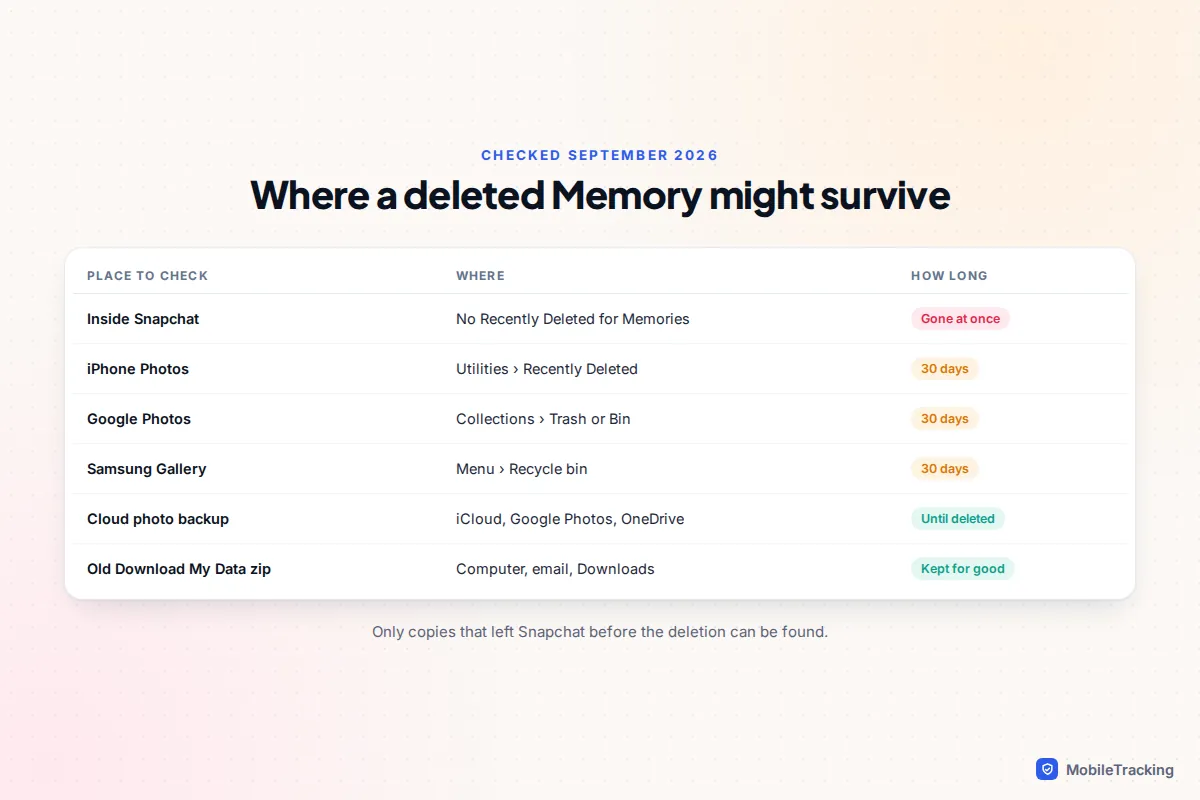
If you deleted a Snap from your Memories inside Snapchat, Snapchat cannot give it back. There is no Recently Deleted folder for Memories, and Snapchat’s own help centre says its servers are designed to erase a deleted Memory as soon as possible, so Snapchat Support can’t restore it either. That is the honest answer, and any app or website promising otherwise is selling something.
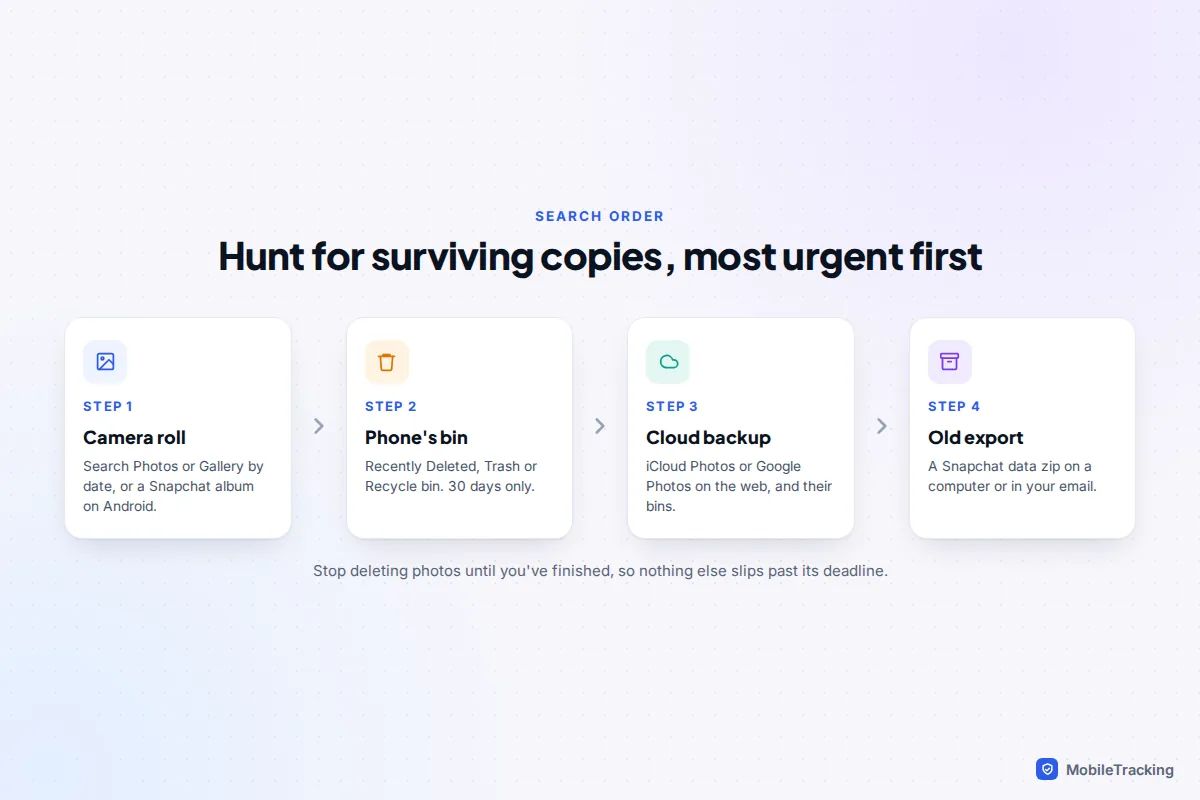
The good news is that a Memory often exists in more than one place. If it was ever saved to your camera roll, backed up by iCloud Photos or Google Photos, included in an old “Download My Data” export, or sent to a friend who kept it, you have a real chance. Work through those places in the order below, starting with the ones that have a countdown clock.
First, make sure the Memories are really deleted
A lot of “deleted” Memories are actually missing, hidden or not yet backed up. Before you assume the worst, rule these out. It takes five minutes and it is the step people most often skip.
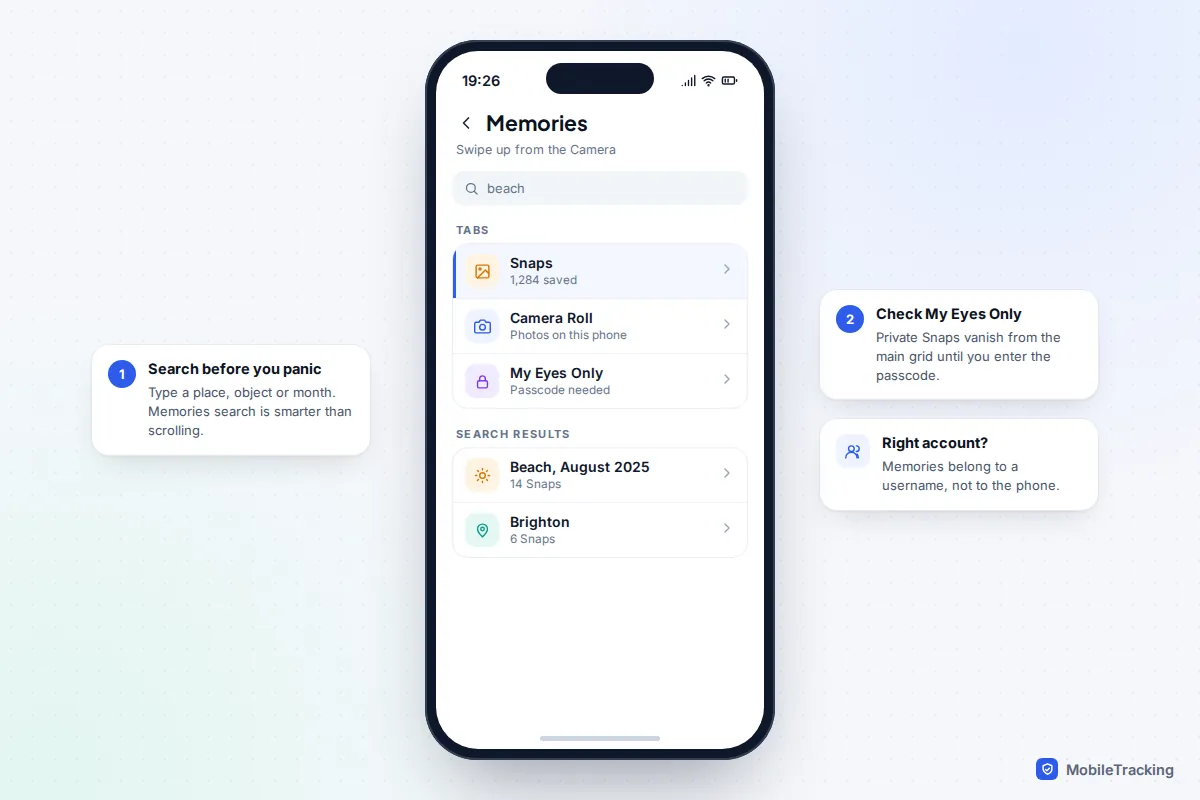
- Wrong account. Memories belong to a Snapchat account, not a phone. If you have a second account, or signed in with a new username after a reset, the Memories are waiting in the other one.
- Wrong tab. Memories is split into tabs, such as Snaps, Camera Roll and My Eyes Only. Private Snaps you moved to My Eyes Only disappear from the main grid until you enter your passcode.
- Not backed up yet. Snaps saved while you were offline sit on the phone until they upload. If you logged out, reinstalled or switched phones before that finished, those particular Snaps never reached Snapchat’s servers.
- An app glitch. Snapchat’s own advice for missing Memories is to update the app, clear the cache and restart the phone. Clearing the cache does not delete Memories, Snaps or Chats.
To clear the cache on iPhone or Android, tap your profile icon, tap the gear icon for Settings, scroll to App & Privacy, tap My Privacy & Data, then Clear Cache under Manage My Data. Close Snapchat, restart the phone and open Memories again on Wi-Fi so it can reload everything.
Why Snapchat can’t undo a deletion
Snapchat is built around ephemerality, and Memories follow the same logic once you delete something. Snapchat’s help page on missing Memories is blunt: support staff cannot recover lost Memories, and a deleted Snap is removed from its servers as soon as possible. We checked this in September 2026 and nothing has changed, even with the new paid storage plans.
My Eyes Only is stricter still. If you forget your My Eyes Only passcode, the only fix is Options › Forgot Passcode, and creating a new passcode deletes every Snap that was stored there. Snapchat says clearly that it cannot recover forgotten passcodes or the private Snaps behind them. If you are unsure of the code, keep trying variations before you reset.
A deleted account follows the same rule. When you delete a Snapchat account it is deactivated first, and you can reactivate it by logging back in during the grace period (about 30 days in most countries). Once it is permanently deleted, its Memories go with it. If that is your situation, our guide on getting a deleted Snapchat account back covers the timing.
Where copies of your Memories might still exist
Check these in order. The first two have a deadline, so do them today.
1. Your phone’s camera roll and its Recently Deleted album
If your Save button was set to Memories & Camera Roll, or you ever exported a Snap from Memories, a copy went into your phone’s photo library. Open Photos (iPhone) or Google Photos or Samsung Gallery (Android) and search for the date, or, on Android, look for a Snapchat album or folder.
If you deleted it there too, look in the bin:
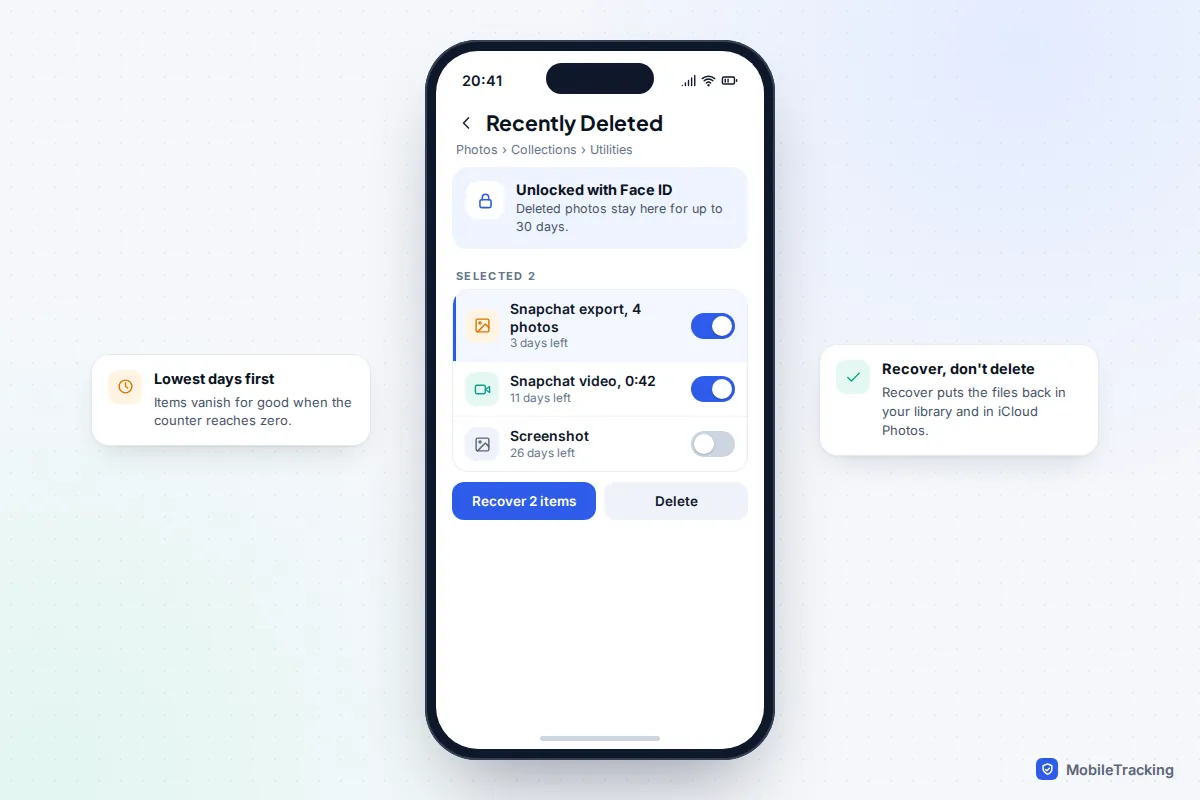
- iPhone (iOS 26 and later): Photos › Collections › scroll to Utilities › Recently Deleted. Unlock with Face ID, select the items and tap Recover. Items stay for 30 days.
- Google Photos: Collections › Trash (Bin in UK English). Since September 2026, Google keeps items for 30 days, down from 60.
- Samsung Gallery: Menu (three lines) › Recycle bin. Items stay for 30 days if the recycle bin is switched on.
2. Your photo cloud backup
Anything that reached your camera roll may also have been uploaded to iCloud Photos, Google Photos, OneDrive or another backup, including on a computer or old phone signed in to the same account. Check the web versions too (icloud.com/photos or photos.google.com), and their bins. Our guide to recovering deleted photos from the cloud lists every service’s bin and time limit.
3. An old Download My Data export
If you, or a helpful relative, ever downloaded your Snapchat data, that zip file contains your Memories as they were on the day you requested it. Search your computer, your Downloads folder and your email for “mydata” or “Snapchat”. Many people did exactly this in late 2025 when the storage limit was announced, then forgot about it. The export includes the actual photos and videos plus a file called memories_history.json with the original dates.
4. Chats and friends
If you sent the Snap to someone, it may be saved in that chat, and the recipient may have saved it to their own Memories or camera roll. It costs nothing to ask. Our guide to recovering deleted Snapchat messages explains what stays in chats and for how long.
The 5GB Memories limit: what changed and what it means
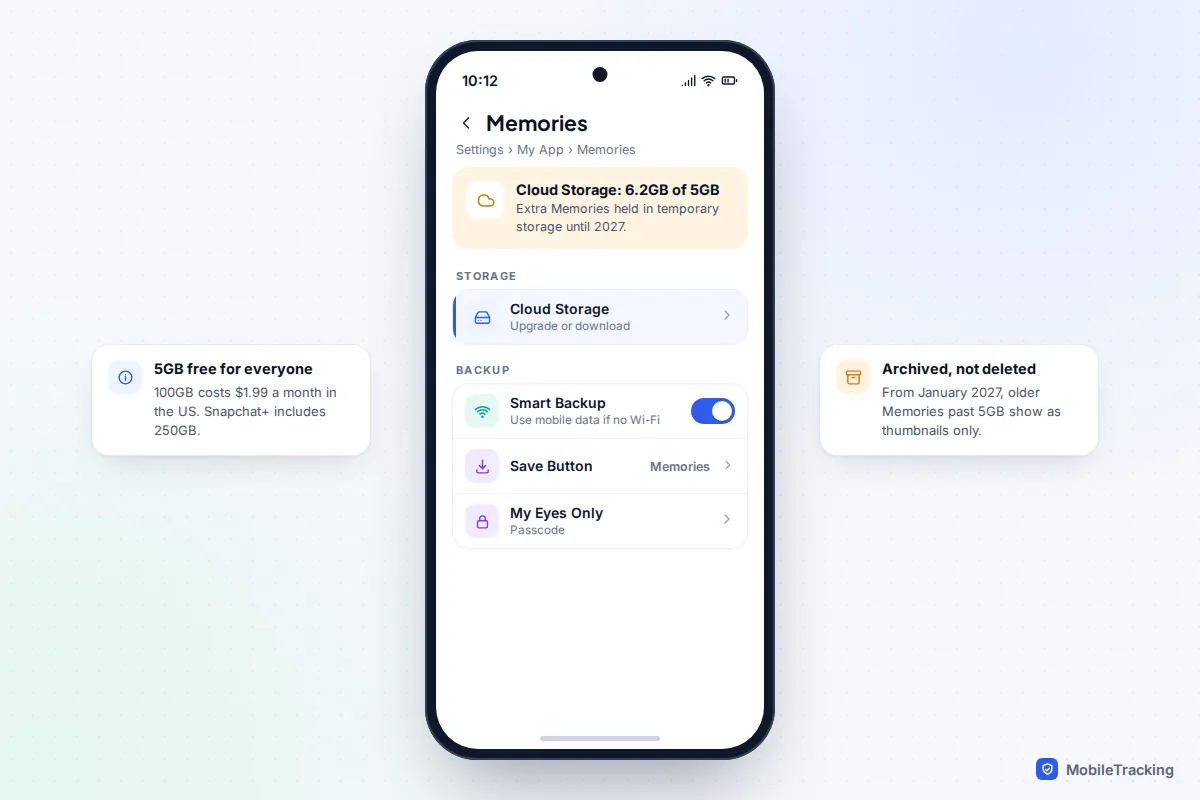
In September 2025 Snapchat announced Memories Storage Plans. Every account now gets up to 5GB of free Memories storage, and anyone above that was given 12 months of temporary extra storage. The plans, as listed on Snapchat’s help centre in September 2026, are:
| Plan | Memories storage | Price |
|---|---|---|
| Free | Up to 5GB | Free |
| Memories-only plan | 100GB | $1.99 a month or $20 a year (US) |
| Snapchat+ or Lens+ | 250GB | Varies by country |
| Snapchat+ Platinum | 5TB | Varies by country |
Early news coverage said Memories above the limit would be deleted. Snapchat’s current help page says something different and more reassuring: it will not automatically delete your Memories because you don’t upgrade. From January 2027, Memories that are more than a year old and are not part of your oldest 5GB will be archived. They will show as thumbnails, but you will need to upgrade to open, edit or share them, or you can download them to use outside the app. Snapchat says nothing will be archived before January 2027 and you will get an in-app notice first.
So if Memories look locked or greyed out next year, they are archived, not deleted. To see how much space you are using, go to Settings › My App › Memories and check under Cloud Storage. If you’re on a Snapchat+ Family plan, each member gets the storage benefit separately.
Recovery apps and “Snapchat recovery services” to avoid
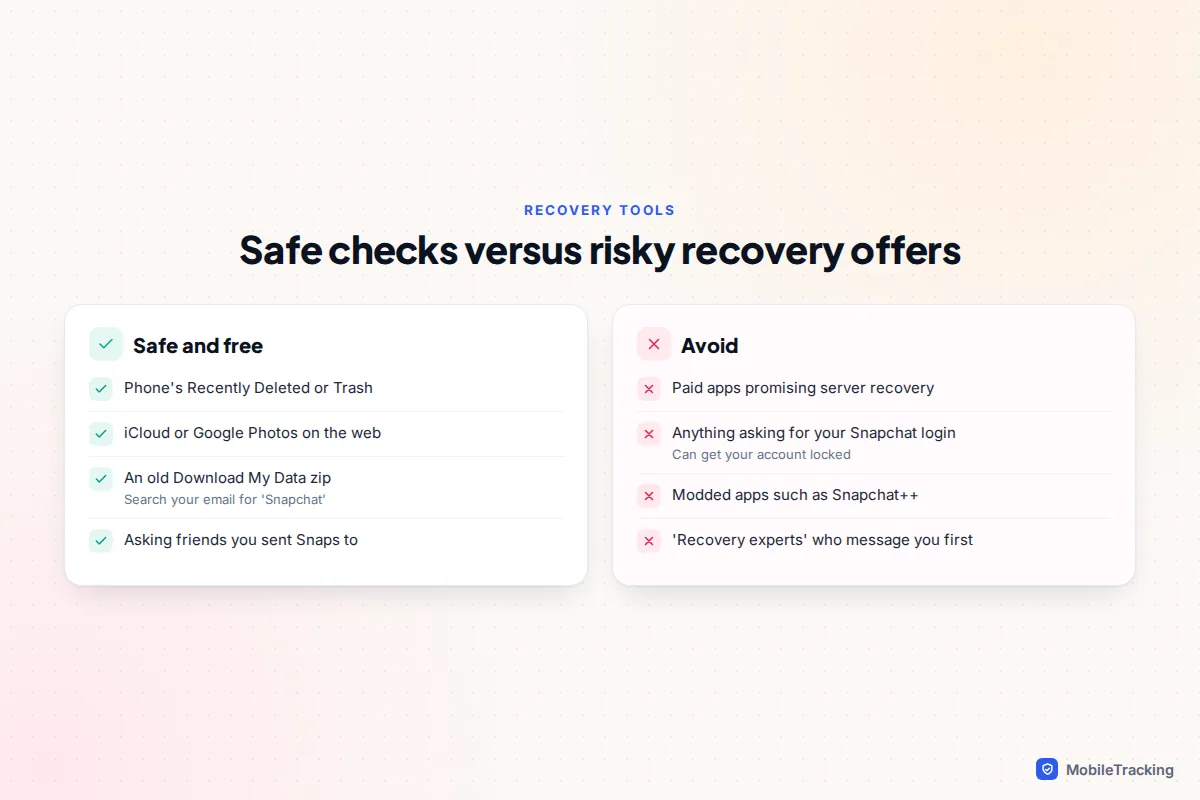
Search for this topic and you will find dozens of paid tools claiming to recover deleted Snapchat Memories. What they actually do is scan your phone or your iCloud or Google backup for images, which is the same camera roll and backup check you can do yourself for free. None of them can reach into Snapchat’s servers, and Snapchat stores Memories in the cloud, not as ordinary files on your phone.
Be even more careful with anything that asks for your Snapchat username and password. Snapchat’s terms ban unauthorised third-party apps and plugins, and it names several, including SnapEnhance, Snapchat++ and Phantom. Using them can get your account locked, which is the last thing you want while trying to save your Memories. People offering to “recover” Snaps on social media or messaging apps for a fee are almost always scammers, and handing over your login can also expose your chats and friends list.
Which option should you use?
Match your situation to the row below. If more than one applies, start at the top.
| What happened | Best next step | Realistic odds |
|---|---|---|
| Deleted a Memory in the last 30 days, Save button was set to Camera Roll | Phone’s Recently Deleted or Trash | Good |
| Deleted months ago, iCloud or Google Photos was on | Search the cloud library by date | Fair |
| Deleted, but you downloaded your data earlier | Find the old zip file | Good, up to that date |
| Memories missing after a new phone or reinstall | Check account, update, clear cache | Good if they had backed up |
| Reset the My Eyes Only passcode | Camera roll or friends only | Poor |
| Deleted inside Snapchat only, never exported | Ask anyone you sent it to | Poor |
Here is how that plays out. Amira cleared 200 Memories to get under 5GB, then realised her holiday Snaps were among them. Snapchat couldn’t help, but her Save button had been set to Memories & Camera Roll for years. Everything from the last month was in Recently Deleted on her iPhone, and the older holiday was still in iCloud Photos. Only a handful of Snaps she had saved with the default setting were truly gone.
How to protect your Memories from now on
Because Snapchat has no safety net, the protection has to come from you. These settings take a few minutes and remove most of the risk.
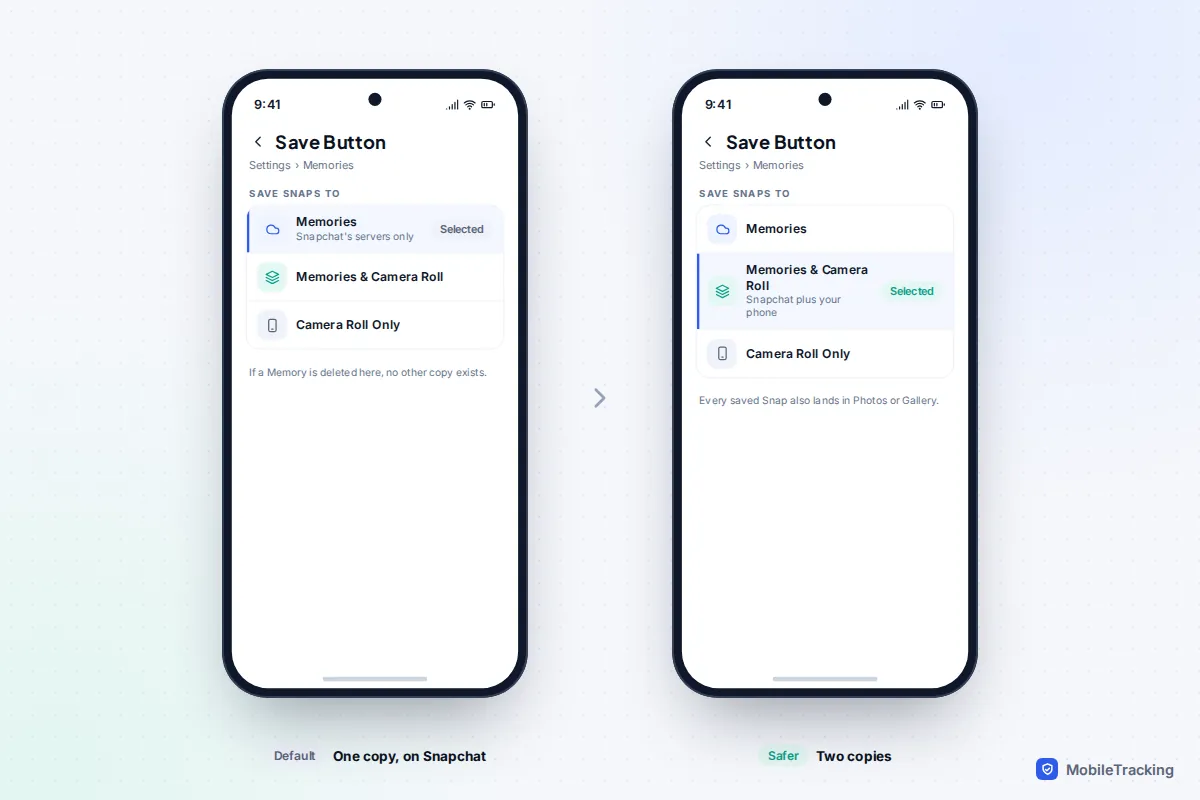
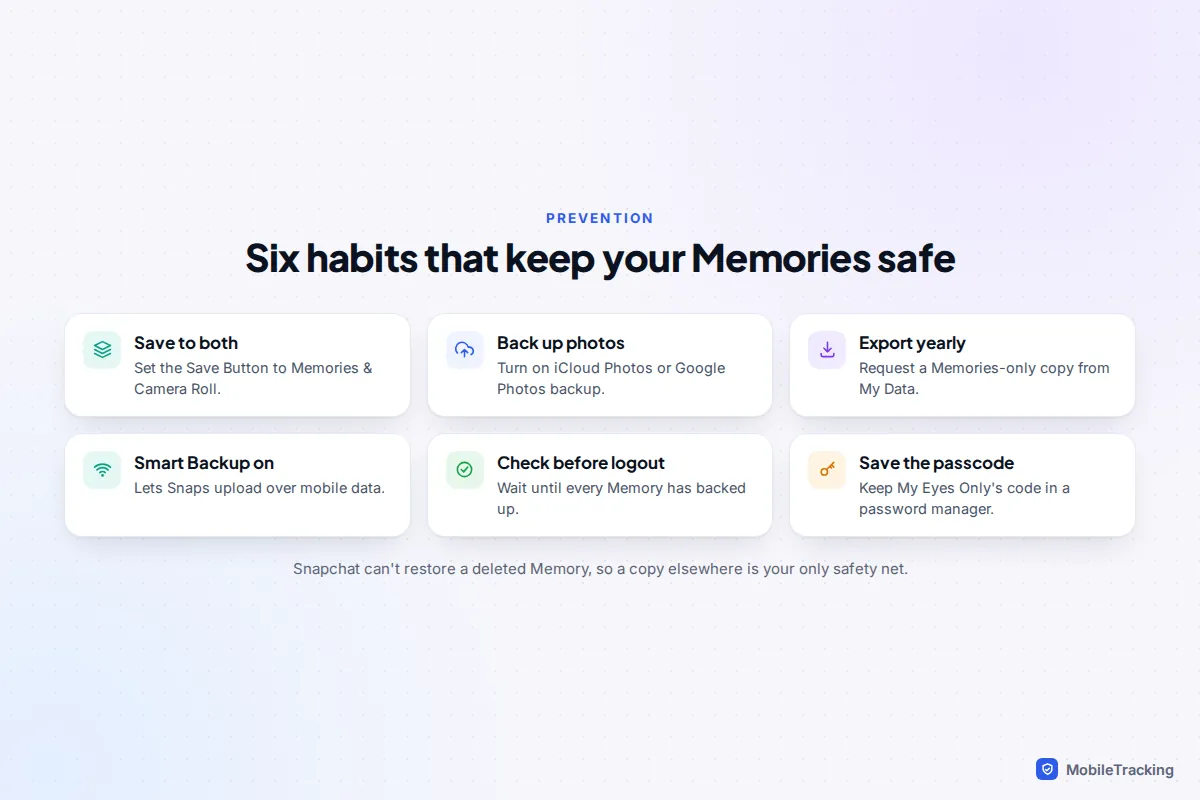
- Save to two places. Go to Settings › My App › Memories › Save Button (the Save Destinations area) and choose Memories & Camera Roll. Labels have moved between versions, so search Settings for “Save” if you can’t see it.
- Back up your camera roll. Turn on iCloud Photos or Google Photos backup so those copies leave the phone. Our guide to backing up your photos to the cloud walks through it.
- Export your existing Memories. For a handful, open Memories, tap Select, pick up to 100 Snaps and tap Export. For everything, go to Settings › My Data (or accounts.snapchat.com), toggle Export your Memories on and tap Request Only Memories. Snapchat aims to deliver within 7 days, and large exports can take longer.
- Keep Smart Backup on. In Settings › My App › Memories, Smart Backup lets Memories upload over mobile data when Wi-Fi isn’t available.
- Check before you log out. Make sure Memories have finished backing up before you log out, uninstall or move to a new phone.
- Store your My Eyes Only passcode in a password manager, so you never have to reset it.
When your Memories export arrives, it may come as several zip files. Download every part and keep them together, since some parts contain only extra media. The photo files may show the download date rather than the day you took them, but the real dates are kept in memories_history.json.
If you are helping a teenager, this is worth doing together, since their Memories are often years of friendships. It pairs well with a quick look at securing their Snapchat account, because a hijacked account is another common way Memories are lost.
Frequently asked questions
Can Snapchat Support recover deleted Memories if I ask?
No. Snapchat’s help centre states that support cannot recover lost or deleted Memories, because deleted Snaps are erased from its servers as soon as possible. You can still contact support about missing Memories that were never deleted, for example after a login problem.
Does deleting or reinstalling the app delete my Memories?
No, as long as they had finished backing up. Memories are stored with your account, so they reappear when you log back in. Snaps saved while offline that never uploaded are the exception, and those can be lost.
Will Snapchat delete my Memories if I go over 5GB?
According to Snapchat’s current help page, no. From January 2027, Memories over a year old that are outside your oldest 5GB will be archived. You’ll see thumbnails and can upgrade or download them, but they are not automatically deleted.
Does Download My Data include Memories I’ve already deleted?
No. An export is a snapshot of what your account holds on the day you request it. That’s why an export made last year can be so valuable: it still contains Snaps you’ve deleted since.
Can I recover My Eyes Only Snaps after resetting the passcode?
Not from Snapchat. Resetting the passcode deletes everything that was in My Eyes Only. The only hope is a copy that was exported to your camera roll or sent to someone before it was made private.
Are Memories stored on my phone?
Mostly not. Memories live on Snapchat’s servers and your phone keeps a temporary cache, which is why phone recovery tools rarely find them. Copies in your camera roll are ordinary photos and can be recovered like any other.
This guide is general information, not legal or financial advice. Read our editorial policy.