
Whether you can recover a deleted WhatsApp account depends on what was actually deleted. If you only removed the app, or lost the phone, nothing is gone: reinstall WhatsApp, verify the same phone number, and restore your chats from your Google or iCloud backup. If you used Delete my account inside WhatsApp, the account itself cannot be brought back. WhatsApp says deletion is irreversible, even when done by accident, and it cannot undo it for you.
That second case is not quite the dead end it sounds. You can register the same number again straight away; it simply starts as a new, empty account. Banned accounts are different again (you ask for a review inside the app), and so are accounts removed after about 120 days of inactivity. The table below sorts out which one you are facing, and each section then covers exactly what you can do.
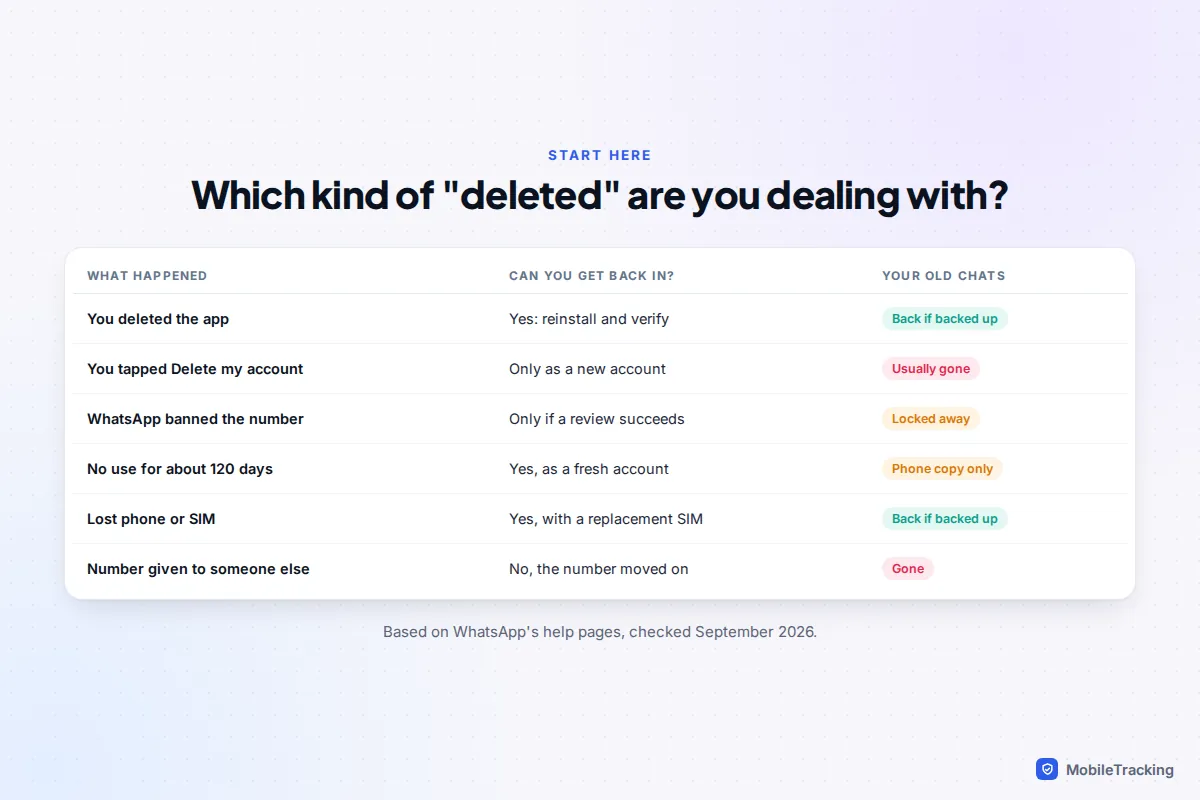
First, work out which kind of “deleted” you mean
“I deleted my WhatsApp” covers four very different events, and the fix for one can make another worse. Answer these in order first.
- Did you go into WhatsApp’s settings, type your phone number and confirm “Delete my account”? If not, your account almost certainly still exists. Removing the app from your home screen, resetting the phone or losing it does not delete the account.
- When you open WhatsApp, does it say the account “can no longer use WhatsApp”? That is a ban, not a deletion, and you should not create a new account on another number to get round it.
- Have you been away from WhatsApp for about four months or more? Think of an old number you stopped topping up, or a phone left in a drawer. Inactive accounts are generally deleted after 120 days.
- Do you still control the phone number? If you can receive a text or call on it, you can verify it again. If the carrier has cancelled it and given it to someone else, the WhatsApp account went with it.
If you only deleted the app (or lost the phone)
This is the good case. Your account lives on WhatsApp’s servers and is tied to your phone number, not to the app on one phone. Reinstall it, verify your number and restore your backup. Have your backup details ready before you verify, because the restore offer appears only during setup.
On Android
- Install WhatsApp from the Play Store and open it.
- Enter your number and the verification code WhatsApp sends by text or call. If you set up a passkey, you may be offered your fingerprint or screen lock instead.
- If you use two-step verification, enter your six-digit PIN.
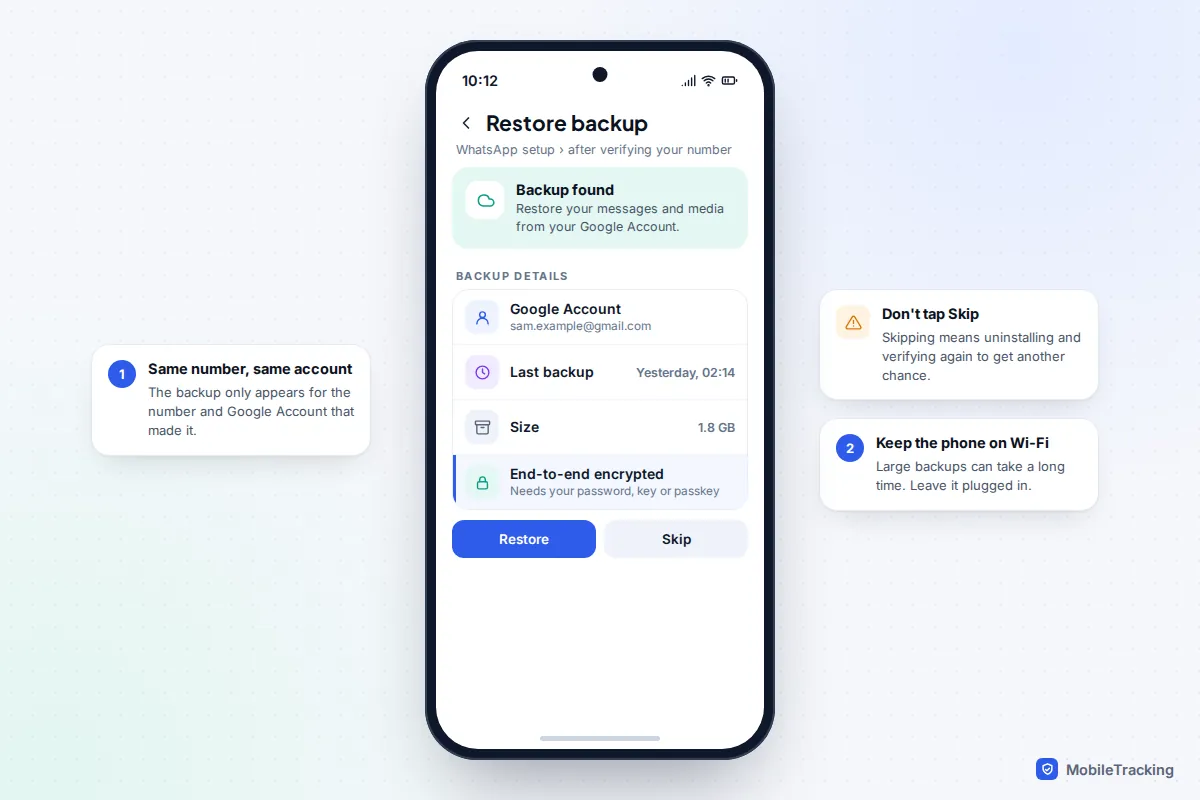
- When Restore backup appears, check it shows the right Google Account and a recent date, then tap Restore. If the backup is end-to-end encrypted, you will be asked for your password, 64-digit key or passkey.
- Leave the phone on Wi-Fi and charging. Messages come back first; media keeps downloading in the background afterwards.
On iPhone
- Before installing, check you are signed in to the same Apple Account that made the backup, and that iCloud Drive is switched on (Settings, tap your name, iCloud, then iCloud Drive).
- Install WhatsApp from the App Store, open it and verify your number.
- Tap Restore chat history when it is offered, and enter your encryption password, key or passkey if asked.
- Keep WhatsApp open on Wi-Fi until the restore finishes. You need enough free space on the iPhone for the backup to unpack; if it stalls, free up space and try again.
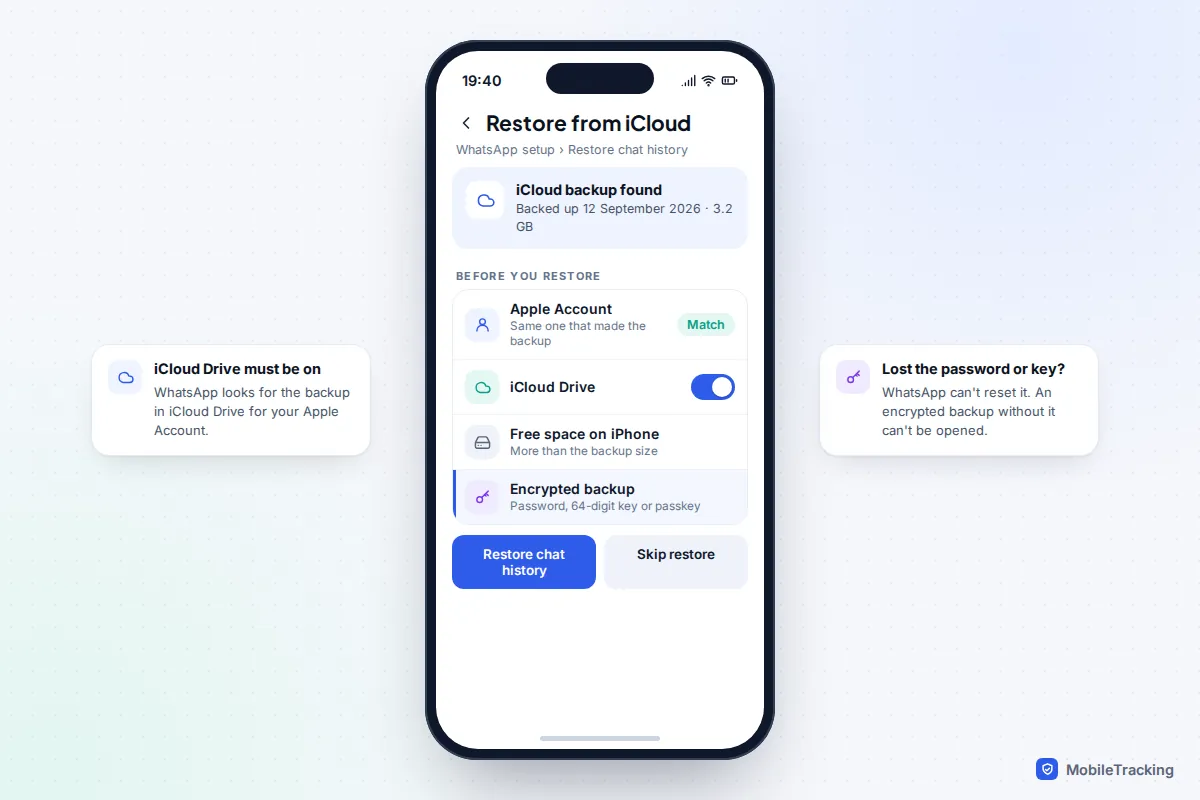
Three conditions trip people up on both systems. The backup is tied to the phone number and the Google Account or Apple Account it was made with, so a new number or a different account shows nothing. Google and iCloud backups cannot cross platforms, so an Android backup will not restore to an iPhone (moving between them is a separate process, covered in our guide to transferring WhatsApp from Android to iPhone). And if you turned on an end-to-end encrypted backup and have lost the password or key, WhatsApp cannot reset it: the backup stays locked for good.
If you lost the phone, get a replacement SIM with the same number from your carrier first, then follow the steps above on the new phone. Verifying your number on the new phone logs the old one out of WhatsApp. If you cannot get the SIM quickly, WhatsApp’s long-standing advice is to email support with “Lost/Stolen: Please deactivate my account” and your number in full international format; you then have 30 days to verify on a new phone before the account is deleted.
If you used “Delete my account”
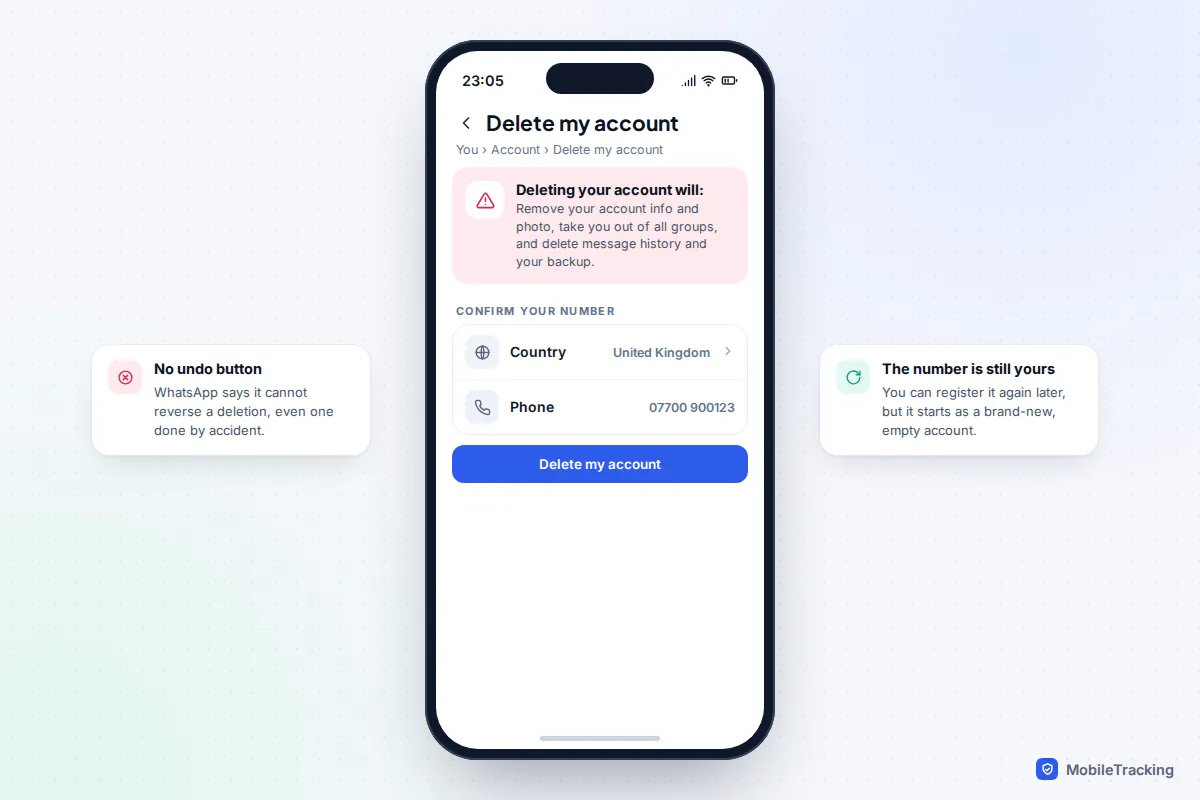
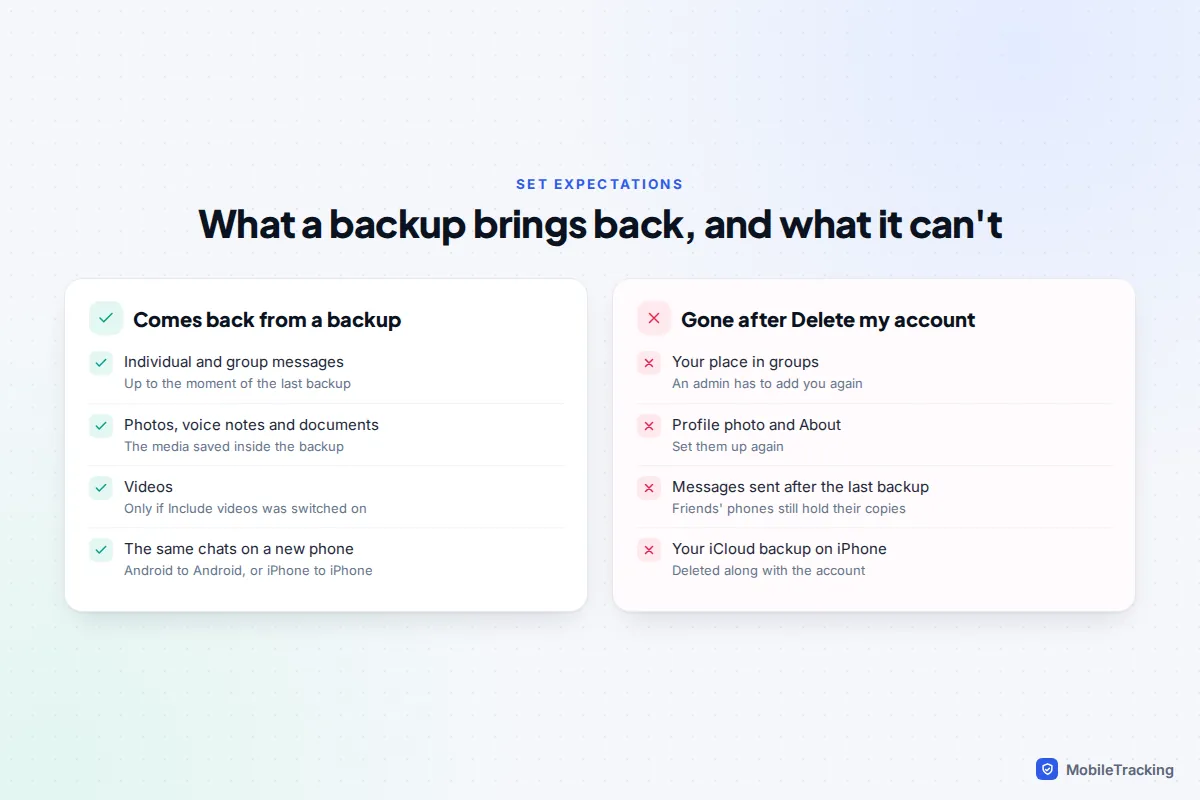
This is the one that cannot be reversed. According to WhatsApp’s help page on deleting your account, deletion removes your account information and profile photo, takes you out of every WhatsApp group, and deletes your message history on the phone. On iPhone, it also deletes your WhatsApp backup in iCloud. WhatsApp staff cannot restore it, and there is no waiting period in which you can change your mind.
What you can still do:
- Register the same number again. Reinstall WhatsApp and verify. You get a fresh account on the same number, so friends can message you as before, but your chat list starts empty.
- Check for a surviving backup. If the setup screen still offers a restore, take it. Treat that as luck rather than a plan, and never pay anyone who claims they can recover one.
- Ask other people for their copies. Deleting your account does not touch the messages on other people’s phones. A friend or family member can open your old chat, tap the contact name, choose Export chat and send it to you as a text file, with or without media.
- Ask group admins to add you back. You were removed from every group. An admin can re-add you or send an invite link.
One detail catches people out: exporting only works when the chat does not have Advanced Chat Privacy switched on, because that setting blocks exports for everyone in the conversation.
If WhatsApp banned your account
A ban means WhatsApp believes the account broke its Terms of Service, usually through bulk or automated messaging, lots of people reporting or blocking you, or using an unofficial, modified version of WhatsApp. Your account is not deleted, but you cannot use it, and it will not let you open your chats. The only route back is the in-app review, described on WhatsApp’s page about account bans.
- Open WhatsApp on the phone that shows the ban message.
- Tap Request a review and add a short, factual explanation: what you use WhatsApp for and anything that might have looked unusual, such as messaging a lot of new contacts for a school fundraiser.
- Submit it and wait. The decision arrives as a notice in the app; reviews usually take a few days, and there is no phone line or live chat to speed it up.
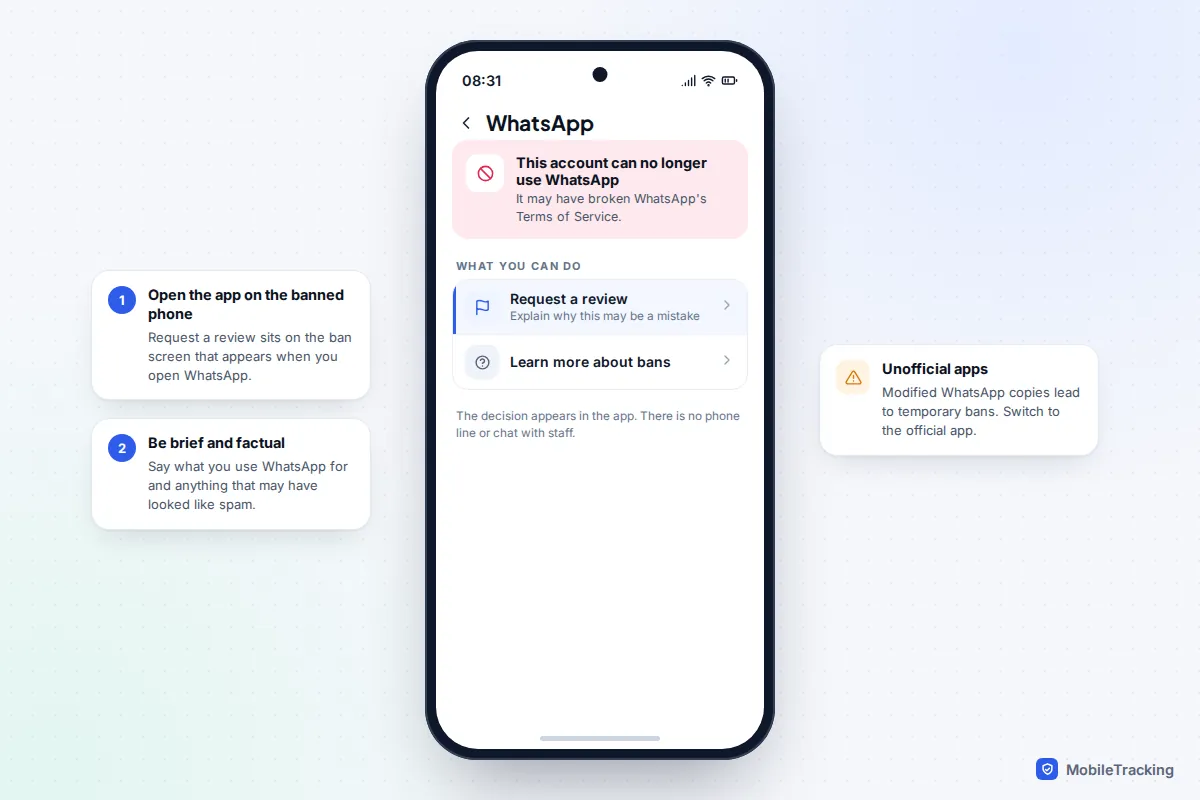
If the ban was a temporary one for using an unofficial app, switching to the official app is the fix; WhatsApp warns that carrying on can turn it into a permanent ban. If the review is turned down, that number cannot use WhatsApp. A new account on another number to dodge the ban breaks the same terms.
If the account was deleted for inactivity, or your number changed hands
WhatsApp says accounts are generally deleted after 120 days of inactivity, meaning the app has not connected to WhatsApp in that time. The chats already stored on your phone are left alone, but the account on WhatsApp’s side is gone, along with any messages that were waiting to be delivered.
If you still have the number and the old phone, open WhatsApp: you will be asked to verify as though new. On Android, check whether a Google backup still exists before you do. It may be gone: Google can delete WhatsApp backups not updated for five months, only weeks after the 120-day mark.
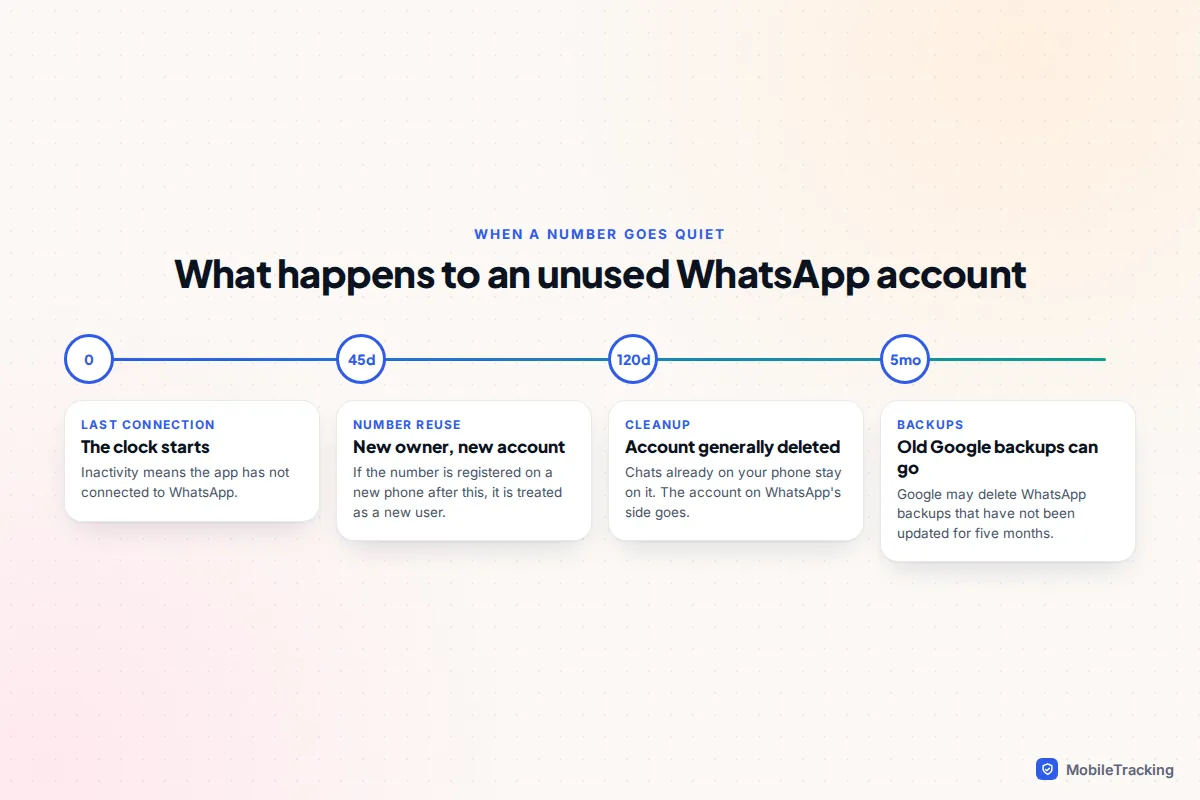
The harder case is a recycled number. Carriers reissue numbers that stop being used, and WhatsApp treats a number registered on a new device after 45 days of inactivity as belonging to a new user. If that has happened, the old account is not coming back, and the new owner cannot see your old chats either. Move to your current number and tell contacts yourself. To avoid this in future, see our guide to keeping your number when switching phones.
What comes back from a backup, and what doesn’t
A backup is a snapshot, not a mirror: anything sent after the last backup is missing. Deleting your account also removes things a backup never held, such as group membership.
| Symptom | Likely cause | What to try |
|---|---|---|
| No backup offered at all | Different number, different Google Account or Apple Account, or iCloud Drive off | Sign in to the account that made the backup, then reinstall and verify again |
| Backup found but weeks old | Auto backup was off or failing for lack of storage | Restore it anyway; it is the newest copy that exists |
| Asks for a password you don’t remember | End-to-end encrypted backup | Try a passkey or your 64-digit key if you saved one; WhatsApp cannot reset it |
| Restore stuck partway | Weak Wi-Fi or low free space | Free up space, stay on Wi-Fi and keep the app open |
| Chats back, photos blank | Media still downloading | Leave the phone on Wi-Fi and charging overnight |
For single conversations rather than whole accounts, our guide to recovering deleted WhatsApp messages covers the other routes.
Beware of “recovery” services and fake support
Search for help with a deleted or banned WhatsApp account and you will find people offering to “restore any account in 24 hours” for a fee. They cannot. Nobody outside WhatsApp can reverse a deletion or lift a ban, and WhatsApp does not charge for reviews. Most want your money and the six-digit verification code WhatsApp sends you.
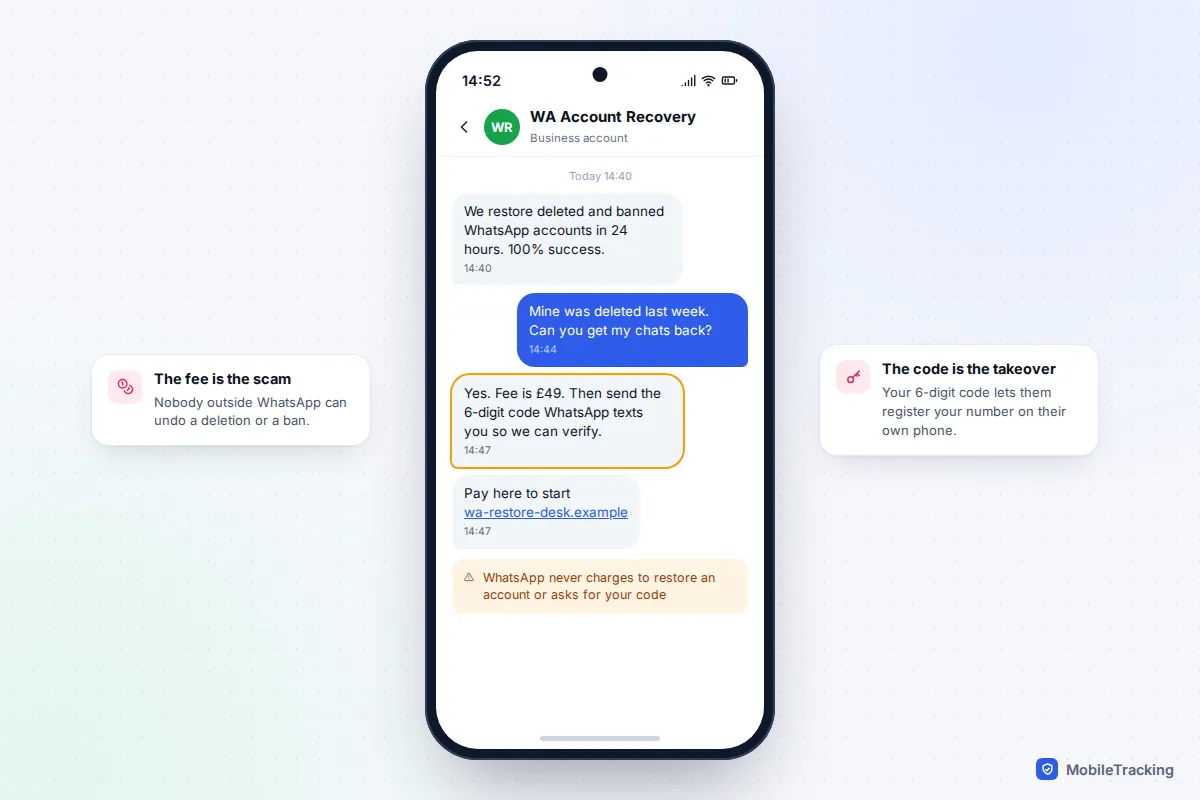
That code is the key to your number. If you hand it over, the scammer can set up your WhatsApp on their device, lock you out with their own two-step PIN, and message your contacts asking for money in your name. The same goes for “data recovery” apps claiming to pull WhatsApp chats from a deleted account: at best they read local backup files you could restore for free, and at worst they are malware. Real help comes from inside the WhatsApp app or its official help centre only.
How to make sure this never costs you your chats again
Priya’s phone was stolen on a train. She had a replacement SIM that evening and, because her Google backup ran nightly, lost one afternoon of messages. Her brother, with backups off, lost four years of family photos in the same situation.
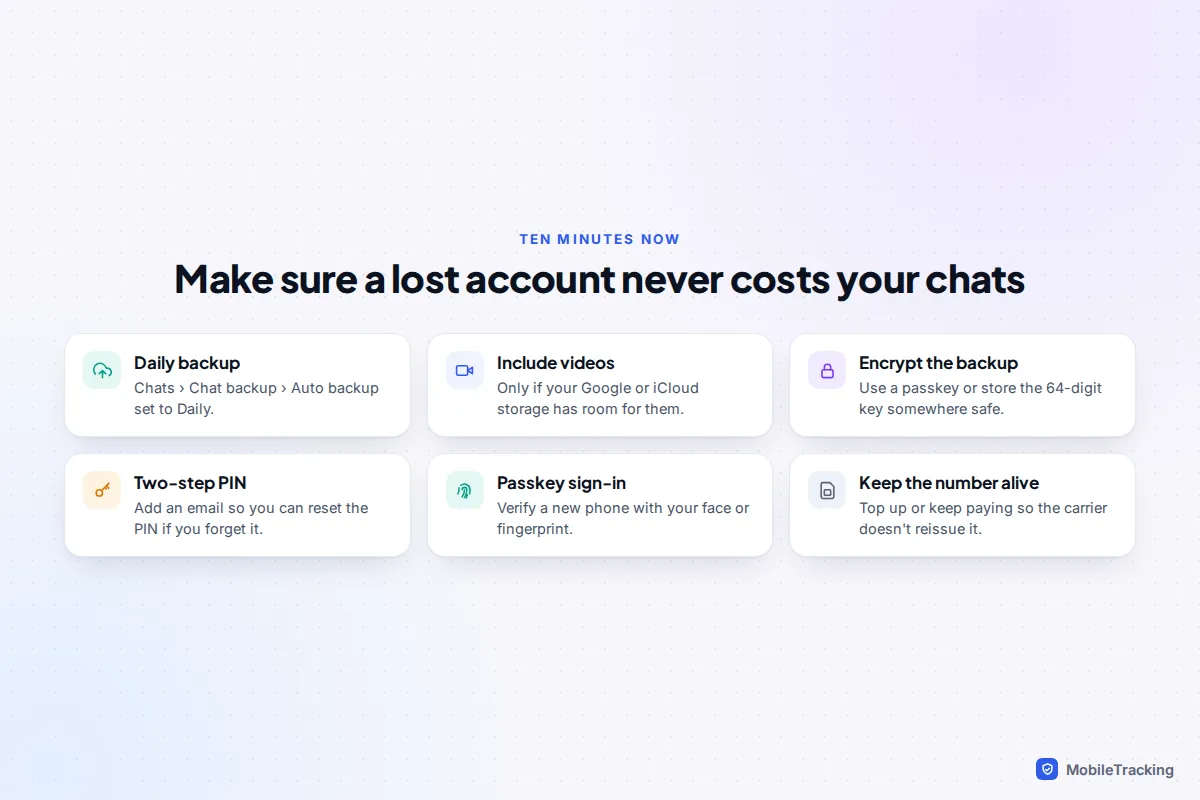
- Turn on a daily backup. In WhatsApp go to Settings (the You tab on current iPhone versions), then Chats, Chat backup, and set Auto backup to Daily. Check the “last backup” date now and then; a full Google or iCloud storage quietly stops backups.
- Encrypt the backup, and don’t lose the key. Under End-to-end encrypted backup, choose a passkey if it is offered to you, or save the 64-digit key in a password manager. A password you forget is as bad as no backup.
- Set a two-step verification PIN with an email address. Under Account, Two-step verification. The email lets you reset a forgotten PIN; without it you may have to wait days to get back in.
- Add a passkey for signing in (Account, Passkeys) so a new phone can be verified with your face, fingerprint or screen lock.
- Keep the number active. A pay-as-you-go number that lapses can be reissued, taking your WhatsApp with it.
Our full guide to backing up WhatsApp chats walks through each backup setting, and securing your WhatsApp from snooping covers the account protections in more depth.
Frequently asked questions
Can WhatsApp support restore a deleted account if I ask nicely?
No. WhatsApp states that deleting an account is irreversible and that it cannot revert it even if you did it by accident. Support can answer questions about bans and reviews, but it has no way to bring back a deleted account or its messages.
If I delete my account and sign up again with the same number, do my contacts notice?
They can message you as usual once you register again, because the number is the same. They may notice your profile photo and About have gone, and any groups you shared will show that you left. Your old chat history with them is still on their phones.
How long does WhatsApp keep my data after I delete the account?
Deleting from inside the app takes effect immediately for your account. WhatsApp’s information page says it can take up to 90 days to delete everything from its systems, and some copies may stay in backup storage longer for legal reasons. None of that can be used to restore your account.
Can I restore an older backup instead of the latest one?
Not from Google. WhatsApp says each new backup to the same Google Account overwrites the previous one, and there is no way to restore an older version. iCloud keeps one WhatsApp backup too, so if you need an older state, don’t let a new backup run until you have restored.
My child deleted their WhatsApp account by mistake. Can a parent reverse it?
No, the same rules apply to everyone. Register the number again, restore any backup the setup screen offers, and ask close contacts to export important chats.
This guide is general information, not legal or financial advice. Read our editorial policy.