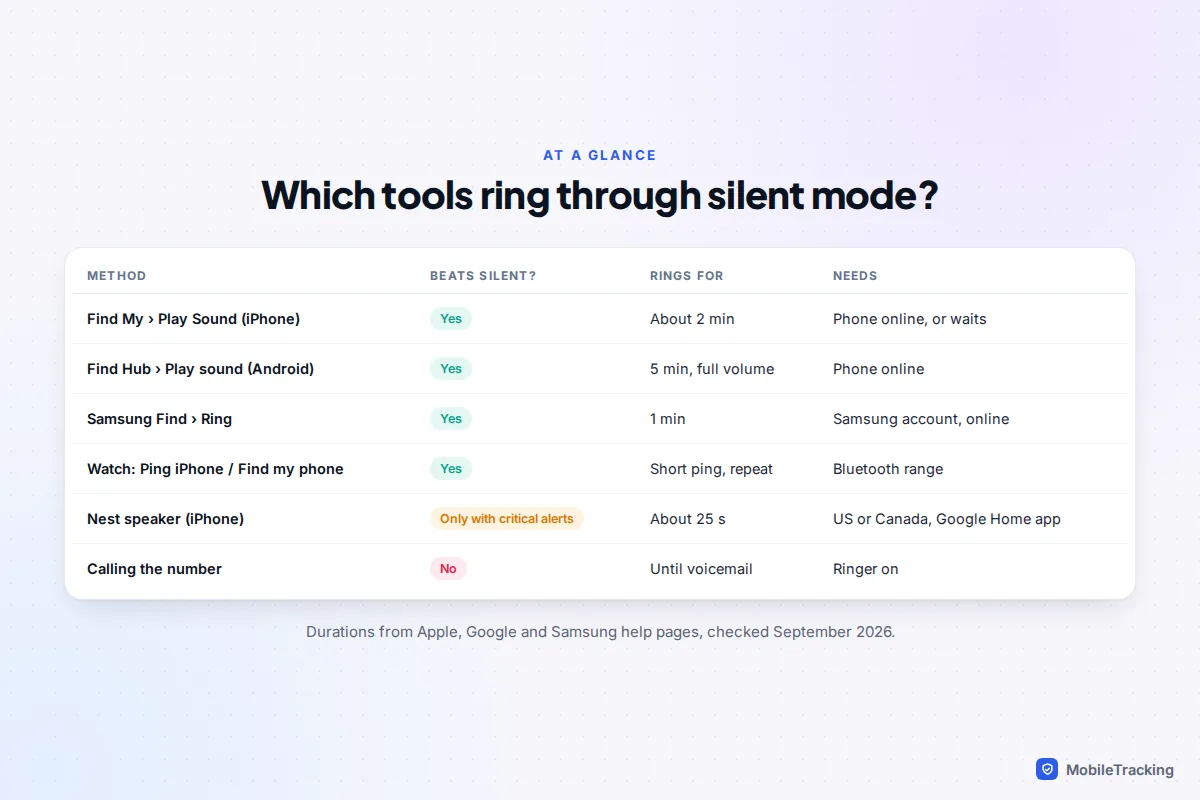
Calling a phone that is on silent gets you nowhere, but the finding tools built into iPhone and Android ignore silent mode completely. On an iPhone, open Find My on another Apple device (or go to icloud.com/find), choose the phone and tap Play Sound. On Android, open Find Hub on another device (or google.com/android/find) and tap Play sound: Google says it rings at full volume for 5 minutes, even on silent or vibrate. Galaxy owners can also use Ring in Samsung Find, and a paired smartwatch can ping the phone in seconds if you are close.
All of these need the phone to be switched on and, apart from the watch, connected to Wi-Fi or mobile data. Below you will find which tool to use in which situation, why the obvious trick of ringing your own number fails, what to try when the phone is offline, and the few settings to change today so the next search takes a minute instead of an hour.
Which method should you use?
Start with where you think the phone is. If it is somewhere in the house, the car or the office, any of the methods below will get it ringing. If it could be further away, the phone-finding services are the only ones that work over the internet rather than Bluetooth.
| Situation | Best first move | Why |
|---|---|---|
| Somewhere in the room, you’re wearing a watch | Watch shortcut | Two taps, no password, rings through silent |
| Somewhere at home, iPhone | Find My › Play Sound on an iPad, Mac or family iPhone | Ignores silent mode and Focus |
| Somewhere at home, Android | Find Hub › Play sound | Five minutes at full volume is long enough to search room by room |
| You only have a borrowed phone or a computer | icloud.com/find or google.com/android/find | Works in any browser with your account password |
| Map shows it somewhere unfamiliar | Don’t ring it; mark it as lost | A loud phone can tip off whoever has it |
That last row matters. Ringing is for a phone that is nearby and safe. If the map puts it at an address you don’t recognise, lock it and add a message instead, and go with someone, or involve the police, rather than turning up alone.
iPhone: Play Sound in Find My
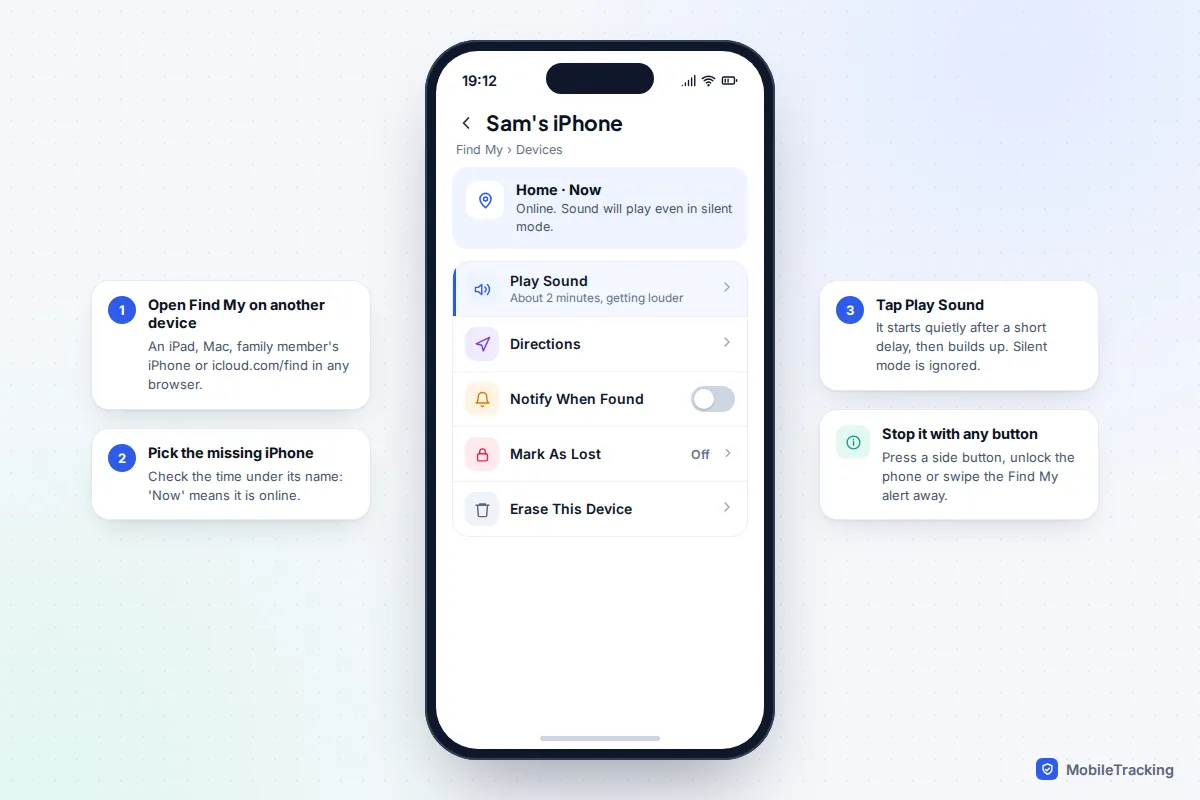
Play Sound is designed for exactly this problem. Apple’s iCloud guide says the sound plays even if the device is in silent mode or the volume is muted. It starts after a short delay, gradually gets louder and plays for about two minutes, so walk slowly from room to room rather than standing still.
- Open the Find My app on another Apple device signed in to your Apple Account, such as an iPad or Mac. If you share a family group, a relative’s iPhone will also show your devices in their Find My app.
- Tap Devices and choose the missing iPhone. Read the line under its name: “Now” means it is online.
- Tap Play Sound.
- When you find it, press a side button, unlock it or swipe away the Find My alert to stop the sound.
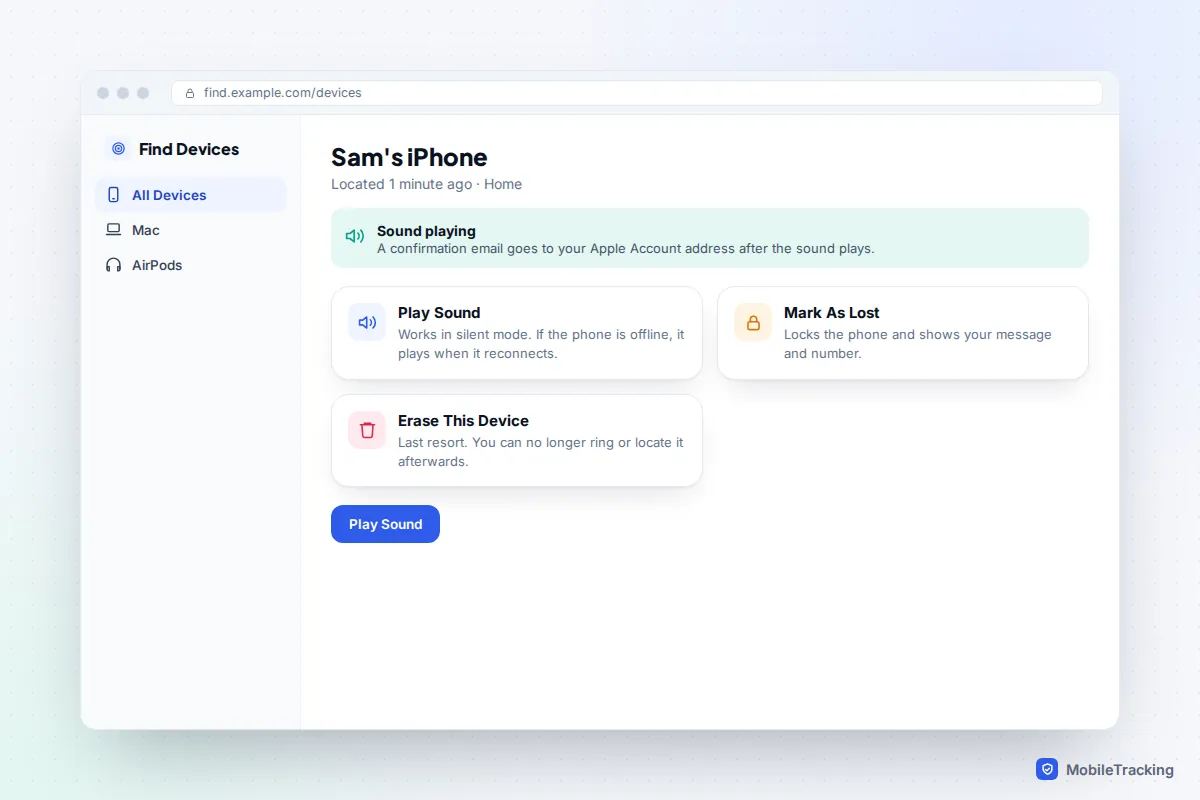
No other Apple device to hand? Open a browser on any computer or phone and go to icloud.com/find. When it asks for a verification code sent to your trusted devices, look for the Find Devices button at the bottom of the window: Apple lets you use Find Devices without the code, precisely because the trusted device is usually the one you’ve lost. On a friend’s iPhone, the Find My app’s Me tab has a Help a Friend link that opens the same page.
Apple sends a confirmation email to your Apple Account address after the sound plays. If that email arrives and you heard nothing, the phone is further away or buried under something thick.
Android: Play sound in Find Hub
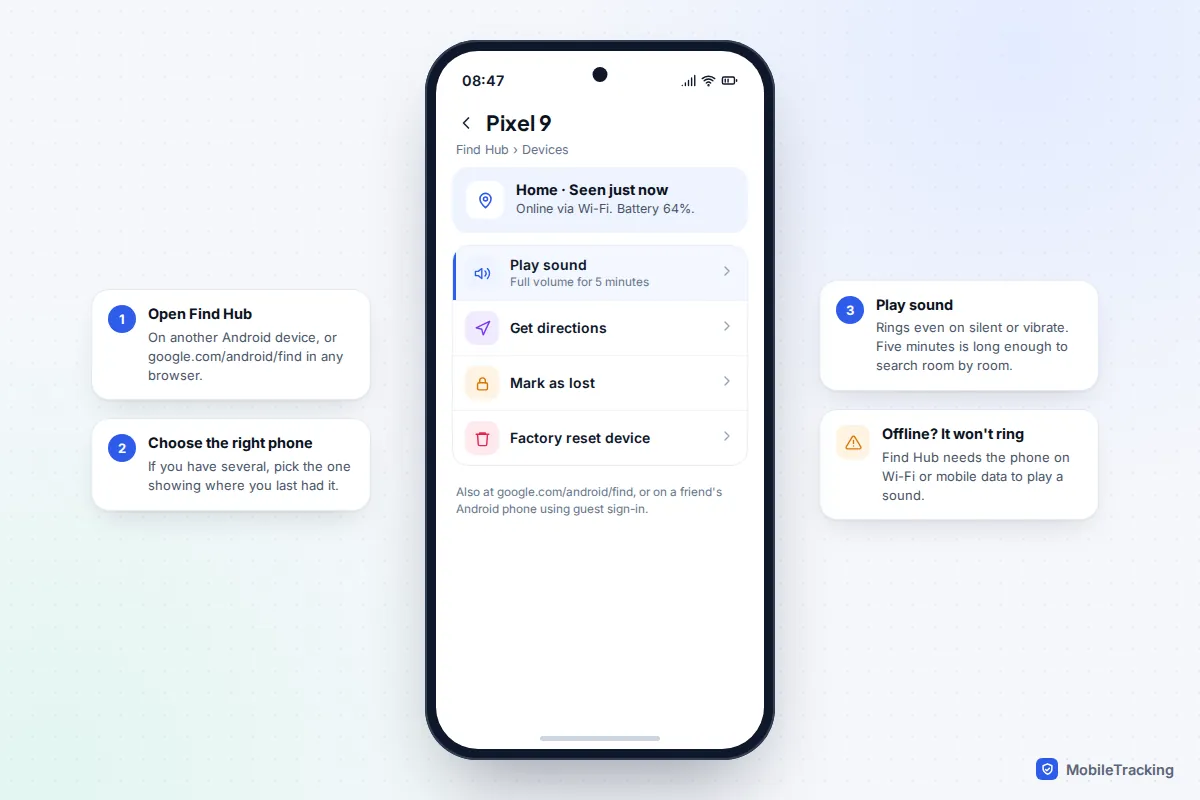
Google renamed Find My Device to Find Hub in 2025, and the old “Ring” button in Google Search has gone with it. According to Google’s lost-device help page, Play sound rings the phone at full volume for 5 minutes, even if it is set to silent or vibrate.
- Open the Find Hub app on another Android phone or tablet, or go to google.com/android/find in any browser.
- Sign in with the Google Account on the lost phone. On a friend’s Android phone, use the guest sign-in in Find Hub so their account isn’t touched.
- Pick the phone from the list at the top. If you own several Android devices, check the name carefully.
- Tap Play sound. Once you have the phone, stop the sound from its screen.
The catch is connectivity. Google’s page lists the conditions: the phone must have power, be connected to mobile data or Wi-Fi, be signed in to a Google Account and have Find Hub turned on. A phone that has lost signal in a basement or car park may show a location but won’t ring until it reconnects.
Samsung Galaxy: Ring in Samsung Find
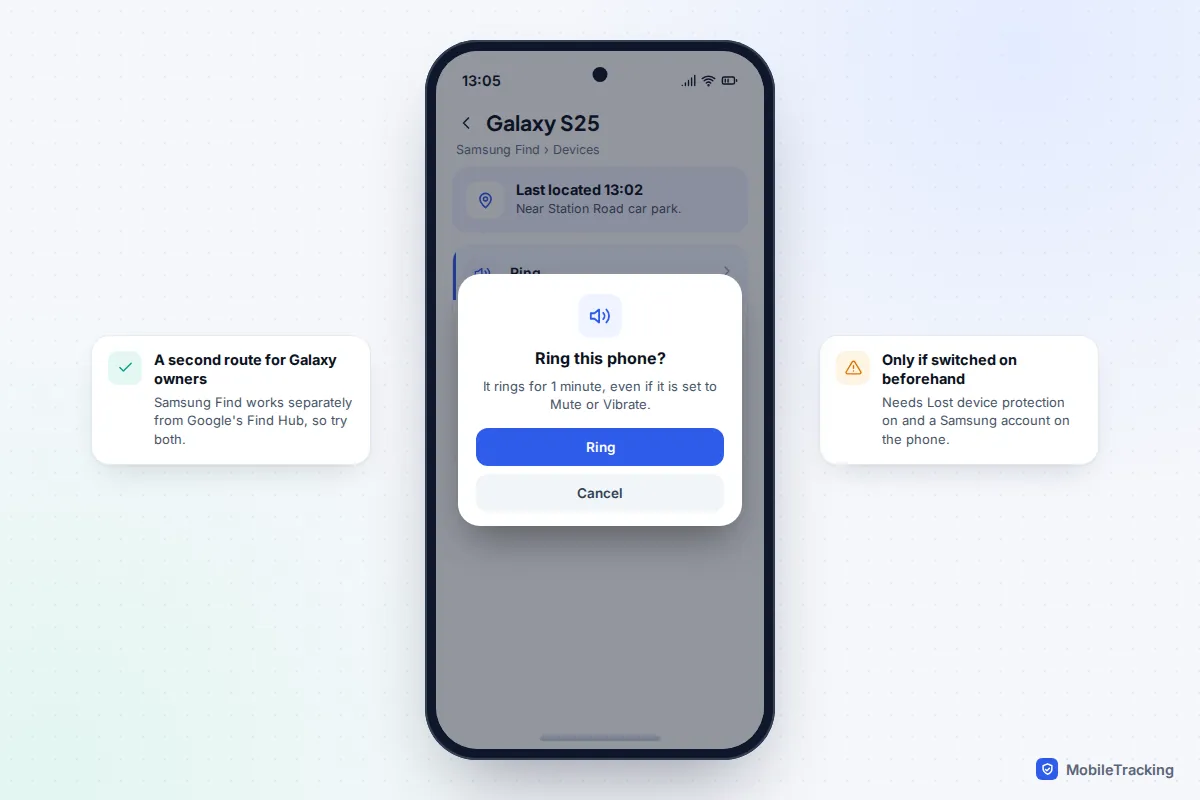
Galaxy phones have their own finder alongside Google’s. In the Samsung Find app on another Galaxy device, or at samsungfind.samsung.com, choose the phone and tap Ring. Samsung says the ringtone sounds for one minute, even if the phone is set to Mute or Vibrate.
It only works if Settings › Security and privacy › Lost device protection › Allow this phone to be found was switched on beforehand, with a Samsung account on the phone. Because the two systems are separate, it is worth trying Find Hub if Samsung Find can’t reach the phone, and the other way round.
From your wrist: the quickest option of all
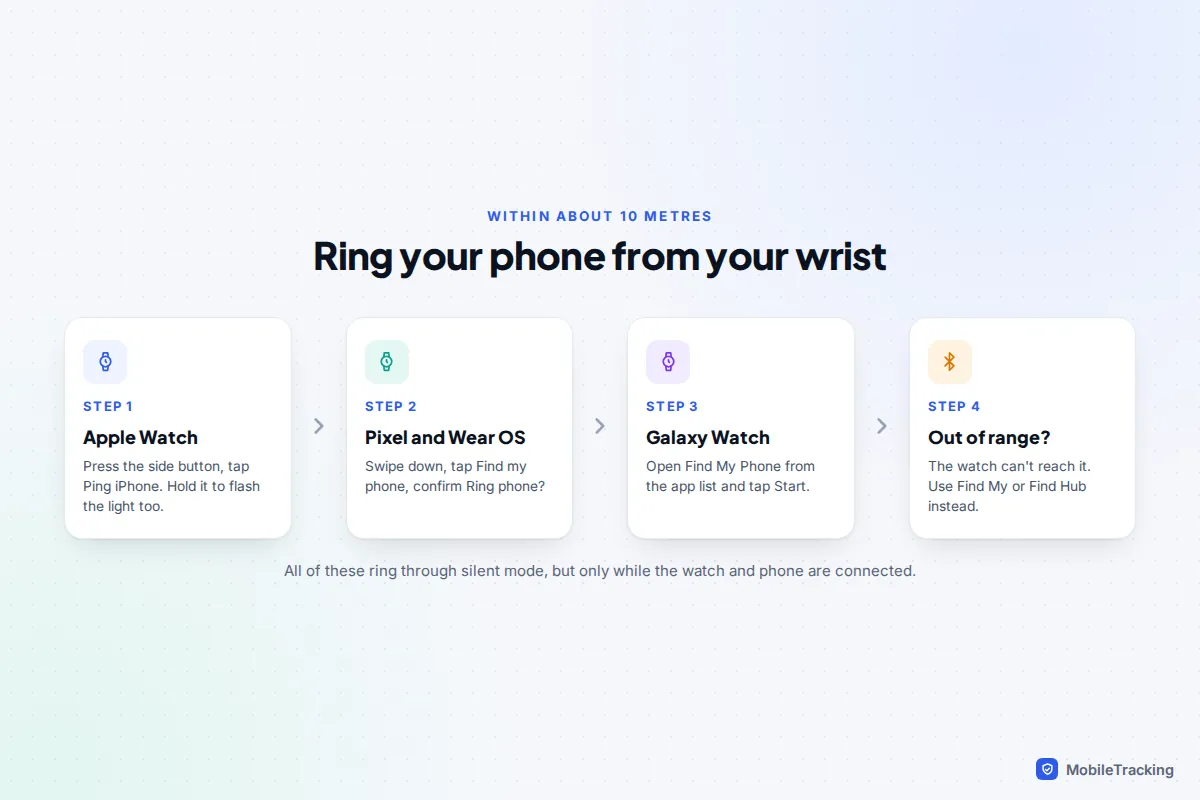
If you wear a smartwatch paired with the phone, it is usually faster than finding another device and typing a password. On an Apple Watch, press the side button to open Control Centre and tap Ping iPhone; touch and hold it to make the iPhone’s flash blink as well. On a Pixel Watch or other Wear OS watch, swipe down and tap Find my phone, then confirm. On a Galaxy Watch, open Find My Phone and tap Start.
These pings ring through silent mode, but they travel over Bluetooth, so the watch has to be connected to the phone: roughly 10 metres, less through walls. If the watch shows the phone as disconnected, go back to Find My or Find Hub. Our guide to using a smartwatch to find your phone covers every watch brand, including Garmin and Fitbit, and the Precision Finding arrow on newer Apple Watches.
Smart speakers and voice assistants
A smart speaker sounds like the perfect answer, but results depend heavily on the phone and the assistant.
- Google Nest speakers, Android phone: say “Hey Google, find my phone”. Google’s Nest help page says the assistant should ring the device even if it is in Do Not Disturb, using the same Find Hub system. Everyone who wants to use it needs Voice Match set up and their own Google Account linked. Name the device (“find my Pixel”) if you own more than one.
- Google Nest speakers, iPhone: this only works in the US and Canada, through a notification from the Google Home app that rings for about 25 seconds. It won’t make a sound in silent mode or Do Not Disturb unless you have allowed the Google Home app’s critical alerts. Speakers switched to Gemini for Home don’t list phone finding among their features yet, and some owners report the command has stopped working, so test yours before you rely on it.
- HomePod: if HomePod recognises your voice, asking “Where’s my iPhone?” makes the iPhone play the Find My sound, which ignores silent mode.
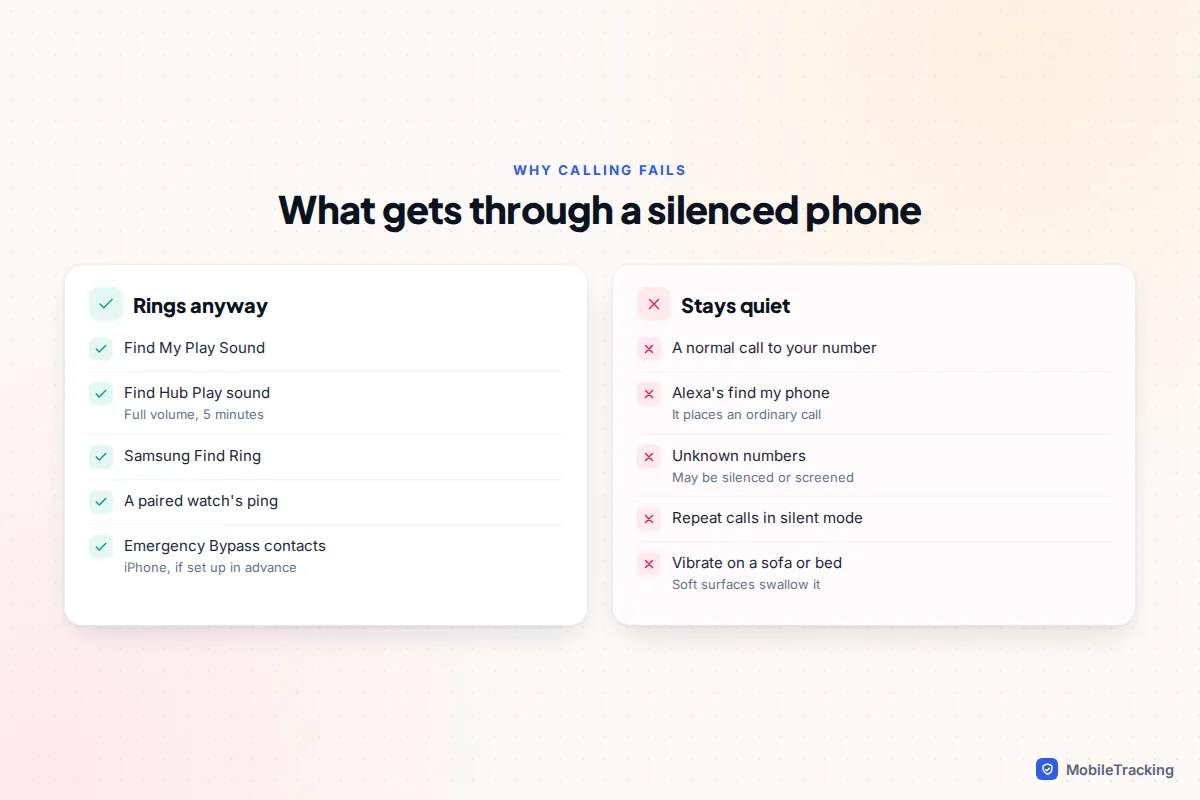
- Amazon Alexa: “Alexa, find my phone” places an ordinary phone call to your number. That makes it useless on a silenced phone, for the reasons below.
Why calling your own number doesn’t work
A phone call is handled by the phone’s normal ringer, and silent mode exists to stop exactly that. Even when the ringer is on, several things can swallow the call:
- Silent or Vibrate: on an iPhone, the Ring/Silent switch on older models or the Action button and Control Centre on newer ones mute calls. On Android, the sound mode does the same. A vibration on a sofa cushion or in a coat pocket is almost silent.
- A Focus or Do Not Disturb: calls from anyone not on the allowed list are silenced. On iPhone, Allow Repeated Calls lets a second call within three minutes through a Focus, but not through silent mode.
- Unknown-number screening: if you ring from a friend’s phone that isn’t in your contacts, iOS 26 and later may send it to voicemail or ask the caller why they are calling, depending on Settings › Apps › Phone › Screen Unknown Callers. Pixels in some countries can screen unknown callers automatically too.
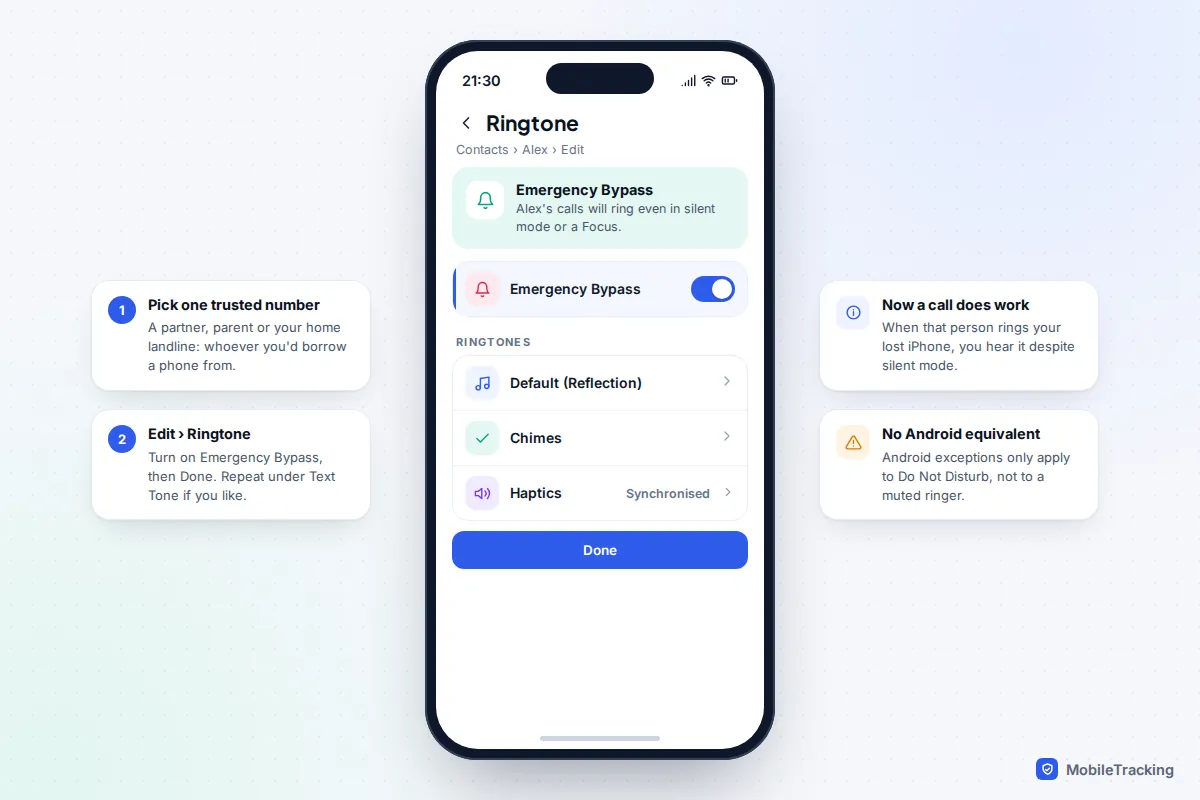
There is one way to make a call work next time on an iPhone: Emergency Bypass. Pick one person you’d realistically borrow a phone from, such as a partner or parent, or your home landline. Open their contact, tap Edit, then Ringtone, and turn on Emergency Bypass. Their calls will now ring even when your iPhone is in silent mode or a Focus. It works only for calls from that exact number, so check the contact has the right one saved.
Android has no true equivalent. Starred contacts and repeat callers can break through Do Not Disturb, but not a ringer set to Silent or Vibrate. If you want the same safety net on Android, get into the habit of using Do Not Disturb, with your starred contacts allowed, instead of switching the ringer to silent.
When the phone is offline or the battery is flat
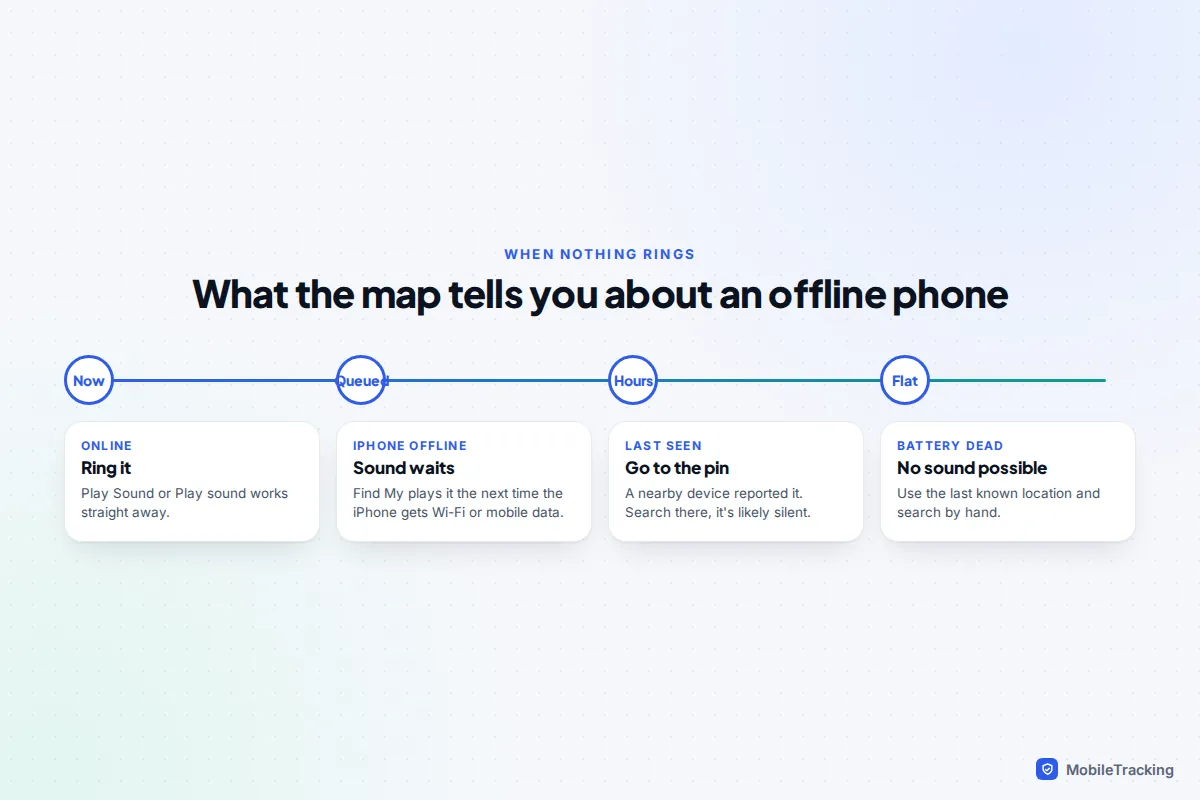
Nothing can make a phone ring once its battery is dead, and most tools need a connection. What you can still do depends on the system.
- iPhone: tap Play Sound anyway. Apple says that if the device is offline, the sound plays the next time it connects to Wi-Fi or mobile data. That helps when the phone is somewhere with patchy signal, such as a basement or a car park.
- Android: Find Hub needs the phone online to play a sound. With offline finding turned on, other Android phones nearby can still report its position, so check the map and the time it was last seen.
- Samsung: Samsung Find can show the last location a Galaxy sent before its battery ran low, if Send last location was on.
Treat the last known location as your search area and look by hand: between cushions, in bags, under car seats, in coat pockets. If that fails, read our guide to finding a lost phone that is turned off, which explains how long each system keeps reporting after power-off.
Troubleshooting: the sound was sent but you heard nothing
- The app says the sound played: the phone is online but further away than you think, or muffled. Turn off the TV and washing machine, open internal doors and try again.
- “Pending” or no response: the phone is offline. Look for it at the last known location, and leave Play Sound queued on an iPhone.
- The phone isn’t listed at all: Find My, Find Hub or Samsung Find wasn’t switched on, or you are signed in to a different account.
Set it up now so it works next time
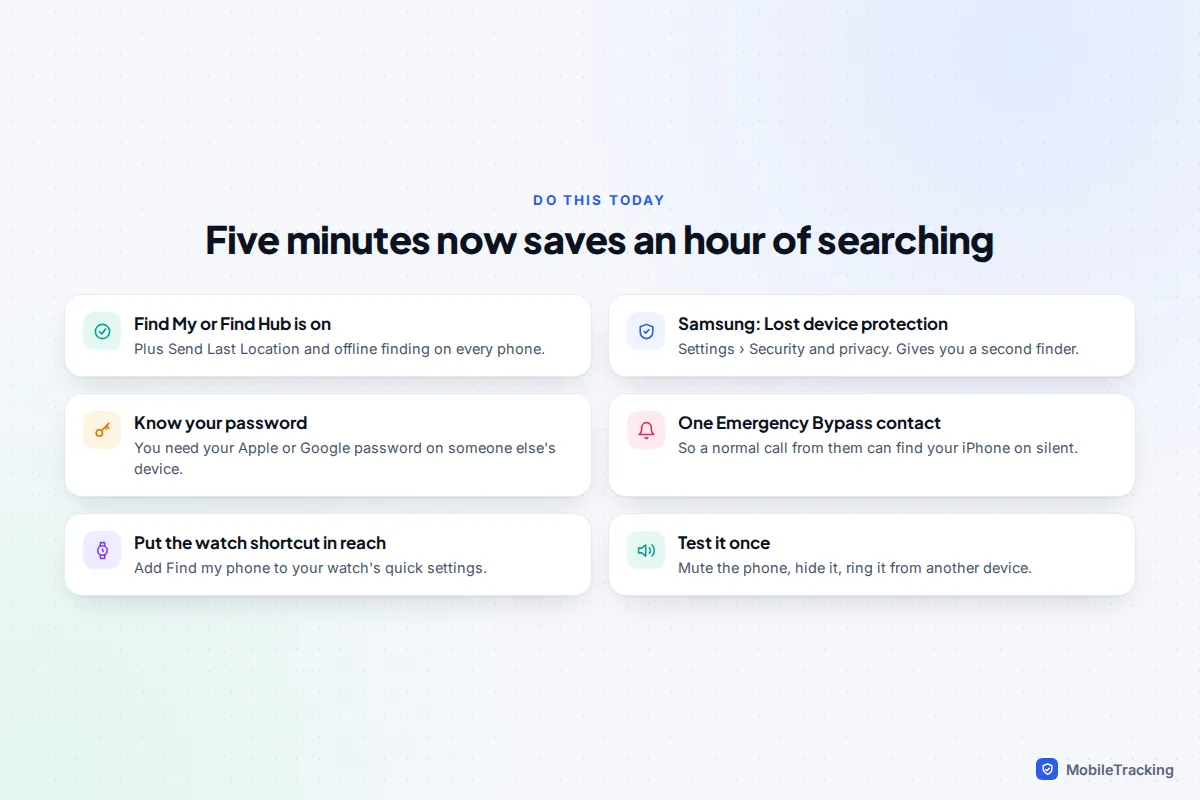
Every method above depends on settings that must be switched on before the phone goes missing. It takes about five minutes per phone, children’s phones included.
- iPhone: Settings › [your name] › Find My › Find My iPhone. Turn on Find My iPhone, Find My network and Send Last Location.
- Android: Settings › Google › All services › Find Hub. Turn on Allow device to be located and choose a “with network” option under Find your offline devices. Labels vary by manufacturer, so search Settings for “Find Hub” if needed.
- Samsung Galaxy: also turn on Settings › Security and privacy › Lost device protection, including Allow this phone to be found and Send last location.
- Know your password. You will need your Apple Account or Google Account password on someone else’s device, without the phone that normally approves sign-ins.
- Add one Emergency Bypass contact on each iPhone, as described above.
- Put the watch shortcut within reach, for example by adding Find my phone to your watch’s quick settings.
- Test it once. Put the phone on silent, hide it in another room and ring it from a second device. Ten seconds of testing now beats discovering a switched-off setting later.
Our step-by-step guide to turning on Find My before you lose your phone explains each of these switches in more detail.
Frequently asked questions
Can I make my phone ring on silent from a computer?
Yes. Go to icloud.com/find for an iPhone or google.com/android/find for an Android phone, sign in with the account on that phone and choose Play Sound or Play sound. Both override silent mode. Our guide to finding a lost phone using a computer walks through the screens.
Will Play Sound work if the phone is in Do Not Disturb or a Focus?
Yes. Find My, Find Hub and Samsung Find’s Ring are all designed to sound regardless of silent mode, vibrate and Do Not Disturb, because those are the most common reasons a lost phone can’t be heard.
Can I make someone else’s phone ring on silent?
Only with their account, which means only with their permission, for example a family member who has shared their device with you through Family Sharing. The tools are built for owners finding their own devices, and nothing legitimate lets you override another person’s phone settings.
Does “find my phone” in Google Search still ring the phone?
No. Google removed the ring option from search results when Find My Device became Find Hub in 2025. Go directly to google.com/android/find instead.
This guide is general information, not legal or financial advice. Read our editorial policy.