
To see someone’s last seen on Telegram, open your chat with them and look under their name at the top of the screen. You will see online, an exact time such as last seen today at 14:05, or a vague status such as last seen recently. You only get the exact time if they share it with you and you share yours with them. If all you see is “recently”, “within a week” or “within a month”, the exact time is hidden from you, and no app, bot or trick will legitimately reveal it.
The good news is that the vague labels still tell you something, and you can often work out whether the block is their choice or your own settings. This guide explains what each status means, why a time might be hidden, what Telegram Premium does and doesn’t change, and how to set your own last seen so it suits you.
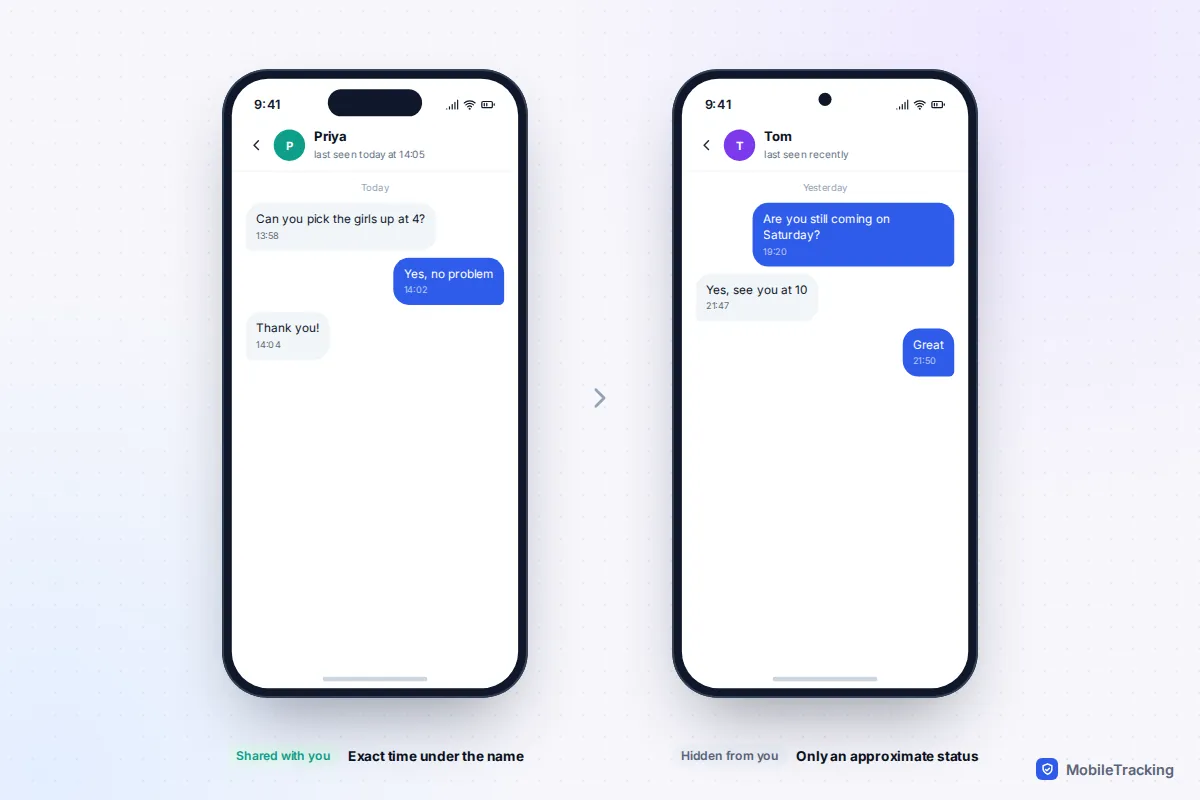
Where Telegram shows last seen
The status appears in the same few places on iPhone, Android and Telegram Desktop:
- The chat header. Open a one-to-one chat and the line under the name shows the status. While the person has Telegram open it says online.
- Their profile. Tap the name or photo at the top of the chat. The same status sits under their name, sometimes with extra options beside it.
- Group member lists. Open a group’s info page and each member shows a status, following that member’s own privacy settings.
- Contacts. The Contacts tab can be sorted by last seen time, which puts the people most recently active at the top.
Exact times read as “last seen just now”, “last seen 12 minutes ago”, “last seen today at 14:05”, “last seen yesterday at 21:40” or a date for anything older. Telegram doesn’t keep a history of when someone was online: you only ever see the latest status.
What “recently”, “within a week” and “long time ago” really mean
When someone’s exact time is hidden from you, Telegram shows one of four rounded statuses instead. Telegram’s own FAQ gives the ranges, and they are deliberately loose so nobody can work out a precise time.
| Status | What it means |
|---|---|
| last seen recently | Anywhere from 1 second to 2 or 3 days ago |
| last seen within a week | Between 2 or 3 days and 7 days ago |
| last seen within a month | Between 6 or 7 days and a month ago |
| last seen a long time ago | More than a month ago, and also what blocked users see |
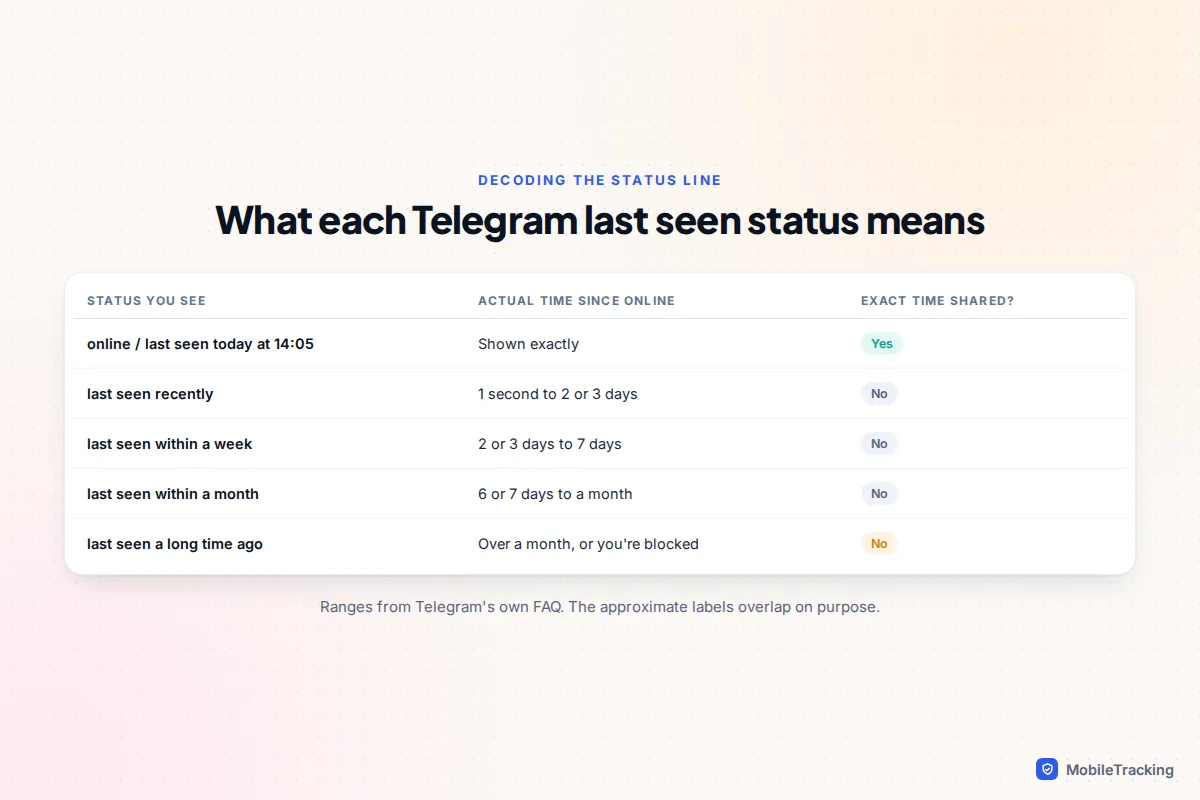
In practice, “recently” means the person is an active user. It does not mean they are online now or that they have read your message. “Within a week” or “within a month” suggests someone who rarely opens Telegram, which is useful if you are wondering why a relative hasn’t replied.
Being hidden doesn’t make someone invisible when they talk to you. Telegram’s FAQ notes that if they send you a message, read yours or start typing, you may briefly see them as online for about 30 seconds, whatever their settings.
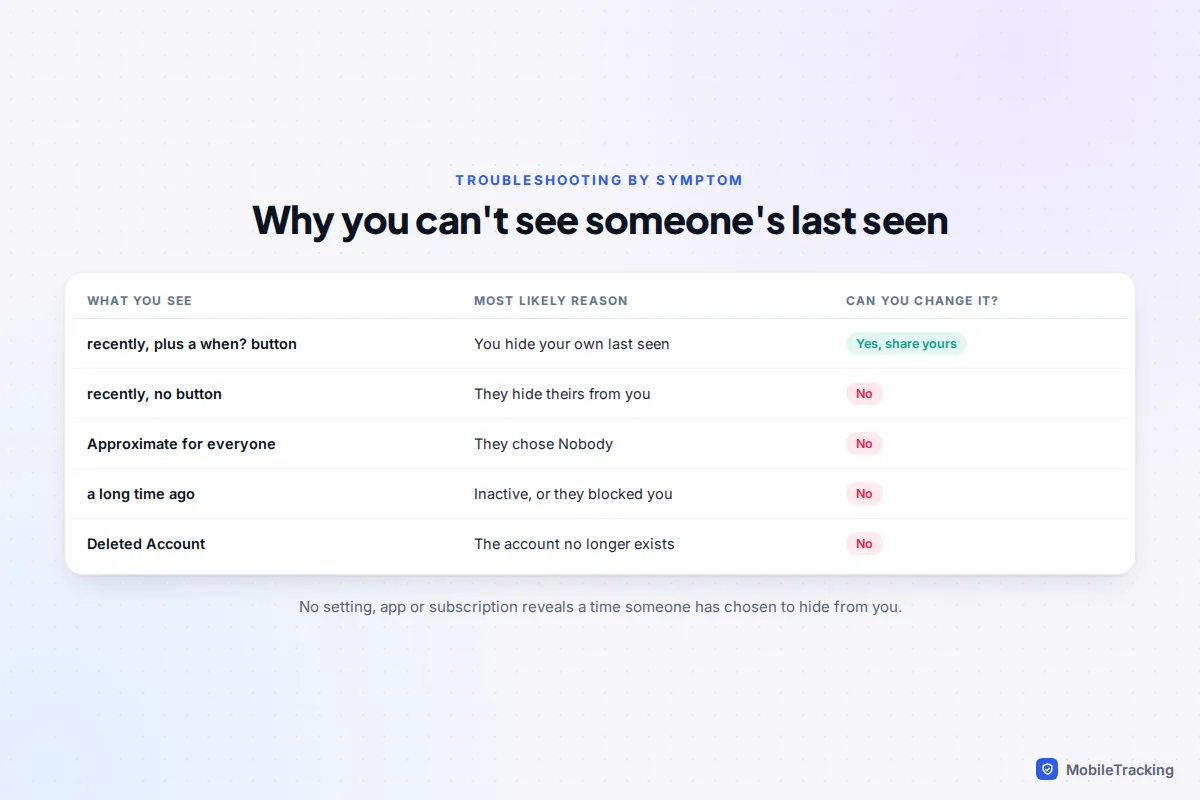
Why you can’t see someone’s last seen
There are only a handful of reasons, and the clues on screen usually tell you which one applies.
You are hiding your own
Telegram’s rule is reciprocal: you won’t see exact last seen times for people you don’t share yours with. If you set your own last seen to Nobody, or to My Contacts when the other person isn’t in your contacts, everyone else’s exact time disappears for you too.
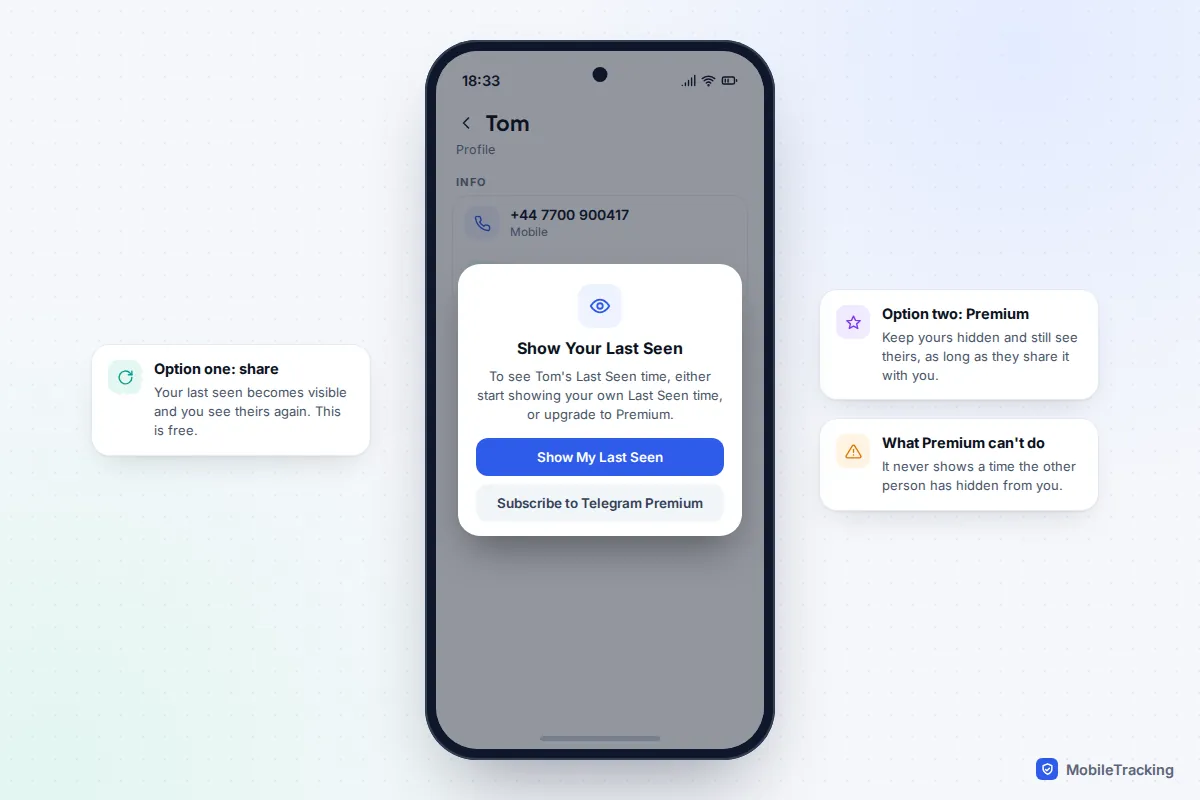
In recent versions of the app there is a quick way to check. Open the person’s profile. If a small when? button sits beside “last seen recently”, their time is being hidden because of your own setting. Tap it and Telegram offers to Show My Last Seen or to subscribe to Premium.
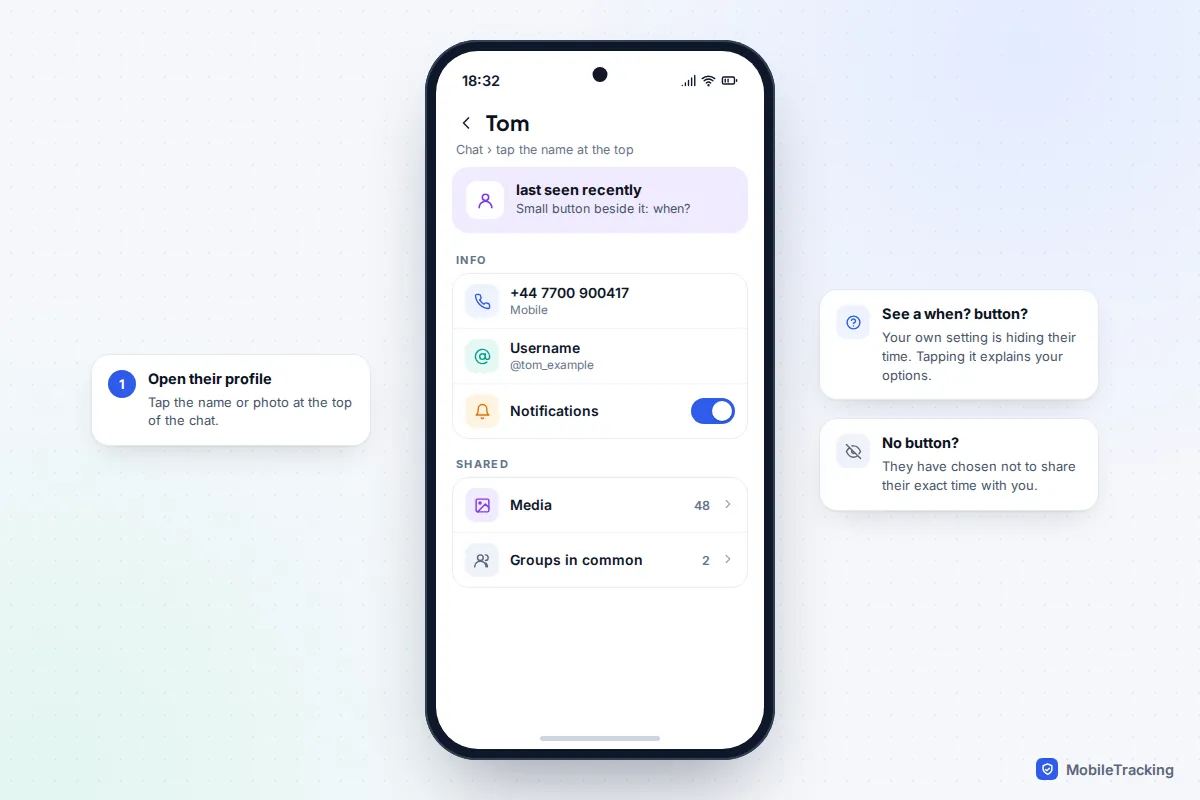
They are hiding it from you
If there’s no when? button, the other person has chosen not to share with you. They may have picked Nobody, picked My Contacts without having you saved, or added you to Never Share With. You can’t tell which, and Telegram doesn’t notify anyone about these choices.
They have blocked you, or stopped using Telegram
Blocked users always see “last seen a long time ago”. So do contacts who genuinely haven’t opened Telegram for over a month, so the label alone doesn’t prove you’ve been blocked. A profile that shows “Deleted Account” means the account no longer exists.
Telegram Premium: what it changes and what it doesn’t
Since January 2024, Telegram Premium has let subscribers hide their own last seen and read times while still seeing other people’s. Telegram’s developer documentation describes it plainly: Premium users can see others’ last seen and read times even if those people can’t see theirs.
That is the whole benefit, and it has a firm limit. Premium only removes the reciprocity penalty. If someone has hidden their last seen from you, by choosing Nobody or adding you to Never Share With, it stays hidden from Premium users too. Telegram states that if you hide your last seen or read time, it is hidden from all those users regardless of their Premium status.
Read times and Hide Read Time
The same rules apply to read times in private chats. Two ticks mean your message was read, and Telegram can show exactly when, but only for messages from the last seven days. There’s also a free Hide Read Time switch, which appears in your last seen settings once you hide your last seen from anyone. It hides when you read messages from people who can’t see your last seen, and in return hides their read times from you. It doesn’t affect group chats. Our guide to turning off read receipts on Telegram goes into the ticks in more detail.
How to control your own last seen
You can change who sees your last seen at any time, and the change applies straight away. The menu is almost identical on both platforms, though the screen is called Last Seen & Online on Android and Last Seen on iPhone.
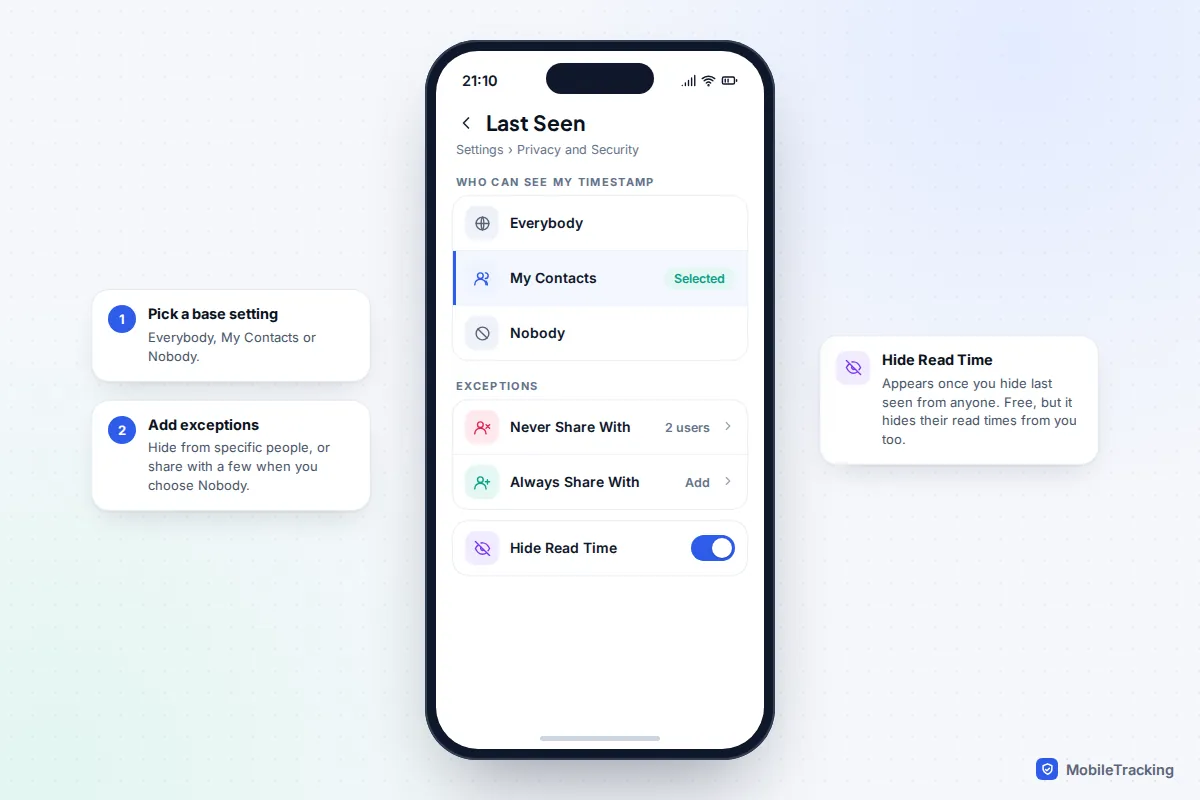
- Open Telegram and go to Settings › Privacy and Security.
- Tap Last Seen & Online (Android) or Last Seen (iPhone).
- Choose Everybody, My Contacts or Nobody.
- Under exceptions, use Never Share With to hide your time from particular people, or Always Share With to let a few people see it even when you have chosen Nobody.
- Decide whether to turn on Hide Read Time, which appears once your setting isn’t simply Everybody.
On Telegram Desktop the same options are under Settings › Privacy and Security › Last seen & online. Your “online” status follows the same rules: people who can’t see your last seen don’t see you as online either, apart from those brief moments when you message, read or type in their chat.
Which setting should you use?
Think about what you gain and lose. Hiding your time also hides everyone else’s exact time from you, unless you pay for Premium. For most families, My Contacts is the sensible middle ground: people you know see your activity, while strangers in large groups only see an approximate status.
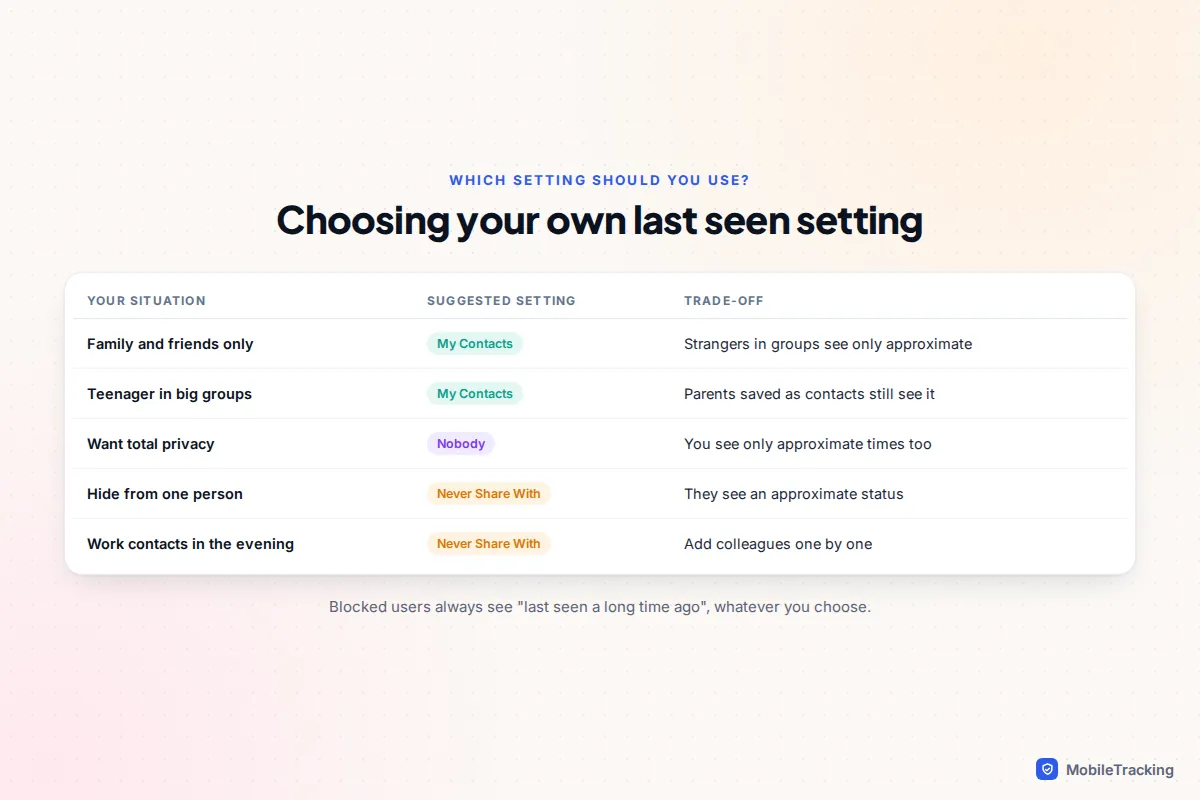
If someone makes you uneasy by commenting on when you were online, don’t wait: add them to Never Share With, or block them. They won’t be told. If you also use WhatsApp, our guide to hiding your last seen on WhatsApp covers the equivalent settings there.
Why you should never use a last seen tracker
Search for Telegram last seen and you will find apps, websites and bots promising to reveal hidden statuses or send an alert every time someone comes online. Avoid them, for three reasons.
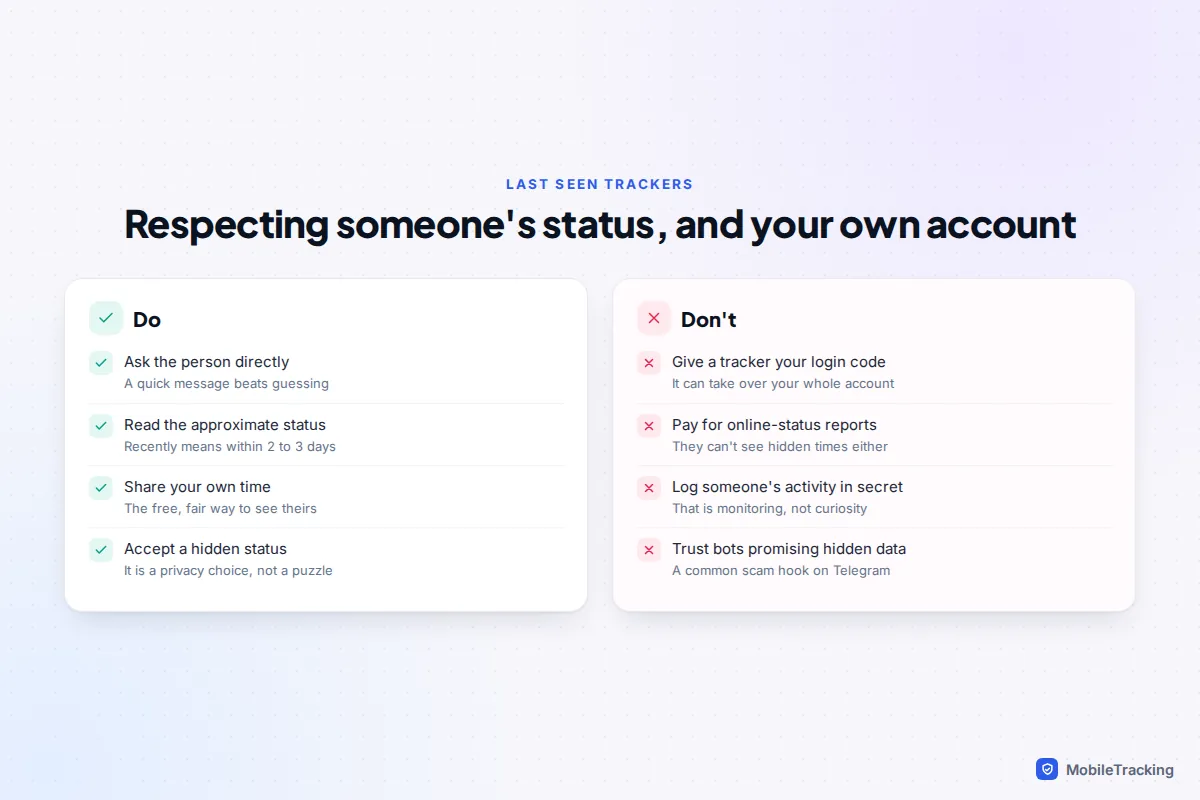
First, they can’t do what they claim. A tracker can only see what Telegram shows to the account it uses. If someone hides their last seen, the tracker sees “recently” too, however much you pay. Second, many ask you to sign in with your phone number and the login code Telegram sends you, or to scan a QR code. That gives them full access to your account, your chats and your contacts, and is a standard way accounts get stolen. Third, recording another person’s activity without their knowledge is monitoring. Telegram’s own rules for apps built on its platform require them to guard users’ privacy with the utmost care and forbid acting on a user’s behalf without their knowledge and consent.
A note for parents
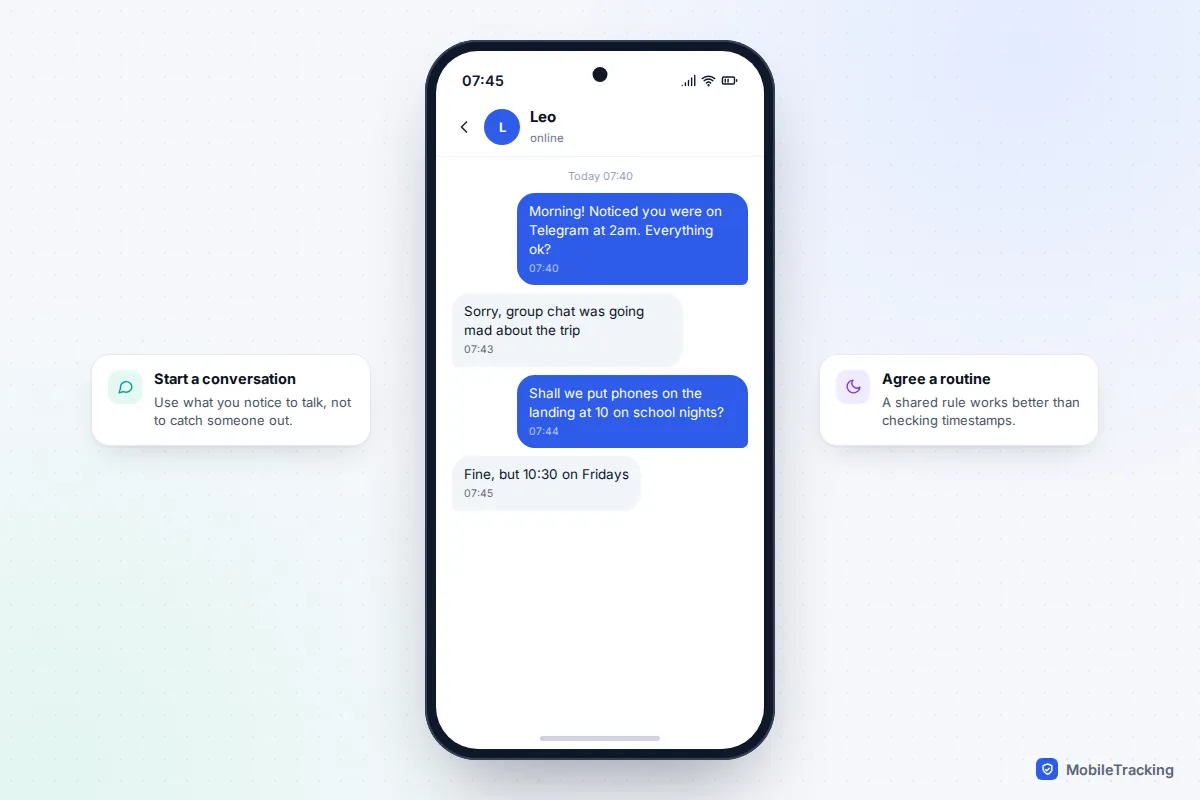
If your child uses Telegram and has you saved as a contact, you may be able to see when they were last active, depending on their settings. Use it as a prompt for a conversation rather than a surveillance tool. Seeing “last seen today at 02:14” on a school night is a good reason to talk about phones at bedtime, not to catch them out.
Teenagers often switch to Nobody once they realise their activity is visible, and that is their right in the app. A clear, agreed routine, such as phones charging outside bedrooms at a set time, works far better than watching a timestamp. For the wider picture, our guide on password safety and account security for kids covers the account protections every young Telegram user should have.
Frequently asked questions
Does “last seen recently” mean I have been blocked?
No. “Recently” means the person hides their exact time from you but has been active within the last two or three days. Blocked users see “last seen a long time ago” instead, though that label also appears for people who simply haven’t used Telegram for over a month.
Will someone know if I check their last seen?
No. Checking a status sends no notification, and Telegram doesn’t tell anyone who viewed their profile. What you can see is still limited by their privacy settings and yours.
If I hide my last seen, can I still see other people’s?
Only approximately, unless you have Telegram Premium. Premium lets you keep yours hidden and still see exact times from people who share theirs with you. Without it, you see “recently”, “within a week” and so on.
Can Telegram Premium show a last seen that someone has hidden?
No. Premium only removes the rule that hides other people’s times when you hide your own. If someone has set their last seen to Nobody or excluded you, Premium users see the same approximate status as everyone else.
Why does someone show as online when their last seen is hidden?
Telegram briefly shows people as online, for about 30 seconds, when they send you a message, read your message or type in your chat, whatever their last seen setting. Outside those moments they won’t appear online to you.
Is there any way to see last seen history over time?
Not in Telegram. It only shows the most recent status, and the full details are in Telegram’s FAQ. Services that claim to log someone’s activity history are best avoided: they rely on repeatedly checking a status you can already see, and many are scams after your login code.
This guide is general information, not legal or financial advice. Read our editorial policy.