
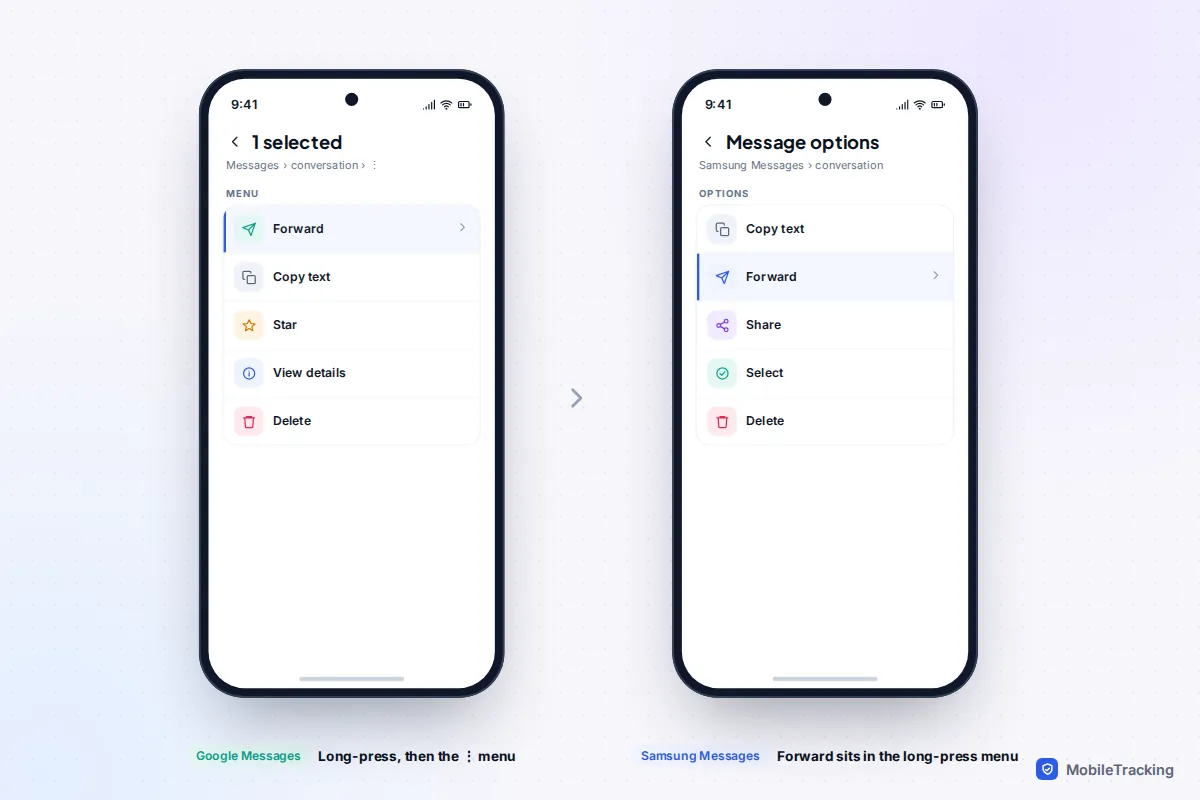
To forward one text on an iPhone, touch and hold the message, tap More…, then tap the curved arrow at the bottom right and choose who to send it to. In Google Messages on Android, long-press the message, tap the ⋮ menu at the top right and choose Forward. On older Samsung phones that still use Samsung Messages, Forward appears as soon as you long-press. The whole thing takes about ten seconds.
What neither iPhone nor Android offers is a switch that silently copies every incoming text to a different phone number. If you want your own texts on a second device, such as a tablet, laptop or smartwatch, there are proper sync features for that, covered below. And if someone asks you to forward a text containing a code, stop: that request is one of the most common account takeover scams there is.
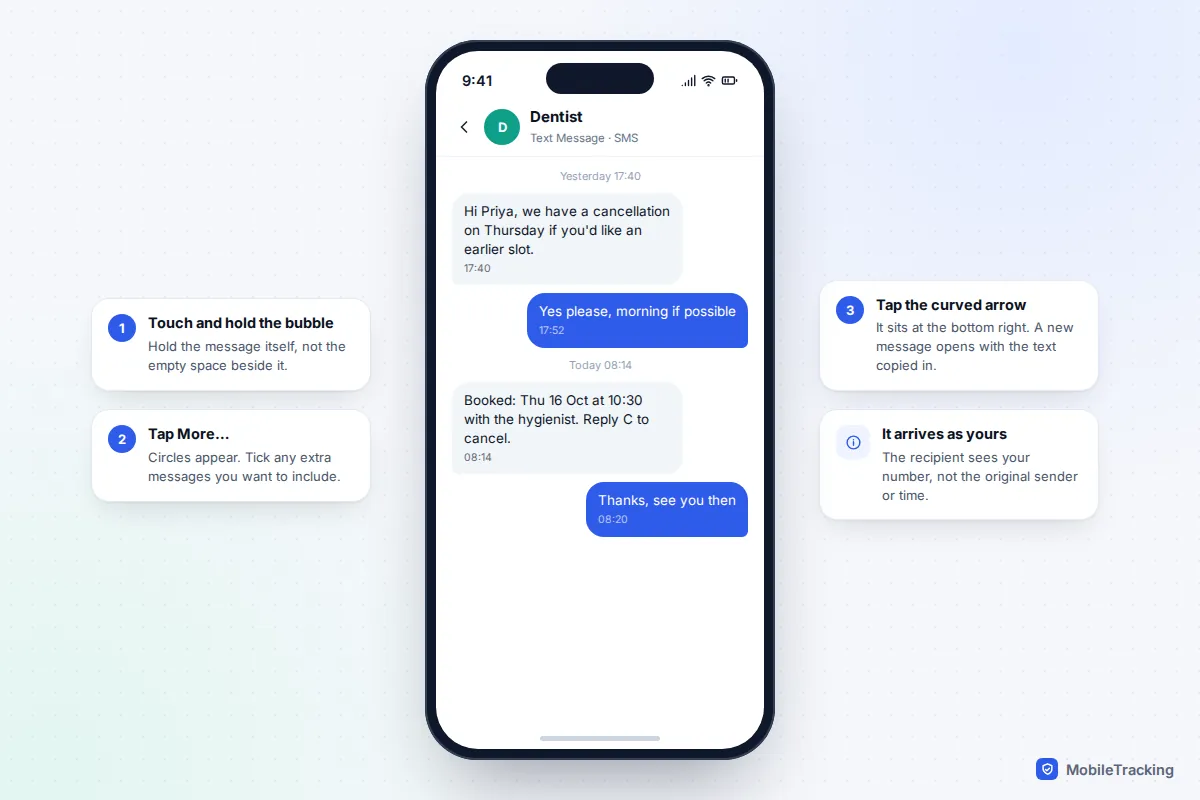
Forward a single text on iPhone
These steps work the same way on iOS 26 and iOS 27, and they apply to blue iMessages, green SMS texts and RCS chats alike.
- Open Messages and go into the conversation.
- Touch and hold the message bubble itself until the menu appears. If you hold the space beside it, nothing happens.
- Tap More…. A circle appears next to every message, with the one you held already ticked.
- Tick any other messages you want to include, including photos or videos.
- Tap the curved forward arrow at the bottom right of the screen.
- Type a name or number in the To field, add a note if you like, and tap send.
Two things surprise people. First, the recipient sees the text as coming from you: there is no “forwarded” label, and the original sender’s name and the time it was sent are not included. Typing “From the dentist, 08:14:” above it saves confusion. Second, if you tick several messages, they arrive as separate messages without the context of who said what.
If you need a record that shows who sent what and when, for a landlord dispute, a school complaint or a harassment report, forward a screenshot instead. Press the side button and volume up together, crop if needed, and share the image. For longer threads, exporting the conversation is more reliable; our guide to exporting text messages to a computer covers the options.
Forward a text on Android
Most Android phones now use Google Messages, including Pixels and recent Samsung Galaxy phones in many countries. The Forward option is tucked away, which is why so many people think it has disappeared.
- Open Messages and the conversation.
- Long-press the message. It turns highlighted and a row of icons appears at the top.
- Tap the ⋮ (three dots) at the top right. Forward is in that menu, not in the icon row.
- Choose a recent conversation or tap New message, pick the contact and send.
Google Messages forwards one message at a time. If you need a run of messages, forward them one by one or take a screenshot (power and volume down together on most phones).
In Samsung Messages, which older Galaxy phones and some regions still use, long-press the message and tap Forward in the menu that pops up. Other manufacturers’ own messaging apps generally follow one of these two patterns, so if you don’t see Forward straight away, look for a three-dot or More menu.
WhatsApp and other chat apps
WhatsApp has its own forward button, and unlike SMS it tells the recipient the message was forwarded. Touch and hold the message, tap Forward (the arrow icon), choose up to five chats and send. The copy carries a small Forwarded label, and once a message has passed along a chain of five or more forwards it shows a double arrow and Forwarded many times. Those messages can only be sent on to one chat at a time, a limit WhatsApp introduced to slow the spread of rumours.
That label is a useful warning sign: treat a “Forwarded many times” alert about a scam or missing child with suspicion until an official source confirms it. Telegram does something similar: forwards show the original sender’s name unless the person forwarding hides it.
Never forward a verification code
This is the single most important rule in this guide. A one-time code sent by text is proof that you, holding your phone, are the person logging in. Anyone who gets that code within its few minutes of life can take over the account it belongs to.
The scam usually looks innocent. A message from an unknown number or, worse, a friend’s hacked account says: “Sorry, I sent a code to your phone by mistake, can you forward it to me?” The code is really for your WhatsApp, your email or your bank, and the scammer triggered it by starting a login with your number. The US Federal Trade Commission puts it bluntly: anyone who asks for your verification code is a scammer.
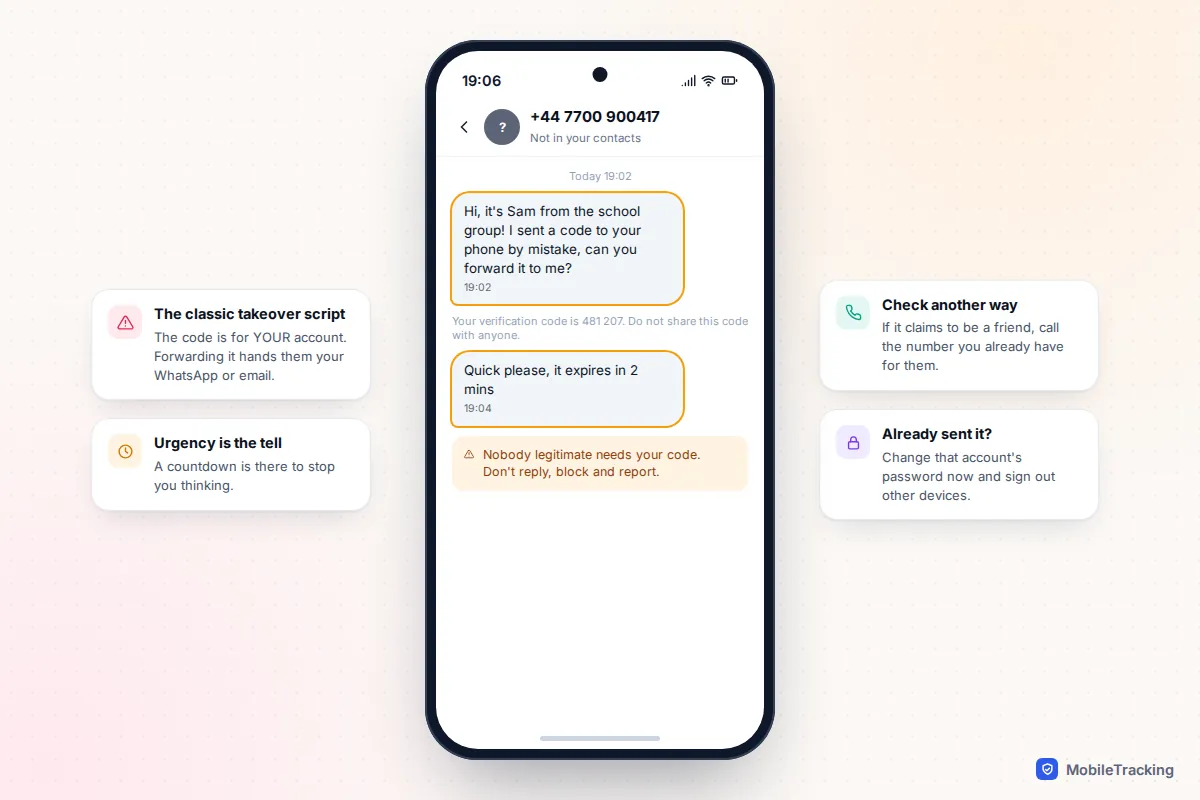
If you have already sent a code, act quickly. Open the account it was for, change the password, sign out of other devices and turn on stronger two-step verification, ideally an authenticator app or passkey rather than texts. Our guide to turning on two-factor authentication everywhere walks through the main accounts. For WhatsApp, re-registering your number on your own phone usually logs the intruder out, and setting your own two-step PIN stops them coming back.
Want all your texts on a second device? Pick the right tool
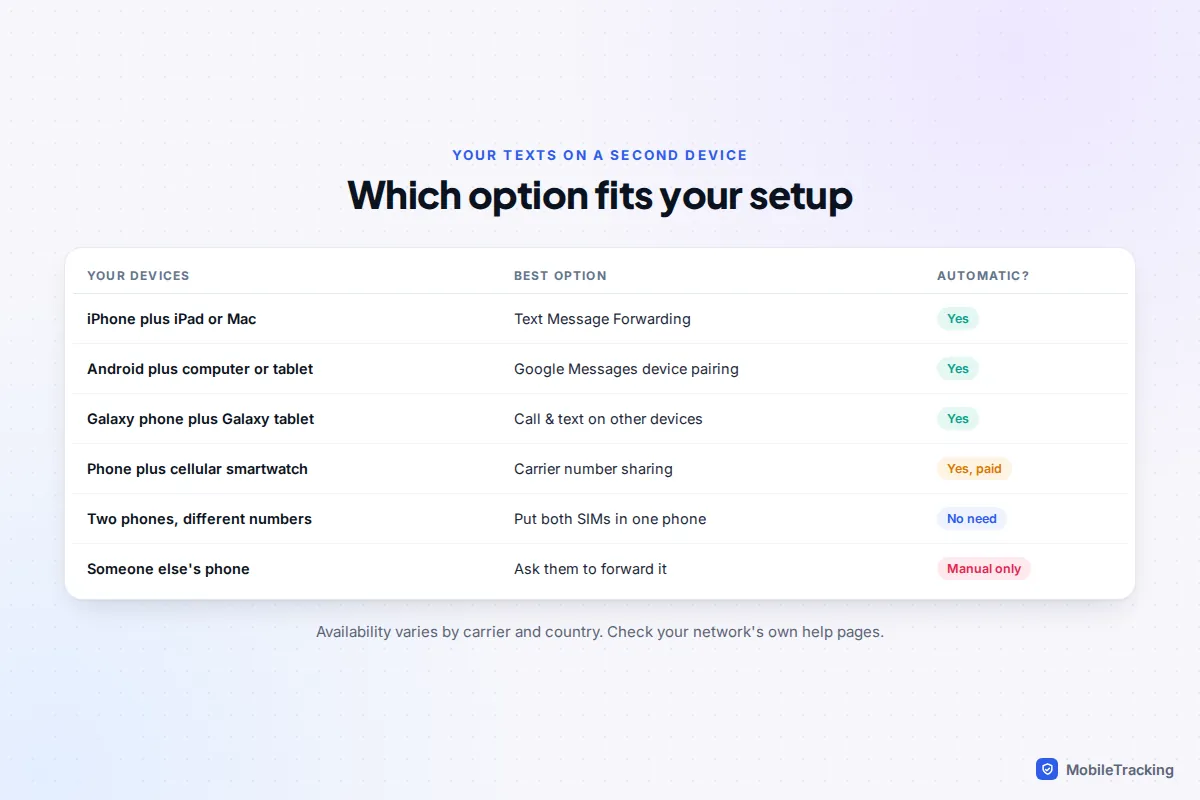
Often what people really want is their own messages on another device: an iPad, a laptop or a watch. Sync features do that better than forwarding, because replies go out from your real number and nothing lands on someone else’s phone.
| Your situation | Use this | Watch out for |
|---|---|---|
| iPhone, plus an iPad or Mac | Text Message Forwarding and Messages in iCloud | Only works for devices signed in to your Apple Account |
| Android, plus a computer or Android tablet | Google Messages device pairing | Your phone must stay on and connected |
| Galaxy phone, plus a Galaxy tablet | Call & text on other devices | Not supported on every carrier or model |
| Phone, plus a cellular smartwatch | Your carrier’s number-sharing add-on | Usually a monthly charge |
| Work and personal phones | Both numbers in one dual-SIM phone | Check your employer’s rules first |
iPhone to iPad or Mac
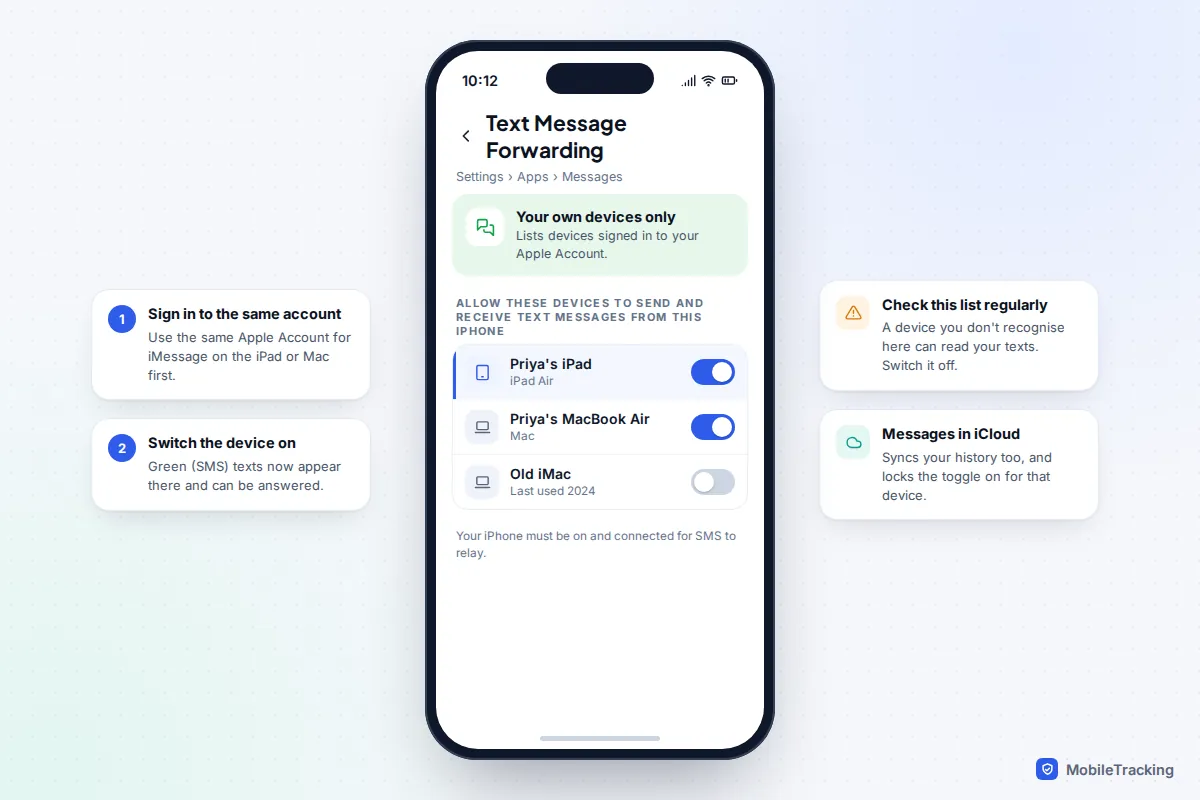
Blue iMessages already reach every Apple device signed in to your Apple Account. Green SMS and RCS texts need one extra step on the iPhone: go to Settings › Apps › Messages › Text Message Forwarding and switch on each iPad or Mac you want to receive them. Your iPhone relays the texts, so it needs to be on and connected. Apple’s page on forwarding texts from your iPhone to other devices lists the requirements.
Turning on Messages in iCloud (in Settings › [your name] › iCloud) goes further and keeps your full history in step across devices. Once a device uses Messages in iCloud, you can’t switch it off in the Text Message Forwarding list; you have to turn off Messages in iCloud on that device itself.
Android to a computer or tablet
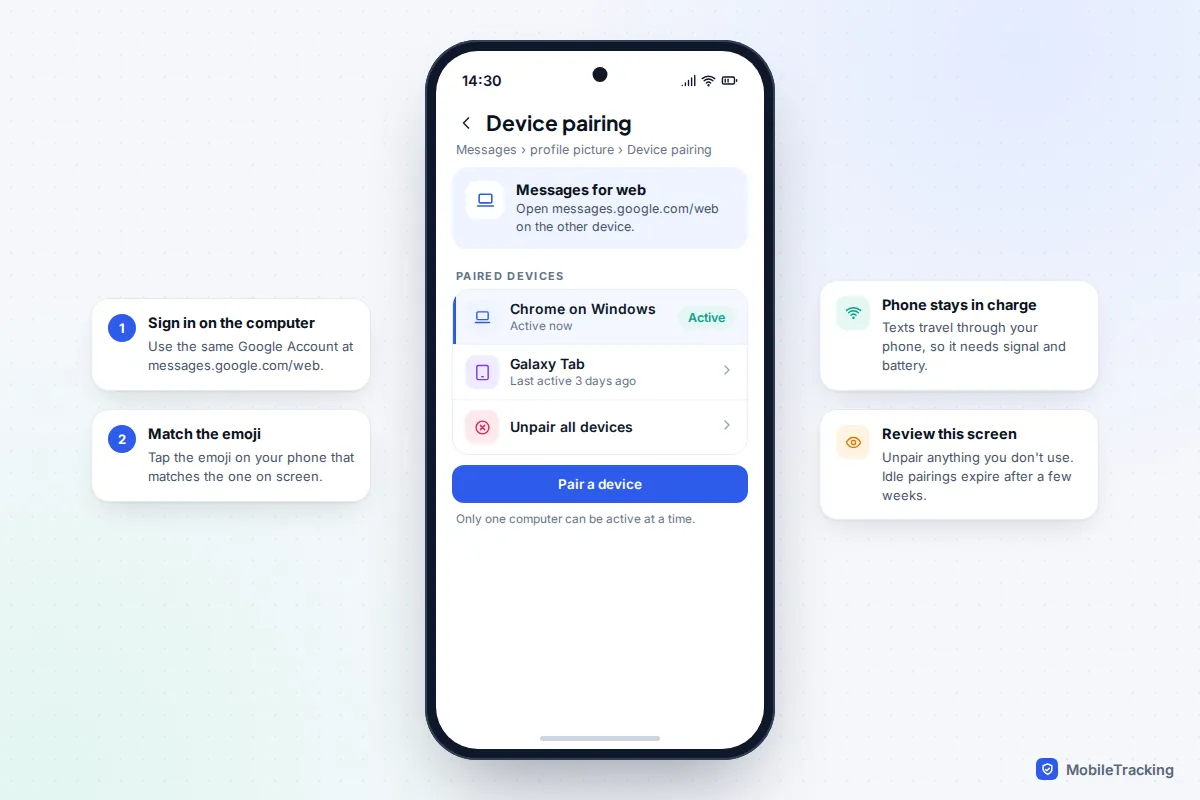
In Google Messages, tap your profile picture, then Device pairing. On the computer, go to messages.google.com/web, sign in with the same Google Account and match the emoji shown on both screens. Android tablets can pair the same way through the Messages app. Google’s help page on checking your messages on a computer or tablet has the details. Only one computer can be active at a time, and pairings you stop using are removed after a few weeks.
Samsung owners with a Galaxy tablet can also use Settings › Connected devices › Call & text on other devices, signed in to the same Samsung account. Samsung notes it doesn’t currently work with Verizon or AT&T phones in the US. Our guide to syncing messages between two devices covers every combination in more depth, including WhatsApp on a second phone.
Carrier number sharing, eSIM and dual SIM
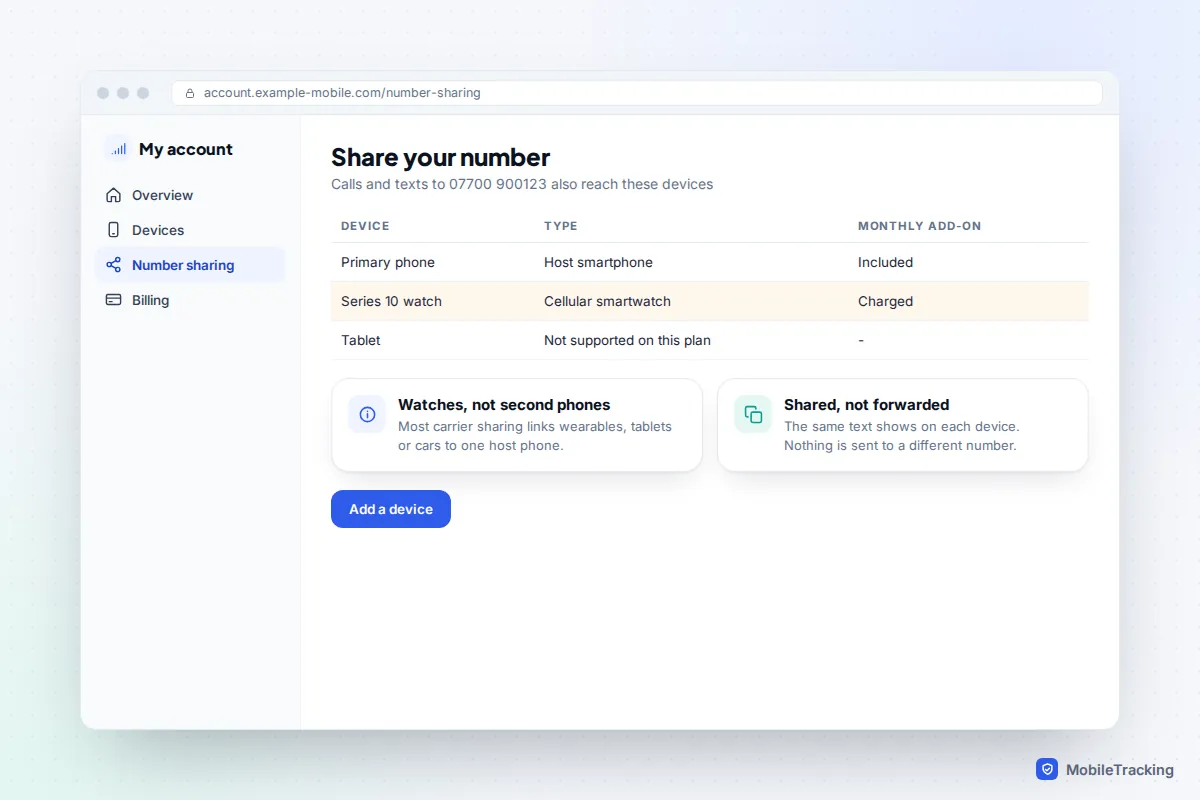
Unlike call forwarding, which every network supports through a setting or short code, most mobile networks don’t offer a simple “send my texts to another number” switch for consumers. What they do offer is number sharing, where extra devices answer to your number alongside your phone.
- AT&T NumberSync links your number to an Apple Watch, Android watch, some iPads and Macs, and certain cars.
- Verizon Number Share connects up to five smartwatches or similar devices to one host smartphone, each with a monthly line charge. It can’t join two smartphones together.
- Vodafone OneNumber in the UK does the same for cellular smartwatches, and other UK networks sell comparable watch plans.
Names, prices and supported devices change, so check your network’s help pages before you buy. All of them are built for wearables and tablets, not a second smartphone.
A SIM or eSIM can only be active in one phone at a time, so you can’t put the same number in two handsets. If you carry two phones because you have two numbers, the neater fix is often the reverse of forwarding: put both numbers in one dual-SIM phone, using a physical SIM plus an eSIM, or two eSIMs on recent iPhones and many Android phones. Our guide on how to use an eSIM explains how to move a number across.
Automatic forwarding: Shortcuts and Android apps
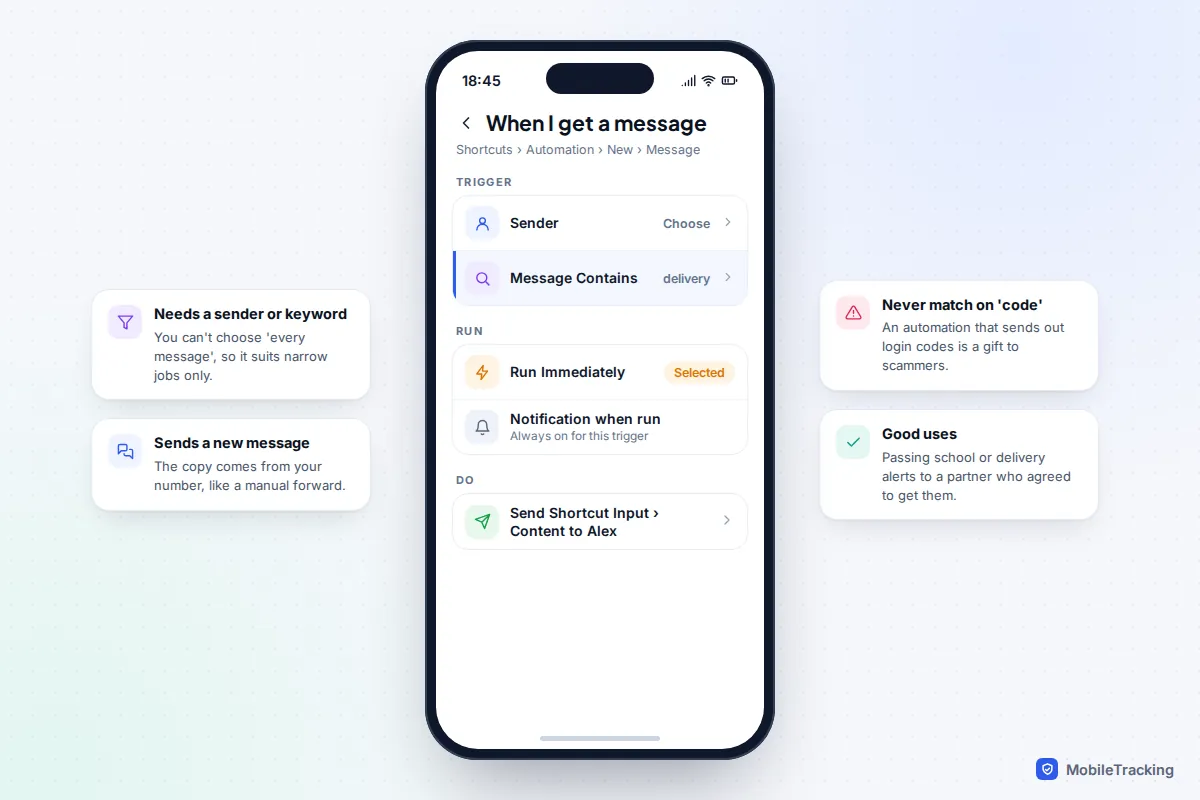
On iPhone, the Shortcuts app can forward some texts automatically. Open Shortcuts › Automation, tap + (or New Automation), choose Message, and set a Sender or a Message Contains word. Add a Send Message action that sends the Shortcut Input’s content to your chosen contact, and pick Run Immediately. Since iOS 17 these automations can run without asking, but iOS always shows a notification when one runs.
The limits are real. You must set a sender or a keyword, so you can’t forward every message, and each copy is a fresh text from your number. That suits narrow jobs, like passing on the school’s “closed today” alerts to a partner who has agreed to receive them. Never build one that matches words like “code” or “verification”.
On Android, SMS-forwarding apps exist, but Google Play only lets apps read your texts if they are your default messaging app or fit a narrow list of approved uses, such as syncing texts between your own devices. Apps outside Play that ask for SMS access deserve real caution: an app that can read all your texts can read your bank alerts and one-time codes, and send them anywhere. If you do use one, choose a well-known app from Play, forward only specific senders, and exclude anything that looks like a code.
Someone else’s phone: consent and the law
Forwarding a message that was sent to you is normal, although it’s kind to think about whether the sender expected it to stay private. Setting up forwarding from another adult’s phone without their agreement is different. Copying someone’s messages as they arrive is interception, and in the UK (under the Investigatory Powers Act 2016 and the Computer Misuse Act 1990) and the US (under federal and state wiretap laws) it can be a criminal offence, even between partners or spouses.
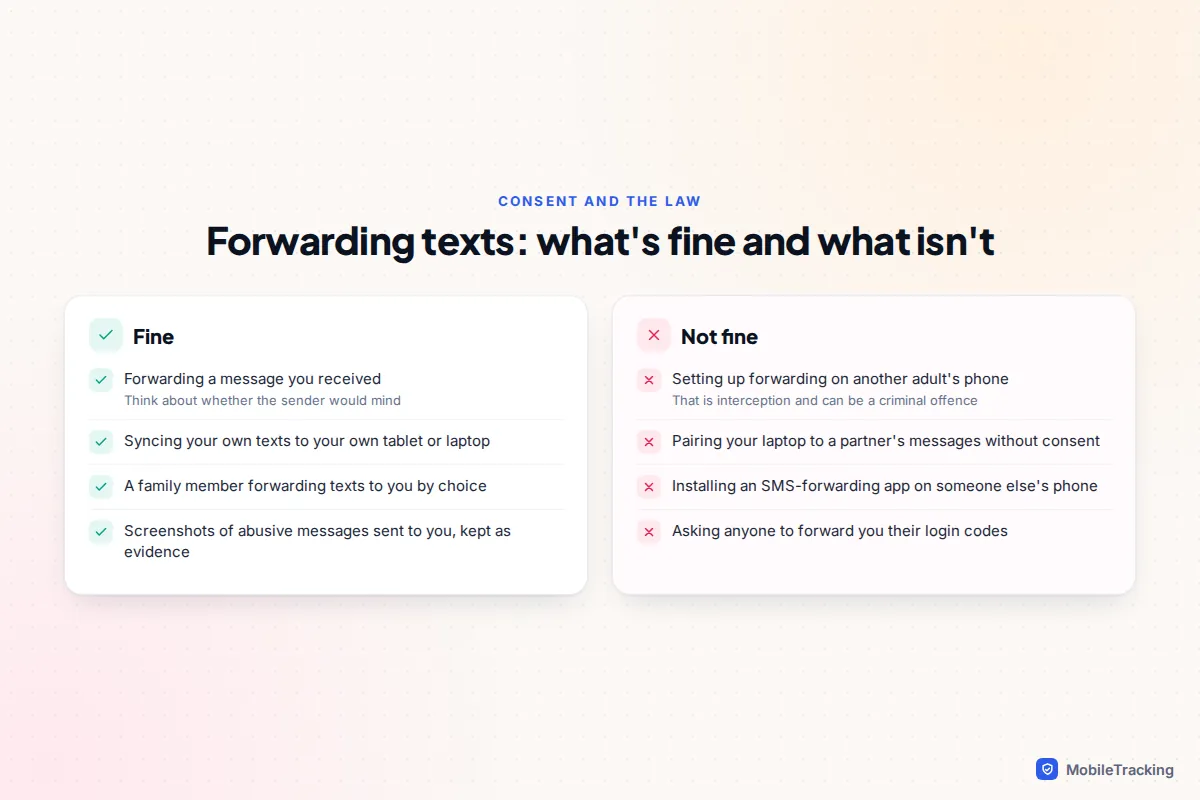
For a child’s phone, the better path is openness: agree what you can see and use proper parental controls rather than hidden forwarding. If you think someone has set up forwarding on your phone, check the Text Message Forwarding list, Google Messages paired devices and apps with SMS permission (on Android, search Settings for Permission manager and open SMS). Bear in mind that removing access can alert the person who set it up. If you are in an abusive relationship, plan first with support from The Hotline (1-800-799-7233) in the US or Refuge (0808 2000 247) in the UK, and see stopstalkerware.org.
A real example: Tom’s elderly mum kept missing her pharmacy’s texts. Instead of pairing her messages to his laptop without asking, they sat down together and set up a Shortcut on her iPhone that forwards texts from that one sender to him. She knows exactly what he sees.
Frequently asked questions
Can I automatically forward all my texts to another phone number?
Not with a built-in setting on iPhone or standard Android, and most carriers don’t offer it for consumers. Shortcuts on iPhone can forward texts that match a sender or keyword, and some Android apps can forward more, but each route also risks sending your login codes. Syncing to your own devices is safer.
Does the other person know I forwarded their text?
No. Forwarding an SMS, RCS or iMessage doesn’t notify the original sender. WhatsApp shows a Forwarded label to the person who receives the copy, but the original sender still isn’t told.
Why can’t I find Forward in Google Messages?
After long-pressing the message, tap the three dots at the top right; Forward is in that menu rather than in the row of icons. If it still doesn’t appear, update Google Messages from the Play Store and try again.
Can I forward a text to an email address?
The simplest way is to copy the text (or take a screenshot) and paste it into an email. On iPhone you can also forward an iMessage to someone’s email address if it is registered with iMessage.
Can I receive my texts on two phones at once?
Not with one SIM in two handsets. Your options are carrier number sharing (mostly for watches and tablets), Text Message Forwarding to an iPad or Mac, or Google Messages pairing to a computer or tablet.
This guide is general information, not legal or financial advice. Read our editorial policy.